3M4-DESK-LOCKING-KIT - Serrure StarTech.com - Notice d'utilisation et mode d'emploi gratuit
Retrouvez gratuitement la notice de l'appareil 3M4-DESK-LOCKING-KIT StarTech.com au format PDF.


| Type de produit | Kit de serrure pour bureau |
| Marque | StarTech.com |
| Modèle | 3M4-DESK-LOCKING-KIT |
| Dimensions (approx.) | 10 x 5 x 2 cm |
| Poids | 180 g |
| Matériau | Acier zingué |
| Type de serrure | À clé |
| Nombre de clés fournies | 2 |
| Mécanisme | Pêne dormant |
| Fonction principale | Verrouiller tiroirs ou armoires de bureau |
| Installation | Montage en applique avec vis fournies |
| Compatibilité | Convient pour dessus de bureau et panneaux latéraux |
| Sécurité | Empêche l'ouverture non autorisée |
| Entretien | Nettoyer avec un chiffon sec ; lubrifier le cylindre avec du graphite si nécessaire |
| Pièces incluses | Corps de serrure, gâche, 2 clés, vis de montage |
| Réparabilité | Remplacement possible du cylindre (non fourni) |
| Garantie constructeur | 2 ans |
FOIRE AUX QUESTIONS - 3M4-DESK-LOCKING-KIT StarTech.com
Questions des utilisateurs sur 3M4-DESK-LOCKING-KIT StarTech.com
0 question sur cet appareil. Repondez a celles que vous connaissez ou posez la votre.
Poser une nouvelle question sur cet appareil
Téléchargez la notice de votre Serrure au format PDF gratuitement ! Retrouvez votre notice 3M4-DESK-LOCKING-KIT - StarTech.com et reprennez votre appareil électronique en main. Sur cette page sont publiés tous les documents nécessaires à l'utilisation de votre appareil 3M4-DESK-LOCKING-KIT de la marque StarTech.com.
MODE D'EMPLOI 3M4-DESK-LOCKING-KIT StarTech.com

Peripherals Security Locking Kit - 10ft (3m) - K-Slot
Product ID: 3M4-DESK-LOCKING-KIT
Product Diagrams:
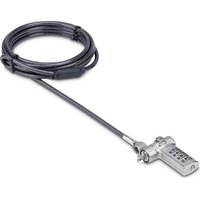
4-Digit Tether Cable Combination Lock

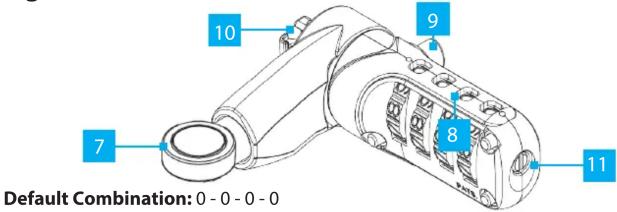
4-Digit Combination K-Slot Lock Head
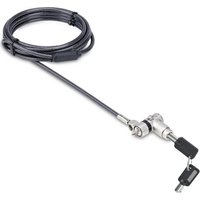
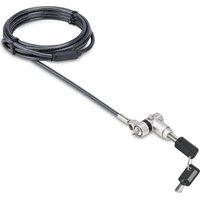
Permanent K-Slot Lock Head(s)
Requirements
For the latest drivers, manuals, product information, technical specifications, and declarations of conformance, please visit: www.StarTech.com/3M4-DESK-LOCKING-KIT
Quick-Start Guide
| Component Function | ||
| 4-Digit Tether Cable Combination Lock | ||
| 1 | Cable Channel | • Routes the Tether Cable (Tether Cable pre-installed) |
| 2 | Combination Dial | • Rotate each row of numbers until the desired combination is aligned with the indicator located on the side of the Lock that features theRelease Button• TheCombination Dialcan only be turned when theLock Buttonis engaged |
| 3 | Release Button | • Press when the correct combination has been rotated into theCombination Dialto disengage theLock Button• Press and hold, when the correct combination has been rotated into theCombination Dial, to remove theTether Cablefrom theCable Locking Port |
| 4 | Lock Button | • Press to engage the locking mechanism |
| 5 | Cable Locking Port | • Insert the end of the Tether Cable |
| 6 | Reset Screw | • Set a new combinationNote:Once the combination is changed, if you lose the new combination you will not be able to reset the combination |
| 4-Digit Combination K-Slot Lock Head | ||
| 7 | Cable Channel | • Route the Tether Cable |
| 8 | Combination Dial | • Rotate each row of numbers until the desired combination is selected within the square openings |
| 9 | Release Button | • Press when the correct combination has been rotated into theCombination Dialto depress theK-Slot Hookto insert/remove theK-Slot Hookfrom the Lock Slot on the Host Device |
| 10 | K-Slot Hook | • Connect the Lock to a Lock Slot on the Host Device |
| 11 | Reset Screw | • Set a new combinationNote:Once the combination is changed, if you lose the new combination you will not be able to reset the combination |
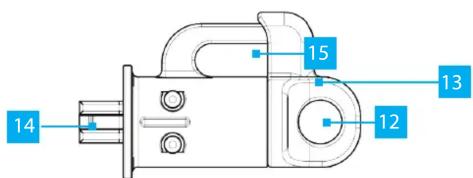
| Permanent Standard-K Lock Heads | ||
| 12 | Cable Channel | • Route the Tether Cable after the K-Slot Hook has been inserted into the Lock Slot on the Host Device |
| 13 | Locking Mechanism | • Pullout to release the K-Slot Hook• Push-in to engage the K-Slot Hook |
| 14 | K-Slot Hook | • Connect the Lock to a Lock Slot on the Host Device |
| 15 | Cable Management Slot | • Route cables to aid with cable management/routing• Can only be opened when the Tether Cable is removed from the Cable Channel |
Package Contents
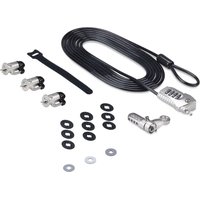
4-Digit Tether Cable Combination Lock (Attached) x 1 10ft. (3m) Tether Cable x 1
4-Digit Combination K-Slot Lock Head x 1 Permanent K-Slot Lock Heads x 3
Spacers for Permanent K-Slot Locks Heads x 9 Spacers for 4-Digit Combination K-Slot Lock Head x 3
Velcro Strap x 1 Quick-Start Guide x 1
To view manuals, FAQs, videos, drivers, downloads, technical drawings, and more, visit www.startech.com/support.
Installation
Tether Cable
- Out-of-the-box, the 4-Digit Tether Cable Combination Lock is attached to the Tether Cable, on the Combination Lock. Press the Release Button and remove the end of Tether Cable from the Cable Locking Port and then from the lock, through the Cable Channel.
- Wrap the Tether Cable around a secure stationary object, and pull the end of the cable through the loop.
4-Digit Combination K-Slot Lock Head
- Route the Tether Cable through the Cable Channel.
- (Optional) For a more secure fit, one of the Spacers for 4-Digit Combination K-Slot Lock Head (gray spacers) can be used. Select the Spacer thickness that best fits the specific Host Device, and remove the adhesive backing. Insert the spacer over K-Slot Hook, with the adhesive side facing the 4-Digit Combination K-Slot Lock Head (away from the host device).
- With the combination entered, press and hold the Release Button and insert the K-Slot Hook into the Lock Slot on the Host Device.
- Release the Release Button to engage the K-Slot Hook.
- Scramble the Combination Dial to protect the combination.
Permanent K-Slot Lock(s)
- Pull-out the Locking Mechanism to release the K-Slot Hook.
- (Optional) For a more secure fit, one of the Spacers for Permanent K-Slot Lock Heads (black spacers) can be used. Select the Spacer that best fits the specific Host Device. Insert the spacer over K-Slot Hook, with the side that features the raised bumps facing toward the Permanent K-Slot Lock Head (away from the host device).
- Insert the K-Slot Hook into the Lock Slot on the Host Device, the push-in the Locking Mechanism to engage the K-Slot Hook.
- Route the Tether Cable the Cable Channel to lock the Permanent K-Slot Lock.

Warranty Information
This product is backed by a two-year warranty.
For further information on product warranty terms and conditions, please refer to www.startech.com/warranty.
StarTech.com Ltd.
45 Artisans Cres
London, Ontario
N5V 5E9
Canada
StarTech.com LLP
2500 Creekside
Parkwy
Lockbourne, Ohio
43137
U.S.A.
StarTech.com Ltd.
Unit B, Pinnac
Gowerton Rd,
Brackmills
Northamp
NN4 7BW
United Kingdom
FR: fr.startech.com
DE: de.startech.com
ES: es.startech.com
NL: hi.startech.com IT: it.startech.com
11: it.startech.com ID: in.startech.com
JP: jp.startech.com


4-Digit Tether Cable Combination Lock
- Reattach the 4-Digit Tether Cable Combination lock to the Tether Cable, by routing the Tether Cable through Cable Channel on the 4-Digit Tether Cable Combination Lock.
-
(Optional) To provide additional security, wrap the tail-end of the Tether Cable around another stationary object.
-
With the combination entered, press the Release Button then insert the end of the Tether Cable into the Cable Locking Port.
- Press the Lock Button to secure the Tether Cable.
- Scramble the Combination Dial to protect the combination.
Setting a New Combination
(4-Digit Tether Cable Combination Lock & 4-Digit Combination K-Slot Lock Head)
IMPORTANT!:
- The combination locks are shipped with an opening combination of all zeros (0 - 0 - 0 - 0) .
-
Once the combination is changed, if you lose the new combination you will not be able to reset the combination.
-
With the combination entered, insert a flathead screwdriver into the Reset Screw, to push the Reset Screw in, then turn the Reset Screw clockwise 90 degrees.
- Set the Combination Dial to the desired new combination.
- Insert a flathead screwdriver into the Reset Screw and turn it counter-clockwise 90 degrees moving the Reset Screw, back to its original position. The Reset Screw will pop back out once it is in the original position.
The new combination has been set (be sure to write down the new combination and keep it in a secure location away from the lock).
Limitation of Liability
In no event shall the liability of StarTech.com Ltd. and StarTech.com USA LLP (or their officers, directors, employees or agents) for any damages (whether direct or indirect, special, punitive, incidental, consequential, or otherwise), loss of profits, loss of business, or any pecuniary loss, arising out of or related to the use of the product exceed the actual price paid for the product. Some states do not allow the exclusion or limitation of incidental or consequential damages. If such laws apply, the limitations or exclusions contained in this statement may not apply to you.
Use of Trademarks, Registered Trademarks, and other Protected Names and Symbols
This manual may make reference to trademarks, registered trademarks, and other protected names and/or symbols of third-party companies not related in any way to StarTech.com. Where they occur these references are for illustrative purposes only and do not represent an endorsement of a product or service by StarTech.com, or an endorsement of the product(s) to which this manual applies by the third-party company in question. StarTech.com hereby acknowledges that all trademarks, registered trademarks, service marks, and other protected names and/or symbols contained in this manual and related documents are the property of their respective holders.
Marque : StarTech.com
Modèle : 3M4-DESK-LOCKING-KIT
Catégorie : Serrure