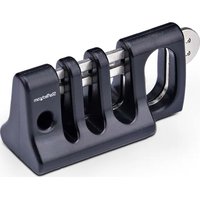
CABLE-ORGANIZER-LOCK - Serrure StarTech.com - Notice d'utilisation et mode d'emploi gratuit
Retrouvez gratuitement la notice de l'appareil CABLE-ORGANIZER-LOCK StarTech.com au format PDF.


| Type de produit | Verrou de sécurité pour câble |
| Marque | StarTech.com |
| Modèle | CABLE-ORGANIZER-LOCK |
| Dimensions (L x l x H) | 7.5 cm x 2.5 cm x 1.5 cm |
| Poids | 50 g |
| Matériau | Acier inoxydable et plastique ABS |
| Couleur | Noir |
| Type de verrouillage | À clé |
| Nombre de clés fournies | 2 clés |
| Compatibilité | Emplacement de sécurité Kensington standard |
| Longueur du câble | 1.8 m |
| Diamètre du câble | 4 mm |
| Résistance à la traction | Jusqu'à 45 kg |
| Utilisation prévue | Sécurisation d'ordinateurs portables, écrans, projecteurs |
| Contenu de l'emballage | 1 x verrou, 1 x câble, 2 x clés, 1 x guide d'installation |
| Entretien et nettoyage | Essuyer avec un chiffon sec, ne pas utiliser de solvants |
| Température de fonctionnement | -10°C à 50°C |
| Garantie | 2 ans |
FOIRE AUX QUESTIONS - CABLE-ORGANIZER-LOCK StarTech.com
Questions des utilisateurs sur CABLE-ORGANIZER-LOCK StarTech.com
0 question sur cet appareil. Repondez a celles que vous connaissez ou posez la votre.
Poser une nouvelle question sur cet appareil
Téléchargez la notice de votre Serrure au format PDF gratuitement ! Retrouvez votre notice CABLE-ORGANIZER-LOCK - StarTech.com et reprennez votre appareil électronique en main. Sur cette page sont publiés tous les documents nécessaires à l'utilisation de votre appareil CABLE-ORGANIZER-LOCK de la marque StarTech.com.
MODE D'EMPLOI CABLE-ORGANIZER-LOCK StarTech.com
Security Lock For Keyboard and Mouse - Up to Three Peripherals
Product ID: CABLE-ORGANIZER-LOCK
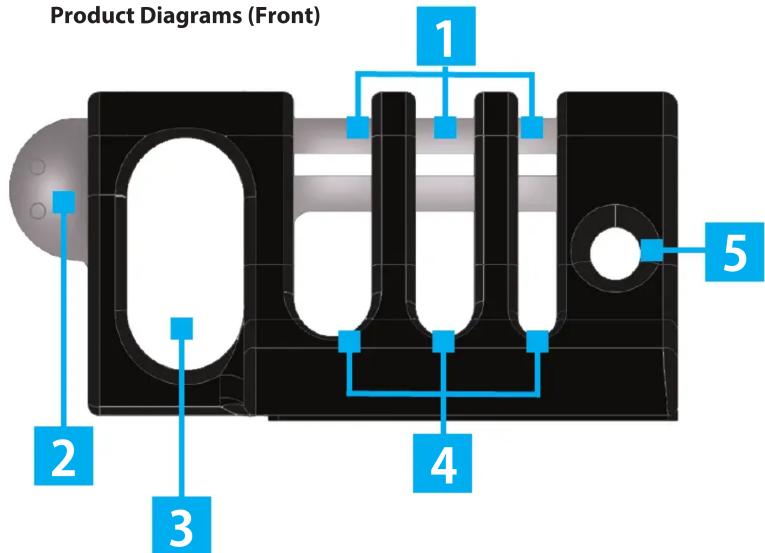
(Bottom)

| Component Function | ||
| 1 | Collector Buckle | Slides In or Out to Secure or Release the Cables Routed Through the Cable Channels |
| 2 | Collector Buckle Pull-Tab | Grasp to Slide the Collector Buckle In or Out |
| 3 | Lock Hole | Secure the Collector Buckle in Place by Routing Either the Shackle of a Lock or a Tether Cable Through the Designated Lock Hole |
| 4 | Cable Channels | Route Peripheral Cables through the Designated Cable Channels |
| 5 | Tether-Cable Channel | Route a Tether Cable to Secure this Security Lock to the Work Station |
| 6 | Preinstalled Adhesive Strip | Adhere the Cable-Organizer Lock to a Surface |
Package Contents
- Cable-Organizer Lock
• Adhesive Strip (Preinstalled) - Quick-Start Guide
Requirements
• Peripheral Cables (Up to 3)
- Surface (For Adhering the Cable-Organizer Lock)
- Tether Cable
- Lock (Optional)
For installation instructions, product information, and certification/compliance documents, please visit: www.StarTech.com/CABLE-ORGANIZER-LOCK
For additional self-service support options and community forums, please visit: www.StarTech.com/support
Installation
Adhere the Cable-Organizer Lock to a Surface
- Locate a flat, clean Surface to adhere the Cable-Organizer Lock.
- Remove the protective liner from the Adhesive Strip (Preinstalled).

- Place Cable-Organizer Lock onto the desired Surface. Apply firm pressure for 30 seconds.

The Cable-Organizer Lock has now been adhered to the Surface.
Note: Adhering the Cable-Organizer to a surface is designed solely for stability and organization purposes. It does not contribute to the security or theft deterrent functions of the device.
Manual
Route Peripheral Cables and Secure the Cable-Organizer Lock
- Grasp the Collector Buckle Pull-Tab and slide the Collector Buckle out.

- Route up to three Peripheral Cables through the Cable Channels, then slide the Collector Buckle inward.
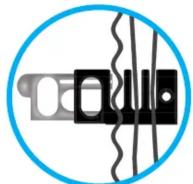
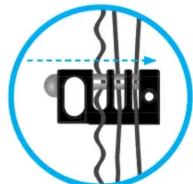
- Secure the Collector Buckle in place by routing either the shackle of a Lock or a Tether Cable through the Lock Hole.
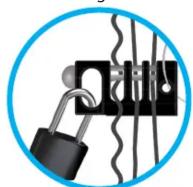

IMPORTANT NOTE!
If a Padlock is used to secure the Collector Buckle, the Tether Cable must be routed through the Tether-Cable Routing Channel to secure the Cable-Organizer Lock.

Use of Trademarks, Registered Trademarks, and other Protected Names and Symbols
This manual may make reference to trademarks, registered trademarks, and other protected names and/or symbols of third-party companies not related in any way to StarTech.com. Where they occur these references are for illustrative purposes only and do not represent an endorsement of a product or service by StarTech.com, or an endorsement of the product(s) to which this manual applies by the third-party company in question. StarTech.com hereby acknowledges that all trademarks, registered trademarks, service marks, and other protected nam and/or symbols contained in this manual and related documents are the property of their respective holders.
Limitation of Liability
In no event shall the liability of StarTech.com Ltd. and StarTech.com USA LLP (or their officers, directors, employees or agents) for any damages (whether direct or indirect, special, punitive, incidental, consequential, or otherwise), loss of profits, loss of business, or any pecuniary loss, arising out of or related to the use of the product exceed the actual price paid for the product. Some states do not allow the exclusion or limitation of incidental or consequential damages. If such laws apply, the limitations or exclusions contained in this statement may not apply to you.
Warranty Information
This product is backed by a 2-year warranty.
For further information on product warranty terms and conditions, please refer to www.StarTech.com/warranty.
StarTech.com Ltd.
45 Artisans Crescent
London, Ontario
N5V 5E9
Canada
StarTech.com LLP
4490 South Hamilton
Road
Groveport, Ohio
43125
U.S.A.
StarTech.com Ltd.
Unit B, Pinnacle 15
Gowerton Road
Brackmills,
Northampton
NN4 7BW
United Kingdom

StarTech.com Ltd.
Siriusdreef 17-27
2132 WT Hoofddorp
The Netherlands
FR: startech.com/fr
DE: startech.com/de
ES: startech.com/es
NL: startech.com/n IT: startech.com/it
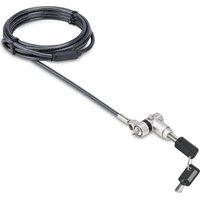
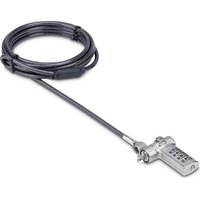
Marque : StarTech.com
Modèle : CABLE-ORGANIZER-LOCK
Catégorie : Serrure