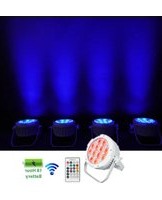
WET PAR PRO - Éclairage Rockville - Notice d'utilisation et mode d'emploi gratuit
Retrouvez gratuitement la notice de l'appareil WET PAR PRO Rockville au format PDF.


| Type de produit | Projecteur LED PAR professionnel |
| Marque | Rockville |
| Modèle | WET PAR PRO |
| Catégorie | Éclairage de scène / événementiel |
| Dimensions (L x P x H) | environ 250 x 200 x 250 mm |
| Poids | environ 2,5 kg |
| Alimentation | AC 100-240V, 50/60 Hz |
| Consommation électrique | 36 W |
| Source lumineuse | 12 x LED RGBW 3W |
| Couleurs | RGBW (rouge, vert, bleu, blanc) + multi-couleurs |
| Angle du faisceau | 25° (ajustable via lentilles optionnelles) |
| Contrôle DMX | Oui, canaux DMX: 4/6/8/10 |
| Modes de fonctionnement | DMX, maître/esclave, autonome (son, automatique, statique) |
| Indice de protection | IP65 (résistant aux intempéries) |
| Matériau du boîtier | Aluminium moulé sous pression |
| Vérin de montage | Support de montage réglable inclus |
| Refroidissement | Convection passive (sans ventilateur) |
| Température de fonctionnement | -20°C à 40°C |
| Entretien et nettoyage | Nettoyer la lentille avec un chiffon doux et un nettoyant pour vitres |
| Sécurité | Conforme CE, RoHS; utilisation en extérieur possible |
| Pièces détachées et réparabilité | LED non remplaçables individuellement; alimentation interne réparable par un technicien |
| Garantie | 1 an constructeur |
| Accessoires inclus | Câble d'alimentation, support de montage, manuel d'utilisation |
FOIRE AUX QUESTIONS - WET PAR PRO Rockville
Questions des utilisateurs sur WET PAR PRO Rockville
0 question sur cet appareil. Repondez a celles que vous connaissez ou posez la votre.
Poser une nouvelle question sur cet appareil
Téléchargez la notice de votre Éclairage au format PDF gratuitement ! Retrouvez votre notice WET PAR PRO - Rockville et reprennez votre appareil électronique en main. Sur cette page sont publiés tous les documents nécessaires à l'utilisation de votre appareil WET PAR PRO de la marque Rockville.
MODE D'EMPLOI WET PAR PRO Rockville
WET PAR PRO Operating Instructions
Thank you for purchasing this Rockville WET PAR PRO. Please read these operating instructions carefully. Should you need assistance, please call our technical help line at 1-646-758-0144, 24 hours a day/7 days a week.

rockvillesupport.com/wet-par-pro

rockvillesupport.com/wet-par-pro-white
Settings
Press the MENU button repeatedly to cycle through modes. Use the UP and DOWN buttons to scroll through the options or numerical values for that setting. Press the ENTER button to save your selection. If you press the ENTER button on any setting, the saved mode/settings/values will remain in place even after powering off the unit and will be the default when you power the unit back on.
| Display Mode | Value | Description |
| A001 | A001 – A512 | DMX channel address |
| 6Ch/10Ch | 6Ch – 10Ch | Select 6 or 10 channel modes. |
| CL01 | CL01 – CL32 | Single color mode |
| CC09 | CC01 – CC09 | Automatically cycle through colors |
| EE09 | EE01 – EE09 | Color pulse |
| FF09 | FF01 – FF09 | Color fade |
| ST09 | ST01 – ST09 | Press the MODE button until the screen reads ST01. Press the ENTER button to toggle between ST (strobe speed) or Co (strobe color) to make adjustments as necessary. |
| Co01 | Co01 – Co32 | |
| SoU1 | SoU1 – SoU4 | Select sound control mode |
| IRCL | On/Off | Turn remote control function on or off.Press the ENTER button, then use the up/down buttons to toggle between on and off. |
| r000 | r000 – r255 | Red dimmer |
| g000 | g000 – g255 | Green dimmer |
| b000 | b000 – b255 | Blue dimmer |
| u000 | u000 – u255 | White dimmer |
| y000 | y000 – y255 | Yellow (amber) dimmer |
| P000 | P000 – P255 | Purple (UV) dimmer |
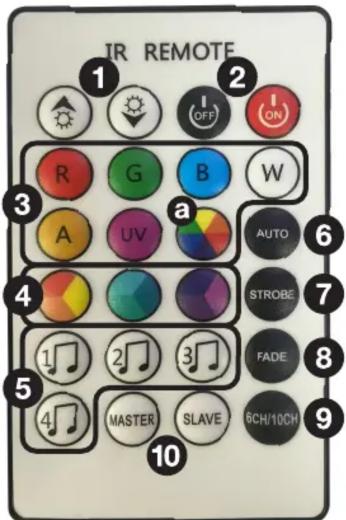
Remote Control Functions
- ⬆/Ⓧ (+/-, up/down): Adjust speed, and brightness depending on what mode the unit is set to.
- ON/OFF: Turns the LEDs on or off. Please note, this button is strictly for the LEDs. The unit will remain on. To turn it off, use the power switch on the unit.
- COLORS: Directly select red, green, blue, white, amber (yellow), or UV (purple) LED color. Press the COLOR WHEEL button (a) then use the ⚙/♥ buttons to cycle through the 32 color presets.
- TRI COLOR WHEELS: Press to cycle through the three colors represented on each button. Once you've chosen a color, use the ⚙/♥ buttons to adjust tthe brightness.
- SOUND: Use these buttons to select the desired sound mode (SoU1 - Sou4. See chart above).
- AUTO: Cycles through 32 colors. Use the ⚙/♥ buttons to set the speed at which the unit will cycle through colors.
- STROBE: Sets the unit to strobe mode. First select the color, then press the STROBE button. Use the ⚙/♥ buttons to set strobe speed.
- FADE: The unit will fade from one color to next. Use the ⚙/♥ buttons to set the speed at which the unit will fade between colors.
- 6CH/10CH: Press to toggle between 6 channel and 10 channel modes.
- MASTER/SLAVE: Press the appropriate button to make the selected light the master or slave unit.
Use the ⚙/💡 buttons to adjust the DMX address.
DMX Controller Functions
When using a DMX controller, use the charts below to reference each channel's function.
6-Channel Mode
| Channel | Function | Value | Description |
| 1 | Red | 0 – 255 | Adjust individual color brightness |
| 2 | Green | 0 – 255 | |
| 3 | Blue | 0 – 255 | |
| 4 | White | 0 – 255 | |
| 5 | Yellow (amber) | 0 – 255 | |
| 6 | Purple (UV) | 0 – 255 |
10-Channel Mode
| Channel | Function | Value | Description |
| 1 | Master dimmer | 0 – 255 | Adjust overall brightness (Channels 1–8) |
| 2 | Red | 0 – 255 | Adjust individual color brightness |
| 3 | Green | 0 – 255 | |
| 4 | Blue | 0 – 255 | |
| 5 | White | 0 – 255 | |
| 6 | Yellow (amber) | 0 – 255 | |
| 7 | Purple (UV) | 0 – 255 | |
| 8 | Strobe | 0 – 10 | Strobe off |
| 11 – 255 | Set strobe speed | ||
| 9 | Off | 0 – 9 | Adjust function settings |
| Select color | 10 – 50 | ||
| Color change | 51 – 100 | ||
| Color fade | 101 – 150 | ||
| Pulse color change | 151 – 200 | ||
| Color changes to the beat | 201 – 220 | ||
| Color strobe changes to the beat | 221 – 240 | ||
| Pulse color changes to the beat | 241 – 255 | ||
| 10 | Ch9 speed/color options | 0 – 255 | Adjust Ch9 function speeds and single colors |
Marque : Rockville
Modèle : WET PAR PRO
Catégorie : Éclairage