
SCOOBA 230 - Robot laveur de sol IROBOT - Notice d'utilisation et mode d'emploi gratuit
Retrouvez gratuitement la notice de l'appareil SCOOBA 230 IROBOT au format PDF.


| Type de produit | Robot laveur de sol |
| Marque | iRobot |
| Modèle | Scooba 230 (Série 200) |
| Usage prévu | Nettoyage humide des sols durs |
| Alimentation | Batterie rechargeable, chargeur secteur (120V AC) |
| Autonomie | Cycle complet : 45 min, cycle court : 20 min |
| Surface max | Cycle complet : jusqu'à 14 m² (150 sq ft), cycle court : jusqu'à 5,6 m² (60 sq ft) |
| Système de nettoyage | 3 étapes : lavage avec solution propre, brossage, récupération de l'eau sale par squeegee et aspiration |
| Réservoirs | 2 réservoirs séparés : eau propre/solution et eau sale |
| Solution de nettoyage | Eau claire ou produit spécial iRobot Scooba Hard Floor Cleaner |
| Types de sols compatibles | Carrelage, linoléum, vinyle, marbre, ardoise, pierre, bois scellé (interdit sur parquet non scellé, stratifié, moquette, cire) |
| Capteurs | Capteurs de vide (anti-chute), capteurs de chocs, détection de flaque d'eau |
| Barrière virtuelle | Incluse sur certains modèles, crée une barrière infrarouge (1 à 2,5 m) |
| Brosses | Brosses rotatives sous la plaque inférieure |
| Squeegee | Racleur en caoutchouc pour l'essuyage |
| Indicateurs lumineux | Bouton Power (vert/rouge), bouton Clean (allumé en cycle), voyant Service |
| Entretien | Vider et rincer les réservoirs après chaque cycle ; nettoyer brosses, roues et squeegee ; stocker sur le tapis de protection |
| Sécurité | Ne pas immerger, ne pas utiliser sur des liquides chauds ou produits chimiques agressifs, surveillance enfants et animaux |
| Batterie | Rechargeable, durée de vie : centaines de cycles si bien entretenue, garantie 6 mois |
| Chargeur | Voyant vert fixe = chargé, clignotement lent = charge normale (8h), rapide = charge de rafraîchissement (15h) |
| Poids | Environ 4,5 kg (estimation) |
| Dimensions | Environ 35 cm de diamètre, 10 cm de hauteur (estimation) |
FOIRE AUX QUESTIONS - SCOOBA 230 IROBOT
Questions des utilisateurs sur SCOOBA 230 IROBOT
0 question sur cet appareil. Repondez a celles que vous connaissez ou posez la votre.
Poser une nouvelle question sur cet appareil
Téléchargez la notice de votre Robot laveur de sol au format PDF gratuitement ! Retrouvez votre notice SCOOBA 230 - IROBOT et reprennez votre appareil électronique en main. Sur cette page sont publiés tous les documents nécessaires à l'utilisation de votre appareil SCOOBA 230 de la marque IROBOT.
MODE D'EMPLOI SCOOBA 230 IROBOT
iRobot®
Scooba®
200 Series
OWNER'S MANUAL
iRobot
Dear iRobot Scooba Owner,
Thank you for purchasing an iRobot Scooba floor washing robot. You've joined the millions of people who clean with robots -- the smarter way to get it done.
Please take a few moments to read this manual and get acquainted with your Scooba to get the best performance from your robot. If you have any questions, visit our website at www.irobot.com for more information.
Register your robot to instantly activate your warranty and enjoy these exclusive benefits:
- Take advantage of iRobot's award-winning customer service. Get support tailored to your specific robot, including answers to questions, maintenance tips, video demos, live chat and more.
- Get product updates and other valuable information. Be among the first to find out about new robots, exclusive discounts and special promotions.
When you register, you can also tell us about your experience with your Scooba; iRobot listens to our customers and makes enhancements to our robots based on your valued feedback. We'd love to hear from you! Register your robot right now at www.irobot.com/register.
On behalf of the entire team, thank you for choosing iRobot; we appreciate your business, feedback and loyalty. Here's to robots that make a difference!

Yours for less chores and more life,
Colin Angle
CEO and Co-Founder
iRobot Corporation
P.S. Don't miss out on your exclusive benefits! Register your Scooba online right now at www.irobot.com/register.
Table of Contents
Important Safety Instructions 4
Important Usage Tips 5
Anatomy 6-7
Cleaning System/Cleaning Cycles 8
Cleaning Pattern 9
Cleaner Solution for Scooba 200 Series 10
Instructions for use 11
Charging & Battery Storage 12
Scooba's Virtual Wall 13
Troubleshooting 14
iRobot Customer Care 15
Important Safety Instructions
CAUTION: DO NOT EXPOSE ELECTRONICS OF SCOOBA, BATTERY OR THE CHARGER. NO USER-SERVICEABLE PARTS INSIDE. REFER SERVICING TO QUALIFIED SERVICE PERSONNEL. CHARGE USING STANDARD U.S. (120V AC) OUTLET ONLY.
Always use caution when operating your Scooba. To reduce the risk of injury and damage, keep these safety precautions in mind when setting up, using and maintaining your Scooba:
GENERAL SAFETY INSTRUCTIONS
- Read all safety and operating instructions before operating Scooba.
- Retain the safety and operating instructions for future reference.
- Observe all warnings on Scooba, battery, charger and in owner's manual.
- Follow all operating and use instructions.
Refer all non-routine servicing to iRobot.
This appliance is not intended for use by persons (including children) with reduced physical, sensory or mental capabilities, or lack of experience and knowledge, unless they have been given supervision or instruction concerning use of the appliance by a person responsible for their safety.
Children should be supervised to ensure they do not play with the appliance.
SCOOBA SAFETY
- Scooba is for indoor use only.
- Scooba is not a toy. Do not sit or stand on the robot. Small children and pets should be supervised when Scooba is cleaning.
- Clean with a damp cloth only. Do not submerge this robot in water.
- Do not use this robot to pick up anything that is burning or smoking.
- Do not use this robot to pick up spills of bleach, paint, or other chemicals.
- Before using this robot, pick up objects such as clothing, loose papers, pull cords for blinds and curtains, power cords and any fragile objects. If the robot passes over a power cord and drags it, there is a chance an object could tumble off a table or shelf.
- If the room to be cleaned contains a balcony, a physical barrier should be used to prevent access to the balcony and ensure safe operation.
- Always remove the battery before long-term storage or transportation of the robot.
SCOOBA BATTERY AND CHARGING SAFETY
- Charge using a standard U.S. (120V AC) outlet only. Robot may not be used with any type of power converter. Use of other power converters will immediately void the warranty.
- Use only the charger supplied by the manufacturer to charge this robot.
- Do not use a charger with a damaged cord or plug.
- Charge indoors only.
- Never handle chargers with wet hands.
Always disconnect Scooba from the charger before cleaning. - Do not charge non-rechargeable batteries.
SCOOBA USE RESTRICTIONS
- Do not use Scooba on carpets, rugs, unsealed hardwood, stone or laminate flooring (such as Pergo®)
- Do not use bleach, ammonia, or hot water as it may damage the robot and void the warranty.
- Store and operate Scooba in room temperature environments only.
- Do not use Scooba to clean up pooled spills (e.g., spilled gallon of milk).
Important Tips
- Before using Scooba for the first time, plug in and charge Scooba until green light on charger is solid (up to 8 hours).
- Sweep the floor prior to using Scooba.
Floor Types
Scooba is designed for use on hard floor surfaces, including tile, linoleum, vinyl, marble, slate, stone and sealed wood. Scooba is not recommended for use on unfinished or unsealed hard floor surfaces, carpet, rugs or waxed floors. Scooba is not intended for use on laminate flooring, which may be damaged by wet cleaning methods.
Cleaning Solution
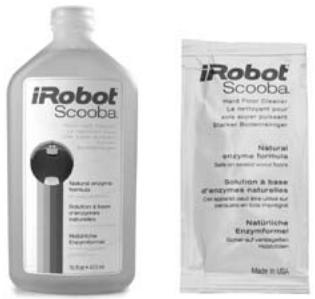
Scooba is designed to work only with Scooba Hard Floor Cleaner or plain tap water.
Filling the tank
Slowly add clean water to Scooba's fill port, then add one full sample packet or 12 capful of Scooba Hard Floor Cleaner.
(Do not use hot water.)
For Best Performance
- Remove clutter and lightweight rugs from area to be cleaned.
- Always empty and rinse both tanks after the cleaning cycle is complete. (See Instructions for Use section.)
- Keep wheels, brushes and squeegee free from hair and debris by inspecting and cleaning the wheels and bottom plate after each use.
- To protect bottom plate brushes, keep Scooba on storage mat, when not in use.
Battery Life
To extend the battery life, always store Scooba connected to a plugged-in charger.
Anatomy
Anatomy
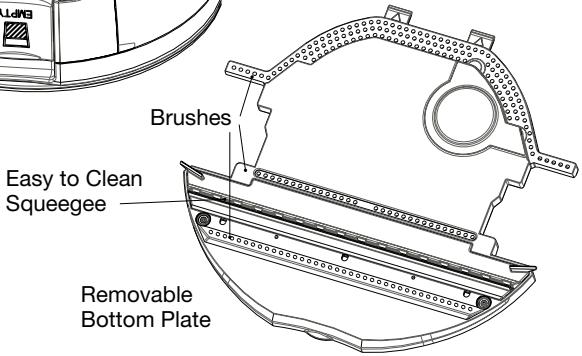
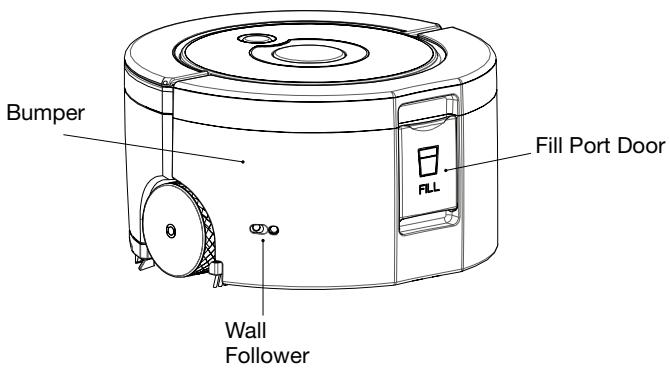
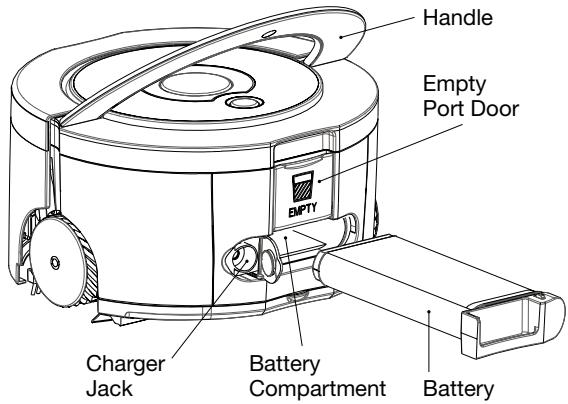
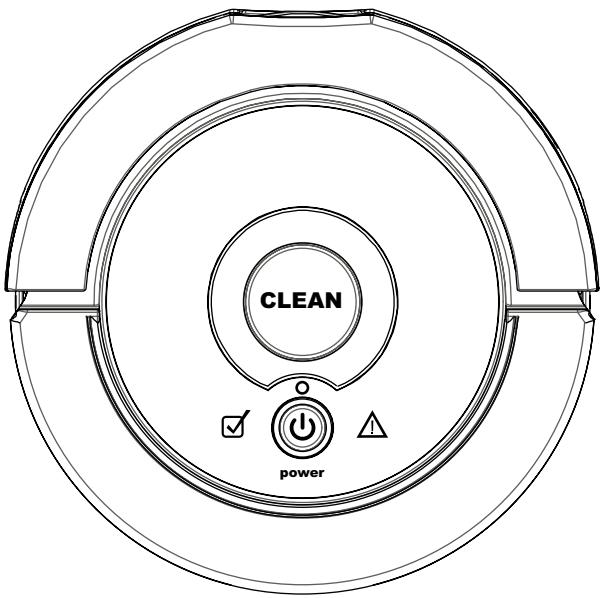
Lights
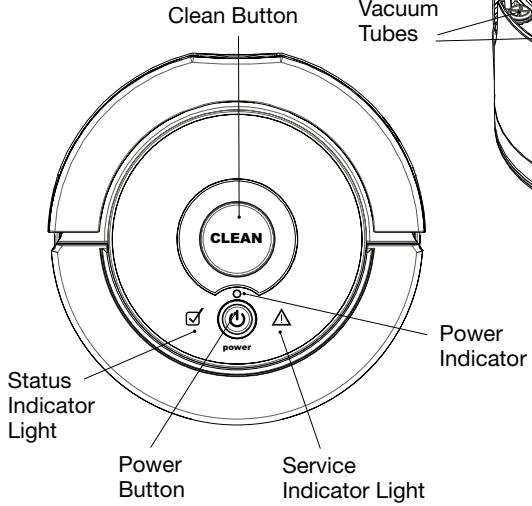
| Power Button Light | Battery Status |
| Green | On |
| Red | Battery is low |
| Clean Button Light | What It Means |
| On | Cleaning |
| Off | Cleaning is complete or Scooba needs help |
Indicator Lights Quick Reference
See Troubleshooting section for detailed instructions.
| Status Light | What It Means |
| The cleaning cycle is complete | |
| Service Light | What It Means |
| Scooba needs help - Refer to troubleshooting section |
Charger
| Scooba Charger Light | Battery Status |
| Solid green | Fully charged |
| Slow green pulse | Regular Charge (up to 8 hours) |
| Fast green pulse | Refresh charge (up to 15 hours) |
| No light when plugged in | Not connected to Scooba |
| No light when connected to Scooba | Refer to troubleshooting section |
Cleaning System
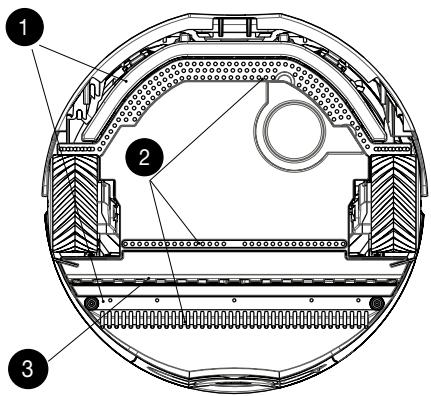
Scooba has an automatic three-part cleaning system that:
Washes - Scooba lays down fresh cleaning solution.
2 Scrubs - Scooba gently scrubs the floor.
3 Dries - Scooba uses a squeezegee and vacuum to pick up the dirty water.
Scooba uses only clean water and solution while
washing your floor. The dirty water is stored in a separate tank and is never reused.
CAUTION:
- Do NOT use bleach, ammonia or alcohol in Scooba. These liquids may damage the robot and will void the warranty.
- Do NOT use hot water as it may damage the robot.
- Scooba contains electronic parts. Do NOT submerge Scooba in water. Clean with a damp cloth only.
- Do not use Scooba on unfinished or unsealed wood or laminate flooring, which can be damaged by wet cleaning methods.
- Always consult your floor manufacturer for approved cleaning methods.
Scooba has two cleaning cycles.
| Cleaning Cycle | Room Size | Approx. Cycle Time | How to Start | When should I use this cycle? |
| Full | Up to 150 sq. ft. | 45 minutes | Press Power On Press CLEAN and release when song starts | For larger rooms or any room that needs extra cleaning time |
| Short | Up to 60 sq. ft. | 20 minutes | Press Power On Press and hold CLEAN until second song starts | To clean multiple small areas on a single battery charge |
Always completely fill Scooba for best performance. Upon completion of a short cycle, Scooba will have water remaining in the Fill tank and can complete a second short cycle if desired. Be sure to empty and rinse both tanks before storing for future use.
Scooba's Cleaning Pattern
Scooba is a robot that cleans differently than the way most people clean their floors. iAdapt™ Responsive Cleaning Technology, iRobot's advanced, proprietary system of software and sensors, allows Scooba to get around, under and past everyday obstacles. By making multiple passes, Scooba cleans the room more thoroughly.
Scooba will alternate between spiraling, wall following, and room crossing during a cleaning cycle.
Spiraling: Enables Scooba to efficiently clean a large area.
Wall Following: Enables Scooba to clean the room perimeter and navigate around furniture and obstacles.
Room Crossing: Enables Scooba to clean new areas while crisscrossing the room.
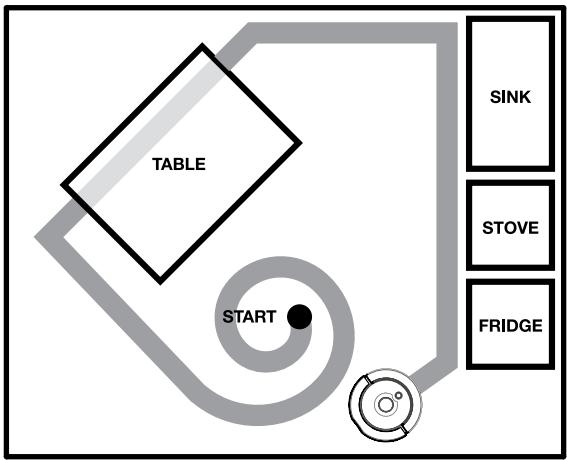
Note: Scooba's full cleaning cycle takes approximately 45 minutes to clean an average room and will pass over the same area on the floor multiple times to ensure total coverage. Scooba's short cleaning cycle takes approximately 20 minutes to clean a small room.
TIP: For fastest cleaning and best performance, clear your floor of clutter and large debris before running Scooba. Sweep floor prior to using Scooba.
TIP: You can confine Scooba to a single room using the Virtual Wall (See Virtual Wall section) included in select models and sold separately. You can purchase this and other Scooba products online at www.irobot.com.
Cleaning Solution
Floor Types
Scooba is designed for use on hard floor surfaces, including tile, linoleum, vinyl, marble, slate, stone and sealed wood. Scooba is not recommended for use on unfinished or unsealed hard floor surfaces, carpet, rugs or waxed floors. Scooba is not intended for use on laminate flooring, which may be damaged by wet cleaning methods.
Actual cleaning results will vary. Be sure to follow the floor manufacturer's cleaning recommendations.
Cleaning Solution
Scooba is designed to work only with Scooba Hard Floor Cleaner or plain tap water.
Filling the tank
Slowly add clean water to Scooba's fill port, then add one full sample packet or 12 capful of Scooba Hard Floor Cleaner.
(Do not use hot water.)
Slowly add clean water to Scooba's fill port, then add one full sample packet or 12 capful of Scooba Hard Floor Cleaner.
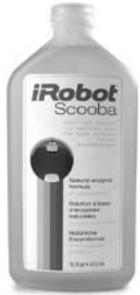
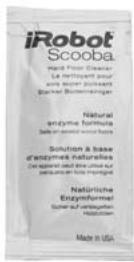
CAUTION: iRobot does not assume responsibility for floor damage caused by the use of other cleaners on hard floor surfaces.
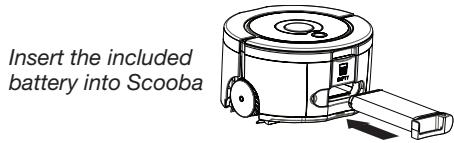
Instructions for Use
Before using your Scooba for the first time, you must:
Insert the included battery into Scooba
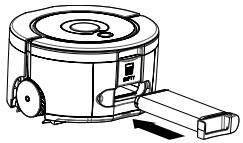
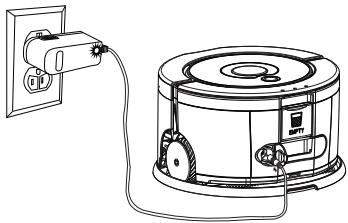
Plug in and charge Scooba overnight for the first charge.
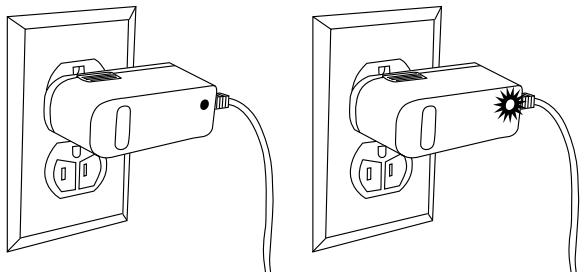
Your charger will flash twice when plugged in to show that it has power. Your Scooba battery is fully charged when the light on the charger is solid green.
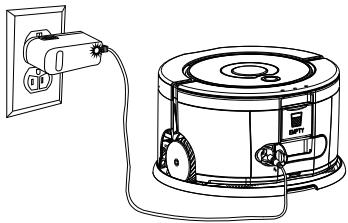
Place Scooba on storage mat to protect bottom plate brushes. Ensure charger jack door is closed when using Scooba.
Using Your Scooba
These steps will guide you through setting up and cleaning the floor with your Scooba

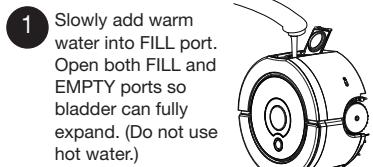
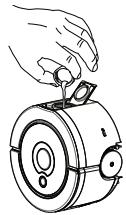
Slowly add warm water into FILL port. Open both FILL and EMPTY ports so bladder can fully expand. (Do not use hot water.)
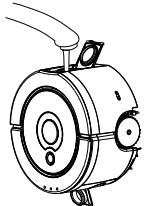

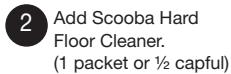
Add Scooba Hard Floor Cleaner. (1 packet or 12 capful)
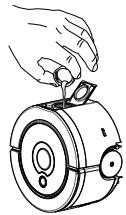

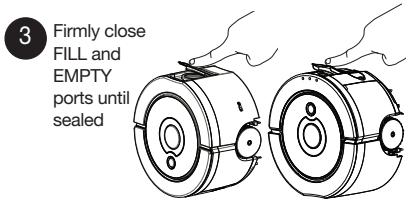
Firmly close
FILL and
EMPTY
ports until
sealed
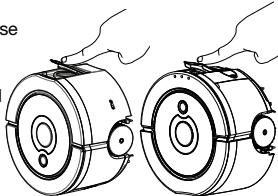

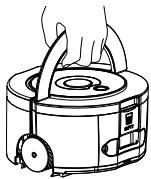
Place Scooba in the middle of the dirtiest area on the floor.

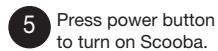
Press power button to turn on Scooba.
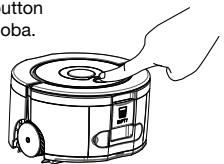

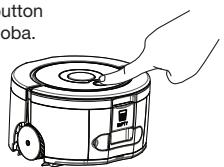
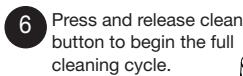
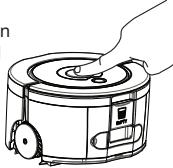
Press and release clean button to begin the full cleaning cycle.
For short cycle, press and hold until second song starts.
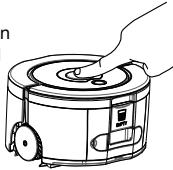
Emptying and Cleaning Your Scooba

Empty and thoroughly rinse both tanks with water.
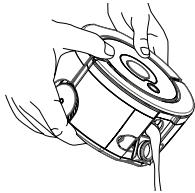

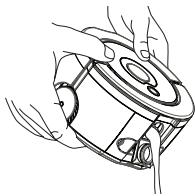
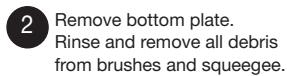
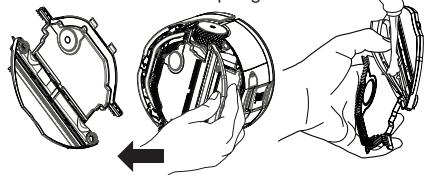
Remove bottom plate. Rinse and remove all debris from brushes and squeegee.
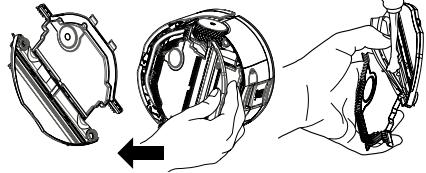

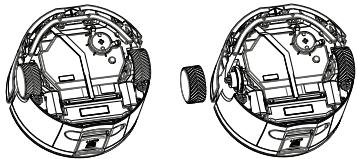
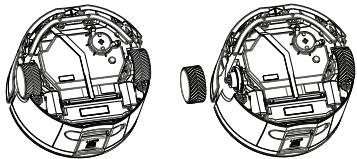
Clear any debris on robot before replacing bottom plate. If necessary, remove and replace tires.
Battery Charging and Storage
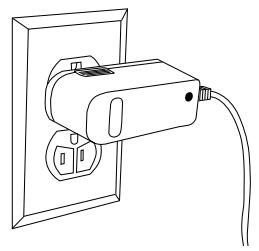
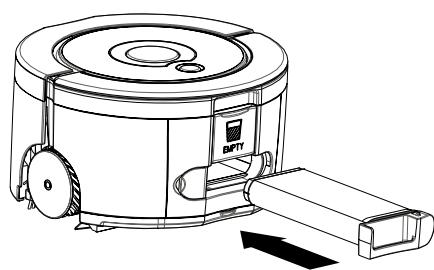
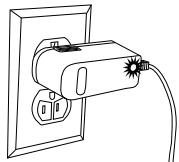
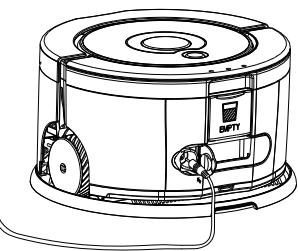
The charger will flash twice when plugged in to show that it has power.
Scooba is powered by a rechargeable battery pack. This battery can last for hundreds of cleaning cycles if cared for properly. The battery is a consumable item (6 month warranty from date of purchase) and after a period of normal use the battery's ability to hold an electrical charge will be diminished.
Charge Scooba by plugging charger into wall and connecting charger to robot.
To extend the battery life, always store Scooba
connected to a plugged in charger. For more details on how to maintain Scooba's battery life, visit www.irobot.com/support.
| Scooba Charger Light | Battery Status |
| Solid green | Fully charged |
| Slow green pulse | Regular Charge (up to 8 hours) |
| Fast green pulse | Refresh charge (up to 15 hours) |
| No light when plugged in | Not connected to Scooba |
| No light when connected to Scooba | Refer to troubleshooting guide |
TIP: For long-term storage of 3 months or longer, fully charge the battery and then remove it from the robot. Store in a cool, dry place. The battery should be recharged at least every 6 months.
Cleaning Time
You should fully charge Scooba's battery before each cleaning cycle. When fully charged, Scooba's battery will last for at least one full cleaning cycle or two short cycles.
15-Hour Refresh Charge
If Scooba has been left unplugged for an extended period, Scooba will initiate a special 15-hour charge cycle. This extensive charge refreshes Scooba's battery and extends the battery life. While charging, the charger light will pulse quickly. Note: For best results, do not interrupt this Refresh Charge.
Scooba's Virtual Wall® (included with select models)
The Scooba Virtual Wall creates an invisible barrier that Scooba will not cross. Virtual Walls can be set to block areas from 1 to 8 feet.
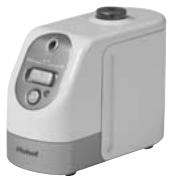
TIP: Use the Virtual Wall to block doorways or to keep Scooba away from cords.
Multiple Virtual Walls can be used as long as their beams do not cross each other.
The Virtual Wall beam is keyhole shaped. A small halo prevents Scooba from bumping the Virtual Wall and a larger beam blocks off areas of your home where you don't want Scooba to go.
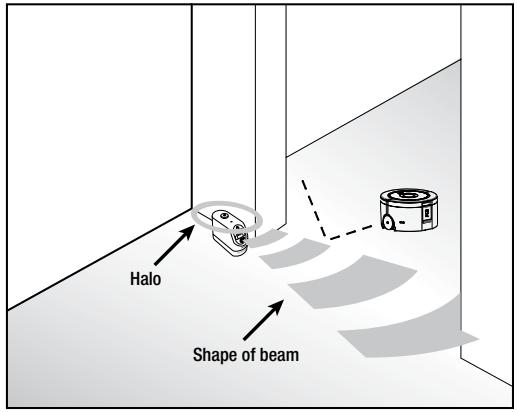
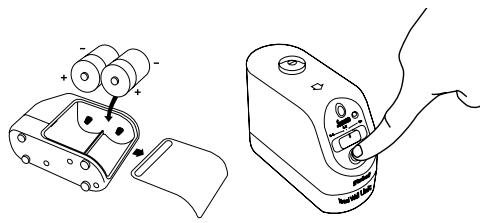
Virtual Walls require 2 "D" batteries. Virtual Walls will automatically shut themselves off at the end of a cleaning cycle.
TIP: For best performance, place the Virtual Wall on the outside of the doorway you wish to block, and always set the Virtual Wall to the shortest setting possible.
Troubleshooting
Scooba will tell you if something is wrong with a two-tone "uh-oh" sound and a series of beeps and light blinks. Count light blinks or beeps and refer to the chart below to identify and resolve Scooba's problem.
To repeat error blinks and beeps, tap Scooba's bumper. If the problem persists, visit www.irobot.com/support for more information.
| Number of beeps/blinks after uh-oh | Likely cause | What to do |
| 0 (error LED on solid) | Fill tank is empty | Fill tank with water and cleaning solution and press clean. |
| 1 | Scooba is on cliff | Move Scooba to clear area away from cliff and press clean. |
| Cliff sensors are dirty | Clean cliff sensors with a cotton swab and press clean. | |
| Cliff Sensor malfunction | Cliff sensors are located in the bumper and are accessed by turning Scooba over. | |
| Contact iRobot customer care. | ||
| 2 | Scooba is stuck | Move to clear area and press clean. |
| Clean cliff sensors and press clean. | ||
| Move out of Virtual Wall beam and press clean. | ||
| 3 | Bumper problem | Tap the bumper to ensure that it moves in and out. Visually inspect the bumper edges for debris and press clean. |
| 4 | Left or Right Wheel malfunction | Inspect and clean Scooba's wheels and press clean. |
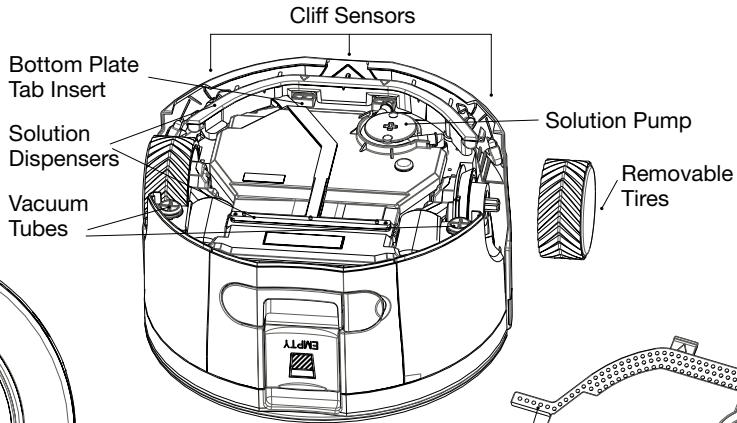
| 5 | Scooba is in a pool of water and vacuum tubes are locked | Move Scooba out of pooled water and press clean. |
| Scooba's vacuum tubes are filled with debris | (Note: Scooba is not intended for cleaning up pooled spills) | |
| Remove bottom plate. Clear any debris from vacuum tubes. | ||
| Replace bottom plate, set robot in clear area and press clean. | ||
| (Note: Be sure to sweep the floor before using Scooba.) | ||
| 6 | Pump malfunction | Contact iRobot customer care. |
| 7 | Vacuum malfunction | Contact iRobot customer care. |
| Charger Light | Likely cause | What to do |
| Charger is plugged in and connected to robot, but light is off | Charging error | Disconnect charger from robot; unplug charger from outlet; wait 5 seconds; plug charger in to outlet; connect charger to robot |
| Charger is plugged in and connected to robot, but light is off | No power at outlet | Confirm power is present at outlet by plugging in a lamp or another electrical device. If still no power, use another electrical outlet. |
Scooba Accessories
Get iRobot accessories at 800-727-9077 or visit store.irobot.com
International customers visit www.irobot.com/international
iRobot Customer Care USA
If you have questions or comments about Scooba, please contact iRobot before contacting a retailer. Please visit our web site at www.irobot.com for support tips, frequently asked questions, and information about accessories and other iRobot products. We would like to hear from you.
If you need additional help:
- Visit the iRobot Support web site at www.irobot.com/support
Call our Customer Care representatives at 877-855-8593
iRobot Customer Care Hours:
- Monday – Friday 9AM – 7PM Eastern Time
Saturday 9AM - 6PM Eastern Time
iRobot Scooba 200 Series Quick Start Guide
- Before using Scooba for the first time, plug in and charge Scooba until green light on charger is solid (up to 8 hours).
- Sweep the floor prior to using Scooba.
Floor Types
Scooba is designed for use on hard floor surfaces, including tile, linoleum, vinyl, marble, slate, stone and sealed wood. Scooba is not recommended for use on unfinished or unsealed hard floor surfaces, carpet, rugs or waxed floors. Scooba is not intended for use on laminate flooring, which may be damaged by wet cleaning methods.
Cleaning Solution
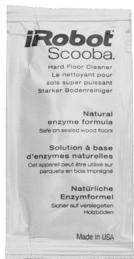
Scooba is designed to work only with Scooba Hard Floor Cleaner or plain tap water.
Filling the tank
Slowly add clean water to Scooba's fill port, then add one full sample packet or 12 capful of Scooba Hard Floor Cleaner.
(Do not use hot water.)

For Best Performance
- Remove clutter and lightweight rugs from area to be cleaned.
- Always empty and rinse both tanks after the cleaning cycle is complete. (See Instructions for Use section.)
- Keep wheels, brushes and squeegee free from hair and debris by inspecting and cleaning the wheels and bottom plate after each use.
- To protect bottom plate brushes, keep Scooba on storage mat, when not in use.
Battery Life
To extend the battery life, always store Scooba connected to a plugged-in charger.
Instructions for Use
Before using your Scooba for the first time, you must:
Plug in and charge Scooba overnight for the first charge.
Your charger will flash twice when plugged in to show that it has power. Your Scooba battery is fully charged when the light on the charger is solid green.
Place Scooba on storage mat to protect bottom plate brushes. Ensure charger jack door is closed when using Scooba.
Using Your Scooba
These steps will guide you through setting up and cleaning the floor with your Scooba

For short cycle, press and hold until second song starts.
Emptying and Cleaning Your Scooba


- iRobot®
- Scooba®
- Series
- OWNER'S MANUAL
- iRobot
- Table of Contents
- Important Safety Instructions
- GENERAL SAFETY INSTRUCTIONS
- SCOOBA SAFETY
- SCOOBA BATTERY AND CHARGING SAFETY
- SCOOBA USE RESTRICTIONS
- Important Tips
- Floor Types
- Cleaning Solution
- Filling the tank
- For Best Performance
- Battery Life
- Anatomy
- Lights
- Indicator Lights Quick Reference
- Charger
- Cleaning System
- CAUTION:
- Scooba's Cleaning Pattern
- Instructions for Use
- Using Your Scooba
- Emptying and Cleaning Your Scooba
- Battery Charging and Storage
- Cleaning Time
- 15-Hour Refresh Charge
- Scooba's Virtual Wall® (included with select models)
- Troubleshooting
- Scooba Accessories
- iRobot Customer Care USA
- iRobot Scooba 200 Series Quick Start Guide
Marque : IROBOT
Modèle : SCOOBA 230
Catégorie : Robot laveur de sol