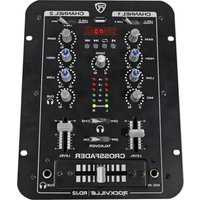
RDJ2 - Table de mixage Rockville - Notice d'utilisation et mode d'emploi gratuit
Retrouvez gratuitement la notice de l'appareil RDJ2 Rockville au format PDF.


| Type de produit | Table de mixage DJ |
| Marque | Rockville |
| Modèle | RDJ2 |
| Dimensions (L x P x H) | 20 x 15 x 5 cm |
| Poids | 1,2 kg |
| Alimentation | USB 5V ou adaptateur secteur (non inclus) |
| Nombre de canaux | 2 canaux stéréo |
| Entrées | 2 x RCA, 1 x Jack 3,5 mm |
| Sorties | 1 x RCA (Master), 1 x Jack 3,5 mm (Casque) |
| Fonctions principales | Crossfader, contrôle de gain, égaliseur 2 bandes, fader de canal, sortie casque pré-écoute |
| Connectique | USB pour alimentation et liaison PC/Mac |
| Matériau | Plastique ABS |
| Couleur | Noir |
| Entretien et nettoyage | Utiliser un chiffon doux sec ; éviter les solvants |
| Sécurité | Ne pas exposer à l'humidité, aux chocs ou aux températures extrêmes |
| Pièces détachées et réparabilité | Contactez le service après-vente Rockville pour les pièces |
| Informations générales | Table de mixage d'entrée de gamme pour DJ débutants, compatible PC/Mac |
FOIRE AUX QUESTIONS - RDJ2 Rockville
Questions des utilisateurs sur RDJ2 Rockville
0 question sur cet appareil. Repondez a celles que vous connaissez ou posez la votre.
Poser une nouvelle question sur cet appareil
Téléchargez la notice de votre Table de mixage au format PDF gratuitement ! Retrouvez votre notice RDJ2 - Rockville et reprennez votre appareil électronique en main. Sur cette page sont publiés tous les documents nécessaires à l'utilisation de votre appareil RDJ2 de la marque Rockville.
MODE D'EMPLOI RDJ2 Rockville
ROCKVILLE

OWNER'S MANUAL

RDJ2
COMPACT 2 CHANNEL DJ MIXER WITH USB AND LED DISPLAY
Thank you for purchasing this Rockville RDJ2 Compact 2 Channel DJ Mixer.
We are very proud to bring you what we consider to be the absolute best value in Pro Audio products. Proudly conceived and developed in the USA, the Rockville RDJ2 mixer was designed and engineered by a team of music enthusiasts, DJ's and musicians. We have spared no expense in manufacturing these mixers to meet the highest quality standards. With proper care and installation this unit will provide you with the highest levels of performance and reliability.
Please read this installation guide carefully for proper use of your Rockville RDJ2 mixer. Should you need technical assistance please call our technical help line at 1-646-758-0144, Monday through Friday, 9am to 5pm EST.

ROCKVILLE
IMPORTANT SAFETY INSTRUCTIONS

- To reduce risk of electric shock, never open the unit. There are no user serviceable parts, refer service to an authorized Rockville service center.
- Do not expose this unit to any kind of moisture.
- Please ensure that the unit is situated in a properly ventilated area.
• Make sure the unit is placed on a level and stable surface.
Features/Specifications
- Selectable Inputs for Channel 1 and Channel 2
- Adjustable high, low, and gain knobs on each channel
• Equalizer: Bass +12dB 60Hz / Treble +12dB 10KHz
• Channel 1/2 Cue monitor control
• Individual volume control - Mic volume control
• Master volume control
• Channel 1 and 2 fader and cross fader
• Built in USB and MP3 player with LCD to play back tracks - Talk-over: -16dB
• Distortion: ≤ 0.05%
• Signal/ Noise ratio: > 80dB
• 1 1/4" Mic input
• 1 1/4" Headphone output
• 4 RCA L/R Line inputs
• 1 RCA L/R Master amp output
• 1 RCA L/R Rec output - You can ground your turntables to the mixer
Functions
- Channel 1 input selector switch: Phono/Line 1 - Line 2
- LCD display screen
- USB input
- MP3 controls: Play/Pause, Repeat, Previous, Next
- Channel 2 input selector switch: Phono/Line 3 - Line 4 - MP3
- Channel 1: a. Gain input control
b. High tone control: 12KHz ±12dB
c. Low tone control: 60Hz ±12dB
d. Microphone level control
- Channel 2: a. Gain input control
b. High tone control: 12KHz ±12dB
c. Low tone control: 60Hz ±12dB
d. Headphone level control
- Master volume control
- Left/Right Stereo level display
- Headphone source selector switch
- Talkover On/Off selector switch
- Channel 1 level control
- Channel 2 level control
- 1/4" Microphone input jack
- 1/4" Headphone input jack
- Crossfade slider

Functions
INPUTS:
LINE INPUT: Use these jacks for connecting stereo audio from any number of sources: mixing consoles, samplers, CD players, cassette decks, DAT machines, and other audio interfaces. Mono audio sources can be connected using an RCA "Y" cable connector.
LINE/PHONO INPUT: Use these jacks for connecting stereo audio from turntables, mixing consoles, samplers, CD players, cassette decks, DAT machines, and other audio interfaces. When connecting a turntable, make sure the input mode selector switch is in the PHONO position.
OUTPUTS:
-
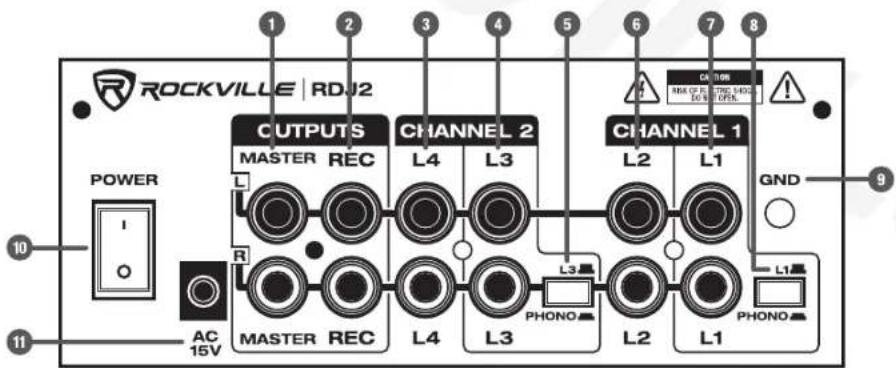
Master output, Left/Right: use this output to connect to an amplifier or speaker system. The level of this output is controlled by the top panel knob labeled MAIN.
-
Record output, Left/Right: This output can be used to record to a computer, CD, MD, and tape recorder.
CHANNEL 2:
- Line 4 input, Left/Right
- Line 3/Phono input, Left/Right
- Line 3/Phono input mode selector
CHANNEL 1:
- Line 2 input, Left/Right
- Line 1/Phono input, Left/Right
- Line 1/Phono input mode selector
- Ground connector
- Power switch
- AC 15V power input
Trouble Shooting
NO SOUND:
- Make sure unit is properly plugged into the wall outlet.
- Check that power cable is properly plugged into the unit.
- Ensure that the Channel input selector switch has been properly set.
- Check the input GAINS, CHANNEL 1/CHANNEL 2 levels, and MAIN volume to make sure they are properly set.
NO SOUND - HEADPHONES:
- Be sure your headphones are properly plugged in.
- Check that the headphone level control (CUE), headphone channel selector (☐), and CHANNEL 1/CHANNEL 2 levels have been properly set.
MIXER NOISE:
- Turn down all Microphone settings if none is in use.
MICROPHONE DOES NOT WORK:
- Be sure your microphone is properly plugged in.
- Make sure the MIC gain is properly set.
LINE INPUT DISTORTION:
- Turn down the input GAIN controls and check EQ settings.
LINE INPUT/PHONO DISTORTION:
- Make sure the LINE INPUT/PHONO selector switch is in the right position (PHONO for turntables, LINE for all other input sources).
- Turn down the input GAIN controls and check EQ settings.
NOISE/HUM:
- Make sure you are using good quality audio cables. We recommend Rockville Pro Audio cables.
- Check the condition of your audio cables.
- Keep cables away from other AC power cables as well as AC transformers.
- Ensure that the unit is not too close to amplifiers, lighting power supplies or ballasts.
- If possible, make sure that your turntables are properly grounded to the back of the mixer (GND).
Trouble Shooting
FEEDBACK:
- If a microphone is being used, make sure you are not too close to the speakers or headphones.
- If there is feedback from the phono input, your turntables may be to the speakers or subwoofer. Make sure the the turntable is on a surface free of vibration when the speakers are turned up.
FEDERAL COMMUNICATIONS COMMISSION COMPLIANCE INFORMATION
Responsible party name: Rockville
Address: 600 Bayview Ave.
Entrance A
Inwood, NY 11096
Hereby declares that the product RDJ2 Compact 2 Channel DJ Mixer complies with FCC rules as mentioned in the following paragraph:
This device complies with Part 15 of the FCC rules. Operation is subject to the following two conditions: (1) this device may not cause harmful interference, and (2) this device must accept any interference received, including interference that may cause undesired operation.

RockvilleAudio.com
© 2018 ROCKVILLE // Features and specifications are subject to change and or improvement without notice.

- ROCKVILLE
- IMPORTANT SAFETY INSTRUCTIONS
- FEATURES/SPECIFICATIONS
- FUNCTIONS
- INPUTS
- OUTPUTS
- CHANNEL 2
- CHANNEL 1
- TROUBLE SHOOTING
- NO SOUND
- NO SOUND - HEADPHONES
- MIXER NOISE
- MICROPHONE DOES NOT WORK
- LINE INPUT DISTORTION
- LINE INPUT/PHONO DISTORTION
- NOISE/HUM
- FEEDBACK
- FEDERAL COMMUNICATIONS COMMISSION COMPLIANCE INFORMATION
- ROCKVILLEAUDIO.COM
Marque : Rockville
Modèle : RDJ2
Catégorie : Table de mixage