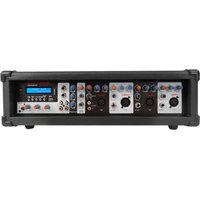
RPM80BT - Table de mixage Rockville - Notice d'utilisation et mode d'emploi gratuit
Retrouvez gratuitement la notice de l'appareil RPM80BT Rockville au format PDF.


| Type de produit | Table de mixage DJ |
| Marque | Rockville |
| Modèle | RPM80BT |
| Dimensions (approx.) | 25 x 20 x 10 cm |
| Poids (approx.) | 1,5 kg |
| Alimentation | Adaptateur secteur 12 V DC (inclus) |
| Connectivité Bluetooth | Bluetooth 5.0, portée 10 m |
| Entrées audio | 2 canaux : RCA et Jack 6,35 mm |
| Sorties audio | Sortie principale RCA, sortie casque Jack 6,35 mm |
| Égalisation | 2 bandes par canal (aigus, graves) |
| Fonctions principales | Crossfader, lecture Bluetooth, enregistrement USB (estimation) |
| Entretien et nettoyage | Chiffon doux sec, ne pas utiliser de liquides |
| Sécurité | Ne pas exposer à l'eau, débrancher avant nettoyage |
| Pièces détachées | Disponibles sur demande auprès du service client Rockville |
| Réparabilité | Réparation par technicien qualifié recommandée |
FOIRE AUX QUESTIONS - RPM80BT Rockville
Questions des utilisateurs sur RPM80BT Rockville
0 question sur cet appareil. Repondez a celles que vous connaissez ou posez la votre.
Poser une nouvelle question sur cet appareil
Téléchargez la notice de votre Table de mixage au format PDF gratuitement ! Retrouvez votre notice RPM80BT - Rockville et reprennez votre appareil électronique en main. Sur cette page sont publiés tous les documents nécessaires à l'utilisation de votre appareil RPM80BT de la marque Rockville.
MODE D'EMPLOI RPM80BT Rockville
ROCKVILLE
RPM80BT
2400W POWERED 8-CHANNEL MIXER/AMPLIFIER w/BLUETOOTH, EQ, and EFFECTS
OWNER'S MANUAL
ATTENTION: WATCH THIS VIDEO BEFORE FIRST USE!
Who reads manuals?
Scan the QR code or go to rockvillesupport.com/rpm80bt to access how-to video(s), the owner's manual, and other important information you may need to get the most out of your item.
If you prefer written instructions, please read ahead!
With Rockville you get many options.
Missing items? If you ordered a bundle that includes more than one product and you are missing part of your bundle then it just means your order shipped from two different warehouses. You will receive the remaining items very soon. If you have any concerns or inquiries, feel free to call our customer support center at 1-646-758-0144, 24 hours a day/7 days a week.
Thank you for purchasing this Rockville RPM80BT 8-Channel Wood Cabinet Powered Mixer with USB input and Bluetooth connectivity. Please read this owner's manual carefully for proper use of your Rockville RPM80BT mixer. Should you need assistance, please call our technical help line at 1-646-758-0144, 24 hours a day/7 days a week.
Includes
- Powered mixer w/Bluetooth
- Remote
- Power cable
- Owner's manual
- Warranty card
IMPORTANT SAFETY INSTRUCTIONS

- To reduce risk of electric shock, never open the unit. There are no user-serviceable parts, refer service to the Rockville service center.
- Do not expose this unit to any kind of moisture.
- Please ensure that the unit is situated in a properly ventilated area.
• Make sure the unit is placed on a level and stable surface.
Functions

- Channel Treble control: ±15dB
- Channel Bass control: ±15dB
- Reverb control
- Line/High impedance 1/4 " input: This input may be used as either a high-impedance instrument input or for line-level devices such as a cassette player, CD player, video projector, or laptop. Will also allow connection from an electric guitar, bass, or keyboard. It is a two-conductor input with an impedance of 10k ohms.
- Microphone/Low impedance XLR input: Connect balanced low impedance microphones with an input impedance of 1K ohms. PIN 1 = shield, PIN 2 = positive (hot), PIN 3 = negative (cold)
WARNING: When using condenser microphones, make sure that Phantom power (48V) is switched on (see item 15).
- Channel Volume control: Volume level should be lower than the master level. This control acts as a preamp. If you are using a device that has a volume output control, you will need to match levels by adjusting the level controls on each unit.
Functions
- USB port: Inserting a USB flash drive will set the RPM80BT to USB mode and it will automatically begin to play music.
- SD card slot: Inserting an SD card will set the RPM80BT to SD mode and it will automatically begin to play music.
- Display screen
- IR remote receiver
- MP3 Player: Play button: Quickly press during play to pause; press button again to resume play.
Mode: Use to switch between input modes (USB/SD, BT, and FM).
Repeat button: Quickly press during play to repeat current song. Press again to repeat all songs. Press again to exit repeat mode.
Next button: Press to go to the next track.
Previous button: Press to go to the previous track.
- Power indicator LED
- MP3 Volume control (USB and SD input)
- Master Volume control
- Phantom Power ON/OFF button (red LED indicates power on): When activated, phantom power provides 48 volts DC to power condenser microphones.
- RCA Record Out: Sends signal to a recording device or any other line-level device.
- RCA Line In: Used to connect line-level sources: DJ controller, mixer, samplers, CD players, cassette decks, DAT machines, MP3 players, etc. Mono audio sources can be connected using an RCA Y-cable connector.
- Line In Volume control
- Digital Delay Effect (echo) controls: Volume: adjusts the mix level of the effect
Echo: controls the echo interval
Repeat: controls the rate of the delay
- 5-Band Equalizer: Adjusts frequencies ±12dB
Functions
Please note: Do not plug or unplug devices and mics while phantom power is on. It can cause severe damage to the mic. When phantom power is turned off, it is recommended you wait approximately 7 seconds to allow time for the voltage to completely die out.
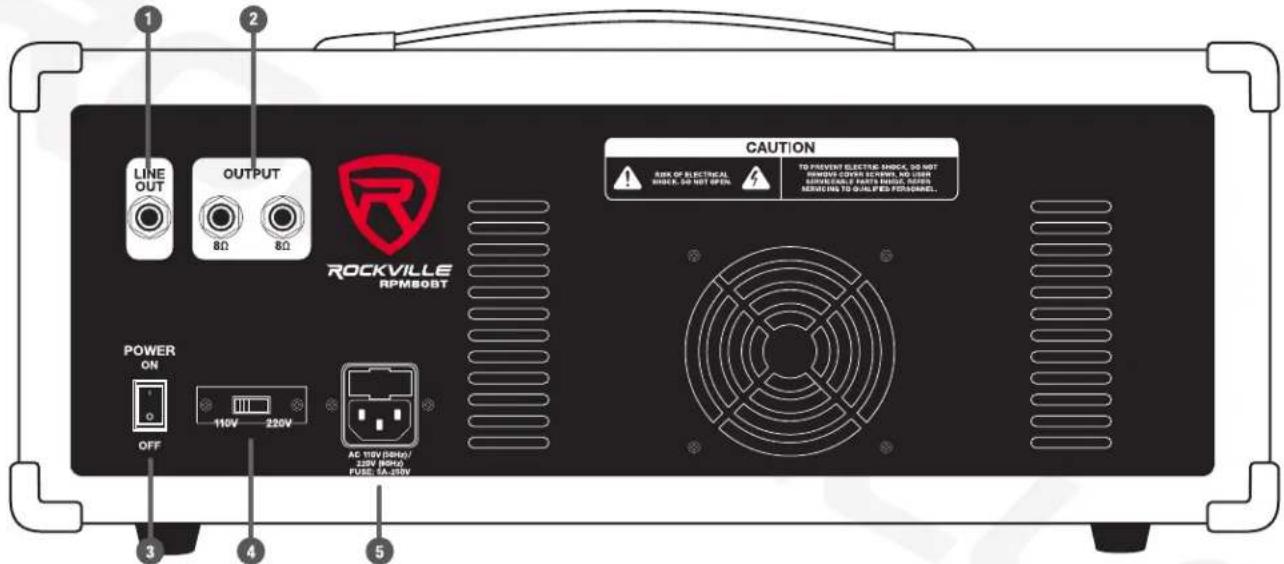
- ¼" Line Out jack
- Speaker Outputs: 1/4"TS jacks accept 8-ohm speakers. WARNING: Do not operate below rated minimum impedance.
- Power switch
- Variable Voltage Selector switch (110V/220V)
- IEC AC Power socket with user-serviceable fuse
Bluetooth Pairing and Operation
- Press the MODE button until you see "BLUETOOTH" on the display.
- Ensure that your device is in Bluetooth mode and discoverable.
- Find "RPM80BT" on your device's list of available Bluetooth connections and select it.
- Once successfully paired, the RPM80BT's LCD display will show "BLUETOOTH CONNECTED."
- You can control playback from your device or you can use the MP3 controls.
Media Playback Sources
The RPM80BT will accept various media playback devices:
• To connect a CD player, an MP3 Player, a smartphone, etc. use the RCA Line In inputs (see page 10).
USB/SD Operation
Inserting a USB flash drive or an SD card into the corresponding port/slot will set the RPM80BT to USB/SD mode and it will automatically begin to play music.
Music Playback (USB/SD and Bluetooth)
Play button: Press to play/pause current track.
Next button: Quickly press to go to the next track.
Previous button: Quickly press to go to the previous track.
Folder Selection (USB/SD only)
- Press and hold the Repeat button to enter the folder interface menu.
- Use the Previous/Next buttons to select the desired folder. Folder name will appear at the bottom right of the screen, track number will appear at the top left and track name and duration will appear on the right.
- Press the Play/Pause button to start or stop the current track.
Setup
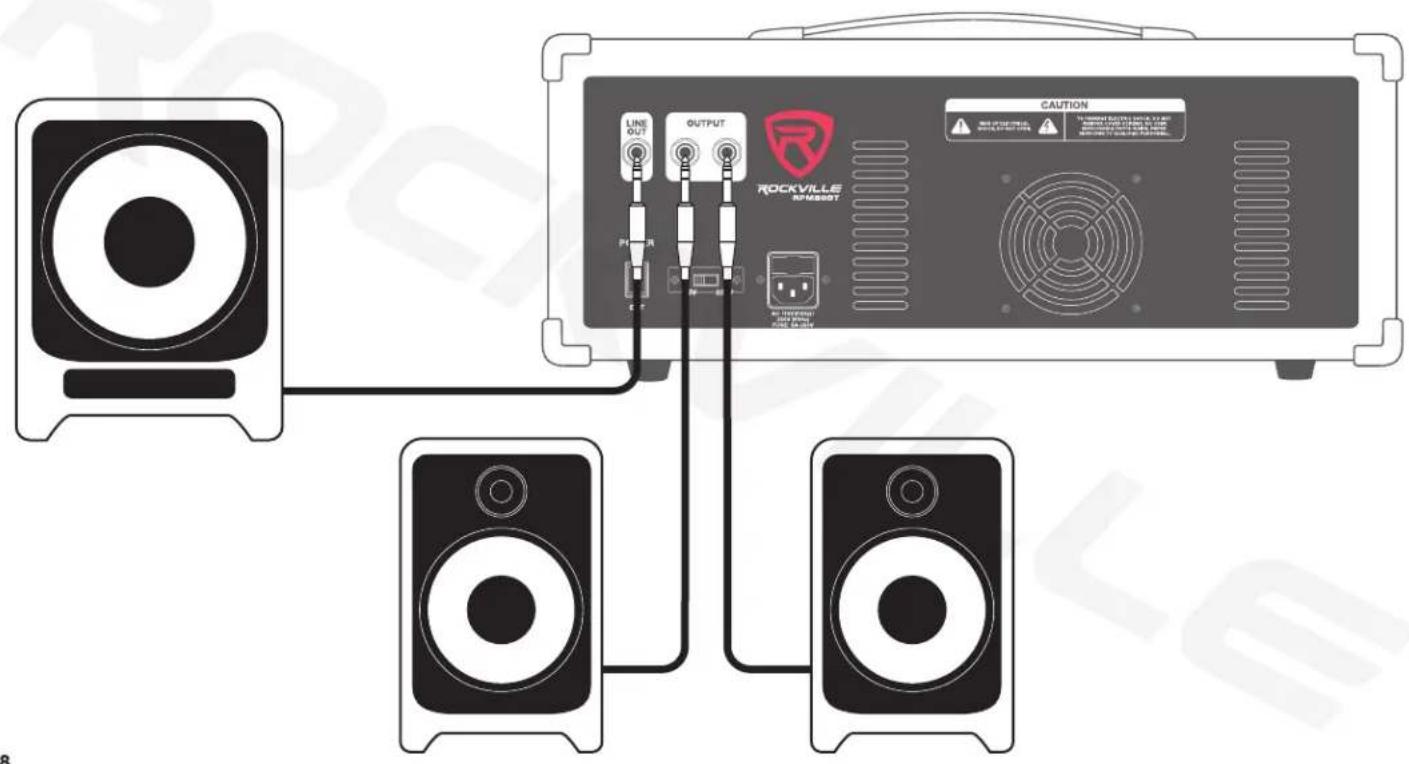
In this setup there is a powered subwoofer connected to the 1/4 " Line Out jack and two 8-ohm speakers connected to the 1/4 " 8 -ohm Outputs on the back of the unit.
Setup
In this setup there is a powered stage monitor connected to the 1/4 " Line Out jack and two 8-ohm speakers connected to the 1/4 " 8-ohm Outputs on the back of the unit.

Setup
Once your speakers are hooked up, there are a variety of devices that can be connected to the RPM80BT.

Features/Specifications
• RMS power output: 350w x 2 @ 4 Ohm 300w x 2 @ 8 Ohm
- Program power output: 700w x 2 @ 4 Ohm 600w x 2 @ 8 Ohm
- Peak power output: 1400w x 2 @ 4 Ohm 1200w x 2 @ 8 Ohm
• Built-in Bluetooth version 3.0 with 100-foot range and great sound quality
- Individual volume, reverb, bass, and treble controls
- Adjustable effects: echo and delay
- 5-Band EQ
- USB/SD input
- MP3 Volume control
• Line In Volume control
• Master Volume control
• 8 balanced XLR inputs
- 8 1/4 " TRS inputs
• 1 RCA Line input
• 1 RCA Rec output
- 2 amplified speaker outputs: 1/4 " TS (8 ohm)
- 1/4 " line output for adding a powered subwoofer or more amplifiers or powered speakers
• +48V phantom power
• Fan vent cooling system
• Dimensions: 19.7" x 11.8" x 7.2"
- Weight: 24Lbs.
Troubleshooting
| PROBLEM | SOLUTION |
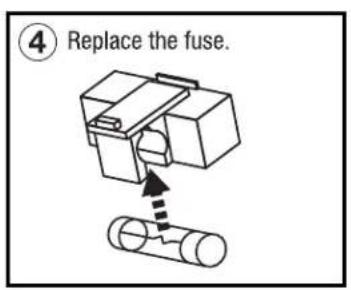
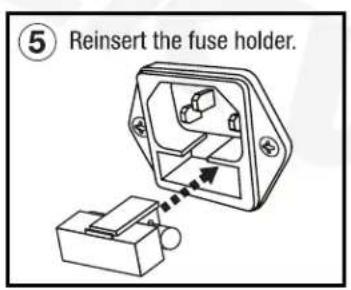
| No power | 1. Make sure the unit is plugged in and the power switch is in the ON position.2. Check that the power cable is plugged in tightly to the unit.3. Check and replace the fuse if necessary. See fuse replacement diagram on the next page. |
| No sound | 1. Check that all appropriate cables are plugged in correctly.2. Check the Master Volume settings.3. Check the individual level control of each channel as well as the MP3 Volume control and Line-Level Volume controls.4. Be sure your microphone(s) is on. |
| Noise | 1. Turn down the channel levels one by one. If you don't hear the sound, then the problem is either with the channel or whatever device is plugged into it.2. Unplug the device(s) to see if the sound disappears.3. Make sure you are using the proper cables. For 1⁄4" cables, there are three types: instrument, TS (unbalanced), and TRS (balanced). Check the requirements of the connected gear and make sure you are using the appropriate cable. |
| Buzzing sound | Make sure you are using a proper cable. For 1⁄4" cables, there are three types: instrument, TS (unbalanced), and TRS (balanced). Check the requirements of the connected gear and make sure you are using the appropriate cable. |
| Bluetooth pairing fails/no sound | 1. Check to see that both devices are turned on and that your Bluetooth device is discoverable.2. Turn both devices off and then on again.3. Make sure you've selected the proper source on the RPM80BT.4. Make sure that the Bluetooth device is within 5 feet of the unit.5. Move both devices away from other Bluetooth devices, microwaves, wireless routers, and other electronics.6. Make sure that the unit is not connected to a previously paired device.7. Make sure that all volume controls are set properly: MP3 Volume control, the Master Volume control, and the paired device's volume controls. |
| No USB/SD playback | 1. Make sure your SD card or USB flash drive is not damaged.2. Check that the files on the media device are not corrupt.3. Make sure that the files are properly formatted (WAV, MP3, WMA). |
Fuse Replacement


FEDERAL COMMUNICATIONS COMMISSION COMPLIANCE INFORMATION
Responsible party name: Rockville
Address: 600 Bayview Ave,
Entrance A.
Inwood, NY 11096
Hereby declares that the product Rockville RPM80BT 8-channel mixer complies with FCC rules as mentioned in the following paragraph:
This device complies with Part 15 of the FCC rules. Operation is subject to the following two conditions: (1) this device may not cause harmful interference, and (2) this device must accept any interference received, including interference that may cause undesired operation.
Note: This equipment has been tested and found to comply with the limits for a Class B digital device, pursuant to Part 15 of the FCC rules. These limits are designed to provide reasonable protection against harmful interference in a residential installation. This equipment generates, uses, and can radiate radio frequency energy and, if not installed and used in accordance with the instructions, may cause harmful interference to radio communications. However, there is no guarantee that interference will not occur in a particular installation. If this equipment does cause harmful interference to radio or television reception, which can be determined by turning the equipment off and on, the user is encouraged to try to correct the interference by one or more of the following measures:
• Reorient or relocate the receiving antenna.
- Increase the separation between the equipment and receiver.
- Connect the equipment to an outlet on a circuit different from that to which the receiver is connected.
- Consult the dealer or an experienced radio/TV technician for help.

RockvilleAudio.com
© 2022 ROCKVILLE // Features and specifications are subject to change and/or improvement without notice.

- ROCKVILLE
- RPM80BT
- ATTENTION: WATCH THIS VIDEO BEFORE FIRST USE
- INCLUDES
- IMPORTANT SAFETY INSTRUCTIONS
- FUNCTIONS
- BLUETOOTH PAIRING AND OPERATION
- MEDIA PLAYBACK SOURCES
- USB/SD OPERATION
- MUSIC PLAYBACK (USB/SD AND BLUETOOTH)
- FOLDER SELECTION (USB/SD ONLY)
- SETUP
- FEATURES/SPECIFICATIONS
- FUSE REPLACEMENT
- FEDERAL COMMUNICATIONS COMMISSION COMPLIANCE INFORMATION
- ROCKVILLEAUDIO.COM
Marque : Rockville
Modèle : RPM80BT
Catégorie : Table de mixage