
COMFORT CURVE DESKTOP 2000 - Clavier et souris MICROSOFT - Notice d'utilisation et mode d'emploi gratuit
Retrouvez gratuitement la notice de l'appareil COMFORT CURVE DESKTOP 2000 MICROSOFT au format PDF.


| Type de produit | Clavier et souris sans fil |
| Marque | Microsoft |
| Modèle | Comfort Curve Desktop 2000 |
| Dimensions du clavier (L x l x H) | 480 x 213 x 30 mm |
| Poids du clavier | 1117 g |
| Dimensions de la souris (L x l x H) | 124 x 66,6 x 39,6 mm |
| Poids de la souris | 125 g |
| Interface clavier | USB |
| Interface souris | USB et PS/2 |
| Systèmes d'exploitation compatibles | Windows 7, Vista, XP (sauf 64 bits) ; Mac OS X v10.2-10.4 |
| Logiciel recommandé | Microsoft IntelliType Pro version 7.0 |
| Technologie de la souris | Optique propriétaire Microsoft |
| Résolution de la souris | 400 ppp |
| Touches de fonction | Messagerie, Web/Accueil, Recherche, Calculatrice |
| Touches média | Muet, Volume -, Volume+, Lecture/Pause |
| Durée de vie des touches QWERTY | 1 000 000 d'actions par touche |
| Durée de vie des touches de fonction | 500 000 d'actions par touche |
| Durée de vie des boutons de la souris | 1 000 000 d'actions (boutons droit/gauche) ; 150 000 (molette) |
| Température de fonctionnement | 0 °C à 35 °C |
| Température de stockage | -40 °C à 60 °C |
| Certifications | FCC, CE, UL, cUL, VCCI, WEEE |
| Pays de fabrication | Chine |
FOIRE AUX QUESTIONS - COMFORT CURVE DESKTOP 2000 MICROSOFT
Questions des utilisateurs sur COMFORT CURVE DESKTOP 2000 MICROSOFT
0 question sur cet appareil. Repondez a celles que vous connaissez ou posez la votre.
Poser une nouvelle question sur cet appareil
Téléchargez la notice de votre Clavier et souris au format PDF gratuitement ! Retrouvez votre notice COMFORT CURVE DESKTOP 2000 - MICROSOFT et reprennez votre appareil électronique en main. Sur cette page sont publiés tous les documents nécessaires à l'utilisation de votre appareil COMFORT CURVE DESKTOP 2000 de la marque MICROSOFT.
MODE D'EMPLOI COMFORT CURVE DESKTOP 2000 MICROSOFT
| Version Information | |
| Product Name | Microsoft® Comfort Curve Desktop 2000 |
| Product Version | Microsoft Comfort Curve Desktop 2000 v1.0 |
| Keyboard Version | Microsoft Comfort Curve Keyboard 2000 v1.0 |
| Mouse Version | Microsoft Wheel Mouse Optical 1.1a |
| Product Dimensions | |
| Keyboard Length | 18.9 inches (480 millimeters) |
| Keyboard Width | 8.4 inches (213 millimeters) |
| Keyboard Depth/Height | 1.2 inches (30 millimeters) |
| Keyboard Cable Length | 60 inches +/- 6 inches (1530 millimeters +/- 150 millimeters) |
| Keyboard Weight | 39.4 ounces (1117 grams) |
| Mouse Length | 4.88 inches (124 millimeters) |
| Mouse Width | 2.62 inches (66.6 millimeters) |
| Mouse Depth/Height | 1.56 inches (39.6 millimeters) |
| Mouse Weight | 4.42 ounces (125 grams) |
| Cable Length | 72 +6/-0 inches (1830 +152/-0 millimeters) |
| Compatibility and Localization | |
| Interface | • Mouse: USB and PSI/2 compatible • Keyboard: USB compatible |
| Operating Systems | • Microsoft Windows® 7, Windows Vista®, and Windows XP (excluding Windows XP 64-bit) • Macintosh Mac OS X v10.2-10.4 |
| Top-line System Requirements | For a Microsoft Windows-based PC: Requires a PC that meets the requirements for and has installed one of these operating systems: • Windows 7, Windows Vista, or Windows XP (excluding Windows XP 64-bit) • USB port • Microsoft IntelliType Pro software version 7.0 recommended For a Macintosh PC: • Mac OS X v10.2-10.4 • USB port • Microsoft IntelliType Pro for Mac software version 7.0 recommended Internet Hot Keys are supported for use with: • Windows-based PC: Browser support (only with software installed): Microsoft Internet Explorer version 5.0 or later; MSN® Explorer versions 7.0 or 8.0; Netscape Navigator versions 6.1, 6.2, 7.0; and AOL versions 7.0, 8.0, 9.0 • Macintosh: Browser support (only with software installed): Apple Safari 1.2, Microsoft Internet Explorer 5.2.3, MSN Explorer 4, Netscape Navigator 7, Mozilla Firefox 1.0, Opera 7 Multimedia Hot Keys are supported for use with: • Windows-based PC: Versions of Microsoft CD Player, Microsoft Deluxe CD, Microsoft Windows Media® Player, and certain versions of other popular media players and browsers • Macintosh PC: iTunes |
| Compatibility Logos | • Compatible with Microsoft Windows 7 • Certified for Microsoft Windows Vista • Mac logo • USB Certified logo |
| Software Localization | For a Microsoft Windows-based PC: Microsoft IntelliType Pro software may be installed in Simplified Chinese, Traditional Chinese, English, French, German, Italian, Japanese, Korean, Brazilian Portuguese, Iberian Portuguese, or Spanish. If available, standard setup will install the software in the default OS language. Otherwise, the English language version will be installed. For a Macintosh PC: Microsoft IntelliType Pro for Mac will install in English, French, German, Italian, Japanese, Brazilian Portuguese, and Spanish. User settings for OS language preference determine which localized version of the software is displayed. In the event that OS language preferences are not supported, the English language version will be displayed. |
| Keyboard Localization | Available language sets will vary by product and sales channel. 104 key configuration: Arabic, Czech, English (North America), International English (ROW), International English (EURO), Greek, and Russian 105 key configuration: English (UK), French (France), German (Germany), Hebrew, Italian, Spanish (EURO), and Turkish |
| Tracking Technology | |
| Mouse Tracking System | Microsoft-proprietary optical technology |
| Imaging Rate | Dynamically adaptable to 9000 frames per second |
| X-Y Resolution | 400 points per inch (15.75 points per millimeter) |
| Tracking Speed | Up to 20 inches (508 millimeters) per second |
| Product Feature Performance | |
| QWERTY Key Life | 1,000,000 actuations per key |
| Hot Key Features | Mail, Web/Home, Search, and Calculator |
| Hot Key Life | 500,000 actuations per key |
| Media Key Features | Mute, Volume -, Volume+, and Play/Pause |
| Media Key Life | 500,000 actuations per key |
| Typing Speed | 1000 characters per minute |
| Mouse Button Features | 3 buttons including scroll wheel button |
| Right & Left Button Life | 1,000,000 actuations at no more than 4 actuations per second |
| Wheel Button Life | 150,000 actuations at no more than 4 actuations per second |
| Mouse Scrolling Features | Standard vertical scroll wheel |
| Wheel Vertical Scrolling Life | • 85,000 revolutions (away from user) at no more than 60 rotations per minute • 100,000 revolutions (toward user) at no more than 60 rotations per minute |
| Storage Temperature & Humidity | -40 °F (-40 °C) to 140 °F (60 °C) at < 5% to 65% relative humidity (non-condensing) |
| Operating Temperature & Humidity | 32 °F (0 °C) to 95 °F (35 °C) at < 5% to 80% relative humidity (non-condensing) |
| Certification Information | |
| Country of Manufacture | People's Republic of China (PRC) |
| ISO 9001 Qualified Manufacturer | Yes |
| ISO 14001 Qualified Manufacturer | Yes |
| Restriction on Hazardous Substances | This device complies with all applicable worldwide regulations and restrictions including, but not limited to: EU directive 2002/95/EC on the Restriction of the Use of Certain Hazardous Substances in Electrical and Electronic Equipment and EU Registration Evaluation and Authorization of Chemicals (REACH) regulation regarding Substances of Very High Concern. |
| FCC ID | This device complies with part 15 of the FCC Rules and Industry Canada ICES-003. Operation is subject to the following two conditions: (1) This device may not cause harmful interference, and (2) this device must accept any interference received, including interference that may cause undesired operation. Tested to comply with FCC standards. For home and office use. Model numbers: 1047, Microsoft Comfort Curve Keyboard 2000 v1.0 and Microsoft Wheel Mouse Optical 1.1a USB and PS/2 Compatible. |
| Agency and Regulatory Marks | • FCC Declaration of Conformity (USA) • UL and cUL Listed Accessory (USA and Canada) • ICES-003 data on file (Canada) • CE Declaration of Conformity, Safety and EMC (European Union) • GOST Certificate (Russia) • TUV-T Certificate (European Union) • VCCI Certificate (Japan) • ACA/MED Declaration of Conformity (Australia and New Zealand) • BSMI Certificate (Taiwan) • KCC Certificate (Korea) • CITC Letter (Kingdom of Saudi Arabia) • WEEE (European Union) • EIP Pollution Control Mark, EPUP (China) • CB Scheme Certificate (International) |
| Windows Hardware Quality Labs (WHQL) | ID: Keyboard 1329038 and Mouse 1364479 Microsoft Windows 7 |
Results stated herein are based on internal Microsoft testing. Individual results and performance may vary. Any device images shown are not actual size. This document is provided for informational purposes only and is subject to change without notice. Microsoft makes no warranty, express or implied, with this document or the information contained herein. Review any public use or publications of any data herein with your local legal counsel.
©2010 Microsoft Corporation. The names of actual companies and products mentioned herein may be trademarks of their respective owners.
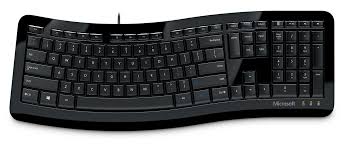
Marque : MICROSOFT
Modèle : COMFORT CURVE DESKTOP 2000
Catégorie : Clavier et souris