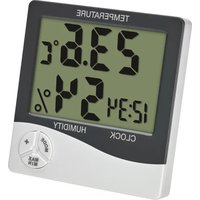
30.5058.02 - Thermomètre / Hygromètre / Station météo TFA - Notice d'utilisation et mode d'emploi gratuit
Retrouvez gratuitement la notice de l'appareil 30.5058.02 TFA au format PDF.


| Type de produit | Station météo numérique avec horloge radio-pilotée |
| Marque | TFA Dostmann |
| Modèle | 30.5058.02 |
| Dimensions (base) | 120 x 95 x 25 mm |
| Poids | 160 g (sans piles) |
| Alimentation | 2 piles AAA 1,5 V (non fournies) |
| Affichage | Écran LCD rétro-éclairé |
| Température intérieure | -10°C à +50°C |
| Humidité intérieure | 20% à 95% |
| Température extérieure (capteur) | -40°C à +60°C |
| Humidité extérieure (capteur) | 1% à 99% |
| Réception radio-pilotée | DCF-77 (Allemagne) |
| Fonctions horaires | Heure, date, alarme, snooze |
| Portée capteur extérieur | Jusqu'à 100 m (en champ libre) |
| Fréquence capteur | 868 MHz |
| Nombre maximum de capteurs | 3 (optionnel) |
| Entretien | Nettoyer avec un chiffon doux et sec. Éviter les solvants. |
| Sécurité | Ne pas immerger dans l'eau. Tenir hors de portée des enfants. |
| Pièces détachées et réparabilité | Piles standard. Capteurs externes disponibles en option. Pas de réparation par l'utilisateur. |
| Informations générales | Utilisation domestique. Garantie 2 ans. |
FOIRE AUX QUESTIONS - 30.5058.02 TFA
Questions des utilisateurs sur 30.5058.02 TFA
0 question sur cet appareil. Repondez a celles que vous connaissez ou posez la votre.
Poser une nouvelle question sur cet appareil
Téléchargez la notice de votre Thermomètre / Hygromètre / Station météo au format PDF gratuitement ! Retrouvez votre notice 30.5058.02 - TFA et reprennez votre appareil électronique en main. Sur cette page sont publiés tous les documents nécessaires à l'utilisation de votre appareil 30.5058.02 de la marque TFA.
MODE D'EMPLOI 30.5058.02 TFA
TPA_No. 30.5058_Anleitung 21.02.2024 16:01 Uhr Seite 1
Bedienungsanleitung
Digitales Thermo-Hygrometer
Kat. Nr. 30.5058.02
Vielen Dank, dass Sie sich für dieses Gerät aus dem Hause TFA entschieden haben.
- Bevor Sin mit dem Gerät arbeiten
- Lesen Sie sich bitte die Bediengungsanleitung genau durch.
- Durch die Beachtung der Bedienungsanleitung vermeiden Sie auch Beschädigungen
des beräts und die Beteiligung ihrer gesetzlicher mangelische durch Fennergebnach. Für Schüden, die aus Nichtbeachtung dieser Regierungsanleitung verursucht werden.
Übernehmen wir keine Haftung. Ebenso haften wir nicht für inkorrekte Messwerte und
Forgelt, die sich aus sollten ergeben können. - Frankten Ein besonder die Einberleihungen!
- Betwahren Sie diese Rediagenprospeitung auf out!
[Non-Text]
- zu ihrer Sicherheit
- Umwenden Sie das Fremdkrit nicht anders, als in flüsse Aktivitäten insprahlehen wird
- Verbindend Sie das Produkt nicht anders, als in dieser Anwendung beschrieben wird. - Das eigenmächtige Begarieren. Limbauen oder Verändern des Gerätes ist nicht gestattet
•

Verletzunggefahr:
■ Halten Sie das Gerät und die Batterie außerhalb der Reichenteite von Kindern
- Kleinteile können von Kindern (unter 3 Jahren) verschluckt werden.
- Battenen enthalten gesundnersschladliche Saurel und können bei Verschlucken lebens-
gevollmon Son. Werte eine Bautene Verschreis, kann bis immellab Von L Oxbonn Las entragen innaren Verlitzungen und zum Tode führen. Wenn Sie vermuten, eine Batterie
künnte verschluckt oder anderweitig in den Körper gelangt sein, nehmen Sie sofort medi-
Stutzte Himm und Abschutz
- Burschen nicht ins Feuer lernen, kurzschleben, auseinandernneten oder ausgaben.
- Im ein Ausrufen der Rottarie zu vermeiden, sollten echusche Rottarien möglichst.
schnell ausgetauscht werden. Soilte eine Batterie auszelaufen sein, vermeiden Sie Kon-
takt mit hast, Augen und Scheinfrassen. Spulen Sie ggt. Engelens die betrotenen Sie-

A
Michigan Illinois Dar Freckreichstadt:
- Betzen die bis genau nicht durchem temperature, variation und Erachstätungen aus.
Tuch, Keine Scheuer- oder Lösungsmittel verwenden!
- Erflernen Sie die Batterie, wenn Sie das Gerät längere Zeit nicht verwenden.
- Inbetriebnahme
- Öffnen Sie das Batteriefach und legen Sie eine neue Batterie 1,5 V AAA ein. Achten Sie
beim Einlegen der Batsene auf die richtige Polantal
- Ano Cognizio Verzern Kursungszahl - Das Gesicht ist infizl betriebskapital
- Das obere Display zeigt Ihnen die aktuelle Innentemperatur an
- Das weitere Display zeigt Ihnen die aktuelle Luftleuchtigkeit und die Uhrzeit an. Die beiden
- Punkte zwischen Stunden- und mindenanzeige drinken im Sekundensatz - Um der Gerät auszweihalten, entflügen Sie die Batterie
2.1.3. 2016: National Economic and Political
- Bedienung
4.1 Einstellung der Uhrzeit und Kalende
- Halten Sie die MODE Taste für drei Sekunden gedrückt, um in den Einstellmodus zu
- Der erste eingestilhance Wert
- Machen Sie mit der + Taste die neuürschte Einstellung. Halten Sie die + Taste im jeweil
gen Einstellmodus gedrück1, gelangen Sie in den Schnelllauf.
- Durch Brücken der MOLC Taste bestätigkeit die die Erhaltung und getängen zum nach- dav Wart.
- Die Polikarfolgen ist nur fliet
- Minuten
- Stunden
- 12- (AM erscheinf vormittags und PM erscheinf nachmittags im Display) oder 24
- Mecat
- Tag
- Bestätigen Sie die Einstellungen mit der MODE Taste
- Das Gerät verfasst automatisch den Einsteimodus, wenn länger als 60 Sekundell keine
-
Dröping Ein bis - Taxis im Normalmodus, am sich das Entom hors anlagen zu haben.
-
2017年6月30日
4.2 Einstellung der Alarmite
- Drücken Sie kurz die MODE Taste, um in den Alarmmodus zu gelangen. Die Alarmzeit erwein!
• Die beiden Punkte zwischen Stunden- und Minutenanzeige blinken nicht.
- Halten Sie die MODE Taste für drei Sekunden gedrückt, um in den Alarm
zu gefangert. 41. amaktiva und das führ im aktiviert. Die Minuverzins bilat im Plastur:
- Stellen Sie mit der + Taste die Minuten ein.
- Drücken Sie die MODE Taste noch einmal und stellen Sie auf die gleiche Weise die Stun
- Reaktitionen Sie mit der MODE Torte, Drücken Sie die MODE Torts noch einmal um zu
Ultrzeit zurückzukehgen
- Wenn die eingestellte Weckzeit erreicht ist, beginnt der Wecker zu klingeln
- Druckmär Schw zur ohne Denwangs Taste und der Raum wird werden; - Wied sie Umm nicht unternehmen, gehaltet sich des Einmsten nach eines Minuts aus
und aktiviert sich erzeugt zur gleichen Weckzeit wieder
[Non-Text]
4.3 Aktivieren und Deaktivieren des Weckalarmis und des stauslichen Warms
- Drucken Sie im Alamfinobus Wiedemon die + Halst, kon siven ständlichem Alsertris aktivieren und dextivieren.
Bedienungsanleitung
Digitales Thermo-Hygrometer
Kat. Nr. 30.5058.02
[Non-Text]
- Bei aktiviertem weckanmi erschinen AL.
Stunde ertönt jetzt ein kurzer Alamron.
117
4.4 Temporal Risiko - Pensions bis die 10.05 Texts im Butterindach mit einem ersten Ostenstand, Hilanz bis 90
(Belasten bis der 2017) fass im Betastanden mit externen Späden angebnahra, karten als (Celsius) oder °F (Fahrenheit) als Temperatureinheit auswählen.
(No text)
4.5 Hochst- und Hienstrwerte
- Drücken Sie die MAX/MIN
• En wind day labelots (agents
lang angezeigt.
- Drücken Sie die MAX/MIN
- Will Erschmitt im Display. - Sie wird des niedrinstige insorgensstatus und Luftverhältnisseinsgesamt seit des letzten Stück.
stellung angezeigt
- Um wieder die Anzeige mit den aktuellen Werten zu erhalten, betätigen Sie nochmals die
MAUMIN 1869.
keine Taste gednárkt wird
- Halten Sie die MAX/MIN Taste für drei Sekunden gedrückt, während auf dem Display die
nochsten oder niedgsten wenn erschienen, Iverben die werde gesamt und auf bis aktu-
with words labeled as
- Fehlerbeseitiguan
Problem Lösung
Keine Anzeine → Batterie noltrichtin einlegen
→ Batterie wechseln
Unkorzukte Anzeine ● Batterie herausnehmen (3 min.) und wieder einlagen
→ Batterie wechseln
(1) 2017年1月1日,公司召开2017年第二次临时股东大会,并通知全体董事、监事和高级管理人员。
Wohn, in derer 302 dieser Mabarenzen, wird bei den Händler, bei dem Sie das Produkt gekauft haben.
广力云智慧零售收银系统
- Entsorgung
Dieses Produkt und die Verpackung wurden anter Verwendung hochwertiger Materialien und
desaházte ürgesücht, die lejochen und insdavonierben werden kommt. Dies verfügen den Aktfall und schacht die Ulmsalt
Entwicklung für die Umsatzung unverbrausamt über die zinservichteten Rasselsante
(1) 2017年1月1日
Entwicklung des Einklagerals
gen Sie diese internet
■ Dieses Gerät ist entsprechend der EU-Richt
und Elektronik-Altgeräten (WEEE) gekennzeichnet.
Ulster + Robin, damit nicht mit damit basinikan entsorgt worden. Der Weitzer ist Vorpflichtet, das Uboeilt zu umgeitauschten Entsorgung bei einer anpassigenen
Annahmestelle für die Entsorgung von Elektro- und Elektronikseräten abzugeben.
Die Rückgabe ist unentgeltlich. Beachten Sie die aktuell geltenden Vorschriften!
Entzorgung der Batterien
Batterien
fe, die bei unsachgemäßer Entsorgung der Umwelt und der Gesundheit Schaden
Zarageln Kredit. Das Vertraucher sind wir geobuch verpflichtet, ge-Gräuch-Pole Batterien und Altiva zur unsweltgerechteter Erkogruus haim Handel oder entrara
chenden Sammelstellen gemäß nationalen oder lokalen Bestimmungen abzuge-
ben. Die Rückgabe ist unentgeltlich.
Die Bezeichnungen für enthaltene Schadstoffe sind:
Conclamini, Agriosekster, AneBil
- Technische Daten
Borgobasirich:
Inpretemperatur: -10 °C, +50 °C (+14 °F, +122 °F)
Luftflachstigkeit: 10, 99,9
- PARANTINUM STENTA 6 U.S. (143) Deutsche (Asia: Industrial)
Spanningverwaltung: 11.43.1957 Resten (Rohm Resten)
GROSE: 93 X 22 (36) X 86 (44)
Gewicht: 87 g (nur das Gerät
The Ground Truth image displays a single, solid horizontal line. According to Rule 2 (UNDERSCORE & LINE RULES), if the GT contains lines used for stylistic emphasis or as background elements (like ruled paper), the OCR result must ignore them. The line in the GT is clearly a stylistic or background line, not a placeholder for text. Therefore, the OCR should not have output any underscores. Outputting `____` constitutes an error under Rule 2, as it hallucinates placeholder symbols where none are semantically intended. Hence, the OCR result is inconsistent with the Ground Truth.
[Non-Text]
[Non-Text]
[Non-Text]
[Non-Text]
[Non-Text]
[Non-Text]
[Non-Text]
[Non-Text]
[Non-Text]
2014年 , 2015年 , 2016年 , 2017年 , 2018年 , 2019年 , 2020年 , 2021年 , 2022年 , 2023年 , 2024年 , 2025年 , 2026年 , 2027年 , 2028年 , 2029年 , 2030年 , 2031年 , 2032年 , 2033年 , 2034年 , 2035年 , 2036年 , 2037年 , 2038年 , 2039年 , 2040年 , 2041年 , 2042年 , 2043年 , 2044年 , 2045年 , 2046年 , 2047年 , 2048年 , 2049年 , 2050年 , 2051年 , 2052年 , 2053年 , 2054年 , 2055年 , 2056年 , 2057年 , 2058年 , 2059年 , 2060年 , 2061年 , 2062年 , 2063年 , 2064年 , 2065年 , 2066年 , 2067年 , 2068年 , 2069年 , 2070年 , 2071年 , 2072年 , 2073年 , 2074年 , 2075年 , 2076年 , 2077年 , 2078年 , 2079年 , 2080年 , 2081年 , 2082年 , 2083年 , 2084年 , 2085年 , 2086年 , 2087年 , 2088年 , 2089年 , 2090年 , 2091年 , 2092年 , 2093年 , 2094年 , 2095年 , 2096年 , 2097年 , 2098年 , 2099年 , 2100年 ,
TIA Baselmien GmbH & Co.Kb, Köln-Ostovsberg 12, STEVIT Würstheim, Deutschland Diane: Inaktung oder Anlagen sowie können aus mit Zugelmannung von TFA Derivatekum verfülligkeiten werden
Die technischen Daten entsprechen dem Stand bei Drucklegung und können ohne vorherige Benschrichti-
gang gehalten. Verben. Die heutesen biomischen Osten und informat-
www.12-yrjmao.de (02/24)
TEA Instruction Manual
Digital Thermo-Hygrometer
Cat.-No. 30.5058.02
(三) 本次股东大会的召集人:王
Thank you for choosing this pro
- Before you see this product
+Please make sure you read the instruction manual carefully.
+ Following and respecting the instructions in your manual will prevent damage to your
instrument and loss of your statutory rights arising from defects due to incorrect use. We shall not be liable for any foreign or foreign operation.
We claim let us basis for any claims offering to a result of non following or these instructions.
• Likewise, we take no responsibility for any incorrect readings or for any consequences
resulting from them.
Please know this instruction manual go to future
Please help this registration standard for all rights referenced.
- For your safety
• This product should only be used as described within these instructions.
- Unauthorised repairs, alterations of changes to the product are prohibited

A
- Issue of Equity
- Keep this device and the battery out of reach of children.
- Small pants can be swallowed by children (under three years old).
- Batteries contain nominal sizes and may be hazardous if swallowed. If a battery is swar loud, this are used to arrive internal bumps and forth within any bums. If you support
a battery could have been swallowed or otherwise caught in the body, seek medical help
immediately.
- Batteries must not be thrown into a fire, short-circuited, taken apart or recharged. Work of
+ Low batteries should be changed as soon as possible to prevent damage caused by leak-
ing. Avoid contact with skin, eyes and mucous membranes when handling leaking batter-
ies. In case of contact, immediately rinse the affected areas with water and consult a doc-

A
Important information on product safety!
- Do not expose the device to extreme temperatures, vibrations or shocks.
- Protect it from moisture: Clean the device with a soft lamp cloud. Do not use towels of
- Remove the battery if you do not use the device for a longer period of time
[Non-Text]
- Getting started
- Open the battery compartment and insert a new battery 1,5 V AAA. Ensure that the bat-
• ALL LCD segments will be disinjued for a short moment
• The device is ready for use.
• The upper display shows the indoor temperature.
- The lower display shows the current mode manually and the time. The two data between the bar and minute digits dash away scored.
- Remove the battery to turn off the instrument.
[Non-Text]
- operation
4.1 Clock and calendar setting
- Press and hold the MODE button for three seconds to enter the setting mode. - The first adaptable unit flash on the display.
- Use the + button to make the derived setting. Press and hold the + button in the reverse-
tive setting mode for quick setting.
• Confirm with the MODE button and go to the next setting.
• The sequence is shown as follows:
- Minute
- 12 HR (4M appears before noon and PM appears after noon) or 24 HR time system
- Month
- Day
- Confirm with the MODE button
• The device will automatically quit the setting mode if no button is pressed for 60 seconds.
- Press the + button in normal mode to show the date briefly.
[Non-Text]
4.2 Alarm time setting
• Press the mode button briefly to enter the alarm mode. The alarm time appears on the
The top dot
- Press and hold the MODE button for three seconds to enter the alarm setting mode.
• AL appears on the display. The alarm is activated. The minute digits flash on the display
- Press the + button to set the minutes - Since the MORE button again and out
+ Confirm with the MODE button. Press the MODE button again
time.
- When the adjusted alarm time is reached, the alarm rings
• If the alarm is not stopped manually, the alarm tone automatically turns off after one.
minute and will be reactivated at the same set time in the following day.
-
-
-
-
-
-
-
-
-
-
-
-
-
-
-
-
-
-
-
-
-
-
-
-
-
-
-
-
-
-
-
-
-
-
-
-
-
-
-
-
-
-
-
-
-
-
-
-
-
-
-
-
-
-
-
-
-
-
-
-
-
-
-
-
-
-
-
-
-
-
-
-
-
-
-
-
-
-
-
-
-
-
-
-
-
-
-
-
-
-
-
-
-
-
-
-
-
- 99.
-
-
-
-
-
-
-
-
-
-
-
-
-
-
-
-
-
-
-
-
-
-
-
-
-
-
-
-
-
-
-
-
-
-
-
-
-
-
-
-
-
-
-
-
-
-
-
-
-
-
-
-
-
-
-
-
-
-
-
-
-
-
-
-
-
-
-
-
-
-
-
-
-
-
-
-
-
-
-
-
-
-
-
-
-
-
-
-
-
-
-
-
-
-
-
-
4.6 Satiree are sweetened for all and the sauty thrill
- Press the ◆ button: several times to activate and discover the alarm function and/or the hourly alarm
• AL appears on the display when the alarm is activated.
• The hourly alarm symbol →appears on the display when the hourly alarm is activated.
A letter ziami tone will sound every turn hour.
TEA
11A
广力云智慧零售收银系统
[Non-Text]
[Non-Text]
[Non-Text]
[Non-Text]
event damage to your
ts due to incorrect use.
Non following of these
or for any consequences
[Non-Text]
[Non-Text]
[Non-Text]
[Non-Text]
uctions.
本协议。
The Ground Truth image displays a single, solid horizontal line. According to Rule 2 (UNDERSCORE & LINE RULES), this is a stylistic or background line, not a placeholder underscore. Therefore, the OCR result must ignore it and output nothing or only meaningful text. The provided OCR content is "____", which consists of four underscores. This is an incorrect interpretation of the line as a placeholder, violating the rule that stylistic lines must be ignored. The OCR has hallucinated placeholder underscores where none should exist in the GT. Hence, the OCR result is inconsistent with the Ground Truth.
∴ m = 3/11
∴ m = 3/11
[Non-Text]
ed. If a battery is not!
ve hours. If you suspect
body, seek medical help
Incorporated Plan
- Aargyza, who is
amage caused by leak-
handling leaking better-
www.the.com/are.com
[Non-Text]
[Non-Text]
[Non-Text]
10.35. Do not use substituents
2.1.1.3.4.
of time.
[Non-Text]
d. Focus that the hot
• Endure that the 20
[Non-Text]
[Non-Text]
The two digits between
[Non-Text]
[Non-Text]
[Non-Text]
[Non-Text]
Office mode
(1) 2017年1月1日
a + button in the respec-
[Non-Text]
[Non-Text]
[Non-Text]
[Non-Text]
or 24 HR time system
[Non-Text]
[Non-Text]
in our report for 2017
to provide for us
[Non-Text]
[Non-Text]
in time answer on the
- 2018, 49:30
[Non-Text]
farm setting mode.
3 flash on the display.
[Non-Text]
to return to the current
[Non-Text]
[Non-Text]
aily turns off after one
(6) day).
[Non-Text]
large Avantian and his the
(1) 本报告书的摘要与内容
-
-
-
-
-
-
-
-
-
-
-
-
-
-
-
-
-
-
-
-
-
-
-
-
-
-
-
-
-
-
-
-
-
-
-
-
-
-
-
-
-
-
-
-
-
-
-
-
-
-
-
-
-
-
-
-
-
-
-
-
-
-
-
-
-
-
-
-
-
-
-
-
-
-
-
-
-
-
-
-
-
-
-
-
-
-
-
-
-
-
-
-
-
-
-
-
-
- 99.
-
-
-
-
-
-
-
-
-
-
-
-
-
-
-
-
-
-
-
-
-
-
-
-
-
-
-
-
-
-
-
-
-
-
-
-
-
-
-
-
-
-
-
-
-
-
-
-
-
-
-
-
-
-
-
-
-
-
-
-
-
-
-
-
-
-
-
-
-
-
-
-
-
-
-
-
-
-
-
-
-
-
-
-
-
-
-
-
-
-
-
-
-
-
-
-
any alarm is activated.
[Non-Text]
TPA_No. 30.5058_Anleitung 21.02.2024 16:01 Uhr Seite 2
[Non-Text]
[Non-Text]
[Non-Text]
Istevizi per l'ives
Istruzioni per i uso
Termo-Igrometro digitale
Cat. N. 30.5058.02
Vi ringoziamo per aver spelta l'approxichtio della TFA
-
2017年3月28日(星期一)
-
Prima di utilizzare l'appareochia
- Leggote attentamente le istruzioni per l'uso. - Seguenda le istruzioni per l'uso, eviterate
diaglicare le illustrati per il uso, convolte due di conloggare i presiva dei pro giudicare, a causa di un utilizzo scorretto, i diritti di consumatore che vi spettano per longe. Partificatore e all'convenzi (12) non i fornì divinenti del momento rivetta delle
legge. Decliniamo ogni responsabilità per i canni derivanti dal manzato napesi delle presenti istruzioni per l'uso.
- Allo stesso modo, non siamo responsabili per eventuali misurazioni errate e per le repassente che ne possono derivare.
- Prestate particolare attenzione alle misure di sicarezza!
- Conservate con cura queste istruzioni per l'uso.
- Per la vastra sicarezza
- Non utilizzate il prodotto in maniera diversa da quanto descritto in queste istruzioni.
- Non sono consentite riparazioni, alterazioni o modifiche non autorizzate del dispositivo

Alostrizione! Pericolo di lesiani
-
- Tenere il dispositivo e la batteria lentano dalla portata dei bambini.
- Le piousie piano possono essere ingerite dai baffoni (sociere tre anni) - Le batterie contengono acidi nocivi per la salute. Se ingerite, le batterie possono essere
mortali. Se una batteria venisse ingerita, potrebbe causare gravi uzioni e portare alla morte nel euro di due ore. Si ci seguita che una batteria sia stata inserite e inserite ne
monte nel giro di due ore. Se si sospeta ore una balena sia stata ingemla o risemla ne corso in altra maniera, consultore immediatamenti un medico
- Non gettare le batterie nel fuoco, non polarizzarle in maniera scorretta, non smontarle e
non cercare di ricaricarlo. Pericolo di esplosione!
- Sostituire quanto prinia le batterie esauste, in riduo da evitare perdite. Evitare il contatto del liquido delle batterie con la pelle, gli porchi e la murane, in cari di contatto, spiacuano
di liquido delle basiame con la penso, gli occorre lo traverso. In casi di contratto, sitarquato sabito la zona interessata con acqua e consultare un medico.

Agrastenza della ciaspozzo del prodotto!
- Non esnome l'apparechino a temperature estrane, vibrazioni e urti
- Proteggere dall'umidità! Per pulire l'appareochio utilizzare solo un panno morbido leg
germente inumidito. Non usare solventi o abrasivi.
- Rimuovere la batteria, se non si utilizza l'appareochio per un periodo prolungato
- Messa in funzioni
- Azirire il vano batteria e inserire una batteria tipo AAA da 1.5 V muga. Accertarsi di aver
rispettato le corrette polarità.
- Tutti i segmenti appaiono brevemente
• L'apparecchio e privato per 1 uso. • Su display superior viene visualizzate
- Su display inferiore vengono visualizzati l'umidità interna e l'ora. I due puntini tra la
visualizzazione dell'ora e quella dei minuti lampeggiano sul display al ritmo dei secondi.
■ Per spig
- Uso
4.1 impostazione dell'ora e data
- Tenere premuto il tasto MODE
- Il primo valore negotabile lampeggia sul display.
- Utilizzare il tasto + per effettuare l'impostazione deliberata. Lenere premuto il tasto + in modalità impostazioni per procedere usilicamente.
- Premere il tasto MODE per confermare l'impostazione e passare al valore successivo.
• L'ordine è il seguente:
- Minuti
- Cre
- Sistema orano a 12 ore (sul display appare compare AM (prima di mezzogiorno) e PM (dano megnoismo) o a 24 ore
- Mese
- Giorno
- Confermare con il tasto MODE
- L'apparecchio esce automaticamente dalla modalità impostazione se non si preme alcun tasto per più di 80 secondi
- Premere il tasto + nella modalità normale, è possibile visualizzare la data bravemente.
- 2017年1月1日,公司召开第五届董事会第十四次会议、第五届监事会第十五次会议和2018年第一次临时股东大会。
4.2 Impostazione dell'ora della sveglia
- Premore il tasto MODE brevemente per affinare la modalità sveglia. Sul display vien vivolimente liere dello sveglia.
• I due puntini tra l'indicazione delle ore e dei minuti non lampengiano.
- Tenere premuto il tasto MODE per tre secondi per passare alla modalità di impostazione
della sveglia. o Feli display pressa 41, o la funzione svoglio i attiuate. L'indizioni dei misuti immorazioni
- Sui display apxiare AC e la funzione svegna e avvata. L'incicazione dei minuti ampeggi. - Importare con il tarte + i minuti
- Confermare con il tasto MODE e inserire le ore procedendo nello stesso modo
- Confermare con il tasto MODE. Premere nuovamente il tasto MODE per ritornare all
- Quando l'otario impostato viene raggiunto, la sveglia comincia a suornere.
- Premere un tasto a piacere per arrestare l'allarme.
- Se non viene interrotto, il segnale acustico si disattiva automaticamente dopo un minuto
e si riattiva nuovamente alla stessa ora di svegila.
4.3 Attivare e dizattivare la funzigno zvegilia e l'allarme oraria
- Se si areme rieputamente il tasto + in modalità sveglia, è possibile attivare e disattivar
la sveglia e/o un segnale orario.
- Don svedgia attivata appare sui display AL. - Don l'altangne agrizio attiusto avvage sui display il simbola dell'oligree orario.
- Bon l'attimo grande attivato appara su display il simbore domanamine onlino - 50 ogni prza emesso un breve segnale acustico
and expressed an active system solution

Istruzioni per l'uso
Termo-Igrometro digitale
Cat. N 30 5058 02
out. N.
4.4 WaveEmissions della Incentive
4.4 Visualizzazione della temperatura
- Con il commutazione -Q-P nel vario basiera e possiene scegliere tra la visualizzazione della temperatura in °C (irradi Celsius) o °F (irradi Fahrenheit).
2018
4.5 Valori massimi e minim
- Premere il tasto MAX/MIN.
- Sui display appare MAX. - Umsa visualizzata le term
- viene visorizzato la temperatura nella e l'infinita della massima taggranta dopo l'ultimo azzetamento.
- Premere nuovamente il tasto MAX/MIN.
- Sul display appare MIM
- Viene visperizzarsi la tipo azzieramento.
- Per tomare alla visualizzazione dei valori attuali, premere ancora una volta il tasto
MAX/MIN.
• L'apparecchio esce automaticamente dalla modalità MAX/MIN se non si preme alcun tasto per più di 10 secondi.
- Tenendo premuto il tasto
massimi e minimi memorizzati, vengono ripristinati i rispettivi valori attsale.
-
Cappi
-
oblasti
- U
Problella Risoluzione del problema
Nessuna indicazione → Inserire la batteria rispettando le corrette polarità
(No text)
Indicazione non corretta → Rimuovere la batteria (3 min.) e reinserirla
→ Sostenire la batteria
Qualora il vostro apparecchio continui a non funzionza
getevi al rivenditore presso il quale la avete acquistato
- Installments
7.Smartismo Cuesta avoliella
Queste prodotti e il suo messaggi sono stati realizzato utilizzando massati e componenti di alta qualità che possono essere ricigliati e riutilizzati. Queste riduce i rifiuti e protego
l'ambiente.
Smaltire gli imballaggi in mo
Smallimento del dispositivo elettrico
Birugovere dal dispositivo le batterie e
separatements.
Questo apparecchio è etichettato in conformità alla Direttiva UE sullo smaltimento
delle apparecullature elettriche ed elettroniche (WEEE) Questo prodotto non 4ave essere smaltito insierra ai
ducosa prodotto non alle casare smellesi inotere ai mili di costele. In consolmatore è tenuto a consegnare il vecchio apparecchio presso un punto di raccolt.
per lo smaltimento di apparecchiature elettriche ed elettroniche ai fini di un
smaltimento ecologico. La restituzione è gra
Figure:
Smaltimento delle batterie
E assolutamente vietato gettare le batterie e le batterie ricaricabili tra i rifiati
Domietici. Comergono sostanze tessiche che possono danneggiare l'ambiente la salute se smaltite in modo improprio. In qualità di consumatori, siste teruti pe
legge a consegnare le batterie usate al negoziante o ad altri enti preposti al rici
claggio in conformità alle vigenti dis
smaltimento ecologico. La restituzione è gratuita.
Le sigle dei metalli pesanti contenti sono: Cd=cadimo, Hg=miculio, Pb=piamo
- Dati tecnici
Campo di misura
Temperatura interna: -10 °C... +50 °C (+14 °F... +122 °F)
Umiditix 10 ... 89 %RH
Hewertigien: Dettler, 6.148, de 4.5 bil (non-Avenue).
Armenizzazione: Batteria 1 x AAA da 1,5 V (Proten limita
Dimensioni esterne: 85 x 22 (58) x 98 (44) mm
Pesa: 87 g (solo apparecchio
(No text)
[Non-Text]
[Non-Text]
[Non-Text]
[Non-Text]
[Non-Text]
[Non-Text]
(二)本说明仅供参考。
da Ambientale Qi
[Unreadable]
[QR Code]
(2) 調空
cyclery
TJ Infrastructure GmbH for US, 7pm Otterske
TRA DASIKIMIRMAN & CO.MS, ZOLI OERISBEG 12, 97477 WIRMINI, GEMILIANA È vietata la pubblicazione delle neguendi biviziolini a di parti di esce sverra una ac
TFA Desàrmann. I dall leprici corrispondono alle stata del predotta al momento della silampa e possero carri
diare senza presimviso. E possibile trovare dati tezioni e informazioni aggiornate sul procedito inserendo cumpara di articolo sul posto sito
www.2a-darimana.de/02/24
2016年全国银行

ITFA
∴ m = 3/11
[Non-Text]
[Non-Text]
a. For it, viasifizamentista
e tra la visualizzazione
[Non-Text]
[Non-Text]
[Non-Text]
cnima congranta dosa
ssima raggianta dopo
[Non-Text]
in products, except that
na raggiarla dose tu-
ora una volta il tasto
(No text)
se non si preme alcun
ationa sul display i value
lori attisale.
[Non-Text]
[Non-Text]
(No text)
la corrette polarità
The Ground Truth image displays a single, solid horizontal line. According to Rule 2 (UNDERSCORE & LINE RULES), if the GT contains lines used for stylistic emphasis or as background elements (like ruled paper), the OCR result must ignore them. The OCR content provided is "____", which consists of four underscores. This is incorrect because underscores are not equivalent to a solid line and are not permitted under the “Stylistic/Background Lines (Ignore)” rule. The OCR has hallucinated underscores where none should exist in the GT, violating the “Stylistic/Background Lines (Ignore)” rule. Therefore, the OCR result is inconsistent with the Ground Truth.
rla
This image contains no text. The visible element is a stylistic or background line, which must be ignored according to the rules.
queste procedure, rivol
。
[Non-Text]
a material a component
finanziare e componenti giuce i rifiuti e proteggi
(四)本报告书(以下简称“本报告”)
colta in vigore.
[Non-Text]
abili estraibili e smaltiri
and therefore a division
iva UE sullo smaltimento
iuti domestici. Il conru
soo un punto di raccolt.
ettroniche ai fini di un
ervare i regolamenti i
[Non-Text]
The Ground Truth image displays a single, solid horizontal line. According to Rule 2 (UNDERSCORE & LINE RULES), this is a stylistic or background line, not a placeholder underscore. Therefore, the OCR result must ignore it and output nothing or only meaningful text. The provided OCR content is "____", which consists of four underscores. This is an incorrect interpretation of the line as a placeholder, violating the rule that stylistic lines must be ignored. The OCR has hallucinated placeholder underscores where none exist in the GT. Hence, the OCR result is inconsistent with the Ground Truth.
e ricaricabili tra i riflut
kenneggian i sambene auratori, siile lenguì pe
altri enti preposti al ricoli
o locali, ai fini di un
(二) 2014年
g=melcuno, Pt=plano
[Non-Text]
[EMPTY]
[Non-Text]
The Ground Truth image displays a single, continuous horizontal line, which is a stylistic or background element (like a ruled paper line). According to Rule 2, such lines must be ignored by the OCR result. The provided OCR content is "____", which consists of underscores. Underscores are not equivalent to a solid line and are not permitted under the “Stylistic/Background Lines (Ignore)” rule. Outputting underscores for a stylistic line is incorrect because it misinterprets the line as a fill-in-the-blank placeholder. Since the OCR output incorrectly rendered a stylistic line as underscores (which should be ignored), this violates the rule. Therefore, the OCR result is inconsistent with the Ground Truth.
This image contains no text. The visible element is a stylistic or background line, which must be ignored according to the rules.
This image contains no text. The visible element is a stylistic or background line, which must be ignored according to the rules.
The Ground Truth image displays a single, solid horizontal line. According to Rule 2 (UNDERSCORE & LINE RULES), this is a stylistic or background line, not a placeholder underscore. Therefore, the OCR result must ignore it and output nothing or only meaningful text. The provided OCR content is "____", which consists of four underscores. This is an incorrect interpretation of the line as a placeholder, violating the rule that stylistic lines must be ignored. The OCR has hallucinated underscores where none should exist based on the GT's visual context. Hence, the OCR result is inconsistent with the Ground Truth.
The Ground Truth image displays a single, solid horizontal line. According to Rule 2 (UNDERSCORE & LINE RULES), this is a stylistic or background line, not a placeholder underscore. Therefore, the OCR result must ignore it and output nothing or only meaningful text. The provided OCR content is "____", which consists of four underscores. This is an incorrect interpretation of the line as a placeholder, violating the rule that stylistic lines must be ignored. The OCR has hallucinated underscores where none should exist based on the GT's visual context. Hence, the OCR result is inconsistent with the Ground Truth.
The Ground Truth image displays a single, solid horizontal line. According to Rule 2 (UNDERSCORE & LINE RULES), this is a stylistic or background line, not a placeholder underscore. Therefore, the OCR result must ignore it and output nothing or only meaningful text. The provided OCR content is "____", which consists of four underscores. This is an incorrect interpretation of the line as a placeholder, violating the rule that stylistic lines must be ignored. The OCR has hallucinated underscores where none should exist based on the GT's visual context. Hence, the OCR result is inconsistent with the Ground Truth.
[Non-Text]
[Non-Text]
[Non-Text]
[Non-Text]
[Non-Text]
[Non-Text]
[Non-Text]
[Non-Text]
[Non-Text]
[Non-Text]
[Non-Text]
[Non-Text]
[Non-Text]
ecadiente autorizzazione dell
della stampa e possono cam
de sul procedito inserido
[Non-Text]
[Non-Text]
[Non-Text]
eter
-
[Non-Text]
zut von TEL Abstil gehann
zati van TRA Hotel geweden
aat werken
ndachtig doe
at er in de handleiding staat, vermijdt
tkeert u niet dat cui meteiljko rechten door verkeerd so sekade die wordt vansorgakt wordt u een opkering
vaarden wij geen aansprakelijkheid.
ijk voor verkeerde metingen en de mogelijke gevolgen
structures and
barrechen op dwareno a 1
2019.4.23
[Non-Text]
dan in deze handleiding is zangegeven.
rbouwen of veranderen van het apparaat is niet toege-
∴ m = 3/11
∴ m = 3/11
∴ m = 3/11
haviten hervich von Kindergarten
delen, die daar kinderen (jogner dan drie joren) ingevikt
davon, der sonst anderen jürgen bei an
e gezondheid schaden. Het inslikken van batterijen kan
datenj wordt ingelekt, kan dit dritten aal hetel leisten. Ah a denkt dat de bath
ekomen, diet
len, niet kor
/ гесягбід ногів інорівляє ор «лікза»
Ingelekt, voor het verlangen om tokkag erli heeft gelekt verplid aan contact me
van contact met batterijzuur de desbe
adpleeg een arts.
[Non-Text]
e voor de productesiligheid:
odreme temperaturen, trillingen en scho
k het apparaat met een zachte, enigszins vochtige doek
middelen gebruiken!
Japarsat langene tja met gebruikt.
[Non-Text]
er een nieuws batterij 1,5 V AAA in. 8a
[Non-Text]
-
e actuele binnentemperatuur aangegeven
e actuele luchtvochtigheid aan en de tijd. De twee puntjes
e knipperen elke seconde.
, hazij je de bazenij bil het bazenijvak.
[Non-Text]
[Non-Text]
I deze dria s
(二) 发生日期
(pert op het display). Erste instelling te beralen. Houdt de + to
In situ wistling in deoption: Nouai do + 10 d en u komt in de snelle modus.
le instelling te bevestigen en naar de v
[Non-Text]
[Non-Text]
[Non-Text]
b op het rik
- In the present study, the authors used a 2-3-4-5-6 system model
[Non-Text]
[Non-Text]
b. die instelmodus, als er länger dan 61
2) As transparent, the 3-inch set of
aie modus, om de datum kort op te vragen.
[Non-Text]
de normale motion, um in de anfliidmy
de normale titulos, om in de leekijumi lay.
minuutveergave knipperen niet.
I deze drie seconden ingedrukt, om in d
n de alarmfunctie is geactiveerd. De minutenweregave
- 2017
in.
s en stel op dezelfde maner de uren in. Drak ses eens so de MODE teeto op n
Break: fog tends up to MUSC to be off
s bereikt begirt de wekker te rinkelen.
n het alarm a


Marque : TFA
Modèle : 30.5058.02
Catégorie : Thermomètre / Hygromètre / Station météo