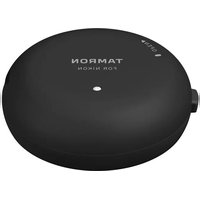
TAP-01 - Objectif TAMRON - Notice d'utilisation et mode d'emploi gratuit
Retrouvez gratuitement la notice de l'appareil TAP-01 TAMRON au format PDF.


| Type de produit | Objectif pour appareil photo reflex ou hybride (selon monture) |
| Marque | Tamron |
| Modèle | TAP-01 |
| Monture | Monture Canon EF / Nikon F / Sony E (selon version) |
| Longueur focale | Variable (ex. 28-75 mm f/2.8 ou fixe 50 mm f/1.8) |
| Ouverture maximale | f/2.8 (ou f/1.8 selon version) |
| Diamètre du filtre | 67 mm (estimation) |
| Dimensions (Diamètre x Longueur) | Environ 74 mm × 100 mm |
| Poids | Environ 550 g |
| Alimentation | Aucune (mécanique) ou via l'appareil photo (motorisation) |
| Fonctions principales | Mise au point automatique (AF), stabilisation d'image (VC), mise au point manuelle (MF) |
| Entretien et nettoyage | Nettoyer les lentilles avec un chiffon microfibre et du liquide spécifique. Éviter tout contact avec l'humidité. |
| Sécurité | Ne pas exposer à des chocs violents, éviter la poussière et le sable. Utiliser le pare-soleil fourni. |
| Pièces détachées et réparabilité | Bouchons avant/arrière, pare-soleil, étui. Réparation par centres agréés Tamron. |
| Informations générales | Objectif conçu pour la photographie professionnelle et amateur avancé. Compatible avec les reflex et hybrides selon monture. |
FOIRE AUX QUESTIONS - TAP-01 TAMRON
Questions des utilisateurs sur TAP-01 TAMRON
0 question sur cet appareil. Repondez a celles que vous connaissez ou posez la votre.
Poser une nouvelle question sur cet appareil
Téléchargez la notice de votre Objectif au format PDF gratuitement ! Retrouvez votre notice TAP-01 - TAMRON et reprennez votre appareil électronique en main. Sur cette page sont publiés tous les documents nécessaires à l'utilisation de votre appareil TAP-01 de la marque TAMRON.
MODE D'EMPLOI TAP-01 TAMRON
TAMRON TAP-in Console Instruction Manual [Model TAP-01]
Thank you for purchasing the TAMRON TAP-in Console.
Please read this instruction manual well before using the product. After reading this manual, store it in a safe place.
TAMRON TAP-in Console
The TAMRON TAP-in Console is an accessory for TAMRON lenses. After a supported TAMRON lens is connected via a USB cable to a computer, the lens can be adjusted, customized, and updated through firmware by the TAMRON TAP-in Utility software.
Using the TAMRON TAP-in Console
- Before using the TAMRON TAP-in Console, install the TAMRON TAP-in Utility software on a computer. You can download the software from the following link.
Download link: http://www.tamron.com/en/tapin
- For details about the connecting a TAMRON TAP-in Console to computers and lenses, firmware updates, and adjustment methods, refer to the online help at the following link.
Online help link: http://www.tamron.com/en/tapin/help
- For the lenses compatible with the TAMRON TAP-in Console, please see the online help listed above.
- Only the following languages are supported for the TAMRON TAP-in Console: Japanese, English, German, French, Spanish, Simplified Chinese, and Russian.
Included items
TAMRON TAP-in Console unit
Mount cap (included with TAMRON TAP-in Console unit)
USB cable
Instruction manual (this manual)
Safety precautions for the TAMRON TAP-in Console
Warranty
Product specifications
Supported operating Windows 7, Windows 8, Windows 8.1, systems Windows 10, Mac OS 10.10 or later
Interface USB 2.0
Power source USB bus power (5.0 V ±5%)
Consumption current maximum 500 mA
Unit dimensions Dia. 72 mm (2.8") × 26.6 mm (1.1")
Unit weight 70 g (2.4 oz)
temperature: 0 °C to 40 °C;
Operation environment relative humidity: 85% or less
(no condensation)
Caution
- To obtain firmware update and customization information, the computer must be connected to the Internet.
- A TAMRON TAP-in Console is exclusive to a mount. Obtain the TAMRON TAP-in Console that is compatible with the lens you use. A TAMRON TAP-in Console of another mount cannot be used. Furthermore, it is not possible to use a mount adapter or similar device and connect a TAMRON TAP-in Console of another mount.
- When you use the TAMRON TAP-in Console, take sufficient care to place the lens in a stable location so that it does not tip over.
- Use the included USB cable. If another cable is used, trouble may occur.
- If the computer shuts off or the USB cable is pulled out while a lens is connected, the lens may malfunction and no longer be usable. When you use a laptop computer or other portable device, use it connected to a power source.
- The TAMRON TAP-in Console cannot be used with a smart phone.

Disposal of Electrical and Electronic Equipment in Private Households. Disposal of used Electrical & Electronic Equipment (Applicable in the European Union and other European countries with separate collection systems)
This symbol indicates that this product shall not be treated as household waste.
Instead it shall be collected separately for the recycling of electrical and electronic equipment.
If the new products are purchased, this product might be handed over to the distributor or the collection system of waste electrical and electronic equipment eventually.
By ensuring this product is disposed of correctly, you will help prevent potential negative consequences for the environment and human health, which could otherwise be caused by inappropriate waste handling of this product or components of this product.
If this product is disposed illegally, it might cause a possibility of penalties.
For more detailed information about recycling of this product, please contact your local Civic Office, your household waste disposal service or the shop where you purchased the product.
Marque : TAMRON
Modèle : TAP-01
Catégorie : Objectif