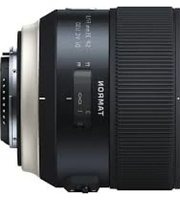
SP 35mm f/1.8 Di VC USD - Objectif TAMRON - Notice d'utilisation et mode d'emploi gratuit
Retrouvez gratuitement la notice de l'appareil SP 35mm f/1.8 Di VC USD TAMRON au format PDF.


| Type de produit | Objectif photographique à focale fixe grand-angle standard |
| Marque | Tamron |
| Modèle | SP 35mm f/1.8 Di VC USD |
| Monture | Canon EF, Nikon F, Sony A (selon version) |
| Focale | 35 mm |
| Ouverture maximale | f/1,8 |
| Ouverture minimale | f/16 |
| Stabilisation d'image | VC (Vibration Compensation) |
| Moteur autofocus | USD (Ultrasonic Silent Drive) |
| Construction optique | 10 éléments en 9 groupes |
| Diamètre du filtre | 67 mm |
| Poids | Environ 480 g |
| Dimensions (Diamètre × Longueur) | 80,4 mm × 78,3 mm |
| Distance minimale de mise au point | 0,20 m (20 cm) |
| Nombre de lamelles du diaphragme | 7 (circulaires) |
| Angle de champ (plein format) | 63°26' |
| Alimentation | Par l'appareil photo (via les contacts électroniques) |
| Entretien et nettoyage | Nettoyer avec un chiffon doux et sec ; éviter les solvants agressifs. |
| Sécurité | Utiliser uniquement sur les appareils compatibles ; protéger des chocs et de l'humidité. |
| Accessoires fournis | Bouchon avant, bouchon arrière, pare-soleil (non précisé) |
| Informations générales | Objectif SP (Super Performance) compatible plein format ; mise au point interne. |
FOIRE AUX QUESTIONS - SP 35mm f/1.8 Di VC USD TAMRON
Questions des utilisateurs sur SP 35mm f/1.8 Di VC USD TAMRON
0 question sur cet appareil. Repondez a celles que vous connaissez ou posez la votre.
Poser une nouvelle question sur cet appareil
Téléchargez la notice de votre Objectif au format PDF gratuitement ! Retrouvez votre notice SP 35mm f/1.8 Di VC USD - TAMRON et reprennez votre appareil électronique en main. Sur cette page sont publiés tous les documents nécessaires à l'utilisation de votre appareil SP 35mm f/1.8 Di VC USD de la marque TAMRON.
MODE D'EMPLOI SP 35mm f/1.8 Di VC USD TAMRON
TAMRON
Model: F 045
Owner's manual
1
Canon
Nikon

2
3

4

SP 35mm F/1.4 Di USD
For Canon DSLR
For Nikon DSLR


CE
* The C€ Marking is a directive conformity mark of the European Community (EC).
* Das C€-Zeichen entspricht der EC Norm.
* La marquage C€ est un marquage de conformité à la directive CEE (CE).
* La marca C€es marca de conformidad segun directiva de la Comunidad Europea (CE).
* Il marchio C€ attesta la conformita alla directiva della Comunità Europea (CEE).
* CC标志表示符合欧州共同体(EC)指标
CE
The EEC Conformity Report applies to the Council Directive 2014/30/EU, 2011/65/EU and is used by Tamron Co., Ltd., manufacturer of this product.
ENGLISH
Thank you for purchasing the Tamron lens as the latest addition to your photographic equipment. Before using your new lens, please read the contents of this Owner's Manual thoroughly to familiarize yourself with your lens and the proper techniques for creating the highest quality images possible. With proper handling and care, your Tamron lens will give you many years of photographing beautiful and exciting pictures.
- Explains precautions that help to prevent problems.
- Explains things you should know in addition to basic operations.
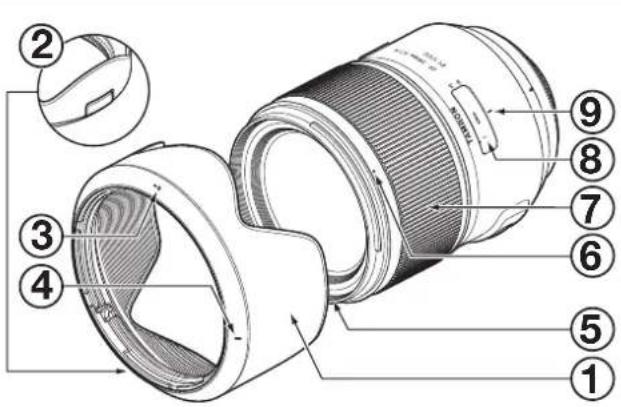
PART NAMES (Refer to Fig. 1)
| 1 Lens hood | 2 Lens hood release button |
| 3 Hood attaching alignment mark | 4 Hood locking mark |
| 5 Filter ring | 6 Hood release mark |
| 7 Focus ring | 8 Distance scale |
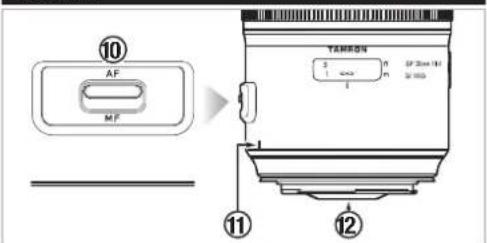
| 9 Distance mark | 10 AF/MF switch |
| 11 Lens attachment mark | 12 Lens-camera interface contacts |
MAIN SPECIFICATIONS
| Model F045 | |
| Focal Length 35 mm | |
| Maximum Aperture F/1.4 | |
| Angle of View 63 | °26' |
| Lens Construction 10°14 | |
| Minimum Focus Distance 0.3 m (11.8) | ") |
| Maximum Magnification Ratio 1:5 | |
| Filter Size | ø 72 mm |
| Length for Canon 104.8 mm (4.1") | |
| FON Nikon 102.3 mm (4") | |
| Diameter | ø80.9 mm |
| Weight for Canon 815 g (28.7 oz) | |
| FOR Nikon 805 g (28.4 oz) | |
| Lens Hood HF045 | |

• Length: From mechanical tip of lens to mount surface.
- Features and appearances of lenses listed in this owner's manual are subject to change without notice.
ATTACHING AND REMOVING THE LENS
Remove the rear cap of the lens. Align the lens attachment mark ⑪ and mounting mark on the camera, and then insert the lens.
Turn the lens clockwise for Canon models or counterclockwise for Nikon models until it locks.
To remove the lens, turn the lens in the opposite direction while pressing the lens release button on the camera.

- Turn off the power of the camera before attaching or removing the lens.
• In the case of Canon cameras, align with the EF lens mark (red circle).

- For details, please read the instruction manual of your camera.
SWITCHING FOCUS MODE (Ref. Figs. 1 - 4)
To shoot using autofocus (AF), set the AF/MF switch ⑩ to "AF". (Ref. Fig. 3)
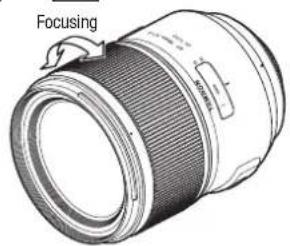
To shoot using manual focus (MF), set the AF/MF switch to "MF", and then use your hand to turn the focus ring ⑦ and focus the image. (Ref. Figs. 2 4)

- The distance scale ⑧ is provided as a guideline. It may differ from the actual focus location.
- In AF mode, it may be difficult for autofocus to work depending on the subject.

- Through the full-time manual mechanism, when focusing with AF, it is possible to switch to MF by turning the focus ring ⑦ while the AF/MF switch ⑩ is set to AF. AF can be resumed by releasing your finger from the shutter button and then repressing the shutter button halfway.
- To ensure focus under various conditions, the focus ring ⑦ rotates past the infinity ( ∞ ) position.
Accordingly, always check the focus in the viewfinder when shooting with manual focus, even when the focus is aligned with infinity. - For details, please read the instruction manual of your camera.
LENS HOOD (Ref. Figs. 1, 5 - 7)
A bayonet-type lens hood ① is provided as standard equipment.
We recommend shooting with the hood properly attached because the lens hood eliminates stray light that may affect the picture.
■ Using the lens hood (Ref. Figs. 5, 6)
Align the hood attaching alignment mark ③ of the hood with the hood release mark ⑥ of the lens. Rotate the hood ① in the direction of the arrow until the hood locking mark ④ meets the hood release mark ⑥.
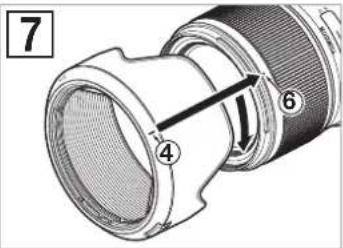
■ Stowing the lens hood (Ref. Fig. 7)
You can stow the lens hood ① by attaching it in reverse.
Align the hood locking mark ④ of the hood with the hood release mark ⑥ of the lens.
Rotate the hood ① in the direction of the arrow until the hood attaching alignment mark ③ meets the hood release mark ⑥.
■Removing the hood
For both using and storing, turn the lens hood release button ② in the opposite direction to that in installation while pressing it.

- Be aware that the perimeter of the photographed image may be darkened if the hood ① is not attached properly.
PRECAUTIONS WHEN SHOOTING
- An internal focusing (IF) system is employed to reduce the minimum focus distance. Because of this, the angle of view may be wider than that of lenses using other focusing systems when shooting at a distance less than infinity.
- Always remove the hood when you use the built-in flash on the camera for flash photography. Otherwise, the hood or lens may darken the perimeter of the image. With close-up photography, the lens itself blocks the flash, and dark semicircle may appear at the bottom of the screen, even when the lens hood is not used. For flash photography, we recommend that you use an external flash unit recommended by the camera manufacturer.
- Differences in the display systems of cameras may result in the display of values different from the maximum and minimum aperture values in the specifications. This is not an indication of an error.
- For information on the compatibility of the product with cameras, see our website. https://www.tamron.jp/en/support/
TO ENSURE LONG-TERM SATISFACTION
- Remove dust and soiling on the lens by using a blower or soft brush. Do not touch the lens with your fingers.
- The lens surface of the front element has been coated to prevent water and oily substances from adhering. Since it will repel water, do not use lens cleaners or other substances but only a dry cloth to clean the front element.
- To clean the lens surface of the rear element, lightly wipe it starting from the center with a commercially available lens cleaning paper, a clean cotton cloth or a microfiber cloth (cleaning cloth for glasses, etc.) soaked in lens cleaner. Do not use a silicone cloth.
- Clean the lens barrel using a silicone cloth. Never use benzene, thinner, or other organic solvents.
- Mildew is a major problem for lenses. Store your lens in a clean, cool, and dry place. When you store the lens in a lens case, store it with a commercially available drying agent and replace the drying agent occasionally.
- Do not touch the lens-camera interface contacts. If dust or stains cause contact problems,
signals are not transmitted properly between the lens and camera, and malfunctions may occur. - If the temperature changes suddenly, moisture may form within the camera and lens and cause malfunctions.
To prevent this, seal your equipment in a plastic bag or similar container. After your equipment has adjusted to the ambient temperature, remove it from the bag and use it as usual.
Disposal of Electrical and Electronic Equipment in Private Households. Disposal of used Electrical & Electronic Equipment (Applicable in the European Union and other European countries with separate collection systems)
This symbol indicates that this product shall not be treated as household waste. Instead it shall be collected separately for the recycling of electrical and
electronic equipment.
If the new products are purchased, this product might be handed over to the distributor or the collection system of waste electrical and electronic equipment eventually. By ensuring this product is disposed of correctly, you will help prevent potential negative consequences for the environment and human health, which could otherwise be caused by inappropriate waste handling of this product or components of this product. If this product is disposed illegally, it might cause a possibility of penalties. For more detailed information about recycling of this product, please contact your local Civic Office, your household waste disposal service or the shop where you purchased the product.
TAMRON
ENGLISH
Precautions for Safe Use of Tamron Lenses
For safe operation be sure to carefully read the "Precautions for Safe Use of Tamron Lenses" and the manual before using the product.
After reading them, store them in a place where they can easily be reviewed whenever needed.
Caution instructions are divided into the following two categories according to the degree of danger involved.

WARNING
This indicates instructions which if not followed or if performed incorrectly could lead to death or serious injury.
- Do not view the sun or other strong light source directly through the lens or through a camera while using this lens.
Doing so could cause loss of vision, damage to the lens and/or the camera, and possibly cause the lens and/or camera to ignite. - Do not dissemble, repair, or modify the lens.
This could damage the lens or camera. - Keep the lens out of the reach of small children.
There is a risk of injury if the lens is dropped or falls down.

CAUTION
This indicates instructions which if not heeded or if performed incorrectly could lead to bodily injury or physical damage
- Do not place lens in direct sunlight or leave it in an extremely hot place such inside a car. Doing such could damage the internal parts of the lens or cause a fire.
- Always attach the lens cap whenever the lens is not in use.
- When attaching the lens to the camera, ensure that the lens has been properly attached to the camera and firmly locked.
If the lens is not attached properly, it could be difficult to remove or it could fall off causing damage or injury. - Do not use this lens for any application other than photography.
- Do not transport the lens while it is still attached to a tripod.
- TAMRON
- SP 35MM F/1.4 DI USD
- ENGLISH
- ATTACHING AND REMOVING THE LENS
- SWITCHING FOCUS MODE (REF. FIGS. 1 - 4)
- LENS HOOD (REF. FIGS. 1, 5 - 7)
- USING THE LENS HOOD (REF. FIGS. 5, 6)
- STOWING THE LENS HOOD (REF. FIG. 7)
- REMOVING THE HOOD
- PRECAUTIONS WHEN SHOOTING
- TO ENSURE LONG-TERM SATISFACTION
- PRECAUTIONS FOR SAFE USE OF TAMRON LENSES
- WARNING
- CAUTION
Marque : TAMRON
Modèle : SP 35mm f/1.8 Di VC USD
Catégorie : Objectif