
KH 1155 ELECTRONIC KITCHEN AND HOUSEHOLD SCALE - Balance de cuisine BIFINETT - Notice d'utilisation et mode d'emploi gratuit
Retrouvez gratuitement la notice de l'appareil KH 1155 ELECTRONIC KITCHEN AND HOUSEHOLD SCALE BIFINETT au format PDF.


| Type de produit | Balance de cuisine électronique |
| Marque | BIFINETT |
| Modèle | KH 1155 |
| Capacité maximale | 5 kg (5000 g) |
| Précision | 1 g |
| Plage de pesée | 10 g à 5000 g |
| Affichage de la température | 0 °C à 40 °C, pas de 0,5 °C, précision ±2 °C |
| Alimentation | Pile 9 V (non incluse) |
| Fonctions principales | Fonction tare, minuterie (jusqu'à 99 min), sélection grammes/onces, arrêt automatique (90 s), indicateur de surcharge et batterie faible |
| Matériau du bol | Non spécifié (estimé plastique ou inox) |
| Dimensions (approx.) | 20 x 15 x 5 cm (sans bol) |
| Poids (approx.) | 300 g (sans pile) |
| Entretien et nettoyage | Nettoyer avec un chiffon humide et du savon doux ; ne pas utiliser de solvants ; éviter la pénétration de liquides |
| Sécurité | Ne pas dépasser 5 kg ; ne pas exposer à des températures élevées ou champs magnétiques ; garder les piles hors de portée des enfants |
| Pièces détachées et réparabilité | Pile remplaçable ; pièces non fournies séparément ; contacter le fabricant pour tout défaut |
| Informations générales | Arrêt automatique après 90 s d'inactivité ; indicateur de surcharge (Err) et batterie faible (LO) |
FOIRE AUX QUESTIONS - KH 1155 ELECTRONIC KITCHEN AND HOUSEHOLD SCALE BIFINETT
Questions des utilisateurs sur KH 1155 ELECTRONIC KITCHEN AND HOUSEHOLD SCALE BIFINETT
0 question sur cet appareil. Repondez a celles que vous connaissez ou posez la votre.
Poser une nouvelle question sur cet appareil
Téléchargez la notice de votre Balance de cuisine au format PDF gratuitement ! Retrouvez votre notice KH 1155 ELECTRONIC KITCHEN AND HOUSEHOLD SCALE - BIFINETT et reprennez votre appareil électronique en main. Sur cette page sont publiés tous les documents nécessaires à l'utilisation de votre appareil KH 1155 ELECTRONIC KITCHEN AND HOUSEHOLD SCALE de la marque BIFINETT.
MODE D'EMPLOI KH 1155 ELECTRONIC KITCHEN AND HOUSEHOLD SCALE BIFINETT
Safety Instructions

Important
Obey the following safety instructions exactly.
Failure to obey these instructions can result in damage to the scale and voids your warranty claims.
When inserting the battery, make certain to correctly align the battery poles, and do not use force when connecting the battery
Remove the battery when you do not use the scale for a longer period of time.
Replace an empty battery punctually.
Never place more than 5kg on the scale.
Make certain that liquids never enter into the scale
Avoid contact with solvents and corrosive or abrasive cleaners.
Only place the scale on a flat and firm surface.
Never place anything on the display.
Do not press the buttons with force or sharp objects.
Do not subject the scale to high temperatures or magnetic fields.
Proper Use
The Bifinett KH 1155 kitchen scale can be used to weigh noncorrosive, non-abrasive fluids and solids in private households.
Weighing of medications and unapproved materials is considered improper use.
Description
The Bifinett KH 1155 is equipped with:
Automatic cut-out,
Tare function (zeroing the display),
Overload indicator,
Battery charge indicator,
Temperature display,
Count-down timer (up to 99 minutes) and
Grams/ounces setting.
Operating Elements
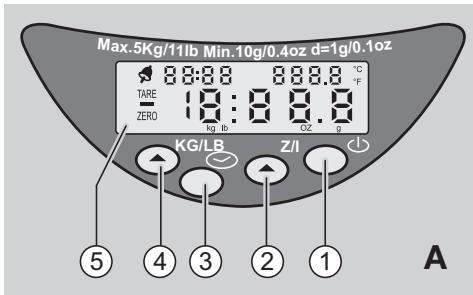
Figure A
① On/off button
② Z/T button (ZERO/TARE)
③ Clock button
④ KG/LB button grams/ounces switch)
⑤ Display
Delivery Contents
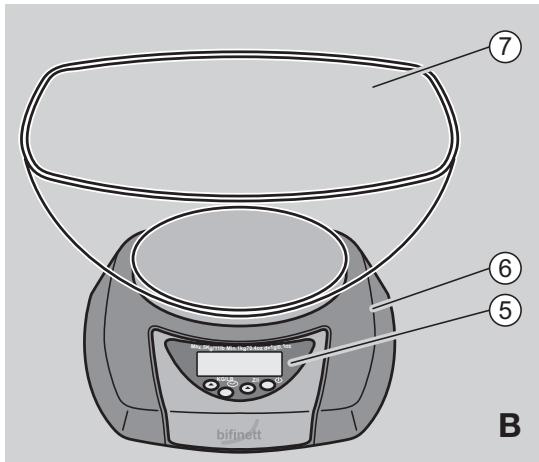
Figure B
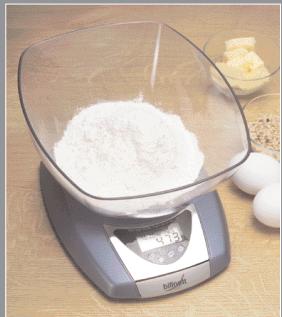
Bifinett KH 1155 kitchen scale⑥
- Bowl ⑦
- Operating instructions (not shown)
- Warranty slip (not shown)
Cleaning

Important!
Make certain that no liquids enter into the scale. Penetrating liquids can damage the scale.
Wash the scale with a light cloth moistened with mild soap suds. Never use abrasive agents or solvents.
Operation
Inserting the Battery
Open the battery compartment cover on the underside of the scale.

Poison hazard!
Batteries can be swallowed by children and endanger their health. Keep batteries out of the reach of children.
Connect a 9 V battery.
Close the battery compartment cover until it snaps into place.
Weighing
① If you switch on the scale then place the bowl ⑦ on the weighing plate, the weight of the bowl is displayed. If you place the bowl on the scale then switch on the scale, the weight of the bowl is not displayed. If the display ⑤ does not automatically show "0", press the Z/T button ② once.
Place the bowl on the weighing plate.
Press the on/off button ① to turn on the scale.
Set the desired unit (grams/ounces). To do this, press the KG/LB button ④.
The configured unit appears beneath the weight value in the display.
The scale shows the weight "0" and ZERO appears in the display.
Add the material to be weighed to the bowl.
The weight is shown on the display.
(i) If you would like to switch the display between grams and ounces, press the KG/LB button.
Adding & Weighing (Tare Function)
You can set the scale to 0 in order to weigh additional partial quantities.
To do this, press the Z/T button ② once.
The scale once again shows 0 grams and TARE appears in the display (5).
Add the material to be weighed to the bowl.
The weight of the added material is shown in the display.
You can repeat this step multiple times.
However, never place more than 5kg on the scale.
Removing Materials
Press the Z/T button ② once.
The scale once again shows 0 grams and TARE appears in the display (5).
Remove the desired quantity of material.
The weight value of the removed material appears in the display as a negative value.
You can repeat this step multiple times.
Setting the Timer
Press the clock button ③ once.
The bell symbol appears in the display ⑤ next to the clock.
Set the desired time with the Z/T ② and KG/LB ④ buttons.
You can set the time in 10 second steps.
Press the clock button ③ to start the timer.
You can stop the timer.
Press the clock button ③ once.
You can reset the timer.
Press the clock button ③ twice.
When the configured time has elapsed, a signal tone sounds for 60 seconds. This tone can be shut off by pressing the on/off button ①.
Temperature Display
When the scale is switched on, the display ⑤ shows the temperature in ^ C in the upper right.
Switching Off the Scale
If you do not weigh anything for 90 seconds, the automatic cut-out switches off the scale.
To switch it off manually, press the on/off button ①.
Troubleshooting
When the display (5) shows "Err", the device is overloaded. Remove the material from the scale. Never place more than 5 kg on the scale.
If the display briefly shows "OL" and the scale cannot be switched on, the scale is overloaded. Remove the material from the scale and switch the scale on again. Place less than 5kg on the scale.
If your scale does not function as expected, replace the battery. Should this not correct the faulty functioning, please contact the manufacturer.
When the display shows "LO", the battery is low. Replace the battery.
Disposal
Dispose of used batteries or the Bifinett KH 1155 kitchen scale through a certified disposal company or your community disposal company. Never put used batteries or the kitchen scale into normal household waste.
Obey the currently applicable regulations. In case of doubt, contact your disposal company.
Technical Data
| Weighing range | 10 g-5000 g, in 1 gram steps |
| Temperature display | 0 °C-40 °C, in 0.5 °C steps; with ± 2 °C tolerance |
| Power supply | 9 V battery |
Warranty and Service
The warranty conditions and the service address can be found on the warranty slip.
Conformity Declaration and Manufacturer
Kompernaß Handelsgesellschaft mbH, Burgstraße 21, D-44867 Bochum, Germany, hereby declares this product to be in accordance with the following standards and directives:
Low Voltage Directive 73/23/EEC
EN 60,335-1
- Electromagnetic Compatibility (EMC) Directive 89/336/EEC
EN 55 014-1
EN 55 014-2
EN61000-3-2
EN61000-3-3
Type of Appliance/Type: KH 1155
Bochum, 17 October 2003,

Hans Kompernaß, Managing Director
bifinett
KH 1155


Operating Instructions