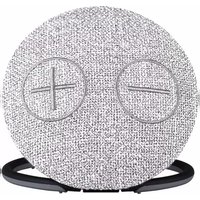
BAS 3 - Enceinte bluetooth Imperial - Notice d'utilisation et mode d'emploi gratuit
Retrouvez gratuitement la notice de l'appareil BAS 3 Imperial au format PDF.


| Type de produit | Appareil électroménager non catégorisé |
| Dimensions (Lxlxh) | 15 x 10 x 5 cm |
| Poids | 0,3 kg |
| Alimentation | Secteur 220-240 V, 50 Hz |
| Puissance nominale | 150 W |
| Matériau principal | Plastique ABS |
| Couleur | Blanc |
| Fonctions principales | Utilisation domestique simplifiée |
| Entretien et nettoyage | Nettoyer avec un chiffon humide ; ne pas immerger |
| Sécurité | Ne pas utiliser à proximité d'eau ; débrancher avant entretien |
| Pièces détachées | Non disponibles individuellement |
| Réparabilité | Réparation par un professionnel agréé |
| Informations générales | Fabriqué en Chine ; marque Imperial |
FOIRE AUX QUESTIONS - BAS 3 Imperial
Questions des utilisateurs sur BAS 3 Imperial
0 question sur cet appareil. Repondez a celles que vous connaissez ou posez la votre.
Poser une nouvelle question sur cet appareil
Téléchargez la notice de votre Enceinte bluetooth au format PDF gratuitement ! Retrouvez votre notice BAS 3 - Imperial et reprennez votre appareil électronique en main. Sur cette page sont publiés tous les documents nécessaires à l'utilisation de votre appareil BAS 3 de la marque Imperial.
MODE D'EMPLOI BAS 3 Imperial

Operating Manual

natural_image
Circular object with two circular symbols (crosses and plus signs) on a textured surface, partially covered by a black base (no text or labels visible)IMPERIAL BAS 3

www.dintelbu.edu
Safety Instructions
- In the event of a malfunction, disconnect the speaker from the USB power source.
- Do not expose the device to rain or moisture.
• Never open the casing. - Only connect the device to a properly installed mains socket
via a charger. - Disconnect the power supply unit from the mains socket when not using the device for an extended period. When disconnecting the power supply unit, only pull at the adapter, not the cord.
- In the event of a thunderstorm, unplug the device's power supply unit from the mains socket.
• If foreign bodies or liquids enter the device, immediately dis
connect it from the USB power source. Have the device
inspected by qualified personnel before using it again. - Please ensure that the power source is easily accessible.
- Do not bend or squeeze the cable connections.
- If the power cord is damaged, you will have to get the device
in the power, sure it damaged, you will have to repaired by a professional before using it again. - Do not allow children to use the device unattended.
• Always leave the maintenance work to qualified personnel.
Otherwise, you are putting yourself and others at risk. - In the event of a malfunction, disconnect the device from the power source
- Spare parts must be ordered directly from the
manufacturer - Modifications to the device will result in the expiration of the
manufacturer's responsibility. - Remove the protective rolls.
• This device should only be cleaned with a dry cloth.
Risk of distraction
In certain situations, the use of this device may affect your concentration.
(e.g. when driving, using the road or operating machinery).
Please read the legal regulations that restrict or prohibit the use of headphones.
Please do not use the device if it hinders the ability to hear other
environmental sounds.
Charging the device
Only use the included charging cable to charge the device and only charge the device via a USB connection.
charge the device via a USB connection. Protection against PE energy
Protection against RF energy
The device generates an electromagnetic field. It complies with the limit
values for protection against RF energy. Please take note of any signs in your environment which prohibit or restrict the operation of electronic
your environment which prohibit of restriction the operation of electronic devices. This may apply, for example, in hospitals, petrol stations, at fuel
pumps or at airports.
In the event of warning signs, please switch the device off immediately.
Delivery Contents
Before using the device for the first time, please check that all of the
delivery contents have been supplied.
The following components are included in the delivery contents:

BAS 3

3.5mm
STEREO Cable

Micro USB Cable

Operating Manual
Abbildungen und Funktionen
Back side

Front side

A. Short press VOL+ 🏠) or VOL- 🔍 on the Speaker for VOL+ and VOL-.
B. Long press to choose the previous or next song
Wireless Daisy Chain

flowchart
graph LR
    A["Smartphone"] -->|Wireless Signal| B["CD Interface"]
A. Hold the Button for 3 Seconds to Power On / Off
B. The Speaker Speaker will response a BEEP sound
C. Open bluetooth setting on your mobile Device, and Select
"IMPERIAL BAS 3"
D. While Pairing is successful, the Speaker will BEEP again.
Speakerphone

Button functions in Bluetooth mode
Incoming call: Press to answer an incoming call.
During a call : Press to end the current call.
Line In Funktion

natural_image
Diagram showing audio connection via CD and vinyl record (no text or symbols)A. 3.5mm audio cable into the big eyes Speaker, it will
automatically switch to line in play mode
B. Hold down the On/Off to switch Bluetooth and line in play mode
SD Karten Funktion

A. Input a SD card into the big eyes Speaker, it will automatically
switch to SD Card mode
B. Hold down the On/Off to switch Bluetooth and TF card play mode
Specification
• Power Input: DC 5V, 1A
- Bluetooth Profile: Bluetooth 4.1,
• Supports A2DP and AVRCP
• Power Rating: 5W x 2 (RMS)
• Freq. Response: 90 - 20k Hz
• S/N Ratio: 80dB
• Dimension: 150 x 150 x 48 mm
• Battery Capacity: 2000mAh
• Max. Playback Time: 5-6 hours
• (Depends on the volume and light)
| Status | LED Indikator | |
| Fully charged | On permanently | |
| Charging | Red light up | |
| Pairing mode | Blue blinking | |
| Connected | Blue light up | |
| Line In | Green light up | |
| Micro SD Card | Green light up | |
Disposal Instructions
The packaging for your device consists entirely of recyclable materials.
Please dispose of these appropriately in accordance with the „Dual System“.
At the end of its service life, this product must not be
disposed of as normal household waste but must be disposed of at a recycling collection point for electric
and electronic equipment

The symbol 📄 on the product, instruction manual or packaging indicates this.
The materials are recyclable according to their labeling.
The reuse and recycling of old materials and devices makes an important contribution
to protecting the environment.
Please ask your municipal administration for the location of a suitable disposal point.
Please ensure that electronic waste and empty batteries are disposed of properly and are not disposed of as household waste.
Dear Customer,
Thank you for choosing a product from our company.
Our product meets legal requirements and was manufactured under constant quality
control. The technical specifications are the most recent at the time of printing.
Subject to change.
Our service area provides professional specialists to answer queries.
Here you can ask any questions you have regarding IMPERIAL products and receiving tips for locating a possible fault.
ups for locating a possible digit. Our technicians are available Mr
Our technicians are available Monday - Friday 8.00 to 16.43 at the following telephone number:
02676 / 95 20 1
If the Service Hotline is unable to help you, send your devic
If the Service Hotline is unable to help you, send your device, preferably in its original packaging, or at least packed secure
transport, to the following address:
TELESTAR - DIGITAL GmbH
Service Center
Am Weiher 14 [Industriegebiet]
56766 Ulmen

Your device bears the CE marking and complies with all relevant EU standards.
TELESTAR DIGITAL GmbH hereby declares that this
IMPERIAL BAS 3 complies with the essential requirements and
other relevant provisions of EMC Directive
The declaration of conformity for this product can be found at:
www.digitalbox.de/de_DE/Konformitaetserklaerung/490-529/?productID=11719
oder
www.telestar.de/de_DE/Konformitaetserklaerung/352-529/?productID=11719


Bedienungsanleitung

natural_image
Circular object with two marked symbols (circle and plus) on a textured surface, resting on a black base (no text or labels visible)IMPERIAL BAS 3


Sicherheitshinweise
- Trennen Sie bei Betriebsstörungen den Lautsprecher von der
USB Stromquelle.
- Setzen Sie das Gerät weder Regen noch sonstiger
Feuchtigkeit aus
- Öffnen Sie niemals das Gebäude
- Oimten Sie hiemala das Genaus. - Schließen Sie des Corlüt nur über ein Ledgesetzt an eine fachgangscht.
• Schließen Sie das Gerät für installierte Nuts-Stockdown von an
Installierte Netz-Steckdose vom an.
- Ziehen Sie das externe Netzteil aus der Steckdose, falls Sie das
über einen längeren Zeitraum nicht benutzen. Ziehen Sie nur am
Netzteil, nicht am Kabel.
- Ziehen Sie bei Gewitter das Netzteil des Geräts aus der Steckdose.
- Sollten Fremdkörper oder Flüssigkeit in das Gerät gelangen, ziehen Sie
sofort von der USB Stromquelle. Lassen Sie das Gerät von qualifizier
tem Fachpersonal überprüfen, bevor Sie es wieder in Betrieb nehmen
- Beachten Sie bitte, dass die Stromquelle leicht zugänglich ist
- Beuchten Sie blue, dass die Stromquelle leicht zugah - Knicken oder austrechen. Ein keine Kahelyanbindungen
- Knicken oder quetschen Sie keine Kabelverbindungen.
- wenn das Netzkabel beschadigt ist, müssen Sie das Gerät von Fach-
personal reparieren lassen bevor Sie es erneut verwenden.
- Lassen Sie Kinder niemals unbeaufsichtigt das Gerät benutzen.
- Überlassen Sie Wartungsarbeiten stets qualifiziertem Fachpersonal
Andernfalls gefährden Sie sich und andere.
• Trennen Sie bei Betriebsstörungen das Gerät von der Stromquelle.
- Bezug von Ersatzteilen nur beim Hersteller
- Änderungen am Gerät führen zum Erlöschen der Verantwortung des
Andertangen am Godeit zuft auf Lahr Erhöschon der Vorzwehr Herstellers
- Schutzfelder
- Schulzrollen enderten.
- Reinigen Sie dieses Gerät nur mit einem trockenen Tuch.
Gefahr der Ablenkung
Die Verwendung des Gerätes kann in bestimmten Situationen Ihre Kon-
zentration beeinflussen. (z.B. beim Führen eines Fahrzeugs. Teilnahme im
Straßenverkehr oder beim Bedienen von Maschinen
Bitte informieren Sie sich über die gesetzlichen Bestimmungen, die die
Verwendung von Konfhörern einschränken oder verbieten.
Verwendung vom Kapinort einsohranken oder verbieten. Bitte verwenden Sie das Gerät nicht, wenn dadurch eine Wahrneh
Bitte verwenden Sie das Gerät nicht, wenn dadurch eine Wall mungsinsechnung anderen Umweltsprüche gegeben ist
Müngeinschrankur Laden des Gerätes
Verwenden Sie zum Laden des Gerätes nur das im Lieferumfang enthal-
vor Wenden Sie zum Leben aus Geräste auf das im Lieferanfang unter- tene Ladekabel und leden Sie das Gerät nur an einem USB Anschluss.
tene Lauckabel, und laden Sie das Gerät hat ein einem OED Anschluss.
Schutz vor HF Energie
Das Gerät erzeugt ein elektromagnetisches Feld.
Es entspricht den Grenzwerten zum Schutz vor HF Energie.
Achten Sie bitte auf Hinweise in Ihrer Umgebung, die das Betreiben von
elektronischen Geräten verbieten oder einschränken. Dies kann z.B. in
Krankenhäusern, an Tankstellen und Tankanlagen oder an Flughäfen der
Fall sein.
Sollten entsprechende Warnhinweise vorhanden Sein, schalten Sie bitte
das Gerät umgehend aus

Lieferumfang
Bitte überprüfen Sie vor der ersten Betriebnahme den Lieferumfang auf Vollständigkeit.
Die im Lieferumfang enthaltenen Komponenten sind:

BAS 3

3,5 mm Stereo
Klinken Kabel

Micro USB
Kabel

Bedienungsan-
leitung

Abbildungen und Funktionen
Rück-Ansicht

Front-Ansicht

A. Drücken Sie die kurz die Taste VOL+ oder VOL-
um die Lautstärke zu erhöhen oder zu verringern.
B. Drücken Sie die Taste + oder - länger, um den
vorherigen oder den nächsten Musiktitel anzuwählen


Bluetooth Verbindung herstellen

A. Halten Sie den Knopf für 3 Sekunden gedrückt um das Gerät einzuschalten.
B. Das Gerät startet mit einem Piep Ton
C. Öffnen Sie die Bluetooth Einstellungen an Ihrem Mobilgerät und
starten Sie eine Suche nach Bluetooth Geräten
D. Wählen Sie das Gerät „IMPERIAL BAS 3“ aus.
E. Sobald die Verbindung zum BAS 3 hergestellt ist, erfolgt ein
Bestätigungstor
Telefon Freisprechfunktion
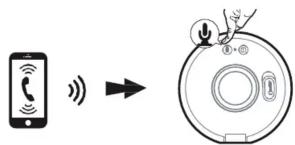
Wenn während der Musikwiedergabe über Bluetooth ein
Telefoanruf erfolgt, können Sie diesen über den Lautsprecher entge-
gennehmen.
Drücken Sie dazu die Taste ✉ um den Anruf entgegenzunehmen.
Drücken Sie die Tarts ⇄ erneut, um den Anzuf zu hengden
Line In Funktion

natural_image
Diagram showing a music player connected to a CD/DVD interface (no text or symbols present)A. Verbinden Sie das 3,5 mm Stereo Klinkenkabel mit dem BAS 1 und einem Audio Ausgabegerät. Der BAS3 schaltet automatisch in den Line In Modus.
B. Um bei gestecktem Kabel zum Bluetooth Modus zu wechseln,
halten Sie die ON/OFF Taste gedrückt.
SD Karten Funktion

Sie können neben einer Bluetooth Verbindung Musik auch von einer SD Karte im Gerät abspielen.
A. Setzen Sie eine SD Karte in den SD Kartenslot ein.
Der BAS3 schaltet automatisch in den SD Karten Modus.
B. Um bei gestecktem Kabel zum Bluetooth Modus zu wechseln, halten Sie die ON/OFF Taste gedrückt.

Spezifikationen
Spannungsversorgung: DC 5 Volt / 1 A
Bluetooth Profil: Bluetooth 4.1
Formate: A2DR AVBCR
Formate.
Leistung: 2 x 5 Watt (RMS)
Frequenzbereich: 90 - 20.000 Hz
Signal/R
Verhältnis:
80dB
Abmessungen: 150 x 150 x 48 mm
Batterie Kapazität: 2000mA
Maximale Wiedergabe
Zeit: 5-6 Stunden (abhängig von Lautstärke)
Gewicht: 326 g
LED Information

pie
| Status | LED Indikator | |---|---| | Voll Aufgeladen | Leuchtet permanent | | Ladenvorgang aktiv | Leuchtet rot | | BT Verbindungsversuch | Blinkt blau | | BT Verbunden | Leuchtet blau | | Line In | Leuchtet grün | | Micro SD Karte | Leuchtet grün |

Entsorgung
Die Verpackung Ihres Gerätes besteht ausschließlich aus wiederverwertbaren Materialien. Bitte führen Sie diese entsprechend sortiert wieder dem *Dualen
System" zu. Dieses Produkt darf am Ende seiner Lebensdauer nicht über den
normalen Haushaltsabfall entsorgt werden, sondern muss an einem Sammelpunkt für das Recycling von elektrischen und elektronischen Geräten abgegeben werden.

Das Symbol auf dem Produkt, der Gebrauchsanleitung oder der Verpackung weist darauf hin.
Die Werkstoffe sind gemäß ihrer Kennzeichnung wiederverwertbar. Mit der Wiederverwendung, der stofflichen Verwertung oder anderen Formen der Verwertung von Altgeräten leisten Sie einen wichtigen Beitrag zum Schutze unserer Umwelt. Bitte erfragen Sie bei der Gemeindeverwaltung die zuständige Entsorgungsstelle. Achten Sie darauf, dass die leeren Batterien sowie Elektronikschrott nicht in den Hausmüll gelangen, sondern sachgerecht entsorgt werden.
Sehr geehrte Kundin, Sehr geehrter Kunde!
Vielen Dank für die Wahl eines Produktes aus unserem Hause. Unser Produkt entspricht den gesetzlichen Anforderungen und wurde unter ständigen Qualitätskontrollen gefertigt. Die technischen Daten entsprechen dem aktuellen Stand zum Zeitpunkt der Drucklegung. Änderungen vorbehalten.
In unserem Servicebereich stehen Ihnen professionelle Fachkräfte Rede und Antwort. Hier können Sie alle Fragen stellen, die Sie bezüglich der IMPERIAL Produkte haben, sowie Tipps zur Lokalisierung einer möglichen Fehlerursache erhalten.
Unsere Techniker stehen Ihnen von Montag - Freitag von 8.00 Uhr bis 16.45 Uhr unter folgender Rufnummer zur Verfügung:
02676/9520101
oder per mail unter: service@telestar.de

Ihr Gerät trägt das CE-Zeichen und erfüllt alle erforderlichen
EU-Normen.
Hiermit erklärt die TELESTAR DIGITAL GmbH, dass sich das Gerät IMPERIAL BAS2 in Überzinsatierung mit das zumflege des Aufwendungen und den übrigen
ing mit den grundlegenden Anforderungen und den übrigen einschlägigen Bestimmungen befindet
einschlagigen Besummlungen Behind.
Die Konformitätserklärung für dieses Produkt erhalten Sie auf: www.digitalbox.de/de_DE/Konformitaetserklaerung/490-529/?productID=11719
www.telestar.de/de_DE/Konformitaetserklaerung/352-529/?productID=11719


Marque : Imperial
Modèle : BAS 3
Catégorie : Enceinte bluetooth