
ISOLO 210 - Boîtier d'ordinateur GIGABYTE - Notice d'utilisation et mode d'emploi gratuit
Retrouvez gratuitement la notice de l'appareil ISOLO 210 GIGABYTE au format PDF.


| Type de produit | Boîtier d'ordinateur moyen tour |
| Marque | GIGABYTE |
| Modèle | ISOLO 210 |
| Compatibilité carte mère | ATX, Micro ATX, Flex ATX |
| Dimensions (L x H x P) | 200 x 440 x 485 mm |
| Poids net | 8,5 kg |
| Matériau du châssis | Acier SECC |
| Matériau du panneau avant | Aluminium |
| Panneau latéral | Grille ventilée |
| Baies 5,25" externes | 5 |
| Baies 3,5" externes | 2 |
| Baies 3,5" internes | 3 |
| Emplacements PCI | 7 |
| Ventilateurs préinstallés | 1 x 12 cm avant, 1 x 12 cm arrière |
| Ports avant | 2 x USB 2.0, 1 x IEEE 1394, 1 x Audio (HD & AC'97) |
| Couleurs disponibles | Argent, Noir, Gris métallisé |
| Alimentation | Non incluse (installation standard) |
| Montage sans outil | Oui |
| Support refroidissement liquide | Oui (compatible GIGABYTE 3D Galaxy et autres) |
| Nettoyage | Utiliser un chiffon doux, éviter les produits abrasifs. Dépoussiéreur inclus. |
| Sécurité | Porter des gants lors de l'installation, suivre les instructions pour éviter les courts-circuits. |
| Pièces détachées | Vis, entretoises, brides, etc. incluses dans la boîte d'accessoires. |
FOIRE AUX QUESTIONS - ISOLO 210 GIGABYTE
Questions des utilisateurs sur ISOLO 210 GIGABYTE
0 question sur cet appareil. Repondez a celles que vous connaissez ou posez la votre.
Poser une nouvelle question sur cet appareil
Téléchargez la notice de votre Boîtier d'ordinateur au format PDF gratuitement ! Retrouvez votre notice ISOLO 210 - GIGABYTE et reprennez votre appareil électronique en main. Sur cette page sont publiés tous les documents nécessaires à l'utilisation de votre appareil ISOLO 210 de la marque GIGABYTE.
MODE D'EMPLOI ISOLO 210 GIGABYTE
iSolo 210
English User's Manual
GZ-AA1CB-SNS/SNB/SNG
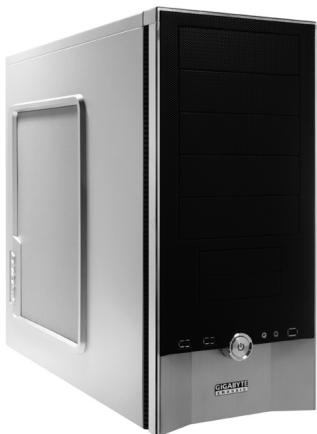
Thank you for purchasing GIGABYTE Tech. thermal product. GIGABYTE Tech. is dedicated to the integration of casing water/air-cooling solution technology to provide users with the most optimal solution for thermal dissipation. For further information and specifications of the "iSolo" series, please visit GIGABYTE Tech. website. (http://www.gigabyte.com.tw)
The following are not covered by the warranty:
- Using the product incorrectly or in a manner other than the designed purpose.
- Nonobservance of the proper operation provided
- Malfunction due to interference from other devices
- Unapproved modification of the product
- Consequential damage to other devices due to the product's fault.
- Malfunction arising from natural hazards, e.g. earthquake, lightning, fire, and floods.
- The product's warranty label has been removed or damaged.
- The devices inside, including power supply, hard disk, CD-ROM drive, motherboard, ventilator, etc, are not detached from the casing prior to transportation of the computer system, resulting in damage to the casing or other computer-related devices.
- Any loss/damage caused by failure to follow the installation process with in the user manual.

CAUTION
Failure to wear gloves during installation of computer products may cause bodily harm or damage to your devices. Incorrect connector installation may possibly burn out the motherboard and other components. Be sure to observe the instructions in installation manual.
Table of Contents
- Components Introduction 3
1-1 Casing's Internal Structure 4
1-2 Front, Rear, and Left Side Panel Structure 5
1.3 Removal of Side and Front Panel 5
- Features 6
- Specifications 7
4.Installation Instruction 8
4-1 Installation of Power Supply 8
4-2 Installation of Motherboard 8
4-3 Installation of Add-on Card 9
4-4 Installation of Front Multi-Media I/O port 10
4-5 Connection of Fan Power Cables 11
4-6 Installation of 5.25" Front Device Bay 11
4-7 Installation of 3.5" Front Device Bay 12
4-8 Installation of 3.5" Internal Device Bay 12
4-9 Foot Supports 13
4-10 Liquid Cooling System Support 13
4-11RecommendedCoolingProducts 14
1.Components Introduction
1-1 Casing's Internal Structure
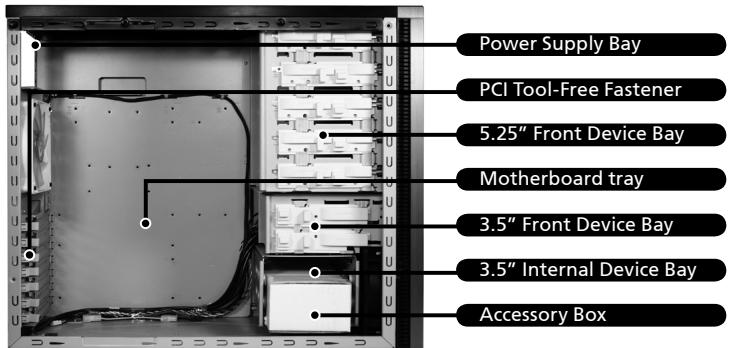
Accessory Box (Refer to the figures below for the attachments in the accessory box)
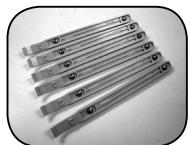
SecuringRunnerx6
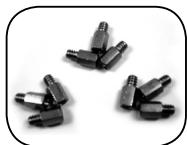
Copper Stand Off x 9
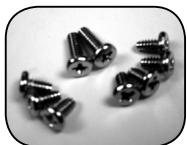
Motherboard Securing Screw x 9
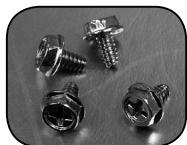
Power Supply Securing Screw x 4
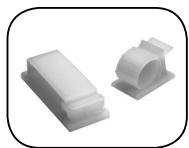
Large Wire Clamp x2
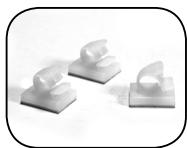
Mini Wire Clamp x 3
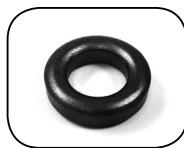
Magnet Ring x 1
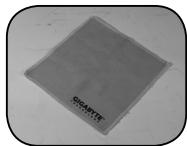
Dust Remover Cloth
Front Cable Kit (Refer to the figures below for the cable connectors)
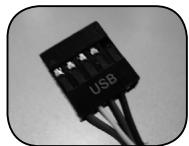
USB 2.0
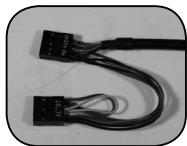
Audio Set (HD & AC'97)
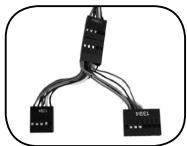
IEEE1394 (Multi-connectors)
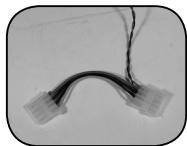
Front Light 4-Pin Power Connector
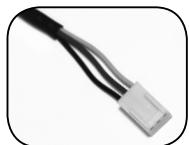
3-Pin Fan Connector

Power SW/Speaker Connector
1-2 Front, Rear, and Left Side Panel Structure a) Left Side Panel b) Front Panel
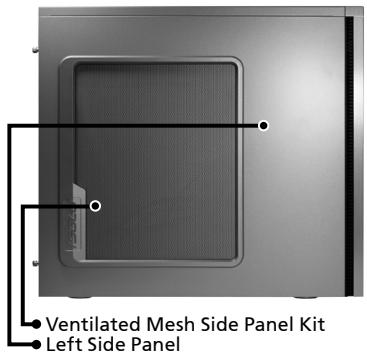
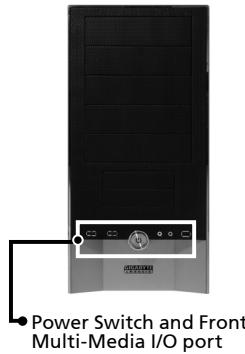
c) Rear Panel
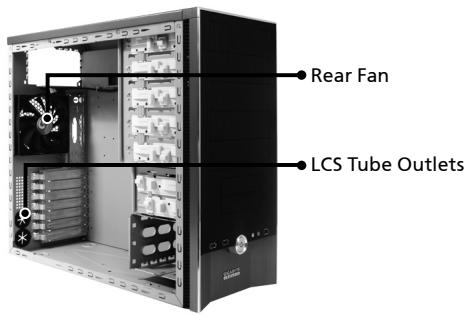
1-3 Removal of Side and Front Panels
1-3.1 To remove side panels:
1-3.1a Remove the 4 thumb screws at the rear of the side panel, and detach the side panels.
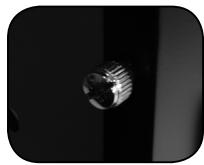
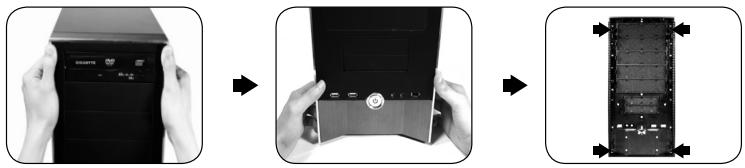
1-3.2 To remove front panel:
1-3.2a Remove the left and right side panels, release the 4 clamps that hold the front panel onto the chassis.
2.Feature
-High Quality Design
Innovative sleek dual-tone design coupled with sophisticated yet simple, precise workmanship.
Illuminated and atmospherically-soothing backlight for a post-modern classy impression.
-Complete Support
Complete front panel multi-media support, include 2 x USB 2.0, 1 x IEEE1394, 1 x audio set (HD & AC97)
Full Support of Gigabyte Tech. thermal solution LCS and Air cooling products lines Support ATX / Micro ATX / Flex ATX motherboard.
-Integration of Cooling Technology
Integrated Ventilated Mesh side panel.
- Convenience of assembly
Internal Cable Management - provides users with a clean assembly environment.
Tool-free installation design.
3\.Specifications
| Model: | GZ-AA1CB-SNS/SNB/SNG |
| Case Type: | Middle Tower |
| Size: | 200 x 440 x 485mm (W x H x D) |
| Front Bezel Material: | Aluminum |
| Color: | Silver/Black/Metallic Grey |
| Side Panel: | Ventilated Mesh |
| Body Material: | SECC |
| Net weight: | 8.5KG / 10.5KG |
| 5.25" drive bay (external): | 5 |
| 3.5 drive bay (external): | 2 |
| 3.5 drive bay (internal): | 3 |
| PCI slot: | 7 |
| Motherboard size: | ATX / Micro ATX / Flex ATX |
| System Fan (Front): | 12cm silent cooling fan x 1 |
| System Fan (Rear): | 12cm silent cooling fan x 1 |
| Multi-Media I/O port: | 2 x USB 2.0 / 1 x IEEE1394 / |
| 1 x Audio Set |
4.Installation Instruction

Please follow the reference sections in order for installation
4-1 Installation of Power Supply
To facilitate the installation, it is recommended to place
the chassis upright on the table.
Required Tools: Power supply securing screw x 4; Cross screwdriver.
4-1.1 Remove side panel (see step 1-3.1 on page 5).
Place the power supply into the power
supply bay.
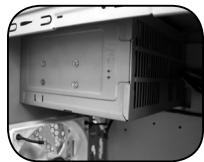
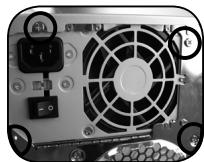
4-1.2 Use the 4 x securing screws to secure the
power supply to the rear of the chassis.
4-2 Installation of Motherboard
The iSolo 210 can support ATX / Micro ATX / Flex-ATX
motherboards. Please confirm the dimension and specifications of the motherboard before installation.
Required Tools: Cross screwdriver, Copper stand offs x 9
and Motherboard screws x 9.
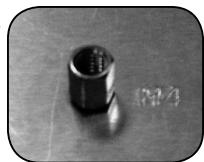
4-2.1 According to the motherboard specifications,
select the proper screw holes. First screw the
copper stand offs into the corresponding
holes of the chassis.
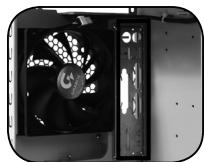
4-2.2 Install the motherboard rear I/O panel
(supplied by the motherboard manufacturer).
4-2.3 Secure the motherboard with the securing screws (Please refer to your motherboard manual to check what type of motherboard you have).
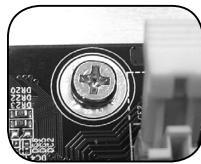
| Motherboard | Code name | Motherboard screws | Case copper post |
| ATX | A1-A9 | 9 | 9 |
| Micro ATX | U1-U9 | 9 | 9 |
| Flex ATX | F1-F6 | 6 | 6 |
4-3 Installation of Add-on Card
The iSolo 210 does not require any tools for installation of add-on cards, e.g. Graphics card and network card.
Required Tools: None
4-3.1 Unlock the corresponding PCI tool-free fastener by pushing it downwards.
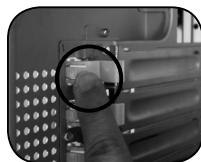
4-3.2 Lift the fastener upwards and remove the internally attached dust-proof PCI cover.
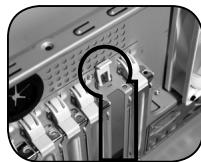
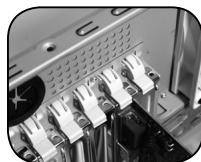
4-3.3 Insert the add-on card into the expansion slot and then lock the PCI tool-free fastener.
4-4 Installation of Front Multi-Media I/O port

WARNING
Incorrect connection of the slots can cause the motherboard to malfunction or completely destroy the motherboard. Please read the manual carefully in the installation as incorrect installations or connection causing faults will void your warranty.
The front panel consists of:
(1) 2 × USB 2.0, 1 × IEEE 1394 and 1 × Audio Set (HD & AC'97)
(2) Basic casing power switch control cable kit.
Required Tools: None

Please refer to the instructions supplied by the motherboard manufacturer and make sure the correct type of connector is used prior to installation.
(1) 2 × USB 2.0, 1 × IEEE 1394 and 1 × Audio Set (HD & AC'97)
4-4.1 Insert the USB 2.0 connectors into the corresponding socket on the motherboard.
USB 2.0 connector
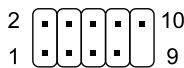
| Pin | Definition | Pin | Definition |
| 1 | Power | 6 | USB Dy+ |
| 2 | Power | 7 | GND |
| 3 | USB Dx- | 8 | GND |
| 4 | USB Dy- | 9 | |
| 5 | USB Dx+ | 10 | USB Over current |
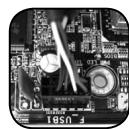
4-4.2 Insert the IEEE 1394 connector into the corresponding socket on the motherboard.
IEEE 1394 connector A
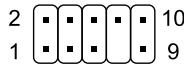
| Pin | Definition | Pin | Definition |
| 1 | TPA+ | 6 | TPB- |
| 2 | TPA- | 7 | |
| 3 | GND | 8 | +12V |
| 4 | GND | 9 | +12V |
| 5 | TPB+ | 10 | GND |
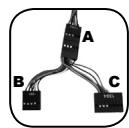
IEEE 1394 connector B
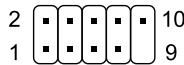
| Pin | Definition | Pin | Definition |
| 1 | TPA+ | 6 | TPB- |
| 2 | TPA- | 7 | +12V |
| 3 | GND | 8 | +12V |
| 4 | GND | 9 | |
| 5 | TPB+ | 10 | GND |
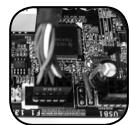
IEEE 1394 connector C
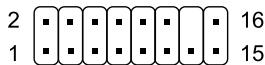
| Pin | Definition | Pin | Definition |
| 1 | +12V | 9 | +12V |
| 2 | +12V | 10 | +12V |
| 3 | TPA+ | 11 | TPA1+ |
| 4 | TPA- | 12 | TPA1- |
| 5 | GND | 13 | GND |
| 6 | GND | 14 | |
| 7 | TPB+ | 15 | TPB1+ |
| 8 | TPB- | 16 | TPB1- |
4-4.3 Insert the Audio connector into the corresponding socket on the motherboard.
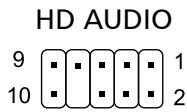
| Pin | Definition | Pin | Definition |
| 1 | MIC2_L | 6 | FSENSE1 |
| 2 | GND | 7 | FAUDIO JD |
| 3 | MIC2_R | 8 | |
| 4 | -ACZ_DET | 9 | LINE2_L |
| 5 | LINE2_R | 10 | FSENSE2 |
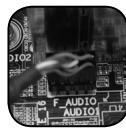
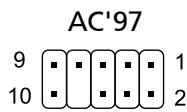
| Pin | Definition | Pin | Definition |
| 1 | MIC | 6 | NC |
| 2 | GND | 7 | NC |
| 3 | MIC Power | 8 | |
| 4 | NC | 9 | Line Out(L) |
| 5 | Line Out(R) | 10 | NC |
(2) Basic casing power switch control cable kit.
Follow the connectors list below for installation (see figure below)

| Connector | Color |
| Speaker | Yellow(+) / Black(-) |
| Power SW | Orange(+) / White(-) |

Different motherboards have different installation areas and specifications, screw holes and connectors. For detailed instructions, please refer to the motherboard user manual supplied by the motherboard manufacturer.
4-5 Connection of Fan Power Cables
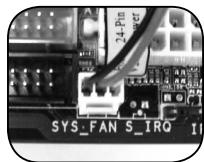
The iSolo 210 has one 12cm silent cooling fan in the front and one in the rear. This case includes internal connectors that connects the front and rear fans making it a single 3-pin connector. Required Tools: None
4-5.1 Plug the 3-pin connector into the corresponding system fan socket on the motherboard.
4-6 Installation of 5.25" Front Device Bay
4-6.1 Detach the front panel (see step 1-3.2 on page 5) and remove the mesh drive rail from the front panel.
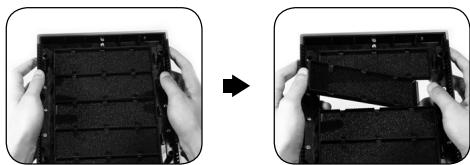
4-6.2 Remove the front EMI plate and attach the front panel onto the chassis.
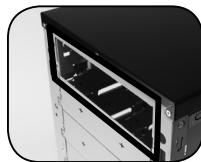
4-6.3 Slide the 5.25" device into the drive bay from the front of the chassis.
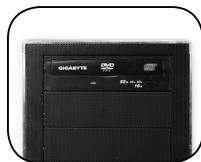
4-6.4 Secure the 5.25" device with the internal latch. Refer to the figure for installation procedure.
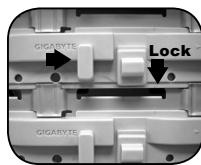
4-7 Installation of 3.5" Front Device Bay
Installation of 3.5'' front device is the same as 5.25'' front devices, please refer to step 4-6.
4-8 Installation of 3.5" Internal Device Bay
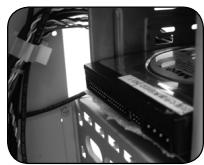
The iSolo 210 provides built-in bays to accommodate up to 3 hard disc drives. The built-in HDD requires securing runners, which can be found in the accessory box.
Required tools: Securing runners (2 per hard disc drive)
4-8.1 Fit the securing runners on both sides of the HDD and slide the HDD into the internal drive bay.
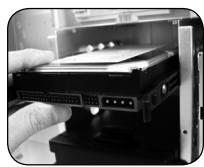

Additional HDD can be installed in the 3.5'' front device bay. Slide in the HDD and lock the internal latch to secure the HDD.
4-9 Foot Supports
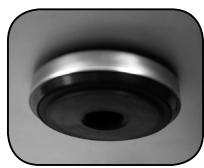
The iSolo 210 is supplied with four high-end skid-proof foot supports for ensuring the casing is firmly seated on the holding surface.
4-10 Liquid Cooling System Support
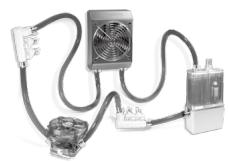
The iSolo 210 casing can fully support the GIGABYTE 3D Galaxy Liquid Cooling System (it also supports majority of the liquid cooling systems available commercially). While installing the liquid cooling system, please refer to the manual provided with the liquid cooling system.
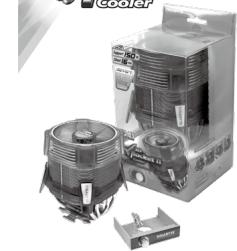
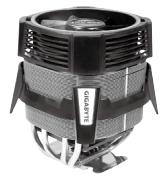
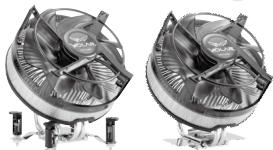
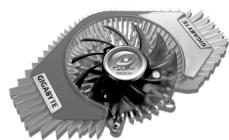
4-11 Recommended Cooling Products
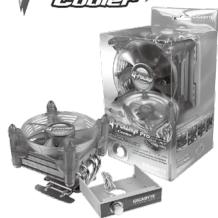
The iSolo 210 is recommended to be used with GIGABYTE Cooling products.











- iSolo 210
- Table of Contents
- 1.Components Introduction
- 1-1 Casing's Internal Structure
- 1-2 Front, Rear, and Left Side Panel Structure a) Left Side Panel b) Front Panel
- c) Rear Panel
- 1-3 Removal of Side and Front Panels
- 1-3.1 To remove side panels:
- 1-3.2 To remove front panel:
- 2.Feature
- -High Quality Design
- -Complete Support
- -Integration of Cooling Technology
- - Convenience of assembly
- 3\.Specifications
- 4.Installation Instruction
- 4-1 Installation of Power Supply
- 4-2 Installation of Motherboard
- 4-3 Installation of Add-on Card
- 4-4 Installation of Front Multi-Media I/O port
- 2 × USB 2.0, 1 × IEEE 1394 and 1 × Audio Set (HD & AC'97)
- Basic casing power switch control cable kit.
- 4-5 Connection of Fan Power Cables
- 4-6 Installation of 5.25" Front Device Bay
- 4-7 Installation of 3.5" Front Device Bay
- 4-8 Installation of 3.5" Internal Device Bay
- 4-9 Foot Supports
- 4-10 Liquid Cooling System Support
- 4-11 Recommended Cooling Products
Marque : GIGABYTE
Modèle : ISOLO 210
Catégorie : Boîtier d'ordinateur