GV-R92S128T - Carte graphique GIGABYTE - Notice d'utilisation et mode d'emploi gratuit
Retrouvez gratuitement la notice de l'appareil GV-R92S128T GIGABYTE au format PDF.


| Type de produit | Carte graphique GIGABYTE GV-R92S128T |
|---|---|
| Chipset graphique | AMD Radeon R9 270 |
| Mémoire vidéo | 128 Go GDDR5 |
| Fréquence du GPU | 925 MHz (fréquence de base) |
| Interface de mémoire | 256 bits |
| Connecteurs d'affichage | 2 x DVI, 1 x HDMI, 1 x DisplayPort |
| Alimentation électrique | Alimentation recommandée de 500W |
| Dimensions approximatives | 250 x 130 x 40 mm |
| Poids | 1.5 kg |
| Compatibilités | Compatible avec les systèmes Windows et Linux |
| Fonctions principales | Jeux vidéo, traitement graphique, calculs intensifs |
| Entretien et nettoyage | Nettoyage régulier des ventilateurs et des dissipateurs thermiques recommandé |
| Pièces détachées et réparabilité | Réparabilité limitée, pièces spécifiques disponibles sur demande |
| Sécurité | Utiliser dans un environnement bien ventilé pour éviter la surchauffe |
| Informations générales | Vérifier la compatibilité avec la carte mère avant l'achat |
FOIRE AUX QUESTIONS - GV-R92S128T GIGABYTE
Questions des utilisateurs sur GV-R92S128T GIGABYTE
0 question sur cet appareil. Repondez a celles que vous connaissez ou posez la votre.
Poser une nouvelle question sur cet appareil
Téléchargez la notice de votre Carte graphique au format PDF gratuitement ! Retrouvez votre notice GV-R92S128T - GIGABYTE et reprennez votre appareil électronique en main. Sur cette page sont publiés tous les documents nécessaires à l'utilisation de votre appareil GV-R92S128T de la marque GIGABYTE.
MODE D'EMPLOI GV-R92S128T GIGABYTE
| (Stamp) | Date: Jul. 24, 2003 | Name : | Timmy Huang | |
| Manufacturer/Improper | Signature : | Chenny Zhang | ||
| EN 60325 | Safyt of households and similar electrical appliances | |||
| EN 60635 | Safyt of households and similar general use | |||
| EN 6065 | Safyt requirements for mains operated electric and leased appliances for household and smaller general use | |||
| nonwood and single guarantee | ||||
| Induding dedicated business equipment | ||||
| Safety for information technology equipment | ||||
| The manufacturer also declares the commodity to above mentioned product with the textual relevant safety standards in accordance with LUV7/23 EEC (EC conoriety marking) | ||||
| EN 50522 | Lunds and methods of measurement for receiving and/or distribution from sound and television signals | |||
| EN VOE 0885 | Caled distribution systems Equipment | |||
| Dart 12 | DIN VOE 0885 | |||
| Dart 10 | DIN VOE 0885 | |||
| CE | CE comorily marking | |||
| EN 50520 | Lunds and methods of measurement for distributed converters and associated equipment | |||
| EN 50521 | Prodrucks refrigerators and associated power systems (JPS) | |||
| EN 50522 | EMC requirements for unimprifiable equipment | |||
| EN 50529 | Immediy room and information of broad electric appliances and associated power systems (JPS) | |||
| EN 50515 | Indusible pumps and unitaries for distributed cardiovascularists or infectious lamps and similar applications | |||
| EN 50520 | Immediy room and information of broad electric appliances and associated equipment | |||
| EN 50514 | Lunds and methods of measurement for distributed cardiovascularists or infectious medical appliances and associated equipment | |||
| EN 50513 | Prodrucks refrigerators and associated equipment | |||
| EN 50511 | Lunds and methods of measurement for distributed cardiovascularists orINDustrial services and medical (ISM)/ nonwood appliances and similar electrical equipment /Volume Iucations caused by individual appliances and similar electrical equipment /Voltage Iucations caused by information technology equipment | |||
| EN 50511 | Lunds and methods of measurement for distributed cardiovascularists of industrial services and medical (ISM)/ nonwood appliances and similar electrical equipment /Volume Iucations caused by information technology equipment | |||
| EN 50511 | Lunds and methods of measurement for distributed cardiovascularists of industrial services and medical (ISM)/ nonwood appliances and similar electrical equipment /Volume Iucations caused by information technology equipment | |||
| EN 50511 | Lunds and methods of measurement for distributed cardiovascularists of industrial services and medical (ISM)/ nonwood appliances and similar electrical equipment /Voltage Iucations caused by information technology equipment | |||
| EN 50511 | Lunds and methods of measurement for distributed cardiovascularists of industrial services and medical (ISM)/ nonwood appliances and similar electrical equipment /Volume Iucations caused by information technology equipment | |||
| EN 50511 | Lunds and methods of measurement for distributed cardiovascularists of industrial services and medical (ISM)/ non wood appliances and similar electrical equipment /Volume Iucations caused by information technology equipment | |||
| EN 50511 | Lunds and methods of measurement for distributed cardiovascularists of industrial services and medical (ISM)/ nonwood appliances and similar electrical equipment /Volume Iucations caused by information technology equipment | |||
| EN 50511 | Lunds and methods of measurement for distributed cardiovascularists of industrial services and medical (ISM)/ non wood appliances and similar electrical equipment /Voltage Iucations caused by information technology equipment | |||
| EN 50511 | Lunds and methods of measurement for distributed cardiovascularists of industrial services and medical (ISM)/ nonwood appliances and similar electrical equipment /Volume Iucations caused by information technology equipment | |||
| EN 50511 | Lunds and methods of measurement for distributed cardiovascularists of industrial services and medical (ISM)/ nonood appliances and similar electrical equipment /Volume Iucations caused by information technology equipment | |||
| EN 50511 | Lunds and methods of measurement for distributed cardiovascularists of industrial services and medical (ISM)/ nonwood appliances and similar electrical equipment /Volume Iucations caused by information technology equipment | |||
| EN 50511 | Lunds and methods of measurement for distributed cardiovascularists of industrial services and medical (ISM)/ nonood appliances and similar electrical equipment /Voltage Iucations caused by information technology equipment | |||
| EN 50511 | Lunds and methods of measurement for distributed cardiovascularists of industrial services and medical (ISM)/ nonwood appliances and similar electrical equipment /Volume Iucations caused by information technology equipment | |||
| EN 50511 | Lunds and methods of measurement for distributed cardiovascularists of industrial services and medical (ISM)/ nonod appliances and similar electrical equipment /Volume Iucations caused by information technology equipment | |||
| EN 50511 | Lunds and methods of measurement for distributed cardiovascularists of industrial services and medical (ISM)/ nonwood appliances and similar electrical equipment /Volume Iucations caused by information technology equipment | |||
| EN 50511 | Lunds and methods of measurement for distributed cardiovascularists of industrial services and medical (ISM)/ nonod appliances and similar electrical equipment /volume Iucations caused by information technology equipment | |||
| EN 50511 | Lunds and methods of measurement for distributed cardiovascularists of industrial services and medical (ISM)/ nonwood appliances and similar electrical equipment /Volume Iucations caused by information technology equipment | |||
| EN 50511 | Lunds and methods of measurement for distributed cardiovascularists of industrial services and medical (ISM)/ nonood appliances and similar electrical equipment /volume Iucations caused by information technology equipment | |||
| EN 50511 | Lunds and methods of measurement for distributed cardiovascularists of industrial services and medical (ISM)/ nonwood appliances and similar electrical equipment /volume Iucations caused by information technology equipment | |||
| EN 50511 | Lunds and methods of measurement for distributed cardiovascularists of industrial services and medical (ISM)/ nonood appliances and similar electrical equipment /volume Iucations caused by information technology equipment | |||
| EN 50511 | Lunds and methods of measurement for distributed cardiovascularists of industrial services and medical (ISM)/ nonwood appliances and similar electrical equipment /Volume Iucations caused by information technology equipment | |||
| EN 50511 | Lunds and methods of measurement for distributed cardiovascularists of industrial services and medical (ISM)/ nonwood appliances and similar electrical equipment /volume Iucations caused by information technology equipment | |||
| EN 50511 | Lunds and methods of measurement for distributed cardiovascularists of industrial services and medical (ISM)/ nonwood appliances and similar electrical equipment /volume Iucations caused by information technology equipment | |||
| EN 50511 | Lunds and methods of measurement for distributed cardiovascularists of industrial services and medical (ISM)/ nonwood appliances and similar electrical equipment /Volume Iucations caused by information technology equipment | |||
| EN 50511 | Lunds and methods of measurement for distributed cardiovascularists of industrial services and medical (ISM)/ non wood appliances and similar electrical equipment /volume Iucations caused by information technology equipment | |||
| EN 50511 | Lunds and methods of measurement for distributed cardiovascularists of industrial services and medical (ISM)/ nonwood appliances and similar electrical equipment /volume Iucations caused by information technology equipment | |||
| EN 50511 | Lunds and methods of measurement for distributed cardiovascularists of industrial services and medical (ISM)/ non wood appliances and similar electrical equipment /volume Iucations caused by information technology equipment | |||
| EN 50511 | Lunds and methods of measurement for distributed cardiovascularists of industrial services and medical (ISM)/ nonwood appliances and similar electrical equipment / volume Iucations caused by information technology equipment | |||
| EN 50511 | Lunds and methods of measurement for distributed cardiovascularists of industrial services and medical (ISM)/ nonwood appliances and similar electrical equipment /volume Iucations caused by information technology equipment | |||
| EN 50511 | Lunds and methods of measurement for distributed cardiovascularists of industrial services and medical (ISM)/ nonwood appliances and similar electrical equipment / volume Iucations caused by information technology equipment | |||
| EN 50511 | Lunds and methods of measurement for distributed cardiovascularists of industrial services and medical (ISM)/ non wood appliances and similar electrical equipment /volume Iucations caused by information technology equipment | |||
| EN 50511 | Lunds and methods of measurement for distributed cardiovascularists of industrial services and medical (ISM)/ nonwood appliances and similar electrical equipment /volgs caused by information technology equipment | |||
| EN 50511 | Lunds and methods of measurement for distributed cardiovascularists of industrial services and medical (ISM)/ nonwood appliances and similar electrical equipment /volgs caused by information technology equipment | |||
| EN 50511 | Lunds and methods of measurement for distributed cardiovascularists of industrial services and medical (ISM)/ nonwood appliances and similar electrical equipment /volgs caused by information Technology equipment | |||
| EN 50511 | Lunds and methods of measurement for distributed cardiovascularists of industrial services and medical (ISM)/ nonwood appliances and similar electrical equipment /volgs caused by information Technology equipment | |||
| EN 50511 | Lunds and methods of measurement for distributed cardiovascularists of industrial services and medical (ISM)/ nonwood appliances and similar electrical equipment /volgs caused by information Technology equipment | (Continence to the specifications under which company is declared) is in conformity with | ||
| EN 50511 | Lunds and methods of measurement for distributed cardiovascularists of industrial services and medical (ISM)/ nonwood appliances and similar electrical equipment /volgs caused by information Technology equipment | |||
| EN 50511 | Lunds and methods of measurement for distributed cardiovascularists of industrial services and medical (ISM)/ nonwood appliances and similar electrical equipment /volgs caused by information Technology equipment | |||
| EG-RAS21281 / GVR-82564T | ||||
Date: Jul. 24, 2003
Signature: Eric Lu Representative Person's Name: ERIC LU
This device complies with part 15 of the FCC Rules. Operation is subject to the following two conditions: (1) This device may not cause harmful and (2) this device must accept any interference received, including that may cause undesired operation.
Supplementary Information: (a), Class B Digital Device (2) and Section 15.107(a) and Section 15.109
Model Number: GV-R92S128T / GV-R92S64T Confirms to the following specifications:
Product Name: VGA Card
Responsible Party Name: C.B.T. INC. (U.S.A.) Address: 17358 Railroad Street City of Industry, CA 91748 Phone/Fax No: (818) 854-9338/ (818) 854-9339 Herby declares that the product

DECILARATION OF CONDITION
Per FCC Part 2 Section 2.1077(a)
Minimum System Requirement
- IBM® or 100% PC compatible with Pentium® III 650MHz or AMD Athlon 650MHz class processor or higher
• One available AGP3.0 compliant slot or better
• Operating Systems Win® 98/98SE / Win® 2000 / Win® ME / Win® XP - 64MB system memory
• 50MB of available disk space for full installation
• CD-ROM or DVD-ROM drive
Table of Contents
- Introduction ...... 2
1.1. Features ...... 2
1.2. Board Layout ...... 2
- Hardware Installation .... 3
- Software Installation 4
3.1. DirectX Installation 4
3.2. Driver Installation (Windows® XP/2000/ME/98) 4
3.3.V-Tuner Installation 5
3.4.HYDRAVISION Installation 5
- Appendix 6
4.1.BIOS Flash Utility 6
4.2. How to Reflash the BIOS 6
12MD-R92S128T-104
1. Introduction
1.1. Features
• Powered by ATi RADEON 9200SE Graphics Processing Unit (GPU)
• Supports Direct X 8.1
• Supports AGP 8X
• Integrated with 128MB(GV-R92S128T)/64MB(GV-R92S64T) DDR memory
• Supports TV-Out and D-Sub connectors
• Dual display supports with HYDRAVISION
1.2. Board Layout
GV-R92S128T (128MB DDR) / GV-R92S64T (64MB DDR)
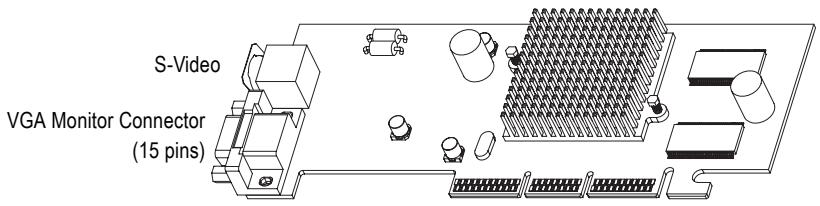
text_image
S-Video VGA Monitor Connector (15 pins)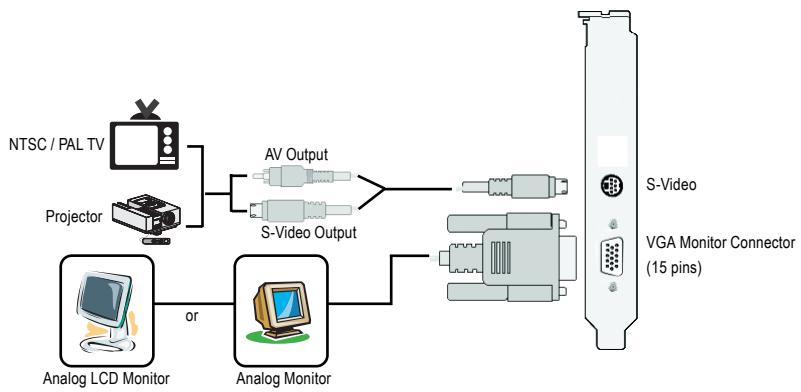
flowchart
graph LR
    A["NTSC / PAL TV"] --> B["Projector"]
    B --> C["AV Output"]
    B --> D["S-Video Output"]
    C --> E["Analog LCD Monitor"]
    D --> F["Analog Monitor"]
    E --> G["Analog LCD Monitor"]
    F --> H["Analog Monitor"]
    G --> I["S-Video"]
    H --> J["VGA Monitor Connector (15 pins)"]
2. Hardware Installation
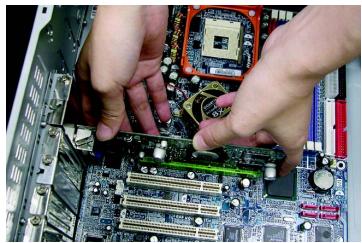
Installing your graphics card.
Now that you have prepared your computer, you are ready to install your graphics card.
- Locate the AGP slot. If necessary, remove the metal cover from this slot; then align your graphics card with the AGP slot, and press it in firmly until the card is fully seated.
natural_image
Close-up of hands installing a computer motherboard with visible CPU socket and RAM slots (no text or symbols)- Replace the screw to fasten the card in place, and replace the computer cover.
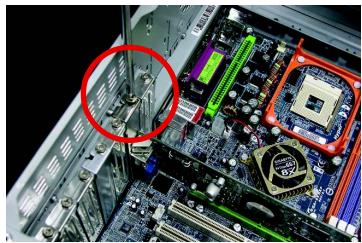
natural_image
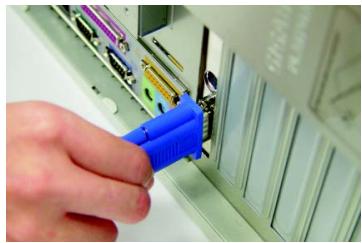
Close-up of a computer motherboard with CPU socket and monitor, circled area highlights (no text or symbols)- Plug the display cable into your card; then turn on the computer and monitor.
natural_image
Close-up of a hand inserting a blue plastic clip into a computer motherboard (no visible text or symbols)3. Software Installation
3.1. DirectX Installation
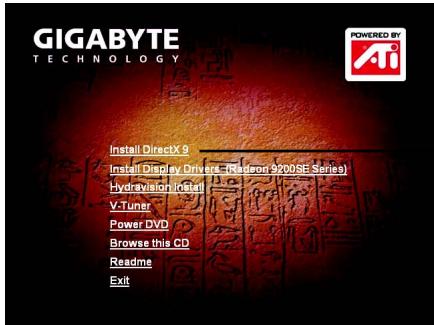
Install Microsoft DirectX to enable 3D hardware acceleration support for Windows ^® 98/ 98SE / Windows ^® 2000/ Windows ^® ME or Windows ^® XP to achieve better 3D performance.

Note: For software MPEG support in Windows® 98/ 98SE/ Windows® 2000/ Windows® ME or Windows® XP, you must install DirectX first.
text_image
GIGABYTE TECHNOLOGY Installed DirectX 9 Installed Display Drivers (Rediron 3200SE Series) Hydravision Install V-Tuner Power DVD Browse this CD Readme ExitClick "Install DirectX 9" item.
DirectX 9.0 is the up-to-date runtime library for all Windows operating system. This version is capable of updating your DirectX of your operating system to what is required for your graphics accelerator hardware to run to its best performance.
For example, if your graphics accelerator can support DirectX 8.1, updating with DirectX 9.0 can upgrade your operating system to the fullset of DirectX 8.1.
3.2. Driver Installation (Windows® XP/2000/ME/98)
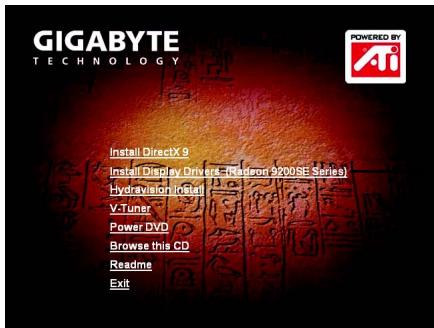
Insert the driver CD disk into your CD-ROM, and then you can see the AUTORUN window. If it does not show up, please run "D:\setup.exe". (We assume that your CD-ROM drive letter to be D:).
text_image
GIGABYTE TECHNOLOGY Installed DirectX 9 Installed Display Drive (Redson 9200SE Series) Hydravision Install V-Tuner Power DVD Browse this CD Readme ExitClick "Install Display Drivers (Radeon 9200SE Series)" item.
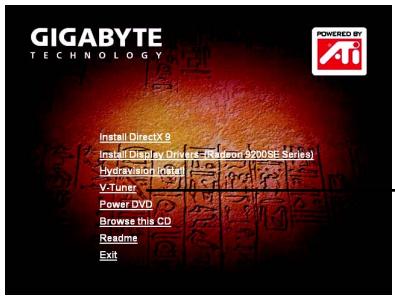
3.3. V-Tuner Installation
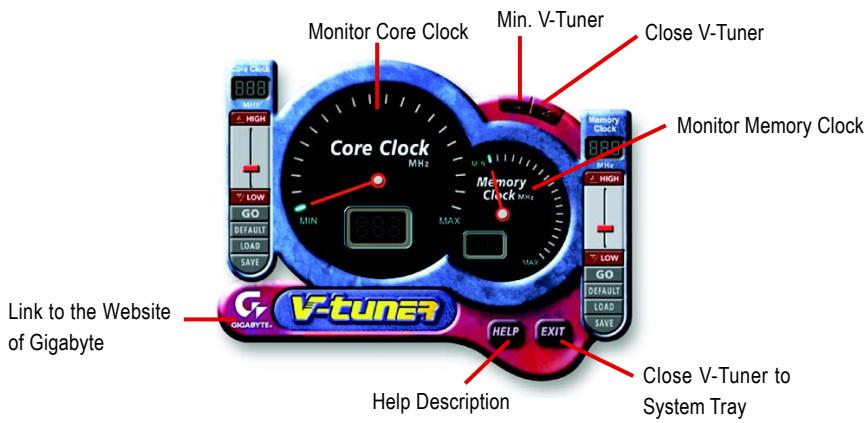
V-Tuner lets you monitor the working frequency of the graphic engine and video memory (Core Clock and Memory Clock).
text_image
GIGABYTE TECHNOLOGY Installed DirectX 9 Installed Display Drive - Robertson 27008E Serial Hydravision Digital V-Tuner Power DVD Browse this CD Readme Exit— Click "V-Tuner" item.
text_image
Monitor Core Clock Min. V-Tuner Close V-Tuner Core Clock Memory Clock V-tuner Link to the Website of Gigabyte Help Description Close V-Tuner to System Tray HELP EXIT3.4. HYDRAVISION Installation
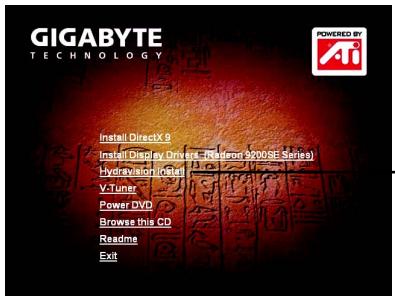
HYDRAVISION and the Desktop Manager are activated whenever Windows® starts. Installing HYDRAVISION adds menu options to the ATI Icon.
Click on the ATI icon to access the application's features and help, or to unload the HYDRAVISION Desktop Manager.
text_image
GIGABYTE TECHNOLOGY Installed DirectX 9 Installed Display Drive (Reason 2008E Series) Hydravision Intel V-Tuner Power DVD Browse this CD Readme Exit— Click "Hydravision Install" item.
4. Appendix
4.1. BIOS Flash Utility
- Please download the newest BIOS Zip file for your graphics card from GIGABYTE website. The file includes a MS-DOS-based BIOS flash utility. Or contact your local dealer for the file.
4.2. How to Reflash BIOS in MS-DOS mode
- Extract the downloaded Zip file to your hard disk(s) (ex: drive C) or floppy disk. This procedure assumes drive C.
- Restart the computer in MS-DOS mode by choosing "Restart in MS-DOS mode" in the Shut Down Windows dialog box. (This option is only available with Windows 98/98SE. For Windows 2000/ME/XP, you need a startup disk to restart the computer in MS-DOS mode.)
- Change the command prompt to C:>.
- Begin to flash BIOS by typing atiflash -p 0 filename (ex:r955128d.f1) at the C:> prompt and press Enter.
- Restart your PC when it's done.