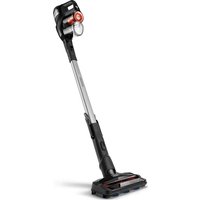
SpeedPro Max XC7040 - Balai PHILIPS - Notice d'utilisation et mode d'emploi gratuit
Retrouvez gratuitement la notice de l'appareil SpeedPro Max XC7040 PHILIPS au format PDF.


| Type de produit | Aspirateur balai sans fil |
| Marque | Philips |
| Modèle | SpeedPro Max XC7040 |
| Dimensions (L x P x H) | 260 x 180 x 1150 mm |
| Poids | 3,5 kg |
| Alimentation | Batterie lithium-ion 40 V |
| Autonomie | 40 minutes |
| Temps de charge | 5 heures |
| Capacité du réservoir | 0,6 L |
| Filtration | Cyclonique, filtre lavable |
| Niveau sonore | 80 dB |
| Fonctions principales | Aspiration, mode 2 en 1, brosse motorisée, mode max |
| Entretien | Nettoyage régulier du filtre, vidage du réservoir |
| Sécurité | Arrêt automatique en cas de surchauffe |
| Pièces détachées | Filtre, batterie, brosse (références disponibles) |
| Réparabilité | Indice de réparabilité 8/10 |
| Informations générales | Conçu pour sols durs et tapis |
FOIRE AUX QUESTIONS - SpeedPro Max XC7040 PHILIPS
Questions des utilisateurs sur SpeedPro Max XC7040 PHILIPS
0 question sur cet appareil. Repondez a celles que vous connaissez ou posez la votre.
Poser une nouvelle question sur cet appareil
Téléchargez la notice de votre Balai au format PDF gratuitement ! Retrouvez votre notice SpeedPro Max XC7040 - PHILIPS et reprennez votre appareil électronique en main. Sur cette page sont publiés tous les documents nécessaires à l'utilisation de votre appareil SpeedPro Max XC7040 de la marque PHILIPS.
MODE D'EMPLOI SpeedPro Max XC7040 PHILIPS

natural_image
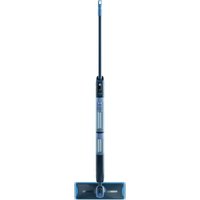
Product photo of a Philips SpeedPro Max vacuum cleaner (XC7043, XC7040) with black and silver casing (no visible text or symbols on device body)
2023 © Versuni Holding B.V. PHILIPS and the Philips Shield Emblem are registered trademarks of Koninklijke Philips N.V. and are used under license. This product has been manufactured by and is sold under the responsibility of Versuni Holding B.V., and Versuni Holding B.V. is the warrantor in relation to this product. 642001001194 (06/2022)
75% recycled paper 75% papier recyclé


English
Congratulations on your purchase and welcome to Philips! To fully benefit from the support that Philips offers, register your product at www.philips.com/MyVacuumCleaner.
Important safety information
Read this important information carefully before you use the appliance and its accessories and save it for future reference. The accessories supplied may vary for different products.
Danger
- Never vacuum up water or any other liquid. Never vacuum up flammable
substances and do not vacuum up ashes until they are cold.
- Never immerse the appliance or the adapter in water or any other liquid, nor rinse it under the tap.
Warning
- Check if the voltage indicated on the adapter corresponds to the local mains voltage before you connect the appliance.
Voltage before you connect the appliance. Always check the appliance before you use it. Do not use the appliance or the adapter if it is damaged. Always replace a damaged part with one of the original type.
The adapter contains a transformer. Do not cut off the adapter to replace it
- This appliance can be used by children aged from 8 years and above and persons with reduced physical, sensory or mental capabilities or lack of
experience and knowledge if they have been given supervision or instruction concerning use of the appliance in a safe way and understand the hazards involved. Children shall not play with the appliance. Cleaning and user maintenance shall not be made by children without supervision.
Always keep the magnetic charging disc away from very small children. The plug must be removed from the socket-outlet before cleaning or maintaining the appliance.
Unplug the adapter if you are not going to use the appliance for some time. When storing the appliance for more than a month (without usage or charging), make sure that the battery is charged to at least 50%. Storing the appliance with an empty battery may lead to irreversible damage to the battery.
Do not let the motorized nozzle move over the mains cords of other
appliances or other cables as this may cause a hazard. Keep loose clothing, hair and body parts away from the motorized brushes. Do not cover or block the ventilation openings when the appliance is operating.
This vacuum cleaner is designed for household use only. Do not use this vacuum cleaner to vacuum up building waste, cement dust, ashes, fine sand, lime and similar substances. Never use the vacuum cleaner without any of the filters. This could damage the motor and shorten the life of the vacuum cleaner. Always clean all parts of the vacuum cleaner as shown in the user manual. Do not clean any parts with water and/or cleaning agents if this is not specifically shown in the user manual.
- Only charge the appliance with the adapter supplied. Only use 25V adapter ZD12D250050 or 30V adapter ZD12D300050.
Charge, use and store the product at a temperature between 5 °C and 40 °C. Do not open, modify, pierce, damage or dismantle the product or battery to prevent batteries from heating up or releasing toxic or hazardous substances. Do not short-circuit, overcharge or reverse charge batteries.
- Keep product and batteries away from fire and do not expose them to direct sunlight or high temperatures.
- If the product becomes abnormally hot or smelly, changes color or if charging takes longer than usual, stop using and charging the product and contact Philips.
Do not place products and their batteries in microwave ovens or on induction cookers.
- If batteries are damaged or leaking, avoid contact with the skin or eyes. If this occurs, immediately rinse well with water and seek medical care.
This product contains a rechargeable battery. The battery may only be
replaced by a qualified service engineer.
Take the appliance to an authorized Phillips service center when you can no longer recharge it or when it runs out of power quickly.
To prevent damage, do not use the appliance if the filter is not present in the dust container.
Caution
- During charging, the adapter becomes warm to the touch. This is normal.
- Do not plug in, unplug or operate the appliance with wet hands.
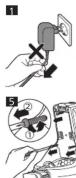
- Do not remove the adapter from the wall socket by pulling at the cord (ing. 1). When you do not use the charging station for charging, always unplug the
appliance by first detaching the magnetic charging disc from the underside of the appliance (Fig. 2).
- Always switch off the appliance after use and before you charge it.
- Never block the exhaust air openings during vacuuming.
- Do not clean the dust container and the dust container lid in the dishwasher. They are not dishwasher proof
- Do not clean the white material of the filter with a normal vacuum cleaner or
a brush to avoid damage to the material.
- Always use the vacuum cleaner with the filter assembled. - When you clean the washable sponge filter with water, make sure it is
completely dry before you put it back into the filter holder and dust container.
Do not dry the sponge filter in direct sunlight, on the radiator or in the tumble
dryer. Do not clean the filter holder with water. This part is not washable. - Replace the filter if it can no longer be cleaned properly or if it is damaged
(see .Ordering accessories')
- Make sure that the appliance is installed with the charging station attached to
the wall according to the instructions in the user manual. - Never use any accessories or parts from other manufacturers or that Philips
does not specifically recommend. If you use such accessories or parts, your
warranty becomes invalid.
- Be careful when you drill holes in the wall to attach the charging station, to avoid the risk of electric shock.
Electromagnetic fields (EMF)
This Philips appliance complies with the applicable standards and regulations regarding exposure to electromagnetic fields.
Ordering accessories
To buy accessories or spare parts, visit www.philips.com/parts-and-accessories
or go to your Philips dealer. You can also contact the Philips Consumer Care Center in your country (see the international warranty leaflet for contact details).
Warranty and support
Versuni offers a two-year warranty after purchase on this product. This warranty is not valid if a defect is due to incorrect use or poor maintenance. Our warranty does not affect your rights under law as a consumer. For more information or for invoking the warranty, please visit our website www.philips.com/support.
Recycling
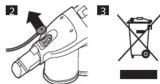
- This symbol means that electrical products and batteries shall not be disposed of with normal household waste (Fig. 3).
- Follow your country's rules for the separate collection of electrical products and batteries.
Removal of built-in rechargeable battery
The built-in rechargeable battery must only be removed by a qualified professional when the appliance is discarded. Before removing the battery, make sure that the appliance is disconnected from the wall socket and that the battery is completely empty.
Take any necessary safety precautions when you handle tools to open the appliance and when you dispose of the rechargeable battery.
When you handle batteries, make sure that your hands, the product and the batteries are dry.
To avoid accidental short-circuiting of batteries after removal, do not let battery terminals come into contact with metal objects (e.g. coins, hairpins, rings). Do not wrap batteries in aluminum foil. Tape battery terminals or put batteries in a plastic bag before you discard them.
To remove the rechargeable battery, follow the instructions below.
1 Disconnect the appliance from the wall socket and let it run until the motor stops.
2 Remove the dust container from the appliance (Fig. 4).
3 Undo the three screws that fix the battery holder to the housing of the
appliance (Fig. 5). Pull the battery holds
Troubleshooting
This chapter summarizes the most common problems you could encounter with the appliance. If you are unable to solve the problem with the information below, visit www.philips.com/support for a list of frequently asked questions of contact the Consumer Care Center in your country.
Problem Possible cause Solution
| The appliance does not work when I push the button. | When the battery is empty, '00' flashes on the display. | To charge the battery, connect the appliance to the charging base or attach the handheld vacuum cleaner directly to the magnet on the charging base. |
| You have to push the slider forward to switch on the appliance. | Push the slider forward to setting 1 to switch on. Increase the suction power further by pushing the slider to setting 2 or select the turbo setting to clean very dirty patches at the highest suction power. |
| The appliance suddenly stops working. | When there is a problem, the buttons will not respond and the screen will remain blank. | Connect the appliance to the charging station or attach the handheld vacuum cleaner directly to the magnet on the charging station. Check the display. Once the appliance starts charging, you may continue to use the appliance as usual. If an error code appears, you can find its meaning in this booklet (see 'Error codes'). |
| The appliance has a lower suction power than usual. | The filter and the cyclone are dirty. | Clean the filter and the cyclone. The filter light lights up after several hours of use to indicate that you have to wash the sponge filter. Make sure that you wash the sponge filter at least once a month if you use the appliance regularly. |
| You have not attached the dust container lid properly to the dust container. You have not attached the dust container to the appliance properly. In both cases, there will be a loss of suction power. | Make sure that you attach the dust container lid to the dust container and the dust container to the appliance properly. |
Dust escapes from The filter is dirty. Clean the filter
| The filter is not present in the appliance. | Make sure that the filter is in the appliance and assembled correctly. | |
| Something blocks the cyclone. | Check the cyclone for objects stuck in it and remove any object that blocks the cyclone. | |
| If dust falls out of the dust container, the dust container lid is probably not attached properly to the dust container. | Empty the dust container and attach the dust container lid correctly. |
| The appliance does not move smoothly across the floor. | You selected a too high suction power. | Reduce the suction power by choosing setting 1. |
when cleaning a
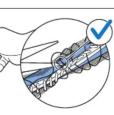
| The brush does not turn anymore | The brush encounters too much resistance | Clean the brush with a pair of scissors or by hand. |
| The brush may stop turning when it encounters too much resistance from high-pile carpet. | Switch off the appliance and then switch it back on again. | |
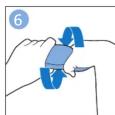
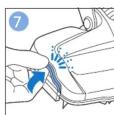
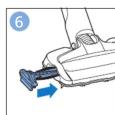
| You have not installed the roller brush in the nozzle properly after cleaning. | Follow the instructions in the cleaning chapter of the user manual to slide the roller brush into the nozzle properly and secure it inside the nozzle by snapping home the locking lever. |
| XC7043: The LEDs in the nozzle do not come on. | You have not attached the nozzle to the appliance or handheld properly. | Attach the nozzle to the appliance or handheld properly. |
| The appliance is not charging. | The magnetic connector is not not connected correctly to the charging disk or the adapter is not inserted into the wall socket properly. | Make sure that the magnetic connector is connected properly to the charging disk and that the adapter is inserted into the wall socket properly. |
| You have not connected the correct | Make sure that you use the correct adapter and cord. |
| If you have checked the above and the appliance still does not charge, take it to a Philips service center or contact the Consumer Care Center. |
Problem Possible cause Solution
| XC7043: The mini turbo brush does not function properly. | The roller brush is blocked. | Remove hairs from the brush with a pair of scissors (see user manual). |
| The roller brush is blocked by fabric or surfaces during cleaning. | Keep the mini turbo brush aligned with the surface and do not push the turbo brush into soft surfaces. | |
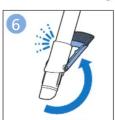
| The mini turbo brush is not fully closed. | Make sure that the top and bottom parts of the mini turbo brush are properly connected and there is no gap between the two parts. Check if the locking ring is in closed position (see user manual). | |
| When I use my vacuum cleaner I sometimes feel static electricity shocks. | Your vacuum cleaner builds up static electricity. The lower the air humidity, the more static electricity, the appliance builds up. | Discharge the appliance by frequently holding the tube against other metal objects in the room (for example the legs of a table or chair, etc.). You can also raise the air humidity level in the room. |
| You vacuumed up fine sand, lime or a similar substance. This also causes static power. | Empty the dust container and clean the filter according to the instructions in the user manual. |
Error codes
Error code Meaning
| E1 The appliance is stored or charged at a temperature below 5°C. Move the appliance to a warmer room. Do not store or charge the appliance at a temperature below 5°C or above 40°C. |
| E4 The roller brush in the motorized floor nozzle or in the mini turbo brush has become blocked and cannot turn freely. Switch off the appliance and check the roller brush for obstructions. |
| E6 No current passes through the adapter. Check if the adapter is inserted into the wall socket properly. If the adapter is inserted properly and the charging disk (magnet) is attached properly and the appliance does not start to charge, the adapter may be defective. In that case, please contact the Consumer Care Center or take the appliance to an authorized Philips service center. |
| E7 You use the wrong adapter. Connect the correct adapter.If the correct adapter does not work, please contact the Consumer Care Center or take the appliance to an authorized Philips service center. |
SE Please take the appliance to an authorized Philips service
| center. |
Türkçe
Ürünümüzü satın aldığınız için teşekkür ederiz; Philips'e hoş geldiniz! Philips'in sunduğu destekten tam olarak yararlanmak için ürününüzü www.philips.com/MyVacuumCleaner adresinden kaydettirin.
Önemli güvenlik bilgileri
Cihazı ve aksesuarlarını kullanmadan önce bu önemli bilgileri dikkatlice okuyun ve gelecekte başvurmak üzere saklayın. Cihazla birlikte verilen aksesuarlar ürünlere göre farklılık gösterebilir.
Tehlike
- Kesinlikle su veya başka bir sıvı çekmeyin. Yanıcı maddeleri kesinlikle süpürmeyin. Sigara küllerini çekmeden soğumasını bekleyin. - Ciħazı ya da adaptörū suya veya başka bir sıviya daldirmayın ve musluk suyu altında durulamayın.
Uyarı
- Cihazı kullanmadan önce, adaptörün üzerinde belirtilen gerilimin ülkenizdeki gerilimle uygunluğunu kontrol edin.
- Cihazı kullanmadan önce her zaman kontrol edin. Hasar gören cihazı veya adaptörü kullanmayın. Zarar görmüş bir parçayı mutlaka orijinaliyle değiştirin. - Adaptör içinde bir transformatör bulunur. Adaptörü kesip başka bir fişle değiştirmeyin, aksi takdirde cihazı kullanmak tehlikeli håle gelir.
- Bu cihazin 8 yaşın üzerindeki çocuklar ve fiziksel, duysusal ya da zinhisel beceriler gelişmemiş veya bilgisi ve tecrübesi olmayan kişiler tarafından kullanımı sadece bu kişilerin nezaretinden sorumlu kişilerin bulunması veya cihazin güvenli kullanım talimatlarının bu kişilere sağlanması ve olası tehlikelerin anlatılması durumunda mümkündür. Çocuklar cihazla oynamamalidir. Temizlik ve kullanıcı bakımı gözetim olmadan çocuklar tarafından yapılmamalidir.
- Manyetik şarj diskini her zaman küçük çocuklardan uzak tutun. - Cihazı temizlemeden veya cihazın bakımını yapmadan önce fişi prizden çekilmelidir.
- Cihazı bir süre kullanmayakacsanız adaptörün fişini çekin. - Cihazı bir aydan daha uzun bir süre (kullanmadan veya şarı etmeden) saklayakacsanız pilinin en az %50 dolu olduğundan emin olun. Cihazı boş bir pille saklamak, pil üzerinde geri dönüşü olmayan bir hasara yol acabilir. - Tehlikeye neden olabileceği için motorlu başlığı, diğer cihazların elektrik kabloları veya başka kablolar üzerinden geçmesine izin vermeyin. - Sabitlenmemiş kumaş, saç ve vücudunuzu motorlu fırçalardan uzak tutun. - Cihaz çalışırken havalandırma delikilerini kapatmayın veya tikamayın.
- Bu elektrikli süpürge sadece evde kullanım için tasarlanmıştır. Bu elektrikli süpürgeyi inşaat atıkları, çimento tozu, kül, ince kum, kireç ve benzer maddeleri çekmek için kullanmayın. Elektrikli süpürgeyi filtre olmadan kesinlikle kullanmayın. Bu, motorun zarar görmesine ve elektrikli süpürge kullanım ömrünün azalmasına neden olabilir. Elektrikli süpürgenin tüm
parçalarını hier zaman kullanım kılavuzunda gösterlien şekilde temizleyin. Kullanım kılavuzunda özellikle gösterilmediği takdirde herhangi bir parçayı su ve/veya temizlik maddeleri ile temizlemeyin.
- Cihazı sadece verilen adaptör ile şarj edin. Sadece 25V'luk ZD12D250050 adaptörü veya 30V'luk ZD12D300050 adaptörü kullanın.
- Ürünü 5 °C lda 40 °C árasi sıcaklıkılarda şarj edin, kullanırın ve saklayın. - Pillerin ısınmasını veya zehirli ya da tehlikeli madde açığa çıkarmasını önlemek için ürünü veya pili açmayın, delmeyin, sökmeyin, değişiklik yapmayın veya hasar görmemesini sağlayın. Pillere kısa devre, aşırı yükleme veya tersine yükleme yapmayın.
- Ürün ve pilleri ateşten uzak tutun, doğrudan güneş ışığına veya yüksek sıcaklığa maruz bırakmayın.
- Ürün aşırı ısınırsa veya üründen koku gelirse, renk değiştirirse ya da şarj işlemi her zamankinden daha uzun sürerse ürünü kullanmayı ve şarj etmeyi bırakıp Philips ile iletişime geçin.
- Urünleri ve pillerini mikrodalga fırına ya da endüksiyonlu pişiricilerin üstüne koymayın.
- Hasarlı veya sızdıran pillerin cilde ya da göze temas etmemesine dikkat edin. Bu durumda, hiç vakit kaybetmeden temas yerini suyla iyice yıkayın ve bir doktora başvurun.
- Bu üründe şarj edilebilir pil bulunur. Pil yalnızca kalifiye servis mühendislerince değistirilebilir.
- Şarj edilebilir pili artık yeniden şarj edemiyorsanız veya gücü hızlı bir şekilde bitivorsa cihazı yetkili bir Philips servisine götürün.
- Cihazın zarar görmesini önlemek için, toz haznesi içinde filtre yoksa cihazı kullanmayın.
Dikkat
- Şarj sırasında adaptör ısınır. Bu durum normaldir. - Elleriniz ıslakken cihazın fişini prize takmayın, prizden çıkarmayın veya cihazı kullanmayın.
- Adaptörü kablosundan çekerek prizden ayırmayın (Şek. 1). Şarj etmek için şarj istasyonunu kullanmadığınızda cihazın fişini daima cihazın alt tarafından manyetik şarj diskini çıkardıktan sonra çekin (Şek. 2).
- Cihazı kullandıktan sonra ve şarj etmeden önce mutlaka kapatın.
- Toz haznesini ve toz haznesi kapağını bulaşık makinesinde temizlemeyin. Bu parçalar bulaşık makinesinde yıkanmaz.
- Malzemeye zarar vermemek için, filtrenin beyaz kısmını normal bir elektrikli süpürge veya fırçayla temizlemeyin.
- Elektrikli süpürgeyi her zaman filtresi takılı olarak kullanın. - Yıkanabilir sünger filtreyi suyla temizlerken, filtre yuvasına ve toz haznesine geri takmadan önce tamamen kuru olduğundan emin olun. Sünger filtreyi doğrudan güneş ışığı altında, radyatör üzerinde veya çamaşır kurutma makinesinde kurutmayın. Filtre yuvasını suyla temizlemeyin. Bu parça yıkanamaz.
- Filtreyi artık düzgün bir şekilde temizlenemiyorsa veya hasar görmüşse (bk. „Aksesuarların sipariş edilmesi“) değiştirin.
- Cihazın, kullanım talimatlarına uygun şekilde duvara monte şarj istasyonu ile birlikte takıldığından emin olun.
- Başka üreticilere ait olan veya Philips tarafından özellikle tavsiye edilmeyen aksesuar ve parçaları kesinlikle kullanmayın. Buna benzer aksesuar veya parcalar kullandığınızda garantınız gecersiz olur.
- Şarj istasyonunu monte etmek için duvara delikler açarken elektrik çarpması riskine karşı dikkatli olun.
Elektromanyetik alanlar (EMF)
Bu Philips cihazı, elektromanyetik alanlara maruz kalmaya ilişkin geçerli standartlara ve düzenlemelere uygundur.
Aksesuarların sipariş edilmesi
Aksesuar veya yedek parça satın almak için www.philips.com/parts-and-accessories adresini ziyaret edin ya da Philips bayinize gidin. Ülkenizdeki Philips Müşteri Hizmetleri Merkezi ile de iletişim kurabilirsiniz (iletişim bilgileri için uluslararası garanti belgesine göz atın).
Garanti ve destek
Versuni, satın alındıktan sonra bu ürün için iki yıl garanti vermektedir. Hatalı kullanım veya yetersiz bakım nedeniyle meydana gelecek kusurlar garanti kapsamı dışındadır. Bu garanti, bir tüketici olarak yasalar kapsamında sunulan haklarınızı etkilemez. Daha fazla bilgi edinmek veya garantiyi kullanmak için lütfen www.philips.com/support adresindeki web sitemizi ziyaret edin.
Geri dönüşüm
- Bu simge, elektrikli ürün ve pillerin normal ev atıklarıyla birlikte atılmaması gerektiğini belirtir (Sek. 3)
- Ülkenizde elektrikli ürün ve pillerin ayrı olarak toplanmasına ilişkin yürürlükte olan yönetmelikleri izlevin.
Dâhilî şarj edilebilir pili çıkarma
Cihaz atıldığında dâhilî şarj edilebilir pilin yalnızca bir uzman tarafından çıkarılması gerekir. Pili çıkarmadan önce cihazı prizden çıkardığınızdan ve pilin tamamen hos olduğundan emin olun.
Cihazı açmak için araçlar kullanırken ve şarj edilebilir pili çöpe atarken tüm gerekli güvenlik önlemlerini alın.
Pillere dokunurken ellerinizin, ürünün ve pillerin kuru olmasına dikkat edin.
Çıkarıldıktan sonra pillerin kazara kısa devre yapmasını önlemek için pil üzerindeki terminallerin metal nesnelere (bozuk para, toka, yüzük vb.) temas etmemesine çok dikkat edin. Pilleri alüminyum folyoya sarmayın. Atmadan önce pil terminallerini bantla kapatın veya pilleri bir plastik torbaya koyun.
Şarj edilebilir pili çıkarmak için aşağıdaki talimatları uygulayın. 1 Cihazın fisini prinzden çekin ve motor durana kadar cihazı çalıştırın. 2 Toz haznesini cihazdan çıkarın (Şek. 4). 3 Pil yuvasını cihaz muhafazasına sabitleyen üç vidayı sökün (Şek. 5). Pil yuvasını cihazdan dışarıya doğru çekin (Şek. 6).
Sorun giderme
Bu bölümde, cihazla ilgili en sık karşılaşabileceğiniz sorunlar özetlenmektedir Sorunu aşağıda verilen bilgileri kullanarak çözemiyorsanız sık sorulan sorular listesi için www.philips.com/support adresini ziyaret edin veya ülkenizdeki Müsteri Destek Merkezi ile iletişim kurun.
Sorun Olası neden Çözüm
| Cihaz, düzmeye bastığımda calışımyor. | Pil bittiğinde ekranda '00' sayısı yanıp söner. | Pili sıari etmek için, cihazı serif standına bağlayın veya elektrikli el süpüresmesi doğrudan şarj standı üzerindeki miknatsa takin. |
| Cihazı çalıştırmak için sensügyi ileri tmeniz gerekir. | Çalıştırmak için sürgüyi iterek ayar 1 e getirtin. Surguyu itip ayar 2 YE getirerek emiş gücünü daha da artının veya en kiri alanılan en yüksek emiş gücünde temizlemek için turbo ayarını seçin. | |
| Cihaz aniden duruyor. | Bir sorun olduğunda dülgemler yanıt vermez ve ekran boş görünür. | Cihazı sıari istasyonuna bağlayın veya elektrikli el süpüresmesi doğrudan şarj istasyonu üzerindeki miknatsa takin. Ekran kontrol edin. Cihaz sıralmaya başladıktan sonra cihazı her zamaniki gibi kullanymaya devam edebilisiniz. Bir hata kodu görüntülenirse kodun ne anlama geldiği ni bu şoründe valabilisiniz (bk. "Hata kodlan"). |
| Cihazın emiş gücünde azalma var. | Filtre ve sikilon bölmesi kirildir. | Filtreyi ve sikilon bölmesini temizleyin. Sünger filtreyi yıkamânız gerektğini belintmek için birkaç saatlik kullanımdan sonate filtre gibi yanan. Cihazı düzenli olarak kullanıyorsanz, sünger filtrey en az ayda bir defa yakıadığınızan emin olun. |
| Toz haznesi kapağını toz haznesine düzgün biçimde takmadınız. Toz haznesini cihaza düzgün biçimde takmadınız. Emiş gücü her ki durumda da azalacakakt. | Toz haznesi kapağını toz haznesine ve toz haznesini cihaza düzgün biçimde taktığınızan emin olun. |
Cihaz toz kaçırıyor. Filtre kirlidir. Filtreyi temizleyin.
| Cihazda filtre yok. Cihazda filtre olduğunden ve filtreinin doğru şekilde takildiğdan emin olun. | ||
| Siklon bir nesneyle engelleniyor. | Siklonun içinde sıkışan nesne olup olmadığını kontrol edin ve siklonu tıkyanan nesneleri çıkarın. | |
| Toz haznesinden toz düşerse, toz haznesi kapağının toz haznesine düzgün biçimde takılmamış olması muhtemeldir. | Toz haznesini boşaltı ve toz haznesi kapağını doğru şekilde takin. | |
| Cihaz halı temizlerken zeminde kolayca hareket etmiyor. | Çok yüksek bir emiş gücü seçtiniz | Ayar 1'i seçerek emiş gücünü azaltın. |
| Fırça artık dönmüyor. | Fırça çok fazla dirençle karşılaşmıştır. | Fırçayı bir makas yardımıyla veya elle temizleyin. |
| Fırça uzun tủyflahiliarda çok yüksek dirençle karşılaştığında dönmeyi durdurabilir. | Cihazı kapatın, ardından tekrar açın. | |
| Temizlikten sonra döner fırçayı başlığa düzgün yerleş时限mediniz. | Döner fırçayı başlığün içine düzgün biçimde kaydırmak ve kilitieme kolunu yerine oturtarak başlığün içinde sabitlemek için kullanım klavuzunun temizlik bölümündeki talimatları elizeyin. | |
| XC7043. Başlıktaki LEDİ ter yanmiyor. | Başlığı cihaza veya el supürgesine düzgün biçimde takmadınız. | Başlığı cihaza veya el supürgesine düzgün biçimde takin. |
| Cihaz şarj etmiyor. | Manyetik konnektörun sarj diskine doğru şekilde takılmamış veya adaptör prize düzgün takilmamış. | Manyetik konnektörün sarj diskine doğru şekilde takildiğdan ve adaptörun prize düzgün takildiğdan emin olun. |
| Doğru adaptörü ve kabloyu takmadınız. | Doğru adaptörü ve kabloyu takifiğinizdan emin olun. | |
| Yukandaki kontrolleri yaptysanız ve cihaz hala şarj olmuyorsa, cihazi Philips servis merkezine götürün veya Müşteri Hizmetleri Merkezi ile iletişime geçin. | ||
| XC7043: Mini turbo fırça düzgün calismiyor. | Döner fırça tıkanmış. | Fırçadaki killeri bir makas yardımıyla temizleyin (bkz. kullanma kılavuzu). |
| Döner fırça temizleme sırasında kumaş veya zemin nedeniyle tikanmıştır. | Mini turbo fırçay zeminle ayını hizada tutun ve turbo fırçayı yumuşak zeminlere bastirmayın. | |
| Mini turbo fırça tamamen kapali değildir. | Mini turbo funçan üst ve alt kısımlarının bağlantısının düzgün yapıldiğdan ve iki parça arasında boşluk olmadığından emin olun. Kilitieme halkasının kapali konumunda olup olmadığını kontrol edin (bkz. kullanım kılavuzu). | |
| Elektrikli süpürgeyi kullanırken bazen statik elektrik çarpması hissediyorum. | Elektrikli süpürgenizde statik elektrik birbekilir. Havadaki nem ne kadar düşük olursa chalazarda binken statik elektrik o kadar yüksek olur. | Boruyu sık sık odadaki diğer metal nesnelere dedirekere cihaz yukarıncu boşaltı (örnieğin, masanın veya sandalyenin ayaklari vb.) Ayrıca odadaki nem seviyesini de artrabilirilsiniz. |
| Ince kum, kireq vb. maddeler süpardünüz. Bu da statik elektriklenmeye yol açar. | Toz haznesini boşaltı ve filtreyi kullanım klavuzundaki talimatlara göre temizleyin. | |
Hata kodları
Hata kodu Anlamı
| E1 Cihazı 5°C'nin altında sıcaklıkta saklányorov yaşı erdiilyor.Cihazı daha sıcak bir odaya alın. Cihazı 5°C'nin altında veya40°C'nin üzerinde sıcaklıkta saklámaner |
| E4 Motorlu zemin brasileği veya mini turbo força içindeki döneriforça tıkandı ve serbştçe dönenimiyor. Cihazı kapatın ve dönerfırada tikaniklik olup (%ımladını kontrol edin). |
| E6 Adaptörden akım geçmiyor. Adaptörün prise düzgün takliptakılmadığını kontrol edin. Adaptör düzgün takildıksya ve şarjdiski (mlknats) doğru şekilde takildıksya ve cihaz şart etmeyebağlamıyorsa, cihaz arızali olabilir. Bu durumda, lüftenMüsteni Destek Merkezii ile letiştime geçin veya cihazı yetkilibir Philips servis merkezinegotürun. |
| E7 Yanlış adaptör kullanıyorsunuz. Doğru adaptörü takoin. Doğruadaptör calıymişora, lüften Müsteni Destek Merkezii ileletiştime geçin veya cihazı yetkili bir Philips servis merkezinegotürun. |
SE Lütfen cihazı yetkili bir Philips servis merkezine götürün
?


[Non-Text]


→


[NO TEXT]


[Non-Text]
XC7043


[Non-Text]






[Non-Text]


[Non-Text]
XC7043



[Non-Text]


[Non-Text]



[Non-Text]
[Non-Text]


[Non-Text]
0
1x
1M





[Non-Text]
[Non-Text]
[Non-Text]


[Non-Text]


XC7043







- English
- Important safety information
- Danger
- Warning
- Caution
- Electromagnetic fields (EMF)
- Ordering accessories
- Warranty and support
- Recycling
- Removal of built-in rechargeable battery
- Troubleshooting
- Error codes
- Türkçe
- Önemli güvenlik bilgileri
- Tehlike
- Uyarı
- Dikkat
- Elektromanyetik alanlar (EMF)
- Aksesuarların sipariş edilmesi
- Garanti ve destek
- Geri dönüşüm
- Dâhilî şarj edilebilir pili çıkarma
- Sorun giderme
- Hata kodları
Marque : PHILIPS
Modèle : SpeedPro Max XC7040
Catégorie : Balai