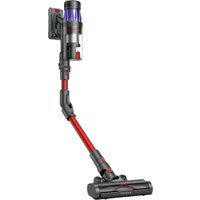
U16 Flex - Aspirateur Ultenic - Notice d'utilisation et mode d'emploi gratuit
Retrouvez gratuitement la notice de l'appareil U16 Flex Ultenic au format PDF.


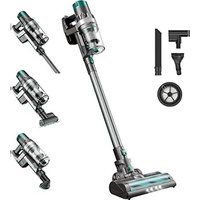
| Type de produit | Aspirateur balai sans fil |
| Marque | Ultenic |
| Modèle | U16 Flex |
| Dimensions (L x l x h) | 265 x 220 x 1100 mm |
| Poids net | 2,6 kg |
| Alimentation | Batterie lithium-ion 22,2 V, 2500 mAh |
| Autonomie maximale | 45 minutes (mode économique) |
| Temps de charge | 4 à 5 heures |
| Capacité du réservoir à poussière | 0,6 L |
| Filtration | Filtre cyclonique à 5 étages + filtre HEPA lavable |
| Puissance d'aspiration | 33 kPa (mode boost) |
| Niveau sonore | 78 dB(A) |
| Fonctions principales | Mode économique, mode boost, brosse motorisée avec LED, conversion en aspirateur à main |
| Brosse principale | Brosse motorisée anti-emmêlement avec rouleau en poils de carbone |
| Accessoires inclus | Suceur plat, brosse 2-en-1, flexible, support mural |
| Entretien et nettoyage | Nettoyer le bloc cyclonique et le filtre HEPA à l'eau froide au moins une fois par mois |
| Sécurité | Arrêt automatique en cas de surchauffe ; utiliser uniquement le chargeur fourni |
| Pièces détachées et réparabilité | Batterie, filtre, brosse et réservoir sont remplaçables ; contacter le service client |
| Informations générales | Garantie 2 ans ; compatible avec les filtres Ultenic U16 Flex |
FOIRE AUX QUESTIONS - U16 Flex Ultenic
Questions des utilisateurs sur U16 Flex Ultenic
0 question sur cet appareil. Repondez a celles que vous connaissez ou posez la votre.
Poser une nouvelle question sur cet appareil
Téléchargez la notice de votre Aspirateur au format PDF gratuitement ! Retrouvez votre notice U16 Flex - Ultenic et reprennez votre appareil électronique en main. Sur cette page sont publiés tous les documents nécessaires à l'utilisation de votre appareil U16 Flex de la marque Ultenic.
MODE D'EMPLOI U16 Flex Ultenic
IMPORTANT SAFETY INSTRUCTIONS
Basic precautions should always be observed when using any electrical equipment, including the following:
WARNING:
READ ALL SAFETY INSTRUCTIONS AND THE ENTIRE MANUAL. Failure to heed the warnings and instructions may result in electric shock, fire, or serious injuries. Please read all instructions before using this device.
WARNING:
- This device is intended for children 8 years of age and older. People with reduced physical, sensory, or intellectual abilities, or those who lack experience and knowledge, should be supervised or instructed in safely using the device; they must also be aware of possible hazards. Children should not play with this device. Cleaning and maintenance should not be performed by children without supervision.
To reduce the risk of injury or damage, please observe the following safety precautions when installing, using and maintaining the device:
- Please read all instructions regarding safety and operation before using the device.
- Keep the safety and user manual for future reference. If you accidentally lose the manual, you may visit the official website to download the electronic version. (http://www.ultenic.com).
- Follow all operating and usage instructions.

"The product's labels or packaging indicate that:"
Do not dispose of the electrical appliances as unsorted waste or, use a separate waste collector.
Contact your local authority for information on the appropriate disposal method. If electrical appliances are discarded in landfills, hazardous substances can leach into groundwater, enter the food chain, and damage people's health. Contact your local or regional waste management agency for more information on their recycling and reuse programs.
Restrictions
- Please read all contents of this manual carefully before using this product.
- Please do not use the Vacuum Cleaner to vacuum detergent, kerosene, glass dregs, needles, wet items, sewage, matches and other items.
- Please do not use the Vacuum Cleaner to vacuum toys, paper balls and other large objects, otherwise it will cause blockage of the Vacuum Cleaner, motor burnout and other failures.
- Please keep the Vacuum Cleaner away from fire and other hot places.
- Please make sure to install the filter modules and the roller brush of the floor brush.
- Please make sure not to block the suction inlet or block the roller brush, as this may cause motor failure when using the Vacuum Cleaner.
- Please do not pour or spill water or other liquids into the machine to avoid short circuits and burning out the machine.
-
Please fully charge the battery when using a new battery or the battery used for the first time after long-term storage. Please ensure that it is charged and discharged at least every three months when the machine is not used for a long time.
-
The appliance is only to be used with the power supply unit provided with the appliance.
- The plug must be removed from the socket-outlet before cleaning or maintaining the appliance.
- When cleaning the Vacuum Cleaner, use a dry cloth to wipe it. Do not use gasoline, banana water and other cleaners that are easy to crack or fade the shell.
- Please do not use or store the Vacuum Cleaner in high temperature, low temperature and other adverse conditions, and do not use them outdoors or on wet surfaces. It is recommended to use them indoors at an ambient temperature of 0-30°C. Please store it in a cool and dry place, and do not expose it to sunlight for a long time.
- Do not allow children to use or play with the Vacuum Cleaner.
- When the Vacuum Cleaner can not work, it must be tested and repaired at the designated service center. Do not disassemble the machine by yourself. Waste battery packs should be safely recycled and disposed of, please do not dispose of them at will.
- If the power cord is damaged, in order to avoid danger, you must go to the manufacturer's local maintenance department or similar department to have it replaced by a professional.
FCC Compliance Statement
This device complies with Part 15 of the FCC Rules. Operation is subject to the following two conditions: (1) This device may not cause harmful interference, and (2) this device must accept any interference received, including interference that may cause undesired operation.
Warning: Changes or modifications not expressly approved by the party responsible for compliance could void the user's authority to operate the equipment.
Note: This equipment has been tested and found to comply with the limits for a Class B digital device, pursuant to Part 15 of the FCC Rules. These limits are designed to provide reasonable protection against harmful interference in a residential installation. This equipment generates, uses, and can radiate radio frequency energy and, if not installed and used in accordance with the instructions, may cause harmful interference to radio communications. However, there is no guarantee that interference will not occur in a particular installation. If this equipment does cause harmful interference to radio or television reception, which can be determined by turning the equipment off and on, the user is encouraged to try to correct the interference by one or more of the following measures: (1) Reorient or relocate the receiving antenna. (2) Increase the separation between the equipment and receiver. (3) Connect the equipment into an outlet on a circuit different from that to which the receiver is connected. (4) Consult the dealer or an experienced radio/ TV technician for help.
OVERVIEW
Host
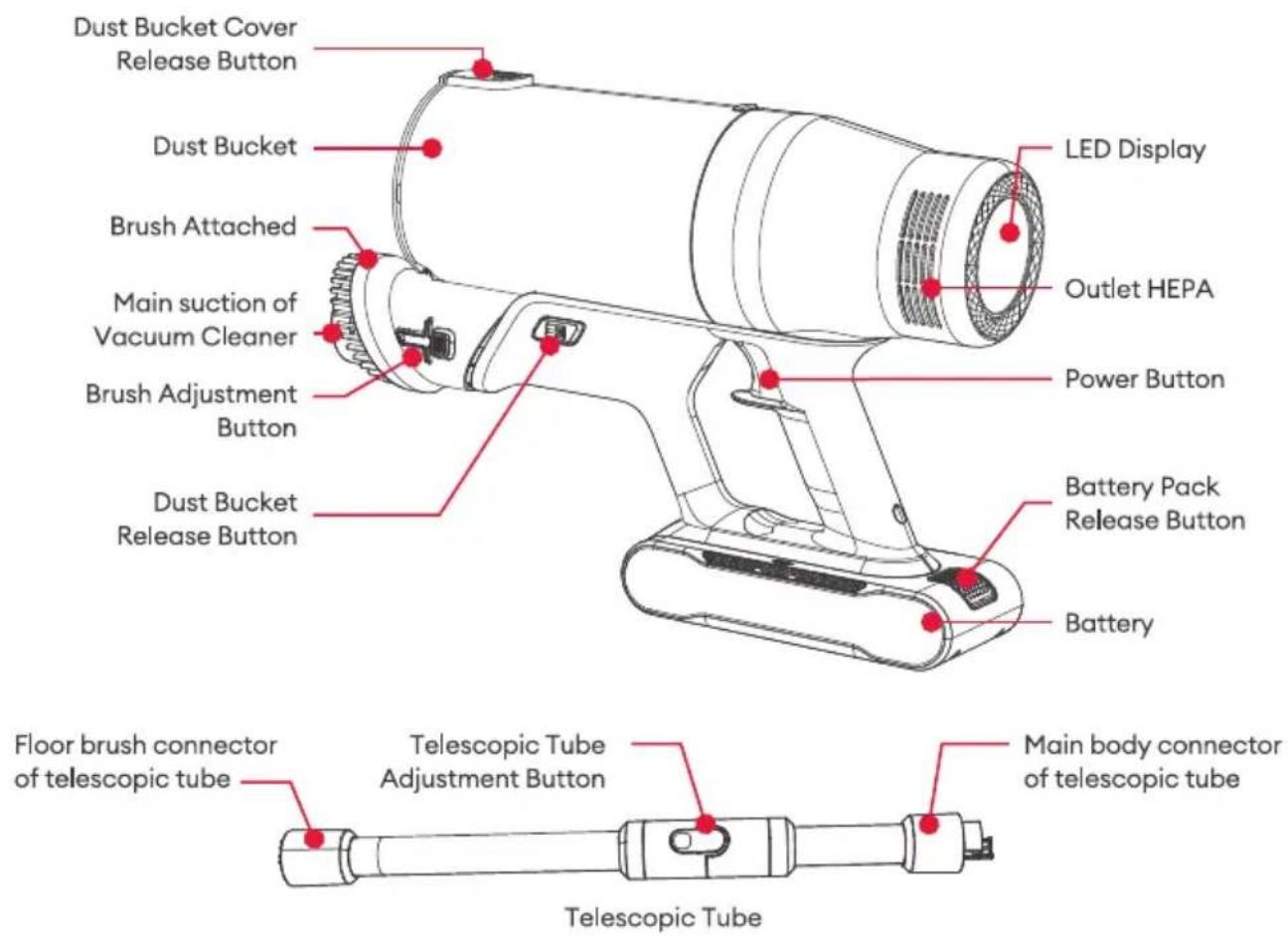
natural_image
Technical line drawing of a mechanical component with screws and a separate view of its base (no text or symbols)
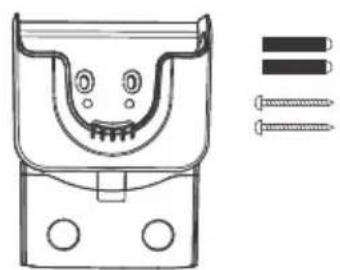
Vacuum Cleaner Storage Rack
natural_image
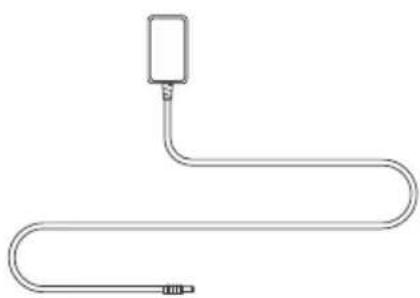
Pure diagram of a U-shaped pipe with a rectangular component attached (no text or symbols)Power Adaptor

natural_image
Technical line drawing of a mechanical valve assembly (no text or symbols)Floor Brush
PRODUCT ASSEMBLY

Notes
- The power supply of the vacuum cleaner needs to be shut off before installing and replacing accessories.
- This product cannot keep itself upright without a fixed support. Please place the machine and accessories firmly!
1. Battery installation and removal
Installation: Insert the battery pack into the main body and hear a click sound of the battery pack release button.
Removal: Press the battery pack release button and pull out the battery pack.

natural_image
Line drawing of a handheld device with a cylindrical lens and attached base (no text or symbols)
2. Install the metal tube and floor brush
Connect the metal tube and the floor brush to the main boy in turn. The clicking sound of the metal tube connection button and the floor brush connection button indicate that the connection is done properly, as shown in the figure.

PRODUCT ASSEMBLY
3. Install accessories of vacuum cleaner
As shown in the picture, the product supports the installation of accessories, such as long crevice nozzle. Install the long crevice nozzle and hear a clicking sound to indicate that the installation is complete.

4. Remove and install the dust bucket
Remove the dust cup: I. Press both dust cup release buttons at the same time with one hand, and remove the dust cup upwards with the other hand.
Install the dust cup: II. Align the dust cup limit buckle, press down the dust cup, hear the click sound, the dust cup installation is complete.
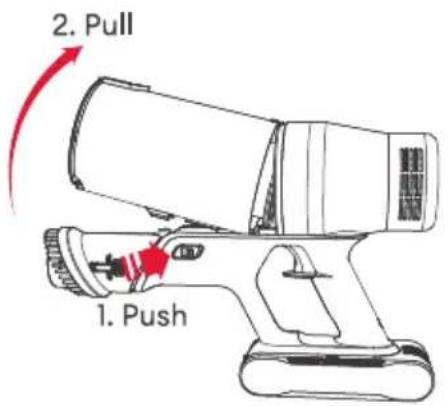
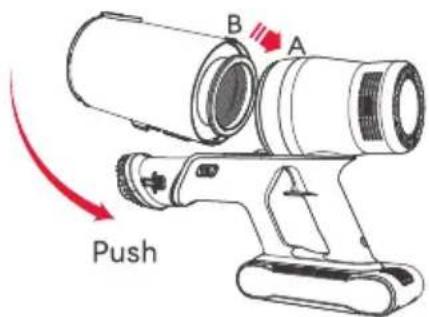
PRODUCT ASSEMBLY
5. Use the telescopic tube
Press the telescopic tube adjusting button to make the telescopic tube in the folding state, lift the telescopic tube upward and hear the clicking sound, the telescopic tube turns into a straight tube.

natural_image
Illustration of two hand tools with red directional arrows indicating movement or force (no text or symbols)6. Use the wall hanger
Install the wall hanger: Insert the expansion tube into the pre-mounting holes on the wall, thread two fixing screws through the two mounting holes of the wall hanger, align the fixing screws with the expansion tube holes, insert the fixing screws into the expansion tube holes, and tighten the screws clockwise.
Use the wall hanger: after the wall mount is fixed, hang the vacuum on the charging wall mount, insert the attachment of the vacuum cleaner into the fixing holes of the side wall mount to fix it, insert the adapter into the hole of the charging wall mount, the machine will be charged automatically when the machine is hung into the charging wall mount.

natural_image
Technical line drawing of a mechanical bracket with screws and fasteners, no text or symbols present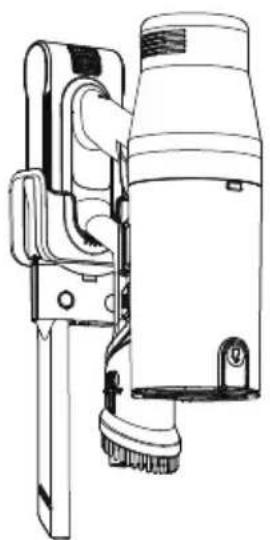
natural_image
Technical line drawing of a mechanical device with no visible text or symbolsUSE OF VACUUM
1. Charging the vacuum
I. Firstly, insert the charging adapter plug into the AC outlet, and then insert the adapter charging head into the main unit for direct charging.
II. You can also dismantle the battery pack and use the adapter to charge it separately.
III. Insert the charging adapter into the charging wall mount, and then put the host directly on the wall mount for charging.
2. Switching on and off and switching gears
natural_image
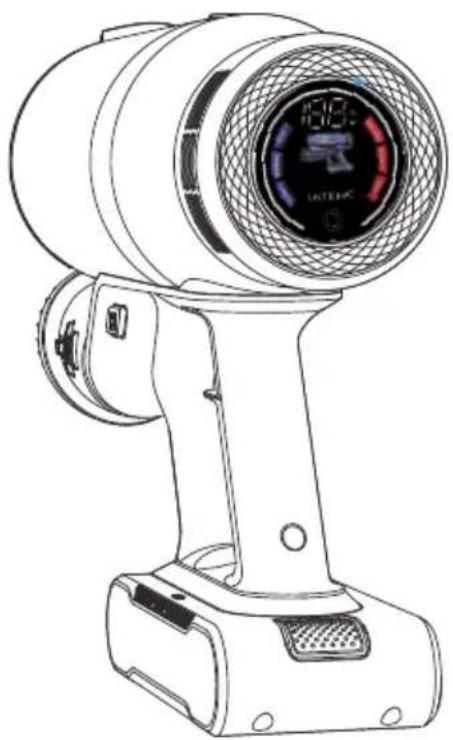
Line drawing of a handheld industrial fan or pressure gun with a circular vent and mesh grille (no text or symbols)Power Button “ ⏻ ”: In case of sufficient power, click the power button to turn on the machine, and click the power button again to turn off the machine.
Gear Adjustment Button “ ☐ ”: the machine defaults to NORMAL gear under power-on condition, click the adjustment button again to switch the gear to TURBO gear, click the gear again to switch to ECO gear (the machine will be shut down when clicking the power button under any gear)
Battery Display “☐”: 100% of battery is displayed when the battery is fully charged after powering on.
Under discharging state, when the power is less than 20%, the charging indicator light will flash green twice in 1 second.
When the power is less than 5%, the battery light will flash red twice in 1 second;
USE OF VACUUM
3. Lamp display situation
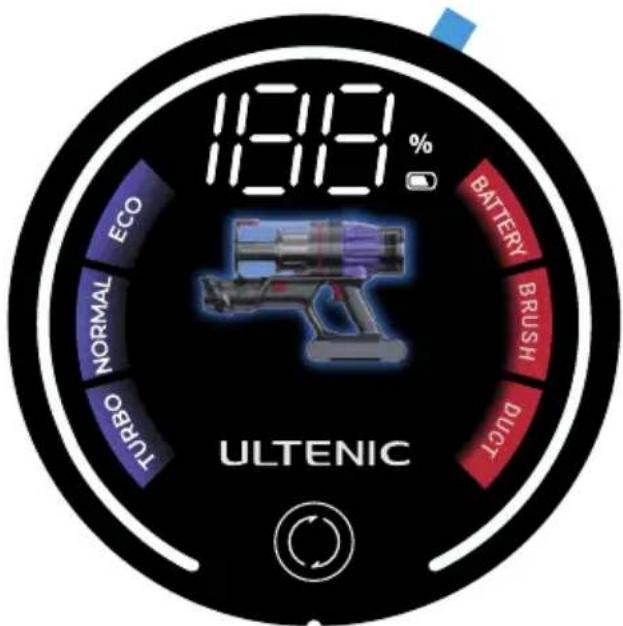
Charge Protection "

": 100% of battery
is displayed when the battery is fully charged after powering on.
Under discharging state, when the power is less than 20%, the charging indicator light will flash green twice in 1 second.
When the power is less than 5%, the battery light will flash red twice in 1 second;
Floor Brush Blocking Protection "

“
when the floor brush is blocked, the brush will be blocked after 1 impact, the host will not stop, the icon will flash at 0.6HZ for 8s (the floor brush will be blocked and the host will not stop).
The icon will flash at 0.6HZ for 8s (the floor brush stops blocking, the host does not stop);
Duct Clogging Protection "

": when the
identification of duct clogging icon to 0.6HZ blinking, for 8s after shutdown.
Maintenance
Clean the dust bucket and filter

Clean the HEPA
If the vacuum cleaner is blocked or the suction drops significantly during normal operation, the HEPA should be cleaned. Take down the dust bucket of the vacuum cleaner, take out the HEPA from the dust bucket, remove the dust from the HEPA, knock the HEPA or wash it with clean water, and then dry the HEPA in the sun, and then put it back into the dust bucket after the HEPA is completely dried.
Don't bend or twist the HEPA during cleaning or rinsing. The HEPA can only be used after been completely dried.

natural_image
Line drawings of a faucet and a mechanical component (no text or symbols)Cleaning of electric floor brush
- As shown in the picture, push the lock button down to the unlocked state, and take out one end of the roller brush and pull out the whole brush.
Note: when pulled out, some of the dusts will fall.
- As shown in the picture, clean up the wound hair or debris on the roller brush. If it is washed with water, it must be dried after rinsing before it can be put back to use.

flowchart
graph TD
    A["Start: Hand presser with valve"] --> B{Adjustment}
    B -->|Yes| C["Close-up sensor"]
    B -->|No| D["Close-up water tap"]
    C --> E["Assembly step"]
    D --> F["Assembly step with valve"]
    E --> G["End"]
Troubleshooting
| Fault | Possible Issues | Solution |
| The machine can not be started | The battery is not installed correctly | Please install the battery correctly |
| The battery is dead | Charge the battery | |
| Vacuum cleaner has no suction/suction becomes smaller | The dustbin is full | Please empty the rubbish in the dustbin |
| The suction of the dust pipe or floor brush is blocked by a foreign body | Clean up the suction of the dust pipe or floor brush | |
| Dustbin or HEPA is not installed correctly | Reinstall the dustbin and HEPA | |
| Filter HEPA blockage | Clean and filter HEPA, dry it and put it back | |
| Dust is leaking from the air outlet | HEPA is not installed correctly | Install HEPA correctly |
| The roller brush stops turning, and the floor brush blockage indicator lights up in red | The roller brush is entangled or stuck, resulting in protection | Clear the winding or blockage and turn it back on |
| The full dust indicator lights up in red | The dustbin is full | The dustbin needs to be dumped |
Note:
- This vacuum cleaner must be used with the original battery and power adapter.
- Do not use the battery for any purpose other than this vacuum cleaner.
Specifications
Please use the original charger of this product for charging.
| Working Voltage | 29.6V |
| Battery Capacity | 2200mAh |
| Rated Power | 500W |
| Adapter Rated Input | 100-240V~50/60Hz |
| Adapter Rated Output | 36V == 0.5A |

- IMPORTANT SAFETY INSTRUCTIONS
- WARNING:
- To reduce the risk of injury or damage, please observe the following safety precautions when installing, using and maintaining the device:
- Restrictions
- FCC Compliance Statement
- OVERVIEW
- PRODUCT ASSEMBLY
- Battery installation and removal
- Install the metal tube and floor brush
- Install accessories of vacuum cleaner
- Remove and install the dust bucket
- Use the telescopic tube
- Use the wall hanger
- USE OF VACUUM
- Charging the vacuum
- Switching on and off and switching gears
- Lamp display situation
- Charge Protection "
- Floor Brush Blocking Protection "
- Duct Clogging Protection "
- Maintenance
- Clean the HEPA
- Cleaning of electric floor brush
- Note:
- Specifications
Marque : Ultenic
Modèle : U16 Flex
Catégorie : Aspirateur