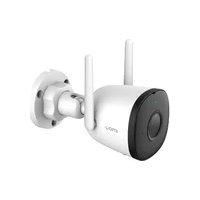
Bullet 2C - Appareil photo IMOU - Notice d'utilisation et mode d'emploi gratuit
Retrouvez gratuitement la notice de l'appareil Bullet 2C IMOU au format PDF.


| Type de produit | Caméra de surveillance IP |
| Marque | Imou |
| Modèle | Bullet 2C |
| Résolution | 2 Mégapixels (1920x1080) |
| Angle de vue | 106° (diagonale) |
| Vision nocturne | Oui, jusqu'à 30 mètres |
| Alimentation | PoE (802.3af) ou adaptateur 12V DC |
| Consommation électrique | 5 W maximum |
| Dimensions (L x l x H) | 72 x 72 x 152 mm |
| Poids | 320 g |
| Matériau du boîtier | Métal et plastique |
| Indice de protection | IP67 (résistant à la pluie) |
| Stockage | Carte microSD jusqu'à 256 Go ou cloud |
| Connectivité | Wi-Fi 2.4 GHz, Ethernet RJ45 |
| Fonctions principales | Détection de mouvement, alarme, audio bidirectionnel |
| Application mobile | Imou Life (iOS/Android) |
| Entretien et nettoyage | Nettoyer la lentille avec un chiffon doux et sec |
| Sécurité | Cryptage AES 128 bits, conformité RGPD |
| Pièces détachées et réparabilité | Aucune pièce détachée disponible, appareil non réparable par l'utilisateur |
| Garantie | 2 ans |
FOIRE AUX QUESTIONS - Bullet 2C IMOU
Questions des utilisateurs sur Bullet 2C IMOU
0 question sur cet appareil. Repondez a celles que vous connaissez ou posez la votre.
Poser une nouvelle question sur cet appareil
Téléchargez la notice de votre Appareil photo au format PDF gratuitement ! Retrouvez votre notice Bullet 2C - IMOU et reprennez votre appareil électronique en main. Sur cette page sont publiés tous les documents nécessaires à l'utilisation de votre appareil Bullet 2C de la marque IMOU.
MODE D'EMPLOI Bullet 2C IMOU
About the Guide
- This quick start guide is for reference only. Minor difference might be found in user interface.
- All the design and software here are subject to change without prior written notice.
- All trademarks and registered trademarks mentioned are the properties of their respective owners.
- Please visit our website or contact your local service engineer for more information.
- If there is any uncertainty or controversy, please refer to our final explanation.
Operating with Imou Life AppOperating
Step 1
Scan the following QR code or search "Imou Life" in Google Play or App Store to download and install the app.
Note: If you have installed the app, update it to the latest version.

Step 2
Run Imou Life App, and then register an account for the first use.
Step 3
Connect the camera to power source with the power adapter.
Step 4
Wait for booting to be finished, and then the camera indicator flashes with green light.
Step 5
Do the following operations to finish adding camera.
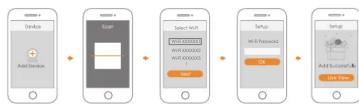
Note:
If you have more than one camera, do step 5 to add them one by one.
If the Wi-Fi network has changed or the indicator status goes wrong, reset the camera, and then do step 5 to add it again.
Installing Camera
Note: Make sure that the mounting surface is strong enough to hold at least three times of the device weight.

Step1 Drill screw holes on the mounting surface as the positioning map shows, and then put in the expansion bolts. Step2 Attach the pedestal to the mounting surface with the self-tapping screws.
Step3 Power up the camera, and then adjust the lens to the ideal angle.
Imou
Quick Start Guide
Version 1.0.0

Packing ListPacking

Camera ×1

Positioning Map ×1

Power Adapter ×1

Screw Package ×1

QSG ×1

Waterproof Connector ×1
Camera IntroductionCamera
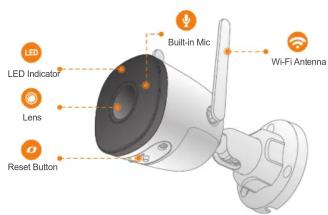

Note: Press and hold the reset button for 10 s to reset the camera.
The pattern of the LED indicator is included in the following table.
LED Indicator Status Device Status
| Off | Powered off/LED turned offRebooting after reset |
| BootingDevice malfunction | |
| Red light on | |
| Green light flashing | Waiting for network |
| Green light on | Operating properly |
| Red light flashing | Network connection failed |
| Green and red lights flashing alternately | Firmware updating |
Marque : IMOU
Modèle : Bullet 2C
Catégorie : Appareil photo