
WS4938 - Déclencheur à distance DSC - Notice d'utilisation et mode d'emploi gratuit
Retrouvez gratuitement la notice de l'appareil WS4938 DSC au format PDF.


| Type de produit | Déclencheur à distance (émetteur radio pour système d'alarme) |
| Marque | DSC |
| Modèle | WS4938 |
| Dimensions | Environ 70 x 35 x 15 mm |
| Poids | Environ 30 g (avec pile) |
| Alimentation | Pile lithium CR2032 3V |
| Autonomie de la pile | Jusqu'à 5 ans en utilisation normale |
| Fréquence de transmission | 433 MHz (typique pour systèmes d'alarme) |
| Portée maximale | Jusqu'à 100 m en champ libre |
| Fonctions principales | Transmission de signal d'alarme, bouton d'urgence panique, indicateur LED de fonctionnement |
| Entretien et nettoyage | Nettoyer avec un chiffon doux et sec. Ne pas utiliser de solvants. |
| Conditions d'utilisation | Intérieur uniquement, température de 0°C à 50°C |
| Sécurité | Code de sécurité anti-rejeu, cryptage KeeLoq |
| Pièces détachées et réparabilité | Pile de rechange CR2032 disponible. L'appareil n'est pas réparable par l'utilisateur. |
| Informations générales | Déclencheur à distance DSC WS4938. Utilisé comme émetteur pour systèmes d'alarme DSC. |
| Contenu de l'emballage | 1 déclencheur WS4938, 1 pile CR2032 installée, 1 notice d'utilisation |
FOIRE AUX QUESTIONS - WS4938 DSC
Questions des utilisateurs sur WS4938 DSC
0 question sur cet appareil. Repondez a celles que vous connaissez ou posez la votre.
Poser une nouvelle question sur cet appareil
Téléchargez la notice de votre Déclencheur à distance au format PDF gratuitement ! Retrouvez votre notice WS4938 - DSC et reprennez votre appareil électronique en main. Sur cette page sont publiés tous les documents nécessaires à l'utilisation de votre appareil WS4938 de la marque DSC.
MODE D'EMPLOI WS4938 DSC
Operating Instructions
Introduction
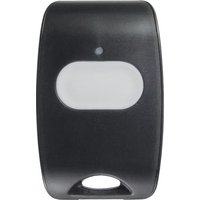
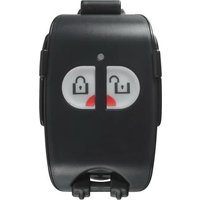
The WS4938 Wireless Panic Button was designed to transmit an emergency signal from any location within the range of the alarm system, regardless if the system is armed or disarmed.
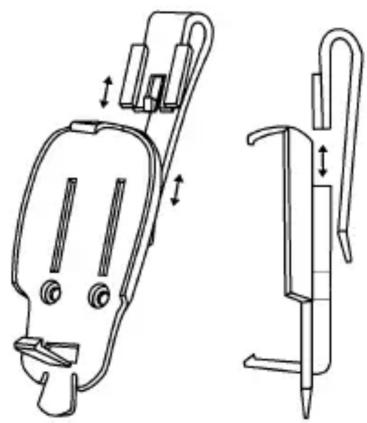
The button is small and lightweight enough to be placed in a shirt pocket or tucked away inside a purse. It can also be used with the supplied neck strap or multi-functional clip - which can connect to your belt, car visor or be permanently mounted to a convenient location.
To activate, press and hold the button for approximately 2 seconds. The LED located on the top of the unit will light up to confirm a signal has been sent.

natural_image
Line drawing of a handheld device with a circular top and handle (no text or symbols)NOTE: Signals will not be received if the button is not within range of the wireless receiver.
Activating, Enrolling and Programming
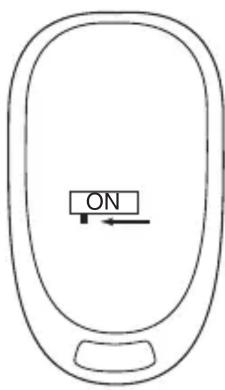
To conserve battery power the button comes deactivated. To activate simply remove the cover and slide the switch to the ON position (to the left).
This device is supervised. If the unit is removed from the coverage range a trouble will be indicated on the system. If this is not desired, the supervisory bit for this zone can be disabled on the receiver.
NOTE: For UL Listed installations, the supervisory bit in the receiver must be enabled.
The following outlines the basic steps for programming and enrolling this device on PowerSeries receivers.
For additional options or for other receivers please refer to the specific receiver installation manuals.
Step 1 - Program Electronic Serial Number (ESN)
Section [804], subsections [01] - [32]
[01] Zone 1 | | | | | | | ... [32] Zone 32 | | | | | | |
Enter the 6 digit ESN located on the back of the device into the next available zone slot.
Step 2 - Program Zone Definition
Section [001] - [004]
Define the selected zone number with appropriate zone type [e.g., 24hr Panic (16), 24hr Holdup (12), 24hr Medical (15)]
Step 3 - Enable Wireless Zone Attribute
Section [101] - [132]
Turn Option [8] ON (wireless zone attribute) in corresponding zone attribute section
Step 4 - Enable/Disable Supervision (default is enabled)
Section [804], subsections [82] - [85]
[82] Wireless Zone Supervision (Zones 1-8)
Default = ON
OPTION ON OPTION OFF
| Option 1 Zone 01 Supervision Enabled Disabled
: : :
| Option 8 Zone 08 Supervision Enabled Disabled
[83] Wireless Zone Supervision (Zones 9-16)
[84] Wireless Zone Supervision (Zones 17-24)
[85] Wireless Zone Supervision (Zones 25-32)
Compatibility
The WS4938 is compatible with the following receivers:
- PC4164-433 (v3.00 or greater) • PC5132-433 (v4.2X or greater)
- RF5501-433
- RF5108-433
- NT9005
Replacing the Batteries
Under normal conditions the batteries can last up to 2 years. If the battery is low, the trouble light on the keypad will turn ON.
To replace the batteries, remove the top cover by inserting a coin into the slot located on the bottom right corner and twist. Remove the screw at the center of the board to expose the batteries. Replace both batteries with Panasonic CR-2025 lithium batteries (see diagram).
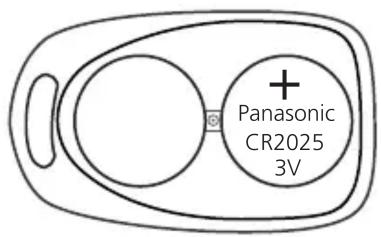
The NT9005 v1.02 requires that the serial number of the WS4938 be deleted and re-enrolled in order to restore the low battery.
NOTE: The polarity of the battery must be observed, as shown in the diagram above. Improper handling of lithium batteries may result in heat generation, explosion or fire, which may lead to personal injuries.
WARNING: Danger of explosion if batteries are installed incorrectly. Replace only with the same or equivalent type recommended by the manufacturer. Keep away from small children. If Batteries are swallowed, promptly see a doctor. Do not try to recharge these batteries. Disposal of used batteries must be made in accordance with the waste recovery and recycling regulations in your area.
Belt Clip Assembly and Mounting
natural_image
Technical line drawing of a mechanical device with two views: top shows internal components, bottom shows external hardware (no text or symbols)
natural_image
Technical line drawing of a mechanical component with two views: top shows internal parts, bottom shows a pin inserted into a slot (no text or symbols)Specifications
- 32^ to 120^ (0^ - 49^)
- 5-93% RH
- Water Resistant
FCC COMPLIANCE STATEMENT
This device complies with Part 15 of the FCC Rules. Operation is subject to the following two conditions: (1) This device may not cause harmful interference, and (2) this device must accept any interference received, including interference that may cause undesired operation.
IC: 160A-WS4938 The term 'IC:' before the radio certification number only signifies that Industry Canada technical specifications were met.
UL and ULC Listed.

- Operating Instructions
- Introduction
- Activating, Enrolling and Programming
- Step 1 - Program Electronic Serial Number (ESN)
- Step 2 - Program Zone Definition
- Step 3 - Enable Wireless Zone Attribute
- Step 4 - Enable/Disable Supervision (default is enabled)
- OPTION ON OPTION OFF
- Compatibility
- Replacing the Batteries
- Belt Clip Assembly and Mounting
- Specifications
- FCC COMPLIANCE STATEMENT
Marque : DSC
Modèle : WS4938
Catégorie : Déclencheur à distance