
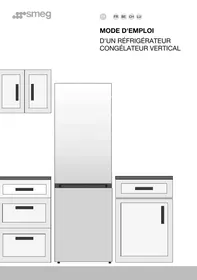
KCVB9B - Réfrigérateur combiné SMEG - Notice d'utilisation et mode d'emploi gratuit
Retrouvez gratuitement la notice de l'appareil KCVB9B SMEG au format PDF.


| Type de produit | Hotte aspirante |
| Marque | SMEG |
| Modèle | KCVB9B |
| Alimentation électrique | 230 VAC – 50/60 Hz |
| Consommation en veille | 20 mA |
| Charge maximale connectable (éclairage) | 150 W |
| Charge maximale connectable (moteur) | 400 W (moteurs à condensateur uniquement) |
| Type de commande | Électronique à microprocesseur |
| Affichage | 2 chiffres + témoins |
| Clavier | 10 touches tactiles |
| Vitesses moteur | 4 vitesses (V1 à V4) + mode Boost |
| Mode Boost | 10 minutes, retour automatique à la vitesse précédente |
| Fonction 24h Air Change | Débit d'environ 100 m³/h |
| Arrêt différé (Delay) | 30 minutes (moteur + éclairage) |
| Variation d'intensité lumineuse | 4 niveaux (hors intensité maximale) |
| Filtres | Filtres à graisse métalliques + filtre à charbon actif (optionnel) |
| Alarme saturation filtre métallique | Après 100 heures de fonctionnement (affichage FF) |
| Alarme saturation filtre à charbon | Après 200 heures de fonctionnement (affichage EF) – si activée |
| Verrouillage clavier | Oui (appui long sur Boost) |
| Télécommande infrarouge | Optionnelle (activation en configuration) |
| Mémoire non volatile | EEPROM pour stockage des réglages |
| Connexion carte électronique | Nappe plate (10 pôles) sous gaine flexible |
| Détection automatique de fréquence réseau | 50 Hz ou 60 Hz |
FOIRE AUX QUESTIONS - KCVB9B SMEG
Questions des utilisateurs sur KCVB9B SMEG
0 question sur cet appareil. Repondez a celles que vous connaissez ou posez la votre.
Poser une nouvelle question sur cet appareil
Téléchargez la notice de votre Réfrigérateur combiné au format PDF gratuitement ! Retrouvez votre notice KCVB9B - SMEG et reprennez votre appareil électronique en main. Sur cette page sont publiés tous les documents nécessaires à l'utilisation de votre appareil KCVB9B de la marque SMEG.
MODE D'EMPLOI KCVB9B SMEG
EN

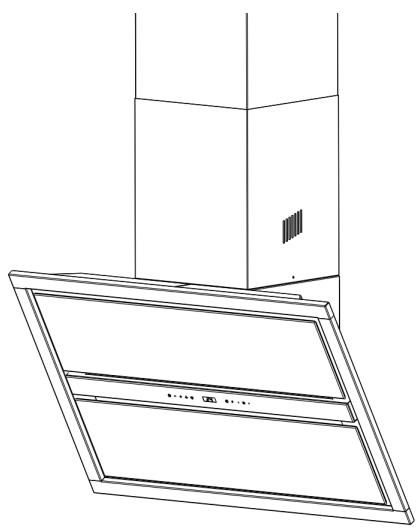
Specific Instruction Manual
EN
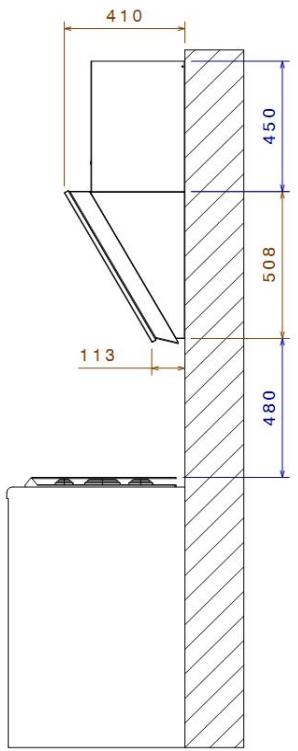
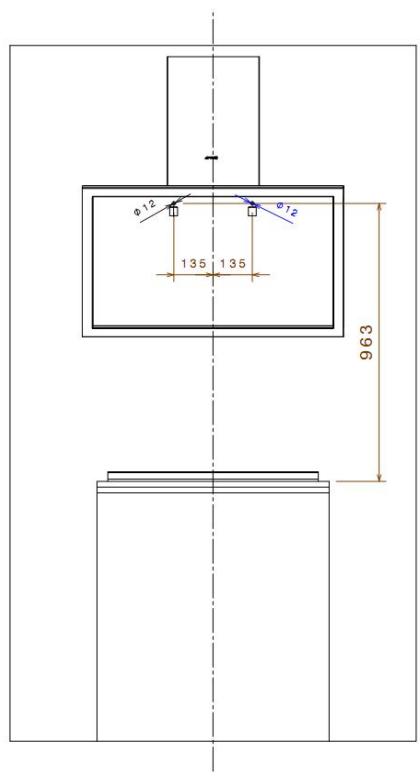
Installation instructions:
Grease filter extraction instructions.
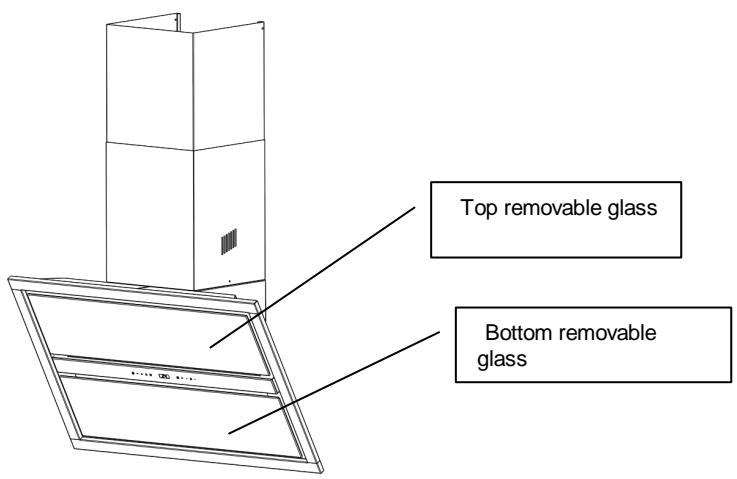
1)Top glass extraction phases:
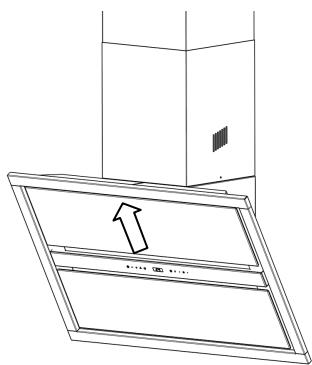
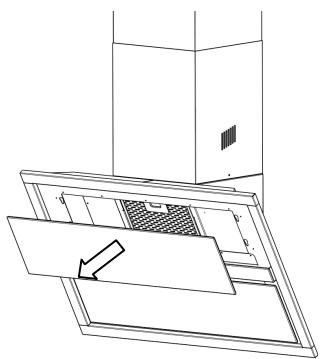
NB: Extract the bottom glass in the same manner.
2) Grease filter extraction:
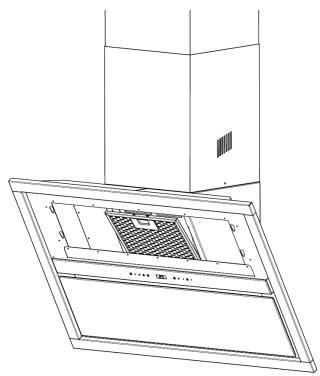
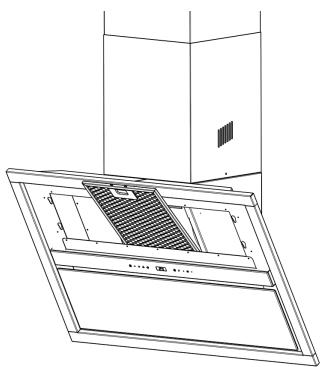
To remove the metal grease filter, follow the instructions carried in the General Instruction Booklet.
EN
Electronic control system instructions for use:
Technical Features:
- Power supply from mains: 230 VAC - 50/60 Hz
- Power consumption in standby: 20 ~mA
- Max. load applicable to LIGHTS connection: 150 W
- Max. load applicable to MOTOR connection: 400 W (capacitor motors only)
- Microprocessor-controlled electronic control system.
- Loads managed by solid-state components, opto-isolated from the mains.
- Hardware and software EMC filtering.
- Connection to electronic control board by flat cable (10 poles) protected by flexible sheath (outside diameter 8mm ). Low voltage circuits (5 V).
- Possibility of operating an optional load at mains voltage.
- Non-volatile internal memory (EEPROM) for storing system settings and flags.
- Optional analog/digital input for sensor and/or external control.
- Phase-cutting motor control.
- SOFT-START light switch: turn the lights on gradually to guarantee better performance of electronic components.
Automatic sensing of mains frequency: number 50 flashing on display = 230 VAC - 50 Hz mains, number 60 flashing on display = 230 VAC - 60 Hz mains, - Software-enabled reception of remote control commands: all the hood's main functions can be controlled by an IR remote control protected by a propriety code, operating at 24 + 1 bit and with an IR carrier frequency of 36KHz .
- Software set-up procedure for selecting and permanently storing blower motor settings and enabling A.C. filter saturation alarm (for filter hoods).
- FILTER saturation alarm and alarm reset control (hour TIMER for hood work).
EN
Operating Features
Keypad with 10 touch buttons + 2 digit display + IR-RX
Buttons from left to right:
MOTOR ON/OFF
Starts and stops the blower motor. The display shows the current speed setting.
- SPEED -
Reduces motor speed: V4 → V3 → V2 → V1
- SPEED +
Increases motor speed: V1 → V2 → V3 → V4
- BOOST-SPEED MODE
Enables BOOST-SPEED mode from any motor speed or when motor is off. To disable BOOST-SPEED, press the button again and stop the motor. BOOST-SPEED mode is set to operate for 10 minutes: during which the display alternatively shows HI and the remaining time and the dot at the bottom right flashes every second.
After 10 minutes the system automatically reverts to the previous speed setting.
24H AIR CHANGE
Starts the blower motor at a speed that provides a flow rate of about 100 m3/h. When 24h AIR CHANGE is enabled the display shows 24. 24h AIR CHANGE cannot be enabled when either BOOST-SPEED or DELAY -OFF is enabled.
- DELAY
Enables and disables the hood's complete shutdown (motor+lights) after 30 minutes: during which the display alternatively shows the motor speed and the minutes remaining and the dot at the bottom right flashes every second.
EN
To disable the DELAY press the button again or stop the motor.
- RESET FILTRI:
Reset the filter saturation alarm if pressed for 2s when all the loads (motor+lights) are off. - If there is a metal Filter sat. alarm, FF appears on the display, after 100 h of operation.
- If there is a CA filter alarm, EF appears on the display after 200h of operation.
- REDUCE LIGHT INTENSITY
- LIGHTS ON/OFF
Turns the hood lights on and off at maximum intensity. The increase/reduce buttons adjust the lights' intensity by 4 steps, excluding max. intensity.
- INCREASE LIGHT INTENSITY
EN
Keypad lock:
Locks keyboard functions (for example, when cleaning the glass surface) when all the loads are off and no alarm is on. To enable/disable this function, press the BOOST-SPEED button for about 5s until the two central segments of every digit on the display light up.
FILTER SATURATION ALARM;
RESETTING THE HOOD WORKING HOURS COUNTER
- After the hood has been running for 100 hours the display shows FF, meaning that the GREASE FILTERS should be cleaned;
- After 200 hours of running, the display shows EF, meaning that the GREASE FILTERS should be cleaned and the A.C. filter cartridges replaced (the latter warning appears only if the A.C. FILTER alarm function has been enabled).
NOTE: The warnings appear on the display only when the blower motor is off.
Direct procedure for enabling/disabling remote control
Turn off the motor and the lights and make sure that no alarms are on (filter saturation). Press and hold the DELAY button for about 5s, until:
- "tc" flashes twice on the display, meaning that the remote control has been enabled;
- "tc" flashes once on the display, meaning that the remote control has been disabled.
SET-UP procedure
The default configuration is as follows:
- 400W motor powered by 230 VAC - 50/60 Hz;
A.C. FILTER saturation alarm disabled;
remote control disabled.
ACCESSING THE SET-UP PROCEDURE:
1) To access the set-up procedure press button 24 for about 5s, until an animation appears on the display; when the animation starts you have about 5 seconds to perform the set-up:
- Press V- to enable/disable the A.C. filter saturation alarm EF flashes twice when enabled and once when disabled
EN
- Press button 24 to enable/disable the remote control receiver; "tc" flashes twice on the display when the remote has been enabled and once when the remote control has been disabled.
- Installation instructions:
- Grease filter extraction instructions.
- EN
- Electronic control system instructions for use:
- Technical Features:
- Operating Features
- Buttons from left to right:
- MOTOR ON/OFF
- - SPEED -
- - SPEED +
- - BOOST-SPEED MODE
- 24H AIR CHANGE
- - DELAY
- Keypad lock:
- FILTER SATURATION ALARM;
- RESETTING THE HOOD WORKING HOURS COUNTER
- NOTE: The warnings appear on the display only when the blower motor is off.
- Direct procedure for enabling/disabling remote control
- SET-UP procedure
- ACCESSING THE SET-UP PROCEDURE:
Marque : SMEG
Modèle : KCVB9B
Catégorie : Réfrigérateur combiné