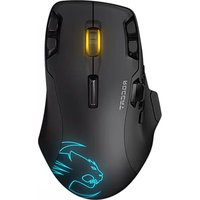
Leadr - Souris ROCCAT - Notice d'utilisation et mode d'emploi gratuit
Retrouvez gratuitement la notice de l'appareil Leadr ROCCAT au format PDF.


| Type de produit | Souris gamer sans fil |
| Marque | ROCCAT |
| Modèle | Leadr |
| Technologie de capteur | Optique Pro-Optic R8 |
| Résolution maximale | 12000 DPI |
| Taux de polling | 1000 Hz |
| Accélération maximale | 50G |
| Nombre de boutons programmables | 15 |
| Éclairage RGB | 16,8 millions de couleurs |
| Connectivité | Sans fil 2,4 GHz et fil USB |
| Alimentation | Batterie Li-Ion rechargeable via station d'accueil |
| Autonomie | Environ 20 heures |
| Dimensions (L x l x H) | 12,6 x 8,9 x 4,3 cm |
| Poids | 134 g (sans câble) |
| Compatibilité logicielle | Windows 7, 8, 10 et macOS |
| Logiciel de configuration | ROCCAT Swarm |
| Contenu de la boîte | Souris, station d'accueil, câble USB, guide de démarrage rapide |
| Entretien et nettoyage | Nettoyer avec un chiffon doux et sec |
| Sécurité | Utiliser à température ambiante, éviter l'humidité |
| Pièces détachées et réparabilité | Batterie non remplaçable par l'utilisateur ; contacter le SAV |
FOIRE AUX QUESTIONS - Leadr ROCCAT
Questions des utilisateurs sur Leadr ROCCAT
0 question sur cet appareil. Repondez a celles que vous connaissez ou posez la votre.
Poser une nouvelle question sur cet appareil
Téléchargez la notice de votre Souris au format PDF gratuitement ! Retrouvez votre notice Leadr - ROCCAT et reprennez votre appareil électronique en main. Sur cette page sont publiés tous les documents nécessaires à l'utilisation de votre appareil Leadr de la marque ROCCAT.
MODE D'EMPLOI Leadr ROCCAT

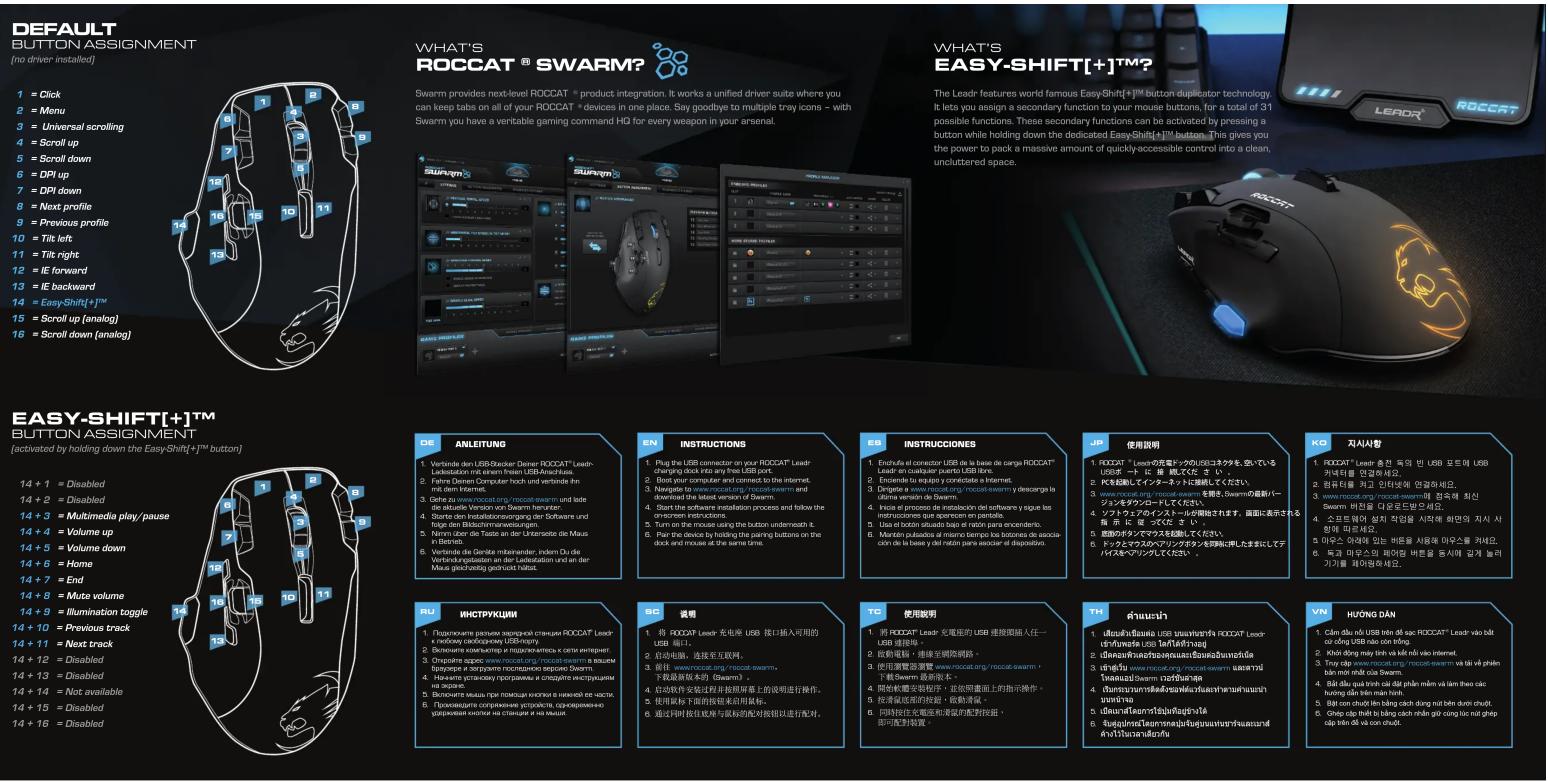
DEFAULT
BUTTON ASSIGNMENT
(no driver installed)
1 = Click
2 = Menu
-
= Universal scrolling
-
- Corollus
4 = Scroll up
5 = Scroll down
6 = DPI up
7 = DPI down
8 = Next profile
9 = Previous profile
0 = Tilt left
- Tilt sigh
1 = 10c Right 2 = 15 forward
2 = IE forward
3 = IE backward
4 = Easy-Shift[+]TM
5 = Scroll up (analog)
6 = Scroll down (analog)
WHAT'S
ROCCAT ^® SWARM?
Swarm provides next-level ROCCAT ^® product integration. It works a unified driver suite where you can keep tabs on all of your ROCCAT ^® devices in one place. Say goodbye to multiple tray icons – with Swarm you have a veritable gaming command HQ for every weapon in your arsenal.
WHAT'S
EASY-SHIFT[+]TM?
The Leadr features world famous Easy-Shift+!™ button duplicator technology. It lets you assign a secondary function to your mouse buttons, for a total of 31 possible functions. These secondary functions can be activated by pressing a button while holding down the dedicated Easy-Shift+!™ button. This gives you the power to pack a massive amount of quickly-accessible control into a clean, uncluttered space.
EASY-SHIFT[+]TM
BUTTON ASSIGNMENT
[activated by holding down the Easy-Shift[+]TM button]
14 + 1 = Disabled
14 + 2 = Disabled
14 + 3 = Multimedia play/pause
14 ± 4 = Volume up
14 + 5 = Volume up
14 + 5 = Volun
14 + 6 = Home
14 + 7 = End
14 + 8 = Mute volume
14 + 9 = Illumination toggle
14 + 10 = Previous track
14 + 11 = Next track
14 + 12 = Next line
14 + 12 - Disabled
14 + 13 = Disabled
14 + 14 = Not available
14 + 15 = Disabled
14 + 16 = Disabled
ANLEITUNG
- Verbinde den USB-Stecker Deiner ROCCAT® Leadr
Ladestation mit einem Inalien USB-Anschluss. - Fahre Deinen Computer hoch und verbinde ihn
mit dem Internet. - Gene zu www.roccat.org/ roccat-swarm und läde die aktuelle Version von Swarm herunter.
- Starte den Installationsvorgang de folge den Bildschirrpanweisungen
- Nimm über die Taste an der Unterseite die Maus
- Verbinde die Geräte miteinander, indem Du die
Verbindungstasten an der Ladestation und an der Maus gleichzeitig gedrückt hältet.
Mitar gieschasing gior telle Halle
INSTRUCTIONS
- Plug the USB connector on your ROCCAT® Lead shopping desk into any free ICP next
- Boot your computer and connect to the internet.
-
Navigate to www.roccat.org/roccat-swarm and download the latest version of Swarm
-
Start the software installation process and follow the
- Inicia el proceso de instalación del software y sigue las
on-screen instructions. 5. Turn on the mouse using the button underneath it instrucciones que aparecen en pantalla. 5. Lisa el botón situado hain el ratón para encenderlo
- Pair the device by holding the pairing buttons on the
- Montén pulsados al mismo tiempo los botones de asoc
dock and mouse at the same time. ción de la base y del ratón para asociar el dispositivo.
INSTRUCCIONES
- Enchufe el conector USB de la base de carga ROCCAT®
- Enciende tu equipo y conéctate a Internet.
- Dingete a www.roccat.org/roccat-swern y descarga la última versión de Swarn
- Inicia el proceso de instalación del software y sigue las
instrucciones que aperecen en pantalla. - Usa el botón situado bajo el ratón para encenderio
- Mantén pulsados al mismo tiempo los botones de asocia
ción de la base y del ratón para asociar el dispositivo.
使用説明
- ROCCAT ^® Leadrの充電ドックのUSBコネクタを、空いている
USBボードに登録してください。 - PBを起動してインターネットに継続してください。
- www.roccat.org/roccat-swarm を聞き、Swarmの最新パ
ジョンをダウンロードしてください。 - クノドウエアのインストールが開始されます。画面に表示される指示に従ってください。
- 店面のボタンでマウスを起動してください
- ドックとマウスのベアリングボタンを同時に押したままにしてデバイスをベアリングしてください。
P. 12. 5. 5. 5.
지시사항
- RODCAT® Leadr 충전 독의 빈 USB 포트에 USB
커넥터를 연결하세요.
2.감류더를 되고 단더듯에 전달하세요. 3.www.mccat.org/coccat-swamp에 적승한
Swarm 버전을 다운로드받으세요. - 소프트웨어 설치 작업을 시작해 화만의 지시 사
항에 따르세요. - 동과 마무스인, 페어링, 버튼을 동시에, 길게 농러
- 속과 바루드의 데어링 바宣言을 경세에 끼게 끼하기기를 케어링하세요.
ИНСТРУКЦИИ
- Подключите разъем зарядной станции ROCCAT® Leader к любому снеборному USB-порту.
- Включите компьютер и подключитесь к сети интернет.
- Откройте адрес www.roccat.org/roccat-swarm в вашем браузере и загрузите последнюю версию Звартт.
- Начните установку программы и следуйте инструкциям
на экране. - Включите мышь при помощи кнопки в нижней ее части.
- Произведите сопряжение устройства, одновременно утвержденной школи на станции и на движим
Uzbekavian кнопки на станцей и на мешки.
说明
- 将 R0CCAT Leadr 充电座 USB 接口插入可用的 USB 溢口
- 启动电脑,连接至互联网。
- 前往 www.roccat.org/roccat-swarm.
下载最新版本的(Swarm)。 - 启动软件安装过程并按照屏幕上的说明进行操作。
-
使用鼠标下面的按钮来启用鼠标。
-
通过同时按住收单与鼠标的配对按钮以进行配对。
使用說明
- 將ROCCAT®Leadr充電座的USB連接頭插入任一USB連接地。
- 啟動電報,連線至國際網路
- 使用瀏覽器瀏覽 www.roccat.c
下载Swarm最新版本。 - 開始軟體安裝程序,並依照畫面上的指示操作。
- 按通貢底複的批製,自動通貢
- 投滑鼠底部的投翅,做勤滑鼠。
- 同时按住充露密和满眼的配射
B. 同時投往光電壓和湧張的配對投組即可配對裝置。
คำแนะนำ
- เสียบตัวเชิ่อมต่อ USB บนแท่นชาร์จ R00CAT® Leadr
2.เปื้อวิชาการ์ของประชาชนปีนที่ - เข้าสเว็บ www.roccat.org/roccat-swamı และดาว
โหลดแอปิพยARM เเวอร์ขันล่าสุด - เริมกระบวนการติดตึงซอฟฟ์แวร์และรหําตามค่าแนะนํา
5.ปีดเมือง์โต - จันต่อปกรณีโดยการทดสอบน้ําดับอยู่
ค้างไว้ในเวลาเดียวกัน
HUỐNG DĂN
- Cảm đầu nối USB trên để sạc ROCCAT® Leadr vào bất gữ cống USB nào còn trống.
- Khói động máy tính và kết n
- Truy cap www.roccat.org/roccat-swarm v
- Bất đầu quá trình cải đặt nhập mềm và làm theo các
- 2017 沈阳区外区南区北区西区西区西区西区西区西区西区西区西区西区西区西区西区西区西区西区西区西区西区西区西区西区西区西区西区西区西区西区西区西区西区西区西区西区西区西区西区西区西区西区西区西区西区西区西区西区西区西区西区西区
- Bật con chuột lên bằng cách dùng nút bên dưới chuột.
- Cherin số thiết bị bằng cáchション più sông lẻ nút enhancing
- Chep cập triet bị bang cach nhân gư công lực hư ghep cập trên để và con chuột.


Marque : ROCCAT
Modèle : Leadr
Catégorie : Souris