
Kova - Souris ROCCAT - Notice d'utilisation et mode d'emploi gratuit
Retrouvez gratuitement la notice de l'appareil Kova ROCCAT au format PDF.


| Type de produit | Souris gaming filaire |
| Marque | ROCCAT |
| Modèle | Kova |
| Dimensions (L x l x H) | 12.5 x 7 x 4 cm |
| Poids | 100 g |
| Alimentation | USB (câble) |
| Capteur | Optique, résolution ajustable (800-4000 DPI) |
| Taux de rapport | 1000 Hz |
| Nombre de boutons | 6 (clics gauche/droite, molette cliquable, deux boutons latéraux, bouton de profil) |
| Éclairage | RGB LED |
| Entretien et nettoyage | Nettoyer avec un chiffon doux sec; éviter les liquides |
| Sécurité | Utilisation conforme aux normes CE; ne pas exposer à l'humidité |
| Pièces détachées et réparabilité | Contactez le SAV pour les pièces; ouverture possible par un professionnel |
| Compatibilité | Windows 7/8/10/11, macOS (via pilotes) |
| Accessoires inclus | Notice d'utilisation |
| Garantie | 2 ans |
FOIRE AUX QUESTIONS - Kova ROCCAT
Questions des utilisateurs sur Kova ROCCAT
0 question sur cet appareil. Repondez a celles que vous connaissez ou posez la votre.
Poser une nouvelle question sur cet appareil
Téléchargez la notice de votre Souris au format PDF gratuitement ! Retrouvez votre notice Kova - ROCCAT et reprennez votre appareil électronique en main. Sur cette page sont publiés tous les documents nécessaires à l'utilisation de votre appareil Kova de la marque ROCCAT.
MODE D'EMPLOI Kova ROCCAT

DEFAULT
BUTTON ASSIGNMENT
(no driver installed)
STANDARD
1 = Left menu button
2 = Right mouse button
2 - Universal scroll
4. «Екту-Ам» (200 ОВИ)
5. = Focus Shift+TV hurr
5 - EBayChem + 7% acquisition
B = L-SHIFT (SHEEN)
7 = L-CTRL button
8 = Escal up
2. = Respond of my
12 - BRI
20 = LIP/ECN
1 = Page up
12 = Page down

WHAT'S
ROCCAT® SWARM?

Swarm provides next-level ROCCAT * product integration. It works a unified driver suite where you can keep beta on all of your ROCCAT * defense in one place. Say goodbye to multiple every icons - with Swarm you have a veritable gaming command HD for every weapon in your answer.

WHAT'S
SMART CAST?
Smart Cast is the name for the two buttons intuitively placed beside mouse 1 and mouse 2. They offer reflexive control for fast-paced games. Coupled with EasyShift[+]TM, you've got some powerful combines at your disposal

natural_image
Close-up of a futuristic computer mouse with blue glowing buttons (no text or symbols visible)ANLEITUNG
- Verbinde deine ROCCAT® Kowe mit einem freien
LED Stenoplasz deines Computers
-
Burschmal Computer work and studies: 2016, 2017
-
In my own sense of respect
-
2016年1月1日,美国国家航空航天局(NASA)宣布
-
Erste d'e Software installation und folge den
JUNZHEN
INSTRUKTIONER
- Bzit USB forbindelsen på d n ROCCAT®KoA
Ind Ten lectig USA port.
-
Start computerization up, my forward channel and inverter
-
Dispersed with registers (recabelware)
on download then need account at Davanna.
- Start software installation, og følp
HAPPY (P=10K)
INSTRUCTIONS
- Plug the USB connector on your R3004T® Kova
Into any free USB port.
- Bank your computer and command to the industry.
- Private to www.nash.com (www.nash.com)
a. Hangale to www.hokai.org/Redo druping the latest version of 5 years
- Start the software installation process and
follow the on screen instructions.
INSTRUCCIONES
- Endura el conector UBB en un puerto UBB
Irenea PODDAT = KAS.
- Fluarix of laboratory manufacturer information.
-
Assets including www.squae.com/
-
"A##e## a la pagina www.bocao.org/102"
-
Based process of installation software
ciga las instruaciones de la pantalla.
OHJEET
- Rota LBB Bindsian RODCAT® Kwa-limocassari
In ihr tenho se vapezene Use-portain - Kiyu nada bubanlava je podicta intumulata
- Kiyu podicta na wanačia se je
- Si Yi 2016, 2017, 1998, 10:15, 10:45, 10:45, 10:45, 10:45, 10:45, 10:45, 10:45, 10:45, 10:45, 10:45, 10:45, 10:45, 10:45, 10:45, 10:45
- Karami di-Richina e Compania
naycónu du la nakevía el cita
ON EASY-SHIFT[+]TM
5 + 1 = IE Backward
5 + 2 = IE Forward
5 + 3 = Volume Mut
5+4 =Play/Boise
5 + 5 = Disabling
5 + 6 - Excluded
5+6=Home
5 + 7 = End!
5 + 8 = Volume up
5 + 9 = Volume dos
5 + 10 = Profilo Cycle
5 + 11 = Бронічна Тра
5 + 19 = Next Tech
6 + 12 = Next Track
INSTRUCTIONS
- Intérrez le sommatique LEE de votre
- All investors are not a interest
-
- BY THE WWW.TOCOL.COM/DOORPORATION
Спартакры и батенеканти по ски «Камп».
- BY THE WWW.TOCOL.COM/DOORPORATION
- Débures l'installation du programme es ouvées
les ind cartons.
INSTRUKCJA
- Pushycrowk USB PODCAT Kow
- Uniclava kumai gavi kala a bitu mato
- Export do eletivwww.tongguo.com/morabaw
- 2017年1月1日
- Pazposenii instalacije opregromowania i postopu.
agodnie z nebrukojami na ekranje.
PT INSTRUÇÕES
- Ligar a concota* USB ao seu RECCAT® Kava
- Lieva a propriação sobriela que funciou:
- Burs d'impôt de la construction of the internet.
- Kungar park www.mazan.org/rozebeetwn
«Восседири и членности техники в Синета» - Imicar o processo de instalação do software e
ИНСТРУЮЦИИ
- Велик USB-сипанцр РООКИТ Кем
- Велическая
- На course на www.mosk.com/пределями и
2014年1月1日 - Наните процесс установки программного
обеспечении и следайте указанным на экране.
INSTRUKTIONER
- S###00C#T ^6 K### LEBkantukli ##
- Entwickaran
- i.e. h://www.morgvum/roselkewerm och leid
гот сит жилищки чолащан и -
Estanta programaru rozaktionen och 101
enteringarna på bil dekremen.
OCAT ^6 Kone LEBkantuktion -
2019年1月24日,公司发布《关于使用部分闲置募集资金进行现金管理的公告》(公告编号:2019-036)。
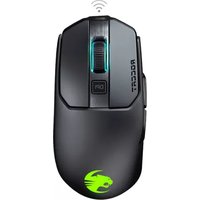
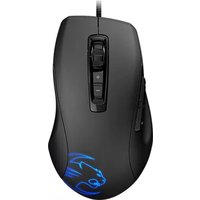
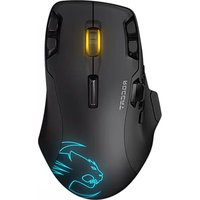


Marque : ROCCAT
Modèle : Kova
Catégorie : Souris