
ACXT145 - Talkie-walkie COBRA - Notice d'utilisation et mode d'emploi gratuit
Retrouvez gratuitement la notice de l'appareil ACXT145 COBRA au format PDF.


| Type de produit | Talkie-walkie |
| Marque | Cobra |
| Modèle | ACXT145 |
| Dimensions (L x l x H) | Environ 13 x 5 x 3 cm |
| Poids | Environ 100 g (avec piles) |
| Alimentation | 3 piles AAA (non fournies) |
| Autonomie estimée | Jusqu'à 20 heures en utilisation normale |
| Fréquence | UHF PMR446 (446 MHz) |
| Nombre de canaux | 16 canaux |
| Codes de confidentialité | 38 codes CTCSS |
| Portée maximale | Jusqu'à 5 km en champ libre |
| Fonction VOX | Oui (mains libres) |
| Fonction scan | Oui (recherche automatique des canaux actifs) |
| Écran LCD | Non |
| Étanchéité | Non, éviter tout contact avec l'eau |
| Entretien et nettoyage | Essuyer avec un chiffon doux et sec. Ne pas utiliser de produits chimiques. |
| Sécurité | Ne pas ouvrir l'appareil. Tenir hors de portée des enfants de moins de 3 ans. Éviter les chocs. |
| Pièces détachées et réparabilité | Aucune pièce détachée disponible. En cas de dysfonctionnement, contacter le service client. |
| Accessoires inclus | Clip ceinture, guide de démarrage rapide (selon version) |
FOIRE AUX QUESTIONS - ACXT145 COBRA
Questions des utilisateurs sur ACXT145 COBRA
0 question sur cet appareil. Repondez a celles que vous connaissez ou posez la votre.
Poser une nouvelle question sur cet appareil
Téléchargez la notice de votre Talkie-walkie au format PDF gratuitement ! Retrouvez votre notice ACXT145 - COBRA et reprennez votre appareil électronique en main. Sur cette page sont publiés tous les documents nécessaires à l'utilisation de votre appareil ACXT145 de la marque COBRA.
MODE D'EMPLOI ACXT145 COBRA
Making Life Easier And Safer
Staying in touch with your family and friends is convenient and easy when using your microTALK® radio. Some of the many uses you will discover include:
Communicating with others while hiking, biking, and working; keeping track of family and friends at a crowded public event; checking with travel companions in another car; talking with neighbors; arranging meeting spots with others while shopping at the mall.
Customer Assistance
In this user's guide, you should find all the information you need to operate your microTALK® radio. If you require further assistance after reading this guide, Cobra offers the following customer assistance services:
For Assistance In The U.S.A.
Customer Assistance Operators English and Spanish.
8:00 a.m. to 5:00 p.m. Eastern Time,
Monday through Friday (except holidays)
866-721-3805 (phone) or
support@altistec.com (email)
www.cobrawalkietalkie.com
Channel Numbers
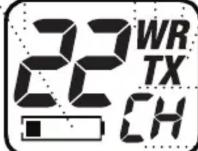
While in Standby mode or when selecting a channel, shows current channel (1 through 22).
When adjusting the volume, shows current level (1 through 8).
● Weather Icon
Visible when in NOAA weather radio mode. You can use your microTALK® radio to listen to weather channels transmitting in your area.
Talk Button
Press and hold to communicate with others. With the microphone about two (2) inches [five (5) cm] from your mouth, speak in a normal voice.
Release the Talk button when you are finished talking and listen for a response. You cannot receive incoming calls while pressing the Talk button.

NOTE Both radios must be tuned to the same channel to communicate.

Call Button
Press and release to alert others that you are calling. This tone is used only to establish voice communications.
Mode/Power Button
Press and hold to turn the radio On or Off.
Press once on the mode button to change channels.
The channel numbers will blink when that mode is selected. Use the Up/Down buttons to select a channel.
Press twice on the mode button to enter the NOAA Weather Channels. Use the Up/Down buttons to select the strongest weather channel in your area.

Speaker/Microphone Jack
Battery Low Icon
Icon blinks and an audible tone will be heard when battery power level is low.
Your microTALK® radio has a unique circuit designed to extend battery life. If there are no transmissions within ten (10) seconds, the radio will automatically switch to Battery Save mode. This will not affect the radio's ability to receive incoming transmissions.
Receive Icon
Visible when receiving a message.
● Transmit Icon
Visible when transmitting a message.
Channel/Volume : Indicator
Visible when receiving a message.
"CH" is visible when in Standby mode or when selecting a channel. "LE" is visible when adjusting volume.
USB Charge Jack
Up/Down Buttons
Press and release to adjust the volume.
While in mode function, press and release to change channels.

Maximum range may vary and is based on unobstructed line-of-sight communication under ideal conditions.
Installing Batteries
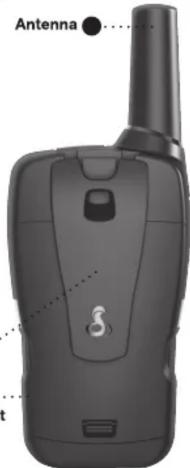
Remove Belt Clip
To Install or Replace Batteries:

- Remove belt clip by releasing belt clip latch and sliding clip up.
- Pull up on the battery door latch to remove the battery compartment cover.
- Insert three (3) AAA batteries. Position batteries according to polarity markings.
- Replace battery compartment cover and belt clip.
- Do not attempt to charge alkaline batteries
- Do not mix old and new batteries.
- Do not mix alkaline, standard (carbon-zinc), or rechargeable (Ni-Cd, Ni-MH, etc.) batteries.
During charging, your radios will show one of the following: 1) The low battery icon will flash to show charging action. -or- 2) The display will show circling icon to show charging action. It is recommended to turn OFF the radios during charging. Charge the radios for 16 hours.
Trademark Acknowledgment
Manufactured, distributed, or sold by Altis Global Limited, official licensee for this product. Cobra®, microTalk®, Nothing Comes Close to a Cobra®, and the snake design are registered trademarks of Cobra Electronics Corporation, USA. Cobra Electronics Corporation™ is a trademark of Cobra Electronics Corporation, USA. All other product or service names are the property of their respective owners.
©2016 Altis Global Limited, Berkeley Lake, GA, USA. All rights reserved.
Limited One-Year Warranty
Altis Global Limited warrants that this product and the component parts thereof, will be free from defects in workmanship and materials for a period of one year from the date of first consumer purchase. This warranty may be enforced by the first consumer purchaser, and is not transferable. If the product is under warranty, it will be repaired or exchanged depending on the model at Altis' sole discretion. Such remedy may be your sole and exclusive remedy for any breach of warranty.
The procedure for obtaining service and support, and the applicability of this warranty, will vary depending on the country or jurisdiction in which you purchase and utilize the product. For details on obtaining product service, support and warranty please visit www.cobrawalkietalkie.com.
Provided that the product is utilized in the U.S.A., Altis will, without charge, repair or replace, at its option, defective products, products or component parts upon delivery to the authorized Altis Global Limited Authorized Service Center, accompanied by proof of the date of first customer purchase, such as a duplicated copy of a sales receipt.
You must pay any initial shipping charges required to ship the product for warranty service, but the return charges, to an address in the U.S.A., will be at Altis' expense, if the product is under warranty.
This warranty gives you specific legal rights, and you may also have other rights which vary from state to state and country to country.
Exclusions:
This limited warranty does not apply: 1) To any product damaged by accident; 2) In the event of misuse, ordinary wear, failure to follow directions, or improper maintenance of the product or as a result of unauthorized alterations or repairs; 3) If the serial number has been altered, defaced, or removed; 4) If the product was purchased or is utilized in a jurisdiction not covered by the limited warranty. All implied warranties, including warranties of merchantability and fitness for a particular purpose are limited in duration to the length of this warranty. Altis shall not be liable for any inconsequential or other damages, including without limitation, damages resulting from the loss of use or cost of installation.
Some states and countries do not allow limitations on how long an implied warranty lasts and do not allow the exclusion or limitation of incidental or consequential damages, so the above limitations may not apply to you. This warranty gives you specific legal rights, and you may also have other rights which vary from state to state and country to country.
For Products Purchased Outside The U.S.A.
Please contact your local dealer for warranty information.
IMPORTANT NOTICE: FCC LICENSE REQUIRED
This two-way radio operates on GMRS (General Mobile Radio Service) frequencies which require an FCC (Federal Communications Commission) license. A user must be licensed prior to operating on Channels 1 through 7 on high power or 15 through 22, which comprise the GMRS channels of this radio. Serious penalties could result for unlicensed use of GMRS channels, in violation of FCC rules. Operation of this radio is subject to additional rules specified in 47 C.F.R. Part 95. Licensed users will be issued a call sign by the FCC, which should be used for station identification when operating this radio. GMRS users should also cooperate by engaging in permissible transmissions only, avoiding channel interference with other GMRS users, and being prudent with the length of their transmission time.
For licensing information and application forms, please call the FCC Hotline at 800-418-FORM. Request form #159 and form #605. Questions regarding the license application should be directed to the FCC at 888-CALL-FCC. Additional information is available on the FCC's website at www.fcc.gov.
Channel 1 through 7 on low power and channels 8 through 14 comprise the FRS (Family Radio Service). No license is required to operate on the FRS.
WARNING: Changes or modifications to this unit not expressly approved by the party responsible for compliance could void the user's authority to operate the equipment.
This device complies with part 15 of the FCC Rules. Operation is subject to the following two conditions: 1) This device may not cause harmful interference, and 2) this device must accept any interference received, including interference that may cause undesired operation.
NOTE: This equipment has been tested and found to comply with the limits for a Class B digital device, pursuant to part 15 of the FCC Rules. These limits are designed to provide reasonable protection against harmful interference in a residential installation. This equipment generates, uses and can radiate radio frequency energy and, if not installed and used in accordance with the instructions, may cause harmful interference to radio communications.
However, there is no guarantee that interference will not occur in a particular installation. If this equipment does cause harmful interference to radio or television reception, which can be determined by turning the equipment off and on, the user is encouraged to try to correct the interference by one or more of the following measures:
- Reorient or relocate the receiving antenna.
- Increase the separation between the equipment and receiver.
- Connect the equipment into an outlet on a circuit different from that to which the receiver is connected.
- Consult the dealer or an experienced radio/TV technician for help.
Safety Information For microTALK® Radios
Your wireless handheld portable transceiver contains a low power transmitter. When the Talk button is pushed, it sends out radio frequency (RF) signals. The device is authorized to operate at a duty factor not to exceed 50%. In August 1996, the Federal Communications Commissions (FCC) adopted RF exposure guidelines with safety levels for handheld wireless devices.
Important:
Normal Position:
Product Service and Support
FCC RF Exposure Requirements: For body-worn operation, this radio has been tested and meets the FCC RF exposure guidelines when used with Cobra accessories supplied or designated for this product. Use of other accessories may not ensure compliance with FCC RF exposure guidelines. Use only the supplied antenna. Unauthorized antennas, modifications, or attachments could damage the transmitter and may violate FCC regulations.
Hold the transmitter approximately two (2) inches from your face and speak in a normal voice, with the antenna pointed up and away.
For any questions about operating this new Cobra branded product, PLEASE CONTACT US FIRST... do not return this product to the retail store. The contact information for support will vary depending on the country in which you purchased and utilize the product.
To obtain warranty service or other information for products purchased and utilized in the U.S.A., please call our consumer support line at (866) 721-3805, or email us at
support@altistec.com. You will receive instructions on how to ship the products at your expense to an Altis Global Limited Authorized Service Center. To obtain service, you must include: (a) a copy of your receipt, bill of sale or other comparable proof of purchase; (b) a written description of the problem; and, most importantly; (c) your address and telephone number.
For warranty and customer service information outside the US, please contact your local dealer.
For further information needed on its features, please visit
www.cobrawalkietalkie.com for frequently asked questions and the electronic manual.



- MAKING LIFE EASIER AND SAFER
- CUSTOMER ASSISTANCE
- FOR ASSISTANCE IN THE U.S.A
- CHANNEL NUMBERS
- ● WEATHER ICON
- TALK BUTTON
- CALL BUTTON
- MODE/POWER BUTTON
- BATTERY LOW ICON
- RECEIVE ICON
- ● TRANSMIT ICON
- CHANNEL/VOLUME : INDICATOR
- UP/DOWN BUTTONS
- INSTALLING BATTERIES
- REMOVE BELT CLIP
- TO INSTALL OR REPLACE BATTERIES
- TRADEMARK ACKNOWLEDGMENT
- LIMITED ONE-YEAR WARRANTY
- EXCLUSIONS
- FOR PRODUCTS PURCHASED OUTSIDE THE U.S.A
- IMPORTANT NOTICE: FCC LICENSE REQUIRED
- SAFETY INFORMATION FOR MICROTALK® RADIOS
- IMPORTANT
- NORMAL POSITION
- PRODUCT SERVICE AND SUPPORT
Marque : COBRA
Modèle : ACXT145
Catégorie : Talkie-walkie