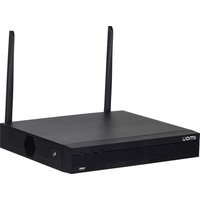
NVR1108HS-W-S2-CE - Magnétoscope IMOU - Notice d'utilisation et mode d'emploi gratuit
Retrouvez gratuitement la notice de l'appareil NVR1108HS-W-S2-CE IMOU au format PDF.


| Type de produit | Enregistreur vidéo réseau (NVR) 8 canaux |
| Marque | Imou |
| Modèle | NVR1108HS-W-S2-CE |
| Résolution d'enregistrement max | 8 MP (3840×2160) |
| Compression vidéo | H.265+, H.265, H.264+, H.264 |
| Entrées vidéo | 8 canaux IP (PoE intégré) |
| Sorties vidéo | 1 × HDMI, 1 × VGA |
| Audio | Entrée/sortie audio (RCA) |
| Stockage | 1 baie SATA (disque dur non inclus, max 10 To) |
| Réseau | 1 × port RJ45 10/100/1000 Mbps |
| USB | 2 × USB 2.0 |
| Alimentation | 48 V CC, 2 A |
| Consommation électrique | ≤ 10 W (sans disque dur) |
| Dimensions (L × P × H) | 260 × 220 × 44 mm |
| Poids | 0,9 kg (sans disque dur) |
| Température de fonctionnement | -10 °C à 55 °C |
| Humidité de fonctionnement | 10 % à 90 % (sans condensation) |
| Protocoles réseau | TCP/IP, DHCP, PPPoE, DDNS, NTP, SMTP, ONVIF |
| Fonctions intelligentes | Détection de mouvement, alarme par e-mail, enregistrement programmé |
| Accès à distance | Application Imou (iOS/Android), client PC, navigateur Web |
| Montage | Bureau ou rack (kit rack inclus) |
| Contenu de la boîte | NVR, adaptateur secteur, câble Ethernet, vis de montage, guide de démarrage rapide |
FOIRE AUX QUESTIONS - NVR1108HS-W-S2-CE IMOU
Questions des utilisateurs sur NVR1108HS-W-S2-CE IMOU
0 question sur cet appareil. Repondez a celles que vous connaissez ou posez la votre.
Poser une nouvelle question sur cet appareil
Téléchargez la notice de votre Magnétoscope au format PDF gratuitement ! Retrouvez votre notice NVR1108HS-W-S2-CE - IMOU et reprennez votre appareil électronique en main. Sur cette page sont publiés tous les documents nécessaires à l'utilisation de votre appareil NVR1108HS-W-S2-CE de la marque IMOU.
MODE D'EMPLOI NVR1108HS-W-S2-CE IMOU

Quick Start Guide
Version 1.0.0
Local Basic Operation
1 Power On and Off
Booting up:
Connect a monitor to the Device, and then plug in the power to boot up the Device.
Select Main Menu is SHUTTOWN to enter the SHUTTOWN
Shut down. Unplug the power after the monitor is blank.
- 2017年1月1日
Do not force the Device to shut down (or unplug the power) when th
interface is indicating Saving data or the Device is recording videos.
2 Initialization
After turning on the De
following steps.
1) Set parameter
2) Draw an unlock pattern for login.
3) Configure the password protection parameters.
(1) 2017年1月1日,公司发布《关于使用部分闲置募集资金进行现金管理的公告》(公告编号:2017-036)。
Be sure that the email address for resetting password is correct.
3 Startup Wizard
For the first time login, you can configure the Recorder quickly by Startup Wizard, and
set options such as general settings, lmou cloud, network settings and record settings.
4 Live View
After you logged in, the system goes to multiple-channel live view mode by default.
You can view the live video of each channel.

5 Playbac
Select Main Menu > Search or right-click on the preview interface and select Search.
You can play back records according to the configured record type, record time and
channel.
App Operation
- 本报告期,公司及子公司累计实现净利润为170.5万元,较上年同期增长1.4%。
Step1 Scan the QR code below to install lmou APP, Register and then log in to lmou App
Ignore Step 1 if you have completed the download and registration of Imou
APP in the Startup Wizard.

Step2 Tap at the top-right corner of Device tag, and then scan the DB code or enter
the serial number of the Device to add it to lmou.

Step3 After adding the Device to lmou, you could perform operations such as viewing
live videos, viewing alarms, setting alarm and sharing the Device.

Step4 (Optional) You could share permissions of the Device or a single video channel
to family members

FAQ
Q: Why does the Device fail to beat up?
A: After the Device is powered on, observe the power status indicator on the front panel. If
the blue light is off, check the wiring. If the blue light is on and the Device failed to boot up, contact the 07miles service
(2)本次发行方案与实施有关事宜
(2) Have to add a vinyl-IBC to a running device?
A: Put the wireless IPC next to the Device and turn it on. Right-click the local GUI and select
Wireless Pairing. After pairing is completed, install the wireless IPC at a place as needed.
(No text)
Q: Why are there no video records in local playback?
A: Three possible reasons: 1. Mining error, 2. H2O malfunction, 3. Record function is not enabled
Check method:
- Check the HDD status indicator, if the light is on, the HDD is working abnormally.
-
Select STORAGE a Disk Check to run the diagnosis, replace the HDD if these are damaged
-
Right-click the local GUI and select Manual > Record to check if the record function is
enabled
- Why is the choice time inconsistent with set of time after building cloud storage?
Q. Why if the playback time incankment with a ball time after erasing lock manager
A: Ensure that the IPC time is consistent with Device time. Select SYSTEM >GENERAL > General to upgrade IPC Time Sum, you can also select SYSTEM >GENERAL >DataTime in
CREATE TO INTEST I.C. TIME SYNC, you can also find: JYNDIA - GLNDIE - DATE TIME IS modify Device time.
m = 311
imou
About the Guide
This quick start guide is for reference only. Minor difference might
be found in user interface
All the ranking and soft work
At the design and software here are subject to change without
prior written notice.
All trademarks and registered trademarks mentioned are the
properties of their respective owners
Properties of the Representative Environment
Please visit our wel
more information.
If there is any uncertainty or controversy, please refer to our final
exploation
公司名称:海利股份

Marque : IMOU
Modèle : NVR1108HS-W-S2-CE
Catégorie : Magnétoscope