
Cell PT - Appareil photo IMOU - Notice d'utilisation et mode d'emploi gratuit
Retrouvez gratuitement la notice de l'appareil Cell PT IMOU au format PDF.


| Type de produit | Appareil photo de sécurité extérieur avec connectivité cellulaire 4G |
| Marque | Imou |
| Modèle | Cell PT |
| Dimensions (approx.) | 110 x 60 x 60 mm |
| Poids (approx.) | 300 g |
| Alimentation | Batterie rechargeable lithium-ion intégrée |
| Autonomie de la batterie | Jusqu'à 6 mois en utilisation normale |
| Résolution vidéo | 1080p Full HD |
| Vision nocturne | LED infrarouge jusqu'à 10 mètres |
| Angle de vue | Pan 360°, tilt 90° (rotation motorisée) |
| Détection de mouvement | Détection intelligente avec notification push |
| Audio | Microphone et haut-parleur intégrés (audio bidirectionnel) |
| Connectivité | 4G LTE intégré (carte SIM nano requise) |
| Stockage | Cloud (abonnement) ou carte microSD (jusqu'à 128 Go) |
| Indice de protection | IP65 (résistant aux intempéries) |
| Température de fonctionnement | -20 °C à 45 °C |
| Compatibilité | Applications Imou Life (iOS et Android) |
| Fonctions principales | Surveillance à distance, détection de mouvement, vision nocturne, audio bidirectionnel, rotation motorisée |
| Entretien et nettoyage | Nettoyer avec un chiffon doux et sec. Ne pas utiliser de produits abrasifs. |
| Sécurité | Chiffrement des données, authentification à deux facteurs |
| Pièces détachées et réparabilité | Batterie remplaçable, supports de montage disponibles. Réparation par un professionnel recommandée. |
| Informations générales | Utilisation extérieure sans fil, installation facile, abonnement cloud optionnel |
FOIRE AUX QUESTIONS - Cell PT IMOU
Questions des utilisateurs sur Cell PT IMOU
0 question sur cet appareil. Repondez a celles que vous connaissez ou posez la votre.
Poser une nouvelle question sur cet appareil
Téléchargez la notice de votre Appareil photo au format PDF gratuitement ! Retrouvez votre notice Cell PT - IMOU et reprennez votre appareil électronique en main. Sur cette page sont publiés tous les documents nécessaires à l'utilisation de votre appareil Cell PT de la marque IMOU.
MODE D'EMPLOI Cell PT IMOU

Imou
Cell PT
IPC-K9EP-3T0WE
IPC-K9EN-3T0WE
3MP H.265 Wi-Fi Battery Camera
The Cell PT set up with 2.4GHz Wi-Fi is a 100% wire-free rechargeable camera that delivers well-rounded home protection for up to almost 365 days on one single charge. With 2K, IP66 Weatherproof, the Cell PT outdoor provides a huge field of view so you can see every corner of your home. Equipped with a built-in microphone and speaker, the outdoor camera allows you to listen and talk to anyone. Easy wireless installation—no need to connect your security camera to electrical wiring. Compatible with Amazon Alexa.

3MP QHD Video
See more details than 1080P

Siren & Spotlight
Once an intruder is detected, the camera's spotlights and siren will be triggered or manually activated to warn off the would-be criminal.

Two-way Talk
Using variable sound when taking real-time talk with people in front of the camera

IP66
Weatherproof for outdoor conditions

100% Wire-Free
Supports 2.4 GHz Wi-Fi, Free of network cabling and power wiring hassles

PIR+Human Detection
Discerns people and motion detection. More accurate alerts.

Auto Tracking
Track moving targets in time.

Flexible and Secure Storage
insert a micro SD card for local storage (up to 256GB).

15000mAh Rechargeable Battery
DC 5V Power Supply Rechargeable Battery Power

Low-Battery Notifications
Informs you when battery level goes down to 20%, 10%, so you can charge it in time.

Type-C
Type-C interface with better adaptability.

Works with Solar Panel
Works with Imou Solar Panel for battery charging

Stay close with what you care
With Cloud service, you will have access to what you care as long as Internet is available. You can record daily or motion videos on Cloud and play back anytime anywhere.
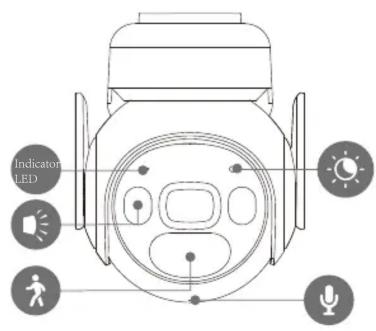
Front View
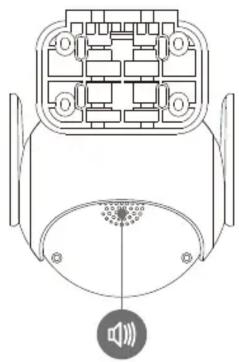
Back View
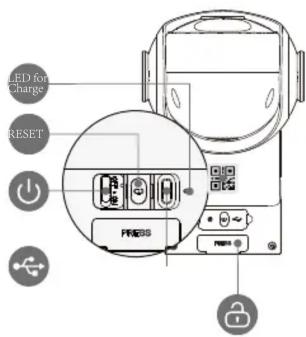
Bottom View

Back View
Specifications
Camera
3MP(2304*1296)
Night Vision: 20m(23ft) Distance
3.6mm Fixed Lens
Field of View: 88° (H), 45° (V), 107° (D), ( 330° Pan, 90° Tilt)
Video & Audio
Video Compression : H.265
Up to 15fps Frame Rate
8x Digital Zoom
Two-way Audio
Notice Management
Motion Detection
Human Detection
Configurable Region
Performance mode
Storage
Local Storage: SD Card (Up to 256GB)
Cloud Storage: Imou Subscription Plan
Record, view, and save events in your Imou app with a 31 day trial of the Imou Subscription Plan.
Network
Wi-Fi:IEEE802.11b/g/n,50m Open Field
Imou App: iOS, Android
Auxiliary Interface
Built-in Mic & Speaker
Power on / off Button
Reset Button
General
DC 5V 2A Power / Imou Solar Panel Supply
Power Consumption:<3.5W
Operating Temperature: -20°C \~ +50°C (-4°F \~ 122°F)
Charging Temperature: -0°C\~+45°C (32°F\~112°F)
Camera Dimensions: XX × XX × XXmm (XX × XX × XX inch)
Camera Weight: XXg (XXXlb)
FCC,CE,IC...
What's in the box
- 1x Camera - 1x Quick Start Guide
- 1x Power Cable(1m)
- 1x Mouting Bracket
- 1x Mounting Template
- 4x Expansion Screw
- 4x Screws

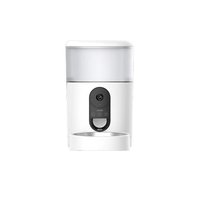
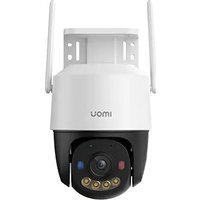
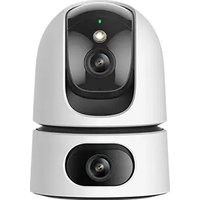
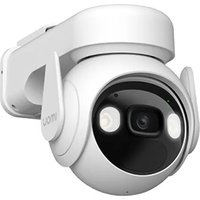
- IMOU
- CELL PT
- 3MP H.265 WI-FI BATTERY CAMERA
- 3MP QHD VIDEO
- SIREN & SPOTLIGHT
- TWO-WAY TALK
- IP66
- 100% WIRE-FREE
- PIR+HUMAN DETECTION
- AUTO TRACKING
- FLEXIBLE AND SECURE STORAGE
- 15000MAH RECHARGEABLE BATTERY
- LOW-BATTERY NOTIFICATIONS
- TYPE-C
- WORKS WITH SOLAR PANEL
- STAY CLOSE WITH WHAT YOU CARE
- SPECIFICATIONS
- CAMERA
- VIDEO & AUDIO
- NOTICE MANAGEMENT
- STORAGE
- NETWORK
- AUXILIARY INTERFACE
- GENERAL
- WHAT'S IN THE BOX
Marque : IMOU
Modèle : Cell PT
Catégorie : Appareil photo