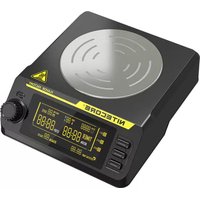
NFF01 - Chargeur de piles Nitecore - Notice d'utilisation et mode d'emploi gratuit
Retrouvez gratuitement la notice de l'appareil NFF01 Nitecore au format PDF.


| Type de produit | Chargeur de piles |
| Marque | Nitecore |
| Modèle | NFF01 |
| Compatibilité | Piles rechargeables NiMH/NiCd AA/AAA |
| Alimentation | USB 5V (câble inclus) |
| Courant de charge | 500 mA (AA), 250 mA (AAA) |
| Nombre de slots | 2 |
| Indicateurs | LED de charge et fin de charge |
| Dimensions | 100 x 50 x 25 mm |
| Poids | 50 g |
| Fonctions principales | Charge individuelle par slot, détection de fin de charge, protection contre inversion de polarité |
| Sécurité | Protection contre surcharge, court-circuit et surchauffe |
| Entretien et nettoyage | Nettoyer avec un chiffon sec et doux |
| Pièces détachées et réparabilité | Câble USB remplaçable |
| Informations générales | Chargeur compact pour déplacements, compatible avec batteries de 1.2V |
FOIRE AUX QUESTIONS - NFF01 Nitecore
Questions des utilisateurs sur NFF01 Nitecore
0 question sur cet appareil. Repondez a celles que vous connaissez ou posez la votre.
Poser une nouvelle question sur cet appareil
Téléchargez la notice de votre Chargeur de piles au format PDF gratuitement ! Retrouvez votre notice NFF01 - Nitecore et reprennez votre appareil électronique en main. Sur cette page sont publiés tous les documents nécessaires à l'utilisation de votre appareil NFF01 de la marque Nitecore.
MODE D'EMPLOI NFF01 Nitecore
Features
• Intelligent magnetic liquid mixer
• Maximum speed of up to 1200 R.P.M.(Revolutions Per Minute)
• Temperature controlled within 70° C ±5
- Utilizes high-graded ceramic heating unit
• The heating panel is made from SS304 stainless steel
- 2 modes selectable and 3 working periods programmable
- Intelligent memory function
- Anti-leakage design prevents accidental liquid spill
- Integrated digital temperature control function
• Housing made from fire retardant PC materials
• Certified by RoHS, CE, FCC and CEC
Specification
Input: DC 12V 3A MAX (a power adapter included)
Motor: 70-1200 R.P.M. (displayed on the screen)
Motor output: 3W
Heat output: 30W
Heating temperature: Surface Center 70°C MAX
Temperature control: Digital temperature control
Control precision: 5°C /10 °F
Heat source: Ceramic
Panel material: SS304 stainless steel
Mixing capacity: 30-1000ML (30-200ML recommended)
Operating duration: SMM default mode: continuous
PMM programmed mode: 14 days (maximum duration)
Size: 161mm×144.7mm×53mm (6.34" ×5.7" ×2.09")
Weight: 486.1g (17.15oz)
Accessories:
Power adapter, 2×stir bars, a magnetic rod (used for taking out the stir bar)
Operating Instructions:
-
Connect the power line to the external adapter;
-
Press the power switch on the right side to turn the NFF01 on, the screen will display R.P.M.(Revolutions Per Minute), TEMP (Temperature), RUN TIME, TIMER (start time and end time), REMAIN (remaining time), SET1, SET2, SET3 (As NFF01 has memory function, when it is restarted, if the previous mode is PMM, SET1, SET2, SET3 will be displayed on the screen. If the precious mode is SMM mode, the screen will not display SET1, SET2, SET3);
-
Place a flat based vessel on the heating panel (Note: do NOT use plastic vessel when heating). Pour liquid into the vessel and put a stir bar into the vessel;
-
Select the appropriate mixing mode and start working.

Mode Selection
SMM mode and PMM mode are available. Users can select the appropriate stirring mode according to demands.
SMM mode:
Users can adjust speed (R.P.M.) and stirring temperature in SMM mode.
PMM mode:
In PMM mode, there are 3 working periods divided from 24 hours: SET1/SET2/SET3. NFF01 will work according to the programmed runtime.
• SET1 working period: 00:00-07:59
• SET2 working period: 08:00-15:59
• SET3 working period: 16:00-23:59
In PMM mode, users can adjust the stirring speed (R.P.M.), temperature, programmed runtime (1 day or longer), start time, end time and system time.
When NFF01 is on, if the icons of SET1, SET2, SET3 are not displayed on the screen, long press the rotary switch to enter the SMM mode; if the icons of SET1, SET2, SET3 are displayed on the screen, long press the rotary switch to enter the PMM mode. Long press the SET1 button to alternate mixing mode and tap the rotary switch once to confirm and enter the mode.
Mode Setting
NFF01 has memory function. After mode selection, NFF01 automatically operates according to the previous settings.
SMM mode:
After entering the SMM mode, NFF01 starts working (if the R.P.M. is low, it takes a little longer to start) while the red heating indicator light above the rotary switch will lit and emit a sound of "beep".
To adjust parameters, tap the set1 button once to hear a "beep", then rotate the rotary switch to select R.P.M. (adjustable range:70-1200 R.P.M.). Tap the rotary switch once to confirm and select the stirring temperature (adjustable range:35-70°C /90-150 °F). Finally, tap the rotary switch once to confirm and start working.
PMM mode:
There are three separate working periods classified as SET1/SET2/SET3. After entering the PMM mode, NFF01 will operate according to the previous settings while the previous parameters and system time will be displayed on the screen.
Parameter Setting of SET1/SET2/SET3:
-
SET1: tap the SET1 button once, the SET1 icon will blink to indicate that parameters are selectable. Rotating the rotary switch to adjust parameters, after setting one parameter, tap once to move to the next parameter to cycle through "R.P.M.-TEMP-TIMER-RUN TIME". Upon the setting completion of RUN TIME, tap the rotary switch once to exit, SET1 icon will not blink. To stop setting, simply by tapping the SET1 button to exit and the screen will display SET1's parameter.
-
SET2: tap the SET2 button once, the SET2 icon will blink to indicate that parameters are selectable. Setting method please refer to the above.
-
SET3: tap the SET3 button once, the SET3 icon will blink to indicate that parameters are selectable. Setting method please refer to the above.
After the completion of run time, NFF01 will notify user that the programmed period is over by beeping repeatedly.
Pause: After the start of NFF01, tap the rotary switch once to pause and enter the heat preservation status, while the red heating indicator will not turn off. To continue, simply tap the rotary switch once again.
System Time Setting
To adjust the system time in PMM mode by long pressing the rotary switch until a "beep" is heard. Rotating the rotary switch to modify time and tapping the rotary switch once to confirm the setting.
Temperature Protection Function
NFF01 has temperature protection function, when the whole temperature of the operating panel is over 70° C, NFF01 will cease heating until the temperature has been decreased.
NFF01 can not provide heating only without stirring. If users adjust the R.P.M. to 0 in any mixing mode, NFF01 will cease both of stirring and heating. In this time, stirring temperature is not allowed to be set.
Precautions
- During operating, do not place any other items on the NFF01 except for the heating vessel.
- The safe environmental temperature for the NFF01 is between -10\~40°C, and the safe storage temperature is -20\~60°C.
- Do not operate or store it in damp area. Keep all the inflammable volatile substances away from operating area.
- The NFF01 is for use of adults above 18 years old. While it is working, keep it out of reach of children to avoid accidents.
- During operating, the working panel is the heating area, do not touch the working panel to avoid being scalded.
- When heating, do not use plastic vessel to avoid accidents and damage of the vessel.
- Please use flat based vessel to stir and heat, which makes it more efficient to transfer heat energy and avoid the impact between the stir bar and vessel.
- When the magnetic stir bar is bouncing, set the speed (R.P.M) lower and proceed to stirring.
- During operating, do not use or place any devices that are sensitive to magnetism nearby to avoid influence.
- If there is any malfunction, please stop using immediately and read the user manual carefully.
- Disassembling, assembling or modification may nullify the warranty. Check the warranty details.
Warranty Details
Our authorized dealers and distributors are responsible for warranty service. Should any problem covered under warranty occurs, customers can contact their dealers or distributors in regards to their warranty claims, as long as the product was purchased from an authorized dealer or distributor. NITECORE's Warranty is provided only for products purchased from an authorized source. This applies to all NITECORE products. Any DOA / defective product can be exchanged for a replacement through a local distributor/dealer within the 15 days of purchase. After 15 days, all defective / malfunctioning NITECORE® products can be repaired free of charge for a period of 12 months (1 year) from the date of purchase. Beyond 12 months (1 year), a limited warranty applies, covering the cost of labor and maintenance, but not the cost of accessories or replacement parts.
- The warranty is nullified if the product(s) is/are broken down, reconstructed and/or modified by unauthorized parties
- Damaged from wrong operations
For the latest information on NITECORE® products and services, please contact a local NITECORE® distributor or send an email to service@nitecore.com
※ All images, text and statements specified herein this user manual are for reference purpose only. Should any discrepancy occurs between this manual and information specified on www.nitecore.com, information on our official website shall prevail. SYSMAX Innovations Co., Ltd. reserves the rights to interpret and amend the content of this document at any time without prior notice.
f Please find us on facebook: nitecorecharger
SYSMAX Innovations Co., Ltd.
TEL: +86-20-83862000
FAX: +86-20-83882723
E-mail: info@nitecore.com
Web: www.nitecore.com
Address: Rm 2601-06, Central Tower, No.5 Xiancun Road, Tianhe District, Guangzhou, 510623, Guangdong, China

NFF10070120


Marque : Nitecore
Modèle : NFF01
Catégorie : Chargeur de piles