
AH-W200 - Écouteurs sans fil DENON - Notice d'utilisation et mode d'emploi gratuit
Retrouvez gratuitement la notice de l'appareil AH-W200 DENON au format PDF.


| Type de produit | Écouteurs sans fil Bluetooth intra-auriculaires |
| Marque | Denon |
| Modèle | AH-W200 |
| Poids | 29 g |
| Alimentation | Batterie rechargeable lithium-polymère 3,7 V |
| Autonomie de lecture Bluetooth | Environ 5 heures |
| Temps de charge | Environ 2 heures |
| Connectivité Bluetooth | Bluetooth 3.0, profils A2DP, AVRCP, HSP, HFP |
| Codecs audio supportés | aptX, SBC |
| Type de haut-parleur | Dynamique, diamètre 11,5 mm |
| Impédance | 20 Ω |
| Sensibilité | 100 dBA |
| Réponse en fréquence | 5 à 25 000 Hz |
| Microphone | Oui, avec réduction de bruit CVC |
| Fonction mains-libres | Oui (appels et commande vocale) |
| Mode filaire | Oui, via câble audio inclus (jack 2,5 mm vers 3,5 mm) |
| Adaptateur avion | Inclus |
| Accessoires inclus | Câble audio, câble USB, adaptateur avion, étui, embouts silicone (XS/S/M/L), embouts mousse Comply |
| Entretien et nettoyage | Nettoyer avec un chiffon doux et sec ; éviter l'humidité |
| Précautions d'usage | Ne pas utiliser dans les zones où les appareils électroniques sont interdits (avion, etc.) |
| Garantie | Se référer au manuel d'utilisation |
FOIRE AUX QUESTIONS - AH-W200 DENON
Questions des utilisateurs sur AH-W200 DENON
0 question sur cet appareil. Repondez a celles que vous connaissez ou posez la votre.
Poser une nouvelle question sur cet appareil
Téléchargez la notice de votre Écouteurs sans fil au format PDF gratuitement ! Retrouvez votre notice AH-W200 - DENON et reprennez votre appareil électronique en main. Sur cette page sont publiés tous les documents nécessaires à l'utilisation de votre appareil AH-W200 de la marque DENON.
MODE D'EMPLOI AH-W200 DENON
DENON
GLOBE CRUISER™
AH-W200
Bluetooth Headphones / In Ear Headphones
Owner's Manual
Getting started
Thank you for purchasing your DENON Globe Cruiser headphones. Denon's engineers have taken great care to design and develop these headphones to provide you with the best-in-class personal listening experience. Please refer to this guide for assistance when using these headphones.
Contents
Getting started 1
Accessories 1
Features 1
Functions 2
Preparation for Use 2
Charging the battery 2
Pairing with a Bluetooth device 3
Turning Bluetooth Wireless Connectivity On 4
Adjusting the fit of the headphones 4
Listening to Music 5
Listening to music using Bluetooth 5
Listening to music using the audio cable 5
Conducting Phone Calls 6
Making a call 6
Answering an incoming call 6
Ending a call 6
Using the call waiting function 6
Ignoring an incoming call 6
Switching from headphones to the mobile phone during a call… 6
Other operations 6
Additional Information 7
Overview of LED indicator display patterns 7
Airplane use 7
Troubleshooting 8
Precautions on use of the headphones 9
Trademark information 9
Product specifications 9
Accessories
① Quick Guide 1
(2) Precautions on the use of headphones. 1
③ Signal related precautions 1
(4) Service network list. 1
⑤ Audio cable (length: approx. 1.3 m)
⑥ USB cable (for charging, length: approx. 1.3 m)
⑦ Airline adapter 1
⑧ Carrying case. 1
⑨ Silicone ear tips (XS / S / M / L size)
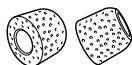
10 Comply™ Foam Tips 1
This material provides a good fit in the ear and is little affected by surrounding noise.
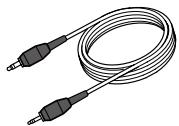
(5)
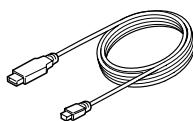
6
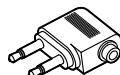
7
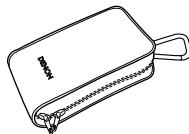
⑧
10
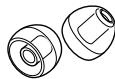
9
(L)
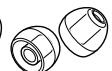


(S)
(XS)
Features
Wireless connection over Bluetooth
( page 5)
Enjoy listening to music wirelessly from Bluetooth enabled audio devices, once paired. Also, easily control the operation of Bluetooth-enabled devices from the headphones.
Wireless, CD-Quality Sound
These headphones feature aptX technology for CD-Quality audio over Bluetooth connection.
If your Bluetooth-enabled audio source supports aptX, this feature is enabled automatically.
Hands-free calling compatibility (page 6)
Pairing the headphones with a Bluetooth-compatible mobile phone enables hands-free calling.
Crystal Clear Phone Conversation
The headphones utilize CVC (Clear Voice Capture) technology for clear calls with minimum echo and signal noise.
Rechargeable battery included ( page 2)
Recharge the battery on the headphone by connecting it to your computer using the USB micro cable (included).
Optional wired listening via audio cable
( page 5)
An audio cable is included for when wireless listening is not allowed (for example, in flight).
Functions
Preparation for Use
Charging the battery
NOTE
- While the battery is being charged, the Bluetooth function does not work.
- If the battery runs out during headphone use, a beeping sound will be emitted and the headphones will turn off.
- Usage time may vary depending on the usage environment's temperature, method of use, etc.
- If usage time is extremely short even when the battery has been fully charged, the battery may be near the end of its life. In this case, please contact DENON service center.
- Battery replacement must be performed by a service person.
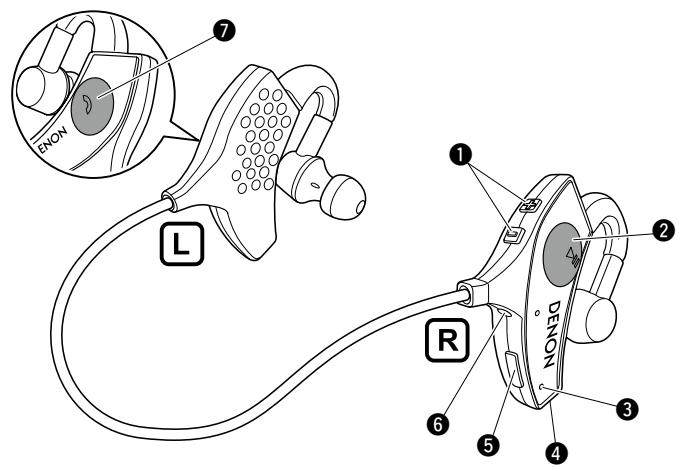
Volume button (+ / -)
Adjusts the volume of the headphones.
Control button
Operates a paired audio device (page 5 "Listening to music using Bluetooth").
Status indicator LED
Displays information on the headphones' status.
4 Call microphone
Charging port (USB connection port)
Recharge the headphone battery by connecting the USB micro cable (included).
Stereo mini jack (2.5 mm)
Connector for the included audio cable.
7 Call button
Press to make calls using a paired mobile phone device.
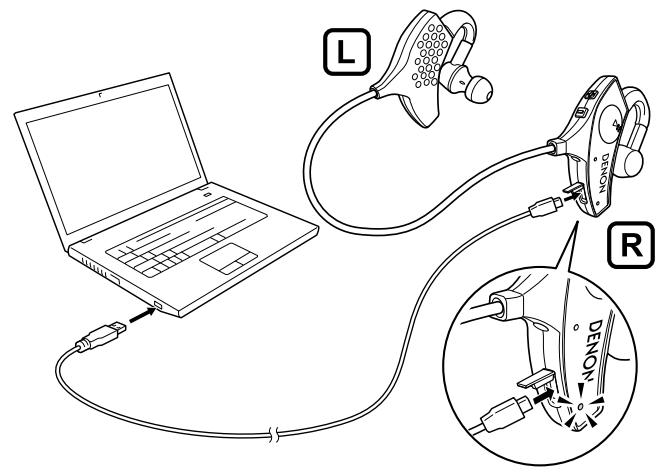
Charge the headphone battery when first using it after purchase or when the battery level is low by connecting the headphones to a computer using the included USB cable.
The LED indicator will flash when the battery is being charged.
- 0 % to 49 % charged : Slowly flashes red
- 50% to 99% charged : Flashes red every approx. 2 seconds
- 100% charged : LED indicator turns off

- When the battery level is low, the LED indicator will flash red every approx. 3 seconds accompanied by a beeping sound.
- Should the battery run out of power, you can still enjoy listening to music by connecting the audio cable (included) (12 page 5 "Listening to music using the audio cable").
- When fully charged, the battery provides approx. 5 hours of audio playback time.
- It takes approx. 2 hours to charge the battery from empty to full.
Pairing with a Bluetooth device
To listen to music or make phone calls, the Bluetooth device must first be registered (pairing).
After pairing has been completed, the Bluetooth device can be reconnected to the headphones.
NOTE
Please pair devices again in the following cases.
After nine devices or more have been paired
The headphones can register a maximum of eight devices. From the ninth device onward, new pairings will overwrite previously stored pairing information, starting from the oldest pairing.
- If the pairing information on the headphones or Bluetooth device has been deleted
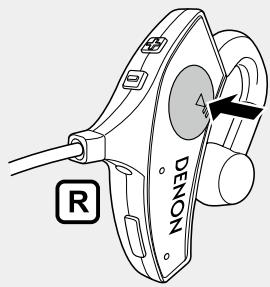
1 With the headphones' Bluetooth function off, press and hold the Control button for approx. 4 seconds.
- The red and blue LED indicators will alternately flash, and the headphones will enter pairing standby mode.
While the battery is being charged, the Bluetooth function does not work ( page 4 "Turning Bluetooth Wireless Connectivity ON").
2 Initiate pairing procedures on the Bluetooth device to be connected, and search for the headphones.
Refer to the Bluetooth device's owner's manual for details.
- If a PIN code (passkey) is requested, enter "0000" (four zeros).
- The blue LED indicator will light up for approx. 5 seconds when pairing has been completed.

- The headphones will exit pairing standby mode if pairing has not been completed within 3 minutes. In this case, press and hold the Control button for 5 seconds or more to turn off the Bluetooth function, then start the pairing process again.
- The headphones will be shown as "DENON AH-W200" on the Bluetooth device to be paired with.
□ Deleting pairing information
If incorrect pairing information has been registered or you wish to pair devices again, delete the registered pairing information first. Press and hold the call button for 5 seconds or more when the headphones and Bluetooth device are paired to delete the pairing information. When the information is deleted, a beeping sound will be emitted and the red and blue LED indicators will flash simultaneously five times.
Turning Bluetooth Wireless Connectivity ON
Turn the Bluetooth function on in advance for the Bluetooth device which is to be connected.
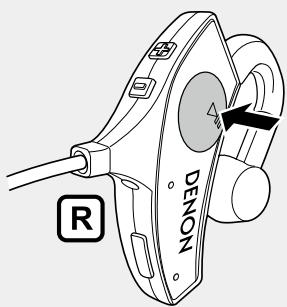
Press and hold the headphones' Control button for approx. 1 second.
- A beeping sound will be emitted and the red and blue LED indicators will light up simultaneously for approx. 1 second.
- The power switches on, and the Bluetooth function switches on.
- Bluetooth is automatically connected if the headphones and Bluetooth device have already been paired ( page 3 "Pairing with a Bluetooth device").
□Turning Bluetooth Wireless Connectivity Off
Press and hold the Control button for approx. 5 seconds and longer.
- A beeping sound will be emitted and the red and blue LED indicators will light up simultaneously for approx. 1 second.
- The power then switches to a standby status, and the Bluetooth function switches off.

- If an audio cable is connected to the headphones while the Bluetooth function is on (power is on), the Bluetooth function automatically switches off (power switches to standby status).
- Even when in a power standby status, the headphones still consume a small amount of power.
NOTE
If the LED indicators don't light up when you press the Control button, the battery has been depleted. Please recharge the battery.
Adjusting the fit of the headphones
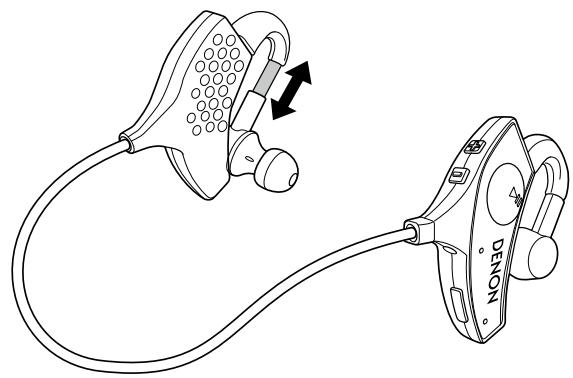
Adjust the slider length to fit your head when wearing the headphones.
NOTE
- Please read the attached "Precautions on the use of headphones" documentation.
- Avoid getting your fingers or other body parts caught in the product's moving portions.
- Do not pull forcefully on the sliders.
Listening to Music
When using the headphones wirelessly, make sure that the Bluetooth function on the Bluetooth device is enabled. When using the headphones with the cable connected, make sure that the Bluetooth function is disabled.
Listening to music using Bluetooth
Operates the paired Bluetooth device using the control button.
NOTE
The Bluetooth function will turn off automatically when a device is connected using the audio cable, and operation of the connected Bluetooth device using the headphones will be disabled.
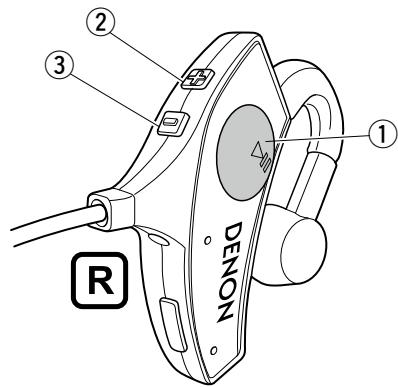
| Play/Pause | Press ① one time | ● |
| Next track | Press ① two times | ● ● |
| Previous track | Press ① three times | ● ● ● |
| Fast forward | Operates after ① has been pressed two times in quick succession | ● |
| Rewind | Operates after ① has been pressed three times in quick succession | ● ● ● |
| Increase volume | Press ② | |
| Decrease volume | Press ③ | |
The blue LED indicator will light up continuously during playback.

- These headphones are compatible with SCMS-T copy protection. They can be used to listen to audio from mobile phones, one-seg TVs, and other SCMS-T-compatible devices.
- In order to listen to music using a Bluetooth connection, the connected Bluetooth device must support A2DP (Advanced Audio Distribution Profile).*
- In order to control audio playback from the connected Bluetooth device using the headphone controls, the connected Bluetooth device must support AVRCP (Audio Video Remote Control Profile).*
- Refer to the Bluetooth device's owner's manual for information on supported Bluetooth profiles.
Listening to music using the audio cable
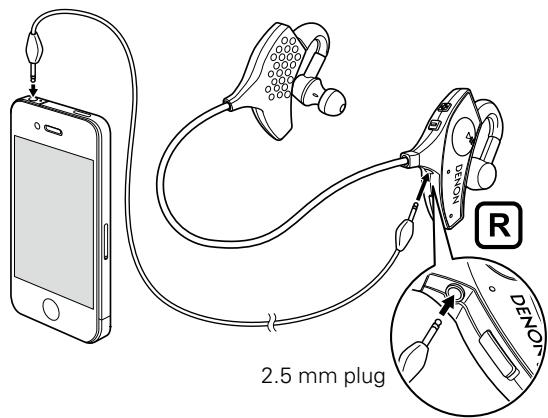
3.5 mm plug
Use the included audio cable when not using the Bluetooth function, when connecting to a device that does not support Bluetooth, etc.
NOTE
Bluetooth calling and audio device control functions on the headphones cannot be used when connecting using the audio cable.
Conducting Phone Calls
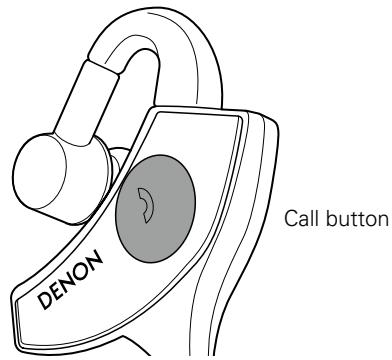
Your DENON Globe Cruiser headphones feature integrated controls and microphones for easy hands free phone conversations. The call button on the left ear cup allows you to easily operate Bluetooth compatible mobile phones once they're paired with the headphones. "Pairing with a Bluetooth device" (14 page 3).
NOTE
The Bluetooth function will turn off automatically when a device is connected using the audio cable, and calls using the headphones will be disabled.
Making a call
Use the paired mobile phone to make a call. The music playback pauses and the call starts.
Answering an incoming call
When an incoming call is detected, you will hear the music pause and a ringtone sound come over the headphones. Press the call button once to answer the call.
Ending a call
To end a phone conversation, press the call button once. When the call has ended, playback of the music that you're listening to will resume automatically.
Using the call waiting function
Use either of the following methods to take an incoming call while a call is in progress.
NOTE
Certain mobile phones may not support call waiting.
End the current call and take the new call
When another incoming call is detected while a call is in progress, press the call button one time.
Put the current call on hold and take the new call / switch to the on-hold call
Press and hold the call button for approx. 3 seconds.
Ignoring an incoming call
When an incoming call is detected, press and hold the call button for approx. 3 seconds to ignore the call.
Switching from headphones to the mobile phone during a call
Press and hold the call button for 5 seconds or more to switch from talking through the headphones to talking on the mobile phone itself.
NOTE
This switching is not possible during the call waiting function. In such cases, the switching must be performed at the mobile phone.
Other operations
| Incoming call detected | Answer | Press call button once |
| In standby mode / during audio playback | Redial | Press call button for approx. 1 sec. |
| Voice dial / voice-activated call | Press call button one time | |
| Call in progress | End call | Press call button one time |
| Mute on/off | Press call button two times |

- In order to adjust the volume of the other party's voice, press the volume button.
- In order to make a call using the headphones, the connected Bluetooth device must support either HSP (Headset Profile) or HFP (Hands-Free Profile).*
- In order to make or answer a call during audio playback, the connected Bluetooth device must support either HSP (Headset Profile) or HFP (Hands-Free Profile), and must also support A2DP.*
- Refer to the Bluetooth device's owner's manual for information on supported Bluetooth profiles.
Additional Information
Overview of LED indicator display patterns
| Headphone status/function | LED indicator display |
| Bluetooth on/off | Blue Red |
| Pairing in progress | Blue Red |
| Pairing standby mode | Blue Red |
| Pairing complete | Blue Red |
| Deleting pairing information | Blue Red |
| Receiving Bluetooth signal | Blue Red |
| Incoming phone call | Blue Red |
| Battery level low | Blue Red |
| Battery charged 0 % to 49 % | Blue Red |
| Battery charged 55 % to 99 % | Blue Red |
| Battery charged 100 % | Blue Red |
Airplane use
To use these headphones to listen to the on-board music broadcast in the aircraft cabin, use the included audio cable and conversion plug.
NOTE
- The conversion plug may not be suitable for certain aircraft.
- Do not use these headphones when the use of electronic devices is prohibited on board, or when the use of personal headphones to listen to the in-flight music services is prohibited.
Troubleshooting
DenON Gbe h e t the operation of the headphones, please check below for answers to common issues.
| Issue | Proposed Solution | Relevant page |
| Bluetooth function will not turn on | • Charge the battery by connecting the headphones to a computer using the included USB cable. | 2 |
| Cannot perform pairing | • Bring the Bluetooth device to be connected and headphones closer together. | 3 |
| Cannot establish Bluetooth connection | • Confirm that the headphones' Bluetooth function is turned on. • Confirm that the Bluetooth device to be connected is turned on and its Bluetooth function is activated. • Confirm that the Bluetooth device to be connected is not in sleep mode. • Pair devices again. • If the headphones and Bluetooth device are connected using the audio cable, disconnect the cable. The headphones' Bluetooth function will turn off automatically when it is connected using the audio cable. | 3, 4 3 - 3 5 |
| Sound cannot be heard through the headphones during Bluetooth connection | • Confirm that the headphones' Bluetooth function is turned on. • Confirm that the Bluetooth device to be connected is turned on and its Bluetooth function is activated. • Select the A2DP profile on the transmitting Bluetooth device. Refer to the Bluetooth device's owner's manual for details. • Confirm that the connected Bluetooth device's audio playback has been initiated. • Increase the volume level. If necessary, increase the volume level on the connected Bluetooth audio device. • Pair devices again. | 3, 4 3 5 - 5 3 |
| Cannot operate connected Bluetooth device using headphone controls | • If the headphones and Bluetooth device are connected using the audio cable, disconnect the cable. The headphones' Bluetooth function will turn off automatically when it is connected using the audio cable. | 5 |
| Cannot hear caller's voice during phone call | • When listening to music using the headphones, press the call button to switch to call mode. • Confirm that the headphones' Bluetooth function is turned on. • Confirm that the Bluetooth device to be connected is turned on and its Bluetooth function is activated. • Select the HSP or HFP profile on the transmitting Bluetooth device. Refer to the Bluetooth device's owner's manual for details. • Confirm that calls using the headphones are enabled on the connected Bluetooth device. Refer to the Bluetooth device's owner's manual for details. • Increase the call volume level. • Increase the volume level on the connected Bluetooth-compatible mobile phone if necessary. | 6 3, 4 3 6 - 6 - |
Precautions on use of the headphones
- Make sure to read the owner's manual for the device to be connected to the headphones.
- To avoid disturbing others around you, be aware of the headphones' volume level when using public transportation or when in a public place.
- This product does not guarantee successful operation of this product together with all Bluetooth devices and mobile phones.
- This product does not support connection with all Bluetooth devices and mobile phones.
- This product's wireless Bluetooth technology has a transmission range of approx. 10 meters, but interfering obstacles (people, metal objects, walls, etc.), other radio signals, and other factors may affect the transmission range.
- In order to connect via Bluetooth, the connected Bluetooth device must support use of the same profiles as these headphones. Refer to the Bluetooth device's owner's manual for information on supported Bluetooth profiles.
- Due to the characteristics of Bluetooth wireless technology, there will be a slight delay between sound/music transmitted from the Bluetooth device and sound/music heard through the headphones.
Trademark information
This product uses the following technologies (Random order):

Bluetooth®
The Bluetooth® word mark and logos are registered trademarks owned by Bluetooth SIG, Inc. and any use of such marks by D&M Holdings Inc. is under license. Other trademarks and trade names are those of their respective owners.


The CSR logo is a trademark of CSR plc or one of its group companies.
Product specifications
| Supported Bluetooth specifications | Bluetooth core specifications Ver. 3.0 |
| Frequency band | 2.4 GHz band |
| Frequency hopping | Frequency-hopping spread spectrum (FHSS) |
| Transmission power | Max. 2.5 mW (Class 2) |
| Transmission range | Approx. 10 m (varies according to usage conditions) |
| Supported Bluetooth profiles | A2DP (audio)AVRCP (audio control)HSP (headset)HFP (hands-free) |
| A2DP codec support | aptX, SBC |
| Max. no. of registered pairings | Max. 8 devices |
| Driver type | Dynamic type |
| Driver size | ø 11.5 mm |
| Input impedance | 20 Ω |
| Sound pressure level | 100 dBA |
| Playback frequency | 5 to 25,000 Hz |
| Continuous playback time | Using Bluetooth: 5 hours |
| Power supply | DC 3.7 V built-in rechargeable lithium polymer battery |
| Weight | 29 g |
- DENON
- GLOBE CRUISER™
- AH-W200
- Owner's Manual
- Getting started
- Contents
- Accessories
- Features
- Wireless connection over Bluetooth
- Wireless, CD-Quality Sound
- Hands-free calling compatibility (page 6)
- Crystal Clear Phone Conversation
- Rechargeable battery included ( page 2)
- Optional wired listening via audio cable
- Functions
- Preparation for Use
- Charging the battery
- NOTE
- Pairing with a Bluetooth device
- With the headphones' Bluetooth function off, press and hold the Control button for approx. 4 seconds.
- Initiate pairing procedures on the Bluetooth device to be connected, and search for the headphones.
- □ Deleting pairing information
- Turning Bluetooth Wireless Connectivity ON
- Press and hold the headphones' Control button for approx. 1 second.
- □Turning Bluetooth Wireless Connectivity Off
- Adjusting the fit of the headphones
- Listening to Music
- Listening to music using Bluetooth
- Listening to music using the audio cable
- Conducting Phone Calls
- Making a call
- Answering an incoming call
- Ending a call
- Using the call waiting function
- End the current call and take the new call
- Put the current call on hold and take the new call / switch to the on-hold call
- Ignoring an incoming call
- Switching from headphones to the mobile phone during a call
- Additional Information
- Airplane use
- Troubleshooting
- Precautions on use of the headphones
- Trademark information
- Bluetooth®
- Product specifications
Marque : DENON
Modèle : AH-W200
Catégorie : Écouteurs sans fil