
MAT12KAC - Climatisation MATSUI - Notice d'utilisation et mode d'emploi gratuit
Retrouvez gratuitement la notice de l'appareil MAT12KAC MATSUI au format PDF.


| Type de produit | Climatiseur split mobile |
| Marque | Matsui |
| Modèle | MAT12KAC |
| Puissance frigorifique | 12 000 BTU/h (environ 3,5 kW) |
| Puissance calorifique | 12 000 BTU/h (environ 3,5 kW) |
| Alimentation électrique | 220-240 V ~ 50 Hz |
| Consommation électrique (refroidissement) | Environ 1100 W |
| Consommation électrique (chauffage) | Environ 1050 W |
| Dimensions de l'unité intérieure (L x H x P) | 79,5 x 29,0 x 20,0 cm |
| Poids de l'unité intérieure | 10,5 kg |
| Dimensions de l'unité extérieure (L x H x P) | 72,0 x 49,5 x 25,5 cm |
| Poids de l'unité extérieure | 27,0 kg |
| Refroidissement | Oui, avec mode froid |
| Chauffage | Oui, avec pompe à chaleur |
| Ventilation | Oui, plusieurs vitesses |
| Déshumidification | Oui, mode déshumidificateur |
| Télécommande | Incluse, avec piles |
| Minuterie | Oui, programmation 24h |
| Filtre à air | Filtre lavable, retirable |
| Niveau sonore (unité intérieure) | Environ 52 dB(A) (max) |
| Niveau sonore (unité extérieure) | Environ 60 dB(A) |
| Fluide frigorigène | R32 |
| Réparabilité | Indice de réparabilité de 7,5/10 |
| Pièces détachées | Disponibles via le SAV et revendeurs agréés |
| Entretien | Nettoyer le filtre toutes les 2 semaines, vider le bac à condensats si nécessaire |
FOIRE AUX QUESTIONS - MAT12KAC MATSUI
Questions des utilisateurs sur MAT12KAC MATSUI
0 question sur cet appareil. Repondez a celles que vous connaissez ou posez la votre.
Poser une nouvelle question sur cet appareil
Téléchargez la notice de votre Climatisation au format PDF gratuitement ! Retrouvez votre notice MAT12KAC - MATSUI et reprennez votre appareil électronique en main. Sur cette page sont publiés tous les documents nécessaires à l'utilisation de votre appareil MAT12KAC de la marque MATSUI.
MODE D'EMPLOI MAT12KAC MATSUI

MATSUI

natural_image
Line drawing of a portable air conditioner unit with front panel and wheels (no text or symbols)Air Conditioner
model
MAT-
12KAC

Know your air conditioner
Please read these instructions before using your air conditioner.
FRONT

BACK

A

B

C

D


Information
A. Front plastic pipe connection
B. Rear plastic pipe connection
C. Flexible Exhaust Hose
D. Window Exhaust Adapter

Information and advice
Safety first!
The unit must not be used on an extension lead, and should be plugged directly into the mains supply.
This is a high current unit. Ensure your ring mains is not overloaded. In the unlikely event of the fuse tripping, please contact a qualified electrician.
If the air conditioner is knocked over during use, turn off the unit and unplug from the mains supply immediately.
Your air conditioner should be used in such a way that it is protected from moisture e.g. condensation and splashed water. Do not place or store the unit where it can fall or be pulled into water, or any other liquid.
Do not operate your air conditioner in a wet room such as a bathroom or laundry room.
Do not touch the unit with wet/damp hands or when barefoot.
Do not press the buttons on the control panel with anything other than your fingers.
Always transport your air conditioner in a vertical position and and stand on a stable, level surface during use. Do not allow the unit to sit on top of the mains lead.
Do not remove any fixed covers. Never use this appliance if it is not working properly, or if it has been dropped or damaged.
Keep an air path of at least 50cm around the unit from walls, furniture and curtains.
Never use the mains switch to start and stop the unit. Always use the switch on the control panel.
Turn off the unit when not in use. If the unit is not going to be used over a long period of time, disconnect from the mains.
Always contact a qualified person to carry out repairs. If the supply cord is damaged it must be repaired by a qualified person.
Do not cover or obstruct the unit.
Do not use hazardous chemicals to clean or allow to come into contact with the unit. Do not use the unit in the presence of inflammable substances or vapour such as alcohol, insecticide, petrol etc.
Do not allow children to operate the unit unsupervised.
Never use the unit without the filter.
Do not use the unit for functions other than those described in this instruction manual.
Before moving the unit drain the water from the appliance.
This unit is heavy. Please use castor cups under the wheels to protect the surface of the floor.
Use a minimum of two people to move this unit safely.
Energy Save:
Use the unit in the recommended room size(up to 32m ^2 for MAT-12KAC)
Locate the unit where furniture cannot obstruct the air flow.
Keep blinds/curtains closed during the sunniest part of the day. Keep the filters clean.
Keep doors and windows closed to keep cool air in and warm air out.

Connecting your air conditioner
This unit is portable and can be moved from room to room.

natural_image
Two diagrams showing a curved structure with internal lines and a separate cross-section, no text or symbols present.To connect the air exhaust:
- Position the product close to a window or outside door, ie, Patio door.
Always use a minimum of 2 people to move the unit.
- Fix the end of the exhaust duct (Part A) to the exhaust terminal on the product, see Page.1.
Attention: The length of the air exhaust must be between 500mm-2000mm.
If you need to bend the exhaust duct, please refer to the following:

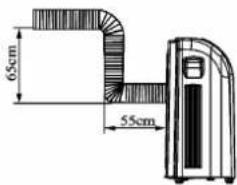
Bending the duct, as in the diagram below, can cause malfunction.


CAUTION
- Keep the exhaust duct in a horizontal position when attaching to the product.
- Do not add or connect any other pipes to the product as this could cause the air conditioner to malfunction.
Please note: For product servicing always contact a qualified engineer.

Using your air conditioner
Allow this unit to stand for at least 4 hours before using for the first time.
Control Panel

Functions of the Control Panel
- ON/OFF Key - Press once to start, and press once more to stop.
- MODE Key - Press this key to change the operation mode: Auto Cool Dry Fan-Heat
- FAN Speed Key - When the unit is running in FAN Mode there are 3 kinds of fan speed to select from: HIGH - MID - LOW.
- Temp. Key - When the unit is in COOL/HEAT mode the unit will display the set temperature. Press the arrow up/down key to increase or decrease the temperature.
- Timer Key - Press the arrow up/down button to set the amount of time you want the unit to stay on for (between 0.5-24 hours). Press the Sleep Key to activate this function.
- Sleep key-when the unit is running, press this button to activate the sleep function. Press again to cancel this function.
Dry Mode
As an effect of the cooling process, the unit has the ability to remove moisture from the room. Selecting "Dry" mode sets the unit for optimum drying performance.
Dehumidifying/Caution
This is most effective in a warmer room environment, if a cooling effect is required the exhaust hose can be vented as shown for "Cool" mode(see page 3). In a cooler room environment the exhaust can be kept within the room. The dehumidifying efficiency will be reduced.
We recommend for effective drying results, the unit should be permanently drained.
Ensure that all windows and doors are closed to obtain the maximum dehumidifying and cooling effect.
COOL Mode
- Press the MODE key to
select COOL mode - Press TEMP, key to select a
suitable temperature.
(between 16°C-30°C) - Press FAN key to select
between HIGH/MID/LOW speed.
AUTO Mode
Press the MODE key to select AUTO mode. The air conditioner will automatically select COOL/DRY/HEAT to ensure a constant temperature.
DRY Mode
Press the MODE key to select DRY mode. The speed is NOT adjustable.
FAN Mode
- Press MODE key to select FAN mode.
- Press FAN SPEED to select between HIGH/MID/LOW.
HEAT Mode
- Press MODE key to select HEAT mode The heater will turn on.
LCD Display


Names and functions of the remote controller

LCD Screen
Note: Ensure the remote is aimed at the remote control sensor on the product.
MODE Key - Press the MODE key to scroll through the following: AUTO/COOL/FAN/HEAT. Please Note: To select DRY mode, use the DRY Key.
SEND Key - Press this key to send the operation. eg. to choose cooling mode at 16°C. Press the MODE key until the cool symbol is displayed. Press +°C or -°C until 16°C is displayed. Press 'SEND' to send command to the unit.
FAN Key - Press this key to select between HIGH/MID/LOW.
TIMER Key - Press this key to select 'Time' or 'Timer' mode. Time - Allows you to adjust the clock using the Hr and Min keys. When you have selected the time use the ON/OFF key to confirm. Timer - Allows you to set a delay time of the unit switching itself on.
DRY Key - Press this key to set the dehumidifying function.
SLEEP Key - Press this key to set the sleep operation.
TEMP. Keys - Pressing the temperature + and - keys will increase or decrease the temperature setting buy 1°C (between 16°C-30°C).
Hr/Min Key - Press these keys to increase the hours/minutes in the Time, Timer and Sleep modes.
ON/OFF Key - Insert the batteries into the remote control. Press once to start and press once more to stop the unit.

Draining water
When the water tank is full it will need to be emptied
Accessories of drainage hose:

Drainage hose

Fixing clip

Pipe clip

Drainage cap

Bolt
- Remove drainage cap(B) from drainage port(A).

- Attach fixing clip(B) to unit using the bolt provided.
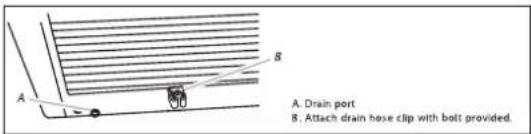
- Attach one end of the pipe to drainage port (B). Fit the drainage cap to the other end. Secure pipe in the fixing clip.

Drainage Method
When using cool or Dry modes, water will be collected in the internal water tray. When the tray becomes full, a buzzer will sound and the LCD will display error code 'H8'. The unit will stop operating until the water is emptied, and resume 3 minutes after the water is removed.
To removed water:
Remove the drainage hose from the fixing clip. Place the end of the hose into a suitable container, then remove the drainage cap and empty water. When empty, replace the drain cap and return to the fixing clip.
Maintenance
Before cleaning, ALWAYS unplug the unit from the mains.
CLEANING
Use a soft, damp cloth to wipe the body of the unit clean.
Never use chemicals, gasoline detergents, chemically treated clothes or other cleaning solutions.
Never use water above 40°C as this could cause the filter to warp or discolour.
END OF SEASON STORAGE
Unplug the unit and empty the water tank. Clean the filter if needed.
Once you have cleaned the unit turn it to FAN mode to dry out the inside.
It is recommended that the unit is put back into the original box for storage.
Do not stack objects on top of the unit.
CLEANING THE FILTER
The cover and the dust filter can be washed under running water but must be dried before inserting back into the unit. The carbon filter can not be washed, but it can be vacuum cleaned.
-
Grip handle on the filter and pull away from the unit to release the catch.
-
Slide filter to remove from housing.

It is recommended that you clean the air filter once every two weeks depending on how frequently the unit is used.

This symbol on the product or in the instructions means that your electrical and electronic equipment should be disposed at the end of its life separately from your household waste. There are separate collection systems for recycling in the EU. For more information, please contact the local authority or your retailer where you purchased the product.

Information
To prolong the product's life, alway's wait for at least 3 minutes after switching the unit off, before attempting to switch it back on again.
When your air conditioner is not in use, keep the power cord tidy buy storing it at the back of the unit.
WARNING
Before maintenance is carried out on the product, turn off and disconnect from the mains supply. Failure to do so could result in electric shock.

Troubleshooting & specifications
Never try to repair or dismantle this product yourself.
The machine doesn't run
Is the machine plugged in and the mains supply on?
Is the room temperature within the working range of the unit. (16°C - 35°C)?
The machine is very noisy
Is the floor underneath the unit uneven? Make sure all wheels are positioned flat against the floor.
The compressor isn't running
Is it possible that the overheat protection of the compressor is on? Turn the unit off. Wait a few minutes for the temperature to cool and turn on again.
The machine is running but not cooling the room
If the sun is shining directly into the room, close the curtains.
Ensure the windows and doors are closed.
Is there something in the room producing heat?
The machine is on but doing very little
Are the filters dusty or need cleaning?
Is the room temperature below your selected temperature?
Other abnormal conditions
Disconnect from the mains supply and consult a repair specialist.
SPECIFICATIONS MAT-12KAC
| Power supply: | 230-240V |
| Cooling capacity: | 12000BTU |
| Air voulme (max speed): | 570m ^3 /h |
| Power input (C/H): | 1380/2450W |
| Refrigerant type: | R410A |
| Refrigerant load: | 1050g |
| Recommended room size: | up to 32m2 |
| Duct length: | 2m |
| Cooling range: | 16°35 °C |
| Net weight: | 47Kgs |
| Dimension | 761 460 870(L×W×H) |
We continually strive to improve our products, specifications may change without notice.
- MATSUI
- Know your air conditioner
- Information
- Information and advice
- Safety first!
- Energy Save:
- Connecting your air conditioner
- To connect the air exhaust:
- CAUTION
- Using your air conditioner
- Functions of the Control Panel
- Dry Mode
- Dehumidifying/Caution
- COOL Mode
- AUTO Mode
- FAN Mode
- HEAT Mode
- Names and functions of the remote controller
- Draining water
- When the water tank is full it will need to be emptied
- Drainage Method
- To removed water:
- Maintenance
- Before cleaning, ALWAYS unplug the unit from the mains.
- CLEANING
- END OF SEASON STORAGE
- CLEANING THE FILTER
- WARNING
- Troubleshooting & specifications
- The machine doesn't run
- The machine is very noisy
- The compressor isn't running
- The machine is running but not cooling the room
- The machine is on but doing very little
- Other abnormal conditions
Marque : MATSUI
Modèle : MAT12KAC
Catégorie : Climatisation