
Ridge Racer (PSP) - Jeu SONY - Notice d'utilisation et mode d'emploi gratuit
Retrouvez gratuitement la notice de l'appareil Ridge Racer (PSP) SONY au format PDF.


| Type de produit | Jeu vidéo |
| Plateforme | PlayStation Portable (PSP) |
| Genre | Course automobile |
| Développeur | Namco |
| Éditeur | Sony Computer Entertainment |
| Date de sortie | 2004 |
| Mode de jeu | Un joueur, multijoueur (2 à 8 joueurs) |
| Format | UMD |
| Classification PEGI | 3 |
| Langues disponibles | Français, Anglais, Allemand, Italien, Espagnol |
| Dimensions du boîtier | 17 x 13,5 x 1,5 cm (estimation) |
| Poids | Environ 100 g |
| Alimentation | Piles ou batterie de la console PSP |
| Fonctions principales | Courses arcade, système de dérive, boost turbo, plusieurs circuits et véhicules |
| Entretien et nettoyage | Essuyer le disque avec un chiffon doux et sec. Nettoyer le boîtier avec un chiffon légèrement humide |
| Sécurité | Respecter les avertissements du manuel. Éviter l'exposition à l'humidité et aux températures extrêmes |
| Pièces détachées | Non applicables (jeu complet sur UMD) |
| Réparabilité | En cas de disque endommagé, contacter le service client. Aucune pièce réparable par l'utilisateur |
FOIRE AUX QUESTIONS - Ridge Racer (PSP) SONY
Questions des utilisateurs sur Ridge Racer (PSP) SONY
0 question sur cet appareil. Repondez a celles que vous connaissez ou posez la votre.
Poser une nouvelle question sur cet appareil
Téléchargez la notice de votre Jeu au format PDF gratuitement ! Retrouvez votre notice Ridge Racer (PSP) - SONY et reprennez votre appareil électronique en main. Sur cette page sont publiés tous les documents nécessaires à l'utilisation de votre appareil Ridge Racer (PSP) de la marque SONY.
MODE D'EMPLOI Ridge Racer (PSP) SONY

PRECAUTIONS
This disc contains game software for the PSP™ (PlayStation®Portable) system. Never use this disc on any other system, as it could damage it. Read the PSP™ system instruction Manual carefully to ensure correct usage. Do not leave the disc near heat sources or in direct sunlight or excessive moisture. Do not use cracked or deformed discs or discs that have been repaired with adhesives as this could lead to malfunction.

Push down one side of the disc as shown and gently pull upwards to remove it. Using excess force to remove the disc may result in damage.

Place the disc as shown, gently pressing downwards until it clicks into place. Storing the disc incorrectly may result in damage.
HEALTH WARNING
Always play in a well lit environment. Take regular breaks, 15 minutes every hour. Avoid playing when tired or suffering from lack of sleep. Some individuals are sensitive to flashing or flickering lights or geometric shapes and patterns, may have an undetected epileptic condition and may experience epileptic seizures when watching television or playing videogames. Consult your doctor before playing videogames if you have an epileptic condition and immediately should you experience any of the following symptoms whilst playing: dizziness, altered vision, muscle twitching, other involuntary movement, loss of awareness, confusion and/or convulsions.
PIRACY
The PSP™ system and this disc contain technical protection mechanisms designed to prevent the unauthorised reproduction of the copyright works present on the disc. The unauthorised use of registered trademarks or the unauthorised reproduction of copyright works by circumventing these mechanisms or otherwise is prohibited by law.
If you have any information about pirate product or methods used to circumvent our technical protection measures please email anti-piracy@eu.playstation.com or call your local Customer Service number given at the back of this manual.
PARENTAL CONTROL
This PSP™ (PlayStation®Portable) Game software has a preset Parental Control Level based on its content. You can set the Parental Control Level on the PSP™ system to restrict the playback of a PSP™Game with a Parental Control Level that is higher than the level set on the PSP™ system. For more information, please refer to the PSP™ system Instruction Manual.
| PARENTAL CONTROL LEVEL |
| 9 |
| 7 |
| 5 |
| 3 |
| 2 |
| AGE GROUP |
| Restricted to 18 and over |
| Not suitable for under 15 unless accompanied by an adult |
| Recommended for mature players |
| Parental guidance recommended |
| General |
UCES-00002
Ridge Racer™ & © 2004 NAMCO LTD. The typetaces included herein are solely developed by DynaComaine. NAMCO is a registered trademark of NAMCO LTD. Developed by Namco. Published by Sony Computer Entertainment Europe. All rights reserved. Library programs © 2003-2006 Sony Computer Entertainment Inc. exclusively licensed to Sony Computer Entertainment Europe. FOR PERSONAL USE ONLY. Unauthorised copying, adaptation, rental, lending, distribution, extraction, re-sale, arcade use, charging for use, broadcast, public performance and internet cable or any telecommunications transmission, access or use of this product or any trademark or copyright work that forms part of this product are prohibited.
SETTING UP
Set up the PSP™ system according to the instructions in its instruction manual. Turn the PSP™ system on and the POWER indicator will light up green. The Home Menu will be displayed. Press the OPEN latch to open the disc cover. Insert the RIDGE RACER disc with the label side facing the rear of the PSP™ system and then securely close the disc cover.
Select the 🔒 icon from the Home Menu and then select the ⭕ icon. An image of the software will be displayed. Select the image and press the ✗ button to commence loading.
PLEASE NOTE: the information in this manual was correct at the time of going to print, but some minor changes may have been made late in the product's development. All screenshots for this manual have been taken from the English version of this product, and some screenshots might have been taken from pre-completion screens that differ slightly from those in the finished product.
MEMORY STICK DUO™
To save game settings and progress, insert a Memory Stick Duo™ into the Memory Stick Duo™ slot of the PSP™ system. Saved game data can be loaded from the same Memory Stick Duo™ or any Memory Stick Duo™ containing previously saved game data.
WIRELESS (WLAN) FEATURES
Software titles that support Wireless (WLAN) functionality allow the user to communicate with other PSP™ systems, download data and compete against other users via connection to a Wireless Local Area Network (WLAN).
AD HOC MODE
Ad Hoc Mode is a Wireless (WLAN) feature that allows two or more individual PSP ^™ systems to communicate directly with each other.
GAME SHARING
Some software titles feature Game Sharing facilities which enable the user to share specific game features with other users who do not have a PSP™Game in their PSP™ system.
INFRASTRUCTURE

Infrastructure Mode is a Wireless (WLAN) feature that allows the PSP™ system to link to a network via a Wireless (WLAN) Access Point (a device used to connect to a Wireless network). In order to access Infrastructure Mode features, several additional items are required, including a subscription to an Internet Service Provider, a network device (e.g. a Wireless ADSL Router), a Wireless (WLAN) Access Point and a PC. For further information and setting up details, please refer to the PSP™ system Instruction Manual.
DEFAULT CONTROLS
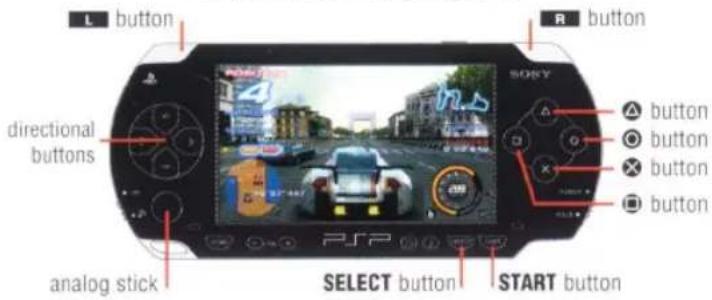
In this manual, ↑, ↓, ←, → etc. are used to denote the direction of the directional buttons only unless otherwise stated. The controller configuration can be changed via the "Controller" setting in the "Options" Menu.

Steer
analog stick
Steer

Change view

Use nitrous

Downshift when in MT mode

Accelerate
button
Upshift when in MT mode
button
Brake
START button
Start game/Display Pause Menu
SELECT button
Change colour of selected car (on Car Select Screen)
USING MENU SCREENS
Press ↑, ↓, ← or →, or use the analog stick to highlight an option, then press the ✗ button to confirm. To return to the previous menu screen, press the ▲ button.
GETTING STARTED
Following a cinematic introductory sequence, the Title Screen will be displayed.
TITLE SCREEN
Press the START button to access the New Game screen.
NEW GAME
Before getting on track, you must first enter your personal details in the Name Entry screen, outlined elsewhere in this manual.
CONTINUE
Resume a previously saved Ridge Racer game. Previously saved Ridge Racer game data must already be saved to an inserted Memory Stick Duo™.
NAME ENTRY
Use the on-screen virtual keyboard to enter your Driver Name. Your name can only be a maximum of seven characters. Press the button to delete a character. Select "OK" if the on-screen details are correct and then select "YES" on the Confirmation Screen.
AUTOSAVE
The Autosave Screen will then be displayed. Choose whether or not to enable Autosave. A Memory Stick Duo™ with at least 700KB of free space must first be inserted into the PSP™ system.
MAIN MENU
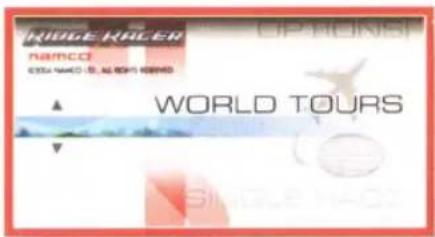
WORLD TOURS
Advance by completing tours consisting of several races.
SINGLE RACE
Select a course on which to compete against CPU-controlled cars.
TIME ATTACK
Achieve the fastest possible time as the only driver on the course. It's you against the clock!
WIRELESS BATTLE
Use the Wireless (WLAN) function of the PSP ^™ system to compete against several other players.
SAVE/LOAD
Save or load your game data. Please ensure that a Memory Stick Duo™ is inserted into the PSP™ system.
OPTIONS
Please see the Options section outlined elsewhere in this manual.
THE GAMESCREEN
NOTE: the layout and content of each gamescreen will differ depending on the game mode. The accompanying screen displays the World Tours Mode and is shown from the "Driver's View" perspective.

COURSE MAP
The Course Map displays an overhead view of the current course.
LAP TIME
Displays the time for each completed lap.
RACE INFORMATION
Shows the countdown, cautions for driving in the wrong direction and other kinds of information during the race.
MULTIMETER
Displays gear, speed, and rpm of your car's engine. The layout will differ according to which car you are using.
NITROUS GAUGE
Amount of nitrous currently charged.
INFO WINDOW
Displays the interval time (time behind the car in first place) and other race information. Shows how far behind the record time you are during Time Attack, and displays the qualifying position during World Tours.
TIME LIMIT
In certain race conditions, the amount of time remaining will be displayed.
TOTAL TIME
Displays the amount of time elapsed from the start of the race.
LAP RECORD
Shows lap records by course and machine class.
POSITION
Current position of your car. In World Tours, this will change to red once you reach or pass the qualifying position.
REAR-VIEW MIRROR
Displayed only in "Driver's View".
CHANGING PERSPECTIVE
Press the L button to switch between views during the race.
Choose either Driver's View or Chase View.
PAUSE MENU
Press the START button during a race to access the Pause Menu. Use the directional buttons to choose an item from the menu and press the ✗ button to confirm your selection.
CONTINUE
Exit the Pause Menu and return to the race.
RESTART
Recommence the current race from the beginning.
MAIN MENU
End the race and access the Main Menu.
IN-RACE MENU
Press the START button during a Wireless Battle to access the In-Race Menu. Be aware that the race will not stop while this screen is being displayed.
CONTINUE
Exit the In-Race Menu and return to the race.
EXIT RACE
Withdraw from the current race.
PLAYING THE GAME
WORLD TOURS
Each tour consists of between two and six races. Each tour has a specific machine class and prizes are awarded for victorious drivers.
RACES
A race is a competition between several cars over three full circuits. Each race has a predetermined qualifying position, and competitors who finish in that position or surpass it will be deemed to have completed the race.
DUELS
Some tours offer one-on-one competitive races called "Duels". The rules do not differ from the Race Mode, but your opponent's vehicle will be a high-performance car.
WORLD TOURS MENU
TOUR SELECTION
Initially only Basic Tours will be accessible and certain driving requirements must be met to access other tours of a higher difficulty level.
Select a tour in which to race from the available tours by first selecting the tour grade and then selecting the circuit name. The "Machine Selection" screen will be displayed from which a car can be chosen. Press the SELECT button to change the colour of the car. Press or to view all of the available cars, then highlight "OK" to access the "Transmission Type" screen. Choose either "AT (automatic)" or "MT (manual)" to access the "Request Confirmation" screen.
REQUEST CONFIRMATION SCREEN
The selected tour and car will be displayed on the "Request Confirmation" screen, and once satisfied with the selections, choose "OK" to commence the race.
BGM CHANGE - Select "BGM CHANGE" on the "Request Confirmation" screen to change the background music before the race. Press or to choose a disc and press the × button to confirm. Press or to select the music track and then press the × button to continue.
CUSTOM TOUR
Use the Custom Tour option to tailor the race conditions to your free time requirements.
Simply specify the "Total Play Time" and "Machine Class", and a unique tour will be automatically generated.
VIEW PRIZES
View the rewards and prizes that your racing prowess has unlocked.
INTRODUCTION
View the cinematic introductory sequence.
RESULTS SCREEN
A replay of the race will be displayed once the race has ended, and then the Results screen will be displayed. The Results screen will display information including finishing position, lap times and total times. "DNF" will be displayed to show competitors who did not finish the course.
RETRY
Recommence the circuit again from the start of the race under the same conditions.
REPLAY DATA
Save replay data to Memory Stick Duo™.
SELECT
Return to the Select Screen.
NEXT ROUND
Continue to the next race in the tour.
SINGLE RACE
Twelve cars compete for racing glory over three laps. Starting the race in last place, you must use skill and guile to weave through the traffic and finish first. Courses and cars awarded during World Tours Mode can be used in Single Race Mode. If a CPU controlled car finishes in first place, a countdown will be displayed indicating the time remaining in which you must complete the course. If the countdown reaches zero before you complete the course, then it is "Game Over" and your current position will then become your finishing place.
TIME ATTACK
Drive for three laps as the only car on the course, choose the best racing line and try to achieve the fastest time in Time Attack Mode.
To race alongside a "ghost car" image of a previous race saved to Memory Stick Duo™ which corresponds to the currently selected course and machine class, simply turn the "Ghost" option on via the Confirmation Screen.
Save race data for the ghost car after the race via the "Ghost Data" option on the Results Screen.
GHOSTS
When the course and machine class you have selected are the same as the Ghost Data in the Memory Stick Duo™, a semi-transparent ghost car will be displayed during a Time Attack race.
If the Memory Stick Duo™ does not contain Ghost Data, a ghost car will be displayed if "RETRY" is selected from the Results Screen. Ghost Data can only be saved if no other Ghost Data exists, or if you have produced a record time that surpasses the current Ghost Data.
WIRELESS (WLAN) BATTLE
Compete against other players on the same course using Ad Hoc Mode. Turn the WLAN switch on before competing in Wireless (WLAN) battles.
WIRELESS BATTLE SELECT SCREEN
Choose "Host Race" to create and host a race competition, or choose "Search Race" to participate in a race being hosted by another player.
When you want to host a race, and someone is already hosting a race on the same channel within your own Wireless (WLAN) communication range, simply switch to another channel and host it there.
SELECTING A CLASS
Choose a machine class for the race you are hosting. Choose from either Class 1 to 6 or Special Class.
SELECTING A COURSE
Choose a course to race. All courses are available for use in Wireless (WLAN) battles.
WIRELESS (WLAN) BATTLE
SETTING HANDICAPS
Setting a handicap will increase the speed of the car driven by the driver holding the lowest position during a race.
ANNOUNCEMENT OF RACE TO BE HOSTED
Notify PSP™ systems in the vicinity that you are going to be hosting a race. Wait a little while until you have received requests to participate from other players.
ENTRY LIST SCREEN
When a player has made a request to participate in a race, their name will be displayed on-screen and if there are two or more participants including yourself ready to commence racing, simply press the START button to block further entries.
SELECTING A CAR
Select a car and transmission type. After this point, it will not be possible to return to the previous screen.
LIST SCREEN
Stand by until the other players have confirmed their car selections and the race will begin once everyone has selected their cars.
RESULTS SCREEN
After the race, the Results Screen will be displayed. Choose either "Retry", "Main Menu" or "Select".
RETRY – use the directional buttons to select a course to re-race.
MAIN MENU – return to the Main Menu.
SELECT – return to the Competition Mode Select Screen.
SEARCH SCREEN
Search for Wireless (WLAN) battles being hosted in the vicinity. The results will be displayed and if a race is being hosted, the related information will be displayed. Select "OK" to participate in the race.
RACE INFORMATION
Displays the name of the person hosting the race, machine class, course and current number of players entered.
OK
Select "OK" to participate in a race being hosted.
SEARCH AGAIN
Searches the vicinity once more.
RETURN
Return to the Wireless Battle Select Screen.
PARTICIPATING IN A RACE
If you are able to participate in a race, a Standby Screen will be displayed and when the host has pressed the START button, the Car Select Screen will be displayed. Follow the same procedure for hosting a race as described earlier in this manual.
* Software developed by NetBSD Foundation, Inc. and its partners has been used for the communication functions in this product.
SAVE/LOAD
NOTE: before quitting a game, please ensure your data has been saved to Memory Stick Duo™ before you switch the power off.
SAVE
The Save New Screen will be displayed if your Memory Stick Duo™ does not contain any saved game data, and the Overwrite Screen will be displayed if it does. At least 700KB of free space on a Memory Stick Duo™ is required to save a game.
LOAD
Load data stored on your Memory Stick Duo™.
AUTOSAVE SETUP
Autosave, which saves your game data automatically, can be switched ON or OFF. An autosave is performed when you move to another screen from the post-race Results Screen. Autosave is also performed when you move to another screen after having changed the Options or other settings.
OPTIONS
Allows you to assign buttons, change sounds, or otherwise configure the game environment. Choose a button setup that makes the game easier for you to play.
CONTROLLER
Allows you to change the button setup. The choices of button operation setups range from Types A to E.
AUDIO
Set the volume levels for "BGM" (Background Music), "SE" (Special Effects), and "VOICE".
NAME CHANGE
Change your name using the virtual keyboard.
AV PLAYER
Listen to BGM (Background Music) as you check out your replay. Choose a song from the "BGM" option and select a circuit from the "Course" option. Choose replay data that has been saved in your Memory Stick Duo™ (if "NONE" has been selected as the course location, the system will switch to power-saving mode provided that button input has not been detected within a certain period of time).
MINI GAME
"NEW RALLY-X" is a mini game that appears during game loading and this option turns the mini game on or off. Alternatively take a spin in the "NEW RALLY-X" mini game by selecting "Play Mini Game".
PLAYING THE GAME
DRIVING TECHNIQUES
"Drifting" and "Nitro" are techniques that are used in RIDGE RACER. Learn them well so that you have them under your command during a race.
WHAT IS DRIFTING?
Drifting is a driving technique in which you take corners while letting your car skid sideways. Make the turn while keeping the car at a fixed speed so that you can accelerate smoothly when coming out of the corner.
THE THREE TYPES OF DRIFT
"Dynamic", "Mild" and "Standard" are the three levels of drift available on the cars in the game, each of which will have a different effect during drifting. Try to choose the type of drift suited to your own style of driving.
DYNAMIC
Intended for fairly advanced drivers dynamic drifting allows drivers to keep drifting with little effort and change the direction of the vehicle with ease. However, precise control is needed to stop drifting.
MILD
Not suited to make big changes to the vehicle's direction or to keep drifting steadily for long stretches, but it is easy to come out of a drift.
STANDARD
Does not offer any of the distinctive features of the Dynamic or Mild styles, but does provide exceptional balance and makes it easy for you to get hooked by the drifting bug.
DRIFTING IN AN ACTUAL RACE
1 As you head into a corner, steer in the direction of the turn. Once your car starts turning, take your foot off the gas.
2 Your car will now start to skid sideways. In order to control the car's movement, steer as needed in the direction opposite the turning direction while stepping on the gas.
3 You'll know you've got the hang of it once you come out of the corners with your car facing the direction you need to go.
USE THE NITROUS BOOST
When drifting during a race, the nitrous gauge will indicate the level of charge and will flash when the tank is full. Press the R button to trigger the nitrous and give you a rapid burst of speed. The longer you drift at high speed, the more nitrous you will have available; and you can store enough for three boosts. However, you will not be able to recharge efficiently if you make long, unnecessary drifts. Nitrous can not be recharged while it is being used.
CARS
PHELIOS ABEILLE TYPE-S
A hot hatch made by Age, the Phelios Abeille Type-S is fitted with a specially-built suspension and is both compact and lightweight. This model's build is reminiscent of a sportster and it accommodates the Prophetie's engine.

natural_image
Purple sports car with visible branding and license plate (no text or symbols on body)BACURA FATALITA TYPE-S
The FATALITA was principally bred to be a circuit racer. Technologies developed over scores of races have been generously shoehorned into this little number.

natural_image
Red sports car with visible branding and number 10, no readable text or symbols beyond brandingNEBULASRAY ESPERANZA TYPE-S
Every racing fan has wanted to own the immensely popular Esperanza at least once in their lifetime. When it comes down to it, the charm of this high-spec car, which is armed to the teeth with the latest technologies, is its otherworldly driving performance.

natural_image
Green sports car with visible branding and license plate (no text or symbols on body)STARLUSTER EO TYPE-S
The 6th generation EO is an heir to the HIMMEL tradition. The EO is naturally famous for its horizontally opposed engine and the high performance it churns out, but this car is also renowned for the exuberance it brings to anyone who owns one.

natural_image
White sports car with visible branding and number 64, no readable text or symbols on bodySHEONITE BISONTE TYPE-S
The Bisonte enjoys enormous popularity among those fans referred to as the supercar generation. Assoluto's flagship über-sportscar deftly melds the soul of a brute with the class of a princess.
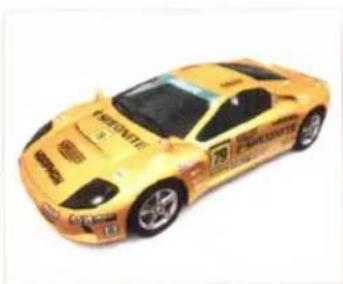
natural_image
Yellow CRUSE sports car with black racing windows and visible branding (no text or symbols on body)GAMP RAGGIO TYPE-S
An out-and-out racing car brought to you by SOLDAT. The note sounded by the RAGGIO's 12 cylinders gives heart palpitations to car fans all over the world.
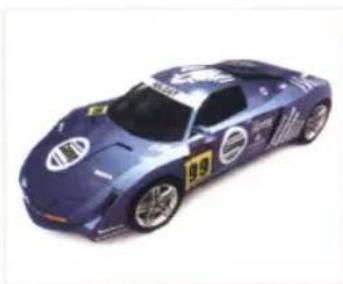
natural_image
Blue sports car with silver accents and visible branding (no text or symbols)COURSES

SEASIDE ROUTE 765
Take in the scenery when driving down Seaside Route 765 - a well-balanced, challenging course.
CRIMSONROCK PASS
This summit road winds around a mountain and has plenty of perfect corners on which to practise drift moves. Crimsonrock Pass is highly recommended for novice drivers.

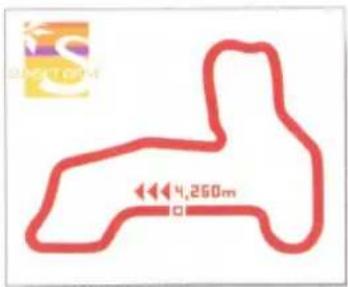
SUNSET DRIVE
A drift-friendly circuit with wide lanes, Sunset Drive is geared to first-time drivers.
MIDTOWN EXPRESSWAY
Rave Racer fans will recognise this circuit and to clock up a fast time, drivers must decide how quickly to take the series of jumps in the first half of the course.


UNION HILL DISTRICT
A rollercoaster of a course, the steep hills and steeper drops will test even the most experienced of drivers.
GREENPEAK HIGHLANDS
Steep gradients, double apex corners and other nasty surprises make up a host of taxing layouts guaranteed to drive racers crazy!

This product uses Ryobi fonts. This software uses fonts produced by Fontworks Japan, Inc. The "Fontworks Japan" company name. "Fontworks" and the names of the fonts are all trademarks or registered trademarks of Fontworks Japan, Inc. Game fonts provided by Bitstream Inc. All rights reserved.
CUSTOMER SERVICE NUMBERS
| Australia*(Calls charged at local rate) | 1300 365 911* |
| Belgique/België/BelgienTarif appel local / lokale kosten | 011 516 406 |
| Česká republikaPo - Pa 9:00 - 17:00 Sony CzechTankovano die piatneych telefornich sazej Pro dalla informace a pipadnou caliki pemoc kontaktute prosimwww.playstation.sony.cz mabo. volajte telfelemi čislo +420.222 864 111 | 222 864 111 |
| Danmarksupport@dk.playstation.com Manfredag 18-21, Lar sendag 18-21 | 70 12 7013 |
| Deutschland*(0.12 Euro/minute) Montag bis Freitag, 10.00 bis 20.0 | 01805 766 977* |
| Ελλάδα*Elvon Xpstucr | 801 11 92000* |
| EspañaTarifa nacional | 902 102 102 |
| FrancePox d'un appel local - ouvert du fundi au samedi | 0820 31 32 33 |
| IrelandAll calls charged at National Rate | 0818 365065 |
| Israel | 09 971170 |
| ItaliaLanVen 8:00 - 18:30 i Salb 8:00 - 13:00 - 11:88 centesuni di euro + IVA al minutoFestrec 4.75 centesuni di euro + IVA al minuto Telefors cellularis secondo il piano tanffario preceito | 199 116 266 |
| MaltaLocal Rate | 23 436300 |
| NederlandInterlokale kosten. Gesprekken kunnen voor tramingdownlenden worden opgenomen | 0495 574 817 |
| New ZealandNational Rate | 09 415 2447 |
| Norge0.55 NOK i startavgift og deretter 0.39 NOK pr. Moutrsupport@no.playstation.com Manfredag 15-21, Lørsandag 12-15 | 81 55 09 70 |
| Österreich*(0.116 Euro/Minute) | 0820 44 45 40* |
| Poccia | +7 (095) 238-3632 |
| Portugal*Servico de Atendimento ao Consumidor/Servico Tecnico | 707 23 23 10* |
| Suisse/Schweiz/SvizzeraTarif appiel national / Nationaler Tarif / Tanffa Nazionale | 0848 84 00 85 |
| Suomi0.79 Euro/min + pvm fi-hotline@nordiskfilm.com maanantar penjanta 15-21 | 0600 411 911 |
| Sverigesupport@ve.playstation.com Man Fre 15-21, Lørsindag 12-15 | 08 587 822 25 |
| UKNational rate. Calls may be recorded for training purposes | 08705 99 88 77 |
Please call these Customer Service Numbers only for PSP™ Hardware Support.
- PRECAUTIONS
- HEALTH WARNING
- PIRACY
- PARENTAL CONTROL
- UCES-00002
- SETTING UP
- MEMORY STICK DUO™
- WIRELESS (WLAN) FEATURES
- AD HOC MODE
- GAME SHARING
- INFRASTRUCTURE
- USING MENU SCREENS
- GETTING STARTED
- TITLE SCREEN
- NEW GAME
- CONTINUE
- NAME ENTRY
- AUTOSAVE
- WORLD TOURS
- SINGLE RACE
- TIME ATTACK
- WIRELESS BATTLE
- SAVE/LOAD
- OPTIONS
- THE GAMESCREEN
- LAP TIME
- RACE INFORMATION
- MULTIMETER
- NITROUS GAUGE
- INFO WINDOW
- TIME LIMIT
- TOTAL TIME
- LAP RECORD
- POSITION
- REAR-VIEW MIRROR
- CHANGING PERSPECTIVE
- PAUSE MENU
- RESTART
- MAIN MENU
- IN-RACE MENU
- EXIT RACE
- PLAYING THE GAME
- RACES
- DUELS
- WORLD TOURS MENU
- TOUR SELECTION
- REQUEST CONFIRMATION SCREEN
- CUSTOM TOUR
- VIEW PRIZES
- INTRODUCTION
- RESULTS SCREEN
- RETRY
- REPLAY DATA
- SELECT
- NEXT ROUND
- GHOSTS
- WIRELESS (WLAN) BATTLE
- WIRELESS BATTLE SELECT SCREEN
- SELECTING A CLASS
- SELECTING A COURSE
- SETTING HANDICAPS
- ANNOUNCEMENT OF RACE TO BE HOSTED
- ENTRY LIST SCREEN
- SELECTING A CAR
- LIST SCREEN
- SEARCH SCREEN
- SEARCH AGAIN
- RETURN
- PARTICIPATING IN A RACE
- SAVE
- LOAD
- AUTOSAVE SETUP
- CONTROLLER
- AUDIO
- NAME CHANGE
- AV PLAYER
- MINI GAME
- DRIVING TECHNIQUES
- WHAT IS DRIFTING?
- THE THREE TYPES OF DRIFT
- DYNAMIC
- MILD
- STANDARD
- DRIFTING IN AN ACTUAL RACE
- USE THE NITROUS BOOST
- CARS
- PHELIOS ABEILLE TYPE-S
- BACURA FATALITA TYPE-S
- NEBULASRAY ESPERANZA TYPE-S
- STARLUSTER EO TYPE-S
- SHEONITE BISONTE TYPE-S
- GAMP RAGGIO TYPE-S
- COURSES
- SEASIDE ROUTE 765
- CRIMSONROCK PASS
- SUNSET DRIVE
- MIDTOWN EXPRESSWAY
- UNION HILL DISTRICT
- GREENPEAK HIGHLANDS
Marque : SONY
Modèle : Ridge Racer (PSP)
Catégorie : Jeu