
Street Fighter Alpha - Warriors (PSP) - Jeu SONY - Notice d'utilisation et mode d'emploi gratuit
Retrouvez gratuitement la notice de l'appareil Street Fighter Alpha - Warriors (PSP) SONY au format PDF.


| Type de produit | Jeu vidéo |
| Marque | Sony |
| Modèle | Street Fighter Alpha - Warriors (PSP) |
| Plateforme | PlayStation Portable (PSP) |
| Genre | Combat |
| Nombre de joueurs | 1 à 2 |
| Classification PEGI | 12+ |
| Langue du jeu | Anglais, Français |
| Format | UMD |
| Fonctions principales | Combats en 2D, modes Arcade, Versus, Entraînement, Défis |
| Contenu de la boîte | Disque UMD, manuel d'utilisation |
| Entretien et nettoyage | Nettoyer le disque avec un chiffon doux et sec ; éviter l'humidité et la poussière |
| Sécurité | Tenir hors de portée des enfants ; ne pas exposer à des températures extrêmes |
| Pièces détachées | Non applicable (jeu sur support UMD) |
| Réparabilité | Consulter un professionnel en cas de problème de lecture |
| Alimentation | Via la console PSP (batterie ou adaptateur secteur) |
| Dimensions | Environ 10 x 7 x 0,5 cm (boîtier UMD standard) |
| Poids | Environ 30 g (boîtier UMD) |
FOIRE AUX QUESTIONS - Street Fighter Alpha - Warriors (PSP) SONY
Questions des utilisateurs sur Street Fighter Alpha - Warriors (PSP) SONY
0 question sur cet appareil. Repondez a celles que vous connaissez ou posez la votre.
Poser une nouvelle question sur cet appareil
Téléchargez la notice de votre Jeu au format PDF gratuitement ! Retrouvez votre notice Street Fighter Alpha - Warriors (PSP) - SONY et reprennez votre appareil électronique en main. Sur cette page sont publiés tous les documents nécessaires à l'utilisation de votre appareil Street Fighter Alpha - Warriors (PSP) de la marque SONY.
MODE D'EMPLOI Street Fighter Alpha - Warriors (PSP) SONY
CAPCOM INSIDER.COM
LOADS OF FREE STUFF EVERY MONTH
If you want to hear what Capcom are up to next, and get loads of free stuff, here's how. Become an Insider now and be the first to receive all the latest news, freebies and info on your favourite Capcom games. Plus 5 lucky members every month will receive an exclusive Capcom T shirt. Register online immediately at
www.capcom-insider.com
and enter the code
Street Fighter
See you on the Inside, Capcom fans...
Terms and conditions apply, see website for details
M89015-01ENG ULES-00235

PlayStation', PFP, 'UMO' and '△ O X □' are trademarks or registered trademarks of Sony Computer Entertainment Inc. All Rights Reserved. 5065060910214
PRECAUTIONS
This disc contains game software for the PSP™ (PlayStation®Portable) system. Never use this disc on any other system, as it could damage it. Read the PSP™ system Instruction Manual carefully to ensure correct usage. Do not leave the disc near heat sources or in direct sunlight or excessive moisture. Do not use cracked or deformed discs or discs that have been repaired with adhesives as this could lead to malfunction.

Push down one side of the disc as shown and gently pull upwards to remove it. Using excess force to remove the disc may result in damage.

Place the disc as shown, gently pressing downwards until it clicks into place. Storing the disc incorrectly may result in damage.
HEALTH WARNING
Always play in a well lit environment. Take regular breaks, 15 minutes every hour. Avoid playing when tired or suffering from lack of sleep. Some individuals are sensitive to flashing or flickering lights or geometric shapes and patterns, may have an undetected epileptic condition and may experience epileptic seizures when watching television or playing videogames. Consult your doctor before playing videogames if you have an epileptic condition and immediately should you experience any of the following symptoms whilst playing: dizziness, altered vision, muscle twitching, other involuntary movement, loss of awareness, confusion and/or convulsions.
PIRACY
The PSPTM system and this disc contain technical protection mechanisms designed to prevent the unauthorised reproduction of the copyright works present on the disc. The unauthorised use of registered trademarks or the unauthorised reproduction of copyright works by circumventing these mechanisms or otherwise is prohibited by law.
If you have any information about pirate product or methods used to circumvent our technical protection measures please email anti-piracy@eu.playstation.com or call your local Customer Service number given at the back of this manual.
PARENTAL CONTROL
This PSP™ (PlayStation®Portable) Game software has a preset Parental Control Level based on its content. You can set the Parental Control Level on the PSP™ system to restrict the playback of a PSP™Game with a Parental Control Level that is higher than the level set on the PSP™ system. For more information, please refer to the PSP™ system Instruction Manual.
ULES-00235
STREET FIGHTER™ ALPHA3 MAX © CAPCOM U.S.A., INC. 1998, 2006 ALL RIGHTS RESERVED. Library programs © 2003-2006 Sony Computer Entertainment Inc. exclusively licensed to Sony Computer Entertainment Europe. FOR HOME USE ONLY: Unauthorised copying, adaptation, rental, lending, distribution, extraction, re-sale, arcade use, charging for use, broadcast, public performance and internet, cable or any telecommunications transmission, access or use of this product or any trademark or copyright work that forms part of this product are prohibited. Published by CE EUROPE LTD. Developed by CAPCOM CO., LTD.
PAN EUROPEAN GAMES INFORMATION (PEGI) AGE-RATING SYSTEM
The PEGI age-rating system protects minors from games unsuitable for their particular age group. PLEASE NOTE it is not a guide to gaming difficulty. Comprising two parts, PEGI allows parents and those purchasing games for children to make an informed choice appropriate to the age of the intended player. The first part is an age rating:-


The second is icons indicating the type of content in the game. Depending on the game, there may be a number of such icons. The age-rating of the game reflects the intensity of this content. The icons are:-

VIOLENCE

BAD LANGUAGE

FEAR

SEXUAL CONTENT

DRUGS

DISCRIMINATION
For further information visit http://www.pegi.info
PARENTAL CONTROL LEVEL
This game is classified according to the PEGI rating system. The PEGI rating marks and content descriptors are displayed on the game package (except where, by law, another rating system applies). The relationship between the PEGI rating system and the Parental Control Level is as follows:
| PARENTAL CONTROL LEVEL | PEGI RATING AGE GROUP |
| 9 | 18+ |
| 7 | 16+ |
| 5 | 12+ |
| 3 | 7+ |
| 2 | 3+ |
SETTING UP
Set up the PSP™ system according to the instructions in its instruction manual. Turn the PSP™ system on and the POWER indicator will light up green. The Home Menu will be displayed. Press the OPEN latch to open the disc cover. Insert the STREET FIGHTER™ ALPHA3 MAX disc with the label side facing the rear of the PSP™ system and then securely close the disc cover.
Select the 📄 icon from the Home Menu and then select the Ⓑ icon. An image of the software will be displayed. Select the image and press the ✗ button to commence loading.
PLEASE NOTE: the information in this manual was correct at the time of going to print, but some minor changes may have been made late in the product's development. All screenshots for this manual have been taken from the English version of this product, and some screenshots might have been taken from pre-completion screens that differ slightly from those in the finished product.
MEMORY STICK DUO™
To save game settings and progress, insert a Memory Stick Duo™ into the Memory Stick Duo™ slot of the PSP™ system. Saved game data can be loaded from the same Memory Stick Duo™ or any Memory Stick Duo™ containing previously saved game data
WIRELESS (WLAN) FEATURES
Software titles that support Wireless (WLAN) functionality allow you to communicate with other PSP™ systems, download data and compete against other players via connection to a Wireless Local Area Network (WLAN).

AD HOC MODE
Ad Hoc Mode is a Wireless (WLAN) feature that allows two or more individual PSP™ systems to communicate directly with each other.

GAME SHARING
Some software titles feature Game Sharing facilities which enable the user to share specific game features with other users who do not have a PSP™ Game in their PSP™ system.
INFRASTRUCTURE MODE
Infrastructure Mode is a Wireless (WLAN) feature that allows the PSP™ system to link to a network via a Wireless (WLAN) Access Point (a device used to connect to a Wireless network). In order to access Infrastructure Mode features, several additional items are required, including a subscription to an Internet Service Provider, a network device (e.g. a Wireless ADSL Router), a Wireless (WLAN) Access Point and a PC. For further information and setting up details, please refer to the PSP™ system Instruction Manual.
CONTENTS
CONTROLS 2
GAME SCREEN 4
GAME RULES 5
BEGINNING A NEW GAME 6
GAMEPLAY MODES 7
WORLD TOUR MODE 9
ENTRY MODE 11
EDIT MODE 11
OPTION MODE 12
SAVE/LOAD 13
NETWORK 15
ISM SYSTEM 18
SUPER COMBOS 19
BASIC MOVES 20
CHARACTERS 22
TOP SECRET INFO 42
natural_image
Black-and-white illustration of a muscular character with spiky hair and flowing sleeves, no visible text or symbolsCONTROLS
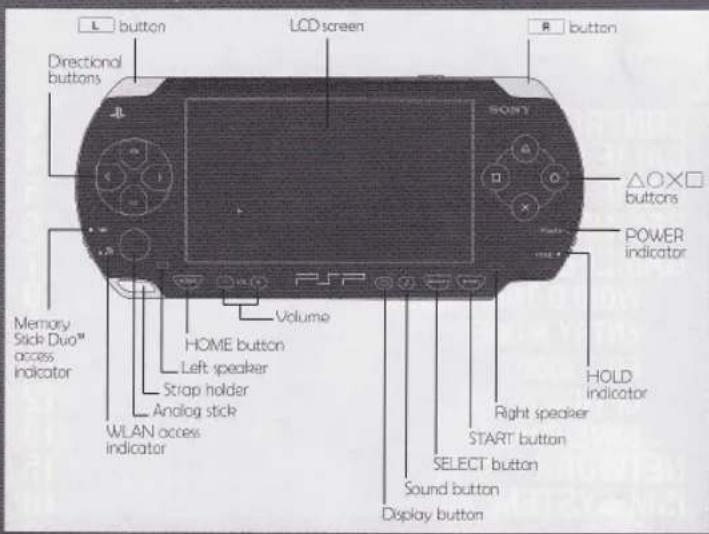
DEFAULT CONTROLS
Vertical jump
Move Forward
Crouch
←Move backward/standing block
Diagonal forward jump
Crouch
Crouching block
Diagonal backward jump
*All buttons listed are default settings. To change the button layout, use the BUTTON CONFIG menu (page 12).
PUNCH BUTTONS
| Light | Medium | Heavy |
KICK BUTTONS
OTHER CONTROLS
Use the directional buttons to navigate within menus and change options.
Confirm Button - ✗
Cancel Button -
START Button
Press the START Button during a match to pause the game.
SELECT Button
Use the SELECT Button to taunt your opponent.
NORMAL MOVE
Normal Moves use the punch or kick buttons, and moves vary depending on the character's stance.
BLOCK
Block an opponent's attack by pressing the direction away from the opponent.
THROW
Press ⇔ or ⇔ plus either two punch buttons or two kick buttons at the same time to grab and throw your opponent.
DIZZY/RECOVERY
If an opponent's attack renders you dizzy, recover more quickly by pressing the directional buttons and punch or kick buttons.
SPECIAL MOVE
Perform various special moves by combining movements of the directional buttons with punch and kick buttons (page 19).
SUPER COMBO
When your Super Combo Gauge fills up, you can perform a super-powerful move, with input commands similar to special moves (page 19).
GAME SCREEN
GAME RULES

① Score – Player's current score.
② Vitality Gauge – Player's remaining vitality.
3 Guard Power Gauge - When this gauge runs out, the player' block can be broken.
4 Timer - Shows the amount of time left in the round.
⑤ Win Mark – Indicates the number of rounds won.
6 Character Icon – Shows the face and name of each player.
7 Super Combo Level Gauge – Allows players to perform different Combos (see page 19).
8 ISM – Shows the currently selected ISM type (see page 18).
9 Bonus Message – Various messages are displayed during each round.
MATCHES
The first player to win two out of three rounds wins the match. Adjust the number of rounds from the Options menu. Note that in some gameplay modes, the number of rounds cannot be changed.
WINNING
Each round lasts 99 'counts'. Reduce your opponent's vitality to 0 before the time runs out to win the round. Should the timer run out before there is a knockout, the player with the most remaining vitality wins the round. Note that in some gameplay modes, the time limit cannot be changed.
DRAW GAME
A draw game occurs when both sides are knocked out at the same time, or when both sides have the same amount of remaining vitality when the time runs out. If a draw game occurs on the third round, a fourth final round will be played. The winner of the fourth round wins the match. However if the fourth round ends up a draw game as well, both sides lose. Adjust the number of rounds from the Options menu. Note that in some gameplay modes, the number of rounds cannot be changed.
natural_image
Black-and-white illustration of a person in dynamic pose, wearing a cap and uniform, with no visible text or symbols.BEGINNING A NEW GAME
GAMEPLAY MODES
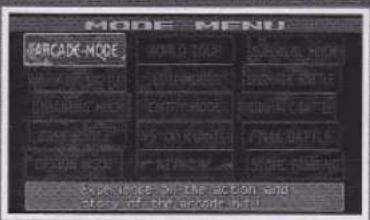
Press the START button from the Title screen to bring up the Mode Select screen. Move the cursor to the mode you wish to play using the directional keys, and press the Confirm button to select that mode.
PLAYER SELECT

- Character Select – Once you select a game mode, you will be taken to the character select screen. Move the cursor to the character you wish to use and press the ✗ button.

- Mode Select - If the "Mode Select" option is turned ON in the Options, you may select a mode for your character. Note that the default setting is OFF, and must be turned on to enable this selection.

-
ISM Select - Choose either X, A, or V ISM type (page 18).
-
Speed Select – Choose a game speed. Note that speed select may not be available depending on Option settings.
ARCADE MODE
Defeat a string of 10 AI-controlled opponents to reach the ending.
TRAINING MODE
Define settings for yourself and your AI-controlled opponent and practice your skills. Press the START button during play to display the Training Mode Select screen.
AI-Controlled Dummy Settings:
ACTION - Set your opponent's action to stand, crouch, or jump. You can also choose to control the character temporarily to record a series of actions to loop back.*
GUARD – Set your opponent's guard status.
SC GAUGE - Set the level of your opponent's Super Combo Gauge.
GP GAUGE - Set the level of your opponent's Guard Power Gauge.
STUN – Set whether your opponent can be stunned or not.
COUNTER HIT – Set whether or not it is a Counter Hit when your opponent takes a hit.
SAFE FALL – Set whether or not your opponent performs a safe fall when knocked to the ground.
THROW ESCAPE – Set whether or not your opponent tries to escape throws.
TIMING GUARD – Set whether or not your opponent performs Timing Guards (page 20).
DAMAGE REDUCE – Set whether or not your opponent has reduced damage.
* While recording a series of moves for your opponent character to perform, you must wait for the timer to run out. Pressing the START button will not return you to the Training Select Mode.
GAMEPLAY MODES
VARIABLE BATTLE
Control a 2-character tag-team to join up against a single opponent, switching between characters at will.
Switch characters with a punch and kick button of different strength.
(Close) LP + MK
(Far) LK + MP
DRAMATIC BATTLE
Team up with an AI-controlled partner to take on an opponent in two-on-one battles.
REVERSE DRAMATIC BATTLE
Go alone against two AI-controlled opponents at once in one-on-two battles.
SURVIVAL MODE
With a limited amount of vitality, go up against a string of opponents and survive as long as you can. There are 8 gameplay modes available for Survival Mode.
VS 100 KUMITE
Fight your way through a series of 100 single-round matches to compete for the best win-loss record out of 100.
FINAL BATTLE
Fight the final match against the final boss. If you win, you can view the game ending after just the one match.
FREE BATTLE
Select an opponent and difficulty level for a single head-to-head match. There are 5 gameplay modes available in Free Battle.
Team battle
Versus mode that allows up to 3 people on a team. You can select an ISM type for each character. Also with the Gauge Reset option, you can select to reset the Super Combo Level Gauge to the max when you lose and switch to the next character.
WORLD TOUR MODE
Beginning A New World Tour Game
Start from the beginning or pick up from where you left off.
New Game
Select a character and start from the beginning.
Load Game
Load previous save data and continue building up your character.
*To play as a different character, you must start a New Game from the beginning.
World Map Stage Select
Select the stage you wish to visit from the world map. Selecting a stage will bring up a menu with the following options:
BATTLE – Starts the match.
SETUP - Move to the ISM setup screen.
SAVE – Save your progress. This is the only place in World Tour Mode that you can save your game, so don't forget to do it.
*Saving requires 128KB of free space.
Battles - The Path to Strength
Your journey begins in Asia. Complete a stage and select the next stage you wish to advance to. Complete all the stages in the area (i.e. Asia) to advance to the next area, building your character as you go.
Leveling Up
Gain valuable experience points by defeating opponents. Once you earn a certain amount of experience points, your level goes up, increasing your stats (abilities).
ISM Plus
Somewhere within each area you can acquire an ISM Plus that boosts your character's abilities (page 18).
ISM Level-Up
Each ISM gains experience points separately, and grows in power. The status set from the ISM Select screen also affects ability boosts from leveling up.
GAMEPLAY MODES

This screen allows you to customize your character.
① Character Name
② Character Level*
3 Current Total Experience Points
4 ISM Select Cursor
5 ISM list
6 Speed Select
⑦ Acquired ISM Plus's
8 ISM Plus description
9 Status
*The maximum player level is 32. Once you reach level 32, the ISM level also stops going up.
1 - ISM Select
Move the cursor to the ISM you wish to use.
2 - Speed Select
Select the preferred match speed
*Depending on the Option mode settings, this option may not be available from this screen.
Stages
There are many, many stages available in the World Tour mode, including special stages with specific conditions, such as stages where only Super Combos do damage. Below are two examples:
Survival Stage
Fight multiple enemies in succession and defeat them all with a limited amount of health.
Team Battle Stage
Go up against teams of 2 or 3 characters, and defeat them all to proceed.
ENTRY MODE
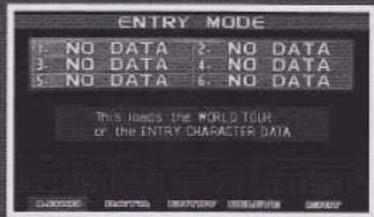
Use Entry Mode to take characters built up with World Tour Mode or created in Edit Mode and use them in the other gameplay modes by loading the character data and entering it in the registry. The data
for this character will be converted to Entry Character Data and appear on the character select screens for the other modes.
* Loading a character into the Entry screen does not load the Option settings, high scores, etc.
* Characters loaded into Entry Mode may not be available for use again in World Tour Mode, etc.
* Characters loaded to slots 1-3 can be used in Network play.

EDIT MODE
Use the Edit Mode to create a custom character for use in other gameplay modes. Create the kind of character you want by assigning points to various attributes.
Note: Custom characters created here cannot be used in World Tour Mode.
GAMEPLAY MODES
OPTION MODE
Adjust various options here.

GAME OPTION
Adjust settings and rules for matches.
- Difficulty – Difficulty level of the game's A.I.
• Time – Time limit for each round - Rounds – Number of rounds per match.
- Damage – Attack strength of moves during matches.
• Speed – Game speed during matches.
• S.C. Gauge – Default level of the Super Combo Gauge. - Mode Select – Turn Mode Select on/off (page 18).
- Player Side – Start the match on the left (1P) or right (2P) side.
• BGM Volume – Adjust the volume of the in-game music from 0-15.
• S.E. Volume – Adjust the volume of the in-game sound effects from 0-15. - Default – Return all options to their default settings.
- Exit – Return to the main menu.
Notes:
• Some game modes do not follow changes in certain settings.
- Some game modes do not reflect changes in settings for time limit or number of rounds.

BUTTON CONFIG
Customize the button configuration by assigning buttons for the punch and kick attacks.
Special Commands
You can assign a single button to perform special commands.
- 3 Buttons at Once - (3 x P or 3 x K) - Assign all three punch or all three kick buttons to a single button, useful for special or throw moves.
- Same Strength P+K - Use to perform original combos
- Special / Super Combos - Assign special moves or Super Combos to a single button.
- VARIABLE 1 and VARIABLE 2 - Use for the player change at "VARIABLE BATTLE" (VARIABLE : close range / VARIABLE 2: long range)
Command
Adjust the amount of time allowed to enter commands for special moves. "Arcade" is the shortest, and "Long" is the longest.
Type
Change to "Easy" to make it easier to input commands.
Rapid
Turn the rapid fire function for buttons on/off.
Note: Button settings can also be modified during a match through the pause menu.
Top Secret Information:
Moves that require pressing all three punch or kick buttons at the same time can also be performed with the following button combinations:
PPP: LP+HK (or LK + HP)
KKK: MP+HK (or MK+HP)
Note: Does not apply to moves that require charging, like Balrog's Turn Punch, or Throw moves that require two buttons to be pressed at once.
natural_image
Black-and-white illustration of a person playing a stringed instrument (no text or symbols visible)GAMEPLAY MODES
NETWORK
SCREEN SETTING
Screen Size
Set the screen setting to Wide or Normal. When set to wide, the gameplay screen will fill up the entire screen.
Wallpaper
When you have the screen size setting set to Normal, you can select to have a wallpaper image displayed on the sides of the screen to fill up the area. There are a number of wallpaper images to choose from.
SAVE/LOAD
Save and load data and settings.
- Save – Manually save changes made to the options or hi-scores attained in Arcade Mode.
- Load – Load settings, scores, and data from a saved file.
- Delete – Delete saved data files.
- Auto-save – Turn the auto save function on/off.
Notes:
- With Auto-save turned on, changes to option settings, high scores, etc. will be saved automatically.
• Memory Stick Duo™ (sold separately) is required to save game data. - Insert it into the Memory Stick Duo™ slot before attempting to save.
• This game requires at least 256KB of free space to save play records. - Memory Stick Duo™ is automatically checked when booting the game, so please insert your Memory Stick Duo™ with your game data before powering up the system.
- Do not remove the Memory Stick Duo™ during save or load operations, as this may corrupt the save data.
SCORE RANKING
View rankings for Arcade Mode, Survival Mode, and VS 100 Kumite Mode.
With the Wireless (WLAN) features, you can connect to other PSPTM systems to send data and use the Ad-Hoc mode to go head-to-head.
NETWORK MODE

VS Mode
Go head-to-head with another player. Once a match is over, replay with the same settings, or select different characters and play again.
Team Battle
Select up to 3 characters for a team, and defeat your opponent's team a character at a time.
Variable Battle
Enjoy Variable Battles with multiple people. With two players, AI-controlled characters are also used.
Dramatic Battle
Enjoy Dramatic Battles with multiple people. With two players, AI-controlled characters are also used.
Using Ad-Hoc
After confirming that the WLAN switch is set to ON, select NETWORK from the mode selection screen. From the mode selection screen for Network, use the directional buttons to select a mode, and the X button to confirm and be connected to the mode's menu selection and standby screen.
Note: Options cannot be modified during an Ad-Hoc versus match. Please verify all settings are correct before entering Network mode.

LOBBY SCREEN
Once you connect to the Lobby, a list of users that can be challenged is displayed for you to choose from. If you choose to do nothing, you will be on standby until someone
challenges you. Once both sides agree to the challenge, the person who received the challenge becomes Player 1, and the person who sent the challenge becomes Player 2, with Player 1 setting the match rules.
NETWORK
- User List – List of nicknames of players that can be challenged.
- Your Nickname - Shows your own nickname.
- Players Online – Shows the number of people online who can be connected to.
*Pressing the × Button to exit the Lobby and return to the Network mode selection screen.
*The nickname setting is carried over from the PSPTM itself. Refer to the PSPTM manual for information about the nickname.
NETWORK BATTLE TYPES
VS MODE
Play one-on-one matches. Select a Versus mode from among 3 types.
TEAM BATTLE
Play team battles with up to 3 characters per team. Select a gameplay mode from among 3 types. Characters battle one at a time, with the winner moving to the next round with a just a certain amount of vitality restored. Defeat all members of your opponent's team to win.
VARIABLE BATTLE
Select the team setup before the character select screen. With two players, the third character becomes AI-controlled. If both characters on the 2-person team are controlled by players, the player on stand-by may jump in during the match without waiting to be brought in by the other player.
DRAMATIC BATTLE
Like Variable Battles, you select the team setup before the character select screen. Up to 3 players can compete in 2-on-1 matches, with all players on the screen at once.
VERSUS MODES
In VS MODE and TEAM BATTLE, you can select the type of system for selecting your opponent.

Single
Play against a single player in multiple matches until one side quits or cancels.
League
Play in a league of two to eight players. To start league play, one person
chooses to become the Host and creates a lobby, and other players join in as Guests. The host sets the rules for the matches, etc.


flowchart
graph TD
    A["FEI-LONG"] --> B["..."]
    C["RYU"] --> B
    D["MBISON"] --> B
    E["SAKURA"] --> B
    F["CHUN LI"] --> B
    G["INGRID"] --> B
    H["AKUMA"] --> B
    I["KEN"] --> B
    B --> J["..."]
Tournament
Play in an 8-person tournament with 2 or more players. If there are not 8 players present, other tournament contestants are
controlled by Al. Just as with League mode, one player becomes the Host and Guests join from there.
AD HOC MODE FAQ
Q) What is "wireless"?
Wireless (WLAN) is a type of wireless data transmission technology that comes built in to the the PSP™ system. This game uses the Ad Hoc mode to enable network play Wireless.
Q) What is Ad Hoc Mode?
Ad Hoc is a type of wireless (WLAN) network connection that does not require "wireless access points" because it connects you directly with other the PSP™ systems in the proximity.
Q) Do I need anything special to play Ad Hoc mode?
Nothing, except for your PSPTM and your copy of Street FighterTM Alpha3 Max.
Q) I can't seem to connect.
Check to make sure your WLAN switch is set to ON. If you discover that it is turned OFF, turn it ON and re-enter the Network Mode from the main menu.
Q) While playing Ad Hoc mode, sometimes the screen freezes and starts again, or slows down really bad.
If you occasionally experience such behavior, it may be due to a weak or bad wireless connection. This may be due to, for example, location, distance between you and the other players, interference, etc.
ISM SYSTEM
SUPER COMBOS
Select from among three types of ISMs.
X-ISM - Simple ISM with one powerful Super Combo. Good for beginners.
A-ISM - Standard ISM with multiple Super Combo moves.
V-ISM - Only ISM where original combos can be used. Allows various combination moves possible.
| X-ISM | A-ISM | V-ISM | |
| Number of Super Combos | 1 | 2 or more | 0 |
| Super Combo Level | 1 Level | 3 Levels | 2 Levels(Orig. Combo) |
| Original Combos | No | No | Yes |
| Mid-Air Guard | No | Yes | Yes |
| Attack Power | High | Standard | Low |
| Defense Power | Low | Standard | Standard |
| Alpha Counter | No | Yes | Yes |
I-ISM – Characters registered through Entry Mode have special I ISM gauges. These gauges depend on how the character was leveled up in World Tour Mode (page 9).
MODE SELECT
If MODE SELECT is ON in Options mode (page 12), you can select a mode for your character. (The default is OFF, so you must turn this option ON in Options mode to enable this selection.)
| Normal | Standard mode. |
| Mazi | Boosts attack power very high, drops defense power very low. One hit and you could be toast. |
| Saikyo | Greatly lowers all character abilities, for people very confident in their skills. |
| Classic | Characters perform in the style of Street Fighter II, with no Super Combo gauge or Guard Power gauge. |
Performing normal moves and special moves fills up your Super Combo Level gauge. Once this gauge reaches a certain point, the level increases, allowing you to use Super Combos, Alpha Counters, or Custom Combos.
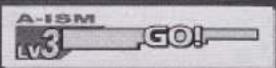
There are 3 levels to A-ISM, with higher levels producing more powerful attacks. The level is determined by the type of button pressed, and different levels of Super Combos use different amounts of energy from the gauge (Weak -> Level 1 / Medium -> Level 2 / Hard -> Level 3)

X-ISM has one level, and the gauge must be completely full to perform a Super Combo. One Super Combo move uses up all the energy in the gauge.
CUSTOM COMBOS

With V-ISM selected, charge the Super Combo Level Gauge up to above 50%, and then press a punch and kick button of the same strength to summon a double of your character for a short amount of time. Control this double well and create original combos of your own. The strength of the punch/kick buttons pressed to summon it (Light, Medium, Hard) determines the interval it is there. You cannot guard while the double is present, and the double stays on the screen until the timer runs out, or until you are hit and take damage.
BASIC MOVES
GUARD
Press the directional buttons in the direction away from your opponent to guard attacks. You can guard high attacks while standing (high guard) and low attacks while crouching (low guard). Low (crouch) attacks cannot be blocked with standing high guards. You can also guard while in the air (except for X-ISM). When going up against 2 enemies at once, if you are not in the middle of an attack, you will guard incoming attacks on the same level (high/low) automatically.
DEFENSIVE FALL
If you get knocked down from the air or on the ground, press two punch buttons at the same time to perform a defensive fall from the air, or two kick buttons to perform a defensive fall on the ground (you cannot perform defensive fall on the ground with when using X-ISM). Not performing a defensive fall may leave you on the ground open for attack.
THROW/ESCAPE
When close to an opponent, press either or and either two punch or kick buttons to grab and throw your opponent. Throws cannot be blocked against, so they can be useful against opponents who continue to guard your attacks. If you are grabbed and about to be thrown, enter the same throw command to escape from it.
ALPHA COUNTER
When blocking an attack, press or towards your opponent and press a punch and a kick button of the same strength to perform a counter attack from the guard position (not available with X-ISM). This move uses one Super Combo level and shortens the Guard Power Gauge.
GUARD CRUSH
Your Guard Power Gauge shortens while you are guarding attacks. When the gauge reaches zero, you will no longer be able to guard any attacks. This gauge will gradually fill back up when you are not guarding. Performing an Alpha Counter uses energy from this gauge.
DAMAGE REDUCE / TIMING GUARD
Press a directional button or punch or kick while being attacked or while guarding to reduce the amount of damage taken. You can also time a guard right before being attacked to reduce the amount of damage taken and GP Gauge used.
TAUNT
Press the SELECT button to taunt your opponent. This is the default button. To assign taunting to a different button, use the Button Config menu in Options (page 12).
CHARACTERS
CHARACTERS
CHARACTER'S NAME

The moves descriptions are based on the characters facing right. Reverse when characters are facing left.


HOLD
REVERSE


Punch Button
Kick Button
Shows the directional buttons or analog stick controls. Example shown: press simultaneously ↓ ↗ ←
Example shown: press simultaneously ↓ ↗ ←
A command which consumes 3 levels worth of Super Combo Gauge
Command for X-ISM
Command for A-ISM
Command for V-ISM
Special / Super Combos
Light
Medium
Heavy
COMMAND LIST





SUPER COMBOS FOR A-ISM ONLY
SUPER COMBOS FOR X-ISM AND A-ISM ONLY


Hadouken
Shakunetsu Hadouken
Shoryuken
Tatsumaki Senpukyaku
Shinku Hadouken
Shinku Tatsumaki Senpukyaku
Metsu Shoryuken lv3
1

2

3

4

1

2

3


Hadouken
Shoryuken
Tatsumaki Senpukyaku
Shoryu Reppa
Shinryuken
Shippu Jinraikyaku
lv3
1

2

3

1

2

3

CHARACTERS
CHARACTERS
| 1 | AV | Kikoken |
| 2 | REVERSAL ONLY | Tenshokyaku |
| 3 | RAPID TAPS | Hyakuretsukyaku |
| 4 | AV | Senenshu |
| 5 | (XOK IN MIDAIR) | Spinning Bird Kick |
| 6 | X | Sohakkei |
| 1 | + | Senretsukyaku |
| 2 | + | Hazan Tenshokyaku |
| 3 | + | Kikosho |


| Double Lariat | 1 | |
| Quick Double Lariat | 2 | |
| Banishing Flat | 4 | 3 |
| Screw Pile Driver | 5 | |
| Atomic Suplex | 6 | CLOSE RANGE |
| Flying Power Bomb | 7 | FROM A DISTANCE |
| Final Atomic Buster | 1 | |
| Aerial Russian Slam | 2 |
| 1 | Yoga Fire | ||
| 2 | AV | 3 | Yoga Flame |
| 4 | AV | 5 | Yoga Blast |
| 6 | Yoga Teleport (OK IN MIDAIR)THE MOVES MARKED X ARE NOT AVAILABLE IN MIDAIR | ||
| 1 | Yoga Tempest | ||
| 2 | Yoga Inferno | ||
| 3 | Yoga Strike | ||
| 4 | Yoga Stream | ||

| Hozanto | 1 | |
| Bushin Senpukyaku | 2 | |
| Bushin Izuna Otoshi | 34 | |
| Hayagake | 5 | |
| Kage Sukui | 5 | |
| Kubikari | 5 | |
| Bushin Musorenka | 1 | |
| Bushin Hassoken | 2 | |
| Bushin Goraikyaku | 3 |
CHARACTERS
CHARACTERS
| 1 | Tiger Shot | |
| 2 | Ground Tiger Shot | |
| 3 OR 4 | Tiger Blow | |
| 3 OR 4 | Tiger Uppercut | |
| 5 | AV | Tiger Crash |
| 1 | Tiger Genocide | |
| 2 | Tiger Cannon | |
| 3 | Tiger Raid |
SAGAT
ADON
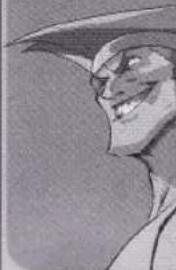
natural_image
Illustration of a smiling cartoon character wearing a hat (no text or symbols)Jaguar Kick
Jaguar Tooth
Rising Jaguar
Jaguar Varied Assault
Jaguar Revolver
| 1 |  |
| 2 |  |
| 3 |  |
| 1 |  |
| 2 |  |
| 1 | Soul Spark | |
| 2 | Soul Throw | |
| 3 | Soul Reflect | |
| 4 | Soul Spiral | |
| 1 | Aura Soul Throw | |
| 2 | Aura Soul Spark | |
| 3 | Soul Illusion |
ROSE
SODOM

natural_image
Monochrome illustration of a person wearing a hat and holding a small object, with no visible text or symbols.Jigoku Scrape
Shiraha Catch
Butsumetsu Buster
Daikyo Burning
Yagura Reverse
Meido no Miyage
Tenchusatsu
| 1 |  |
| 2 |  |
| 3 |  |
| 4 |  |
| 5 |  |
| 1 | |
| 2 |


CHARACTERS
CHARACTERS
| 1 | Sonic Boom |
| 2 | Somersault Shell |
| 3 | Knee Bazooka |
| 1 | Somersault Justice |
| 2 | Sonic Break |
| 3 | Crossfire Blitz |
| DAN | Gadoken | 1 |
| Koryuken | 2 | |
| Dankukyaku | 3 OR 4 ISM AND V ISM (OK IN MIDAIR) | |
| PECULIAR ACTION Saikyoryu Guard | V WHILE ON GUARD | |
 | Hissho Buraiken | 1 |
| Shinku Gadoken | 2 | |
| Koryu Rekka | 3 |
| 1 | RAPID TAPS | Hadouken |
| 2 | + | Shououken |
| 3 | (DK IN MIDAIR) | Shunpukyaku |
| 4 | AV | Sakura Otoshi |
| 1 | UP TO 3 | Midare Zakura |
| 2 | + | Shinku Hadouken |
| 3 | + | Haru Ichiban |
| VEGA | Flying Barcelona Attack | 1 OR 2 |
| Izuna Drop | 1 OR 2 | |
| Rolling Crystal Flash | 3 | |
| Sky High Claw | 4 | |
| Scarlet terror | 5 | |
| Rolling Izuna Drop | 1 | |
| Scarlet Mirage | 2 | |
| Red Impact | 3 |
CHARACTERS
CHARACTERS
| 1 |  | Criminal Upper |
| 2 |  | Ruffian Kick |
| 3 |  | Bad Stone |
| 4 | A V | Bad Spray |
AFTER BEING
HIT IN THE AIR  | ||
 SIMULTANEOUSLY SIMULTANEOUSLY | PECULIAR ACTION Knife Grab | |
| 1 |  | Final Distraction |
| 2 |  | Dead End Irony |
R.MIKA

natural_image
Illustration of a cartoon character with bunny ears and a face mask (no text or symbols)Flying Peach
Shooting Peach
Day Dream Headlock
Paradise Hold
Wingless Airplane
Rainbow Hip Rush
Heavenly Dynamite
1

2

3

4

5

2

3

| 1 |  | UP TO 3 TIMES | Patriot Circle |  |
| 2 |  | Stinger | ||
| 3 |  | Mekong Delta Attack | ||
| 4 |  | Mekong Delta Air Raid | ||
| 5 |  | Mekong Delta Escape | ||
| 1 |  | Take No Prisoner | ||
| 2 |  | Mine Sweeper | ||
| 3 |  | Steel Rain |

flowchart
graph TD
    A["SARDINE'S BEACH SPECIAL"] --> B["RUN AFTER ENTERING COMMAND"]
    B --> C["+"]
    B --> D["+"]
    B --> E["+"]
    C --> F["HIT"]
    D --> G["OR"]
    E --> H["WHILE JUMPING OVER"]
| BEFORE JUMPING ON TO A CORNER POST | |
| MOONSAULT PRESS | |
| MISSILE KICK | |
| PARADISE HOLD | |
| WINGLESS AIRPLANE | |
| BEHIND YOUR OPPONENT | |
| ENZUI LARIAT | |
| ENZUI DROP KICK | |
| RAINBOW SUPLEX | |
| DAY DREAM HEADLOCK | |
33
32


natural_image
Illustration of a person wearing a hat and holding a curved object (no text or symbols visible)BIRDIE

natural_image
Illustration of a cartoon character with large ears and a helmet (no text or symbols)3
Orcchi Kudaki


3
Fuji Oroshi


2
Oni Muso


↓
0-icho Throw


4
Super Hykkan Otoshi


3
Super Zustuki!


2
Hykuretsu Harite
Rapid taps

D

natural_image
Illustration of a person with long hair and a headband, no visible text or symbolsCAMMY
natural_image
Illustration of a winged creature with a large mouth (no text or symbols)BLANKA


2
Tropical Hazard


©
Ground Shave Rolling


m = 311
Back Step Rolling


-
Vertical Rolling


-
Rolling Attack
Rapid TAPS

m = 311
Electric Thunder
CHARACTERS
CHARACTERS
CHARACTERS
CHARACTERS
CHARACTERS
| 1 | + | + | Gurenken |
| 2 | + | CHANGE BY COMBINING ANALOG STICK AND BUTTON | Mujinkyaku |
| 3 | Ressenha | ||
| 4 | + | Hosho | |
| 5 | + | + | Ressencho |
| 6 OR 7 | TO MATCH THE OPPONENT S ATTACK | ABOVE BELOW | Yasha Gaeshi |
| 8 | + | Arakuma Inashi | |
| 1 | + | + | Kanzuki-ryu Shinbikaibyaku |
| 2 | + | + | Kanzuki-ryu Kououken |
| [A]X4WA] | Air Thrasher | 1 |
| Double Rolling Sobat | 2 | |
| Machine Gun Upper | 3 | |
| Jack Knife Maximum | 4 | |
| Sobat Carnival | 1 | |
| Theme of Sunrise | 2 | |
| Climax Beat | 3 |
| 1 | UP TO 3 TIMES | Rekkaken |
| 2 | Shienkyaku | |
| 3 | Rekkukyaku | |
| 1 | Rekkashinken | |
| 2 | Shien Renkyaku | |
| 3 | Ryuhassai |
| Mexican Typhoon | 1 |
| Tomahawk Buster | 2 |
| Condor Dive | 3IN MID AIR + |
| Condor Spine | 4 |
| Raging Typhoon | 1 |
| Canyon Splitter | 2 |
CHARACTERS
CHARACTERS
| 1 | Psycho Shot |
| 2 | Psycho Crusher |
| 3 | Double Knee Press |
| 4 | Head Press |
| 5 | Somersault Skull Diver |
| 6 | Bison Warp |
| 1 | Knee Press Nightmare |
| 2 | PsychoCrusher |
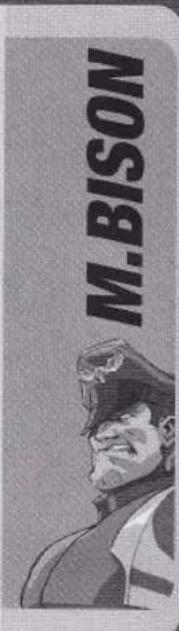

| Cannon Spike | 1 |
| Sniping Arrow | 2 |
| Axle Spin Knuckle | 3 |
| Reverse Shaft Breaker | 1 |
| Spin Drive Smasher | 2 |
| 1 | Dash Straight |
| 2 | Dash Ground Straight |
| 3 | Dash Uppercut |
| 4 | Dash Ground Uppercut |
| 5 | Turn Punch |
| 6 | Buffalo Head |
| 1 | Crazy Buffalo |
| 2 | Gigaton Blow |


| Cannon Spike | 1 |
| Spiral Arrow | 2 OR 3 |
| Hooligan Combination | 4 |
| Cannon Strike | 5 WHILE JUMPING FORWARD |
| Mach Slide | 6 |
| Earth Direct | 7 |
| Psycho Streak | 1 |
| Spin Drive Smasher | 2 |
CHARACTERS
CHARACTERS
SWAP STYLES BY PRESSING PUNCH 3 TIMES OR KICK 3 TIMES
COMBINED STYLES IF X-ISM IS CHOSEN
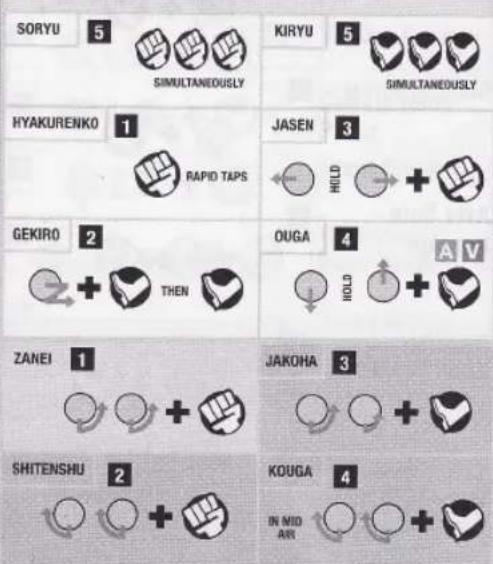
GEN
natural_image
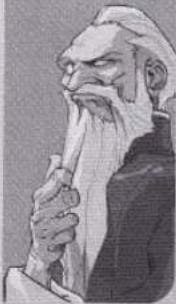
Illustration of an elderly man with a long beard holding a tool, wearing traditional attire (no text or symbols visible)GUILF
natural_image
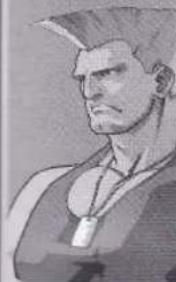
Illustration of a muscular character wearing a conical hat and military-style uniform (no text or symbols visible)Somersault
Kick
Somersault
Strike
Sonic Hurricane
Sonic Boom
1

2

1

2


AKUMA

natural_image
Illustration of a stylized, spiky creature with no visible text or symbolsEVIL RYU

natural_image
Black-and-white illustration of a person in a suit with spiky hair (no text or symbols)Shoryuken
Tatsumaki
Senpukyaku
Ashura Senku
Shungokusatsu
v3
Messatsu
Goshoryu
Shinku Hadouken
Shinku Tatsumaki
Senpukyaku
Hadouken
Shakunetsu Hadouken
1

2

3

4

5


1
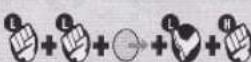
2

3

4

CHARACTERS
CHARACTERS
| 1 | Manchester Black | |
| 2 | Canterbury Blue | |
| 3 | Oxford Red | |
| 4 | Liverpool White | |
| 5 | St Andrews Green | |
| 1 | Manchester Gold | |
| 2 | Union Jack Platinum |
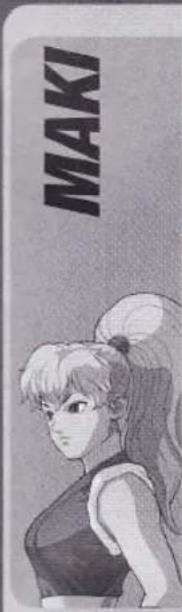
| Genko | 1 |
| Hayagake | 2 |
| Saka Hayagake | 3 |
| Hassokyaku | 4 BY THE WALL WHILE LEAPING OR |
| Tengudaoshi | 5 IN MID AIR |
| Reppukyaku | 6 SIMULTANEOUSLY |
| Bushin Goraiha | 1 |
| Tessinho | 2 |
| Ajara Tengu | 3 (OK IN MID AIR) |
| 1 | A V | Tetsuzanko |
| 2 | + | Zesshohoho |
| 3 | X V | Senkyutai |
| 4 | + (TO FEINT) | Kobokushi |
| 5 | + | Zenpo Tenshin |
| 1 | + | Yoho |
| 2 | + | Sorai Rengeki |
| 3 | IN MID AIR | Hiten Soryujin |
| INGRID |
| Sun Shoot | 1 | |
| Sun Rise | 2 | |
| Sun Arch | 3 | |
| Sun Dive | 4 | |
| Sun Upper | 5 | |
| Sun Lower | 6 | |
| Sun Delta | 1 | |
| Sun Burst | 2 | |
| Sunshine | 3 |
TOP SECRET INFORMATION

natural_image
Black-and-white photo of a person in motion near a ship, with no visible text or symbolsSCOOP 1 - Use Extra Balrog, SHIN Akuma, and Final M. Bison!
After completing arcade mode, you can select Extra Balrog, SHIN Akuma and Final M. Bison by highlighting Balrog, SHIN Akuma and M. Bison and
holding the SELECT button when you confirm the character.
*Final M. Bison cannot be used in certain gameplay modes.

SCOOP 2 - Secret stages in World Tour Mode?
If you have over a certain amount of experience points when you complete the World Tour Mode, you can unlock more stages to play.
SCOOP 3 – What happens when you beat World Tour Mode?
Once you complete World Tour Mode, if you take your original I ISM Character and play different game modes, you'll find...
"Wait, that's a secret!"

natural_image
Black-and-white illustration of a girl in traditional-style outfit saluting (no text or symbols)CUSTOMER SERVICE NUMBERS
| Australia*(Calls charged at local rate) | 1300 365 911* |
| Belgique/België/BelgienTarif appel local / Lokale kosten | 011 516 406 |
| Česká republikaPo - Pa 9:00 - 17:00 Sony Czech.Tarifovano die platnayich telefonnich sazeb. Pro dalši informace a připadnou dalši pomoc kontaktujte prosímwww.playstation.sony.cz nebo volejte telefonni číslo +420 222 864 111 | 222 864 111 |
| Danmarksupport@dk.playstation.com Man-fredag 15-21; Lør søndag 12-15 | 70 12 7013 |
| Deutschland*10.12 Euro/minute) Montag bis Freitag, 10.00 bis 20.0 | 01805 766 977* |
| Ελλάδα*EBvict Xpėwon | 801 11 92000* |
| EspañaTarifa nacional | 902 102 102 |
| FrancePrix d'un appel local - ouvert du lundi au samedi | 0820 31 32 33 |
| IrelandAll calls charged at National Rate | 0818 365065 |
| Israel | 09 971170 |
| ItaliaLun/Ven 8:00 - 18:30 e Sab 8:00 - 13:00: 11,88 centesimi di euro + IVA al minutoFestivi: 4,75 centesimi di euro + IVA al minuto. Telefoni cellulari secondo il piano tariffario prescelto | 199 116 266 |
| MaltaLocal Rate. | 23 436300 |
| NederlandInterlokale kosten. Gesprekken kunnen voor trainingsdoeleinden worden opgenomen | 0495 574 817 |
| New ZealandNational Rate | 09 415 2447 |
| Norge0,55 NOK i startavgift og deretter 0,39 NOK pr. Minuttsupport@no.playstation.com Man-fredag 15-21; Lor-søndag 12-15 | 81 55 09 70 |
| Österreich*10.116 Euro/Minute) | 0820 44 45 40* |
| Roccia | +7 (095) 238-3632 |
| Portugal*Servico de Atendimento ao Consumidor/Serviço Técnico | 707 23 23 10* |
| Suisse/Schweiz/SvizzeraTarif appel national / Nationaler Tarif / Tariffa Nazionale | 0848 84 00 85 |
| Suomi0,79 Euro/min + pvm fi-hotline@nordiskfilm.com maanantai - perjantai 15-21 | 0600 411 911 |
| Sverigesupport@se.playstation.com Mån-Fre 15-21, Lör-söndag 12-15 | 08 587 822 25 |
| UKNational rate. Calls may be recorded for training purposes | 08705 99 88 77 |
Please call these Customer Service Numbers only for PSP Hardware Support.
- CAPCOM INSIDER.COM
- LOADS OF FREE STUFF EVERY MONTH
- Street Fighter
- PRECAUTIONS
- HEALTH WARNING
- PIRACY
- PARENTAL CONTROL
- ULES-00235
- PAN EUROPEAN GAMES INFORMATION (PEGI) AGE-RATING SYSTEM
- PARENTAL CONTROL LEVEL
- SETTING UP
- MEMORY STICK DUO™
- WIRELESS (WLAN) FEATURES
- AD HOC MODE
- GAME SHARING
- INFRASTRUCTURE MODE
- CONTROLS
- OTHER CONTROLS
- START Button
- SELECT Button
- NORMAL MOVE
- BLOCK
- THROW
- DIZZY/RECOVERY
- SPECIAL MOVE
- SUPER COMBO
- GAME SCREEN
- GAME RULES
- MATCHES
- WINNING
- DRAW GAME
- BEGINNING A NEW GAME
- GAMEPLAY MODES
- ARCADE MODE
- TRAINING MODE
- VARIABLE BATTLE
- DRAMATIC BATTLE
- REVERSE DRAMATIC BATTLE
- SURVIVAL MODE
- VS 100 KUMITE
- FINAL BATTLE
- FREE BATTLE
- Team battle
- WORLD TOUR MODE
- Beginning A New World Tour Game
- New Game
- Load Game
- World Map Stage Select
- Battles - The Path to Strength
- Leveling Up
- ISM Plus
- ISM Level-Up
- - ISM Select
- - Speed Select
- Stages
- Survival Stage
- Team Battle Stage
- ENTRY MODE
- EDIT MODE
- OPTION MODE
- GAME OPTION
- Notes:
- BUTTON CONFIG
- Special Commands
- Command
- Type
- Rapid
- Top Secret Information:
- NETWORK
- SCREEN SETTING
- Screen Size
- Wallpaper
- SAVE/LOAD
- SCORE RANKING
- VS Mode
- Using Ad-Hoc
- LOBBY SCREEN
- NETWORK BATTLE TYPES
- VERSUS MODES
- Single
- League
- Tournament
- AD HOC MODE FAQ
- Q) What is "wireless"?
- Q) What is Ad Hoc Mode?
- Q) Do I need anything special to play Ad Hoc mode?
- Q) I can't seem to connect.
- Q) While playing Ad Hoc mode, sometimes the screen freezes and starts again, or slows down really bad.
- ISM SYSTEM
- SUPER COMBOS
- MODE SELECT
- CUSTOM COMBOS
- BASIC MOVES
- GUARD
- DEFENSIVE FALL
- THROW/ESCAPE
- ALPHA COUNTER
- GUARD CRUSH
- DAMAGE REDUCE / TIMING GUARD
- TAUNT
- CHARACTERS
- SAGAT
- ADON
- ROSE
- SODOM
- R.MIKA
- BIRDIE
- CAMMY
- BLANKA
- GEN
- GUILF
- AKUMA
- EVIL RYU
- TOP SECRET INFORMATION
Marque : SONY
Modèle : Street Fighter Alpha - Warriors (PSP)
Catégorie : Jeu