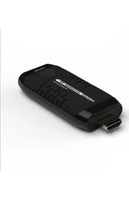
HDMI Wireless Extender - Extension audio/video Techly - Notice d'utilisation et mode d'emploi gratuit
Retrouvez gratuitement la notice de l'appareil HDMI Wireless Extender Techly au format PDF.


| Type de produit | Extendeur HDMI sans fil |
| Marque | Techly |
| Modèle | HDMI Wireless Extender |
| Technologie de transmission | Sans fil (RF 2,4 GHz / 5 GHz) |
| Ports d'entrée | 1 x HDMI (type A femelle) |
| Ports de sortie | 1 x HDMI (type A femelle) |
| Résolution maximale | 1080p (Full HD) à 60 Hz |
| Distance de transmission | Jusqu'à 30 mètres en champ libre |
| Alimentation | Via port USB (5 V, 1 A) ou adaptateur secteur (non inclus) |
| Consommation électrique | Inférieure à 5 W |
| Dimensions (émetteur) | 70 x 30 x 15 mm |
| Dimensions (récepteur) | 70 x 30 x 15 mm |
| Poids total | 100 g |
| Compatibilité HDMI | HDMI 1.3 et versions ultérieures |
| Fonctions principales | Extension sans fil du signal HDMI, support audio numérique stéréo |
| Entretien et nettoyage | Nettoyer avec un chiffon doux et sec, ne pas utiliser de produits liquides |
| Sécurité | Éviter l'exposition à l'humidité, aux températures extrêmes et aux chocs |
| Pièces détachées et réparabilité | Appareil scellé, aucune pièce détachée disponible, réparation par professionnel uniquement |
FOIRE AUX QUESTIONS - HDMI Wireless Extender Techly
Questions des utilisateurs sur HDMI Wireless Extender Techly
0 question sur cet appareil. Repondez a celles que vous connaissez ou posez la votre.
Poser une nouvelle question sur cet appareil
Téléchargez la notice de votre Extension audio/video au format PDF gratuitement ! Retrouvez votre notice HDMI Wireless Extender - Techly et reprennez votre appareil électronique en main. Sur cette page sont publiés tous les documents nécessaires à l'utilisation de votre appareil HDMI Wireless Extender de la marque Techly.
MODE D'EMPLOI HDMI Wireless Extender Techly
- Important Safety Notice
Please read below safety instructions carefully before installation and
- Please pay attention to all the warnings and hints on this device.
- Do not expose this unit to rain, moisture and liquid.
- Do not put any stuff into the device.
- Do not repair the device or open the enclosure without professional person guidance to avoid electronic shock
- Make sure good ventilation openings to avoid electronic shock.
Of Maine sure good ventilation openings to avoid product overloading damage. - Use DC5V/2A only. Make sure the specification matched if using 3rd party DC adapters.
- Introduction
This HDMI wireless extender includes transmitter unit and receiver unit, allows to transmit and extend HDMI signal up to 20 meters long away wirelessly, it has strong anti-interference ability by running at 5GHz operation frequency, and supports one to one, many to one connection.
really a very good solution for meeting, conference, home It is
entertainment and multi-media education etc.
Note:
1) Transmission distance will be different due to the environment.
2) Wall, brick or glass will shorten the signal cover range or cause big signal loss.
- Features
- Plug and play, easy installation
- High resolution up to 1080p@60Hz full HD
- Support point to point .many to point configuration
- Support HDMI1.3, compatible with HDCP1.2
- 20 meters long range transmission sight dis
- Smart portable design, excellent performance
- Support select transmitter via switch button freely
- Transmitter powered by input sources through HDMI port (when the
transmission/connection is not stable, or the output is not fluent,
please connect Micro USB cable to the DC5V port for power supply)
- Strong anti-interference ability by running at 5GHz operation
freq
- Package Contents

• Installation Requirement
-
HDMI source device (DVD, PS3, Set top box, PC etc)
-
HDMI display device like SDTV, HDTV, and projector with HDMI port.
- Panel Description
- HDMI Extender TX sender

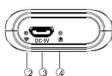
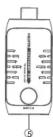
| 1 | HDMI input | Connect with HDMI source device |
| 2 | Wireless connections indicator | Led keeps on when there is HDMI input, blinks slowly when it is successfully connected, blinks fast when it is transmitting data |
| 3 | Power input | Connect with Micro USB power cable (optional) |
| 4 | Power indicator | LED indicator turn on when power on |
| 5 | Switch button | To select transmitter input (many to one connection use only) |
【NOTE】This device can be powered from the HDMI source device (which with HDMI input port) directly. However, when the transmission/connection is not stable, or the output is not fluent, please connect Micro USB cable to the DC5V port for power supply.
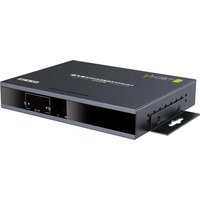
2.HDMI Extender RX receiver

| 1 | Power input | Connect with DC5V/2A power adapter |
| 3 | Wireless connections indicator | Led keeps on when power on, blinks when it is successfully connected |
| 1 | Data transmission led | It keeps on when it is transmitting data, other wise, it's off |
| 4 | HDMI output | Connect with HDMI display device |
| 3 | Antenna | Connect the antenna |
- Connection
- Point to Point connection:

- many to one connection
![graph TD A["Notebook"] --> B["10 pcs"] B --> C["Notebook"] C --> D["Notebook"] D --> E["Notebook"] E --> F["Notebook"] F --> G["Notebook"] G --> H["Notebook"] H --> I["Notebook"] I --> J["Notebook"] J --> K["Notebook"] K --> L["Notebook"] L --> M["Notebook"] M --> N["Notebook"] N --> O["Notebook"] O…](/content/2026/06/1330133/images/a1dde70a43ec5b2cc6c1ee868fe0245a570e546962dfdf171cc02e701dbe79c7.jpg)
Connection instruction:
1) Plug the transmitter into the source device.
2) Connect HDMI output to HDMI display device by HDMI cable.
3) Power on the device (power led lights) and it works
Note:
1) When the wireless signal transmits through wall, glass or other
obstacles, it will cause signal loss. Please install this device in good environment with few obstacles.
2) The external environment wireless signal will affect transmission, such as micro waver, wireless mouse and keyboard etc.
• FAQ
Q: Transmitter and receiver can't be connected with each other?
A: 1) Please check if the wireless connection light on product blinks properly.
2) Restart the transmitter or receiver.
3) Reconnect the HDMI cable or use another HDMI cable and try again.
4) Please change the location of sender (TX) and receiver (RX) and make sure devices is within the signal coverage.
Q: The wifi LED indicator of the transmitter keeps on, but no signal output on display/monitor?
A: 1) please check if there is an HDMI signal input of sender TX
2) Try to connect the signal source directly to display device to see if there is signal output from source device or change the signal source, the resolution of input signal, HDMI cables and try again.
Q: Display not fluent and stable
A: 1) Please change the location of sender (TX) and receiver (RX) and make sure devices is within the signal coverage.
2) Restart the transmitter or receiver.
3) Reconnect the HDMI cable. 4) Remove other wireless signal disturbance and reduce the obstacle on the way.
- Specification
| Items | Specification | |
| Power supply | Voltage/Current | TX-powered by input sources through HDMI port, RX-DC5V/2A |
| Power consumption | TX < 2.5W RX < 5W | |
| HDMI performance and interface | HDMI compliance | HDMEL3 |
| HDCP compliance | HDCP1.2 | |
| HDMI resolution supported | 480p@60Hz, 576p@50Hz, 720p@50/60Hz, 1080p@50/60Hz | |
| Maximum transfer rate | 4.95Gbps | |
| Input and output TMD5 signal | 0.7 ~ 1.2Vp-(TMD5) | |
| Input and output DDC signal | 5Vp-(PTL) | |
| Wireless performance and interface | Transfer method | 5G Wireless transmission |
| Transmission distance | 20 Meters | |
| Latency | ≤200 ns | |
| Protection level | Electrostatic protection of the whole machine | 1a Contact discharge level 3 |
| 1b Air discharge level 3 | ||
| Standard: IEC61000-4-2 | ||
| Operating environment | Working temperature | 0 ~ 50°C |
| Storage temperature | -10 ~ 70°C | |
| Humidity (no condensation) | 0 ~ 90% | |
| Body properties | Dimension | TX: 38.92(W) x 88.75(D) x15.26(H)mmRX: 85.58(W) x 138.11(D) x 19.18(H)mmPlastic |
| Material | Plastic | |
| Finishing Grit blast | ||
| Weight TX : 20g , RX : 120g | ||
Disclaimer
The product name and brand name may be registered trademark of related manufacturers.TM and ® may be omitted on the user manual. The pictures on the user manual are just for reference, and there may be some slight difference with the real products. We reserve the rights to make changes without further notice to a product or system described herein to improve reliability, function or design.
HDMI Wireless Extender
User manual



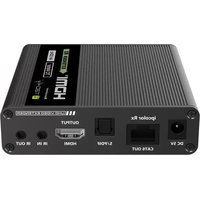

Marque : Techly
Modèle : HDMI Wireless Extender
Catégorie : Extension audio/video