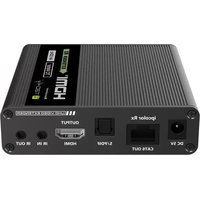
IDATA EXT-676R - Extension audio/video Techly - Notice d'utilisation et mode d'emploi gratuit
Retrouvez gratuitement la notice de l'appareil IDATA EXT-676R Techly au format PDF.


| Type de produit | Extension audio/video (prolongateur HDMI) |
| Marque | Techly |
| Modèle | IDATA EXT-676R |
| Dimensions (L x l x H) | 85 x 60 x 25 mm |
| Poids | 180 g |
| Alimentation | 5V DC via adaptateur secteur (fourni) |
| Consommation électrique | 5 W |
| Résolution vidéo maximale | 4K@60Hz |
| Bande passante | 18 Gbps |
| Distance de transmission | Jusqu'à 60 mètres (via câble HDMI) |
| Connecteurs d'entrée | 1x HDMI femelle |
| Connecteurs de sortie | 1x HDMI femelle |
| Formats audio supportés | PCM, Dolby Digital, DTS, Dolby TrueHD, DTS-HD |
| HDCP | Compatible HDCP 2.2 |
| Télécommande | Non incluse |
| Fonctionnalités principales | Extension longue distance, transmission sans perte, boîtier métallique robuste |
| Entretien et nettoyage | Nettoyer avec un chiffon doux et sec. Ne pas utiliser de produits abrasifs. |
| Sécurité | Utiliser uniquement l'adaptateur fourni. Protéger de l'humidité et des températures extrêmes. |
| Température de fonctionnement | 0°C à 40°C |
| Humidité relative | 10% à 85% (sans condensation) |
| Contenu de l'emballage | 1x Récepteur/source, 1x Transmetteur/destination, 1x Adaptateur secteur, 1x Manuel d'utilisation |
FOIRE AUX QUESTIONS - IDATA EXT-676R Techly
Questions des utilisateurs sur IDATA EXT-676R Techly
0 question sur cet appareil. Repondez a celles que vous connaissez ou posez la votre.
Poser une nouvelle question sur cet appareil
Téléchargez la notice de votre Extension audio/video au format PDF gratuitement ! Retrouvez votre notice IDATA EXT-676R - Techly et reprennez votre appareil électronique en main. Sur cette page sont publiés tous les documents nécessaires à l'utilisation de votre appareil IDATA EXT-676R de la marque Techly.
MODE D'EMPLOI IDATA EXT-676R Techly

User's Manual

Manuale d'istruzione

TECHly® The Modern IT brand
HDMI EXTENDER OVER
NETWORK CABLE
Technical features
4K ULTRAHD
extension 70 M
10 RECEIVERS IN CASCADE


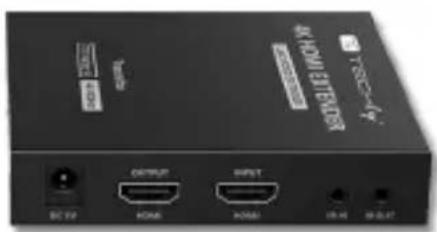
AIV SERIES

P/N: IDATA EXT-676
(transmitter + receiver)
8051128109832

P/N: IDATA EXT-676R
(additional receiver)
8051128109849
HDMI EXTENDER OVER NETWORK CABLE
Dear Customer
Thank you for purchasing this product. For optimum performance and safety, please read these instructions carefully before connecting, operating or adjusting this product. Please keep this manual for future reference.
IMPORTANT SAFETY INSTRUCTION
INTENDED USE

We do not permit using the device in other ways like described in this user's manual. Use the product only in dry interior rooms. Not attending to these regulations and safety instruction might cause fatal accidents, injuries, and damages to persons and property. The manufacturer/supplier assumes no liability for damages caused by failure to comply with the intended use.



To reduce risk of electric shock, this product should ONLY be opened by an authorized technician when service is required. Disconnect the product from mains and other equipment if a problem should occur. Do not expose the product to water or moisture.
- Your product is not a toy and is not meant for children, because it contains small parts which can be swallowed and can injure when used inappropriately!
- Please install the system and devices attached to it in a way that persons cannot be injured, or objects not be damaged for example by dropping or stumbling.
- Please remove the packing materials, because children may cut themselves on them while playing. Furthermore, there is a risk of swallowing and inhalation of incidentals and insulating material.
- Avoid places with high temperatures, or humidity, or places which might come into contact with water. Do not install the product close to openings of air conditioners, or at places with an excessive amount of dust or smoke.
- Do not install the product at places subject to vibration, or oscillation
- Do not modify and alter the product and any accessories! Do not use any damaged parts.
- Keep enough space around all devices for a good ventilation and free motion and to avoid damages.
-
Do not mix up HDMI to RJ45 transmitter and RJ45 to HDMI receiver before installation
-
Do not unplug the deve when it is in using, keep distance from flammable and explosive devices.
- Power supply: DC 5V/2A, usage only the supplied power unit, do not use the power supply if it is damaged. Make sure specification matched if using 3rd party adapters.
- Static electricity will cause damage of the device, please do ESD protection when using the device.
FEATURES
This HDMI Extender includes a transmitter unit and receiver unit, allows HDMI signal to be transmitted up to 70 meter at 4K resolution using a Cat.6/6A/7 network cable. It is the perfect solution for outdoor advertising, video clips, monitor system, home entertainment and conference, etc.
SPECIFICATIONS
- Zero latency
- Resolution supported: 480i@60Hz, 480p@60Hz, 576i@50Hz, 576p@50Hz, 720p@50/60Hz, 1080i@50/60Hz, 1080p@50/60Hz
• Network cable: Cat.6/6A/7 with copper core and excellent quality - Receiver can extract the digital audio from transmitter through S/PDIF port
• Supports Dolby audio (Dolby TrueHD 7.1CH/Dolby Digital 5.1CH)
• Supports HDR (YUV4:4:4), EDID passback - Supports bi-directional IR passback function (20 \~ 60KHz), cascade when 10 receivers are available
• Anti-lighting, anti-surge, anti-static protection
PACKAGE CONTENTS
Make sure your package includes the following items:
• Transmitter unit *1
- Receiver unit *1
• Power supply DC5V/2A *2
- IR Blaster extension cable *1
- IR receiver extension cable *1
- User's manual
INSTALLATION REQUIREMENTS
- HDMI source device like computer graphics card, DVD,PS3, HD monitoring equipment etc.
• HDMI display device like SDTV, HDTV, projector with HDMI port - UTP/STP cat6/cat6A/cat7 cable with copper core and excellent quality
• Follow standard EIA/TIA-568B
INTERFACES
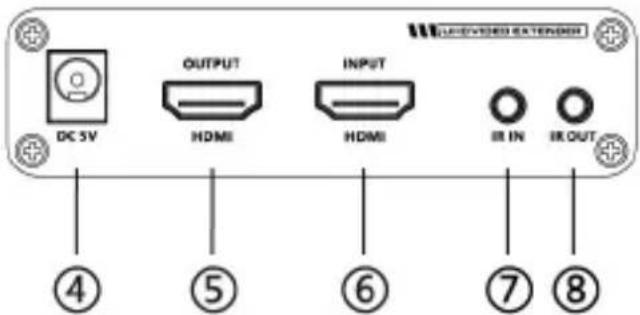
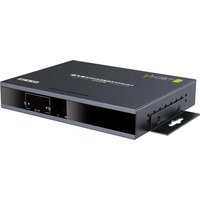
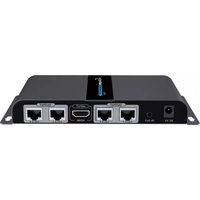
Transmitter (TX)


| 1 | Reset button | Press to restart the device |
| 2 | RJ45 signal output | Connect with network cable |
| 3 | Power/Signal indicator | When there is power and no HDMI signal, the indicator will flash, when there is HDMI signal, the indicator will light solid blue |
| 4 | DC5V power input | Connect with DC5V/2A power adapter |
| 5 | HDMI output | Connect with HDMI display device |
| 6 | HDMI input | Connect with the source device |
| 7 | IR in | Connect with IR receiver extension cable, please make sure the remote control is used within the effective range |
| 8 | IR out | Connect with IR blaster extension cable, please get closer to the source device while using |
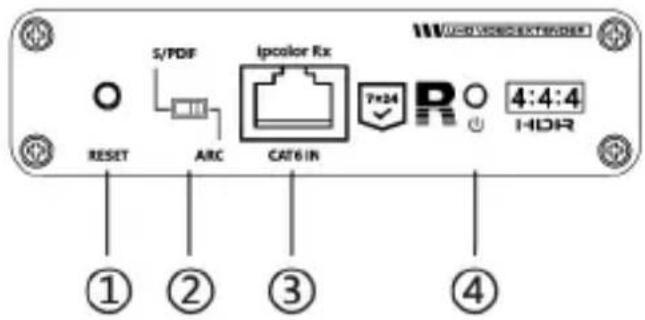
Receiver (RX)


| 1 | Reset button | Press to restart the device |
| 2 | Audio switch | Choose to decode audio from HDMI or ARC output from fiber optic interface |
| 3 | RJ45 signal input | Connect with network cable |
| 4 | Power/Signal indicator | When there is power and no HDMI signal, the indicator will flash, when there is HDMI signal, the indicator will light solid blue |
| 5 | DC5V power input | Connect with DC5V/2A power adapter |
| 6 | RJ45 signal output | Connect with network cable |
| 7 | S/PDIF out | Output digital audio signal |
| 8 | HDMI output | Connect with HDMI display device |
| 9 | IR in | Connect with IR receiver extension cable, please make sure the remote control is used within the effective range |
| 10 | IR out | Connect with IR blaster extension cable, please get closer to the source device while using |
INSTALLATION PROCEDURES
Connection

Note: to ensure the quality of signal transmission, please use network cable within 50 meters when cascaded
Follow the standard EIA-568B. It is recommended to select a network cable with less loss and crosstalk
1-Orange/white
2-Orange
3-Green/White
4-Blue
5-Blue/white
6-Green
7-Brown/white
8-Brown
CONNECTION INSTRUCTION
1) Connect the source device to the HDMI input port of the transmitter with an HDMI cable and connect the HDMI output port of the receiver to the display device with another HDMI cable
2) Connect the RJ45 output port of the transmitter and the RJ45 input port of the receiver via a network cable (CAT6/CAT6A/CAT7). If cascading is used, connect the RJ45 output port of the previous receiver to the RJ45 input port of the next receiver
3) If using HDMI loop out, connect the display device to the HDMI out port of the transmitter
4) Plug the power supply into the device to get started
NOTE: It is recommended to use a lenght range within 2 - 70 m network cable. If the cable is too short, there may be no display output because the signal is too strong. If the cable is too long, the output may be with poor quality.
IR USER GUIDE
1) IR Blaster extension cable should plug in the IR OUT port of the transmitter and receiver. IR Receiver extension cable should plug in the IR IN port of the transmitter and receiver
2) The emitter of the IR Blaster extension cable should be as close as possible to the IR receiving window of the source device
3) Face the receiving head of the IR receiver extension cable to the user for convenient remote control
RFQ
Q: There is no output on screen when all connections are correct?
A: 1) Please make sure the HDMI cables support 4Kx2K if the output signal from the source device is 4Kx2K resolution
2) Please check and make sure the network cable insert to the RJ45 port well
3) Restart the transmitter or receiver by pressing the rest button
Q: Black screen happened on the display/monitor?
A: 1) Check if the length of the cable is within the specified range
2) Reset the transmitter to re-built the connection
Q: The display shows unusual color or no sound?
A: 1) Reset the transmitter or receiver to re-built the connection
2) Check if the HDMI cables are connected well
3) Reconnect the network cable
SPECIFICATION
| Power Supply | Voltage/Current | DC5V/2A |
| Power consumption | TX<4W RX<4W | |
| HDMI performance and interference | HDMI compliance | HDMI2.0 |
| HDCP compliance | HDCP 2.2 | |
| HDMI resolution | 480i@60Hz, 480p@60Hz, 576i@50Hz, 576p@50Hz, 720p@50/60Hz, 1080i@50/60Hz, 1080p@50/60Hz, 3840x2160@24/25/30/50/60Hz, 4096x2160@24/25Hz, 1280x960, 1280x800, 1280x768, 1680x1050, 1360x768, 1366x768, 1600x900, 1024x768, 800x600 | |
| Support audio format | LPCM/DTS-HD/DTS-Audio/Dolby TrueHD 7.1CH/Dolby Digital 5.1CH | |
| Input and output TMDS signal | 0.7 ~ 1.2Vp-p (TMDS) | |
| Input cable length | ≤ 8m (AWG24) | |
| Output cable length | ≤ 8m (AWG24) | |
| Transmission distance | CAT6/6A/7 | ≤ 70 m |
| Protection level | Electrostatic protection of the whole machine | 1a Contact discharge level 31b Air discharge level 3 implementation of the standard IEC61000-4-2 |
| Operating Environmental | Working temperature | -20 to 60°C |
| Storage temperature | -30 to 70°C | |
| Humidity (no condensation) | 0 -90% RH | |
| Body proprieties | Dimension | 106.0 (L) x 99.0 (W) x 26.20 (H) mm |
| Material | Iron | |
| Color | Black | |
| Weight | TX: 210g RX: 210g |

In compliance with EU Directive WEEE this product is marked with this symbol. It means that used electrical and electronic products should not be mixed with general household waste. There is a separate collections system for these products in compliance with WEEE directive, otherwise contaminative and hazardous substances can pollute the environment.
CE
With the CE sign, Techly® ensures that the product is conformed to the basic European standards and directives.
EXTENDER HDMI SU CAVO DI RETE
Gentile Cliente
Grazie per aver acquistato questo prodotto. Per ottenere il massimo delle prestazioni nella salvaguardia della sua sicurezza, le consigliamo di leggere con attenzione il presente manuale prima di collegare e mettere in funzione il prodotto. Tenga sempre a disposizione il presente manuale per ulteriori esigenze future.
IMPORTANTI INFORMAZIONI SULLA SICUREZZA
USO PREVISTO

Non è consentito l'uso dell'apparecchio in modi diversi da quello indicato nel presente manuale. Utilizzare il prodotto solo in luoghi interni asciutti. Non rispettare le istruzioni e le precauzioni di sicurezza riportate nel presente manuale potrebbe causare incidenti mortali, lesioni e danni a persone e cose. Il costruttore/fornitore non risponde dei danni risultanti da un utilizzo non conforme all'uso previsto.

ATTENZIONE
FISCHIO DI BOCOSE ELETTRICHE NON APRIRE

Per ridurre il rischio di shock elettrico, questo prodotto dovrebbe essere aperto SOLO da un tecnico autorizzato quando è necessario ripararlo. Scollegare il prodotto dall'alimentazione e da altri apparecchi se dovesse esserci un problema. Non esporre il prodotto ad acqua o umidità.
- Questo prodotto non è un giocattolo e non è pensato per i bambini, contiene piccolo parti che potrebbero venir ingerite o inalate e provocare danni se non utilizzato correttamente!
- Installare l'apparecchio e le periferiche ad esso collegate in modo che non possano provocare danni a persone e oggetti come far inciampare o causare cadute.
- Rimuovere tutti gli imballi che potrebbero causare soffocamento se manipolati da bambini.
- Evitare di installare l'apparecchio in luoghi con temperature o umidità eccessive, o luoghi che potrebbero venire a contatto con l'acqua. Non installare vicino a bocchette dell'aria condizionata o in luoghi che presentano polvere o fumi eccessivi.
- Aggiungi anche non utilizzare l'alimentatore se risultasse danneggiato.
- Non installare il prodotto in luoghi soggetti a vibrazioni o oscillazioni.
- Non modificare o alterare il prodotto e i suoi accessori! Non utilizzare parti danneggiate.
-
Mantenere sufficiente spazio attorno alla periferica per garantire una buona ventilazione, permettere una maggiore libertà di movimento ed evitare danni.
-
Non invertire il trasmettitore da HDMI a RJ45 con il ricevitore da RJ45 a HDMI prima dell'installazione.
- Non scollegare la periferica durante l'uso, mantenere il prodotto distante da materiali infiammabili ed esplosivi.
- Alimentatore: DC 5V/2A, utilizzare solo l'alimentatore fornito nella confezione. Non utilizzare se l'alimentatore risulta danneggiato. Se si usa un alimentatore di terze parti verificare che le specifiche di questo coincidano con l'alimentatore originale.
- L'elettricità statica può danneggiare il dispositivo, si prega di usare una protezione contro le cariche elettrostatiche quando si utilizza il dispositivo.
CARATTERISTICHE
Questo Extender HDMI è costituito da un trasmettitore e da un ricevitore e permette di estendere il segnale HDMI fino a 70m ad una risoluzione di 4K utilizzando un cavo di rete di Cat.6/6A/7. Rappresenta la soluzione ideale per la pubblicità esterna, videoclip, sistema di monitoraggio, home entertainment e conferenze, ecc.
SPECIFICHE
- Zero latenza
- Il segnale 4K@60Hz può essere trasmesso fino a 70 metri attraverso un cavo di rete Cat.6/6A/7
- Supporta fino a 10 ricevitori in cascata, adattamento automatico alla risoluzione dello schermo
- Il ricevitore può estrarre l'audio digitale dal trasmettitore tramite la porta S/PDIF
• Supporta Dolby Audio (Dolby TrueHD 7.1CH/Dolby Digital 5.1CH)
• Supporta HDR (YUV4:4:4), EDID passback - Supporta funzione IR pass-back bidirezionale (20 \~ 60KHz), cascata quando sono disponibili 10 ricevitori
- Protezione contro i fulmini, protezione contro le sovratensioni, protezione antistatica
CONTENUTO DELLA CONFEZIONE
Verificare che nella confezione siano inclusi i seguenti elementi:
- Trasmetitore *1
- Ricevitore *1
- Alimentatore DC5V/2A *2
• Prolunga IR blaster *1
• Prolunga ricevitore IR *1
• Manuale d'istruzione
REQUISITI PER L'INSTALLAZIONE
- Sorgente HDMI come schede grafiche per computer, DVD, PS3, telecamere HD...
- Schermo HDMI come SDTV, HDTV, proiettore con porta HDMI
• Cavo UTP/STP Cat6/Cat6A/Cat7 in rame con qualità eccellente - Seguire lo standard EIA/TIA-568B
INTERFACE
Trasmettitore (TX)

| 1 | Tasto reset | Premere per riavviare il dispositivo |
| 2 | Uscita segnale RJ45 | Collegare con il cavo di rete |
| 3 | Indicatore alimentazione/ Segnale | Quando non c'è alimentazione o segnale HDMI, l'indicatore lampeggia, quando c'è segnale HDMI l'indicatore sarà blu fisso |
| 4 | Ingresso alimentazione DC5V | Collegare all'alimentatore DC5V/2A |
| 5 | Uscita HDMI | Collegare al dispositivo di visualizzazione HDMI |
| 6 | Ingresso HDMI | Collegare con un dispositivo sorgente |
| 7 | Ingresso IR | Collegare al cavo prolunga ricevitore IR, assicurarsi che il telecomando venga usato all'interno del range indicato |
| 8 | Uscita IR | Collegare al cavo prolunga IR Blaster, avvicinarsi al dispositivo sorgente durante l'utilizzo |
Ricevitore (RX)

| 1 | Tasto reset | Premere per riavviare il dispositivo |
| 2 | Commutatore audio | Scegliere di decodificare l'audio dall'uscita HDMI o ARC o dall'interfaccia in fibra ottica |
| 3 | Ingresso segnale RJ45 | Collegare con il cavo di rete |
| 4 | Indicatore alimentazione/ Segnale | Quando non c'è alimentazione o segnale HDMI, l'indicatore lampeggia, quando c'è segnale HDMI l'indicatore sarà blu fisso |
| 5 | Ingresso alimentazione DC5V | Collegare all'alimentatore DC5V/2A |
| 6 | Uscita segnale RJ45 | Collegare al cavo di rete |
| 7 | Uscita S/PDIF | Uscita segnale audio digitale |
| 8 | Uscita HDMI | Collegare al dispositivo di visualizzazione HDMI |
| 9 | Ingresso IR | Collegare al cavo prolunga ricevitore IR, assicurarsi che il telecomando venga usato all'interno del range indicato |
| 10 | Uscita IR | Collegare al cavo prolunga IR Blaster, avvicinarsi al dispositivo sorgente durante l'utilizzo |
PROCEDURE DI INSTALLAZIONE
Collegamento

Nota: per garantire la qualità del segnale di trasmissione, utilizzare un cavo di rete non superiore ai 50 metri quando si crea la cascata tra ricevitori
Seguire lo standard EIA-568B. Si consiglia di selezionare un cavo di rete di ottima qualità con ridotte perdite e diafonia
1 - Arancio/bianco
2 - Arancio
3 - Verde/bianco
4 - Blu
5 - Blu/bianco
6 - Verde
7 - Marrone/bianco
8 - Marrone
ISTRUZIONI DI COLLEGAMENTO
1) Collegare la sorgente alla porta di ingresso HDMI del trasmettitore con un cavo HDMI e collegare la porta HDMI di uscita del ricevitore allo schermo usando un altro cavo HDMI
2) Collegare la porta di uscita RJ45 del trasmettitore e la porta di ingresso RJ45 del ricevitore con un cavo di rete (CAT6/CAT6A/ CAT7). Nel caso di collegamento in cascata, collegare la porta RJ45 in uscita del ricevitore precedente con la porta RJ45 in ingresso del ricevitore successivo
3) Se si usa la porta HDMI loop out, collegare lo schermo aggiuntivo al'uscita HDMI sul trasmettitore
4) Collegare l'alimentatore al dispositivo per mettere in funzione
NOTA: si raccomanda di usare un cavo di rete di lunghezza compresa tra i 2 e i 70 metri. Se il cavo è troppo corto, potrebbe non esserci uscita video perché il segnale è troppo forte. Se il cavo è troppo lungo, il segnale in uscita potrebbe essere di scarsa qualità.
GUIDA ALL'USO DELL'IR
1) La prolunga IR Blaster deve essere collegata alla porta IR OUT del trasmettitore e del ricevitore. La prolunga del ricevitore IR deve essere collegata alla porta IR IN del trasmettitore e del ricevitore
2) L'emettitore del cavo di prolunga IR Blaster deve essere posizionato il più vicino possibile alla finestra di ricezione IR del dispositivo sorgente
3) Rivolgere la parte ricevente del cavo di prolunga del ricevitore IR verso l'utente per consentire il controllo remoto
RFQ
D: Non c'è alcuna uscita sullo schermo anche se tutte le connessioni sono corrette?
R: 1) Assicurarsi che i cavi HDMI supportino 4Kx2K se il segnale di uscita dal dispositivo sorgente ha una risoluzione 4Kx2K
2) Controllare e assicurarsi che il cavo di rete sia inserito correttamente nella porta RJ45
3) Riavviare il trasmettitore o il ricevitore premendo il pulsante di reset
D: Lo schermo appare nero?
R: 1) Controllare se la lunghezza del cavo rientra nell'intervallo specificato
2) Riavviare il trasmettitore per ricreare la connessione
D: Lo schermo presenta un colore insolito o non c'è alcun suono?
R: 1) Riavviare il trasmettitore o il ricevitore per ricreare la connessione
2) Controllare se i cavi HDMI sono collegati correttamente
3) Ricollegare il cavo di rete
SPECIFICHE
| Alimentazione | Voltaggio/Corrente | DC5V/2A |
| Consumo | TX<4W RX<4W | |
| Prestazioni e interferenze HDMI | Conformità HDMI | HDMI2.0 |
| Conformità HDCP | HDCP 2.2 | |
| Risoluzione HDMI | 480i@60Hz, 480p@60Hz, 576i@50Hz, 576p@50Hz, 720p@50/60Hz, 1080i@50/60Hz, 1080p@50/60Hz, 3840x2160@24/25/30/50/60Hz, 4096x2160@24/25Hz, 1280x960, 1280x800, 1280x768, 1680x1050, 1360x768, 1366x768, 1600x900, 1024x768, 800x600 | |
| Formato audio supportato | LPCM/DTS-HD/DTS-Audio/Dolby TrueHD 7.1CH/Dolby Digital 5.1CH | |
| Ingresso e uscita segnale TMDS | 0.7 ~ 1.2Vp-p (TMDS) | |
| Lunghezza cavo ingresso | ≤ 8m (AWG24) | |
| Lunghezza cavo uscita | ≤ 8m (AWG24) | |
| Distanza di trasmissione | CAT6/6A/7 | ≤ 70 m |
| Livello di protezione | Protezione elettrostatica dell'intera macchina | 1a Contact discharge level 31b Air discharge level 3 implementation of the standard IEC61000-4-2" |
| Informazioni operative ambientali | Temperatura d'esercizio | Da -20 a 60°C |
| Temperatura di stoccaggio | Da -30 a 70°C | |
| Umidità (senza condensa) | 0 -90% RH | |
| Informazioni alloggiamento | Dimensioni | 106.0 (P) x 99.0 (L) x 26.20 (A) mm |
| Materiale | Ferro | |
| Colore | Nero | |
| Peso | TX: 210g RX: 210g |

In conformità alla normativa RAEE, le apparecchiature elettriche ed elettroniche non devono essere smaltite con i rifiuti domestici. Il presente prodotto deve essere consegnato ai punti di raccolta preposti allo smaltimento e riciclo delle apparecchiature elettriche ed elettroniche. Contattate le autorità locali competenti
per ottenere informazioni in merito allo smaltimento corretto della presente apparecchiatura.
CE
Con il marchio CE, Techly® garantisce che il prodotto e conforme alle norme e direttive europee richieste.
All rights reserved.
All trademarks and trade names are those
of their respective owners.
TECHLY® - Viale Europa 33
33077 Sacile (PN) - Italy


- HDMI EXTENDER OVER NETWORK CABLE
- Dear Customer
- IMPORTANT SAFETY INSTRUCTION
- INTENDED USE
- FEATURES
- SPECIFICATIONS
- PACKAGE CONTENTS
- INSTALLATION REQUIREMENTS
- INTERFACES
- INSTALLATION PROCEDURES
- CONNECTION INSTRUCTION
- IR USER GUIDE
- RFQ
- EXTENDER HDMI SU CAVO DI RETE
- Gentile Cliente
- IMPORTANTI INFORMAZIONI SULLA SICUREZZA
- USO PREVISTO
- ATTENZIONE
- CARATTERISTICHE
- SPECIFICHE
- CONTENUTO DELLA CONFEZIONE
- REQUISITI PER L'INSTALLAZIONE
- INTERFACE
- PROCEDURE DI INSTALLAZIONE
- ISTRUZIONI DI COLLEGAMENTO
- GUIDA ALL'USO DELL'IR
Marque : Techly
Modèle : IDATA EXT-676R
Catégorie : Extension audio/video