
CI 482-100 - Cuisinière GAGGENAU - Notice d'utilisation et mode d'emploi gratuit
Retrouvez gratuitement la notice de l'appareil CI 482-100 GAGGENAU au format PDF.


| Type de produit | Table de cuisson à induction |
| Marque | Gaggenau |
| Modèle | CI 482-100 |
| Dimensions (L x P x H) | 802 x 522 x 51 mm |
| Poids net | 15 kg |
| Alimentation électrique | 220-240 V, 50/60 Hz, 7.4 kW |
| Nombre de foyers | 4 (dont 2 avec flexInduction) |
| Classe énergétique | A+ |
| Fonction Booster | Oui, sur tous les foyers |
| Reconnaissance des casseroles | Oui, avec indication automatique |
| Sécurité enfants | Oui, verrouillage du bandeau |
| Arrêt automatique de sécurité | Oui, en cas de débordement ou d'absence |
| Indicateur de chaleur résiduelle | Oui, pour chaque foyer |
| Nettoyage | Surface vitrocéramique, produit adapté recommandé |
| Pièces détachées disponibles | Oui, via service après-vente Gaggenau |
| Indice de réparabilité | 8.2/10 (estimation) |
| Garantie | 2 ans (pièces et main-d'œuvre) |
FOIRE AUX QUESTIONS - CI 482-100 GAGGENAU
Questions des utilisateurs sur CI 482-100 GAGGENAU
0 question sur cet appareil. Repondez a celles que vous connaissez ou posez la votre.
Poser une nouvelle question sur cet appareil
Téléchargez la notice de votre Cuisinière au format PDF gratuitement ! Retrouvez votre notice CI 482-100 - GAGGENAU et reprennez votre appareil électronique en main. Sur cette page sont publiés tous les documents nécessaires à l'utilisation de votre appareil CI 482-100 de la marque GAGGENAU.
MODE D'EMPLOI CI 482-100 GAGGENAU
Operating Instructions
| CI 261110 |
| CI 261111 |
| CI 481110 |
| CI 482100 |
Ceramic induction hob

natural_image
Top-down view of a four-c� electric stove burner with four circular ventricles on a dark surface (no text or symbols visible)
natural_image
Black and white photo of four circular cutouts on a grid-patterned surface, with no visible text or symbols.
natural_image
Black-and-white technical drawing of a four-circled component with grid pattern and measurement scale (no readable text or symbols)Tableofcontents
Importantinformation5......
Beforeswitchingonyourappliance5......
Safetyprecautions5......
Reasonsfordamage8......
Familiarisingyourselfwiththeappliance10.....
Thecontrolpanel10....
The Hotplates 11
Safety instructions. Residual heat 11
Twist pad with removable twist knob 12
Twist pad 12
Twist knob 12
The cooking with Induction 13
What is induction cooking? 13
Suitable pans 14
Main switch with child-proof lock 14
Main switch 14
Childproof lock 15
Cooking 16
Setting procedure 16
Table 17
Tips on saving energy 19
Cooking with the electronic boil start control . . 19
Setting procedure 20
Tips on electronic boil start control 20
Tables 21
Powerboost function 22
Tableofcontents
Restrictionswhenusingthepowerboostfunction22.
Howtoactivateit22......
Thisishowtodeactivateit23......
Timerfunction23......
Settingahotplatetoswitchchoffautomatically23
Cooking timer 24
Memory function 25
Storing the setting 25
Calling up the memory 26
Automatic time limiter 28
Switching off entry confirmation 28
Care and cleaning 29
Care 29
Cleaning glass ceramic 29
Cleaning the hob surround 30
Procedure in the event of a malfunction ..... 30
Normal operating noises for the appliance ..... 33
Packaging and old appliances 34
After-sales service 34
Importantinformation
Readtheseinstructionscarefully.Onlyafterreadingthesewillyoubeabletooperatetheappliance correctly.
Please keep the use and installation instructions in safe place. If the appliance is passed to another person, please enclosethe instructions.
Beforeswitchingon your appliance
Transportdamage
Checkyourapplianceafterremovingthepackaging.If ithassufferedanydamageduringtransport,donot connecttheappliancebutcontacttheTechnical Servicesdepartment.
Electrical connection or installation
Before using the appliance for the first time, you must ensure that the domestic electrical system is earthed and meets all the current safety regulations. An authorized electricians should install and connect your appliance.
Useofthisappliancewithoutanearthconnectionor incorrectlyinstalledcancauseseriousinjuries(injuries orelectrocution),althoughthisisveryrare Themanufacturerdoesnotacceptanyresponsibility foranyinappropriateuseorforanyinjurycausedby incorrectelectricalinstallation.
Safetyprecautions
This appliance is intended only for domestic use. Only use the hobfor food preparation.
Thisproduktisnotintendedforusebyyoungchildren orinfirmpersonswithoutsupervision.
Cookingandheatingfood
During their cooking, foods such as stews, soups, sauces or drinks may heat up too quickly without any indication, spilling out of the cookware.
| Itisthereforeadvisabletohealthistypeoffoodgently,selectingasuitablepowerlevelandstirringthecontentsbeforeandduringcooking. | |
| Overheatedoilandfat | Overheatedoilorfatcanigniteveryquickly.Riskoffire!Neverleaveheatingoilorfatunsupervised.Shouldtheoilignite,donottrytoputitoutbypouringwateronit.Coverthepanwithalidorplateimmediately.Switchoffthehotplate.Leavetheovenwareonthehotplatetocooldown. |
| Hothotplates | Donottouchhothotplates.Thereisariskofburning.Childrenmustbekeptatasafedistancefromtheappliance.Theresidualheatindicatorwarnsyouthatthehotplatesarehot.Neverplacecombustibleitemsonthehob.Riskoffire!Youmustnotkeepanycombustibleitemsoraerosolcansinadrawerlocatedunderthehob.Riskoffire!Theservicecablesfromelectricalappliancesmustnottouchthehothotplates.Thiscouldcausedamagetothehobandthecableinsulation. |
| Wetsaucepanbasesandhotplates | Steampressurecanbegeneratedfromtheliquidbetweenthebaseofthesaucepanandthehotplate.Thesteampressurecouldcausethepantojumpsuddenly.Thereisariskofinjury.Alwayskeepthehotplateandthebasesofsaucepansdry. |
| Cracksintheglassceramic | Iftherearefractures,flawsorcracksintheglassceramic,thereisariskofelectricshock.Switchofftheapplianceimmediately.Isolatetheappliancefromthepowersupplyatthefusebox.Callafter-salesservice. |
| Thehotplateheatsup,the indicatordoesnotwork | Switchoffthehotplateifthehotplateheatsupbuttheindicatorisnotworking.Thereisariskofburning.Callafter-salesservice. |
Donotplacemetalobjects ontheinductionhob
Donotleavelidsorotherlargemetalobjectsonthe hotplate.Ifthepplianceisswitchedonbymistake, theseobjectswillheatupveryquicklyandcould causeburns.
Takingcareofthecooling fan
Thisobcomeswithacoolingfanmounted underneath.Becareful!lfadrawerisfittedbeneath thehobyoumustnotkeepsmallobjectsorpaperinit as,iftheyarepickedup,theycoulddamagethe coolingfanoraffectthecoolingsystem.Silverfoiland flammablematerialsorliquids(forexamplesprays) mustnotbekeptinthedrawerornearthehob.There isariskofexplosion! Thereshouldbeamimumdistanceof2cm betweenthedrawercontentsandthecoolingfan.
Incorrectrepairs
Incorrectrepairsaredangerous.Thereisariskof electrocution. Repairsmayonlybecarriedoutbyoneofour experiencedafter-salesengineers.
Powercable
Anyadjustmenttotheappliance,includingchanging orinstallingthesupplycable,shouldbecarriedoutby theAfter-SalesService.

This appliance complies with current safety regulations and electromagnetic compatibility regulations. Nevertheless, people with apacemakers should not use this appliance. It is impossible to guarantee that all such devices found on them market comply with current safety regulations and electromagnetic compatibility regulations, and that dangerous interference will not occur. It is also possible that people with other types of device, such as hearing aid, could experience or discomfort.
Reasonsfor damage
Neverusethehobinsteadofthekitchenunitworktop asasupportorworksurface.
Saucepanandpanbases
Roughpanbasesscratchtheglassceramic. Check yourovenware.
It is very important that cookware placed on an activated hob has liquid food inside of it. Although your hob is equipped with an internal safety system, empty cookware can heat up so quickly that the "automatic OFF" function does not have yet to react and may reach a very high temperature. The cookware base could also melt and damage the hob's glass surface. If this happens, don't touch the cookware and turn off the hob. If, after cooling, it does not work, please contact customers service".
Hotpansandsaucepans
Neverplacehotpansorsaucepansonthecontrol panel, displayareaortheframe. Thiscouldcausedamage.
Salt, sugarandsand
Salt, sugarandsandcausescratchesontheglass ceramic. Donotusethehobasaworksurfaceor storagespace.
Hardandpointedobjects
Damagecanoccurifhardorpointedobjectsfallon thehob. Donotstoresuchobjectsabovethehob.
Foodspills
Sugarandfoodwithahighsugarcontentdamagethe hob.Removefoodspillsimmediatelywithaglass scraper. CautionTheglassscraperhasasharpblade.
Foilandplastic
Aluminiumfoilorplasticcontainersmeltonhothobs. Ovenprotectivefoilisnotsuitableforyourhob.
Examplesofpossible damage
The followingdamagedoesnotaffectthe performanceorstrengthofyourhob.

natural_image
Abstract curved black lines on a gray background with no text or symbolsPresenceofstains
Formedbyspilledormeltedsugarorfoodwithahigh sugarcontent.

natural_image
Abstract curved line pattern on gray background (no text or symbols)Scratches
Duetosalt, sugar, grainsofsandorirregularities in the baseofthesaucepans.
natural_image
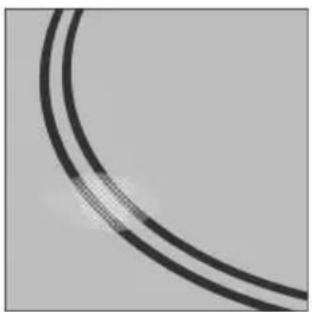
Close-up of two curved black lines on a gray background, no text or symbols visibleColourloss
Acolourchangetoametallicshadeduetowearby hobsorfromtheuseofinappropriatecleaningproducts.

natural_image
Close-up of two curved black lines on a gray background, no text or symbols visibleDecorativecolourloss
Grinding decoration dueto the use of inappropriate cleaning products.
The various types of damage mentioned above are caused by the incorrect use of the appliance, and therefore they are not covered by the warranty, as they are not technical problems relating to the appliance.
Familiarisingyourselfwiththeappliance
Thissectiondescribesthecontrolpanels,hotplates anddisplays. Theyareshownbyappliancemodel.
Thecontrolpanel

Controlpanels
Whenyoutouchasymbol,therespectivefunctionis activated.
Example: Touchthe①symbol. Thehobisswitchedon.
Note
Thesettingsremainunchangedifseveralsymbolsare touchedbriefly.Youcanthereforeeasilymopupspills onthecontrolpanel.
Alwayskeepthecontrolpanelscleananddry. Moistureanddirtmayimpairfunction.
TheHotplates
Singlecookingzone

natural_image
Simple geometric shape: a circle with a dashed line through its center, on a plain gray background (no text or symbols)Selecttheappropriatehotplate.
Thesizeofthepanshouldbethesameasthatofthe hotplate.
Inthe "Suitablepans" section were recommend two types of pans for induction cooking.
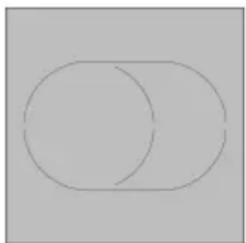
Extendedcookingzone
natural_image
Simple geometric diagram with two overlapping circles (no text or symbols)Thesizeofthesehotplatesmaybealtered. The hotplatemustbeconnected.
Howtheexteriorzoneoperates:
Placeapanwhichhasthesamesizebasethanthe exteriorzone.Theexteriorzonestartsworking automaticallyandtheindicatorlightcomeson.

Safetyinstructions. Residualheat
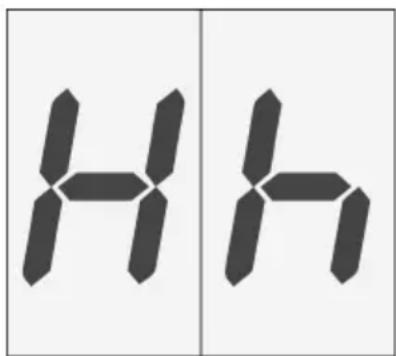
Thehobhasaresidualheatindicatorforeach hotplate.Itshowswhichhotplatesarestillhot. Youshould, therefore, avoidtouchingthehotplate whenthisindicatorisshown.
Although the hob is switched off, the indicator h/H will staylitwhilethehotplateishot.
If thepan has been removed but the hot plate has not been switched off, the indicator h/h will flash, showing the power level selected
Twistpadwithremovabletwistknob
Twistpad
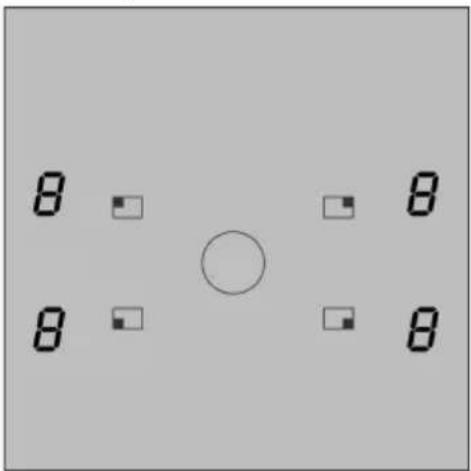
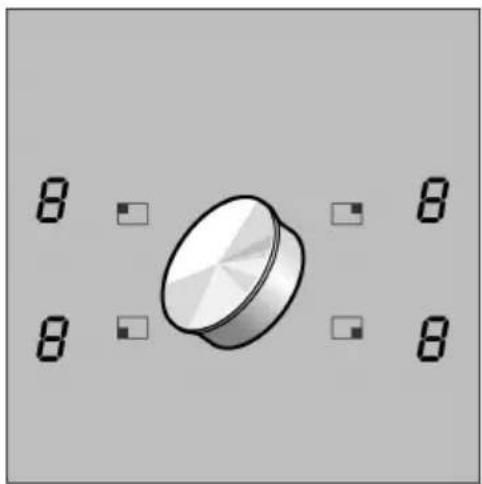
Thetwistpadistheareainwhichyouselectthe hotplateswiththetwistknobandcansetheat settings. Thetwistknobautomaticallycentresitselfin thetwistpad.
Twistknob
natural_image
Pure diagram of a 3D mechanical component with no text, numbers, or symbolsThetwistknobismagneticandisplacedonthetwist pad. Thecorrespondinghotplateisactivated by slidingthetwistknobinthedirectionofthearrow. You cansettheheatsettingbyturningthetwistknob.
Removingthetwistknob
Youcanremovethetwistknob. This makes cleaning easier.
Thetwistknobcanalsoberemovedwhenthe hotplateisinoperation.Allthehotplatesswitchoff after3seconds.

If you place a metal object on the twist pad within 3 seconds, the hob may continue to heat up. For this reason, always switch off the hob using them in switch.
Storingthetwistknob
Thereisastrongmagnetinthetwistknob.Donot, therefore,placeitnearmagneticdatacarriers,e.g. videocassettes,disks,creditcardsandcardswith magneticstrips.Thesecouldbedestroyed. Malfunctionstotelevisionsandmonitorsmayoccur.

Forpeoplehowearelectronicimplantssuchas apacemakerorinsulinpump.
Implantscouldbeaffectedbymagneticfields. Donot, therefore, carrythetwistknobinthepockets of your clothing. It should be kept at least 10cm away from apacemaker.
ThecookingwithInduction
Whatisinduction cooking?
Induction cooking constitutes radical change in the traditional form of heating, given that the heatis generated directly in the pan, keeping the cooking surface cold. Therefore, it has a number of advantages over other cooking methods:
GREATerspeedincooking and frying
Asthepanisheateddirectlyandnottheglass,the efficiencyisgreaterthaninothersystemsbecauseno heatislost.
Economical
Ithasbeenproventhatcookingwithaninductionis moreeconomicalthantheothercookingmethods.
Cookingcontrolandsafety
Thehobsuppliesorcutsofftheheatimmediately the controlsareoperated.Itstopssupplyingheatifthe panisremovedwithoutfirstswitchingoffthepower.If aclothorotherflammableobjectisleftonthehobby mistakethiswillnotcatchfire,evenwiththehotplate switchedon,becauseafterthehobhasbeenused, onlytheresidualheatproducedbythepanremainsin theglass.
Cleaning
Theglassisnotheated,sofoodspiltonthehob surfacewillnotburn.Furthermore,itisnotnecessary forthehobtocooldowntoallowcleaning.This providesmaximumconvenienceandcleanliness.
Suitablepans
Alwayschooseadequatesizedpressurecookersand pansforthequantitiesoffoodthatyouaregoingto prepare.Alargesizedpressurecookerorpanthatis onlyhalffullwillusealotofenergy.
Onlyferromagneticpansaresuitablefor inductioncooking. Thesecanbeofenamelled steel, castironorspecialstainlesssteelutensils forinductioncooking. You must neverusenormal stainlesssteel, glass, ceramic, copperor aluminiumpans. Check that your pans are attracted by amagnetto find out if they are suitable.
Nopan.
Ifnopanisplacedonthehotplate,orthepanisnot madeofasuitablematerialoritisnotasuitablesize, thenumberonthehotplateindicator,showingthe powerlevel,willflash.Itwillstopflashingoncea suitablepanisplacedonthehotplate. Ifyoutakelongerthanninetysecondstoplacea suitablepanonthehotplate,itwillautomaticallyturn itselfoff.
Mainswitchwithchild-prooflock
Mainswitch
Switchontheelectronicsinthecontrolpanelusing themainswitch.Nowthehobisreadyforuse.
Switchingon
Touchthe ①symboluntilthe ②hotplateindicators lightup.
Switchingoff
Touch the ① symbol until the ☐ hotplate indicators go out. Allthehotplatesareswitchedoff. Theresidual heatindicatorremainslituntilthehotplateshave cooledsufficiently.
Notes
Thehobswitchesoffautomaticallyifallthehotplates havebeenswitchedoffformorethan10seconds.
Thesettingsremainstoredfor5secondsafterthehob hasbeenswitchedoff.Ifyouswitchthehobonagain duringthistime,thehobwilloperateusingthe previouslystoredsettings.
Childprooflock
Youcanpreventthehobfrombeingswitchedon unintentionallysothatchildrencannotswitchonthe hotplates. Thechildprooflockremainsactivated permanently.
Activating the child-proof lock
Switchonthehobusingthemainswitch.
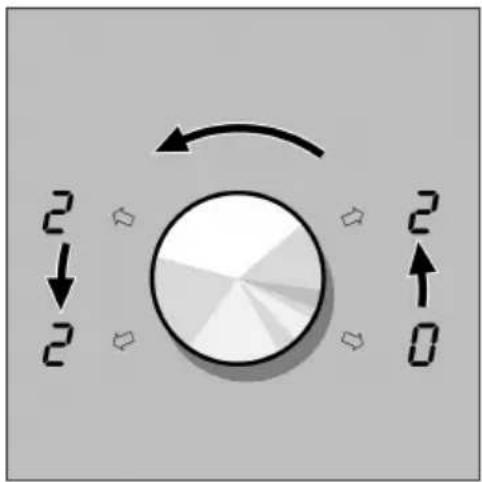
- Setall4hotplatestoheatsetting2.
- Switchoffthehotplates, oneaftertheother, startingwiththefrontrighthotplate.(See illustration)
- Touchthemainswitchforatleast5seconds, after whichasignalsounds. Thechild-prooflockisactivated.
Operatingthehob
Toswitchon,touchthe ①mainswitchformorethan 4 seconds.Duringthistime,-lightsupinthedisplay. Assoonasthedisplaygoesout,thehobisswitched on.
Deactivating the childproof lock
Youcandeactivatethechildprooflockagain.Proceed inthesamemannerasforactivatingthechild-proof lock.
Lockingthehobonceoff
Youcanlockthehobonasingleoccasion,iffor example,smallchildrenarevisiting: Thehobmustbeswitchedoff. Touchthe①mainswitchformorethan4 seconds. Thehotplateindicatorsgoout.The-indicatorlights upfor10secondsandgoesout.Thehobislocked.
Unlockingtheonceoff locking
Touchthe①mainswitchformorethan4 seconds. Thehobisswitchedon.Thehobisunlocked.
Important
Thechild-prooflockscouldbeactivatedor deactivatedunintentionallywhentheapplianceis cleanedusingwaterorasaresultofspillagesor objectscoveringthemainswitch①.
Cooking
Thissectiondescribeshowtoadjustthehotplates. Thetableshowstheheatsettingsandcookingtimes forvariousfooddishes.Thefollowingtipshelptosave energy.
Settingprocedure
natural_image
Simple graphic with a cursor arrow pointing at a circular button, surrounded by control buttons (no text or symbols)Thehobmustbeswitchedon.
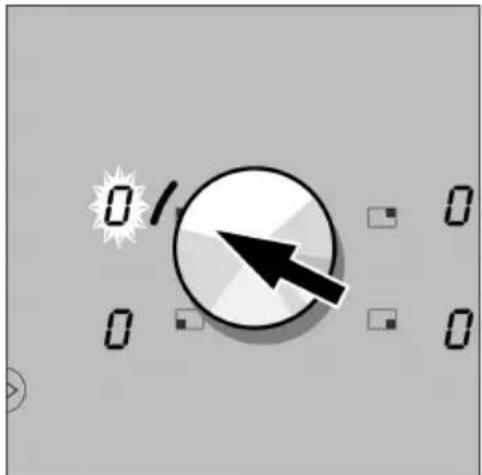
- Select the hot plate.
Todothis, slidethetwistknobinthedirectionof thecorrespondingheatsettingindicator. TheindicatorlightcomesonandOflashesintheheatsettingindicator.
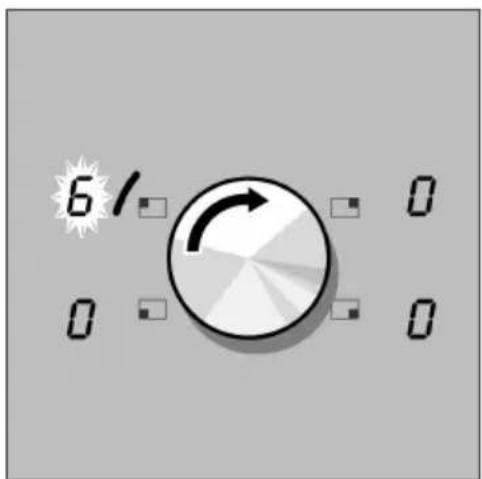
2.Movethetwistknobbacktothecentre.
- Withinthenext5seconds, turnthetwistknobuntil thedesiredheatsettingappearsinthehotplate indicator.
Heatsetting1=lowestpower
Heatsetting9=highestpower
Theheatsettingindicatorlightsuppermanently after5secondsandtheindicatorlampgoesout.
Changingtheheatsetting
Switchingoffthehotplate
Selectthehotplateandsetanewheatsetting.
Selectthehotplateandsetitto.
The hot plate is switched off, and the residual heat indicator appears after approximately 5 seconds.
Table
The following table provides a few examples.
The cooking timemay vary depending on the type of food, its weight, and quality. Deviations are therefore possible.
| AmountHeatsetting 90ongoing | cooking | Ongoingcooking time | ||
| Melting | ||||
| Chocolate,chocolatecoating, butter,honey | 100 g | - | 1-2 | - |
| Gelatine | 1 pck. | - | 1-2 | - |
| Heating | ||||
| Cannedvegetables | 400g-800g | 1-3mins | 2-3 | 3-6mins |
| Clearsoup | 500ml-1ltr | 2-3mins | 7-8 | 3-6mins |
| Thicksoup | 500ml-1ltr | 1-3mins | 2-3 | 2-4mins |
| Milk** | 200ml-400ml | 1-3mins | 1-2 | 2-4mins |
| Heatingandkeepingwarm | ||||
| Stew(e.g.lentilstew) | 400g-800g | 1-2mins. | 1-2 | |
| Milk | 500ml-1 ltr. | 2-3mins. | 1-2 | |
| Defrostingandheating | ||||
| Frozenspinach | 300 g-600 g | 3-4mins. | 2-3 | 5-15mins. |
| Frozengoulash | 500 g-1 kg | 3-4mins. | 2-3 | 20-30mins. |
| Simmering | ||||
| Dumplings, meatballs (1 - 2 ltr. water) | 4-8 pieces | 6-9mins. | 4-5* | 20-30mins. |
| Fish | 300g-600g | 3-6mins. | 4-5* | 10-15mins. |
| Heatsetting 9 AMOogbing cooking | Ongoing cooking time | |||
| Cooking | ||||
| Rice(withdoubletheamount of water) | 125 g-250 g | 2-4mins | 2-3. | 15-30mins |
| Ricepudding (500 ml - 1 litre milk) | 125 g-250 g | 3-5mins | 2-3 | 25-35mins |
| Potatoesboiledintheirskins with 1-3cupswater | 750 g-1.5 kg | 3-5mins | 4-5 | 30-35mins |
| Boiledpotatoeswith 1 - 3 cupswater | 750 g-1.5 kg | 3-5mins | 4-5 | 15-25mins |
| Freshvegetableswith 1 - 3 cupswater | 500 g-1 kg | 3-4mins | 4-5 | 10-20mins |
| Pasta(1-2litreswater) | 250 g-500 g | 6-9mins | 6-7* | 6-10mins |
| Roasting | ||||
| Roulade | 4pieces | 4-6mins | 4-5 | 50-60mins |
| Potroast | 1kg | 4-6mins | 4-5 | 60-100mins |
| Goulash | 500g | 4-8mins | 4-5 | 50-60mins |
| Frying | ||||
| Pancakes (Flädle,Swabian pancakes) | 1-2mins | 6-7 | Constantfrying | |
| Cutlet,breaded | 1-2pieces | 1-2mins | 6-7 | 6-10mins |
| Steak | 2-3 pieces | 1-2mins | 7-8 | 8-12mins |
| Fishfingers | 10pieces | 1-2mins | 6-7 | 8-10mins |
| Deep-fatfrying(in1-2 ltr. oil) | ||||
| Deep-frozenfoods** | ||||
| Others** | 200 gperserving | 8-13mins | 8-9* | constantdeep-fat frying |
| 400 gperserving | 8-13mins | 4-5* | constantdeep-fat frying | |
| *ongoingcookingwithoutlid | ||||
| **withoutlid | ||||
Tipsonsaving energy
Usesaucepansandpotswiththick,evenbases. Unevenbasesincreasethecookingtime.
Thecorrectsaucepansize
Selectthecorrectsaucepansizeforeachhotplate. Thediameterofthebasesofthesaucepansandpots shouldmatchthesizeofthehotplate.
Note: Ovenwaremanufacturersoftengivethe diameterofthetopofthesaucepan. It is usually larger than the diameter of the base of the saucepan.
Useasmallsaucepanforsmallquantities. Alarger, lessfullsaucepanrequiresmoreenergy.
Usingalid
Saucepansandpotsshouldalwaysbecoveredwitha suitablelid.Cookingwithoutalidrequiresmuchmore energy.
Cookingwithsmall quantitiesofwater
CookwithsmallquantitiesofwaterThissavesenergy andhelpsvegetablestoretainvitaminsandminerals.
Loweringtheheatsetting
Switchdowntoalowerheatsettinggoodtime.
Cookingwiththeeelectronicoboilstart control
Allfourhotplateshaveanelectronicboilstartcontrol.
Itisnolongernecessarytoswitchonthehotplate, waitforthepantoboilandthenchangethesetting. Yousimplystartwiththeheatsettingyourequirefor simmering.
The hot plate initially heatsup using the highest heat setting, and then automatically switches back to the heat settings selected.
Thetimetakenforthehotplatetoheatupdependson thesimmersettingselected.
Settingprocedure
- Settherequiredongoingcookinglevelforthe hotplate.
- Touch the A symbol. Electronic boil start control is activated. R and the ongoing cooking level flash alternatelyinthedisplay.
Afterthefoodisbroughttotheboil,thehotplate automaticallyswitchesbacktoongoingcooking.Only theongoingcookinglevelremainslitinthedisplay.
Tipsonelectronic boilstartcontrol
Fooddoesnotcometothe boilusingelectronicboil startcontrol.
The electronic boil start control is designed for cooking usingsmall quantities of watertopreserve nutrients.
Addonlyapproximately3 cupsofwatertothefoodfor largehotplatesandapproximately2 cupsofwaterfor smallhotplates.
Cookriceindoublequantitiesofliquid.
Placealidonthesaucepan
Electronicboilstartcontrolisnotsuitableforfood whichiscookedinlargequantitiesofwater(e.g. noodles).
Milkorhighlyfrothyfood boilsover.
Useatallersaucepan.
Milkburns.
Washthesaucepanoutwithcoldwaterbeforefilling it.
Whenfrying, thefood stickstothefryingpan.
Placefoodinapanpre-heatedtoasufficient temperature.Ifthefatishotenough,itrunsinstreaks overtheslopingbaseofthepan.Donotaddfoodtoo early.Meatorpotatofritterswillbreakintopiecesafter awhile.
Tables
Refertothefollowingtableforwhichappliancesthe electronicboilstartcontrolissuitablefor.
Thesmalleramountsspecifiedaresuitableforthe smallerhotplates, the larger amounts forthelarger hotplates. The value specified are guidelines only.
| Applianceswithelectronicboilstart control | QuantityHeatsettingCookingtimein | minutes | |
| Heating | |||
| cannedvegetables | 400 g-800 g | A2-3 | 5-10 |
| clearsoup | 500 ml-1 ltr. | A7-8 | 4-7 |
| thicksoup | 500 ml-1 ltr. | A2-3 | 4-7 |
| 200ml | |||
| milk | 400 ml | A1-2. | 4-7 |
| Heatingandkeepingwarm | |||
| stew(e.g.lentilstew) | 400 g-800 gA1-2- | ||
| Defrostingandheating | |||
| frozenspinach | 300 g-600 g | A2.-3. | 10-20 |
| frozengoulash | 500 g-1 kg | A2.-3. | 20-30 |
| Simmering | |||
| fish | 300 g-600 gA4-5*20-25 | ||
| Cooking | |||
| rice(withdoubletheamountofwater) | 125 g-250 g | A2.-3. | 20-35 |
| boiledpotatoeswith1-3 cupsofwater | 750 g-1,5 kg | A4-5 | 30-40 |
| boiledpotatoeswith1-3 cupsofwater | 750 g-1,5 kg | A4-5 | 20-30 |
| freshvegetableswith1-3 cupsofwater | 500 g-1 kg | A4-5 | 10-20 |
| Braising | |||
| roulade | 4 pieces | A4-5 | 50-60 |
| potroast | 1 kg | A4-5 | 80-100 |
| Frying | |||
| fishfingers | 10pieces | A6-7 | 8-12 |
| pancakes(Fladle,Swabianpancakes) | A6-7 | constantfrying | |
| cutlet,breaded | 1-2pieces | A6-7 | 8-12 |
| steak | 2-3pieces | A7-8 | 8-12 |
*Ongoingcookingwithoutlid
Powerboostfunction
Thisfunctionallowsyourfoodtobeheatedeven quickerthanwiththehighestpowersettingonyour appliance(9).
The powerboostfunction temporarily increases the power of the highest setting.
Restrictionswhen usingthe powerboost function

bar
| Group | Value | |---|---| | Group2 | 2 | | Group2 | 5 | | Group2 | 3 | | Group2 | 1 | | Group2 | 4 |Group1
Allthecookingzoneshavethisfunction,exceptthe roastingzonewhenitsexpandablepartisactivated. (Seefigure,zone5)

Group1
The power boost function can only be used if the other hot plate in the same group is not in use (see illustration).
Example: if you wish to set the function on hot plate 1, hot plate 2 (behind hot plate 1) must be switched off and vice versa. If the hot plate is not switched off, letter P and previously selected power level alternate in the display; then the previously selected level is switched back on. The same application hot plates 3 and 4.
Howtoactivateit
Thehotplatemustbeconnected.
- Select the hot plated desired using the control knob.
☐willflashontheindicator.Selecttheheatlevel withthecontrolknob. - Press the sensor >>, and the letter P will appear on the display.
Thisishowto deactivateit

Followthesesteps:
- Select the hotplate desired with the control knob.
- Press the symbol >>. The letter P will disappear from the display.
Incertaincircumstances,thePowerboost functionmaybeactivatedautomatically to protect the internale electronic component so the hob.
Timerfunction
Thisfunctioncanbeusedintwodifferentways:
-toswitchahotplateoffautomatically
-asacookingtimer
Settingahotplate toswitchoff automatically
Enteraspecificdurationforthedesiredhotplate. Whenthedurationhaselapsed, thehotplateswitches offautomatically.
Settingprocedure

Thehotplatemustbeswitchedon.
- Usethetwistknobtoselectthehotplate.

- Touch the ⏻ symbol. 00 flashes in the timer indicator. Usethetwistknobtosetherequired duration. Thedurationflashesforseveralsecondsandthen beginstocountdown. If you havesetaduration forseveralhotplates, it is alwaystheshortest duration that is displayed.
Whenthedurationhas elapsed
Whenthedurationhaselapsed,thehotplateswitches off.0lightsupintheheatsettingindicator.Asignal soundsforoneminute.00flashesinthetimer indicator.Touchanycontrolpanel.Thedisplayswill gooutandtheaudiblesignalwillstop.
Changingtheduration
Usethetwistknobtoselectthehotplate.Touchthe① symbolandchangethedurationusingthetwistknob.
Cancellingprematurely
Selectthehotplateusingthetwistknob,touchthe symbolandsetto. Theindicatorgoesoutaftera fewseconds.
Notes
If you would like to call up their remaining duration for a hot plate: Use the twist knob to select the hot plate. The duration is displayed for 5 seconds.
Youcansetadurationofupto99minutes.
Theautomatictimelimitcanalsobeeactivatedusing thetimerfunction.
Thetimerfunctionisnolongeractiveafterapowercut.
Cookingtimer
Youcanusethetimeronyourcookertosetatimeof upto99 minutes.ltrunsindependentlyofalltheother settings.
Settingprocedure
Theremustbenohotplateselected.
Touchthe Symbol, theminindicatorflashes. 00 flashesinthetimerindicator.
Usethetwistknobtosettherequiredtime.
Thetimedisappearsafterafewseconds. The shortesttimesetwiththetimerisdisplayed.
Whenthecookingtimehas elapsed
Asignalsoundsforoneminute.00flashesinthetimer indicatorandminflashes.Touchanycontrolpanel. Thedisplaysgooutandtheaudiblesignalceases.
Changingthetime
Touchthe Symbolandsetthetimerequired using thetwistknob.
Note
The cooking timer is no longer in operation after a powercut.
Memoryfunction
Youcanusethememoryfunctiontostoretheheat settingsandtimesforadishwhichforrecallatany time.
Thememoryfunctionisusefulifyourequireseveral differentheatsettingsinordertoprepareadish, andif thereisadishwhichyoucookparticularlyoften.
The conditions must always be the same as when you stored these settings when preparing the dish, e.g.: the same saucepan, the same quantity and the same initial temperature for the dish.
Storingthesetting
Youcanstoreonememoryeventforeachhotplate. Foreachmemoryeventyoucanrecordupto 5 settings.Themaximumdurationthatcanbe recordedis99minutes.
Method
Thehobmustbeswitchedon.Nohotplateshouldbe selected.Thehotplateforwhichthesettingsaretobe recordedmustbeswitchedoff.
-
Touch the M symbol. rec flashes in the display.
-
Selecttherequiredhotplateandsettheheat settingwiththetwistknob.Recordingbegins.The recindicatorlightsupandMflashesnexttothe hotplateindicator.
Notes
- Now prepare the dish as you wish. These settings are recorded.
- When your dish is ready, switch off the hot plate. The cooking procedure is stored.
If you set more than 5 heat settings for your dish, flashes in the timer indicator and flashes in the hot plate indicator alternately with the continuation cooking setting. The subsequent heat settings are not recorded. The timer indicator goes out when you touch any control panel. You can finish cooking the dish as you wish.
If you set more than 99 minutes, 99 flashes in the timer display and alternates with the ongoing cooking setting in the hot plate indicator. Subsequent heat settings are not recorded. The indicators go out when you touch any control panel. You can finish cooking the dish as you wish.
If you want to store read different memory event fora hotplate: make anewrecording. The old memory is overwritten.
Theautomatictimelimitcanalsobeeactivatedusing thememoryfunction.
Callingupthe memory
If you want to cook a dish again for which the setting has been recorded, call up them memory. The hot plate for which the memory function is be activated must be switched off.
- Select the hot plate with the twist knob.
- Touch the Msymboltoactivatethememory.
Displayingthememory

The stored settings appear in the hot plate indicator in quick succession.
Thehotplatedoesnoheatupyet.TheMsymbolon thehotplate lightsup.
Each individual step appears in the indicator for 3 seconds.
Startingthememory function
After all the step have been displayed, the memory program starts. The hot plate heats up.
Thecurrentsettingisdisplayedinthehotplate indicator. Thedurationofthewholecookingevent countsdowninthetimerindicator.
Youcancalluptheremainingheatsettingsandthe respectivecookingtimeswhilethememoryprogram isrunning:
Selectthehotplatewiththetwistknob.
Touchthe ^L symboltodisplaythecurrentheat settingandduration.Youcannowcallupallthe remainingheatsettingsandtherespectivedurations usingthe ^L symbol.
Memoryends

Whenthememoryprogramhasfinished,thehotplate switchesoff.Asignalsoundsforoneminute.
00 flashesinthetimerindicator. The Msymbolflashes onthehotplate. 0lightsupinthehotplateindicator.
Touchanycontrolpanel. Thedisplaysdisappearand thesignalstops.
Endingthememory prematurely
Select the hot plate with the twist knob. The hot plate display flashes. Changethe heat setting. The hot plate switches off.
Severalhotplatesin memoryoperation
If you want to set the memory function on several hot plates at the same time, the shortest duration of the memory programs is displayed in the timer indicator.
Note
If you would like to call up the duration of another memory program: Select the hot plate with the twist knob. The current setting is displayed.
Automatictimelimiter
Ifahotplateisinconstantuseforalongtimewithout thesettingbeingchanged, theautomatictimelimiter willbeactivated.
The hot plate heating is interrupted.
AnFandan8flashalternatelyinthehotplate indicator.
The indicator goes out when you touch any control panel. Now you can reset the hot plate.
The time at which the timer restriction is activated depends on the heat setting (1 to 10 hours).
Switchingoffentryconfirmation

Ashortbuzzconfirmsthatabuttonhasbeen touched. Thisbuzzercanbeswitchedoff:
Switchonthehobusingthemainswitch.
- Setallhotplatestoheatsetting3.
2.Switchoffthehotplatesoneaftertheother, beginningwiththefrontrighthotplate.See illustration. - Touchthemainswitchforatleast5seconds, after whichtimeaconfirmationsignalwillsound.
Youmayalsoswitchtheentryconfirmationonagain. Proceedinthesamemannerasforswitchingoff.
Careandcleaning
Donotusehighpressurecleanersorsteamjets.
Care
Cleanyourhobusingaprotective/careproductfor glassceramic.Itcoatsthecookingsurfacewitha glossy,dirt-repellentfilm.Yourhobwillcontinueto lookgoodforalongtime.Itmakescleaningeasier.
Cleaningglass ceramic
Cleaningagents
Cleanthehobaftereachuse. This prevents food from being burnt into the hobsurface.
Only use cleaning agents which are suitable for glass ceramic, e.g. CERACLEAN, cera-fix, Sidolfor ceran + steel.
Watermarkscanalsoberemovedusinglemonjuice orvinegar.
Unsuitablecleaningagents
Donotuse:
Abrasivesponges, scouringpadsoraggressive cleaningagents, suchasovensprayorstainremover.
Twistknob
Itispreferabletowipethetwistknobusinglukewarm soapywateronly.Neverusestrongorabrasive products.Thetwistknobcouldbedamagedif cleanedinadishwasherorimmersedinsoapywater.
Glassscraper

natural_image
Illustration of stacked documents or documents with a pile of papers (no visible text or symbols)Youcanremovethickdirtbestwithaglassscraper.
Removetheprotectivecoverfromtheglassscraper. Onlyusethebladetocleantheglassceramicsurface. Thecasingmayscratchtheceramicsurface.

Thebladeisverysharp.Thereisariskofinjury.Cover thebladeaftercleaning.
Replacedamagedbladesimmediately.
Howtocleantheglass ceramiccookingsurface
Usetheglassscrapertoremovefoodresiduesand greasesplashes.
Useacleaningproductandkitchentoweltocleanthe surfacewhenitislukewarm.Ifthesurfaceisstilltoo hotitcanbecomestained.
Wipethesurfaceandrubdrywithasoftcloth.
Shimmeringmetallic discoloration
Discolorationiscausedbypanabrasionortheuseof unsuitablecleaningagents. This is very difficult to remove. Use HobCleanor Sidolforceran+steel. Our after-salesservice can removed discoloration, but will charge forth this service.
Controlpanels
Alwayskeepthecontrolpanelscleananddry.Food residuesandspillscanimpairthefunctionofthe controlpanels.
Cleaningthehob surround
Onlyusewarmsoapywater.
Donotuseanythingwhichissharporabrasive.The glassscraperisunsuitable.Thehobsurroundcould bedamaged.
Neither lemonjuicenorvinegarshouldbeused for cleaning the hobsurround.
Thiscouldresultinmattpatches.
Procedureintheeventofamalfunction
The circuit breaker in your householdelectrical circuit trips when you switch on the hob
Malfunctionsoftenhavesimpleexplanationsandmay beeasilyrectified.Pleasereadthefollowing instructionsbeforecallingtheafter-salesservice.
Makesurethatthepowerdrawofalltheappliances switchedondoesnotexceedyourmaximum householdelectricitysupply.Checkwhetherthe circuitbreakertriggerswhenyouswitchonanother hotplate.
Eisflashinginallthe hotplatedisplaysanda signalissounding
The control panel is very dirty, food has been spiltor an object has been placed on the works surface. Clean the control panel thoroughly or remove the object from the works surface. Pressthe control panel concerned. The flashing stops.
Thehobhasswitcheditself off
Themainswitchwastouchedinadvertently.Switch thehobbackon.Adjustthesettingsagain.
Thedisplayflashes(there isnopower)whenyou placeasaucepanonan inductionhotplate
Checkwhetherthesaucepaniselectromagnetic (attractsamagnet). Checkwhetherthediameterof thesaucepanislargeenough.
Allowthesaucepantocooldownintheeventthatit hasbecometoohotwhenused.
Ifthedisplaystilldoesnotlightupwhenyouswitch thehotplateoffandonagain, disconnectthe appliancefromthemains.Wait20secondsandthen reconnectit.
Thepowerboostfunction displayflashesandthen switchesoff
The power boost function operates the hot plate with themost possible power. During long cooking times, it is possible that the function will switch the hot plate off to protect the hob from overheating. You can continuet ou set the hob if the display is not flashing.
Repairs

Er displayandnumbers
Repairsmayonlybecarriedoutbytrained customerservicepersonnel.
Incorrectrepairstotheappliancemayexposethe usertoincreasedrisks.
IfE - andnumbersappearinthedisplaypanels, there isafaultintheelectronics.Disconnecttheappliance fromthemainsandreconnectit.Consultthe after-salesserviceifthedisplayappearsagain.
Fdisplayandnumbers
If F and an number flash alternately in the display, your appliance is indicating a fault. The following table contains measures for rectifying faults.
| Visual indication | FaultrMeasure | |
| F0Aninternalerrorwas producedwhilethehob wasworking. | Disconnectthecookinghobfromthemains.Waitafew secondsbeforeconnectingitagain.Ifthesymbolcontinuestoappearcontactthetechnical assistanceservice. | |
| F2Thecookinghobistoohot andhasturnedoff. | Removethecookwarefromthefrontcookingzones.F2it isturnedoffbytouchingthecontrolsurfaceifthehobhas cooleddownsufficiently. | |
| F4Thecookinghobistoohot andhasturnedoff. | Checkwhetherthereisanyhotcookwareonthecontrol panel.Removethecookwarefromthecontrolpanel.Wait afewminutesuntilthecontrolpanelhascooledalittle.If afterconnectionF4appearsagain,callthetechnical assistanceservice. | |
| F8Thecookingzonehas beenworkingatahigh powerandcontinuously fortoolong. | Automatictimelimitationhasbeenactivated.Tocontinuecookingtouchanysensor. | |
| c1Thepowervoltageistoo low. | Deactivatethehob.Waitafewsecondsbeforeconnecting itagain.Iftheindicationcontinues,contactyourelectricity supplier. | |
| c2/c3 | The cooking zone has overheated. | Ithasbeenautomaticallydeactivatedtoprotectyourhob.Waitafewminutesforittocooldownandswitchitback onagain. |
| U400Thecookinghobisnot wellconnected. | Disconnectthecookinghobfromthemains.Checkthe connectionandconnectitagaincorrectly.Iftheindicationcontinues,notifythetechnicalassistance service. | |
Normaloperating noisesforthe appliance
Inductionheatingtechnologyisbasedonthevibration resistanceofcertainmetalswhensubjectedto high-frequencywaves.Insomecircumstances,these vibrationscancauseacertaindegreeofnoise,such asthefollowing:
Lowhumminglikea transformer
Thisoccurswhencookingatahighpower. Thecause ofthisistheamountofenergywhichistransmitted fromthehobtothecookware. Thisnoisedisappears orbecomesquieterwhenthepoweristurneddown.
Quietwhistling
This occurs when the cookware is empty. This noise disappears when water or food is added to the cookware.
Crackling
Thisnoiseoccurswhencookwareisusedwhich consistsoflayersofdifferentmaterials. Thenoiseis causedbyvibrationsinthejointfacesbetween the differentlayers. Thisnoiseismadebythecookware.It maychangedependingontheamountandtypeof foodbeingcooked.
High-pitchedwhistle
Thisnoiseoccursprincipallyincookwarewhich consistsoflayersofdifferentmaterialswhenitisused atthehighestheatsettingandontwohotplatesnext toeachother.Thiswhistlingdisappearsorbecomes quieterwhenthepoweristurneddown.
Fannoise
The electronics require a controlled temperature in order of function reliably. The hobist therefore fitted with a fan which runs at various speeds according to the temperature detected. The fan may also run on once the hob has been switched off the temperature it detects is still too high.
Thenoisesdescribedarenormalandpartofthe inductiontechnologyanddonotindicateafault.
Packagingandoldappliances
Disposinginan environmentally-responsible manner
Unpacktheapplianceanddisposeofthepackaging inanenvironmentally-responsiblemanner.

This appliance is marked according to the European directive 2002/96/EConWasteElectrical and Electronic Equipment (WEEE).
This guideline is the timeframe of European-wide validity of return and recycling on Waste Electrical and Electronic Equipment.
After-salesservice
Ourafter-salesserviceisthereforyouifyourhob shouldneedtoberepaired.Youwillfindtheaddress andtelephonenumberofyournearestafter-sales servicecentreinthephonebook.Theafter-sales servicecentreslistedwillalsobehappytoadviseyou ofaservicepointinyourlocalarea.
EnumerandFDnumber
PleasequotetheNumber(productnumber)andtheFDnumber(productionnumber)ofyourappliance whencontactingtheafter-salesservice. Theratingplatebearingthesenumberscanbefound intheappliancebooklet.
GAGGENAU
GAGGENAU HAUSGERÄTE GMBH
CARL-WERY-STR. 34 · D-81739 MÜNCHEN
(089) 45 90-03
FAX (089) 45 90-23 47
www.gaggenau.com


- Operating Instructions
- Ceramic induction hob
- Tableofcontents
- Importantinformation5......
- Familiarisingyourselfwiththeappliance10.....
- Twist pad with removable twist knob 12
- The cooking with Induction 13
- Main switch with child-proof lock 14
- Cooking 16
- Cooking with the electronic boil start control . . 19
- Powerboost function 22
- Importantinformation
- Beforeswitchingon your appliance
- Transportdamage
- Electrical connection or installation
- Safetyprecautions
- Cookingandheatingfood
- Donotplacemetalobjects ontheinductionhob
- Takingcareofthecooling fan
- Incorrectrepairs
- Powercable
- Reasonsfor damage
- Saucepanandpanbases
- Hotpansandsaucepans
- Salt, sugarandsand
- Hardandpointedobjects
- Foodspills
- Foilandplastic
- Examplesofpossible damage
- Presenceofstains
- Scratches
- Colourloss
- Decorativecolourloss
- Familiarisingyourselfwiththeappliance
- Controlpanels
- Note
- TheHotplates
- Singlecookingzone
- Extendedcookingzone
- Safetyinstructions. Residualheat
- Twistpadwithremovabletwistknob
- Removingthetwistknob
- Storingthetwistknob
- Forpeoplehowearelectronicimplantssuchas apacemakerorinsulinpump.
- ThecookingwithInduction
- Whatisinduction cooking?
- GREATerspeedincooking and frying
- Economical
- Cookingcontrolandsafety
- Cleaning
- Suitablepans
- Nopan.
- Mainswitchwithchild-prooflock
- Mainswitch
- Switchingon
- Switchingoff
- Notes
- Childprooflock
- Activating the child-proof lock
- Operatingthehob
- Deactivating the childproof lock
- Lockingthehobonceoff
- Unlockingtheonceoff locking
- Important
- Cooking
- Settingprocedure
- Changingtheheatsetting
- Switchingoffthehotplate
- Tipsonsaving energy
- Thecorrectsaucepansize
- Usingalid
- Cookingwithsmall quantitiesofwater
- Loweringtheheatsetting
- Cookingwiththeeelectronicoboilstart control
- Tipsonelectronic boilstartcontrol
- Tables
- Powerboostfunction
- Restrictionswhen usingthe powerboost function
- Howtoactivateit
- Thisishowto deactivateit
- Followthesesteps:
- Timerfunction
- Settingahotplate toswitchoff automatically
- Whenthedurationhas elapsed
- Changingtheduration
- Cancellingprematurely
- Cookingtimer
- Whenthecookingtimehas elapsed
- Changingthetime
- Memoryfunction
- Storingthesetting
- Method
- Callingupthe memory
- Startingthememory function
- Endingthememory prematurely
- Severalhotplatesin memoryoperation
- Automatictimelimiter
- Switchingoffentryconfirmation
- Careandcleaning
- Care
- Cleaningglass ceramic
- Cleaningagents
- Unsuitablecleaningagents
- Twistknob
- Glassscraper
- Howtocleantheglass ceramiccookingsurface
- Shimmeringmetallic discoloration
- Cleaningthehob surround
- Procedureintheeventofamalfunction
- The circuit breaker in your householdelectrical circuit trips when you switch on the hob
- Eisflashinginallthe hotplatedisplaysanda signalissounding
- Thehobhasswitcheditself off
- Thedisplayflashes(there isnopower)whenyou placeasaucepanonan inductionhotplate
- Thepowerboostfunction displayflashesandthen switchesoff
- Repairs
- Er displayandnumbers
- Repairsmayonlybecarriedoutbytrained customerservicepersonnel.
- Fdisplayandnumbers
- Normaloperating noisesforthe appliance
- Lowhumminglikea transformer
- Quietwhistling
- Crackling
- High-pitchedwhistle
- Fannoise
- Packagingandoldappliances
- After-salesservice
- GAGGENAU
Marque : GAGGENAU
Modèle : CI 482-100
Catégorie : Cuisinière