
10-LD2590 - Compteur CRIVIT - Notice d'utilisation et mode d'emploi gratuit
Retrouvez gratuitement la notice de l'appareil 10-LD2590 CRIVIT au format PDF.


Choisissez votre langue et indiquez votre email : nous vous enverrons une version traduite specifiquement.
| Type de produit | Compteur de pas (podomètre) |
| Marque | CRIVIT |
| Modèle | 10-LD2590 |
| Dimensions | Environ 4,5 x 3,5 x 1,2 cm |
| Poids | Environ 20 g (sans pile) |
| Alimentation | 1 pile bouton CR2032 (incluse) |
| Affichage | Écran LCD à 5 chiffres |
| Fonctions principales | Comptage de pas, distance (km/miles), calories brûlées, temps d'exercice, horloge |
| Capacité mémoire | Conserve les données jusqu'à 7 jours |
| Précision | Calibré par défaut (ajustable via longueur de foulée) |
| Matériau | Plastique ABS, finition mate |
| Fixation | Clip ceinture intégré |
| Résistance à l'eau | Indice IPX4 (protégé contre les éclaboussures) |
| Autonomie de la pile | Environ 6 mois (selon utilisation) |
| Entretien et nettoyage | Nettoyer avec un chiffon doux et sec. Ne pas immerger. |
| Sécurité | Tenir hors de portée des enfants (piles). Avertissement de pile faible. |
| Pièces détachées et réparabilité | Pile remplaçable. Pas de pièces détachées fournies. Pas réparable par l'utilisateur. |
| Accessoires inclus | Pile CR2032, notice d'utilisation |
| Garantie | 2 ans (selon législation en vigueur) |
FOIRE AUX QUESTIONS - 10-LD2590 CRIVIT
Comment allumer et éteindre le compteur ?
L'appareil s'allume automatiquement dès qu'il détecte un mouvement. Pour l'éteindre, maintenez la touche 'MODE' enfoncée pendant 3 secondes.
Comment régler la longueur de foulée ?
Mesurez votre foulée en mètres ou en pas, puis appuyez sur 'SET' jusqu'à ce que le symbole 'STEP' clignote. Utilisez les touches fléchées pour ajuster la valeur (par défaut 75 cm).
Que faire si l'écran reste noir ?
Vérifiez la pile : ouvrez le compartiment à l'aide d'un tournevis et remplacez la pile CR2032 si nécessaire. Assurez-vous du bon contact.
Le compteur est-il étanche ?
Il résiste aux éclaboussures (IPX4) mais ne doit pas être immergé. Évitez de l'utiliser sous la pluie battante ou en nageant.
Comment remettre le compteur à zéro ?
Maintenez la touche 'RESET' enfoncée pendant 5 secondes pour effacer toutes les données du jour. Les données des jours précédents restent en mémoire.
Comment consulter l'historique des jours précédents ?
Appuyez plusieurs fois sur 'MODE' pour faire défiler les modes : pas, distance, calories, temps, puis 'HISTORY'. Utilisez les flèches pour naviguer entre les 7 derniers jours.
Pourquoi le nombre de pas semble inexact ?
Vérifiez le réglage de la longueur de foulée. Un réglage trop grand ou trop petit affecte la distance. Ajustez-le en fonction de votre foulée réelle.
Le compteur émet un bip, que faire ?
Un bip toutes les 15 minutes indique une pile faible. Remplacez-la rapidement. Si le bip est continu, appuyez sur 'RESET' pour arrêter l'alarme.
Puis-je porter le compteur à la ceinture ou au poignet ?
Il est conçu pour être clipé à la ceinture ou placé dans une poche. Un porte-montre n'est pas inclus. Pour une mesure optimale, portez-le près du bassin.
Comment changer la pile ?
Ouvrez le couvercle du compartiment à piles (au dos) avec un tournevis cruciforme. Retirez la pile usagée et insérez une nouvelle CR2032 en respectant la polarité. Refermez le couvercle.
Questions des utilisateurs sur 10-LD2590 CRIVIT
0 question sur cet appareil. Repondez a celles que vous connaissez ou posez la votre.
Poser une nouvelle question sur cet appareil
Aucune question pour l'instant. Soyez le premier à en poser une.
Téléchargez la notice de votre Compteur au format PDF gratuitement ! Retrouvez votre notice 10-LD2590 - CRIVIT et reprennez votre appareil électronique en main. Sur cette page sont publiés tous les documents nécessaires à l'utilisation de votre appareil 10-LD2590 de la marque CRIVIT.
MODE D'EMPLOI 10-LD2590 CRIVIT
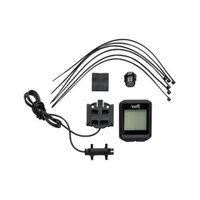
| 10-LD2590Edition 1GB/IE |  | FeaturesMemory for 2 bicyclesService interval selectableSpeed dispersion (0-99,9km/h)Average speed (0-99,9km/h)Maximum speed (0-99,9km/h)Speed comparisonSpeed tendency(Accelerating or slowing down)Trip timer (max 3:59.59)Trip timer (forward or reverse counting)TimeStop watchDistance counter (0-999,9km/m)Distance counter (forward or reverse counting)Distance counter for 2 bicyclesTotal distanceMemory function for OdometerScan feature for alternating displayThermometer with max./min. memoryCelsius or Fahrenheit selectableKilometers or miles selectableFat burn counterCalorie counterStandby featureAuto startEasy or advanced mode selectableBacklight | Display description1 Selected bicycle (1 or 2)Speed tendency; acceleration (turning to the right) or slowing down (turning to the left)2 Service interval reached3 Scan (alternating display)4 Subfeature display5 Main feature display6 Battery low indicator7 Speed comparison: faster or slower than average speed -3- -3- |
| Congratulations on your purchase of this bicycle computer. Please read the instruction manual before using the unit.Safety notesThis electronic appliance must be protected from water and other hazards.It is not a toy and children should not use it unsupervised.Cleaning instructionsClean the product with a dry, lint-free cloth. A glasses cleaning cloth is ideal.SetupThe setup and installation of the bicycle computer is described on the information sheet installation'After installing the bicycle computer, please remove the protective foil from the display and press any key to start the computer.LightPress C briefly to activate the light temporarily.-4- | Basic settingsThe setting mode for basic settings is activated by inserting the battery or by pressing RESET (on the back side of the unit).The language selection will appear on the display. Select a language (English, German or French) by pressing B. Confirm your selection by pressing A.The display will now show the mode for advanced usersADVANCE / FORTGES / AVANCEOr for beginnersEASY / EINFACH / FACILESelect a mode by pressing B. Confirm your selection by pressing A.Important: In easy mode only the following features are available:Speed, average speed, trip distance and trip timer.In advanced mode all features are available and settings for 2 bicycles can be stored.C1 will now appear on the display. Set the circumference of your tire in mm (see "Calculating tire circumference"). Press B to set each digit and press A to confirm each setting.-5- | If you have selected advanced mode, you may now enter the tire circumference for an additional bicycle.Calculating tire circumferenceTire circumference can be easily calculated by multiplying the tire diameter with 3.1416.The tire circumference of some standard tire types is listed in the following table.Diameter Circumference20" 159822" 175924" 191626" (650A) 207326.5" (Tubular) 211726.6" (700x25C) 212426.8" (700x28C) 213627" (700x32C) 215528" (700B) 2237ATB 24x1,75 1688ATB 26x1,4 1995ATB 26x1,5 2030ATB 26x1,75 2045ATB 26x2 (650B) 209927"x1 213827"x1 1/4 2155-6- | The display now shows the unit of distance SET KM / EINST KM / AJUSTE KMSelect the unit miles (M) or Kilometers (KM) by pressing B. Confirm your setting by pressing A.The display now shows the age selection SET AGE / ALTER / AGESet your age in years. Press B to set each digit and pres A to confirm each setting.The display now shows the unit of weight selection SET KG / EINST KG / AJUSTE KGSelect the unit Kilogram (KG) or Pounds (LB) by pressing B. Confirm your selection by pressing A.The display now shows the weight selection SET MT / GEWICHT / POIDSSet your weight in the selected unit. Press B to set each digit and pres A to confirm each setting.-7- |
| The display will now show the 12 or 24 hour time format selectionSET CLK / EINST U / REG MONTSelect your preferred format by pressing B. Confirm your selection by pressing A.Set the hours and minutes in the same way.The display will now show the service interval selectionSERVICE / SERVICE / SERVICESet the interval by pressing B. Confirm your selection by pressing A.Possible settings are 200, 400, 600 or 800 Kilometers or MilesIf you selected advanced mode you may now select the service interval for an additional bicycle.The display will now show the temperature unit selection. Select the temperature unit Celsius (°C) or Fahrenheit (°F) by pressing B. Confirm your selection by pressing A.-8- | Using the bicycle computerPress B to select a feature mode of the computer. The lower row of the display will show the name of the mode.Press A to reach the subfeatures of each mode.Press and hold A to reach the setting mode of a feature or reset stored values.TimeCLOCK / UHRZEIT / HEUREPress and hold A for 3 seconds to enter time setting mode (see basic settings)Total distanceTOTODO / KM-RAD / KM-VELOPress and hold A for 3 seconds to enter setting mode for tire diameter (see basic settings). After tire diameter setting the stored values for the odometer can be changed.-9- | Total distance for both bicyclesTAWARDO DESAMTKM / DIST-TOTPress and hold A for 3 seconds to enter tire circumference setting (see basic settings). After tire diameter setting the stored values for the odometer can be changed.Trip distancetrIPDIST / TAGES-KM / DISJOURPress and hold A for 3 seconds to reset trip distance, trip time and average speed.Maximum speedMAXSPEED / MAX-KMH / VIT-MAXPress and hold A for 3 seconds to reset the stored maximum speed.Average speedA VILLIRED / DURCH-KM / VITMOYENThe average speed can be reset in the menu „trip distance”.Trip timeTRPTIME / FAHRZEIT / TEMPPARCThe trip time can be reset in the menu „trip distance”.-10- | ThermometerTEMPORAD / TEMPPress A to show the maximum (HI) and minimum (LO) values.Press and hold A for 3 seconds to reach temperature unit selection (°C or °F) (see basic settings)Stop watchSTPWATCH / STOPPUHR / CHRONOPress A to start or stop the stop watch. Press and hold A to reset the stop watch.Current calorie consumptionCAL RATE / KAL RATE / CONS CALCalorie consumption at the current speed is displayed.Calorie countercAL RATE / KAL RATE / CONS CALPress and hold A for 3 seconds to reset the calorie counter.Fat burn in gramsFAIT-BURN / FETT / GRASPress and hold A for 3 seconds to reset the fat burn counter.-11- |
| Distance counter (forward/reverse)KM / KM / KMPress and hold A for 3 seconds to reach the setting mode for the distance counter.The symbol for the forward counter (-) or reverse counter (+) will appear. Press B to select a counter and confirm your setting by pressing A.You can now set the desired distance. Press B to set each digit and press A to confirm each setting. After the set distance has been covered the display will blink. Press A to stop the blinking.Trip timer (forward/reverse)TIME / TIMER / TIMERPress and hold A for 3 seconds to reach the setting mode for the trip timer.The symbol for the forward counter (-) or reverse counter (+) will appear. Press B to select a counter and confirm your setting by pressing A.You can now set the desired riding time. Press B to set each digit and press A to confirm each setting.After the set riding time has been completed the display will blink. Press A to stop the blinking.-12- | Scan mode SCANIn scan mode SCAN will appear on the display. The trip distance (DST), maximum speed (MXS), average speed (AVS) and trip timer (TM) alternate on the display.Service reminderWhen the set service interval is reached the service reminder will blink on the display. Press A to reset the service reminder.Selection of bicycle 1 or bicycle 2Press A and B together briefly to load the settings for bicycle 1 or 2.Please note: All stored values except total distance will be reset.Battery replacement (30-second memory)Before changing the battery, please press and hold A and B together. {<---->} will appear on the display. If a new battery is inserted within 30 seconds, the stored values will remain intact. Press A.Please dispose of your batteries properly in containers especially set up at retailers. Batteries do not belong in household waste.-13- | Easy mode, advanced mode and custom menus for easy modePress and hold C for 3 seconds. The display will now show the mode for advanced use.ADVANCE / FORTGES / AVANCEor for beginnersEASY / EINFACH / FACILESelect the desired mode by press B.You can now confirm your selection by pressing A or customize the easy mode. To customize easy mode select the mode by pressing B, then press and hold A.Energy saving modeIf the bicycle computer was not used for 5 minutes it will automatically enter standby mode. Press any button or start riding to reactivate the computer.BatteriesPlease dispose of your batteries properly in containers especially set up at retailers. Batteries do not belong in household waste.-14- | DisposalThis electrical appliance may not be disposed of with normal household waste. Please hand it in at an appropriate local collection point.WarrantyWe provide a 3-year warranty for this item. The warranty period starts from the date of sale (receipt, proof of purchase). Within this period we rectify all faults which are attributable to material and manufacturing defects at no cost. For damage which is attributable to improper treatment, e.g. dropping, knocking, or water damage, there is no warranty claim.Free sevice hotline: 00800 5515 6616http://www.inter-quartz.digi-tech®, Valterweg 27A, D-65817 Eppstein |


Assistant notice
Powered by Anthropic
En attente de votre message
Informations produit
Marque : CRIVIT
Modèle : 10-LD2590
Catégorie : Compteur