
MiFa - Haut-parleur Xiaomi - Notice d'utilisation et mode d'emploi gratuit
Retrouvez gratuitement la notice de l'appareil MiFa Xiaomi au format PDF.


| Type de produit | Haut-parleur Bluetooth portable |
| Marque | Xiaomi |
| Modèle | MiFa |
| Dimensions | 152 × 62 × 25 mm |
| Poids | 270 g |
| Alimentation | Batterie rechargeable lithium-ion 2000 mAh |
| Autonomie | Jusqu'à 10 heures d'écoute |
| Connectivité | Bluetooth 5.0 |
| Puissance de sortie | 5 W |
| Réponse en fréquence | 100 Hz - 20 kHz |
| Portée Bluetooth | Jusqu'à 10 mètres |
| Entrée de charge | Micro USB 5V |
| Fonctions principales | Lecture audio sans fil, commandes tactiles, kit mains-libres, assistant vocal compatible |
| Entretien et nettoyage | Essuyer avec un chiffon doux et sec. Ne pas utiliser de produits abrasifs. |
| Sécurité | Ne pas exposer à l'eau, ne pas ouvrir l'appareil, ne pas écouter à volume excessif |
| Pièces détachées et réparabilité | Pas de pièces réparables par l'utilisateur. Contacter le service après-vente. |
| Contenu de la boîte | Enceinte, câble micro USB, manuel d'utilisation |
FOIRE AUX QUESTIONS - MiFa Xiaomi
Questions des utilisateurs sur MiFa Xiaomi
0 question sur cet appareil. Repondez a celles que vous connaissez ou posez la votre.
Poser une nouvelle question sur cet appareil
Téléchargez la notice de votre Haut-parleur au format PDF gratuitement ! Retrouvez votre notice MiFa - Xiaomi et reprennez votre appareil électronique en main. Sur cette page sont publiés tous les documents nécessaires à l'utilisation de votre appareil MiFa de la marque Xiaomi.
MODE D'EMPLOI MiFa Xiaomi
Portable speaker MiFa
Accesories

MIFA speaker
Shackle
Manual
Warranty card
USB cable
Speaker structure
V- Prev.: Short press for previous track, long press for volume down.
V+ Next.; Short press for next track. long press for volume up.
Red indicator: Blinks when charging is needed, lights when charges, out when charged.
Blue: blinks; Connect with Bluetooth, burns constantly-connected; Flashes slowly - pause; Quickly blinks - playback mode or maximum volume.

Start / Stop. Long press - unpair speaker from a Bluetooth device, short press - to pair again.
M: Turn-off. Short press to turn on Bluetooth mode, press twice to enter the SD card mode, press three times to enter the USB mode, long press for 3 seconds to switch on / off.
Incoming calls button. Short press o answer, long press to deny.
Interfaces

Insert an SD-card, press M button to enter the card mode to play music.
Pairing with other device via Bluetooth
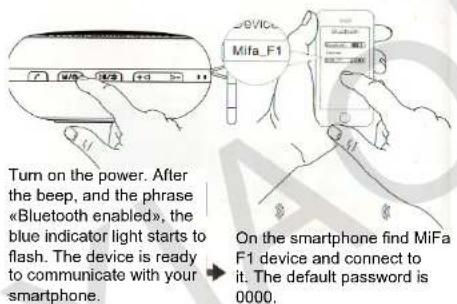
Speaker will connect with familiar devices automatically. To unbind speaker from device, long press the Start / Stop button. And only after that pair it with another device.
Characteristics
Type of device
Speaker system
Controls
Features
Memory
Power
Charger
Output power
Freq range
Bluetooth
USB
Formats
Portable Bluetooth speaker
Mono
Active
Button
One button control, handleless control,
Bluetooth connection, SD-card, USB
sound card mode, card reader
to 32 GB flash card support
1100 mAh battery
5V 500 mA adaptor, USB connection
3 W, 4 Ohm
80 - 18 000 Hz
2.1+EDR
USB 2.0, support USB 1.1
ape, flac, wma, wav, mp3
FAQ
- MiFa F1 speaker is not connected to a Bluetooth device.
Reset the speaker. When asked, set password 0000.
- Playbaqck stucks.
Check Bluetooth connection, range (to 10 m.), reset speaker if needed.
- File format is not supported.
Check type of the SD-card file system (supports FAT32). Also check music file formats. Speaker supports ape, flac, wma, wav, mp3 files with any bitrate.
- Indicator shows connection is on, but music is no playing.
Check a volume of speaker, or play and pause mode.
FAQ
5. Speaker is no playing
Check a battery level
6. System stucks
Reset speaker
7. Acceptable music files bitrate.
MP3: 8-320 kbps, WMA: 32-384 kbps, APE: 600-1400 kbps, FLAC: 600-1400 kbps, WAV: 32-1200 kbps.
Notices
- Use and store devices at room temperature;
- Do not leave the device in the rain or in a humid atmosphere;
- Do not throw, drop or puncture the device in order to avoid damage;
- Do not disassemble, attempt to repair or modify the product;
- Do not use chemical solvents to clean the device;
- Do not put a lithium battery in a fire to avoid explosion.
Warranty Terms
The list of circumstances (including, but not limited to), in which the compensation is not possible:
- Repair of the device by unauthorized service centers, drop, neglect, abuse, liquid ingress, an accident, or if you have broken or slipped label and labeling devices;
- The warranty period is ended;
- Damage caused by force majeure;
- Problems that are not included in the list of faults;
- Damage to the device arising from use of the device investigation for other purposes or intentional damage.
Manufacturer: MIFA INNOVATIONS LLC. Designed in US / Made in China.
Features of the device
- MiFa F1 supports a response function of a phone, connected to the device via Bluetooth;
- After 10 minutes of inactivity, speaker is automatically turned off to save electricity;
- The speaker supports a handleless control mode;
- Supports Bluetooth reconnect with one button;
- Supports iOS playing ringtones and music from your devices;
- Supports USB sound card modes, and SD card reader.
Warranty
Warranty service is carried out in accordance with the law on «consumer rights» and the «Law on the quality of products.» The warranty service includes:
During the warranty period, you have the right to repair, exchange or return an item. For repair, replacement or return of goods you need a warranty card.
-
Within 7 days from the date of purchase, in case of a problem of «fault list» Xiaomi service center determines the cause of the problem, then you can choose a free replacement of product, return or repair.
-
Within 8-15 days of purchase, in case of a problem of «fault list» Xiaomi service center defines the problem, then you choose a free replacement or repair of the goods.
-
Within 12 months from the date of purchase, in case of a problem from the «List of faults», Xiaomi service center defines the problem, then you are given a free repair.

Marque : Xiaomi
Modèle : MiFa
Catégorie : Haut-parleur