
Mini Life Jacket 2 - Station d'accueil ALTEC LANSING - Notice d'utilisation et mode d'emploi gratuit
Retrouvez gratuitement la notice de l'appareil Mini Life Jacket 2 ALTEC LANSING au format PDF.


| Type de produit | Enceinte Bluetooth portable / Station d'accueil |
| Marque | Altec Lansing |
| Modèle | Mini Life Jacket 2 |
| Couleur | Noir / Bleu / Rouge |
| Dimensions (L x l x H) | 18 x 7 x 7 cm |
| Poids | 0,5 kg |
| Alimentation | Batterie lithium-ion rechargeable via port micro USB, 5V / 2A |
| Autonomie | Jusqu'à 10 heures |
| Connectivité | Bluetooth 4.2 (portée 10 m) |
| Fonctions principales | Diffusion audio sans fil, kit mains-libres, résistance à l'eau IP67, station d'accueil pour appareils mobiles |
| Entrée auxiliaire | Oui (jack 3,5 mm) |
| Indice de protection | IP67 (étanche à la poussière et à l'immersion jusqu'à 1 mètre pendant 30 minutes) |
| Entretien et nettoyage | Essuyer avec un chiffon doux et sec. Ne pas utiliser de produits abrasifs ou solvants. |
| Sécurité | Ne pas immerger au-delà de 1 mètre. Ne pas exposer à des températures extrêmes. Ne pas démonter l'appareil. |
| Pièces détachées et réparabilité | Aucune pièce réparable par l'utilisateur. Pour toute réparation, contacter le SAV agréé Altec Lansing. |
| Accessoires fournis | Câble micro USB, guide de démarrage rapide, certificat de garantie |
| Garantie | 2 ans |
FOIRE AUX QUESTIONS - Mini Life Jacket 2 ALTEC LANSING
Questions des utilisateurs sur Mini Life Jacket 2 ALTEC LANSING
0 question sur cet appareil. Repondez a celles que vous connaissez ou posez la votre.
Poser une nouvelle question sur cet appareil
Téléchargez la notice de votre Station d'accueil au format PDF gratuitement ! Retrouvez votre notice Mini Life Jacket 2 - ALTEC LANSING et reprennez votre appareil électronique en main. Sur cette page sont publiés tous les documents nécessaires à l'utilisation de votre appareil Mini Life Jacket 2 de la marque ALTEC LANSING.
MODE D'EMPLOI Mini Life Jacket 2 ALTEC LANSING
MINI LIFEJACKET 2
RUGGED BLU E TOOTH SPEAKER

Quick Start Guide
Item # IMW477

LANSING

- Make sure the following items are included in your package.
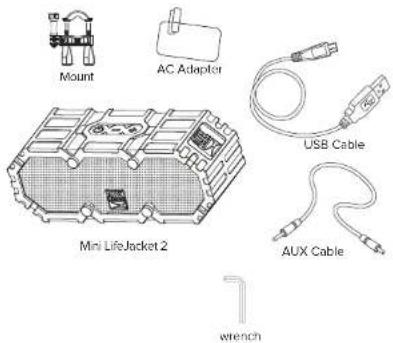
- For a look at the various buttons on your speaker, view the graphic below.

- Charging: In order to charge your speaker's internal battery, connect one end of the included USB cable to the charging port on your speaker. Connect the other to a USB port or AC charging adapter. The LED Light indicator turns red when charging, and turns off when fully charged. Charging may take up to 3 hours.

flowchart
graph TD
    A["Power Input"] --> B["Switch"]
    B --> C["Laptop"]
    C --> D["Car"]
    D --> E["Indicator"]
4. Pairing Your Speaker With a Bluetooth Phone
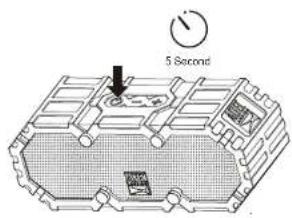
-Press and hold the Power button for around 5s. Your speaker will enter pairing mode with voice once powered on.
-Go to the Bluetooth Manager of your Bluetooth device. Search Bluetooth devices and select "MiniLifeJacket2" to start connecting.
-If required, enter the PIN code "0000" and confirm the entry. Once paired, you will hear your speaker audibly say: "You are now paired, enjoy."
5. Listening to Music on Your Speaker
Play/Pause
Press the Power button to get music from your audio source to play or pause.
Next/Previous Song
Press and hold the Volume + or Volume- buttons for 2s to advance to the next song or go back to the previous one,
Increase/Decrease Volume
Press and hold the Volume | or Volume - buttons to increase or decrease the volume.

6. Wired External Audio Input
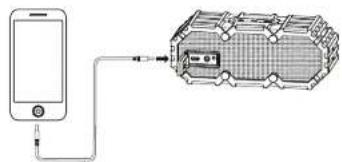
You can also use the included 3.5mm Auxiliary Cable to connect audio devices through the AUX In port on your speaker.
natural_image
Diagram showing a smartphone connected to a device with a cable, no text or symbols presentTechnical Support For technical support issues please visit our website at www.alteclansing.com. You can find manuals, software and FAQ's at the website. Can't find what you are looking for? Call 1-855-292-4087 to access our technical support information on the phone.
MINI LIFEJACKET 2
RUGGED BLUETO OTH SPE A KER
Quick Start Guide
Item # IMW477


WATERPROOF
SANDPROOF
EVERYTHING PROOF
NOTE:
If product is exposed to salt water we recommend that you rinse it off with tap water to maintain proper long term performance of your product
Using the Mount: The included mounting bracket allows you to attach your speaker to cylinder shaped surfaces such as the handle bars of a bicycle or ATV, or the rails on a yacht. This bracket comes unassembled. To use it, first attach the pieces as shown below. Next connect your speaker by screwing it into your speaker's tripod mount, and then attach the bracket to a suitable surface. Use the included wrench to help you loosen or tighten when necessary.

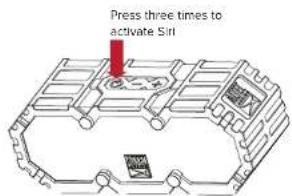
If your speaker is paired with an iOS device that is capable of running the Siri audio personal assistant application, you can use your speaker to activate Siri. To do so, press the power button 3 times.
Altec Lansing One Year Warranty Card
This warranty covers the original consumer purchaser only and is not transferable.
This warranty covers products that fail to function properly UNDER NORMAL USAGE, due to defects in material or workmanship. Your product will be repaired or replaced at no charge for parts or labor for a period of one year.
What Is Not Covered by Warranty
Damages or malfunctions not resulting from defects in material or workmanship and damages or malfunctions from other than normal use, including but limited to, repair by unauthorized parties, tampering, modification or accident.
To Obtain Warranty Service and Troubleshooting information:
Call 1-855-292-4087 or Visit our website at www.alteclansing.com.
To receive Warranty service along with the name and address of an authorized product service center, the original consumer purchaser must contact us for problem determination and service procedures. Proof of purchase in the form of a bill of sale or received invoice, evidencing that the Product is within the applicable Warranty period(s), MUST be presented in order to obtain the requested service. It is your responsibility to properly package and send any defective products along with a dated copy of proof of purchase, a written explanation of the problem, and a valid return address to the authorized service center at your expense. Do not include any other items or accessories with the defective product. Any products received by the authorized service center that are not covered by warranty will be returned unrepaired.
NO WARRANTIES, WHETHER EXPRESS OR IMPLIED, INCLUDING, BUT NOT LIMITED TO, ANY IMPLIED WARRANTIES OF MERCHANTABILITY OR FITNESS FOR A PARTICULAR PURPOSE, OTHER THAN THOSE EXPRESSLY DESCRIBED ABOVE SHALL APPLY. DISTRIBUTOR FURTHER DISCLAIMS ALL WARRANTIES AFTER THE EXPRESS WARRANTY PERIOD STATED ABOVE. NO OTHER EXPRESS WARRANTY OR GUARANTY GIVEN BY ANY PERSON, FIRM OR ENTITY WITH RESPECT TO THE PRODUCT SHALL BE BINDING ON DISTRIBUTOR. REPAIR, REPLACEMENT, OR REFUND OF THE ORIGINAL PURCHASE PRICE - AT DISTRIBUTOR'S SOLE DISCRETION - ARE THE EXCLUSIVE REMEDIES OF THE CONSUMER. IN NO EVENT WILL DISTRIBUTOR, ITS MANUFACTURERS, OR SAKAR INT. BE LIABLE FOR ANY INCIDENTAL, DIRECT, INDIRECT, SPECIAL, PUNITIVE OR CONSEQUENTIAL DAMAGES (SUCH AS, BUT NOT LIMITED TO, DAMAGES FOR LOSS OF PROFITS, BUSINESS, SAVINGS, DATA OR RECORDS) CAUSED BY THE USE, MISUSE OR INABILITY TO USE THE PRODUCT. EXCEPT AS STATED HEREIN, NO OTHER WARRANTIES SHALL APPLY. NOTWITHSTANDING THE FOREGOING, CONSUMER'S RECOVERY AGAINST DISTRIBUTOR SHALL NOT EXCEED THE PURCHASE PRICE OF THE PRODUCT SOLD BY DISTRIBUTOR. THIS WARRANTY SHALL NOT EXTEND TO ANYONE OTHER THAN THE ORIGINAL CONSUMER WHO PURCHASED THE PRODUCT AND IS NOT TRANSFERABLE.
Some countries, states or provinces do not allow the exclusion or limitation of incidental or consequential damages or allow limitations on warranties, so limitation or exclusions may not apply to you. This warranty gives you speci c legal rights, and you may have other rights that vary from state to state or province to province. Contact your authorized retailer to determine if another warranty applies. This product is manufactured, distributed and sold by SAKAR International, Inc. All other trademarks are the property of the respective owner, who has not sponsored, endorsed or approved this product.
This device complies with part 15 of the FCC rules. Operation is subject to the following two conditions: (1) this device may not cause harmful interference, and (2) this device must accept any interference received, including interference that may cause undesired operation.
Caution: changes or modifications not expressly approved by the party responsible for compliance could void the user's authority to operate the equipment.
NOTE. This equipment has been tested and found to comply with the limits for a Class B digital device, pursuant to Part 15 of the FCC Rules. These limits are designed to provide reasonable protection against harmful interference in a residential installation. This equipment generates. Uses and can reduce radio frequency energy end, if not installed and used in accordance with instructions. May cause harmful interference to radio or delevating reception, which can be
determined by turning the equipment off and on, the user is encouraged to try to correct the interference by one or more of the following measures: Replant or relocate the receiving antenna.
_ Increase the separation between the equipment and receiver.
Connect the equipment into an outlet on a circuit different from that to which the receiver is connected.
Consult the dealer or experienced radio/TV technician for help.


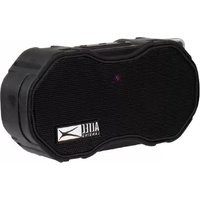
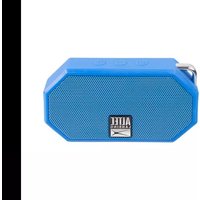
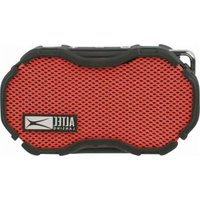


- MINI LIFEJACKET 2
- Pairing Your Speaker With a Bluetooth Phone
- Listening to Music on Your Speaker
- Play/Pause
- Next/Previous Song
- Increase/Decrease Volume
- Wired External Audio Input
- Quick Start Guide
- WATERPROOF
- SANDPROOF
- EVERYTHING PROOF
- NOTE:
- Altec Lansing One Year Warranty Card
- What Is Not Covered by Warranty
Marque : ALTEC LANSING
Modèle : Mini Life Jacket 2
Catégorie : Station d'accueil