
Kindle Fire HD 7 - Tablette AMAZON - Notice d'utilisation et mode d'emploi gratuit
Retrouvez gratuitement la notice de l'appareil Kindle Fire HD 7 AMAZON au format PDF.


| Type de produit | Tablette tactile |
| Marque | Amazon |
| Modèle | Kindle Fire HD 7 |
| Dimensions | 190 x 128 x 10,4 mm |
| Poids | 395 g |
| Écran | 7 pouces HD (1280 x 800 pixels) |
| Processeur | TI OMAP 4460 double cœur à 1,2 GHz |
| Mémoire vive (RAM) | 1 Go |
| Stockage interne | 8 Go ou 16 Go (selon version) |
| Batterie | Lithium-ion 4400 mAh, autonomie jusqu'à 7 heures |
| Système d'exploitation | Fire OS (basé sur Android 4.0 Ice Cream Sandwich) |
| Caméra avant | VGA (0,3 Mpx) pour appels vidéo |
| Connectivité | Wi-Fi 802.11 b/g/n, Bluetooth, micro-USB, prise casque 3,5 mm |
| Capteurs | Accéléromètre, gyroscope |
| Alimentation | Charge via câble USB (adaptateur secteur vendu séparément) |
| Entretien et nettoyage | Essuyer avec un chiffon doux et sec ; éviter les liquides |
| Sécurité | Verrouillage par glissement ; option code PIN (paramètres) |
| Pièces détachées et réparabilité | Batterie non amovible ; réparation par service agréé |
| Garantie | Garantie limitée d'un an (détails sur www.amazon.com/kindlewarranty) |
FOIRE AUX QUESTIONS - Kindle Fire HD 7 AMAZON
Questions des utilisateurs sur Kindle Fire HD 7 AMAZON
0 question sur cet appareil. Repondez a celles que vous connaissez ou posez la votre.
Poser une nouvelle question sur cet appareil
Téléchargez la notice de votre Tablette au format PDF gratuitement ! Retrouvez votre notice Kindle Fire HD 7 - AMAZON et reprennez votre appareil électronique en main. Sur cette page sont publiés tous les documents nécessaires à l'utilisation de votre appareil Kindle Fire HD 7 de la marque AMAZON.
MODE D'EMPLOI Kindle Fire HD 7 AMAZON
getting to know your kindle
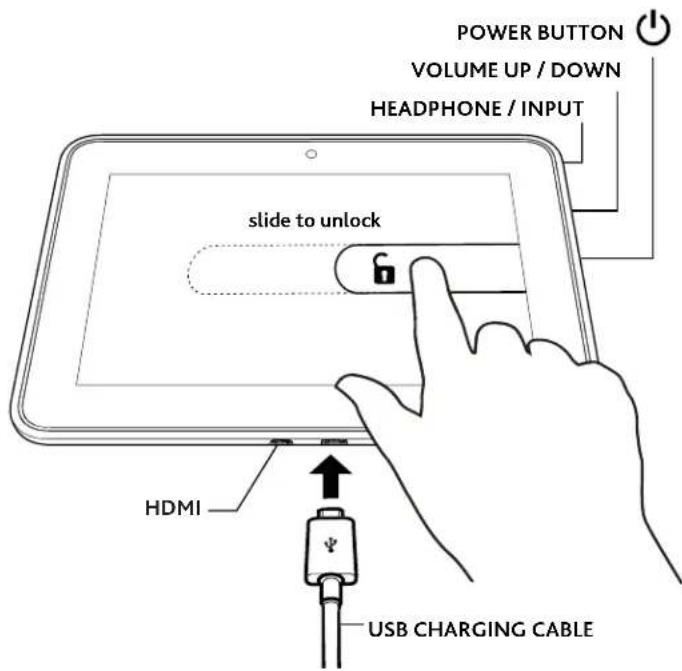
To charge your Kindle, connect it to the USB charging cable as shown. Connect the opposite end of the USB charging cable to a Kindle PowerFast accelerated charging accessory (sold separately), or other USB power adapter. To learn more about charging accessories, visit www.kindle.com/support/charging.
To start your Kindle, press the power button. To unlock your Kindle, touch the lock icon and drag the shaded bar across the screen to the left. To learn more about your Kindle, open the Help & Feedback app.
For Kindle customer support, visit www.kindle.com/support
important product information
Safety, compliance, recycling, and other important information regarding your Kindle, can be found in the Legal & Compliance section of the Settings menu on your Kindle. For additional help, please visit www.kindle.com/support.
Amazon Terms and Policies
Before using the Kindle device, please read the terms located at www.amazon.com/kindlefireterms and all rules and policies for the Kindle device and services related to the device (including, but not limited to, the Amazon privacy notice located at www.amazon.com/privacy and any rules or usage provisions specified on the www.amazon.com website or the Kindle Store) (collectively, the “Agreements”). By using the Kindle device you agree to be bound by the terms of the Agreements.
Your Kindle is covered by a One-Year Limited Warranty. Details are available at www.amazon.com/kindlewarranty.
Marque : AMAZON
Modèle : Kindle Fire HD 7
Catégorie : Tablette