
M-65 DM - Système Hi-Fi MUSE - Notice d'utilisation et mode d'emploi gratuit
Retrouvez gratuitement la notice de l'appareil M-65 DM MUSE au format PDF.


| Type de produit | Système Hi-Fi stéréo |
| Marque | MUSE |
| Modèle | M-65 DM |
| Dimensions (L × H × P) | 430 × 120 × 300 mm |
| Poids | 5 kg |
| Alimentation | 230 V ~ 50 Hz |
| Consommation électrique | 50 W (veille < 1 W) |
| Puissance de sortie | 2 × 25 W RMS |
| Fonctions principales | Lecteur CD/MP3, tuner FM/AM, entrée auxiliaire (3.5 mm), Bluetooth, télécommande |
| Haut-parleurs | 2 enceintes passives (4 Ω, 50 W max) |
| Connectique | Entrée ligne (RCA), sortie casque (3.5 mm), ports USB (lecture MP3) |
| Entretien et nettoyage | Débrancher avant nettoyage, utiliser un chiffon doux sec. N'utiliser aucun produit abrasif ou solvant. |
| Sécurité | Ne pas exposer à l'humidité, aux sources de chaleur, ni ouvrir l'appareil. Risque de choc électrique. |
| Pièces détachées et réparabilité | Indice de réparabilité: 7.0/10. Pièces disponibles (télécommande, adaptateur secteur). Réparation par centre agréé. |
| Température d'utilisation | 5 °C à 35 °C |
| Informations générales | Notice téléchargeable au format PDF. Garantie 2 ans. |
FOIRE AUX QUESTIONS - M-65 DM MUSE
Questions des utilisateurs sur M-65 DM MUSE
0 question sur cet appareil. Repondez a celles que vous connaissez ou posez la votre.
Poser une nouvelle question sur cet appareil
Téléchargez la notice de votre Système Hi-Fi au format PDF gratuitement ! Retrouvez votre notice M-65 DM - MUSE et reprennez votre appareil électronique en main. Sur cette page sont publiés tous les documents nécessaires à l'utilisation de votre appareil M-65 DM de la marque MUSE.
MODE D'EMPLOI M-65 DM MUSE

MUSE
M-65 DM
User Manual
DVD Micro system

natural_image
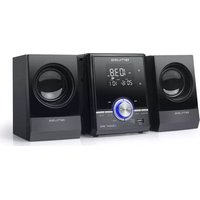
Exterior view of a black audio recording device with two speakers (no visible text or labels)Please read the instruction carefully before operating the unit.

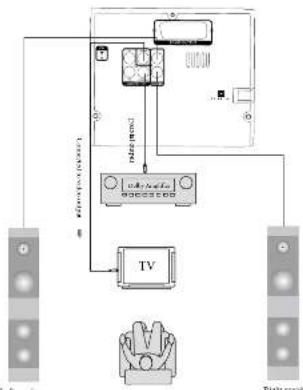
Connecting to the amplifier
flowchart
graph TD
    A["Power supply unit"] --> B["TV"]
    A --> C["Rustors"]
    B --> D["Resistor 1"]
    B --> E["Resistor 2"]
    B --> F["Resistor 3"]
    B --> G["Resistor 4"]
    B --> H["Resistor 5"]
    B --> I["Resistor 6"]
    B --> J["Resistor 7"]
    B --> K["Resistor 8"]
    B --> L["Resistor 9"]
    B --> M["Resistor 10"]
    B --> N["Resistor 11"]
    B --> O["Resistor 12"]
    B --> P["Resistor 13"]
    B --> Q["Resistor 14"]
    B --> R["Resistor 15"]
After connected, you should also select corresponding AUDIO mode in the SYSTEM SETUP.
38-435-5
192-547. II 628: CC: M33 Q1 16:11 1-2012-2-2 16:10:27
LOCATION OF CONTROLS
Main unit
-
Display screen
-
© Stane
J. Source d. ■ Sea
C. ▶ Player
-
Decisay
-
USB port
-
Vanma?
- A Elast
10 Video copy
11.7M arlona
12 LR India output
- Oceanal cutout
15-R Speaker
10.SCAPT output


Remote control
- DVD To order DVD mode.
-
STEN-PEN: Print for web
-
eTWLB7. SWITCH TO A 10% SIA DOY, SHUT MOYA
- eSEARCH. To switch hand from mice
automatically
-
PM: To enter ratio mode
-
MENU: To access the disc menu during playback.
-
TIP E: To access the disc line menu.
-
TITLE: To success this disc the menu.
- LIRLAN: selecting playing mode (VCD/CD) or
select sound language (DVD).
-
ZOOM To make the last function
-
PROGRAM: To program play a disc in a wider
10.OSD: To d
-
▶ II PLAY/PALUSE To steel and passes the playback
-
ENTER: To confirm the selection during menu
ravigation
- SETUP. Setup menu
15.←:TLINE→:To tune radio frequency in the
tiner mode / To start forward or reverse accelerated
of sub-mental properties.
GB-1
POWER SUPPLY
This set operates on 220-240V - 60Hz.
SOUND FEATURES
Press ⬆/UTE button on the remote control to mute the sound. Press MUTE or VOL
Sound mode.
To sell the Sound mode, less and better in the AUDIO SETUP PAGE
DISC PLAYBACK
Region Management Information
Region Management Information: This unit is designed and manufactured to respond to the Service Management information that is opened on FWD discs. It is the
to the Region management this motion that is focused on DVD disc. It is the Region number paired on the DVD disc does not correspond to the Region number of this unit, this unit cannot play that disc.
Basic Playback
- Turn on your TV set
-
Pass in STANDEY
-
Pines ▲ ELECT to open the dc ray
-
Insert a disc with label face up.
-
Press ▲ ELEC: button again to close the disc. Pay.
-
After loading a disc, playwork starts automatically.
-
Press ■ on remote control to stop playback.
Accelerated play
While the disc is playing, press -
Changing chapter/track
While the disc is playing, press go immediately to the next or previous
chapter (5-12). CI to all need 3 (please select, 02)
Zoom (DVD, VCD and JPEG)
When a bus is playing, press 200M to your touch 3 x 2x10 and you want. If the two cycles through 2x, 3x, 4x and then zooms out to 1/2x, 1/3x and 1/4x, then returns in remote devices.
Note: Under Zoom function for JPEG file, press ZOOM button to go to Zoom 100% mode, then Press ←or →button a number of times to vary the Zoom stops which you want, then press ZOOM to exit Zoom mode.
DESEY.
in no disc, press RESET button will return the unit to the original setup or the default
value


- CH+CH: To select pressel timer slators? To directly access the next or previous charge (CH) or back (CB).
17 RESET Return to the
18 VOLUME++ To adjust the volume.
19.MUTE: Press once to turn sound, press again to resume.
20 DVD/USB: Switch the function between DVD, USB mode.
- ■ STOP: Stop playback
22 SHUFFLE: This songs play in a 50-minute order.
- CLEAR TO clear the signs you have replaced.
- ANGLE To assess the game a angle function for DVD size.
25.S.0111E: To change the supply setting
-
REPEAT A-B. To inject an example A to B.
-
REPEAT: To repeat playback.
-
UME-FREQUENCY: To equal frequency 10 PM mon, to reach maximum threshold VCD/VR mode
20.10- Number
30 MONOSTEREO: - Select between Mono and Stereo In FM mode.
31 SAVE: To save the current frequency of band in FM mode.
- ▲EJECT: Open and close the disc tray.
35.PALNTSC: To switch TV system output, then PAL, AUTO, NTSC.
Note: Q will
Installing Battery
Insert 2 "AAA UAA" batteries to the remote control prior to use. Make sure to match
their potential (1-6) in the markets made this compartment.
NOTES:
- Before throwing any bellies away, consult your clendricor who may be able to take them back for specific services.
In order to avoid casages, always remove the batteries when unit will not be used for a
long period of time
If the remote control is not going to be used for a long time, remove the battery to
- avoid damage caused by battery leakage correction. - SOLUTION: Features of explosion if battery is positively replaced. Repair can with
the name is not selected here.


If at any time in the time you should need to dispose of this product
The first section of the household was to be acquired in a household weekly. In person who has lived with. Check with your
residential authority or retailer for recycling advice (Waste Electric and Electronic
Equipment Directive)
CB-2
PLAY MODES
Repeat playback
While the circle is playing, press the REPEAT button repeatedly to select a play mode.
DVD: Repeat Chapter. Repeat Title, Repeat All, Repeat On; WCD: IPSE switches all and audio CD: Sound back, Version
103: IP-50. Onshore, 400m, Repeats 6D, Repeat P3X, Repeat A4, Repeat A6, MP3: Single, Repeat one, Repeat Fokier, Repeat off
A-B trypak
To repeat a sequence between two points A and B, press the A-B button at the beginning
at the sequences you want to repeat. Then press the A-B button again at the end of the sequence. Then the sequence is allowed precisely with you present. It is assumed normal
sequence, then and science is played researchally with you press it to resume normal pushback.
Note: Some DVD clips do not allow A-B repeat function.
Program playback (DVD, VCD and audio CD)
With this option, you choose and program the playback order. You can store up to
2.4000. 1. insert a disc
- In playing or soap mode, press the PRCC button. The Program menu appears.
DVD
VCD & CD
| 1 r: m: | 6 m: m: |
| 2 r: m: | 7 m: a: |
| 3 r: m: | 8 m: a: |
| 4 r: m: | 9 m: a: |
| 5 r: a: | 10 m: =: |
| Exit | |
| 1 | — | — | 06 | — | — |
| 2 | — | — | 07 | — | — |
| 3 | — | — | 08 | — | — |
| 4 | — | — | 09 | — | — |
| 5 | — | — | 10 | — | — |
| EXIT | |||||
- Use the number before to enter the title number and then the chapter number (i)
DVD) of the track number (for VCD and Audio CD).
4.250, 4, 1, 1 button moving to the next input. Repeat step 3 and programming is complete.
Note: press → to go to next page for programming track 11 to 20.
-
Highlight the "START" icon, press ENTER button to select the program play.
-
Press the ■ button to stop the program playback and clear the program memory.
CB-8
ACCESSORIES
One remote control
One MV cable
CONNECTIONS
Disconnect all devices from the mains supply before connecting.
Connecting to the TV
You can connect the player to the TV-mail in different ways. Choose only calls of them.

flowchart
graph TD
    TV["TV"] -->|AC Power Supply| M1["M meters"]
    M1 -->|Meters| M2["M meters"]
    M2 -->|Meters| M3["M meters"]
    M3 -->|Meters| M4["M meters"]
    M4 -->|Meters| M5["M meters"]
    M5 -->|Meters| M6["M meters"]
    M6 -->|Meters| M7["M meters"]
    M7 -->|Meters| M8["M meters"]
    M8 -->|Meters| M9["M meters"]
    M9 -->|Meters| M10["M meters"]
    M10 -->|Meters| M11["M meters"]
    M11 -->|Meters| M12["M meters"]
    M12 -->|Meters| M13["M meters"]
    M13 -->|Meters| M14["M meters"]
    M14 -->|Meters| M15["M meters"]
    M15 -->|Meters| M16["M meters"]
    M16 -->|Meters| M17["M meters"]
    M17 -->|Meters| M18["M meters"]
    M18 -->|Meters| M19["M meters"]
    M19 -->|Meters| M20["M meters"]
After connected, you should also select corresponding VIDEO mode in the SYSTEM SETUP.
28.
USING USB CONNECTOR PORT
You can connect a USB flash drive (not induced) to the USB connector port on the unit
- Play Linux movies as well as sound & picture files. - Plan the USB open drive from the USB port on the unit
In DISC node press DVD/USB button on remote control to select USB mode. For
operation of playing files on the USB flash drive, please refer to the section "PLAYING
MPSDAX / FIGURE FILES
-It is recommended USB flash drive is plugged when the unit is in STANDBY mode
There are many USD devices in the market. We can control securities to support all differences
PLAYING MP3/DIVX/JPG/AVIVOB FILES
This unit can play MP3. DivX JPOAVWOB has recorded on CD-ROD RW disease
1.5B 180M 379E
Playing MP3 DIVX / Picture files 1. Image a day
-
The content of disc will be displayed on screen.
-
Press the ◀▶▲▼ button to view and select the likes that you want to play, then
press ENTER button to confirm the selected file. 4. Pass ■ button is also pushback
4.F162 ■ Buon 3.505 playback
RADIO
-
Press FM on remote contact to select FM band.
-
Select your desired frequencies
- Prices and the burden on the remote control, then input the frequency that you want. The range of FM frequency is from 87.50MHz to 103.02MHz.
- Press ←TUNE→ button to adjust the frequency up or down a step. The step of
FV is 0.05 MHz.
- Major volumes to secured level.
Presetting radio stations
The unit can show up to 80 FM radio station in its memory. You can perform the
Dressor 1:203 Ways Manual cover
Press ←TUNE→ or T/F button on remote to select desired frequencies
Press 104-CHP can remote to choose a preferred preset strike number
Press SAVE on remote control, then use number buttons to select a desired preset
A small and save the basic solution as the simplified problem solution. Automatic proof
Automobile press in a metropolitan area
- Use in case, press SEARCH information control or start softmax. Preset program filing.
28.1

[Non-Text]


Radio frequencies will be browsed and radio stations stored automatically. When all the available radio stations are stored or all memory locations are full, the auto preset programming function will stop.
Retrieving the preset stations
In radio mode, press 1 to access a preset station.
SETUP MENU
SET OF MENO
Navigating the setup menu
-
Press SETUP to display the setup main menu in DVD mode
-
Press ▶, ▶ to select a menu icon
-
Press ▼ ▲ In select one of the available options under a menu iron.
-
Press to ▶ access the submenu and ▼, ▲ to select an option.
-
Trans ENTER to confirm your section
-
Press → to return to a previous menu.
-
There EFTU# is not into the naïve way.
-
P1365 SETUP 15-64, hcm dls 650p mio 6.
GENERAL SETUP PAGE

\*ANGLE MARK
ON: To show angle mark when a disc with multiple camera angles is playing. You can view different camera angles of a DVD disc by pressing ANGEL button on remote control.
OFF: To hide single mark.
NOTE: This function is only available for classes encoded with multiple camera angles.
'CLOSED CARTION
Some places have plenty ratings
ON: Show the close options.
OFF: Hide the closed captions.
2017年3月25日
SCREEN SAVER
To sell screen size: ON or OFF
MAINTENANCE
SUBTITLE
• To select the language of the DVD sublikes.
All the selected language is not available on the disc, the disc's language will be used instead.
1.2.1
The Argentina de los dos latos de sujeos, presa subíndez o la dellos con el
*DISC MENU (MENU LANGUAGE)
• To select the language of the DVD theme.
If the selected language is not available on the disc, the class's language will be used
1154850.
PARENTAL CTRI SETUP PAGE
This setup page is available in ELECT the necessary or NO DISC status.
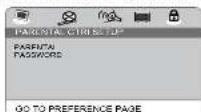
\* PARENTAL
Some DVD discs are equipped with a password function and are rated according to their contact. The contents allowed by parental link based on the way a DVD disc is controlled may vary from disc to disc. For example, if the disc shows, you could look out violent scenes available for children or you could look out playback of the disc.
You cannot play DVD discs based higher than the level you selected unless you cancel the parental lack function.
The parental risk levels are equivalent to the following ratings.
Level 1: Klc Safe
Level 2:5
LEVEL 3 : FC
Level 4:FG13
Levels: PCR
LEVEL 2: NC17
Level 2:6d
DANCE
PASSWORD This opening ask
This output allows you to sell a charge the password. Down ENTER to write the Change Password menu.
THE ENTER TO WITH THE ENGLISH MANNER
192-517: 10:42: 00:30: 01:14: 1:2012-2-2 16:10:29
LAST MEMORY
When the player is stopped during DVD/VC0 playback, the player will memorize the last scene of the playback. When the disc is loaded again playback will continue from the last scene.
ON: Actuals the last monthly lunching.
OFF: Deactivate the last memory function.
Note: This function will not be activated if the pushback is stopped by pressing STOP
button twice.
LSAN Housing
This option is used to display the model number of this unit
THIS OPTION
DEFAULT in no class or first the data, any condition is common. ENTER with this function selected
In the use of executive use, they could be, briefly entering with this in cash proceeds
the first of the 1980s is a result, except for capital level.
AUDIO SETUP PAGE
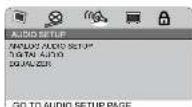
\* ANALOG AUDIO SETUP
DOWNMIX
LT/RT: left and right soundtrack audio output
STEREO: Stereo audio signal output
* DIGITAL AUDIO
-DIGITAL AUDIO DIGITAL OUTPUT
SPDIFIOFF
When digital output is not in use, it is recommended to run 'OFF' the data point.
A. In an agreement, the company is not a member of a meeting or voting for the purpose to minimize email interference.
ALL (SPDIF/RAW)
Choose this selling, if your DVD price is connected to a power sampler with a caseable cable. When playing a disc recorded with Dolby Digital and MPEG audio formats, the corresponding digital audio will be output from the Cassal Control jack.
PCM ONLY (SPDIF / PCM)
Choose this setting, if your DVD prayer is connected to a 2-channel digital stereo amplifier. When playing a disc recorded with Dobby Digital and MPEG audio formats, audio signal will be modulated into a 2-channel PCM signal and IWI to output from the Coastal Outa Creek
To die on the command, enter the current 5-dial resistor at the initial battery.
password 139900; in the "Old Password" box. Then enter the new password in the "New Password" box. You are then prompted to enter it again in the "Confirm Password" box to confirm and press ENTER.
SAFETY INSTRUCTION
CAUTION FOR UP ELECTION, DO NOT OPEN ATTENTION: To reduce the risk of electric shoes, do not remove the cover or back. There are no user servicable parts inside the unit. Referal servicing to qualified personnel.
The lighting flesh with arrowhead symbol within the triangle is a warning sign steering the user of "dangerous voltage" inside the unit.
The modernist print within the triangle is a warning sign during the user of important instructions accompanying the product.
WARNING: TO PREVENT FIRE OR SHOCK HAZARD, DO NOT EXPOSE THIS APPLIANCE TO RAIN OR MOISTURE.
CAUTION: Intrinsic laser excision when open and interlocked defected. A small excision to beam. Class 1 laser proced.


SAFETY PRECAUTIONS
- The ventilation should not be impeded by covering the ventilation openings with
Items such as newspapers, tablecloths, curtains, etc.
- No naked time source, such as lighted candies, should be placed on the apparatus.
- The use of apparatus in moderate climates.
- The apparatus should not be exposed to dropping or splashing.
- (1) 2017年1月1日,美国的劳动就业率(包括人均就业率)为1.3%,较前一年平均就业率下降0.4%。
- Do not place objects need with liquids, such as: - The moving price is more than the back of unit
- Have simply used as the descent index and total remain modulatively.
This plan should not be reproduced or should be easily accessed during nucleic use.
- Stention should be drawn to the environmental aspects of battery clamps.
- Do not know better in the
- Battery shall not be exposed to excess ice heat such as sunshine, fire or the life.
- Excessive sound pressure from carphones and headphones can cause hearing loss - Under the influence of electrical fast transient orland electrostatic phenomenon, the product may malfunction and require user to power reset.
Head - Do not use this and near sources of heat, including heating vents, stoves, or other appliances that generate heat.


\* Equalizer
EQUALIZER Mode
This option is used to select the different balanced effect, such as OFF, ROCK, POP,
LIVE. DANCE, TECHN0, CLASSIC, 80FT
Base Boost
It use to adjust the sound effect of Bass boost to ON or OFF.
Super Bass
CN: set the super bass on, and adjust the super bass effect
CIT: set the super base oil.
Требля Воски
ON: sel the table boost on and adjust the table effect.
OFF: set the super treble head off.
VIDEO SETUP PAGE

\*VIDEO OUTPUT
CVBS: le sel video cpuur le comperte.
RGB: This gives the best quality picture output from the TV AUDIO VIDEO OUT
SCART SOCKIE
Note: If the video setting differs from the physical video connection, the TV set may
have no picture. In such case you should need to select a proper video output mode
under VIDEO SETUP PAGE
\*TV DISPLAY
4:3 Pan Scan
- When wide-screen video is played, this more clips the right and left sides of the
image as first I can be viewed on a conventional screen
• Some wise-screen DVDs had no permit. Pan Scan mode playback was automatically
prayed in lettuce stock (black bands top and hammt).
4:3 Letter Box
- When wide-screen video is played in this mode on a conversational screen, black
hands appear at the ion and bottom of the screen.
16:9 (Wide)
• This is the some more for playing wide-screen videos on a wide-screen TV.
Wide squeeze
The wide-screen image will be displayed in full screen in its native aspect ratio and
so does the 4.3 images but with black borders on the left and the right side
Notes:
• The visible picture size is preset on the DVD disc. Therefore the playback picture of
some DVD discs may not conform to the picture size you select.
- When you play DVD discs recorded in the 4:3 aspect ratio, the playback picture will
always appears in the 4:3 aspect rate regardless of the TV shape setting in the
Junction setup menu
TV TYPE
To select your TV system among PAL, MTSC or AUTO
(1)在证券交易所网站
*COLOR SETTING
SHARPNESS: To adjust the sharpness of video output
BRIGHTNESS: To adjust the video brightness level on a scale of -20 to +20.
CONTRAST: To adjust the video contrast level on a scale of 10 lb + 15.
GAMMA. To adjust the video display gamma level [HIGH MEDIUM, LOW OF NONE]
HUE: To adjust the color hue level on a scale of 8 to +9.
SATURATION: To adjust the better attenuation level of a scale of -0.5 to 19
*DIVXIRI YGO
In this option, you can activate or deactivate the registration code.
Language setup page
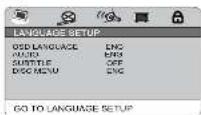
\* OSD LANGUAGE
To select the language of unit's menu.
TAUDIO
- AUDIO To select the video language
- If the selected language is not available on the disc, the class's language will be used.
instead.
•To change the dialog language during playback, press AUDIO on the remote control
36 11GB 10GB EGB 3
* Do not try to open the disc appointment during physical
* Do not touch the lens. Doing so may cause malfunction
* If there is a scratch, dirt or fingerprints on the disc, it may cause tracking error.
Before playing, clean the disc with a cleaning cloth. Wipe the disc from the center out.
Don't store discs in places with high temperatures or high humidity, they can become
warped. After playing, store the disc n is nice.
SPECIFICATIONS
Pursing Service, 4C=250V 50Hz
Power consumption: 25%
TROUBLE SHOOTING
The appliance does not switch on.
- Water supply is placed into a man's sector.
- Set POWER switch to ON position. If unit is in standby mode, press STANDBY button
to turn on the unit
The remote control does not work or works only intermittently.
- Check that batteries are inserted or charge them.
Aim the remote centre at the appliance. The infrared beam must not be blocked or interrupted
Operate the remote control within about 25ft (7m).
There is no picture.
Check you have switched on the TV set
Check the connection
Select the squareis video rpt.1 mods on the TV as the picture from the DVD player
sepsers on the TV screen. The picture is of our own
The picture is of past Check the appearance
Cloud I am clear
The player does
insert the disc with the printed side
Check that the disc can actually be played by
Check that the disc's regional code matches the player's regional code. This player's
regional scale la
Clean the disc
There is no sound or the sound is of poor quality.
- Check the connections.
- Make sure the speakers are connected.
Make sure that NOTE can be done.
100%
You can join the 'passbox' when 'sells' to date.
38-15



- MUSE
- M-65 DM
- User Manual
- DVD Micro system
- LOCATION OF CONTROLS
- Main unit
- Remote control
- POWER SUPPLY
- SOUND FEATURES
- DISC PLAYBACK
- Basic Playback
- Accelerated play
- Changing chapter/track
- NOTES:
- PLAY MODES
- A-B trypak
- ACCESSORIES
- CONNECTIONS
- USING USB CONNECTOR PORT
- PLAYING MP3/DIVX/JPG/AVIVOB FILES
- RADIO
- SETUP MENU
- GENERAL SETUP PAGE
- \*ANGLE MARK
- 'CLOSED CARTION
- 2017年3月25日
- MAINTENANCE
- SUBTITLE
- PARENTAL CTRI SETUP PAGE
- \* PARENTAL
- LAST MEMORY
- AUDIO SETUP PAGE
- \* ANALOG AUDIO SETUP
- SAFETY INSTRUCTION
- SAFETY PRECAUTIONS
- \* Equalizer
- VIDEO SETUP PAGE
- \*VIDEO OUTPUT
- \*TV DISPLAY
- Wide squeeze
- TV TYPE
- Language setup page
- \* OSD LANGUAGE
- SPECIFICATIONS
- TROUBLE SHOOTING
Marque : MUSE
Modèle : M-65 DM
Catégorie : Système Hi-Fi