
SCB5055NB - Chargeur de piles PHILIPS - Notice d'utilisation et mode d'emploi gratuit
Retrouvez gratuitement la notice de l'appareil SCB5055NB PHILIPS au format PDF.


| Type de produit | Chargeur de piles |
| Marque | Philips |
| Modèle | SCB5055NB |
| Dimensions (L x l x h) | 10 x 7 x 3 cm |
| Poids | 150 g |
| Alimentation | 220-240 V ~ 50/60 Hz |
| Nombre de compartiments | 4 |
| Types de piles compatibles | AA, AAA, C, D, 9V (rechargeables) |
| Courant de charge | Variable selon le type de pile (jusqu'à 500 mA) |
| Protection contre la surcharge | Oui, arrêt automatique |
| Protection contre les courts-circuits | Oui |
| Indicateur LED | Oui, pour état de charge |
| Charge rapide | Oui, pour piles AA/AAA |
| Fonction de décharge | Non |
| Entretien et nettoyage | Débrancher avant nettoyage; utiliser un chiffon sec |
| Sécurité | Conforme aux normes CE; ne pas exposer à l'humidité |
| Pieces détachées | Cordon d'alimentation (si détachable). Contacter SAV Philips |
| Reparabilité | Indice de réparabilité non communiqué |
| Informations générales | Chargeur intelligent adapté aux piles NiMH |
FOIRE AUX QUESTIONS - SCB5055NB PHILIPS
Questions des utilisateurs sur SCB5055NB PHILIPS
0 question sur cet appareil. Repondez a celles que vous connaissez ou posez la votre.
Poser une nouvelle question sur cet appareil
Téléchargez la notice de votre Chargeur de piles au format PDF gratuitement ! Retrouvez votre notice SCB5055NB - PHILIPS et reprennez votre appareil électronique en main. Sur cette page sont publiés tous les documents nécessaires à l'utilisation de votre appareil SCB5055NB de la marque PHILIPS.
MODE D'EMPLOI SCB5055NB PHILIPS
SCB5055NB
EN User Manual
FR Manuel d'utilisation
ES Guía de usuario
DE Bedienungsanleitung
NL Gebruikershandleiding
IT Manuale d'uso
PT Manual do utilizador
GR Οδηγός χρήσης
TR Kullanım kılavuzu
DK Brugervejledning
sv Använderhandbok
FI Käyttöohje
PL Instrukcja obsługi
cs Uživatelská příručka
SK Návod na použitie
HU Felhasználói kézikönyv
RU Руководство по эксплуатации

natural_image
Exterior view of a black open electronic device with a transparent lid (no text or symbols visible)PHILIPS

natural_image
Diagram of a battery pack with an open casing and internal components, showing battery, plug, and cable (no text or symbols)
D) Battery charging times:
| Battery size | Battery capacity (mAh) | Approx. charging time |
| AA Ni-MH | 2600 mAh | 12 1⁄2 hrs |
| AA Ni-MH | 2100 mAh | 10 hrs |
| AA Ni-MH | 1800 mAh | 8 3⁄4 hrs |
| AA Ni-MH | 1300 mAh | 6 1⁄4 hrs |
SCB5055NB USB charger EN
Important Safety Instructions:
Save these instructions - this manual contains important safety and operating instructions for this charger. Before using your charger read all instructions and cautionary markings on the charger, the batteries to be charged and the products that use the batteries.
Warning:
- Use to charge Ni-MH batteries only. Do not charge Alkaline, Zinc Carbon, Lithium or any other type of battery not specified on the charger. Other types of batteries might burst or leak causing personal injury.
- For proper battery insertion, please observe pole indications (+/-). See fig.A.
- Do not dispose of in hire, short cliv
- Charge new batteries before using.
- Never alter the USB cable or plugs.
- Do not operate the charger if it has been subjected to shock or if it is damaged.
• Do not disassemble the charger.
• To avoid risk of electric shock, unplug the charger from the PC or laptop computer before cleaning or when not in use. - This battery charger is for indoor use only. Do not expose the charger to rain or excessive moisture. Keep the charger away from dust and dirt, which can cause premature wear of parts or harm its normal operation.
- Never use the charger as a power source for any electrical equipment.
- Do not incinerate, disassemble or short circuit batteries since they may burst or release toxic materials.
- This charger is not intended for use by young children or infirm persons without supervision.
• To reduce the risk of damage to the USB cable and plugs, disconnect the charger by pulling the plugs and not the cable. - Do not operate the charger if USB cable or plugs are damaged.
- Do not charge damaged or leaking batteries.
Care:
- Wipe the charger with a damp cloth occasionally without harsh chemicals, cleaning solvents or strong detergents.
- Charger and batteries must be disposed of separately. Inform yourself about the separate collection system for electrical and electronic products.
Operating Instructions
General charging guidelines
- At the same time you can charge 2 or 4 AA batteries. Make sure the batteries in each pair of slots (1/2 and 3/4) have the same capacity.
- For long battery life, only charge empty batteries.
- When charging, ambient temperature should be between 0°C and 40°C (32°F and 104°F).
- You can charge batteries with different capacity (mAh) at the same time.
Note: It is normal for the unit and the batteries to become warm while charging.
Charging batteries
1 Lift up the charger cover and insert batteries into the charger. See fig.A.
2 Connect the USB cable to both the USB connector of the charger and one of the USB ports of a PC or laptop computer. See fig. B.
The CHARGE LED(s) light(s) up red indicating that charging is in progress.
If the batteries are not installed correctly, the CHARGE LED(s) will not illuminate and the charger will not start charging.
When the temperature of the batteries reaches 65^ C ( 149^ F), or when the charging time has elapsed, the charger will turn off.
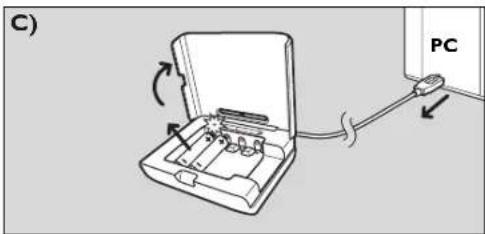
3 When you are going to use the batteries, disconnect the plug from the outlet and remove the batteries. See fig. C. Always unplug between charges!
Battery charging times: See fig. D.
CE0682①
Specifications are subject to change without notice.
Trademarks are the property of Koninklijke Philips Electronics N.V. or their respective owners. 2008 © Koninklijke Philips Electronics N.V. All rights reserved.
10.24.3.1. 10.25.3.1. 10.26.3.1. 10.27.3.1. 10.28.3.1. 10.29.3.1. 10.30.3.1. 10.31.3.1. 10.32.3.1. 10.33.3.1. 10.34.3.1. 10.35.3.1. 10.36.3.1. 10.37.3.1. 10.38.3.1. 10.39.3.1. 10.40.3.1. 10.41.3.1. 10.42.3.1. 10.43.3.1. 10.44.3.1. 10.45.3.1. 10.46.3.1. 10.47.3.1. 10.48.3.1. 10.49.3.1. 10.50.3.1. 10.51.3.1. 10.52.3.1. 10.53.3.1. 10.54.3.1. 10.55.3.1. 10.56.3.1. 10.57.3.1. 10.58.3.1. 10.59.3.1. 10.60.3.1
www.philips.com
Additional information (including warranty conditions) available at our website:
www.philips.com/support
Specifications subject to change without notice.
All dimensions shown are approximate.
Visit our website at: www.philips.com


Marque : PHILIPS
Modèle : SCB5055NB
Catégorie : Chargeur de piles