
AF 5108PS - Cadre photo numérique AGFAPHOTO - Notice d'utilisation et mode d'emploi gratuit
Retrouvez gratuitement la notice de l'appareil AF 5108PS AGFAPHOTO au format PDF.


| Type de produit | Cadre photo numérique |
| Marque | AgfaPhoto |
| Modèle | AF 5108PS |
| Dimensions (L x H x P) | 20 x 15 x 3 cm |
| Poids | 500 g |
| Alimentation | Adaptateur secteur 5 V CC (inclus) |
| Taille de l'écran | 8 pouces (20,3 cm) |
| Résolution | 800 x 600 pixels |
| Formats d'image supportés | JPEG, BMP |
| Fonctions principales | Diaporama, horloge, calendrier, réveil |
| Stockage | Lecteur de cartes SD/MMC, port USB hôte |
| Mémoire interne | 2 Go (estimation) |
| Rotation automatique | Oui |
| Cadre | Bois ou plastique (selon version) |
| Entretien et nettoyage | Utiliser un chiffon doux et sec. Ne pas utiliser de produits abrasifs. |
| Sécurité | Ne pas exposer à l'humidité ou à des températures extrêmes. Débrancher avant nettoyage. |
| Pièces détachées et réparabilité | Adaptateur secteur disponible. Pour toute réparation, contacter le SAV. |
| Accessoires inclus | Adaptateur secteur, câble USB, support mural (selon version) |
| Garantie | 2 ans |
FOIRE AUX QUESTIONS - AF 5108PS AGFAPHOTO
Questions des utilisateurs sur AF 5108PS AGFAPHOTO
0 question sur cet appareil. Repondez a celles que vous connaissez ou posez la votre.
Poser une nouvelle question sur cet appareil
Téléchargez la notice de votre Cadre photo numérique au format PDF gratuitement ! Retrouvez votre notice AF 5108PS - AGFAPHOTO et reprennez votre appareil électronique en main. Sur cette page sont publiés tous les documents nécessaires à l'utilisation de votre appareil AF 5108PS de la marque AGFAPHOTO.
MODE D'EMPLOI AF 5108PS AGFAPHOTO

AGFAPHOTO
AF 5088/5108 PS
Quick Start Guide
1

1.1

1.2

2


3


3.2
1 Packing Contents
1.1 Digital Photo Frame
12 Power Supply
1.3 Quick Guide
1.4 Warranty Card(not shown in the diagram)
2 Getting Started
2.1 Insert a memory card (SD, MMG, MS or xO) into the card slot
Insert the USB device into the USB port
The card will only fit in one direction, do not
Torbe it. The card should it snugly when
2.2 Plug AC adaptor into the Digital Photo Frame, and plug
It into a wall outlet
2.3 Press the POWER button on the rear of the device to
power tr.
3 Basic Operations
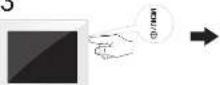
3.1 Press the MENU button
to exchange between sidesnow mode and preview mode
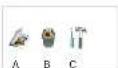
Press the button to enter the setting menu:
- Comi Meni
В. Дейна Мену
C: Selling Mode
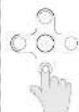
3.2 Use the direction key to select different item.
- Direction Key
-
Slips to previous or next image/video/music file
-
Direction Key
Adjust the LCD backlight brightness
2. Adjust the LCD backlight brightness
or StartPause the playback.
Press the 7 button during photo playback:
Photo Preview Mode( 16 thumbnails per page)
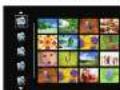
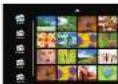
- Use Ⓐ or Ⓥ button to select a folder/album on the left, then press ⚫ button
- Use Ⓐ Ⓤ Ⓗ button to select an image and press OK to start the slideshow
- Skip to the previous or next image, use the
button. To pause or start the slide show, press OK - Press
button to adjust LCD backlight.
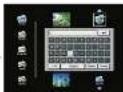
Photo Copy Menu


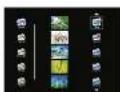
- Use Apr button to select a source;
- Select an image and press OK. Press OK again to cancel the selection. Select all images long press OK.
- Use 📄 button to select a folder/album and press OK to start copying.
- If select new album and press OK, you can rename the album. Use ⚙️ button to select a letter/digit and press OK. After input all the letters/digits, select the Enter and press OK to confirm.
Photo Delete Menu


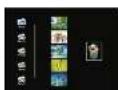

- Use@or@button to select a source
- Select an image and press OK. Press OK again to cancel the selection. Select all images long press OK.
- Press(b) button and then press OK button.
- Use 📷 or Ⓧ button to select √ to delete, select x to cancel.

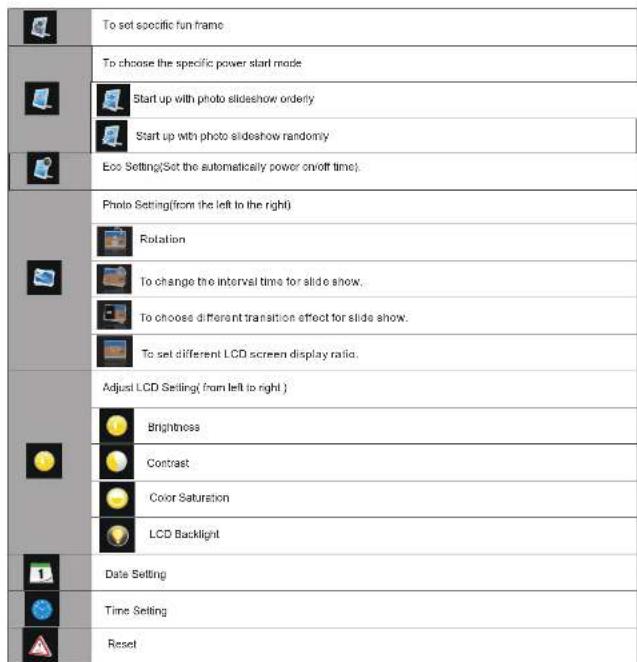
Setting Mode
loons in the setting mode:
Technical Data
| Dimensions | 203x162.5x83.1mm (AF508PS) |
| 255x202x88.3mm (AF6108PS) | |
| Screen size | 20cm/8" (AF508PS) |
| 26cm/10.4" (AF5108PS) | |
| Aspect ratio | 4.3 |
| Resolution | 800 x 600 pixel |
| Internal memory | 128MB |
| USB port | USB-Host |
| Compatible memory card | SD/MAC/MSXAD |
| Photo format | PEG |
| File format | *.jpg |
Safety instructions and recommendations
- Keep the screen clean (please use a dry soft cloth for cleaning). Make sure the power is off before cleaning the unit. Then
- In order to prevent damage to the card or the unit, please turn off the power before removing or inserting the card
- Use enclosed DC 5W/2A power adapter, the unit is for indoor use only
- Always handle the unit with care. Avoid to using the LCD screen.
- Never place heavy or sharp objects on the LCD panel, frame, or power cord
gently wipe with a dry soft cloth.
- Do not place the unit near any other heat sources.
- Do not splash or 1 l the unit with liquids
Do not place the unit to rain, water, moisture or high humidity.
- Tempens lure and humidity:
Operah ng tempora fure : CC- + 45G, Humidity : 20% - 8.6%
- This equipment comprises with the voltage ge type specified on the unit.
The CE marking certifies that the product meets the main requirements of the European Parliament and Council

regarding electromagnetic interference.
The declaration of compliance can be consulted on the site www.agfapholo.com
Preservation of the environment as part of a sustainable development logic is an essential concern of AgfaPhoto.
The desire of Agfa-Photo is to operate systems observing the environment and consequently it has decided to integrate environmental performances.
In the life cycle of this products, from manufacturing to commissioning use and elimination.

Packaging:
The presence of the logo(green dot) means that a contribution is paid to an approved national organisation to improve package recovery and recycling infrastructures to facilitate, please respect the sorting rules set up locally for this kind of waste.

Product:
The crossed-out waste bin stuck on the product means that the product belongs to the family of electrical and electronic
equipment. In this respect, the European regulations ask you to dispose of it selectively;
At sales points in the event of the purchase of similar equipment
At the collection points made available to you local-bridge p-off centre, selective collection, etc.
In this way you can participate in the re-use and upgrading of Electrical and Electronic Equipment Waste, which can have an
effect on the environment and human health.
AgfaPhoto Holding GmbH AGFAPHOTO is used under license of Agfa-Gevaert NV & Co KG Agfa-Gevaert NV & Co KG does not
manufacture these products or provide any product warranty or support. Contact www.agfaphoto.com
For service support and warranty information, contact the distributor or manufacturer.


Marque : AGFAPHOTO
Modèle : AF 5108PS
Catégorie : Cadre photo numérique