
V-450 - Microphone Valcom - Notice d'utilisation et mode d'emploi gratuit
Retrouvez gratuitement la notice de l'appareil V-450 Valcom au format PDF.


| Type de produit | Microphone de bureau |
| Marque | Valcom |
| Modèle | V-450 |
| Dimensions (approx.) | 12 x 4 x 3 cm |
| Poids (approx.) | 150 g |
| Alimentation | Alimentation fantôme 48V ou batterie interne (selon version) |
| Type de capsule | Dynamique ou électret (non spécifié) |
| Directivité | Cardioïde (estimation) |
| Fonction push-to-talk | Oui |
| Connectique | XLR 3 broches |
| Réponse en fréquence | 100 Hz - 10 kHz (estimation) |
| Entretien et nettoyage | Nettoyer avec un chiffon doux et sec. Éviter les solvants. |
| Sécurité | Ne pas exposer à l'humidité ou à des températures extrêmes. |
| Pièces détachées | Aucune pièce détachée disponible séparément. |
| Réparabilité | Réparation par un technicien qualifié recommandée. |
| Informations générales | Microphone conçu pour la sonorisation et la communication vocale. |
FOIRE AUX QUESTIONS - V-450 Valcom
Questions des utilisateurs sur V-450 Valcom
0 question sur cet appareil. Repondez a celles que vous connaissez ou posez la votre.
Poser une nouvelle question sur cet appareil
Téléchargez la notice de votre Microphone au format PDF gratuitement ! Retrouvez votre notice V-450 - Valcom et reprennez votre appareil électronique en main. Sur cette page sont publiés tous les documents nécessaires à l'utilisation de votre appareil V-450 de la marque Valcom.
MODE D'EMPLOI V-450 Valcom
V-450
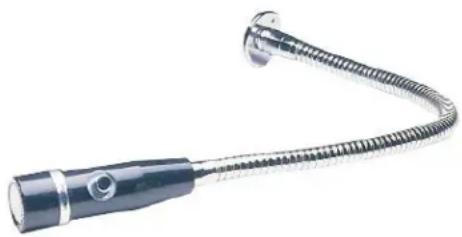
DYNAMIC GOOSENECK
OMNIDIRECTIONAL MICROPHONE
INTRODUCTION
These instructions contain the specifications and information necessary to install, operate, and maintain the V-450 Dynamic Omnidirectional Gooseneck Microphone.
SPECIFICATIONS
Applications
- Valcom Paging Systems
Features
• Dynamic element
- Omnidirectional pickup pattern
• Chrome screen with a black housing
- 4 foot, 4 conductor, 2 shielded cable with cable permanently attached
- Pushbutton sealed micro switch
- 5/8"-27 mounting thread
- Mounting flange included
- Low impedance (balanced)
Dimensions/Weight
- Microphone 1-3/4"D x 4-5/8"L
- Gooseneck 19"L
• 1.3 lbs. (.59kg)
Specifications
- Element Dynamic
- Pattern Omnidirectional
• Freq. Response 50 to 12K Hz
• Output Impedance Lo Z 400 Ohms - Output Level Lo Z -58 dB (0db = 1 mw/10 microbars) -152 dB EIA
INSTALLATION
Figure 1 shows the V-450 connected to the Valcom V-9939C microphone adapter.
TECHNICAL ASSISTANCE
Assistance is available from the factory when problems are encountered. Call (540) 563-2000 and press 1 for Technical Support, or visit our website at http://www.valcom.com.
Valcom equipment is not field repairable. Valcom, Inc. maintains service facilities in Roanoke, VA. Should repairs be necessary, attach a tag to the unit clearly stating your company name, address, phone number, contact person and the nature of the problem. Send the unit to:
Valcom,
Inc.
Repair and Return Dept.
5614 Hollins Road
Roanoke, VA 24019-5056
![graph TD A["V-450 MICROPHONE"] --> B["SHIELDED CABLE"] B --> C["POWER (-24VDC)"] C --> D["POWER (GND)"] D --> E["LO Z1"] E --> F["MIC SHIELD"] F --> G["LO Z2"] G --> H["H I Z"] H --> I["GND OUT SWITCH"] I --> J["STATIONARY BREAK"] J --> K["MAKE"] K --> L["RING TIP"] C --> M["RED (+)"] C --> N["SHELD…](/content/2026/06/1259534/images/61eff47fa9f6e5b8ac1c810a7661cf0f74e8840fb31a98d3c39f78ee60318c5b.jpg)
FIGURE 1. CONNECTING ARRANGEMENT
VALCOM LIMITED WARRANTY
Valcom, Inc. warrants its products only to the original purchaser, for its own use, to be free from defects in materials and workmanship under conditions of normal use and service for a period of one year from the date of shipment. This Limited Warranty obligation shall be limited to the replacement, repair or refund of any such defective device within the warranty period, provided that:
- inspection by Valcom, Inc. indicates the validity of the claim;
- the defect is not the result of damage, misuse or negligence after the original shipment;
- the product has not been altered in any way or repaired by others and that factory sealed units are unopened (a service charge plus parts and labor will be applied to units defaced or physically damaged);
- freight charges for the return of products to Valcom are prepaid;
- all units 'out of warranty' are subject to a service charge. The service charge will cover minor repairs (major repairs will be subject to additional charges for parts and labor).
This Limited Warranty is in lieu of and excludes all other warranties, expressed or implied and in no event shall Valcom, Inc. be liable for any anticipated profits, consequential damages, loss of time or other losses incurred by the buyer in connection with the purchase, operation, maintenance, installation, removal or use of the product. The maximum liability of Valcom under this warranty is limited to the purchase price of the specific Product covered by the warranty.
Disclaimer. Except for the Limited Warranty provided herein, the product is provided "as-is" without any warranty of any kind whatsoever including, without limitation, any WARRANTY OF MERCHANTABILITY, FITNESS FOR A PARTICULAR PURPOSE OR NON-INFRINGEMENT.
This warranty specifically excludes damage incurred in shipment. In the event a product is received in damaged condition, the carrier should be notified immediately. Claims for such damage should be filed with the carrier involved in accordance with the F.O.B. point.
Headquarters:
Valcom, Inc.
5614 Hollins Road Roanoke, VA 24019-5056
Phone: (540) 563-2000 FAX: (540) 362-9800


Marque : Valcom
Modèle : V-450
Catégorie : Microphone