HD203WI - Disque dur SAMSUNG - Notice d'utilisation et mode d'emploi gratuit
Retrouvez gratuitement la notice de l'appareil HD203WI SAMSUNG au format PDF.


Questions des utilisateurs sur HD203WI SAMSUNG
0 question sur cet appareil. Repondez a celles que vous connaissez ou posez la votre.
Poser une nouvelle question sur cet appareil
Téléchargez la notice de votre Disque dur au format PDF gratuitement ! Retrouvez votre notice HD203WI - SAMSUNG et reprennez votre appareil électronique en main. Sur cette page sont publiés tous les documents nécessaires à l'utilisation de votre appareil HD203WI de la marque SAMSUNG.
MODE D'EMPLOI HD203WI SAMSUNG

3.5" Serial ATA HDD INSTALLATION GUIDE
This product is a precision designed mechanism and is very sensitive to shock and electrostatic discharge (ESD). When storing, please avoid high temperature and humidity and use the original ESD protection package in which the product was shipped at the time of purchase. Please handle the product carefully. Damaged or detached labels or any other components may directly cause product malfunction and void warranty. Samsung does NOT guarantee any data on your drive, please always BACK - UP your precious data.
1. Installing the hard disk
NOTE : SATA 1.5Gb/s Speed Limit Jumper setting Only for SATA 3.0Gb/s products
In some rare cases SATA 1.5Gb/s hosts can not establish SATA interface connection with SATA 3.0Gb/s devices due to interface protocol issues. In this case the jumper may be installed as shown on the figure below to force the device to negotiate for SATA 1.5Gb/s speed.
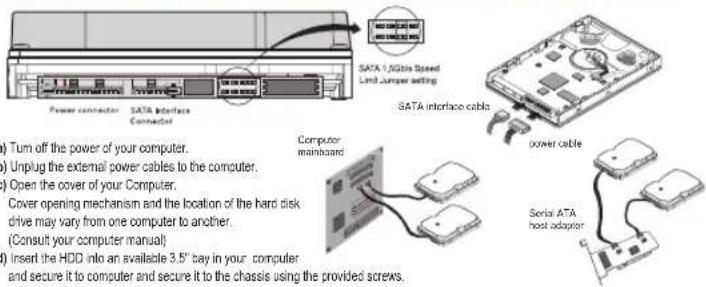
text_image
SATA 1/2Gbps Speed Limit Jumper setting SATA Interface Cable Power connector SATA Interface Connector Computer mainboard power cable Serial ATA host adapter ) Turn off the power of your computer. ) Unplug the external power cables to the computer. ) Open the cover of your Computer. Cover opening mechanism and the location of the hard disk drive may vary from one computer to another. (Consult your computer manual) ) Insert the HDD into an available 3.5" bay in your computer and secure it to computer and secure it to the chassis using the provided screws.(a) Turn off the power of your computer. (b) Unplug the external power cables to the computer. (c) Open the cover of your Computer. Cover opening mechanism and the location of the hard disk drive may vary from one computer to another. (Consult your computer manual) (d) Insert the HDD into an available 3.5" bay in your computer and secure it to computer and secure it to the chassis using
(e) Connect Cables.
- Attach the SATA interface cable to the interface connector on the hard disk drive. The connector is keyed and will fit in only one way.
- Attach the power cable to the power receptor on the hard disk drive. The connector is keyed and will fit in only one way.
- Check all other cable connections before turning on your computer.
CAUTION: Do not force or rock the connectors into their sockets on the hard disk drive. Push them in straight until they are sealed.
2. Making Computer Detect the New Device
Run the CMOS(BIOS) set-up program to detect the new hard disk drive.
1 Go into CMOS screen during the booting of the computer.
For descriptive details of the program, refer to the computer's user's manual
2 Make the computer detect the hard disk.
1 If your computer supports IDE HDD Auto Detection, the hard disk drive will automatically be detected.
2 If your computer does not support auto detect, go into the User Define Mode and by referring written information on the product, set the correct settings for Cylinder, Head, and Sector and if some Bios must be, set the HDD Mode to LBA.
3 Save the changed details and exit.
3. Partitioning and Formatting the Drive
Refer to your Operating System manual or system manual for partitioning and formatting.
4. Samsung World Wide Web Site
Additional information can be obtained at www.samsunghdd.com.
SAMSUNG ELECTRONICS CO., LTD.
STORAGE SYSTEM DIVISION
HEAD OFFICE: 94-1, IM SOO-DONG, GUMI-CITY KYUNG BUK, KOREA 730-350
FAX:82-54-479-5567
This device complies with Part 15 of the FCC Rules.
Operation is subject to the following two conditions :
(1) this device may not cause harmful interference, and
(2) this device must accept any interference received, including interference that may cause undesired operation.

This marking shown on the product or its literature, indicates that it should not be disposed with other household wastes at the end of its working life. To prevent possible harm to the environment or human health from uncontrolled waste disposal, please separate this from other types of wastes and recycle it responsibly to promote the sustainable reuse of material resources.
Household users should contact either the retailer where they purchased this product, or their local government office, for details of where and how they can take this item for environmentally safe recycling.
Business users should contact their supplier and check the terms and conditions of the purchase contract. This product should not be mixed with other commercial wastes for disposal.
©Samsung Electronics Co., Ltd. Printed in Korea.
BF68-00174A REV04