HM320II - Disque dur SAMSUNG - Notice d'utilisation et mode d'emploi gratuit
Retrouvez gratuitement la notice de l'appareil HM320II SAMSUNG au format PDF.


Questions des utilisateurs sur HM320II SAMSUNG
0 question sur cet appareil. Repondez a celles que vous connaissez ou posez la votre.
Poser une nouvelle question sur cet appareil
Téléchargez la notice de votre Disque dur au format PDF gratuitement ! Retrouvez votre notice HM320II - SAMSUNG et reprennez votre appareil électronique en main. Sur cette page sont publiés tous les documents nécessaires à l'utilisation de votre appareil HM320II de la marque SAMSUNG.
MODE D'EMPLOI HM320II SAMSUNG
Q3
HDD does not be recognized in BIOS setup
① First, confirm whether each cable was connected correctly.
② Contain whether Jumper-setting is correct.
Confirm whether BIOS setup becomes correctly
Q4
Even though the HCD recognized in BIOS setup, it does not be
seen in Windows
① Confirm whether did correctly partition and format.
② Partition can be created through the Fdisk or Instaling OS
according to OS's version.
Q5
I am looking for a Software & Firmware mainly about drivers; but I
found nothing
Where I can find I want?
We don't release any filmwares.
because the product has been already optimized with its own
configurations
IDE (PAX & SUI) drive does not miss any drivers. You just have to make a partion and forest your drug for using
Please make sure whether you had partitioned and
First of all, you must partition and format for recognizing the new
drive in the Windows Explorer
Within Win36 series, please use the Fdisk.
Within Win2000 & Win-XP, please use the Disk Management.
When fixing Win2000 or Win-XP, the installation process and plan for multi-gamma electrical
includes the partitioning step heat
to open the Disk Management
① Click Start, point to Settings, and then click Control Panel
© Double-click Administrative Tools, and then double-click Comps for Management
Computer management.
© In the left panel, expand storage, and then expand Disk Management
Contact SAMSUNG WORLD WIDE
If you have any comments or questions regarding a Samsung products.
| Country | Customer Care Center | Web Site |
| CANADA | 1-800-SAMSUNG (728764) | www.samsung.com/ka |
| U.S.A | 1-800-SAMSUNG (728764) | www.samsung.com |
| GERMANY | 01805 - 121213 € (0.14Mn) | www.samsung.de |
| U.K | 0670 SAMSUNG (728764) | www.samsung.com/uk |
| RUSSIA | 8-800-203-3400 | www.samsung.ru |
| UKRAINE | 8-800-592-3000 | www.samsung.com/ur |
| AUSTRALIA | 1300 362 605 | www.samsung.com/au |
The Names and Content of Toxic and Hazardous Substances
or Elements
| Parts | Toxic and hazardous substances or elements | |||||
| Pb | Hg | Cd | Cr* | PB8 | PBDE | |
| Printed Circuit Assemblies | X | O | O | O | O | O |
| Head Disk Assemblies | X | O | O | O | O | O |
O: indicates that the concentration of the hazardous substance in all homogeneous materials in the parts is below the relevant threshold of the SJ/T11283-2006 standard.
X: Indicates that the concentration of the hazardous substance of at least one of all homogeneous materials in the parts is above the relevant threshold of the SJ/T11363-2008 standard.
* Hybrid Disk Drive products are licensed for use only on devices and deploy the Windows VISTA operating system as the principle operating system. If you or any other party installed on operating system on the computing device that is not Window Vista, the use of this Hybrid Disk Drive may occur on additional license from Microsoft. For further information, please contact Microsoft.
SAMSUNG ELECTRONICS CO., LTD
STORAGE SYSTEM DIVISION
HEAD OFFICE: 94-1. IM SDO-DONG, GUNI-CITY KYUNG BLK, KOREA 730-350
FAX
This device complies with Part 15 of the FCC Rules.
Operation is subject to the following two conditions:
I'm this device may not cause harmful interference. And
(a) this device must select any interference reserve, including interference and detection.
- 19.000

This marking shown on the product or its literature, indicates that it should not be disposed with other household wages at the end of its working life. To prevent possible harm to the environment or human health from uncontrolled waste disposal, please separate this from other types of wastes and recycle it responsibly to promote the sustainable use of material resources.
Household users should contact for the retailer where they purchased this
product, or their local government office, for details of where and how they can take
this has for environmentally safe recycling
Business users should contact their supplier and check the terms and conditions of the workers' contact.
The purchase contract.
The stock should not be listed with risks to the car masses of disposal.
© Samsung Electronics Co., Ltd. Printed in Korea. DF68-DC2037A REM02
CHINA SONG
2.5" HDD INSTALLATION GUIDE
does NOT guarantee any data on your own,
Precautions
1MB = 1,000,000bytes / 1GB = 1,000,000,000 bytes.
Actual accessible capacity may vary from advertised capacity due to
formatting and pertaining of the hard drive, as well as due to your
computers operating system
Do not drop, shock or strike.
Happy impact to The HLD; It causes a Bok seeler by crushing between Heart and Media. Do not slack. Do not external shock and vination.
Do not remove all items, such as Hard drive label, warranty label
Warranty vein if any stickers or she's are removed
or damaged. Never disassemble hard drives.
Do not touch the circuit board with hands or tools.
Protect the HDD from Electrostatic Discharge(ESD)
MR Head is very sensitive in Electrostatic.
Keep the HDD in their static shielding bag.
Avoid extreme temperatures and humidity places
Humidity causes a drive malfunction by reducing with an immature of v1 in Disk and blood surface
- Also, parts can be complete by leaving in humidity.
1920, State Bank of California, Maryland.
When use an external case
Do not drop or fall while using and
being storage the external case
An external case is easy to transfer, but can be shocked easily also.
Check the External case's Grounding
External case's grounding prevents HDD malfunction form ESD

shocked easily also.
PATA Installation
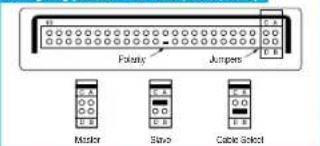
Configuring your Hard Disk Drive (Master, Slave)
text_image
Folksy Jumpers Master Slave Cable SelectInstallation Your Hard Drive
Note - Turn off the system power
Cover opening mechanism and the location of the hard
disk drive may vary from one computer to another.
1 Turn off the computer, unplug the external cables, and open computer cover. Mount the hard disk drive in the designated place in the computer with screws provided with the product.
2 Connect 40 pin interface cable and power cable. Make sure that the direction of the cables are correct and matches the shape of the receptacles when connecting cables. Incorrect cable connection may damage the hard disk olive.
SATA Installation
Installing the hard disk
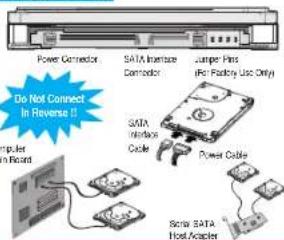
Note: SATA L5Gb's Speed Limit Jumper setting Only for SATA 30Gb's products, in some rare cases SATA L5Gb's hosts can not establish SATA interface connection with SATA 30Gb's devices due to interface protocol issues. In this case the jumper may be installed as shown on the figure below to force the device to negotiate for SATA L5Gb's spread.
Installing the hard disk
text_image
Power Connector SATA Inframe Connector Jumper Pin (Ro Patching Use Only) Do Not Connect in Reverse # Appler In Board SATA Interface Cable Power Cable Sono SATA Host Adapter(a) Turn off the power of your computer.
(b) Unplug the external power cables to the computer.
Open the cover of your Computer. Cover operating mechanism and the location of the hard disk drive.
605 Opening Meets will and the focus for the hard case of we may vary from one computer to another. (Consult your computer
manual
(d) Insert the HDD into an available 3.5" bay in your computer and
secure it to computer and secure it to the chassis using the
proven series
1 Attach the SATA interface cable to the interface connector on the hard
disk drive. The connector is keyed and will fit in only one way.
2 Attach the power cable to the power receptor on the hard disk drive. The connector is keyed and will fit in only one way.
3 Check all other cable connections before turning on your computer.
CAUTION: Do not force or rock the connectors into their
sockets on the hard dish drive
straight until they are seated.
1. Making Computer Detect the New Device
Run the CMOS (BIOS) set-up program to detect the new hard disk
Go into CMOS screen during the booting of the computer. For descritive details of the program, refer to the computer's user's manual
2 Make the popular doctor the hard disk.
① If your computer supports IDE HDD Auto Detection, the hard disk
drive will automatically be detected.
© If your computer does not support auto detect, go into the User Define Mode and by referring written information on the product, set the correct settings for Cylinder, Head, and Sector and if some Bins must be, set the HDD Mode to LBA.
Save the changed details and out.
2. Partitioning and Formatting the Drive
Refer to your Operating System manual or system manual for partitioning and formatting
3. Samsung World Wide Web Site
Additional information can be obtained at www.sanyanghd.com.
FAQs
Q1 When using within an USB external case, sometimes drive is not recognized.
It may be caused by insufficiency of USB DC power. By supplying a subsidy DC power, the symptom can be solved.
Q2 When using within an USD external case, drive can not be Format. First, confirm whether a partition has been created correctly. Format does not work if there is no partition.