
Blu-ray Remote Control PS3 - Télécommande SONY - Notice d'utilisation et mode d'emploi gratuit
Retrouvez gratuitement la notice de l'appareil Blu-ray Remote Control PS3 SONY au format PDF.


| Marque | Sony |
| Modèle | Blu-ray Remote Control PS3 |
| Catégorie | Télécommande |
| Type de produit | Télécommande Blu-ray pour PlayStation 3 |
| Dimensions (L x l x H) | 51 x 25,5 x 219 mm |
| Poids (avec piles) | Environ 100 g |
| Alimentation | 2 piles AA (LR6) fournies |
| Technologie de connexion | Bluetooth |
| Température de fonctionnement | 5 °C à 35 °C |
| Fonctions principales | Lecture, pause, arrêt, avance/retour rapide, saut de chapitre, changement d'angle, sous-titres, audio, menu contextuel, touches de couleur |
| Touches | Directionnelles, PS, L1/R1, L2/R2, L3/R3, SELECT, START, ENTER, EJECT, AUDIO, ANGLE, SUBTITLE, CLEAR, TIME, 0-9, RED/GREEN/YELLOW/BLUE, DISPLAY, TOP MENU, POP UP/MENU, RETURN, OPTIONS, VIEW |
| Compatibilité | PlayStation 3 (PS3) |
| Nombre maximum de télécommandes enregistrées | 1 télécommande par PS3 |
| Entretien | Nettoyer avec un chiffon doux et sec. Ne pas utiliser de solvants ou produits chimiques. |
| Précautions | Ne pas exposer à la chaleur, à l'humidité ou au soleil. Ne pas faire pénétrer de liquide ou de particules. Ne pas démonter ni modifier. |
| Stockage | Retirer les piles en cas de non-utilisation prolongée. |
| Sécurité des piles | Ne pas manipuler des piles endommagées ou qui fuient. Ne pas jeter au feu. Respecter la polarité. |
| Garantie | Consulter le site eu.playstation.com/ps3 ou contacter le service client PlayStation. |
| Fabricant | Sony Computer Entertainment Inc. |
| Pays d'origine | Non spécifié |
FOIRE AUX QUESTIONS - Blu-ray Remote Control PS3 SONY
Questions des utilisateurs sur Blu-ray Remote Control PS3 SONY
0 question sur cet appareil. Repondez a celles que vous connaissez ou posez la votre.
Poser une nouvelle question sur cet appareil
Téléchargez la notice de votre Télécommande au format PDF gratuitement ! Retrouvez votre notice Blu-ray Remote Control PS3 - SONY et reprennez votre appareil électronique en main. Sur cette page sont publiés tous les documents nécessaires à l'utilisation de votre appareil Blu-ray Remote Control PS3 de la marque SONY.
MODE D'EMPLOI Blu-ray Remote Control PS3 SONY
PLAYSTATION.3

Télécommande Blu-ray Disc
Manuel d'instructions
FR
AVERTISSEMENT
- Avant d'utiliser ce produit, lisez attentivement ce manuel et conservez-le pour référence future. Lisez également les instructions du système PLAYSTATION®3. • Ne manipulez pas de piles endommagées ou qui fuient.
Précautions
Utilisation des piles
• Ne jetez jamais les piles au feu. - N'utilisez que les piles spécifiées et remplacez-les toujours par le même type de piles. Ne mélangez pas des piles anciennes et neuves. - Insérez les piles en respectant les polarités plus et moins. - Retirez les piles lorsqu'elles sont usées ou si la télécommande BD doit être stockée pendant une période prolongée.
Utilisation et manipulation
- N'exposez pas la télécommande BD à des températures élevées, à une humidité élevée ou à la lumière directe du soleil. • Ne laissez pas de liquide ou de petites particules pénétrer dans le produit. • Ne posez pas d'objets lourds sur le produit. • Ne démontez jamais le produit et ne le modifiez pas.
- Ne jetez pas le produit, ne le laissez pas tomber et ne le soumettez pas à des chocs physiques violents.
- Ne placez pas de matériaux en caoutchouc ou en vinyle sur l'extérieur du produit pendant une période prolongée.
- Pour nettoyer le produit, utilisez un chiffon doux et sec. N'utilisez pas de solvants ou d'autres produits chimiques.
Préparation à l'utilisation
Insertion des piles
Retirez le couvercle à l'arrière de la télécommande BD et insérez les piles fournies. Placez les piles dans la bonne position.
Enregistrement de la télécommande BD avec le système PS3™
Avant d'utiliser la télécommande BD, vous devez l'enregistrer (la « jumeler ») avec le système PS3™. Cette opération n'est effectuée qu'une seule fois lors de la première utilisation de la télécommande.
1 Allumez le système PS3™. 2 Dans le menu d'accueil du système, sélectionnez Paramètres
(Paramètres de périphériques) > « Enregistrer un périphérique Bluetooth ® », puis appuyez sur le bouton ×.
3 Sélectionnez le type de périphérique à enregistrer.
4 Suivez les instructions à l'écran.
Conseils
• Une seule télécommande BD peut être enregistrée avec le système PS3™. - Si vous enregistrez la télécommande BD avec un autre système PS3™, vous devrez la ré-enregistrer si vous souhaitez l'utiliser à nouveau avec le premier système PS3™.
Opérations de base
Fonctionnement de base de la télécommande BD
Ce manuel explique les opérations des boutons pour la lecture de disques Blu-ray (BD). Les mêmes opérations peuvent également être effectuées lors de la lecture de DVD vidéo ou de CD audio, à l'exception de certaines fonctions.
Avis
Certains contenus peuvent avoir des conditions de lecture prédéfinies par le développeur du contenu. Dans ce cas, certaines opérations des boutons de la télécommande peuvent ne pas être disponibles.
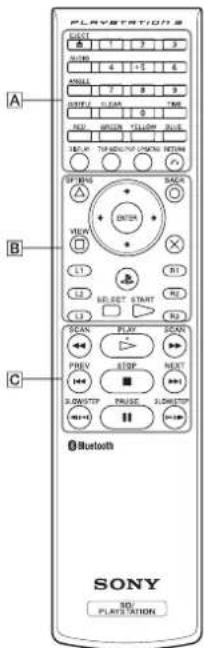
Opérations des boutons A (voir schéma)
| EJECT button Eject the disc. | |
| AUDIO button Change audio on BDs with multiple audio tracks recorded. | |
| ANGLE button | Change viewing angles on BDs with multiple angles recorded on the same scene. |
| SUBTITLE button Change the language for subtitles on BDs with subtitles recorded. | |
| CLEAR button Clear entered numbers. | |
| TIME button View the elapsed time or remaining time of a title or chapter. | |
| 0-9 button Enter numbers. | |
| RED, GREEN, YELLOW, BLUE button | Perform functions assigned to each button.(Assigned functions vary depending on the content being played.) |
| DISPLAY button | View status information or other information on the content being played. |
| TOP MENU button | View the content's top menu. |
| POP UP/MENU button | View the content's pop-up menu. |
| RETURN button | Return to a specific point in the video. |
Opérations des boutons B (voir schéma)
| Δ /OPTIONS, /VIEW, X, O/BACK button | Perform the same operations as the SIXAXISTM Wireless Controller for the PS3TM system. |
| Directional buttons | |
| (PS button) | |
| L1, R1, L2, R2, L3, R3 button | |
| SELECT, START button | |
| ENTER button | Perform the same operation as the X button on the SIXAXISTM Wireless Controller for the PS3TM system. |
Opérations des boutons C (voir schéma)
| PLAY button | Start playback. |
| STOP button | Stop playback. |
| PAUSE button | Stop playback temporarily. |
| SCAN. ▶ SCAN button | Fast forward or fast reverse playback. Playback speed changes each time you press the button. |
| PREV. ▶ NEXT button | Move to the previous or next chapter. |
| SLOW/STEP. ▶ SLOW/STEP button | Play content one frame at a time. If you press and hold down the button, content plays in slow motion. |
Astuce
Appuyer sur n'importe quel bouton de la télécommande BD lorsque le système PS3™ est éteint (en mode veille) allumera le système.
Si la charge de la batterie est faible
Lorsque la charge de la batterie est faible, la télécommande peut ne pas fonctionner correctement ou la distance à laquelle vous pouvez l'utiliser peut être réduite. Dans ce cas, remplacez les deux piles par des neuves.
Spécifications
Source d'alimentation : piles de taille AA (2)
Dimensions externes : environ 51 x 25,5 x 219 mm / 2 x 1 x 8,6 po (l x h x p)
Température de fonctionnement : 5 °C - 35 °C / 41 °F - 95 °F
La conception et les spécifications sont sujettes à modification sans préavis.
GARANTIE
Pour les détails de la garantie du fabricant, veuillez consulter eu.playstation.com/ps3 ou appeler la ligne d'assistance clientèle PlayStation®, dont le numéro se trouve dans chaque manuel de logiciel PLAYSTATION®3.
Ce produit peut être soumis à la législation nationale sur le contrôle des exportations. Vous devez vous conformer pleinement aux exigences de cette législation et à toutes les autres lois applicables de toute juridiction concernant ce produit.
Ce produit contient des composants et des logiciels soumis à certaines restrictions en vertu des règlements américains sur les exportations (Export Administration Regulations) et peut ne pas être exporté ou réexporté vers des destinations sous embargo des États-Unis. De plus, ce produit peut ne pas être exporté ou réexporté vers des personnes ou entités interdites par les règlements américains sur les exportations.
Lorsque vous voyez ce symbole sur l'un de nos produits électriques ou sur leur emballage, cela indique que le produit électrique concerné ne doit pas être jeté avec les déchets ménagers ordinaires en Europe. Pour garantir un traitement correct des déchets du produit, veuillez le mettre au rebut conformément aux lois ou exigences locales applicables en matière d'élimination des équipements électriques. Ce faisant, vous contribuerez à préserver les ressources naturelles et à améliorer les normes de protection de l'environnement dans le traitement et l'élimination des déchets électriques.
« PlayStation », « PlayStation » et « PLAYSTATION » sont des marques déposées de Sony Computer Entertainment Inc. De plus, « PS3 » est une marque de la même société. « SONY » et « » sont des marques déposées de Sony Corporation.
Bluetooth
La marque verbale et les logos Bluetooth sont la propriété de Bluetooth SIG, Inc. et toute utilisation de ces marques par Sony Computer Entertainment Inc. se fait sous licence. « Blu-ray Disc » est une marque commerciale.
SONY
COMPUTER
eu.playstation.com/ps3
© 2006 Sony Computer Entertainment Inc. Tous droits réservés.


- PLAYSTATION
- TÉLÉCOMMANDE BLU-RAY DISC
- FR
- AVERTISSEMENT
- PRÉCAUTIONS
- UTILISATION DES PILES
- UTILISATION ET MANIPULATION
- PRÉPARATION À L'UTILISATION
- INSERTION DES PILES
- ENREGISTREMENT DE LA TÉLÉCOMMANDE BD AVEC LE SYSTÈME PS3™
- CONSEILS
- OPÉRATIONS DE BASE
- FONCTIONNEMENT DE BASE DE LA TÉLÉCOMMANDE BD
- AVIS
- ASTUCE
- SI LA CHARGE DE LA BATTERIE EST FAIBLE
- SPÉCIFICATIONS
- GARANTIE
- BLUETOOTH
- SONY
Marque : SONY
Modèle : Blu-ray Remote Control PS3
Catégorie : Télécommande