
ASPIRE Z3-115 - Ordinateur de bureau ACER - Notice d'utilisation et mode d'emploi gratuit
Retrouvez gratuitement la notice de l'appareil ASPIRE Z3-115 ACER au format PDF.


Choisissez votre langue et indiquez votre email : nous vous enverrons une version traduite specifiquement.
| Type de produit | Ordinateur de bureau tout-en-un |
| Marque | ACER |
| Modèle | ASPIRE Z3-115 |
| Année de fabrication | 2014 |
| Consommation annuelle d'énergie (E_TEC) | 68,77 kWh/an (configuration la plus énergivore) |
| Puissance en veille | 2,95 W |
| Puissance hors tension | 0,398 W |
| Efficacité de l'alimentation externe | 87,94 % |
| Mémoire vive (RAM) | 2 Go (extensible jusqu'à 8 Go) |
| Carte graphique | Discrète, 1 pièce, catégorie G1 |
| Niveau sonore (mode inactif) | 30 dB |
| Niveau sonore (recherche disque) | 34 dB |
| Mise en veille automatique | Après 30 minutes d'inactivité |
| Mise en veille de l'écran | Après 10 minutes d'inactivité |
| Alimentation | Externe (adaptateur secteur) |
| Stockage interne | 1 disque dur |
FOIRE AUX QUESTIONS - ASPIRE Z3-115 ACER
Comment allumer l'ordinateur ?
Appuyez sur le bouton d'alimentation situé à l'avant ou sur le côté de l'écran. Attendez que le système démarre.
Que faire si l'écran reste noir ?
Vérifiez que le câble d'alimentation est branché et que l'ordinateur est sous tension. Essayez de maintenir le bouton d'alimentation enfoncé pendant 10 secondes pour forcer l'arrêt, puis redémarrez.
Comment connecter des périphériques USB ?
Insérez la fiche USB dans l'un des ports USB situés à l'arrière ou sur le côté de l'ordinateur. Le système détectera automatiquement le périphérique.
Comment économiser l'énergie ?
Activez les paramètres de gestion d'alimentation dans le panneau de configuration. L'ordinateur passe automatiquement en veille après 30 minutes d'inactivité et l'écran après 10 minutes.
Comment effectuer une réinitialisation d'usine ?
Accédez aux paramètres de récupération via 'Paramètres > Mise à jour et sécurité > Récupération'. Choisissez 'Réinitialiser ce PC' et suivez les instructions.
Comment nettoyer l'écran ?
Utilisez un chiffon doux et sec légèrement humidifié avec de l'eau. N'utilisez jamais de produits chimiques ou de nettoyants abrasifs.
Comment mettre à jour les pilotes ?
Téléchargez les derniers pilotes depuis le site Acer Support ou utilisez Windows Update pour les mises à jour automatiques.
Comment régler la luminosité de l'écran ?
Utilisez les touches de fonction (généralement Fn + F6 ou Fn + F7) ou accédez aux paramètres d'affichage dans le panneau de configuration.
Comment accéder au BIOS ?
Redémarrez l'ordinateur et appuyez sur la touche F2 (ou Suppr) immédiatement après l'écran de démarrage.
Où trouver le numéro de série ?
Le numéro de série se trouve sur une étiquette au dos de l'ordinateur ou sous le socle. Il commence souvent par SNID ou S/N.
Questions des utilisateurs sur ASPIRE Z3-115 ACER
0 question sur cet appareil. Repondez a celles que vous connaissez ou posez la votre.
Poser une nouvelle question sur cet appareil
Aucune question pour l'instant. Soyez le premier à en poser une.
Téléchargez la notice de votre Ordinateur de bureau au format PDF gratuitement ! Retrouvez votre notice ASPIRE Z3-115 - ACER et reprennez votre appareil électronique en main. Sur cette page sont publiés tous les documents nécessaires à l'utilisation de votre appareil ASPIRE Z3-115 de la marque ACER.
MODE D'EMPLOI ASPIRE Z3-115 ACER
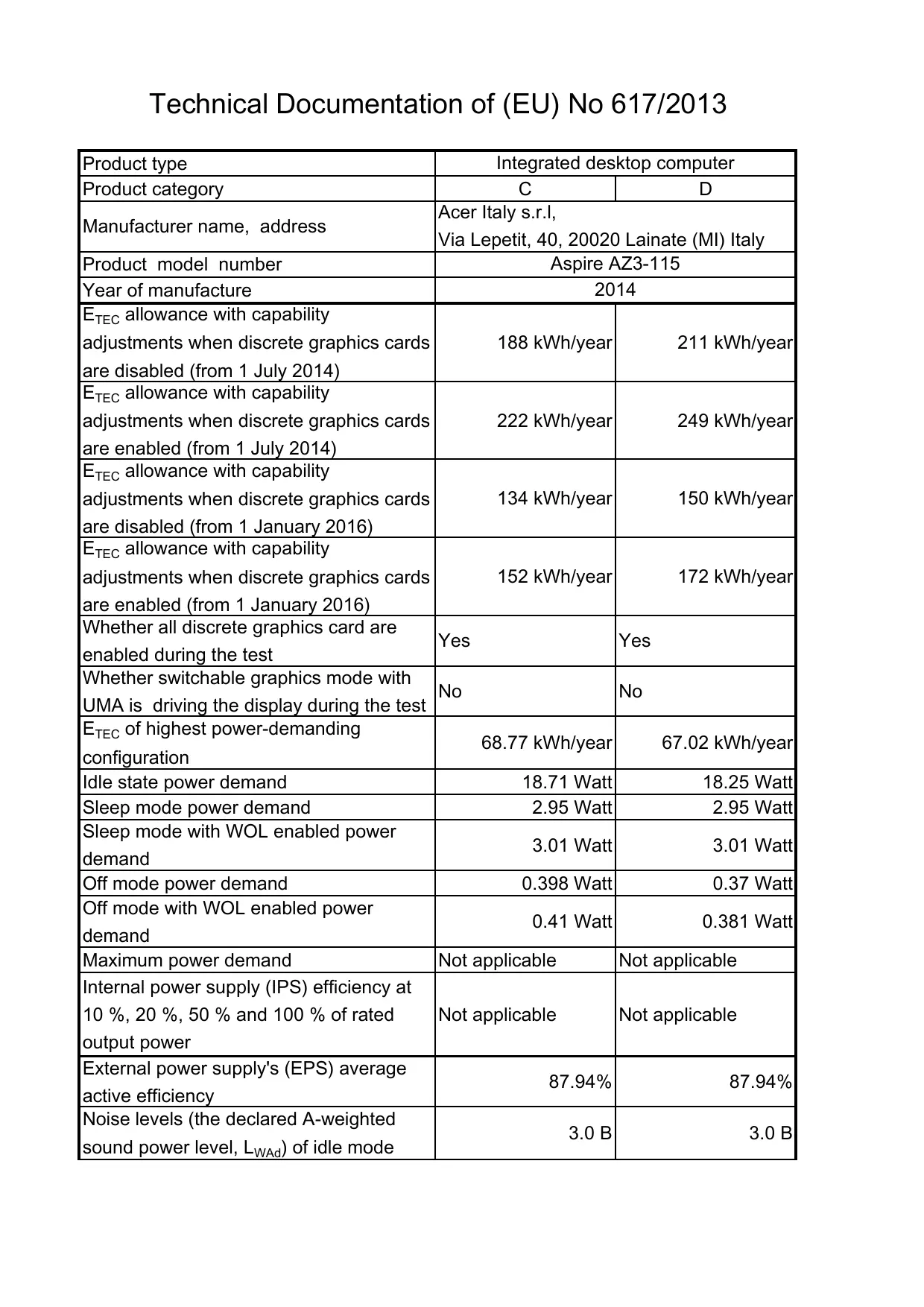
Technical Documentation of (EU) No 617/2013
| Product type | Integrated desktop computer | |
| Product category | C | D |
| Manufacturer name, address | Acer Italy s.r.l., Via Lepetit, 40, 20020 Lainate (MI) Italy | |
| Product model number | Aspire AZ3-115 | |
| Year of manufacture | 2014 | |
| E_TEC allowance with capability adjustments when discrete graphics cards are disabled (from 1 July 2014) | 188 kWh/year | 211 kWh/year |
| E_TEC allowance with capability adjustments when discrete graphics cards are enabled (from 1 July 2014) | 222 kWh/year | 249 kWh/year |
| E_TEC allowance with capability adjustments when discrete graphics cards are disabled (from 1 January 2016) | 134 kWh/year | 150 kWh/year |
| E_TEC allowance with capability adjustments when discrete graphics cards are enabled (from 1 January 2016) | 152 kWh/year | 172 kWh/year |
| Whether all discrete graphics card are enabled during the test | Yes | Yes |
| Whether switchable graphics mode with UMA is driving the display during the test | No | No |
| E_TEC of highest power-demanding configuration | 68.77 kWh/year | 67.02 kWh/year |
| Idle state power demand | 18.71 Watt | 18.25 Watt |
| Sleep mode power demand | 2.95 Watt | 2.95 Watt |
| Sleep mode with WOL enabled power demand | 3.01 Watt | 3.01 Watt |
| Off mode power demand | 0.398 Watt | 0.37 Watt |
| Off mode with WOL enabled power demand | 0.41 Watt | 0.381 Watt |
| Maximum power demand | Not applicable | Not applicable |
| Internal power supply (IPS) efficiency at 10 %, 20 %, 50 % and 100 % of rated output power | Not applicable | Not applicable |
| External power supply's (EPS) average active efficiency | 87.94% | 87.94% |
| Noise levels (the declared A-weighted sound power level, L_WAd ) of idle mode | 3.0 B | 3.0 B |
| Noise levels (the declared A-weighted sound power level, L_WAd ) of "HDD random seek" mode | 3.4 B | 3.4 B |
| Minimum number of loading cycles that the batteries can withstand | Not applicable | Not applicable |
| Configuration of memory | 2GB | 4~8GB |
| Configuration of internal storage | 1 piece | 1 piece |
| Configuration of discrete television tuner | 0 piece | 0 piece |
| Configuration of discrete audio card | 0 piece | 0 piece |
| Configuration of discrete graphics cards | 1 piece | 1 piece |
| Configuration of discrete graphics cards category | G1 | G1 |
| The battery in this product cannot be easily replaced by users themselves | Not applicable | Not applicable |
| For products with an integrated display, the total content of mercury is | 0 mg | 0 mg |
| Measurement methodology for E_TEC | COMMISSION REGULATION (EU) No 617/2013 of 26 June 2013 implementing Directive 2009/125/EC of the European Parliament and of the Council with regard to ecodesign requirements for computers and computer servers: ANNEX II Ecodesign requirements and timetable: 1.1.1. E_TEC formula. | |
| Measurement methodology for idle mode | EN 62623:2013 — Desktop and notebook computers — Measurement of energy consumption: 5.2. Test setup; 5.3.4. Measuring long idle mode; 5.7. True RMS watt meter specification; 5.8. True RMS watt meter accuracy; Annex E.2 (informative) ENERGY STAR® V5 compliant testing methodology. | |
| Measurement methodology for sleep mode | EN 62623:2013 — Desktop and notebook computers — Measurement of energy consumption:5.2. Test setup;5.3.3. Measuring sleep mode;5.4. Test conditions;5.7. True RMS watt meter specification;5.8. True RMS watt meter accuracy. | |
| Measurement methodology for off mode | EN 62623:2013 — Desktop and notebook computers — Measurement of energy consumption:5.2. Test setup;5.3.2. Measuring off mode;5.4. Test conditions;5.7. True RMS watt meter specification;5.8. True RMS watt meter accuracy. | |
| Measurement methodology for IPS efficiency | Not applicable | |
| Measurement methodology for EPS efficiency | EN 50563:2011 External a.c.—d.c. and a.c.—a.c. power supplies — Determination of no-load power and average efficiency of active modes. | |
| Measurement methodology for noise level | ECMA-109 2ndedition (December 1987)Declared Noise Emission Values of Computer and Business Equipment:4. Determination of the declared noise emission values.ECMA-74 11thedition (December 2010)Measurement of Airborne Noise emitted by Information Technology and Telecommunications Equipment:5. Installation and operating instructions;6. Method for determination of sound power levels of equipment in reverberation test rooms;7. Method for determination of sound power levels of equipment under essentially free-field conditions over a reflecting plane;Annex C.15 Equipment category:personal computers and workstations. | |
| Measurement methodology for battery loading cycles | Not applicable | |
| Sequence of steps for achieving a stable condition with respect to power demand | EN 62623:2013 — Desktop and notebook computers — Measurement of energy consumption:5.2. Test setup;5.3.2. Measuring off mode;5.3.3. Measuring sleep mode;5.3.4. Measuring long idle mode. | |
| Description of how sleep mode was selected or programmed | EN 62623:2013 — Desktop and notebook computers — Measurement of energy consumption:5.2. Test setup;5.3.3. Measuring sleep mode. | |
| Description of how off mode was selected or programmed | EN 62623:2013 — Desktop and notebook computers — Measurement of energy consumption:5.2. Test setup;5.3.2. Measuring off mode. | |
| Sequence of events required to reach the mode where the equipment automatically changes to sleep mode | ENERGY STAR® Program Requirements Product Specification for Computers, Eligibility Criteria Version 6.0, Rev. Oct-2013:1.D.4 Sleep Mode. | |
| Sequence of events required to reach the mode where the equipment automatically changes to off mode | Not applicable | |
| The length of time after a period of user inactivity in which the computer automatically reaches a power mode that has a lower power demand requirement than sleep mode | 30 minutes | |
| The length of time before the display sleep mode is set to activate after user inactivity | 10 minutes | |
| User information on the energy-saving potential of power management functionality | http://www.energystar.gov/index.cfm?c=power_mgt.pr_power_mgt_users | |
| User information on how to enable the power management functionality | http://www.energystar.gov/index.cfm?c=power_mgt.pr_power_mgt_users | |
| Test parameter for ambient temperature | 25 °C | |
| Test parameter for test voltage | 230 V | |
| Test parameter for frequency | 50 Hz | |
| Test parameter for total harmonic distortion of the electricity supply system | 3 % | |
| Test parameter for information and documentation on the instrumentation, set-up and circuits used for electrical testing | Digital Power Meter- Yokogawa WT210 Programmable AC Soure- Chroma 61603 | |