PLFMTR4 - Hi-Fi System Pyle - Gratis bruksanvisning og manual
Finn enhetens veiledning gratis PLFMTR4 Pyle i PDF-format.


Brukerspørsmål om PLFMTR4 Pyle
0 spørsmål om dette apparatet. Svar på dem du kjenner, eller still ditt eget.
Still et nytt spørsmål om dette apparatet
Last ned instruksjonene for din Hi-Fi System i PDF-format gratis! Finn veiledningen din PLFMTR4 - Pyle og ta den elektroniske enheten tilbake i hendene. På denne siden er alle dokumenter som er nødvendige for bruken av enheten din publisert. PLFMTR4 av merket Pyle.
BRUKSANVISNING PLFMTR4 Pyle
PLFMTR4
FM Transmitter Operation Manual
Thank you for purchasing the PLFMTR4! Ensure the best operation of your device by reading this brief manual before operating your device.
Set Up:
- Insert this FM transmitter into your vehicle's cigarette lighter or power port
- Tune to your radio to a desired FM frequency, then match that same frequency on to the player by using the buttons on the unit or on the remote control. If you're getting a lot of static, try another station.
- Plug a USB stick into the device to listen to your digital music.
- You can also connect virtually any audio device using the 2.5mm to 3.5mm adaptor — just connect your iPod, iPhone, Android, or other MP3 player to the adaptor and then plug in to the FM transmitter. To change tracks and sort through your music, use your connected device, not the remote control for the PLFMTR4.
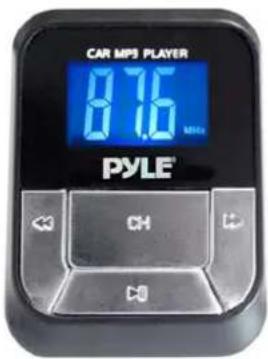
Operation Guide:
| Operation Guide FM transmitter Remote Control | ||
| 1. How to play and stop | Press “PLAY” Button : Play the musicSecond Press “PLAY” Button: Stop | Press PLAY/PAUSE Button |
| 2. How to adjust the Volume | Long Press ➔" button : Increase the Volume ; Long press "◀" Button : Decrease the Volume | Press “VOL + ” Increase the Volume ; Press “VOL- ” reduce the Volume ; |
| 3. How to change the frequency | Press “CH” button first, thenpress ➔": increase the frequencyPress “◀”: decrease the frequency | Press “CH+” button:Increase 0.1MHZPress “CH-” button:reduce 0.1MHZOr press the number of the frequency what you desired and then press “CH SET” button. |
| 4. How to choose music | Short Press ➔"Button: Play the next song; Short Press “◀Button: Play the previous song; | Press “NEXT”Button: Play the next song; Press “PREV” Button: Play the previous song;Or press the serial number of the song then press “PICK SONG”button |
| 5. How to set EQ Not Supported | Press “EQ” button to switch your favorite EQ |