
PSM2042 - Beugel voor Platte Schermen Chief - Gratis gebruiksaanwijzing en handleiding
Vind de handleiding van het apparaat gratis PSM2042 Chief in PDF-formaat.


| Type product | Plasma statische beugel |
| Merk | Chief |
| Model | PSM2042 |
| Categorie | Support voor plat scherm |
| Maximale belasting | 79,38 kg (175 lbs) |
| Bevestigingspunten op scherm | 4 montageknoppen (clear zinc) |
| Meegeleverde schroeven | 4 M6 x 25 mm Phillips pannekoekschroeven |
| Borgvlag | 1 stuks, met 10-24 Phillips platte schroef, nylon ring en Nylock moer |
| Benodigd gereedschap | Phillips schroevendraaier |
| Installatie | Vereist montage aan een constructie die 4x het totale gewicht kan dragen |
| Compatibiliteit | Plasmaschermen (en waarschijnlijk LCD) |
| Materiaal | Staal (geschat) |
| Kleur | Zwart of zilver (geschat) |
| Afmetingen | Niet gespecificeerd |
| Inhoud van de verpakking | 1 statische beugel, 4 montageknoppen, 4 M6-schroeven, 1 borgvlag, 1 nylon ring, 1 10-24 Nylock moer, 1 10-24 platte schroef |
Veelgestelde vragen - PSM2042 Chief
Gebruikersvragen over PSM2042 Chief
0 vraag over dit apparaat. Beantwoord die u kent of stel uw eigen vraag.
Stel een nieuwe vraag over dit apparaat
Download de handleiding voor uw Beugel voor Platte Schermen in PDF-formaat gratis! Vind uw handleiding PSM2042 - Chief en neem uw elektronisch apparaat weer in handen. Op deze pagina staan alle documenten die nodig zijn voor het gebruik van uw apparaat. PSM2042 van het merk Chief.
GEBRUIKSAANWIJZING PSM2042 Chief
INSTALLATION INSTRUCTIONS
DISPLAY STATIC MOUNT
PSM-2029

natural_image
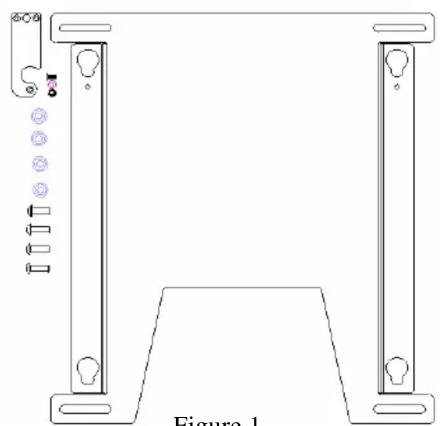
Technical line drawing of a mechanical bracket with mounting holes and a base plate, labeled Figure 1 (no text or symbols on the diagram itself)Figure 1
(1) Plasma Static Mount (4) Mounting Buttons - Clear Zinc
(4) M6 x 25mm Phillips Head Screw (1) Nylon Washer
(1) Latching Flag (1) 10-24 Nylock Nut
(1) 10-24 x .5 Flat Head Undercut Screw
BEFORE PROCEEDING: Unpack the carton, verify contents shown in Figure 1 and read installation instructions completely. If you are missing any of the listed components, please contact Customer Service at 1-800/582-6480.
CAUTION!
Plasma Displays are Extremely Fragile.
- Attach latching flag to mount using the 10-24 Phillips flat head screw, Nylon washer, and Nylock nut (see Figure 2). Tighten until friction will hold the flag in place.
- Attach mounting buttons to display using four M6 screws provided (see Figure 3 & Figure 4).
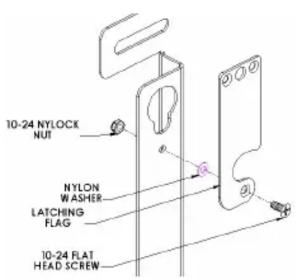
Figure 2

Figure 3 Figure 4

WARNING
ALL COMPONENTS MUST BE SECURELY FASTENED TO A STRUCTURAL MEMBER CAPABLE OF SUPPORTING 4 TIMES THE COMBINED WEIGHT OF ALL COMPONENTS PLUS THE EQUIPMENT BEING MOUNTED. IF IT CANNOT SUPPORT THIS WEIGHT, THE STRUCTURE MUST BE REINFORCED. THE MAXIMUM WEIGHT TO BE INSTALLED ON THE MOUNT IS 175 POUNDS (79.38 KG).
- Securely anchor the static mount to wall studs or supporting framework (see WARNING).
- Make sure the flag is lowered before attempting to place the screen on the mount.
- With the aid of another person, lift the display up to the mount, align the mounting buttons on the display with the teardrop slots in the mount, and set the display into place (see Figure 5).
- Position (raise) the flag to secure the display.
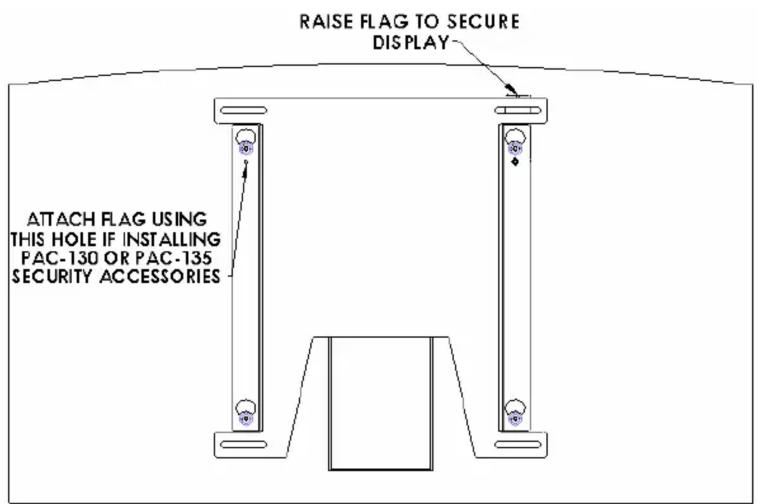
Figure 5


Merk : Chief
Model : PSM2042
Categorie : Beugel voor Platte Schermen