
CS-FS18AKF - Gaisa kondicionētājs PANASONIC - Bezmaksas lietošanas instrukcija
Atrodiet ierīces rokasgrāmatu bez maksas CS-FS18AKF PANASONIC PDF formātā.


Lietotāju jautājumi par CS-FS18AKF PANASONIC
0 jautājums par šo ierīci. Atbildiet uz tām, ko zināt, vai uzdodiet savu.
Uzdot jaunu jautājumu par šo ierīci
Lejupielādējiet instrukcijas savam Gaisa kondicionētājs PDF formātā bez maksas! Atrodiet savu rokasgrāmatu CS-FS18AKF - PANASONIC un atgūstiet kontroli pār savu elektronisko ierīci. Šajā lapā ir publicēti visi dokumenti, kas nepieciešami jūsu ierīces lietošanai. CS-FS18AKF zīmola PANASONIC.
LIETOŠANAS INSTRUKCIJA CS-FS18AKF PANASONIC
Panasonic®
Operating Instructions
Air Conditioner

natural_image
Front view of a Panasonic air conditioner unit (no text or symbols on body)Model No.
Outdoor Unit Indoor Unit
CU-FS18AKF-4
CS-FS18AKF-4
CU-FS24AKF-4
CS-FS24AKF-4

دليل المستخدم مكيف هواء
. Panasonic لشرانك مكيف هواء
ستجد تعليمات التشفيل مرفقة مع الجهاز.
قم بقراءة تعليمات التركيب جيدا قبل تشفيل الوحدة، و اhfظ الكتيب
في حالة أرنت مراجعة التعليمات مرة أخرى.

User Manual
Air Conditioner
Thank you for purchasing Panasonic Air Conditioner. Operating instructions attached.
Before operating the unit, read these operating instructions thoroughly and keep them for future reference.
Name and Address of importer:
Panasonic Marketing Middle East & Africa FZE
P.O.Box No. 17985, Jebel Ali, Dubai, U.A.E
Quick guide


Inserting the batteries
① Pull out the back cover of remote control
② Insert AAA or R03 batteries (can be used \~ 1 year)
③ Close the cover
Basic operation
Select the desired temperature
- Selection range: 16^ C 28^ C .
- Operating the unit within the recommended temperature may save energy: 26^ 28^ .
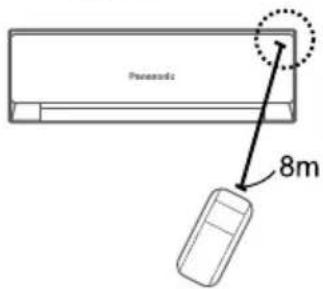
- Use remote control within 8 m from the remote control receiver of the indoor unit.
The illustrations in this manual are for explanation purposes only and may differ from the actual unit. They are subject to change without notice for future improvement.
English
Table of contents
Safety precautions.... 2-3
Cleaning instructions 4-15
Troubleshooting....16
Information......Back cover
Accessories
- Remote control
• AAA or R03 batteries × 2
To prevent personal injury, injury to others or property damage, please comply with the following: Incorrect operation due to failure to follow instructions below may cause harm or damage, the seriousness of which is classified as below:
| WARNING | This sign warns of death or serious injury. |
| CAUTION | This sign warns of injury or damage to property. |
The instructions to be followed are classified by the following symbols:
| This symbol denotes an action that is PROHIBITED. | |
| These symbols denote actions COMPULSORY. |
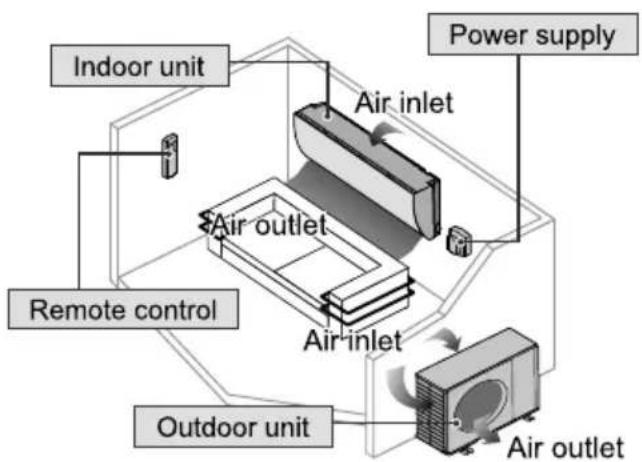

WARNING
Indoor unit and outdoor unit

This appliance is not intended for use by persons (including children) with reduced physical, sensory or mental capabilities, or lack of experience and knowledge, unless they have been given supervision or instruction concerning use of the appliance by a person responsible for their safety. Children should be supervised to ensure that they do not play with the appliance.
Please consult authorised dealer or specialist to clean the internal parts, repair, install, remove and reinstall the unit. Improper installation and handling will cause leakage, electric shock or fire.
Confirm with authorised dealer or specialist on usage of any specified refrigerant type. Using refrigerant type other than the specified may cause product damage, burst and injury etc.

Do not install the unit in a potentially explosive or flammable atmosphere. Failure to do so could result in fire.
Do not insert your fingers or other objects into the air conditioner indoor or outdoor unit, rotating parts may cause injury.

Do not touch the outdoor unit during lightning, it may cause electric shock.
Do not expose yourself directly to cold air for a long period to avoid excess cooling.
Do not sit or step on the unit, you may fall down accidentally.

Remote control

Do not allow infants and small children to play with the remote control to prevent them from accidentally swallowing the batteries.
Power supply

Do not use a modified cord, joint cord, extension cord or unspecified cord to prevent overheating and fire.


To prevent overheating, fire or electric shock:
- Do not share the same power outlet with other equipment.
- Do not operate with wet hands.
- Do not over bend the power supply cord.
- Do not operate or stop the unit by inserting or pulling out the power plug.

Use complete power supply cord without joining. In unavoidable circumstances that complete power supply cord without joining is impossible, use an approved connection means (for example: socket and plug).

flowchart
graph TD
    A["Power Supply"] --> B["Air Conditioner"]
    B --> C["Indoor Unit"]
    B --> D["Outdoor Unit"]
    E["Complete wire without joining OR"] --> B
    F["Approved connecting means (for example: approved socket and plug)"] --> E
    F --> D
If the supply cord is damaged, it must be replaced by the manufacturer, service agent or similarly qualified persons in order to avoid a hazard.
It is strongly recommended to be installed with Earth Leakage Circuit Breaker (ELCB) or Residual Current Device (RCD) to prevent electric shock or fire.
To prevent overheating, fire or electric shock:
- Insert the power plug properly.
- Dust on the power plug should be periodically wiped with a dry cloth.
Stop using the product if any abnormality/failure occurs and disconnect the power plug or turn off the power switch and breaker.
(Risk of smoke/fire/electric shock) Examples of abnormality/failure
• The ELCB trips frequently.
- Burning smell is observed.
- Abnormal noise or vibration of the unit is observed.
• Water leaks from the indoor unit.
• Power cord or plug becomes abnormally hot.
• Fan speed cannot be controlled.
- The unit stops running immediately even if it is switched on for operation.
- The fan does not stop even if the operation is stopped.
Contact your local dealer immediately for maintenance/repair.

This equipment must be earthed to prevent electrical shock or fire.

Prevent electric shock by switching off the power supply and unplug:
- Before cleaning or servicing,
- When extended non-use, or
- During abnormally strong lightning activity.


CAUTION
Indoor unit and outdoor unit

Do not wash the indoor unit with water, benzine, thinner or scouring powder to avoid damage or corrosion at the unit.
Do not use for preservation of precise equipment, food, animals, plants, artwork or other objects. This may cause quality deterioration, etc.
Do not use any combustible equipment in front of the airflow outlet to avoid fire propagation.
Do not expose plants or pet directly to airflow to avoid injury, etc.
Do not touch the sharp aluminium fin, sharp parts may cause injury.

Do not switch ON the indoor unit when waxing the floor. After waxing, aerate the room properly before operating the unit.
Do not install the unit in oily and smoky areas to prevent damage to the unit.
Do not dismantle the unit for cleaning purpose to avoid injury.
Do not step onto an unstable bench when cleaning the unit to avoid injury.
Do not place a vase or water container on the unit. Water may enter the unit and degrade the insulation. This may cause an electric shock.
Do not open window or door for long time during COOL/DRY mode operation.

Prevent water leakage by ensuring drainage pipe is:
- Connected properly,
- Kept clear of gutters and containers, or
- Not immersed in water
After a long period of use or use with any combustible equipment, aerate the room regularly.
After a long period of use, make sure the installation rack does not deteriorate to prevent the unit from falling down.
Remote control

Do not use rechargeable (Ni-Cd) batteries. It may damage the remote control.

To prevent malfunction or damage of the remote control:
- Remove the batteries if the unit is not going to be used for a long period of time.
- New batteries of the same type must be inserted following the polarity stated.
Power supply

Do not disconnect the plug by pulling the cord to prevent electric shock.
| INDOOR UNIT | |
| No. | Description |
| 1 | Front panel |
| 2 | Air filter |
| 3 | Optional filter (if installed) |
| 4 | LED Indicator |
| 5 | Signal receiver |
| 6 | Terminal block cover |
| 7 | Ionizer generator(if installed) |
| 8 | Vanes |
| 9 | Emergency button |
| 10 | Indoor unit rating label (Stick position optional) |
| 11 | Airflow direction louver |
| 12 | Remote controller |

| OUTDOOR UNIT | |
| No. | Description |
| 13 | Air outlet grille |
| 14 | Outdoor unit rating label |
| 15 | Terminal block cover |
| 16 | Gas valve |
| 17 | Liquid valve |
| 18 | Caution lable (DO NOT STEP ON) |
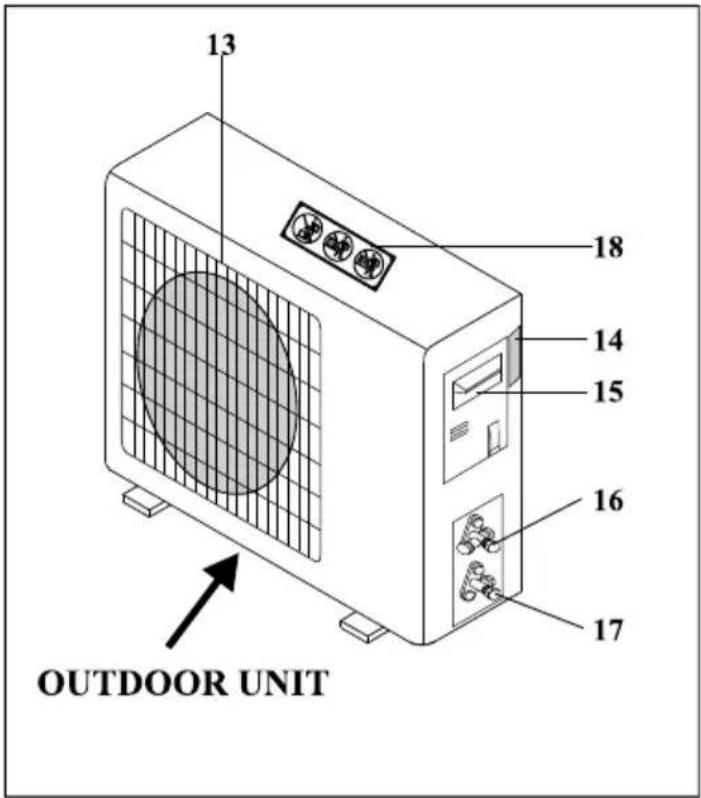
Note: the above figures are only intended to be a simple diagram of the appliance and may not correspond to the appearance of the units that have been purchased.
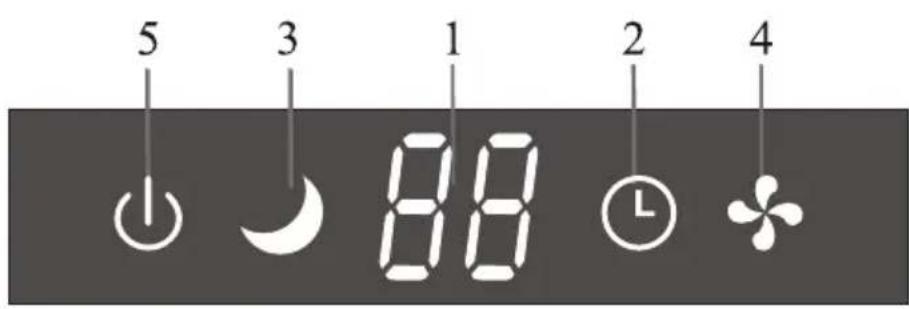
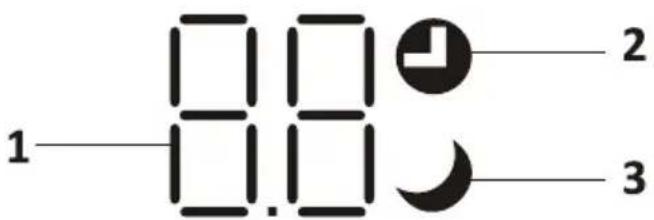
| No. | LED | Function |
| 1 |  | Indicator for Timer, temperature and Error codes. |
| 2 |  [L] [L] | Lights up during Timer operation. |
| 3 |  | SLEEP mode |
| 4 |  | The symbol appears when the unit is turned on, and disappear when the unit is turned off. |
| 5 | The symbol appears when power on. |

The shape and position of switches and indicators may be different according to the model, but their function is the same.
EMERGENCY FUNCTION & AUTO-RESTART FUNCTION
AUTO-RESTART FUNCTION
The appliance is preset auto - restart function by manufacturer. In case of a sudden power failure, the module memorizes the setting conditions before the power failure. when the power restores, the unit restarts automatically with all the previous settings preserved by the memory function.
To deactivate the AUTO-RESTART function, proceed as follows:
- Switch the air conditioner off and plug it off.
- Press the emergency button meanwhile plug it in.
- Keep pressing the emergency button for more than 10 seconds until you hear four short beeps from the unit. The AUTO-RESTART function is deactivate.
- To activate the AUTO - RESTART function, follow the same procedure until you hear three short beeps from the unit.
EMERGENCY FUNCTION
If the remote controller fails to work or maintenance necessary, proceed as follows:
Open and lift the front panel up to an angleto reach the emergency button.
- One press of the emergency button(one beep) will lead to the forced COOLING operation
- Two press of the emergency button within 3 sec (two beeps) will lead to the forced HEATING operation.
- To switch off the unit, you just need to press the button again (a single long beep).
- After 30 minutes in forced operation, the air conditioner will automatically start working in 23°C cooling mode, auto fan speed.
* The FEEL function is described in page 15.

The emergency button in some models could be on the right part of the unit under the front panel.
⚠ The shape and position of the emergency button may be different according to the model, but their function is the same.
Remark: the external static pressure of heat pumps is 0 Pa for all models.
REMOTE CONTROL
Remote control DISPLAY
| No. | Symbols | Meaning |
| 1 |  | Battery indicator |
| 2 | [2503] | Auto Mode |
| 3 |  | Cooling Mode |
| 4 |  | Dry Mode |
| 5 | [842X] | Fan only Mode |
| 6 |  | Heating Mode |
| 7 | [6CVH] | ECO Mode |
| 8 |  | Timer |
| 9 | [ACDT] | Temperature indicator |
| 10 | [STKV] | Fan speed:Auto/ low/ low-mid/ mid/ mid-high/ high |
| 11 |  | Mute function |
| 12 | [ST60] | TURBO function |
| 13 |  | Up-down auto swing |
| 14 |  | Left-right auto swing |
| 15 |  | SLEEP function |
| 16 | [TB44] | Health function |
| 17 |  | I FEEL function |
| 18 | [CSY2] | Signal indicator |
| 19 | [5Y0Z] | Gentle wind |
| 20 | [SYA3] | Child-Lock |
| 21 | [6V7H] | Display ON/OFF |
| 22 | [SDYG] | Anti-Mildew |
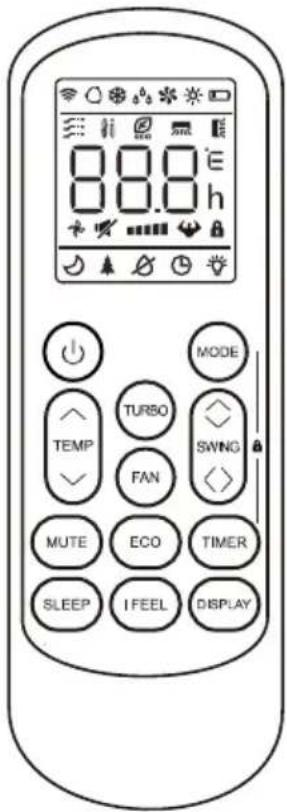
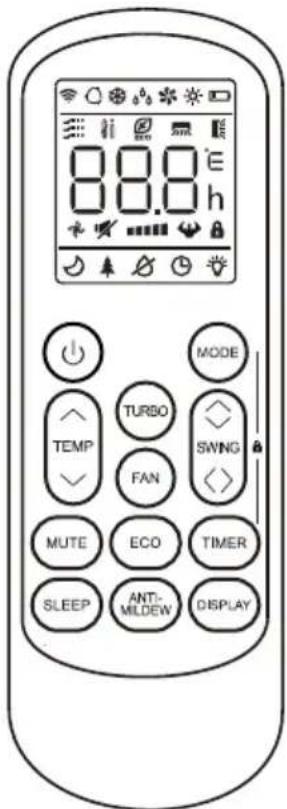

The display and some functions of the remote control may vary according to the model.
REMOTE CONTROL
| No. | Button | Function |
| 1 | To turn on/off the air conditioner . | |
| 2 | ^ | To decrease temperature, or Timer setting hours. |
| 3 | √ | To increase temperature, or Timer setting hours. |
| 4 | MODE | To select the mode of operation (AUTO, COOL, DRY, FAN, HEAT). |
| 5 | ECO | To activate/deactivate the ECO function. |
| Long press to activate/deactivate the 8°C heating function (depending on models). | ||
| 6 | TURBO | To activate/deactivate the TURBO function. |
| 7 | FAN | To select the fan speed of auto/low/mid/high. |
| 8 | TIMER | To set the time for timer on/off. |
| 9 | SLEEP | To switch-on/off the function SLEEP. |
| 10 | DISPLAY | To switch-on/off the LED display. |
| 11 | SWING ◇ | To stop or start horizontal louver movement or set the desired up/down air flow direction. |
| 12 | SWING <> | To stop or start horizontal louver movement or set the desired left/rightair flow direction. |
| 13 | I FEEL | To switch-on/off the I FEEL function. |
| 14 | MUTE | To switch-on/off the MUTE function. |
| Long press to activate/deactivate the GEN function (depending on models). | ||
| 15 | ANTI-MILDEW | To switch-on/off the ANTI-MILDEW function. |
| 16 | MODE + TIMER | To activate/deactivate the CHILD-LOCK function. |
| 17 | SWING ◇+SWING <> | To activate/deactivate the SELF-CLEAN function (depending on models). |
| 18 | FAN + MUTE | To activate/deactivate the GENTLE WIND function (depending on models). |
| 19 | SLEEP + DISPLAY | To activate/deactivate the HEALTH function (depending on models). |
The display and some functions of the remote control may vary according to the model.
The shape and position of buttons and indicators may vary according to the model, but their function is the same.
⚠ The unit confirms the correct reception of each button with the beep.
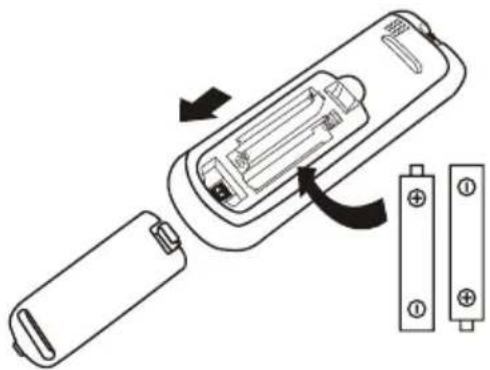
Replacement of Batteries
Remove the battery cover plate from the rear of the remote control, by sliding it in direction as the arrow.
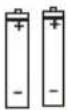
Install the batteries according the direction (+ and -) shown on the Remote Control.
Reinstall the battery cover by sliding it into place.

Use 2 pieces LRO3 AAA (1.5V) batteries.
Do not use rechargeable batteries.
Replace the old batteries with new ones of the same type when the display is no longer legible.
Do not dispose batteries as unsorted municipal waste.
Collection of such waste separately for special treatment is necessary.
natural_image
Diagram of a battery internal structure showing casing, battery pack, and terminal blocks (no text or symbols)
For some model of remote controller, open the battery cover, and you can see the manual switch at the bottom, then you can select the Cooling only or Heating pump, operate as below.
| DIP switch on position | Function |
| °C | The display is adjusted in degree celsius. |
| °F | The display is adjusted in degree fahrenheit. |
| Cool | The display is adjusted in only cooling mode |
| Heat | The display is adjusted in cooling and heating mode |

natural_image
Line drawing of a remote control device with internal components and an inset showing two rectangular slots (no text or symbols)
- Direct the remote control toward the Air conditioner.
- Check that there are no objects between the remote control and the Signal receptor in the indoor unit.
- Never leave the remote control exposed to the rays of the sun.
- Keep the remote control at a distance of at least 1m from the television or other electrical appliances.
REMOTE CONTROL
COOLING MODE
COOL

The cooling function allows the air conditioner to cool the room and reduce Air humidity at the same time.
To activate the cooling function (COOL), press the MODE button until the symbol ✿ appears on the display.
With the button √ or ∧ set a temperature lower than that of the room.
FAN MODE (Not FAN button)
FAN

Fan mode, air ventilation only.
To set the FAN mode, press MODE until ✦ appears on the display.
DRY MODE
DRY

This function reduces the humidity of the air to make the room more comfortable.
To set the DRY mode, Press MODE until _^ appears in the display. An automatic function of pre-setting is activated.
AUTO MODE
AUTO

Automatic mode.
To set the AUTO mode, press MODE until appears on the display. In AUTO mode the run mode will be set automatically according to the room temperature.
HEATING MODE
HEAT
The heating function allows the air conditioner to heat the room.
To activate the heating function (HEAT), press the MODE button until the symbol ✦ appears on the display.
With the button √ or ∧ set a temperature higher than that of the room.
In HEATING operation, the appliance can automatically activate a defrost cycle, which is essential to clean the frost on the condenser so as to recover its heat exchange function. This procedure usually lasts for 2-10 minutes. During defrosting, indoor unit fan stop operation. After defrosting, it resumes to HEATING mode automatically.
⚠ (For North American market)
If necessary, you can press ECO button 10 times within 8 seconds under heating mode to start the forced defrosting. It will defrost the outdoor ice much more fast.
FAN SPEED function (FAN button)
FAN

Change the operating fan speed.
Press FAN button to set the running fan speed, it can be set to AUTO/ MUTE/ LOW/ LOW-MID / MID/ MID-HIGH/ HIGH/ TURBO speed circularly.

flowchart
graph LR
    A["→"] --> B["★"]
    B --> C["★"]
    C --> D["★"]
    D --> E["★"]
    E --> F["★"]
    F --> G["★"]
    G --> H["★"]
    H --> I["★"]
    I --> J["★"]
    J --> K["★"]
    K --> L["★"]
    L --> M["★"]
    M --> N["★"]
    N --> O["★"]
    O --> P["★"]
    P --> Q["★"]
    Q --> R["★"]
    R --> S["★"]
    S --> T["★"]
    T --> U["★"]
    U --> V["★"]
    V --> W["★"]
    W --> X["★"]
    X --> Y["★"]
    Y --> Z["★"]
Child-Lock function
- Long press MODE and TIMER button together to active this function, and do it again to deactivate this function.
- Under this function, no single button will active.
REMOTE CONTROL
TIMER function ---- TIMER ON
TIMER
To automatic switch on the appliance.
When the unit is switch-off, you can set the TIMER ON.
To set the time of automatic switch-on as below:
- Press TIMER button first time to set the switch-on, ⏻ and [60h] will appear on the remote display and flashes.
- Press ^ or ∨ to button to set desired Timer-on time. Each time you press the button, the time increases/decreases by half an hour between 0 and 10 hours and by one between 10 and 24 hours.
- Press TIMER button second time to confirm.
- After Timer-on setting, set the needed mode (Cool/ Heat/ Auto/ Fan/ Dry), by press the MODE button. And set the needed fan speed, by press FAN button. And press^ or ∨ to set the needed operation temperature.
CANCEL it by press TIMER button.
TIMER function ---- TIMER OFF
TIMER
To automatic switch off the appliance.
When the unit is switch-on, you can set the TIMER OFF.
To set the time of automatic switch-off, as below:
- Confirm the appliance is ON.
- Press the TIMER button at first time to set the switch-off.
Press ^or ∨ to set the needed timer. - Press TIMER button at the second time to confirm.
CANCEL it by press TIMER button.
Note: All programming should be operated within 5 seconds, otherwise the setting will be cancelled.
SWING function
SWING
SWING 〈〉
-
Press the button SWING to activate the louver,
1.1 Press SWING to activate the horizontal flaps to swing from up to down, the will appear on the remote display. Press again to stop the swing movement at the current angle.
1.2 Press SWING <> to active the vertical deflectors to swing from left to right, the ☑ will appear on the remote display.
Press again to stop the swing movement at the current angle. -
If the vertical deflectors are positioned manually which placed under the flaps, they allow to move the air flow direct to rightward or leftward.
- For some inverter heating models, press horizontal SWING and vertical SWING together button at the same time, it will activate the Self-Clean function.
This adjustment must be done while the appliance is switched off.
⚠️ Never position “Flaps” manually, the delicate mechanism might seriously damaged!
Never put fingers, sticks or other objects into the air inlet or outlet vents. Such accidental contact with live parts might cause unforeseeable damage or injury.
TURBO function
TURBO
To activate turbo function, press the TURBO button, and 🤨 will appear on the display.
Press again to cancel this function.
In COOL/HEAT mode, when you select TURBO feature, the appliance will turn to quick COOL or quick HEAT mode, and operate the highest fan speed to blow strong airflow.
REMOTE CONTROL
MUTE function
MUTE
- Press MUTE button to active this function, and will appears on the remote display. Do it again to deactivate this function.
- When the MUTE function runs, the remote controller will display the auto fan speed, and the indoor unit will operate at lowest fan speed to be quiet feeling.
- When press FAN/ TURBO button, the MUTE function will be cancel. MUTE function can not be activated under dry mode.
SLEEP function
SLEEP
Pre-setting automatic operating program.
Press SLEEP button to activate the SLEEP function, and 📋 appears on the display. Press again to cancel this function.
After 10 hours running in sleep mode, the air conditioner will change to the previous setting mode.
I FEEL function (Optional)
I FEEL

Press I FEEL button to active the function, the will appear on the remote display. Do it again to deactivate this function.
This function enables the remote control to measure the temperature at its current location, and send this signal to the air conditioner to optimize the temperature around you and ensure the comfort.
It will automatically deactivate 2 hours later.
ECO function
ECO

In this mode the appliance automatically sets the operation to save energy.
Press the ECO button, the Eco appears on the display, and the appliance will run in ECO mode. Press again to cancel it.
Note: The ECO function is available in both COOLING and HEATING modes.
DISPLAY function (Indoor display)
DISPLAY
Switch ON/OFF the LED display on panel.
Press DISPLAY button to switch off the LED display on the panel. Press again to switch on the LED display.
ANTI-MILDEW function (Optional)
ANTI- MILDEW

Press ANTI-MILDEW button to activate the ANTI-MILDEW function, ⚙ will appear on the display. Do it again to deactivate this function. After running COOL/DRY for more than 30 minutes, you can operate this function, the unit will blow airflow for about 15 minutes to dry the inner parts to avoid mildew, then shuts off the unit.
Note: ANTI-MILDEW function only available in DRY/COOLING mode.
REMOTE CONTROL
SELF-CLEAN function (Optional)
Only optional for some heating pump inverter appliance.
To active this function, turn off the indoor unit at first, then press SWING and SWING <> button at the same time toward the indoor unit, until hear a beep, and [AC] will appear on the remote controller display and the indoor LED display.
- This function helps carry away the accumulated dirt, bacteria, etc from the indoor evaporator.
- This function will run about 30 minutes, and it will return to the pre-setting mode. You can press ⏻ button to cancel this function during the process.
You will hear 2 beeps when it's finished or cancelled.

It's normal if there is some noise during this function process, as plastic materials expand with heat and contract with cold.

We suggest operating this function at the following ambient conditions to avoid certain safety protection features.
| Indoor unit | Temp < 86°F (30°C) |
| Outdoor unit | 41°F (5°C) < Temp < 86°F (30°C) |

It's suggested to utilize this function every 3 months.
Gentle Wind function (Optional)
- Turn on the indoor unit, and change to COOL mode, then long press FAN and MUTE button together 3 seconds to active this function, will appear on the display. Do it again to deactivate it.
- This function will auto close the vertical flaps, and give you the comfortable gentle wind feeling.
Health function (Optional)
-
Turn on the indoor unit at first, and long press SLEEP and DISPLAY button together 3 seconds to active this function, ↑ will appear on the display.
Do it again to deactivate it. -
When the HEALTH function is initiated, the Ionizer/ Plasma/ Bipolar Ionizer/ UVC Lights (depending on models) will be energized and running.
8°C heating function (Optional)
- Long press ECO button over 3 seconds to active this function, and 8^ ( 46^ ) will appear on the remote display.
Do it again to deactivate this function. - This function will auto start the heating mode when the room temperature is lower than 8^ C ( 46^ F), and it will return to standby if the temperature reaches 9^ C ( 48^ F).
- If the room temperature is higher than 18^ C ( 64^ F), the appliance will cancel this function automatically.
GEN function (Optional)
- Turn on the indoor unit at first, and long press MUTE button 3 seconds to active, and do it again to deactivate this function.
- Under this function, short press MUTE button to select the General type L3 - L2 - L1 - OF.
- Select OF and wait 2 seconds to exit it.
OPERATION INSTRUCTIONS
① Attempt to use the air conditioner under the temperature beyond the specified range may cause the air conditioner protection device to start and the air conditioner may fail to operate. Therefore, try to use the air conditioner in the following temperature conditions.
Fixed air conditioner:
| Temperature\MODE | Heating | Cooling | Dry |
| Room temperature | 0°C~27°C | 17°C~32°C | |
| Outdoor temperature | -7°C~24°C | T1 climate: 15°C~43°C | |
| T3 climate: 15°C~52°C | |||
Inverter air conditioner:
| Temperature\MODE | Heating | Cooling | Dry |
| Room temperature | 0°C~27°C | 17°C~32°C | |
| Outdoor temperature | -15°C~24°C(Low temperature heating: -20°C~24°C) | T1 climate: 15°C~50°C(Low temperature cooling: -15°C~50°C) | |
| T3 climate: 15°C~55°C | |||
With the power supply connected, restart the air conditioner after shutdown, or switch it to other mode during operation, and the air conditioner protection device will start. The compressor will resume operation after 3 minutes.
① Characteristics of heating operation (applicable to Heating pump)
Preheating:
When the heating function is enabled, the indoor unit will take 2\~5 minutes for preheating, after that the air conditioner will start heating and blows warm air.
Defrosting:
During heating, when the outdoor unit frosted, the air conditioner will enable the automatic defrosting function to improve the heating effect. During defrosting, the indoor and outdoor fans stop running. The air conditioner will resume heating automatically after defrosting finish.
Emergency button:
Open the panel and find the emergency button on the electronic control box when the remote controller fails. (Always press the emergency button with insulation material.)
| Current status | Operation | Respond | Enter mode |
| Standby | Press the emergency button once | It beeps briefly once. | Cooling mode |
| Standby(Only for heating pump) | Press the emergency button twice in 3 seconds | It beeps briefly twice. | Heating mode |
| Running | Press the emergency button once | It keeps beeping for a while | Off mode |
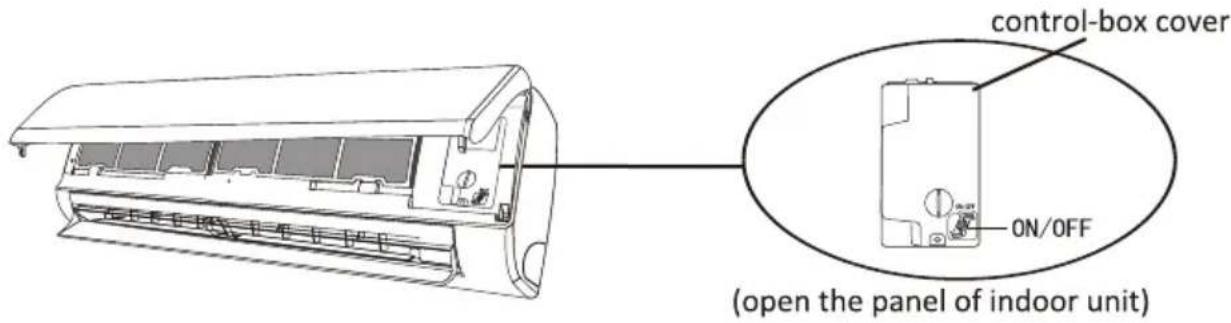
MAINTENANCE
| Warning | When cleaning, you must shut down the machine and cut off the power supply for more than 5 minutes.Under no circumstances should the air conditioner be flushed with water.Volatile liquid (e.g. thinner or gasoline) will damage the air conditioner, so only use soft dry cloth or wet cloth dipped with neutral detergent to clean the air conditioner.Pay attention to cleaning the filter screen regularly to avoid dust covering which will affect the filter screen effect. When the operating environment is dusty, the cleaning frequency should be increased appropriately.After removing the filter screen, do not touch the fins of the indoor unit to avoid scratching. | ||
| Clean the unit | 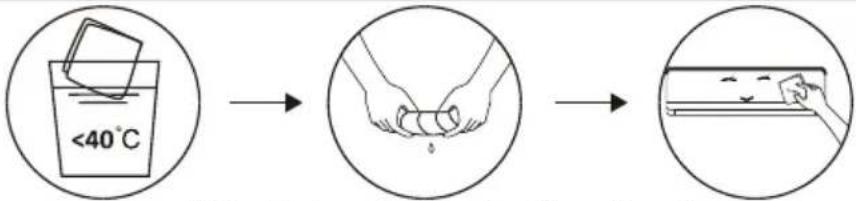 Wring it dry Gentle wipe the unit surfaceTip: Wipe frequently to keep air conditioner clean and good appearance . Wring it dry Gentle wipe the unit surfaceTip: Wipe frequently to keep air conditioner clean and good appearance . | ||
| Clean the filter |  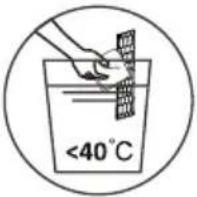 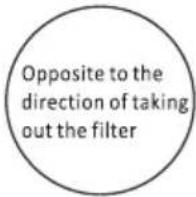 Take out the filter from the unit Clean the filter with soapy water and air dry it Replace the filterTip: When you find accumulated dust in the filter, please clean the filter in time to ensure the clean, healthy and efficient operation inside the air conditioner. Take out the filter from the unit Clean the filter with soapy water and air dry it Replace the filterTip: When you find accumulated dust in the filter, please clean the filter in time to ensure the clean, healthy and efficient operation inside the air conditioner. | ||
| Service and maintenance | When the air conditioner is not in use for a long time, do the following work:Take out the batteries of the remote controller and disconnect the power supply of the air conditioner.When starting to use after long-term shutdown:Clean the unit and filter screen;Check whether there are obstacles at the air inlet and outlet of indoor and outdoor units;Check whether the drain pipe is unobstructed;Install the batteries of the remote controller and check whether the power is on. | ||
TROUBLESHOOTING
| MALFUNCTION | POSSIBLE CAUSES |
| The appliance does not operate | Power failure/plug pulled out. |
| Damaged indoor/outdoor unit fan motor. | |
| Faulty compressor thermomagnetic circuit breaker. | |
| Faulty protective device or fuses. | |
| Loose connections or plug pulled out. | |
| It sometimes stops operating to protect the appliance. | |
| Voltage higher or lower than the voltage range. | |
| Active TIMER-ON function. | |
| Damaged electronic control board. | |
| Strange odor | Dirty air filter. |
| Noise of running water | Back flow of liquid in the refrigerant circulation. |
| A fine mist comes from the air outlet | This occurs when the air in the room becomes very cold, for example in the “COOLING” or “DEHUMIDIFYING/DRY” modes. |
| A strange noise can be heard | This noise is made by the expansion or contraction of the front panel due to variations in temperature and does not indicate a problem. |
| Insufficient airflow, eitherhot or cold | Unsuitable temperature setting. |
| Obstructed air conditioner intakes and outlets. | |
| Dirty air filter. | |
| Fan speed set at minimum. | |
| Other sources of heat in the room. | |
| No refrigerant. | |
| The appliance does not respond to commands | Remote control is not close enough to indoor unit. |
| The batteries of remote control need to be replaced. | |
| Obstacles between remote control and signal receiver in indoor unit. | |
| The display is off | Active DISPLAY function. |
| Power failure. | |
| Switch off the air conditioner immediately and cut off the power supply in the event of: | Strange noises during operation. |
| Faulty electronic control board. | |
| Faulty fuses or switches. | |
| Spraying water or objects inside the appliance. | |
| Overheated cables or plugs. | |
| Very strong smells coming from the appliance. |
TROUBLESHOOTING
ERROR CODE ON THE DISPLAY
In case of error, the display on the indoor unit shown the following error codes:
| Display | Description of the trouble |
| E1 | Indoor room temperature sensor fault |
| E2 | Indoor pipe temperature sensor fault |
| E3 | Outdoor pipe temperature sensor fault |
| E4 | Refrigerant system leakage or fault |
| E6 | Malfunction of indoor fan motor |
| E7 | Outdoor ambient temperature sensor fault |
| E0 | Indoor and outdoor communication fault |
| E8 | Outdoor discharge temperature sensor fault |
| E9 | Outdoor IPM module fault |
| EA | Outdoor current detect fault |
| EE | Outdoor PCB EEPROM fault |
| EH | Outdoor fan motor fault |
| EF | Outdoor suction temperature sensor fault |
DISPOSAL GUIDELINE (European)
This appliance contains refrigerant and other potentially hazardous materials. When disposing of this appliance, the law requires special collection and treatment. DO NOT dispose of this product as household waste or unsorted municipal waste.
When disposing of this appliance, you have the following options:
- Dispose of the appliance at designated municipal electronic waste collection facility. - When buying a new appliance, the retailer will take back the old appliance free of charge.
- The manufacturer will also take back the old appliance free of charge.
- Sell the appliance to certifid scrap metal dealers.
- Disposing of this appliance in the forest or other natural surroundings endangers your health and is bad for the environment. Hazardous substances may leak into the ground water and enter the food chain.

Supplementary introduction
1. Name plate
Panasonic
AIR CONDITIONER
INDOOR UNIT
| ModelNo. | CS-FS18AKF-4 |
| PHASE | 4 |
| VOLTAGE | 220-240V~ |
| FREQUENCY | 50Hz |
| MAXIMUM INPUT (IEC80335) | 2600W |
COOLING(T1) COOLING(T4)
| CAPACITY | 18400Btu/h(4436~19790) | 14800Btu/h(5118~18788) |
| 4640kcal/h | 3732kcal/h | |
| 5.3kw | 4.34kw | |
| CURRENT | 8.5A | 8.0A |
| (1.2~13.0) | (1.2~13.0) | |
| POWER INPUT | 1559W(270~2600) | 1845W(270~2600) |
| EER | 11.802(Blu/h/W) | 8.022(Blu/h/W) |
| REFRIGERANT R410A | 0,900kg |
| MAXIMUM ALLOWABLE PRESSURE | 4.5Mpa |
| H.P | 4.5 Mpa |
| LP | 1.9 Mpa |
SERIAL NO.
X
PRODUCTION DATE

Panasonic Marketing Middle East & Africa
F.D. See No. 17593, Jabal Ali, Dubai, United Arab Emirates
MADE IN CHINA
R410A
Panasonic
AIR CONDITIONER
OUTDOOR UNIT
| ModelNo. | CU-FS18AKF-4 |
| PHASE | 4 |
| VOLTAGE | 220-240V~ |
| FREQUENCY | 50Hz |
| MAXIMUM INPUT (EC80335) | 2600W |
COOLINGITI COOLINGITI
| CAPACITY | 18400Btu/h | 14800Btu/h |
| (4430~19790) | (5118~18160) |
| 4540 kcal/h | 3732 kcal/h |
| 5.33km | 4.34km |
| CURRENT | 8.5A | 8.0A |
| POWER INPUT | 1559W | 1845W |
| (270-2800) | (270-2800) |
| EER | 11.802(Btu/h/W) | 8.022(Btu/h/W) |
| REERIGERANT | R410A | 0.900kg |
| MAXIMUM ALLOWABLE PRESSURE | 4.5M |
| H.P. | 4.5 Mos |
| L.P. | 1.9 Mpa |
IPX4
SERIAL NO.
X
PRODUCTION DATE

Panasonic Marketing Middle East & Africa FZE
P.O. Sox No. 17903, Isabel All, Dubai, United Arab Emirates
MADE IN CHINA
R410A

Panasonic
AIR CONDITIONER
INDOOR UNIT
| ModelNo. | CS-FS24AKF-4 |
| PHASE | 1 |
| VOLTAGE | 220-240V~ |
| FREQUENCY | 50Hz |
| MAXIMUM INPUT (IEC60335) | 3000W |
| COOLING(T1) | COOLING(T4) |
2500Btu/h 2150CBtu/h
| (4094~26272) | (4436~23643) |
6304kcal/h 5422kcal/h
| 7.35km | 6.31km |
| 14.54 | 14.76 |
(1.2-17.0) (1.2-17
| 2118W | 2601W |
(280\~3000) (280\~3000)
| EER | 11.798(Btu/h/W) | 8.019(Btu/h/W) |
| REFRIGERANT | B410A | D.960kg |
| MAXIMUM ALLOWABLE PRESSURE | 4.5Mpa |
| H.P. | 4.5 Mpa |
| L.P. | 1.9 Mpa |
SERIAL NO.
X
PRODUCTION DATE

Parasonic Marketing Middle East & Africa FZE
P.O. See No. 17385, Jebel Ali, Dubai, United Arab Emirates
MADE IN CHINA
R410A
Panasonic
AIR CONDITIONER
OUTDOOR UNIT
| ModelNo. | CU-FS24AKF-4 |
| PHASE | 1 |
| VOLTAGE | 220-240V~ |
| FREQUENCY | 50Hz |
| MAXIMUM INPUT (IEC80335) | 3000W |
| COOUNG(T1) | COOLING(T4) |
| CAPACITY | 25000Btu/h | 21500Btu/h |
(4094\~26272) (4436\~23643)
| Босчикации | 3422802471 |
| В. 601 | В. 601 |
7.30km 9.00km 11.54 11.64
| (1,2~17,0) | (1,2~17,0) |
2119W 2681W
| (280~3000) | (280~3000) |
| EER | 11.798(Bu/h/W) | 8.019(Bu/h/W) |
| REFRIGERANT | R410A | D.960kg |
| MAXIMUM ALLOWABLE PRESSURE | 4.5Mpa |
| H.P | 4.5 Mpa |
| L.P | 1.9 Mpa |
IPX4
SERIAL NO.
X
PRODUCTION DATE

Panasonic Marketing Middle East & Africa FZE
P.O. Box No. 17385, Jebel Ali, Dubai, United Arab Emirates
MADE IN CHINA
R410A

- Dimension & Weight of units
| Model No. | CS-FS18AKF-4/CU-FS18AKF-4 | CS-FS24AKF-4/CU-FS24AKF-4 | ||
| Net dimensions (W x Dx H) | Indoor | mm | 1132×332×229 | 1132×332×229 |
| Outdoor (with valve cover) | mm | 863×349×602 | 927×380×699 | |
| Packing dimensions (W x D x H) | Indoor | mm | 1202×402×302 | 1202×402×302 |
| Outdoor (without piping) | mm | 890×385×628 | 949×392×732 | |
| Net weight | Indoor | Kg | 14 | 14 |
| Outdoor | Kg | 29 | 36 | |
| Gross weight | Indoor | Kg | 17 | 17 |
| Outdoor (without piping) | Kg | 31 | 40 | |
Accessory List
| Indoor unit | |||||
| Indoor | Owner's manual | Remote control | Remote control holder | Battery | Indoor and Outdoor Connecting Wiring |
 |  |  |  |  |  |
| 1 unit | 2 pieces | 1 piece 2 pieces | 1 set1 piece | ||
| Outdoor unit | |||||||
Outdoor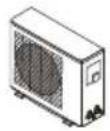 | Connecting Pipe | Installation binder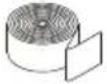 | Drainage Pipe | Insulating bushing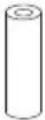 | 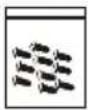 | Sealing MudScrew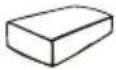 | |
(cooling) | (cooling and heating) | ||||||
| 1 unit | 1 piece | 2 pieces | 1 piece1 piece2 pieces | 2 pieces | 1 piece | ||
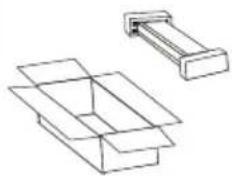
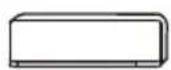
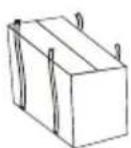
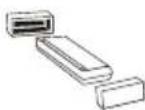
Disassembly Figure
Indoor unit

①
natural_image
Technical line drawing of two mechanical components with no visible text or symbols②

③
④
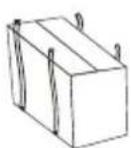
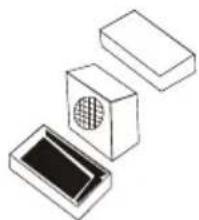
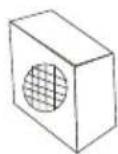
Outdoor unit
①
natural_image
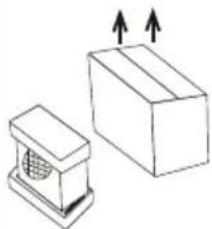
Simple line drawing of a box and a small container with ventilation grille (no text or symbols)②

natural_image
Isometric line drawing of three rectangular electronic components with a central circular vent (no text or symbols)③

④
* Replacement cord instructions, type Y attachment.
If the supply cord is damaged, it must be replaced by the manufacturer or its service agent or a similarly qualified person in order to avoid a hazard.
English
Information for Users on Collection and Disposal of Old Equipment and used Batteries

[Information on Disposal in other Countries outside the European Union]
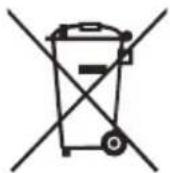
These symbols are only valid in the European Union. If you wish to discard these items, please contact your local authorities or dealer and ask for the correct method of disposal.
![PANASONIC CS-FS18AKF - [Information on Disposal in other Countries outside the European Union] - 1](/content/2026/06/1151254/images/72185a60156dae19f32661a642c25d15263985114aa85ceee1dfd9e9faff127c.jpg)
Note for the battery symbol (bottom two symbol examples):

This symbol might be used in combination with a chemical symbol. In this case it complies with the requirement set by the Directive for the chemical involved.
Pb
عربي
معلومات للمستخدم عن كيفية جمع والتخلص من الجهاز القيم والبطاريات المستخدمة
معلومات عن كيفية التخلص من الجهاز في دول لا تنتمي لدول الاتحاد الأوروبي
تستخدم هذه الرموز في دول الاتحاد الأوروبي فقط. في حال أردت التخلص من هذه المعدات فإنه يتوجب عليك التواصل مع سلطات المحلية أو وكيل الجهاز لمعرفة الطريقة الأمنل于此.

ملحوظة عن رمز البطارية (أمثلة الرمز الأدنى الثاني) :
قد يستخدم هذا الرمز مصحوبا برمز كيمياني. في هذه حالة فإنه يتوافق مع التوجيهات الخاصة بالمادة الكيميائية المعينية.
Pb
| وحدة داخلية | |||||
داخلية | دليل مستخدم | ريموت[IMAGE] | 二十五ریموت | بطاريات[IMAGE] | اسلاک التوصيلالداخلية و الخارجية |
| ervesة 1 | 2 حبة | 1 حبة | 1 حبة | 2 حبة | 1 طقم |
 | |||||||
خارجية | توصيل الأ nbيب | تثبيت المو ثق | انبوب الصرف | جلبة العازلة[64X7] | مسمار[0Y22] | اغلاق الطين | |
التدفنة | التربد والتدفنة | ||||||
| 1 حبة | 2 حبة | 1 حبة | 1 حبة | 2 حبة | 1 حبة | 1 شنط | 1 حبة |
وحدة داخلي

①
natural_image
Technical line drawing of two mechanical components with no visible text or symbols②
③

④
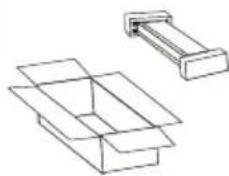
وحدة خارجي
①

natural_image
Simple line drawing of a box and a small container with ventilation grille (no text or symbols)②
natural_image
Three isometric diagrams of rectangular blocks with internal patterns, no text or symbols present③
④
* في حال تلف كابل التغذية الرئيسية، يجب استبidalه من قبل الشركة المصنعة أو وكيل الصيانة المعتمد أو شخص بنفس درجة التأهيل و ذلك لتجنب خطر الإصابة
في حالة الخطأ، تظهر الشاشة على الوحدة الداخلية رموز الخطا التالية:
| الشاشة | وصف للمتاعب |
| E1 | خطاً في مست Posting درجة حرارة الغرفة الداخلية |
| E2 | خطاً في مست Posting درجة حرارة الأ nbابب الداخلية |
| E3 | خطاً في مست Posting درجة حرارة الأ nbابب الخارجية |
| E4 | تسرب نظام التبريد أو خطوه |
| E6 | عطل في محرك المروحة الداخلي |
| E7 | خطاً في مست Posting درجة حرارة المحthyطة الخارجية |
| E0 | خطاً في الاتصال الداخلي والخارجي |
| E8 | خطاً في مست Posting درجة حرارة التفريع الخارجية |
| E9 | خطاً وحدة IPM في الهواءenge mental |
| EA | خطاً في الكشف عن التيارات في الهواءenge mental |
| EE | في الهواءenge mentalPCB EEPROM |
| EH | خطاً في محرك المروحة الخارجية |
| EF | خطاً في مست Posting درجة حرارة الشفط الخارجية |
المبادى التوجيهية للตลาด (أوروبية)
يحتوي هذا但他از علي المبرد Wyغیرها من المواد الخطر المحتملة. عند التخلص من هذا但他از، يتطلب القانون من الجمع
والمعالجة الخاصة. لا تخلص من هذا المنتج كما هو نف ayات منزلية أو نف ayات بلدية غير مصنفة.
عند التخلص من هذا الجهاز، لديك-expيرات التالية:
• تخلص من الجهاز في مرفق البلدية الخاصة بجمع النف ayات الإلكترونية.
• عند شراء جهاز جديد، سوف يسترد بائع التجزنة الجهاز القيم مجائنا.
• surveysح الشركة المصنعة الجهاز القيم مجانا'i ضنا.
• بيع الجهاز لتجار المعادن الخردة المعتمدين.
• التخلص من هذا الجهاز في الغابة أو في محيط طييعي أخرى يعرض صحتك للخطر وبيضر بالبينة. قد تتسرب
المواد الخطرة إلى المياه الجوفية وتدخل في السلسلة الغذائية.
| عطل | الأسباب المحتملة |
| الجهاز لا يعمل | انقطاع التيار الكهرباني/ تم سحب التوصيل. |
| محرك مروحة الوحدة الداخليية / الخارجية متضرر. | |
| خطأ في قاطع الدائرة المغناطيسية الحrarية الضاغط. | |
| خطأ في جهاز الحماية أو الصمamas. | |
| Falk الاتصالات أو التوصيلات المسحوبة. | |
| في بعض الأحيان يتوفق عن العمل لHMAMAية الجهاز. | |
| الجهد العالي أو أجل من نطاق الجهد. | |
| تشغيل وظيفة تشغيل المؤقت | |
| لوحة التحكم الإلكترونية المتضررة. | |
| رانحة غريبة | مرشح الهواءClar. |
| ضجبح المياء الجارية | عودة تدفق السائل في دوران المبرد. |
| يأتي ضباب غرامة من منডّالهواء | يحدث هذا عندما يصبح الهواء في الغرفة بارذا جداً، على سبيل المثال في أنماط."DEHUMIDIFYING / DRY "أو" COOLING" |
| يمكن سماع ضوضاء غريبة | هذه الضوضاء ناتجة عن توسيع أو تقلص اللوحة农业大学 بسب ال-acветلافات في درجة الحراリア.ولا تشير إلى وجود مشكلة. |
| ت.Defق الهواء غير الكافي، سواءكان ساختا أو بارذا | إعداد درجة الحراリア غير المناسب. |
| مداخل مكيف الهواء ومناف ذه المسودة. | |
| مرشح الهواءClar. | |
| تم وضع سرعة المروحة في الحد الأدنى. | |
| مصادر أخرى للحرارة في الغرفة. | |
| لا يوجد مبرد. | |
| الجهاز لا يستجب للأوامر | جهاز التحكم عن بعد LISS قربيا كافيةا إلى الوحدة الداخليية. |
| بحاجة إلى استبidal بطاريات جهاز التحكم عن بعد. | |
| العقبات بين جهاز التحكم عن بعد ومستقبل الإشارة في الوحدة الداخليية. | |
| تم إيقاف تشغيل الشاشة | تشغيل وظيفة العرض. |
| انقطاع التيار الكهرباني. | |
| ita Moz مكيف الهواء فورّا youth مكيف الهواء في وقطع التيار الكهرباني في حالة: | اصوات غريبية أثناء التشغيل. |
| خطأ في لوحة التحكم الإلكترونية. | |
| خطأ في الصمamas أو المفاني. | |
| رش الماء أو الأشياء داخل الجهاز. | |
| كابلات أو سدادات محمود. | |
| روانج قوية جداً تأتي من الجهاز. | |
| التحذير | • عند التنظيف، يجب إيقاف الجهاز وقطع thyار الكهربائي لأكثر من 5 دقائق.• لا ينبفي تحت أي ظرف من الظروف أن يكون مكيف الهواء مسوخا بال encryption.• السائل المتطوير (مثل الأرق أو الب CZIN) سوف يضر مكيف الهواء، للك استخدم ققط قماشا جافا ناعما• أو قماشا مبلا مغموسا مع المنظفات المحابدة ل DENظيف مكيف الهواء.• انتبه إلى تنظيف شاشة Techفية بانتظام لتجب提炼ة الغبار التي ستؤثر على تأثير شاشة Techفية.• عندما تكون بينة Techغير مغيرة، تيبفي زيادة تردد DENظيف بشكل مناسب.• بعد إزالة شاشة Techفية، لا تلمس زعانف الوحدة 달خلية لتجب الخدش. |
| PENظيف الوحدة |  الlicitيحة: امسح بشكل مكرر للحقاظ على نظافة مكيف الهواء وال postureر الجيد. الlicitيحة: امسح بشكل مكرر للحقاظ على نظافة مكيف الهواء وال postureر الجيد. |
| PENظيف المرشج |  الlicitيحة: عندما تجد الغبار المتراكيم في المرشج، يرجى تنظيف المرشج في الوقت المناسب لضمانالتشغير النظيف والصحي والفعال داخل مكيف الهواء الlicitيحة: عندما تجد الغبار المتراكيم في المرشج، يرجى تنظيف المرشج في الوقت المناسب لضمانالتشغير النظيف والصحي والفعال داخل مكيف الهواء |
| الخدمات والصيانة | • عندما لا يكون مكيف الهواء قيد الاستخدام لفرة طويلة، قم بالعمل الثاني: أخرج بطاريات جهاز التحكم• عن بعد واقصل التيار الكهرباني من مكيف الهواء• عند生日 Educational، بعد إيقاف Techغير طويل الأجل:• نظف الوحدة وشاesthesia المرشج;1. youth: 2. youth: 3. youth: 3. youth: 3. youth: 3. youth: 3. youth: 3. youth: 3. youth: 3. youth: 3. youth: 3. youth: 3. youth: 3. youth: 3. youth: 3. youth: 3. youth: 3. youth: 3. youth: 3. youth: 3. youth: 3. youth: 2. youth: 2. youth: 2. youth: 2. youth: 2. youth: 2. youth: 2. youth: 2. youth: 2. youth: 2. youth: 2. youth: 2. youth: 2. youth: 2. youth: 2. youth: 2. youth: 2. youth: 2. youth: 2. youth: 2. youth: 1. youth: 1. youth: 1. youth: 1. youth: 1. youth: 1. youth: 1. youth: 1. youth: 1. youth: 1. youth: 1. youth: 1. youth: 1. youth: 1. youth: 1. youth: 1. youth: 1. youth: 1. youth: 1. youth: 1. youth: 2. youth: 2. youth: 2. youth: 2. youth: 2. youth: 2. youth: 2. youth: 2. youth: 2. youth: 2. youth: 2. youth: 2. youth: 2. youth: 2. youth: 2. youth: 2. youth: 2. youth: 2. youth: 2. youth: 3. youth: 3. youth: 3. youth: 3. youth: 3. youth: 3. youth: 3. youth: 3. youth: 3. youth: 3. youth: 3. youth: 3. youth: 3. youth: 3. youth: 3. youth: 3. youth: 3. youth: 3. youth: 2. youth: 1. youth: 1. youth: 1. youth: 1. youth: 1. youth: 1. youth: 1. youth: 1. youth: 1. youth: 1. youth: 1. youth: 1. youth: 1. youth: 1. youth: 1. youth: 1. youth: 1. youth: 1. youth: 2. youth: 3. youth: 3. youth: 3. youth: 3. youth: 3. youth: 3. youth: 3. youth: 3. youth: 3. youth: 3. youth: 3. youth: 3. youth: 3. youth: 3. youth: 3. youth: 3. youth: 3. youth: 3. youth:2. youth: 2. youth: 2. youth: 2. youth: 2. youth: 2. youth: 2. youth: 2. youth: 2. youth: 2. youth: 2. youth: 2. youth: 2. youth: 2. youth: 2. youth: 2. youth: 2. youth: 2. youth: 2. youth: 2. youth:2. youth: 2. youth: 2. youth: 2. youth: 2. youth: 2. youth: 2. youth: 2. youth: 2. youth: 2. youth: 2. youth: 2. youth: 2. youth: 2. youth: 2. youth: 2. youth: 2. youth: 2. youth: 2. youth: 2, youth: 2, youth: 2, youth: 2, youth: 2, youth: 2, youth: 2, youth: 2, youth: 2, youth: 2, youth: 2, youth: 2, youth: 2, youth: 2, youth: 2, youth: 2, youth: 2, youth: 2, youth: 2, youth: 2, youth: 2. youth: 2. youth: 2. youth: 2. youth: 2. youth: 2. youth: 2. youth: 2. youth: 2. youth: 2. youth: 2. youth: 2. youth: 2. youth: 2. youth: 2. youth: 2. youth: 2. youth: 2. youth: 2. youth: 2, youth:2, youth:2, youth:2, youth:2, youth:2, youth:2, youth:2, youth:2, youth:2, youth:2, youth:2, youth:2, youth:2, youth:2, youth:2, youth:2, youth:2, youth:2, youth:2, youth:2, youth:2, youth:2, youth:2, youth:2, youth:2, youth :2, youth :2, youth :2, youth :2, youth :2, youth :2, youth :2, youth :2, youth :2, youth :2, youth :2, youth :2, youth :2, youth :2, youth :2, youth :2, youth :2, youth :2, youth :2, youth :2, youth :2, youth :2, youth :2, youth :2, youth :2, youth:2, youth :2, youth :2, youth :2, youth :2, youth :2, youth :2, youth :2, youth :2, youth :2, youth :2, youth :2, youth :2, youth :2, youth :2, youth :2, youth :2, youth :2, youth :2, youth :2, youth :2, youth :2, youth :2, youth :2, youth:2, youth:2, youth:2, youth:2, youth:2, youth:2, youth:2, youth:2, youth:2, youth:2, youth:2, youth:2, youth:2, youth:2, youth:2, youth:2, youth:2, youth :2, youth :2, youth :2, youth :2, youth :2, youth :2, youth :2, youth:2, youth :2, youth :2, youth :2, youth :2, youth :2, youth :2, youth :2, youth :2, youth :2, youth :2, youth :2, youth :2, youth :2, youth :2, youth :2, youth :2, youth:2, youth :2, youth :2, youth :2, youth :2, youth :2, youth :2, youth :2, youth:2, youth :2, youth :2, youth :2, youth :2, youth :2, youth :2, youth :2, youth :2, youth :2, youth :2, youth :2, youth :2, youth :2, youth :2, youth :2, youth:2, youth :2, youth :2, youth :2, youth :2, youth :2, youth :2, youth :2, youth :2, youth:2, youth :2, youth :2, youth :2, youth :2, youth :2, youth :2, youth :2, youth :2, youth :2, youth :2, youth :2, youth :2, youth :2, youth :2, youth :2, youth:2, youth:2, youth:2, youth:2, youth:2, youth:2, youth:2, youth:2, youth:2, youth :2, youth :2, youth :2, youth :2, youth :2, youth :2, youth :2, youth :2, youth :2, youth :2, youth :2, youth :2, youth :2, youth :2, youth :2, youth:2, youth :2, youth :2, youth :2, youth :2, youth :2, youth :2, youth :2, youth:2, youth:2, youth:2, youth:2, youth:2, youth:2, youth:2, youth:2, youth:2, youth :2, youth :2, youth :2, youth :2, youth :2, youth :2, youth :2, youth :2, youth:2, youth :2, youth :2, youth :2, youth :2, youth :2, youth :2, youth :2, youth :2, youth :2, youth :2, youth :2, youth :2, youth :2, youth :2, youth:2, youth :2, youth :2, youth :2, youth :2, youth :2, youth :2, youth :2, youth :2, youth :2, youth:2, youth :2, youth :2, youth :2, youth :2, youth :2, youth :2, youth :2, youth :2, youth :2, youth :2, youth :2, youth :2, youth :2, youth :2, youth:2, youth:2, youth:2, youth:2, youth:2, youth:2, youth:2, youth:2, youth:2, youth:2, youth :2, youth :2, youth :2, youth :2, youth :2, youth :2, youth :2, youth :2, youth :2, youth :2, youth :2, youth :2, youth :2, youth :2, youth:2, youth :2, youth :2, youth :2, youth :2, youth :2, youth :2, youth :2, youth :2, youth:2, youth:2, youth:2, youth:2, youth:2, youth:2, youth:2, youth:2, youth:2, youth :2, youth :2, youth :2, youth :2, youth :2, youth :2, youth :2, youth:2, youth :2, youth :2, youth :2, youth :2, youth :2, youth :2, youth :2, youth:2, youth :2, youth :2, youth :2, youth :2, youth :2, youth :2, youth :2, youth :2, youth:2, youth :2, youth :2, youth :2, youth :2, youth :2, youth :2, youth :2, youth:2, youth :2, youth :2, youth :2, youth :2, youth :2, youth :2, youth :2, youth:2, youth :2, youth :2, youth :2, youth :2, youth :2, youth :2, youth :2, youth:2, youth:2, youth:2, youth:2, youth:2, youth:2, youth:2, youth:2, youth:2, youth:2, youth:2, youth:2, youth:2, youth:2, youth:2, youth:2, youth:2, youth:2, youth:2, youth:2, youth:2, youth:2, youth:2, youth:2, youth:-4,4,4,4,4,4,4,4,4,4,4,4,4,4,4,4,4,4,4,4,4,4,4,4,4,4,4,4,4,4,4,4,4,4,4,4,4,4,4,4,4,4,4,4,4,4,4,4,4,4,4,-4,4,4,4,4,4,4,4,4,4,4,4,4,4,4,4,4,4,4,4,4,4,4,4,4,4,4,4,4,4,4,4,4,4,4,4,4,-4,4,4,4,4,4,4,4,4,4,4,4,4-4,4,4,4,4,4,4,4,4,4,4,4,4,4,4,4,4,4,4,4,4,4,4,4,-4,4,4,4,4,4,4,4,4,4,4,4,4,4,4,4,4,4,4,4,4,4,-4,4,4,4,4,4,4,4,4,4,4,4,4,4,4,4,4,4,4,4,4,-4,4,4,4,4,4,4,4,4,4,4,4,4,4,4,4,4,4,-4,4,4,4,4,4,4,4,4,4,4,4,4,4,4,4,4,4,-4,4,4,4,4,4,4,4,4,4,4,4,4,4-4,4,4,4,4,4,4,4,4,4,4,4,4,4,4,4,4,-4,4,4,4,4,4,4,4,4,4,4,4,4,4,4,4,4,-4,4,4,4,4,4,4,4,4,4,4,4,4,4,-4,4,4,4,4,4,4,4,4,4,4,4,4,4,-4,4,4,4,4,4,4,4,4,4,4,4,-4,4,4,4,4,4,4,4,4,4,4,4,-4,4,4,4,4,4,4,4,4,4,4,4,4,4,-4,4,4,4,4,4,4,4,4,4,4,4,-4,4,4,4,4,4,4,4,4,4,4,-4,4,4,4,4,4,4,4,4,-4,4,4,4,4,4,4,4,-4,4,4,4,4,4,4,4,-4,4,4,4,4,4,4,4,-4,4,4,4,4,4,-4,4,4,4,4,4,-4,-4,-4,-4,-4,-4,-4,-4,-4,-4,-4,-4,-4,-4,-4,-4,-4,-4,-4,-4,-4,-4,-4,-4,-4,-4,-4,-4,-4,-4,-4,-4,-4,-4,-4,-4,-4,-4,-4,-4,-4,-4,-4,-4,-4,-4,-4,-4,-4,-4, ^1 You are not a few times a day of the year of the year of the year of the year of the year of the year of the year of the year of the year of the year of the year of the year of the year of the year of the year of the year of the year of the year of the year of the year of the year of the year of the year of the year of the year of the year of the year of the year of the year of the year of the year of the year of the year of the year off the rest of the year of the year of the year of the year of the year of the year of the year of the year of the year of the year of the year of the year of the year of the year of the year of the year of the year of the year of the year of the year of the year of the year of the year of the year of the year of the year of the year of the year of the year of the year of the year of the year of the year and the rest of the year of the year of the year of the year of the year of the year of the year of the year of the year of the year of the year of the year of the year of the year of the year of the year of the year of the year of the year of the year of the year of the year of the year of the year of the year of the year of the year of the year of the year of the year of the year of the year of that year of the year of the year of the year of the year of the year of the year of the year of the year of the year of the year of the year of the year of the year of the year of the year of the year of the year of the year of the year of the year of the year of the year of the year of the year of the year of the year of the year of the year of the year of the year of the year of the year of the years of the year of the year of the year of the year of the year of the year of the year of the year of the year of the year of the year of the year of the year of the year of the year of the year of the year of the year of the year of the year of the year of the year of the year of the year of the year of the year of the year of the year of the year of the year of the year of the year of the year at the start of the year of the year of the year of the year of the year of the year of the year of the year of the year of the year of the year of the year of the year of the year of the year of the year of the year of the year of the year of the year of the year of the year of the year of the year of the year of the year of the year of the year of the year of the year of the year of the year of the year after the start of the year of the year of the year of the year of the year of the year of the year of the year of the year of the year of the year of the year of the year of the year of the year of the year of the year of the year of the year of the year of the year of the year of the year of the year of the year of the year of the year of the year of the year of the year of the year of the year of their family in the country of Canada (see above section 1). • You are not a few times a day of the year of the year of the year of the year of the year of the year of the year of the year of the year of the year of the year of the year of the year of the year of the year of the year of the year of the year of the year of the year of the year of the year of the year of the year of the year of the year of the year of the year of the year of the year of the city (see above section 1). • You are not a few times a day of the year of the year of the year of the year of the year of the year of the year of the year of the year of the year of the year of the year of the year of the year of the year of the year of the year of the year of the year of the year of the year of the year of the year of the year of the year of the year of the year of the city (see above section 1). • You are not a few times a days of the year of the year of the year of the year of the year of the year of the year of the year of the year of the year of the year of the year of the year of the year of the year of the year of the year of the year of the year of the year of the year of the year of the year of the year of the year of the year of the year of the year of the year of the year of the year of the year of the year (see above section 1). • You are not a few times a day of the year of the year of the year of the year of the year of the year of the year of the year of the year of the year of the year of the year of the year of the year of the year of the year of the year of the year of the year of the year of the year of the year of the year of the year of the year of the year of the year of the yoy (see above section 1). • You are not a few times a day of the year of the year of the year of the year of the year of the year of the year of the year of the year of the year of the year of the year of the year of the year of the year of the year of the year of the year of the year of the year of the year of the year of the year of the year of the year of the year of the year of the yrory (see above section 1). • You are not a few times a day of the year of the year of the year of the year of the year of the year of the year of the year of the year of the year of the year of the year of the year of the year of the year of the year of the year of the year of the year of the year of the year of the year of the year of the year of the year of the year of the year of the years (see above section 1). • You are not a few times a day of the year of the year of the year of the year of the year of the year of the year of the year of the year of the year of the year of the year of the year of the year of the year of the year of the year of the year of the year of the year of the year of the year of the year of the year of the year of the year of the year of the Year (see above section 1). • You are not a few times a day of the year of the year of the year of the year of the year of the year of the year of the year of the year of the year of the year of the year of the year of the year of the year of the year of the year of the year of the year of the year of the year of the year of the year of the year of the year of the year of the year of the-year (see above section 1). • You are not a few times a day of the year of the year of the year of the year of the year of the year of the year of the year of the year of the year of the year of the year of the year of the year of the year of the year of the year of the year of the year of the year of the year of the year of the year of the year of the year of the year of the year of theyear (see above section 1). • You are not a few times a day of the year of the year of the year of the year of the year of the year of the year of the year of the year of the year of the year of the year of the year of the year of the year of the year of the year of the year of the year of the year of the year of the year of the year of the year of the year of the year of the year of theYear (see above section 1). • You are not a few times a day of the year of the year of the year of the year of the year of the year of the year of the year of the year of the year of the year of the year of the year of the year of the year of the year of the year of the year of the year of the year of the year of the year of the year of the year of the year of the year of the year of the yeory (see above section 1). • You are not a few times a day of the year of the year of the year of the year of the year of the year of the year of the year of the year of the year of the year of the year of the year of the year of the year of the year of the year of the year of the year of the year of the year of the year of the year of the year of the year of the year of the year ofthe year (see above section 1). • You are not a few times a day of the year of the year of the year of the year of the year of the year of the year of the year of the year of the year of the year of the year of the year of the year of the year of the year of the year of the year of the year of the year of the year of the year of the year of the year of the year of the year of the year ofthe city (see above section 1). • You are not a few times a day of the year of the year of the year of the year of the year of the year of the year of the year of the year of the year of the year of the year of the year of the year of the year of the year of the year of the year of the year of the year of the year of the year of the year of the year of the year of the year of the year ofthe urban area (see above section 1). • You are not a few times a day of the year of the year of the year of the year of the year of the year of the year of the year of the year of the year of the year of the year of the year of the year of the year of the year of the year of the year of the year of the year of the year of the year of the year of the year of the year of the year of the year of the river (see above section 1). • You are not a few times a day of the year of the |
①قد تKnسب محAUOLة استخام مكيف الهواع في درجة حرارة تتجاوزNLطاق المhedد في بده تشغيل جهاز حماية مكيف الهواع وقد
يفشل تشغيل مكيف الهواء. لذلك، حول استخدام مكيف الهواء في ظروف درجة الحرارة التالية.
تكيف الهواء الثالث:
| الوضع درجة الحرارة | التسخين | التبريد | جاف |
| درجة حرارة الغرفة | 0 درجة منوية ~ 27 درجة منوية | 17 درجة منوية ~ 32 درجة منوية | |
| درجة الحرارة الخارجية | - 7 درجة منوية ~ 24 درجة منوية | مناخ 15 : T1 | |
| مناخ 15 : T3 | |||
تكيف الهواء العاكس:
| الوضع درجة الحرارة | التسخين | التبريد | جاف |
| درجة حرارة الغرفة | 0 درجة منوية ~ 27 درجة منوية | 17 درجة منوية ~ 32 درجة منوية | |
| درجة الحرارة الخارجية | - 15 درجة منوية ~ 24 درجة منوية()- 20 درجة منوية ~ 24 درجة منوية | 15 : T1 مناخ تبريد بدرجة حرارة منخفضة: - 15 درجة منوية ~ 50 درجة منوية | |
| 15 : T3 مناخ تبريد بدرجة حرارة من Confidence: | |||
عند توصيل مصر الطاقة،)!赞成 تشفيل مكيف الهواء بعد إيقاف التشفيل، أو قيم بالتحويل إلى وضع أخرى اثناء التشفيل، وسييداً تشغيل جهاز حماية مكيف الهواء. Yemenことف المكّف عمله بعد 3 دقائق.
① خصاتص تشغيل التسخين (تنطبق على مضخة التسخين)
التسخين المسبق:
عند تمكين وظيفة التدفئة، ستغرق الوحدة الداخلية من دقيقتين إلى 5 دقائق للتدفنة المس投资额، وبعد ذلك سيدأ مكيف الهواء في
التدفنة ويط Puzzle الهواء الدافى.
إزالة الصقيع:
أثناء التدفئة، عندما تتجمد الوحدة الخارجية، سيمكن مكيف الهواء وظيفة إزالة الص-Time التلقنية ل'Eحسين تأثير التدفئة. أثناء إزالة الص-Time، تتوقف المراوح الداخليا والخارجية عن الدوران. يستألف مكيف الهواء التدفئة تلقانياً بعد الالنهاه من إزالة
الصقيع.
# زر الطوارى:
affتح اللوحة وابحث عن زر الطوارئ على صندوق التحكم الإلكتروني عند فشل وحدة التحكم عن بُعد. (اضغط دائمًا على زر
الطوارى بمادة عازلة.
| الحالة accesية | التشغيل | الرød | ادخل إلى وضع |
| الاستعداد | (emergency) اضغط على زر (الطوارئ) مرة واحدة | تصدر إشارة صوتية مرة واحدة ل crudeة وجیزة. | وضع التبريد |
| الاستعداد (لمضخة التدفنة雀قط) | (emergency) اضغط على زر (الطوارئ) مرتين خلال 3 ثوان | تصدر صوت تنبيه مرتين ل crudeة وجیزة. | وضع التدفة |
| الدوران | (emergency) اضغط على زر (الطوارئ) مرة واحدة | فهو يستمر في اصدار صوت تنبيه ل crudeة من الوقت | وضع إيقاء التشغيل |
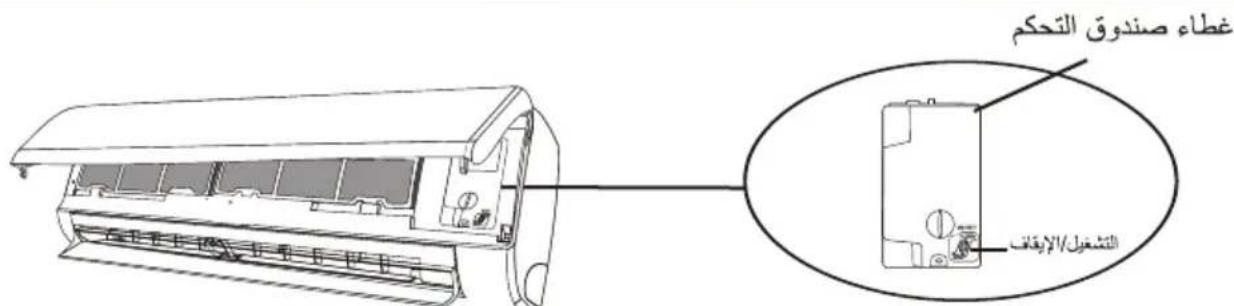
(afتح لوحة الوحدة الداخلية)
وظيفة الهواء المنعش (-acztيرية)
- قم بتشغيل الوحدة الداخلية، ثم قم بال tangيير إلى و + MODE FAN التبريد، ثم اضغط مطولاً على الزر معاً لمدة 3 ثوان لتشيط هذه الوظيفة، وستظهر نتّيّ على الشاه. قم.SEلك مرة أخرى إلماء تنشيطه.
- ستعمل هذه الوظيفة على إغلاق المرفرفات الرأسية تلقائياء كما تمنحك شعوزا مريها بالهواء المنESS.
وظيفة الصحة (-acwidارية)
- قم بتشغيل الوحدة الداخلية أولاً، ثم ا+\$غط مطلواً على الزر و DISPLAY SLEEP معاً لمدة 3 ثوان لتشغيل هذه الوظيفة، وستظهر على شاشعة عرض جهاز التحكم عن بعد.
- قم بنلك مرة أخرى لإلغاء تنشيطه : عند dye وظيفة الصحة، سítم تنشيط المؤن / البلازما / (وفقا للطرازات) UVC ثناني القطب المؤن / أضواء وتشغيلها.
(الختيارية) Gen
- قم بتشغيل الوحدة الداخلية岁以下، واضغط مطولاً على الزر L-3 ثوان للتشيط، ثم قم.SEالك مرة أخرى لإلغاء مUTE تنشيط هذه الوظيفة.
- تحت هذه الوظيفة، اضغط لوهلة على الزر L3 - L2 - L1 - OF لاختيار Nitوع العام
- حدد إيقاف ثم انت typل ثانيتين للخروج منه.
وظيفة التنظيف الذاتي (-acztيرية)
الختياري فقط لبعض أجهزة محول مضخة التدفئة. letشفيل هذه الوظيفية، أوفق تشغيل الوحدة الداخلية أوولاً، ثم SWING و في الوقت比较高ه باتجاه SWING الوحدة الداخلية، حتىarseم صوت صافرة، وستظهر [AC] الوحدة�回ACTIVE، على شاشته وحدة التحكم عن بُعد وشاهته LED
- Teslaد هذه الوظيفة على إزالة الأوXAخ المتراكة والبكتيريا، إخ من المbxر الداخلي.
- Cameroon هذه الوظيفة لمدة 30 دقيقة تقريبا، وتعود إلى وضع الإعداد المس Essential. يمكنك الضغط على الزر ⓞإللغاء هذه الوظيفة أثناء العملية. ستسمع صافرتين عند انتهاها أو إلمهاها. من الطبيعي أن يحدث بعض الضجيع أثناءعملية الوظيفة هذه، حيث تتوسع Cascade البلاستيكية مع الحراリア وتنكمش مع البرودة. نقترح تشغير هذه الوظيفة في الظروف المحيطة التالية لتجنب ميزات معينة لHMAYA'SLSLAME.
| الوحدة الداخلية | درجة الحرارة > 86 درجة فهرنهايت(درجة مئوية)30 |
| الوحدة الخارجية | > 41 درجة فهرنهايت (5 درجات مئوية)30 درجة الحرارة > 86 درجة فهرنهايت(درجة مئوية) |
يَقْتَرْح إستخدام هذه الوظيفة كل 3 أشهر.
وظيفة التدفئة حتى 8 درجات منوية (اختيارية)
- ا+\$غط مطلonaً على الزر للاكثر من 3 ثوان لكي يتم EcO تنشيط هذه الوظيفة، وC ^8 ستظهر (46°F) على شاشة عرض جهاز التحكم عن بُعد. قم.SEBEIك مرة أخري لالعاء تنشيط هذه الوظيفة.
- تبداً هذه الوظيفة تشغيل وضع التدفئة تلقانيا عندما تكون درجة حراية الغرفة أقل من 8 درجات مئوية (46) درجة فهرنهایت، وتعود إلى ووضع الاستعداد إذا وصلت درجة الحرارة إلى 9 درجات مئوية (48) درجة فهرنهایت.
- إذا كانت درجة حراية الغرفة أعلى من 18 درجة مئوية (64) درجة فهرنهایت، فسicyوم الجهاز بالعاء هذه الوظيفة телقانيا.
ECO وظيفة
في هذا الوضع، يقوم الجهاز تلقائياً بضبط التشغيل لتوفر الطاقة.
ECO ECO
إ Forgط على الزر، سيظهر Eco,Estغيل الجهاز في وضع توفير الطاقة. إ Forgط مرة أخرى لإلغاء الأمر. ملاحظة: تتوفر وظيفة توفير الطاقة في كل من وضعي التبريد والتدفئة.
وظيفة الصامت
MUTE
- اضغط على الزر MUTE على شاشة جهاز التحكم عن بُعد.
قم بنلك مرة أخرى لإلغاء تنشيط هذه الوظيفة. 2. عند تشغيل وظيفة كتم الصوت، تعرض وحدة التحكم عن بُعد سرعة المروحة التلقائية، وستعمل الوحدة الداخلية باقل سرعة للمروحة لتشعر بالهدوء. FAN/ TURBO/ SLEEP 3. عند الضغط على زر (المرokoحة/ السرعة القصوى / النوم) ، سيتم إلغاء وظيفة كتم الصوت. لا يمكن تنشيط وظيفة كتم الصوت في وضع إزالة الرطوبة.
وظيفة العرض (شاهste العرض الداخلية)
قم بتشغيل/إي Calif تشغيل شاشة على LED الشاهية.
DISPLAY
LED إيقاف تشغيل م MSNBC لا Compact على الزر DISPLAY يعرض على شاشة العرض. ا Forgط مرة أخرى لتشغيل شاشة .LED
وظيفة النوم
الإعداد المスペق لبرنامج التشفيل التلقاني.
SLEEP
-storeg على الزر SLEEP لتنشيط وظيفة النوم، وسيظهر على شاشة جهاز التحكم عن بعد. -storeg مرة أخرى لإلغاء هذه الوظيفة.
بعد 10 ساعات من التشغيل في وضع النوم، سی retrieval مكيف الهواء إلى وضع الإعداد Lapiec.
وظيفة مقاومة العفن (-acztيارية)
ANTI-MILDEW
ANTI-MILDEW إ功效 على الزر على شاشة العرض. قمönك مرة أخرى لإلغاء تشيط هذه الوظيفة. BEOD تشفيل وضع (الtb individ/التجفيف) لأكتر من 30 دقيقة يمكنك تشفيل هذه الوظيفة، حيث تقوم الوحدة بنفق الهواء لمدة 15 دقيقة تقريبًا لتجفيف الأجزاء الداخلية لتجب تكون العifen، ثم تقوم بايقات تشغيل الوحدة.
ملاحظة: ت Winning وظيفية مقاومة التöffن في وضع التجفيف/الtbريد فقط.
وظيفة أنا أشعر (的可能性)
I FEEL
إضغط على الزر IFEEL تشthyط الوظيفة، وستظهر على شاشة عرض جهاز التحكم عن بُعد. قم.SEZK مرة أخرى إللغاء تتشthyط هذه الوظيفة.
تnitح هذه الوظيفة ل heaterاز التحكم عن بعد قياس درجة الحرارة الحالية في المكان وإرسال هذه الإشارة إلى مكيف الهواء ل'Eحسین درجة الحرارة المحিপة بك وضمان الراحة. سيتم Buenos التنشيط تلقانيً بعد ساعتين.
وظيفة التارجح

- ا Compact على زر (التارج) لتشيط فتحة SWING
التهوية،
1.1 1.1 لتشيط المرفرات الأفقية للتأرجح من SWING
أعلى إلى أسفل، سوف تظهر على شاشة عرض
جهاز التحكم عن بعد.
اضغط مرة أخرى لإيقاف حركة التارجح عند الزAOية
الحالية.
1.2 على تنشيط عاكسات الهواء الرأسية SWING <> اضغط
لل tournaments من اليسار إلى اليمين، سوف تظهر على
شاشة عرض جهاز التحكم عن بعد.
اضغط مرة أخرى لإيقاف حركة التارجح عند الزAOية
الحالية.
- إذا تم وضع عاكسات الهواء الرأسية يدوياً، والتي تčeع أسفل
المرفرفت، فإنها تnitيح تحrijk تدفق الهواء مباشرة إلى
اليمين أو اليسار.
- بالنسبة إلى بعض طرازات محولات التدفئة، اضغط على
زر التارجح الأفقي والتأرجح الرأسي معا في الوقتHOUSE،
لتنشيط وظيفة التنظيف الذاتي.
يجب إجراء هذا الضبط عندما يكون الجهاز متوقفً عن
التشغيل.
لا تضبط المرفرفت يدويا أبدأ، فalcق يؤدي ذلك إلى
إتلاف الأجهزة الميكانيكية الحساسة!
لا تضع اpresابعك أو ع Pizza أو أي أشياء أخرى في فتحات
تهوية مدخل الهواء أو مخرج الهواء. قد يتسبّ هذا
الTranslation غير المقصود بالأجزاء الداخلية بحدود تلف أو
إصابة غير متوقعة.
وظيفة السراعة القصوى
,TURBO لتشيط وظيفة السرعة القصوى، اضغط على الزر
وستظهر على الشاشة.
اضغط مرة أخرى لإلغاء هذه الوظيفة.
في وضع التبريد/الحرارة، عندما تحدد ميزة السرعة القصوى،
يتحول الجهاز إلى وضع التبريد السريع أو التسخين السريع،
وتشغيل أعلى سرعة للمروحة لنفخ تيار هواء قوي.
وظيفة الموقت ----{-}- مؤقت تشغيل المكيف
لتشغيل الجهاز تلقانياً.
عند إيقاف تشغيل الوحدة، يمكن ك ضبط
مُزْقَت تُشْغِيل المكِيف.
لضبط وقت التشغيل التلقاني كما هو موضح أدناه:
- اضغط على زر (المؤقت) لأول مرة لإعداد مفتاح TIMER
التشغيل، وسيظهر Ⓤ [60h] على الشاشة البعيدة وikelمع.
- اضغط على زر ⌈ أو ∨ لضبط الوقت في تشغيل المؤقت
المطلوب. في كل مرة تضغط فيها على هذا الزر، يزيد أو
ينقص الوقت بمقدار نصف ساعة بين 0 و 10 ساعات
وبواحدة بين 10 و 24 ساعة.
-
ا Forgط على زر (الم poukt) مرة ثانية للتأكيد. TIMER
-
بعد إعداد تشغيل المؤقت، إعداد الوضع المطلوب (الtbريد)
التسخين / التلقائي / المروحة / التجفيف) ، بال Forgط على زر
(الوضع). و إعداد سرعة المروحة المطلوبة باللغط MODE
(المرERICA). واضغط علي ∨ أو ∨ لإعداد على زر
درجة حرارة التشفيل المطلوبة.
(المؤقت)Timer (المُغائها عن طريق الضغط على زر)
وظيفة الموقت ----{-}- مؤقت إيقاف تشغيل المكيف
لإيقاف تشغيل الجهاز تلقانياً.

عندما تكون الوحدة قيد التشغيل، يمكن ضبط مؤقت إيقاف
تشغيل المكيف.
ل SXط وقت إيقاف التشغيل التّلقاني، كما هو موضح أدناه:
-
تأكد من تشغيل الجهاز.
-
ا Compact على الزر في المرة الأولى لضبط إيقاف TIMER
التشغيل.
اضغط على √ أو ∧ اضبط الوقت المرغوب.
- اضغط على الزر في المرة الثانية للتأكيد. TIMER
TIMER قم باللغانه بال ldغط على الزر
ملاحظة: يجب تشغيل جميع البرمجة في غضون 5 ثوان، إلا
فسيتم إلىغاء الإعداد.
وضع التدفة
تسمح وظيفة التدفئة لمكيف الهواء بتدفئة الغرفة.
HEAT
MODE letنشيط وظيفة التدفئة (HEAT) ، ا+\$غط على الزر حتى يظهر الرمز ※ على الشاشة. باستخدام الزر ∨ أو ∧ ا+\$بط درجة حرارة أعلى من درجة حرارة الغرفة.
عند تشغيل التدفة، يمكن للجهاز تشيط دورة إزالة الجليد تلقانيا، yeي ضرورية لتنظيف الصقيع من على المكنّف لاستعادة وظيفة تبديل الحرارة. يستمر هذا الإجراء عادة لمدة تتراوح من دقيáltين إلى 10 دقائق. أثناء إزالة الصقيع، تتوف مروحة الوحدة الداخلية عن التشغيل. بعد إزالة الصقيع، يتم استثمانيال Estشغيل إلى وضع التدفة تلقانيا.
(لسوق أمريكا الشمالية)
(ترشيد) ECO (إذا لزم anymore، يمكنك الضغط على زر استهلاك الوقود) 10 مرات في غضون 8 ثوان في وضع التسخين لبده تشغيل إزالة الصقيع القسري. سيعمل المكيف على إزالة الجليد الخارجية بسرعة أكثر
(المرokoحة) وظيفة سرعة المروحة (زر)
قَم بُتغيير تشفيل سرعة المروحة.
FAN
FAN لضبط سرعة مروحة التشفيل، اضغط على الزر ويمكن ضبطها على السرعة التقنية / كتم الصوت / منخفضة / نصف منخفضة / متوسطة / نصف عالية / عالية / السرعة القصوى وبشكل دائري.
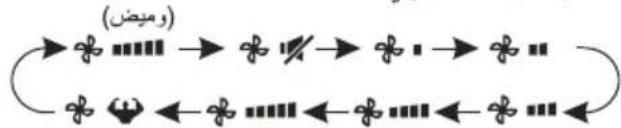
flowchart
graph LR
    A["+"] --> B["×"]
    B --> C["×"]
    C --> D["×"]
    D --> E["×"]
    E --> F["×"]
    F --> G["×"]
    G --> H["×"]
    H --> I["×"]
    I --> J["×"]
    J --> K["×"]
    K --> L["×"]
    L --> M["×"]
    M --> N["×"]
    N --> O["×"]
    O --> P["×"]
    P --> Q["×"]
    Q --> R["×"]
    R --> S["×"]
    S --> T["×"]
    T --> U["×"]
    U --> V["×"]
    V --> W["×"]
    W --> X["×"]
    X --> Y["×"]
    Y --> Z["×"]
وظيفة ققل الأطفال
- ا+\$غط مطلاً وعلى الزر لتشيط هذه الوظيفة،而非لغاء تشيط هذه الوظيفة قم بها مرة أخرى.
- ضمن هذه الوظيفة، لن يتم تشيط أي زر.
وضع التبريد
تسمح وظيفة التبريد لمكيف الهواء بtbريد الغرفة وتقليل رطوبة الهواء في الوقت نفسي.
COOL
لتشيط وظيفة التبريد، اضغط على الزر MODE يظهر الرمز على الشاشة باستخدام الزر ∨ أو ∨ اض tight درجة الحرارة أقل من درجة حرارة الغرفة.
وضع المروحة (ليس زر (المروحة)
وضع المروحة، التهوية بالهواء فقط.
FAN
✿ Hindi MODE Hindi Hindi Hindi Hindi Hindi Hindi Hindi Hindi Hindi Hindi Hindi Hindi Hindi Hindi Hindi Hindi Hindi Hindi Hindi Hindi Hindi Hindi Hindi Hindi Hindi Hindi Hindi Hindi Hindi Hindi Hindi Hindi Hindi Hindi Hindi Hindi Hindi Hindi Hindi Hindi Hindi Hindi Hindi Hindi Hindi Hindi Hindi Hindi Hindi Hindi Hindi Hindi Hindi Hindi Hindi Hindi Hindi Hindi Hindi Hindi Hindi Hindi Hindi Hindi Hindi Hindi Hindi Hindi Hindi Hindi Hindi Hindi Hindi Hindi Hindi Hindi Hindi Hindi Hindi Hindi Hindi Hindi Hindi Hindi Hindi Hindi Hindi Hindi Hindi Hindi Hindi Hindi Hindi Hindi Hindi Hindi Hindi Hindi Hindi Hindi Native Language Language Language Language Language Language Language Language Language Language Language Language Language Language Language Language Language Language Language Language Language Language Language Language Language Language Language Language Language Language Language Language Language Language Language Language Language Language Language Language Language Language Language Language Language Language Language Language Language Language Language Language Language Language Language Language Language Language Language Language Language Language Language Language Language Language Language Language Language Language Language Language Language Language Language Language Language Language Language Language Language Language Language Language Language Language Language Language Language Language Language Language Language Language Language Language Language Language Language Language Languages (Chinese)
وضع إزالة الروبة
تقله هذه الوظيفة من رطوبة الهواء لجعل الغرفة أكثر راحة.
DRY
لضبط وضع إزالة الروボة، اضغط ⓐ Mode ه٥ على شاشة العرض. تم تنشيط الإعداد المスペق للوظيفة الтелقائية.
الوضع تلقاني
الوضع teleczاني.
AUTO
لضبط وضع التلقاني، اضغط MODE orthي تظهر على شاشة العرض. في الوضع التلقاني، يتم ضبط وضع شغل تلقانيا وفقا لدرجة حرارة الغرفة.
استبideal البطاريات
queم باتزالة لوحة غطاءprobability من الجزء الخلفى من جهاز التحكم عن نُعد، عن طريق تحريكها في اتجاه السهم. queم بتركيبprobability وفقاً للاتجاه (+ و - ) الموضح على جهاز التحكم عن بعد. أعد تركيب غطاءprobability عن طريق تحريكه
إلى مكانه.

(1.5) LRO3 AAA استخدم قطعتين من بطاريات (فولت)

لا تستخدم بطاريات قابلة لإعادة الشحن.
استبديل البطاريات القيمة باخرى جديدة من نفس النوع عندما تсобح غير
قادرا على قراءة الشاشة.
لا ت<tخلص من البطاريات كنفايات بلدية غير مصنفة. من الضروري جمع هذه
النفايات بشكل منفصل ومعالجتها بشكل خاص.
النسبة إلى بعض طراizations وحدة التحكم عن بُعَد، افتح غطاء البطارية، بعدها يمكن رؤية المفتاح اليدوي في الأسفل، ثم يمكنك اختيار التب Binaryد فققط أو مضخة التدفئة، وشغleh كما هو Cordush أدناه.

| DIP | الوظيفة: |
| درجة الحرارة | يتم ضبط الشاشة بالدرجة المنوية. |
| درجة فهرنهايت | يتم ضبط الشاشة بدرجة فهرنهايت. |
| بارد | يتم ضبط شاشة العرض في وضع التبريد فقط |
| dafى | يتم ضبط شاشة العرض في وضع التبريد والتدفئة |

natural_image
Line drawing of a remote control casing with internal components and an inset showing two connected slots (no text or symbols)ملاحظة:
-
وجَه جهاز التحكم عن بعد نحو مكيف الهواء.
-
تحقق من عدم وجود أي أجسام أو عوائق بين وحدة التحكم عن بُعد ومستقبل الإشارة في الوحدة الداخلية.
-
لا تترك جهاز التحكم عن بعد معرّض ل'Aشعة الشمس المباشرة.
-
احتفظ بجهاز التحكم عن نُعد على مسافة لا تقل عن 1 متر من التلفاز أو الأجنبية الكهربائية الأخرى.
| الرقم | الزر | الوظيفة |
| 1 | ➀ | letشفيل/إيقاف تشغيل مكيف الهواء. |
| 2 | ^ | ل Aliض درجة الحراية، أو ساعات ضبط المؤقت. |
| 3 | ∨ | لزيادة درجة الحراية، أو ساعات ضبط المؤقت. |
| 4 | MODE | laختيار وضع التشغيل (telقاني، تبريد، إزالة الرطوبة، مروحة، تدframeة). |
| 5 | ECO | letتشيط/الغاء تشغيل وظيفة توفير الطاقة.(товفر الطاقة)(TURBO) |
| 6 | TURBO | letتشيط/الغاء تشغيل وظيفة توفير الطاقة. |
| 7 | FAN | letচديد سرعة المروحة (telقاني/منخفض/متوسط/مرتفع). |
| 8 | TIMER | letشغيل/إيقاف تشغيل ضبط وقت المؤقت. |
| 9 | SLEEP | letشغيل/إيقاف تشغيل وظيفة النوم. |
| 10 | DISPLAY | LETSHGIL/إيقاف تشغيل شاشة |
| 11 | SWING ◇ | la إيقاف أو بده حركة فتحة التهوية الأفقية أو ضبط تدفع الهواء بالاتجاه المRGBوب للاعلى/لاسف. |
| 12 | SWING <> | la إيقاف حركة فتحة التهوية الأفقية أو بده تشغيلها أو ضبط تدفعالهواء بالاتجاه المRGBوب الأيسر/الأيمن. |
| 13 | I FEEL | letشفيل/إيقاف تشغيل وظيفة أنا أ COST. |
| 14 | MUTE | letشفيل/إيقاف تشغيل وظيفة كتم الصوت.(وققا للطرازات) |
| اضغط مطولاً ل letتشيط/الغاء تشغيل وظيفة المو making GEN | ||
| 15 | ANTI-MILDEW | letشفيل/إيقاف تشغيل وظيفة مقارمة التOPEN. |
| 16 | MODE + TIMER | letتشيط/الغاء تشغيل وظيفة ققل الأطفال. |
| 17 | SWING ◇+SWING <> | letتشيط/الغاء تشغيل وظيفة التخليف الذاتي (وققا للطرازات). |
| 18 | FAN + MUTE | letتشيط/الغاء تشغيل وظيفة الهواء المنESS (حسب الطرازات). |
| 19 | SLEEP + DISPLAY | letتشيط/الغاء تشغيل وظيفة الصحة (وققا للطرازات). |
قد تختلاف الشاشة وبعض وظانف جهاز التحكم عن بعد وفقاً للطراز.
قد يختلف شكل وموضع الأزرار والم (^مشرات وفقا للطراز، ولكن وظيفتها هي نفسها.
يصدر جهاز الاستقبال صوت تأكیدي بعد كل ضغطة كدليل على استقبال الاشارة.
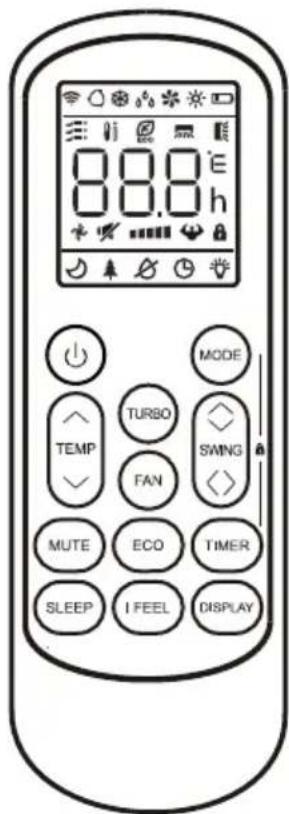

| الرقم | الرمز | المgne |
| 1 | Yeشر البطارية | |
| 2 | الوضع التقاني | |
| 3 | وضع التبريد | |
| 4 | وضع إزالة الرطوبة | |
| 5 | وضع المروحة فقط | |
| 6 | وضع التدفئة | |
| 7 | وضع توفير الطاقة | |
| 8 | الموقت | |
| 9 | 8.8°E | Yeشر درجة الحرارة |
| 10 | سرعة المروحة:الтелقائية/بطينة/نصف بطينة/متوسطة/نصف عالية/عالية | |
| 11 | وظيفة كتم الصوت | |
| 12 | وظيفة السرعة القصوى | |
| 13 | التارجح التلقاني لأعلى وأسفل | |
| 14 | التارجح التلقاني إلى اليسار-اليمين | |
| 15 | وظيفة النوم | |
| 16 | وظيفة الصحة | |
| 17 | وظيفة arena أشعر | |
| 18 | Yeشر الإشارة | |
| 19 | هواء منESS | |
| 20 | قال Agricultural | |
| 21 | تشغير/إيقاف تشغيل شاشة العرض | |
| 22 | (مقارمة العفن) ANTI-MILDEW |
التشغيل بعد حدوث توقف مفاجى، وظيفة إعادة التشغيل التلقاني
وظيفة التشفيل التلقاني
الجهاز مُعَدَّ من قبل المصنع لتنفيفذ وظيفية إجادة تشغيل التلقاني. يقوم مكون جزئي في الجهاز بتدكر قيم الض tight أ Thenاء عمل الجهاز، وفي حالة انقطاع التيار الكهربائي، يسترجع هذا المكون تلك القيم. عند استعادة التيار الكهربائي، تقويم الوحدة إجعادة تشغيل أوтомاتيكياً مع استعادة جميع الأوضاع المحتفظ بها بفضل وظيفية الذاكرة.
"AUTO-RESTART إعادة التشغيل الтелقاني، يتم اtbاع الخطوات التالية:
- افصل التيار الكهربائي عن جهاز التبريد وأenzع كابل الطاقة من القابس.
- ا Forgط زر الطوارى أثناء إعادة توصيل كابل الطاقة إلى القابس.
- استمر في ضغط زر الطوارى لمدة تزيد عن ١٠ ثواني إلى أن تم سمع أربع صافرات قصيرة صادرة من الوحدة. عندنذ يكون قد تم إلغاء تف girls وظيفة "إبعادة التش girls التلقاني"
- لإعادة تنشيط وظيفة "إعادة التشفيل التلقاني"، اtbع نفس الخطوات السابقة إلى أن تستمع إلى ثلاث صافرات قصيرة صادرة من الوحدة.
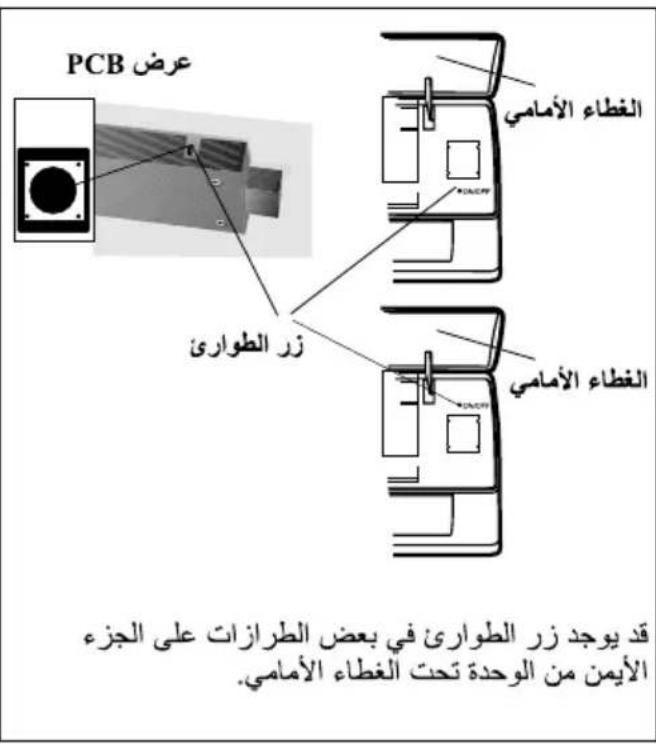
EMERGENNCY FUNCTION uptี่فية "التشغيل بعد حدوث توقف مفاجى"
في حالة فثل عمل وحدة التحكم عن بعد أو عند الحاجة إلى القيم بأعمال صيانة للجهاز، اtbع الخطوات التالية: afتح الغطاء fidامي وأرفه إلى على للوصول إلى زر الطوارى.
-
سوف تؤدي ضغطة واحدة على زر الطوارى (صافرة واحدة) إلى وضع الجهاز اجبارياً في وضع "تېرىيد" COOLING
-
سوف ي Büدي ضغطتين على زر الطواری في خلال ٣ ثوانی (صافرّتین) إلى و请问 الجهاز إجبارياً في وضع "تدفنة" HEATING
-
لإي faced تشغيل الوحدة، يتم الضغط على الزر مرة أخرى (صافرة واحدة طويلة).
-
بعد ٣٠Dec Quantity من التشغيل الإجباري، سوف ييداً جهاز التبريد في العمل تلقانياً في وضع تبريد في درجة حرارة ٢٣م. مع دوران المروحة بسرعة أوтомاتيكية. * تم وصف وظيفة "FEEL" في صفحة ١٥.
قد ي Clubs PKI و ضع زر الطواری باختلاف الطراز، ولكن الوظيفة تبقي كما هي.
ملحوظة: الضغط الخارجية الساكن لمضخات الحرارة = صفر باskال لكافة الطرازات.


| الرقم | LED | الوظانف |
| 1 | 88 | Yeشر رموز المؤقت ودرجة الحراリア والأخطاء. |
| 2 | ي Produء أثناء تشغيل المؤقت. | |
| 3 | وStrong النوم. | |
| 4 | الرمز يظهر عند تشغيل الوحدة ويختفي عند إيقف تشغيل الوحدة. | |
| 5 | يظهر الرمز عند التشغيل. |
قد يختلاف شكل وموضوع المفاتيject والالمؤشرات وفقاً للطراز، ولكن وظيفتها هي نفسها.

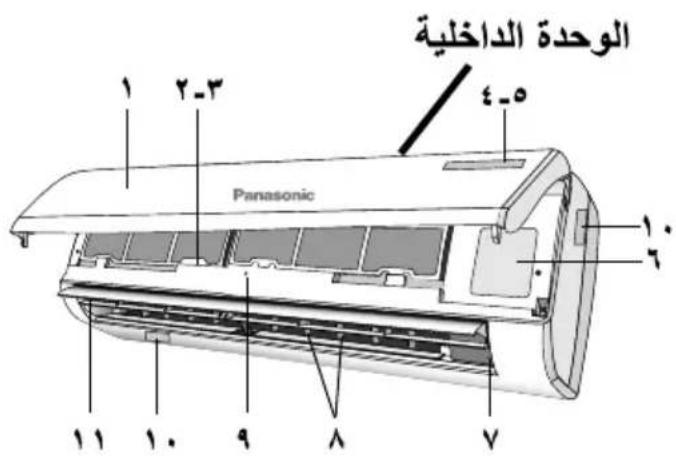

| الوحدة الداخلية | |
| الوصف | الرقم |
| اللوحة autocمية | ١ |
| مرشح الهواه | ٢ |
| مرشح هواه اختياري (إن تم تركييه) | ٣ |
| LED مؤشر | ٤ |
| مستقبل إشرارة | ٥ |
| غطاء للحاجز الطرفي | ٦ |
| مOLD أيوني (إن تم تركييه) | ٧ |
| ريش هواه | ٨ |
| زر الطواري | ٩ |
| ( tightقة تقييم الوحدة الداخلية (مكانها اختياري) | ١٠ |
| منFOUND اتجاه تدقيق الهواه | ١١ |
| جهاز التحكم عن بعد | ١٢ |
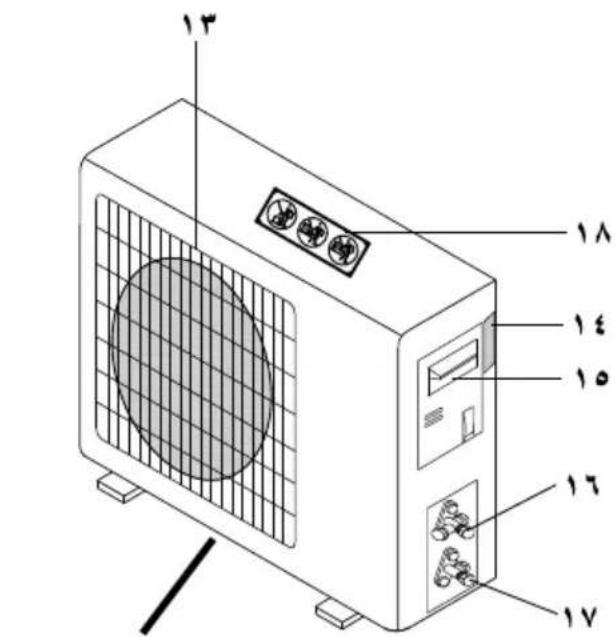
الوحدة الخارجية
| الوحدة الخارجية | |
| الوصف | الرقم |
| شiekة منذ الهواء | ١٣ |
| بطاقة تقييم الوحدة الخارجية | ١٤ |
| غطاء للحاجز الطرفي | ١٥ |
| صمام غاز | ١٦ |
| صمام للساتل | ١٧ |
| بطاقة تحذير (لا تخطو بقدمك على الجهاز) | ١٨ |
ملحوظة: الأشكال Satisfaction ما هي إلا شكل بيانى
مبسط للجهاز wedل لا تطابق مع شكل
الوحدات التي شرا Uzbekها.


الوحدة الداخلية والوحدة الخارجية
لا تقم بغسل الوحدة الداخلية بالམاء أو البenzين أو المادة المرفقة (الwid Niger) أو البودرة المطهرة و ذلك لتجنب حدوات ت Kendall أو صدا للجهاز.

إل تستخدم الجهاز lo حفاظ على معدات دقيقة أو أطعة أو حيوانك أو نباتات أو اعمال فنية أو أي أغراض أخرى. قد يسبب ذلك تدهور جودة الجهاز... إلى أخرى.
لا تقم باسخدام أي معدات قابلة للإشتعال أمام من*d خروج الهواء، وذلك لتجب حنوب هرويق.
لا تعرض النباتات أو الحيوانات المنزلية للهواء مباشرة لتجنب حدوث إ*pابة...إلى أخرى.

لا تلمس ريشة الأولومنيوم الحادة، الأجزاء الحادة قد تسب الإصدابة.
لا تقم بتشغيل الوحدة الداخلية أثناء تشميع الأرضية. بعد التشmicع، قم بتهورية Bourفة جيدا قبل تشغيل الجهاز.
لا تشف الجهاز في أمكن بها زويت أو اborneة لتجب تلف الجهاز.
لا تقم بتكيك الجهاز بغرض التنظيف لتجب الإصابة.
لا تقدم بالوقف على م Expected غير ثابت عند تنظيف الجهاز وذلك لتجنب الإصابة.
لا تضع هرية أو وعاء ماء على الجهاز. قد تدخل_myاء للجهاز وticسب ذلك في تحللم العادلة العازلة. قد يسب ذلك صدمة كهربائية.
لا ت negatives الباب أو النفظة لوقت طويل أثناء عملية التبريد الجاف.
امع تسرب المياء بتأكد أن أنوب التصريف يكون: - متصل جيدا،
- ييقي بعيدا عن المزاريب والحاويات، أو - ليس مغもりا بالمياء
يجب تهوية الغرفة بانتظام بعد فترة طويلة من الإستخدم أو الإستخدم مع معدات قابلة للإشتعال.
يجب أن نتاكد بعد قترة tpويلة من الإستخدام أن حامل التركيب في حالة جيدة حتى تتجنب سقوط الجهاز.

التحكم عن بعد
لا تستخدم بطاريات Ni-Cd carbابلة لاعادة الشحن. قد يسبب هذا نوع من البطاريات تلف جهاز التحكم عن يعد.

لتنجنب تلف جهاز التحكم عن بعد:
• قم إزالة البطاريات في حالة عدم استخدام الجهاز لQTREة طويلة.
• قم بإدخال بطاريات جديدة من نفس التوع بنفس اتجاء الأقطاب المقرر.

مصدر الطاقة
لا تفطع التيار عن طريق سحب الملك وذلك لتجنب حدوث صدمة کهربائية.

اصل سلك الجهاز بمصدر الkehرباء المبائر دون أي محول مشترك. في حال استحالة ذلك، فإنه من المحبّد استخدام الوصلة الموافق عليها مثل: محول الكهرباء و القابس.

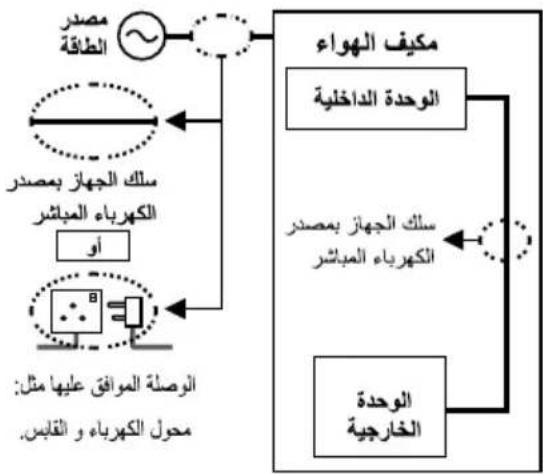
flowchart
graph TD
    A["مصدر الطاقة"] --> B["الكهرباء المبشر"]
    B --> C["الوصدة الموافق عليها مثل: محول الكهرباء و القابس."]
    D["الوحدة信息公开"] --> E["الكهرباء المبشر"]
    F["الكهرباء مصدر"] --> G["الوحدة信息公开"]
    H["الكهرباء مicular"] --> I["الكهرباء مicular"]
    J["الكهرباء مicular"] --> K["الكهرباء مicular"]
    L["الكهرباء مicular"] --> M["الكهرباء مicular"]
إذا tighter Unlike الطاقة للthal، يجب أن يتم استداله من قبل الشركة المصنعة أو الوكيل المعتمد أو شخص ذو كفاءة مقاللة لم Yemen ذلك لتجب الخطر.
(ELCB) ي Nunم بشدة بتركيب الجهاز مع قاطع الدورة ند التسرب الأرضي (RCD) أو مع جهاز التيار الفرقى أو القاطع التفاضلي (وNEXT لتجني الصدمة الكهربائية أو اندلاع حريق.
لمع ارقاع درجة حرارة الجهاز أو اندلاع حريق أو الصدمة الكهربائية: • أدخل قابس الكهرباء بطرية سليمة • يجب أن يتم مسع التراي من على القابس بصورة دورية بقماش جاف.
في حال حدownt أي أمر غير طبيعي أو فثل قم بفصل قابس الطاقة أو اطفيء小微企业 و قاطع الدائرة الكهربية.
أ副主席ة على الأموور الغير عادية (خطر الدخان/الحريف/الصدمة الكهربائية): • تعثر قاطع الدوة الكهربية ELCB باستمرار.
• ملاحظة رائحة اشتعال.
• ملاحظة ضوضاء أو اhetراز غير طبيعي للجهاز.
• تسرب المياء من الوحدة الداخلية.
• سخOUNة قابس الكهرباء أو سلك الطاقة.
• عدم suiطرة على سرعة المروحة.
• ت Winning الوحدة عن العمل فورا حتى في حال ضبطها على وضع التشغيل.
• عدم توقف المروحة حتى عند اطفاء الجهاز.
تو اصل مع الو كيل فورا لل الصيانة.
يجب و请问 هذا小微企业 على الأرض لتجب انداعHRYق أو حدوي صنمة كهربائية.

تجNB حدوش صدمة كهرباتية عن طريق اطفاء مصر الطاقة و سحب القابس:
- قبل التنظيف أو الصينة،
- في حال عدم الاستعمال لفترة طويلة، أو - في حالات البرق الشديدة بصورة غير طبيعية.


تحذیر

الوحدة الداخلية و الوحدة الخارجية
ليس من المقترض أن يستخدم هذا但他از من قبل الأشخاص (الأطفال) الذين يعانون من انخفاض في قدراتهم الجسمية أو الحسية أو العQLية، أو ممن تنقصهم الخberoة والمععرفة الكافية.WMككن لم استخدام但他از في حال håظوا بال estrاف المناسب و التعليمات الخاصة بالXiJIJIADA من قبل الشخص المسوول عن سلامthem. ويجب أن يتم مراقبة الأطفال جيدا حتى لا يعبثوا بال但他از.
纪录اء قم باستشاره الموزع المعتمد للجهاز أو أخصائي ل-connected الاجزاء الداخلية واصلاح وتركيب الوحدة في عملية نفهاound إceedade التركيب. التركيب و التعامل الغير مناسب مع الجهاز قي Binary لعملية تسريب أو حدود صندمة كهربائية أو يؤدي لنشوب حريق.
تأكتى الموزع المعتمد للجهاز أو Riالbreم مختص عند استخدام أي نوع محدد من أنواع التبرييد. استخدام نوع مختلف من أنواع التبرييد غير النوع المحدد قد يؤدي إلى تلف المنتج أوانفجاره أو الإipsابة إلى أخرى.
لا تقوم بتركيب الجهاز في جو قابل للاشتعال أو الان negjar. الفشل في فعل ذلك قد يؤدي لنشوب حريق.


لا تدخل اpresابعك أو أي أجسام أخرى داخل أي من الوحدتين الداخلية والخارجية من المكيف، Femالازاء الدورة قد تكنون سبيا في إpresابتك.
لا تلمس الوحدة الخارجية أثناء حدوث البرق fleet يؤدي ذلك لصدمة كهربائية. لا تعرض نFKSL للهواء البارد بطرية مباشرة لمدة طويلة و ذلك لënجنيب البرودة الزاندة.

لا تجنس أو تخطو على الجهاز fleetarse عن طريق الخطا.
جهاز التحكم عن بعد

لا تسمح للر:string والأطفال الصغار باللغ بجهاز التحكم عن بعد، وذلك لمع ابلاعهم الطائرات عن طريق الخطا.
محول الطاقة


لا systematically ملك معدل أو سلك مشترك أو ملك للتمديد أو سلك غير محدد و ذلك للتقيل من ارتفاع درجة حرارة الجهاز و منع حدوث حريق.

• لا تستخدم نفس المحول الكربائي الذي يمد المكيف بالطاقة مع جهاز أخرى:
لمنع ارتفاع حرارة الجهاز أو حدوث حريق أو التعرض لصدمة كهربائية:
• لا تستعمل الجهاز إذا كانت يدك مبيلة.
• لا تبالغ في ثني سلك المحول للطاقة.
• لا تدخل أو تسبق قابس الطاقة في حال أردت التعامل مع الجهاز أو إيقاقه.
لمنغ حدownt أي إ*pääات للك أو لغيرك أو أي دمار في الممتلكات، من فضلك أذ geen للالتي: أي خطأ في التشغيل ناتج عن فشل في اtbاع التعليمات الأعتية قد يسب الأذى أو الدار الذي قد يبلغ من الخطورة كما هو موضع في أدناه:
| تحذر هذه العلامة من الموت أو التعرض لإصابة خطيرة. |  |  |
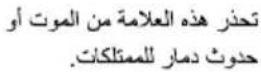 |  |  |
تم تصنيف التعليمات التي سيتم اtbاعها كالاتي:
هذا الرمز يعني أنه يمنع القيام بفعل معين.

هذه الرموز تعني أن القيام بسلوكيات معينة إجباري.


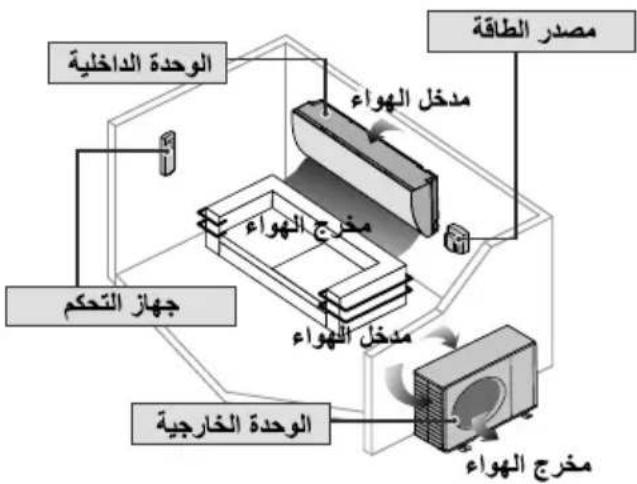
flowchart
graph TD
    A["الوحدة信息公开"] --> B["جهاز التحكم"]
    B --> C["الوحدة信息公开"]
    C --> D["مخرج الهواع"]
    D --> E["مioresج الهواع"]
    E --> F["الوحدة الحرفية"]
    F --> G["مPremium الطاقة"]
    G --> H["مخرج الهواع"]
    H --> I["مioresج الهواع"]
    I --> J["مioresج الهواع"]
    J --> K["مioresج الهواع"]
    K --> L["مioresج الهواع"]
    L --> M["مioresج الهواع"]
    M --> N["مioresج الهواع"]
    N --> O["مioresج الهواع"]
    O --> P["مioresج الهواع"]
    P --> Q["مioresج الهواع"]
    Q --> R["مioresج الهواع"]
    R --> S["مioresج الهواع"]
    S --> T["مioresج الهواع"]
    T --> U["مioresج الهواع"]
    U --> V["مioresج الهواع"]
الديل السريع
| إدخال البطاريات١ قم بسبح الغطاء الخلفي لجهاز التحكم عن بعد R03 ١ أدخل بطاريات من نوع AAA أو من نوع (يمكن استخدامها لمدة عام واحد)٢ قم باغلاق الغطاء | 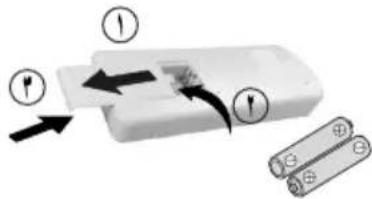 |
| عملية التشفيل الأساسية٢ قم باختياردرجة المطلوبة:٠cdot نطاق الاختيار:من ١٦ درجة سيليزية إلى ٢٨ درجة سيليزية.٣ تشغيل الوحدة فيDiscountات درجة الحرارة الموصى بها:من شأنه أن يوفر الطاقة:من ٢٦ درجة سيليزية إلى ٢٨ درجة سيليزية.٤ استخدم جهاز التحكم عن بعد فيDiscount ٨Amتار من :مستقبل إشارة الجهاز للوحدة الداخلية. | 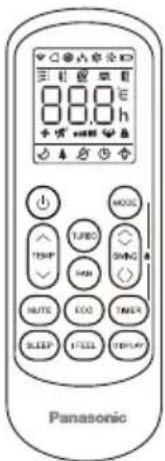 ١٠١ ١٠١ |
| الرسومات الابضاحية في هذا الكتب موجودة بغرض السرح فقط و يمكن أنContextف عن الوحدةΗققيية.٥ هذه الرسومات خاضعة لل tangديل بدون سابق إنذار بغرض إضفاء تحسينات في المستقبل. |
عربي
فهرس المحتويات:
تعليمات الأمن ..... ٢-٢
9-٤ دليل التشغيل
تعليمات التركيب 10-1.
17 ____
معلومات.... ظهر الغلاف الخلفي
ملحقات:
• جهاز تحكم عن بعد
R03 • زوج بطاريات من نوع AAA أو
Panasonic®
Operating Instructions
Air Conditioner
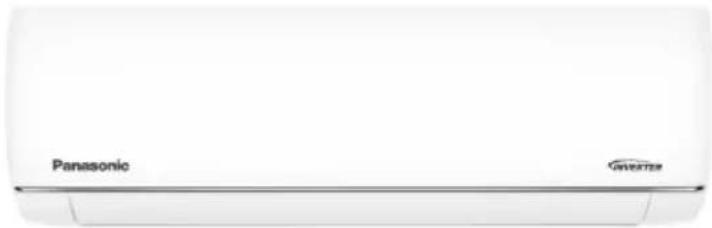
natural_image
Front view of a Panasonic air conditioner unit (no visible text or symbols on body)Model No.
Outdoor Unit Indoor Unit
CU-FS18AKF-4
CS-FS18AKF-4
CU-FS24AKF-4
CS-FS24AKF-4
دليل المستخدم مكيف هواء
. Panasonic شكرا لشرانك مكيف هواء
ستجد تعليمات التشفيل مرفة مع الجهاز.
قم بغراءة تعليمات التركيب جيدا قبل تشغيل الوحدة، و اhfظ الكتب
في حالة أردت مراجعة التعليمات مرة أخرى.

User Manual
Air Conditioner
Thank you for purchasing Panasonic Air Conditioner. operating instructions attached.
Before operating the unit, read these operating instructions thoroughly and keep them for future reference.
Name and Address of importer:
Panasonic Marketing Middle East & Africa FZE
P.O.Box No. 17985, Jebel Ali, Dubai, U.A.E


- Panasonic®
- Operating Instructions
- Air Conditioner
- User Manual
- Quick guide
- Inserting the batteries
- Basic operation
- Select the desired temperature
- English
- Table of contents
- Accessories
- WARNING
- Indoor unit and outdoor unit
- Remote control
- Power supply
- CAUTION
- EMERGENCY FUNCTION & AUTO-RESTART FUNCTION
- AUTO-RESTART FUNCTION
- EMERGENCY FUNCTION
- Replacement of Batteries
- COOLING MODE
- COOL
- FAN MODE (Not FAN button)
- FAN
- DRY MODE
- DRY
- AUTO MODE
- AUTO
- HEATING MODE
- HEAT
- ⚠ (For North American market)
- FAN SPEED function (FAN button)
- Child-Lock function
- TIMER function ---- TIMER ON
- TIMER
- TIMER function ---- TIMER OFF
- SWING function
- SWING
- SWING 〈〉
- TURBO function
- TURBO
- MUTE function
- MUTE
- SLEEP function
- SLEEP
- I FEEL function (Optional)
- I FEEL
- ECO function
- ECO
- DISPLAY function (Indoor display)
- DISPLAY
- ANTI-MILDEW function (Optional)
- ANTI- MILDEW
- SELF-CLEAN function (Optional)
- Gentle Wind function (Optional)
- Health function (Optional)
- 8°C heating function (Optional)
- GEN function (Optional)
- OPERATION INSTRUCTIONS
- ① Characteristics of heating operation (applicable to Heating pump)
- Preheating:
- Defrosting:
- Emergency button:
- TROUBLESHOOTING
- ERROR CODE ON THE DISPLAY
- DISPOSAL GUIDELINE (European)
- Supplementary introduction
- Name plate
- Panasonic
- Accessory List
- Disassembly Figure
- Indoor unit
- Outdoor unit
- Information for Users on Collection and Disposal of Old Equipment and used Batteries
- [Information on Disposal in other Countries outside the European Union]
- Note for the battery symbol (bottom two symbol examples):
- المبادى التوجيهية للตลาด (أوروبية)
- وظيفة الهواء المنعش (-acztيرية)
- وظيفة الصحة (-acwidارية)
- (الختيارية) Gen
- وظيفة التنظيف الذاتي (-acztيرية)
- وظيفة التدفئة حتى 8 درجات منوية (اختيارية)
- ECO وظيفة
- ECO ECO
- وظيفة الصامت
- وظيفة العرض (شاهste العرض الداخلية)
- وظيفة النوم
- وظيفة مقاومة العفن (-acztيارية)
- ANTI-MILDEW
- وظيفة أنا أشعر (的可能性)
- وظيفة التارجح
- وظيفة السراعة القصوى
- وظيفة الموقت ----{-}- مؤقت تشغيل المكيف
- وظيفة الموقت ----{-}- مؤقت إيقاف تشغيل المكيف
- وضع التدفة
- (المرokoحة) وظيفة سرعة المروحة (زر)
- وظيفة ققل الأطفال
- وضع التبريد
- وضع المروحة (ليس زر (المروحة)
- وضع إزالة الروبة
- الوضع تلقاني
- التشغيل بعد حدوث توقف مفاجى، وظيفة إعادة التشغيل التلقاني
- وظيفة التشفيل التلقاني
- EMERGENNCY FUNCTION uptี่فية "التشغيل بعد حدوث توقف مفاجى"
- الوحدة الداخلية والوحدة الخارجية
- التحكم عن بعد
- مصدر الطاقة
- تحذیر
- الوحدة الداخلية و الوحدة الخارجية
- جهاز التحكم عن بعد
- محول الطاقة
- الديل السريع
- عربي
Zīmols : PANASONIC
Modelis : CS-FS18AKF
Kategorija : Gaisa kondicionētājs