
WM-FX888 - 휴대용 카세트 플레이어 SONY - 무료 사용 설명서
기기 매뉴얼을 무료로 찾기 WM-FX888 SONY PDF 형식.
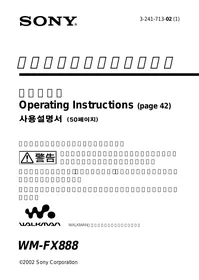


| 제품 유형 | 휴대용 카세트 플레이어 AM/FM 라디오 |
| 브랜드 | 소니 |
| 모델 | WM-FX888 |
| 크기(배터리 제외) | 108,4 × 77,7 × 23,0 mm |
| 크기(충전지 포함) | 108,4 × 77,7 × 23,4 mm |
| 무게(배터리 제외) | 160 g |
| 무게(충전지 포함) | 187 g |
| 전원 | LR6(AA) 배터리 1개 또는 NH-14WM(A) 충전지 1.2V 1350mAh |
| 사용 시간 - 카세트 재생(알카라인 LR6 배터리) | 36시간 |
| 사용 시간 - 라디오(알카라인 LR6 배터리) | 32시간 |
| 사용 시간 - 카세트 재생(충전지) | 22시간 |
| 사용 시간 - 라디오(충전지) | 22시간 |
| 사용 시간 - 카세트 재생(병용) | 58시간 |
| 사용 시간 - 라디오(병용) | 54시간 |
| 재생 기능 | 반복, 빠른 감기/되감기, AMS, 스킵 리버스, 리와인드 자동 재생 |
| 라디오 | AM/FM, 32개 프리셋(AM 8, FM1 12, FM2 12), 수동/자동 튜닝 |
| 사운드 설정 | RV(사운드 리바이탈라이저), MB(메가 베이스), GRV(그루브) |
| 노이즈 감소 | 돌비 B NR |
| 청력 보호 | AVLS(자동 음량 제한) |
| 추가 기능 | HOLD(잠금), BL SKIP(무음 구간 건너뛰기), 지역 선택(JPn/USA/Eur) |
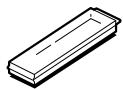
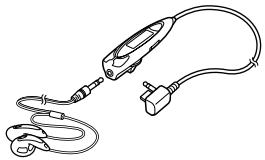
| 제공 액세서리 | AC 어댑터, NH-14WM(A) 충전지, 이어폰 내장 리모컨 |
| 관리 | 마른 천으로 닦으십시오; 용제를 사용하지 마십시오 |
| 안전 | 충전 중에는 사용하지 마십시오; 제공된 어댑터만 사용하십시오 |
자주 묻는 질문 - WM-FX888 SONY
사용자 질문 WM-FX888 SONY
0 질문 이 기기에 대해. 알고 있는 것에 답하거나 자신의 질문을 하세요.
이 기기에 대한 새로운 질문하기
기기 설명서 다운로드 휴대용 카세트 플레이어 무료 PDF 형식! 매뉴얼 찾기 WM-FX888 - SONY 전자 기기를 다시 손에 넣으세요. 이 페이지에는 기기 사용에 필요한 모든 문서가 게시되어 있습니다. WM-FX888 브랜드 SONY.
사용 설명서 WM-FX888 SONY
사용 설명서 (42페이지)


WALKMAN
WM-FX888
위험
• • •
4 6 8 10
13
AMS 14
MODE 15
16
*BNR 18
19
20
23
24
SOUND 25
AVLS- 26
27
28
30 31 34 36 37 38
| GROOVE | 25 | 3 | REVIVE | MEGA | BASS | ||
| 16 | 9 | AMS | 14 | ||||
| 29 | 58 | ||||||
| 1 | 1 | 13 |
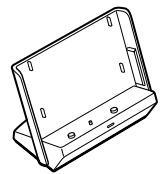
AC ( NH-14WM (A)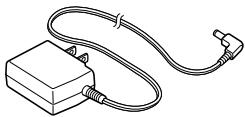
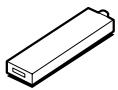
AC
1
2
AC

CHARGE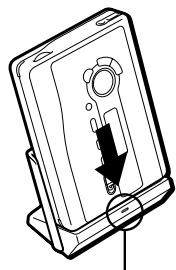
6

3
TYPEI
TYPE II
TYPE IV
1
① OPEN (2)
FWD
REV
2
1 2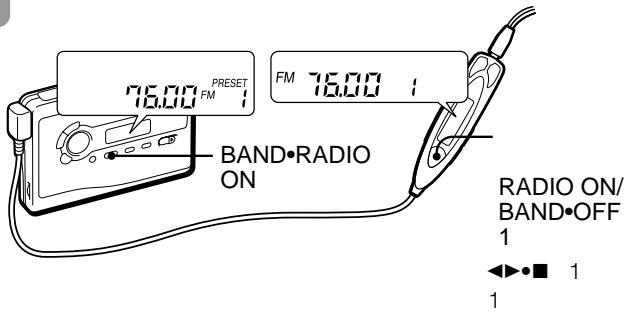
AM
FM
3
4
RADIO OFF
RADIO ON/BAND·OFF
AM
| ▲●REPEAT | FWD | |
| REV | ||
| ▲●REPEAT | FWD | |
| REV | ||
| ■ | ||
| / | FF | REW |
| * | 1 | |
| ▲●REPEAT | ||
| 2 | ||
| FF | AMS | |
| 2 | ||
| REW | AMS | |
| 2 | ||
AMS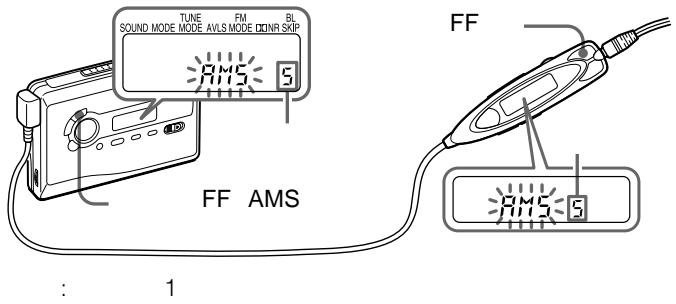
9
AMS 1
AMS 1
4
4
AMS 1
34
MODE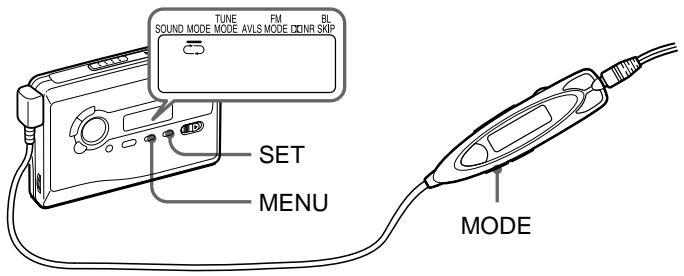
| MODE | ||
| ← | ← | |
| → | → | 1 * |
| * REV | REV | |
MODE
MENU MODE
SET
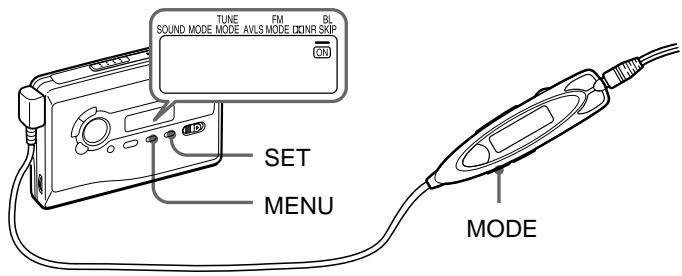
| BL SKIP | ||
| BL SKIP | ON | BL SKIP |
| BL SKIP | ||
모드
메뉴
설정

BLSKIP
12 10 34
*B NR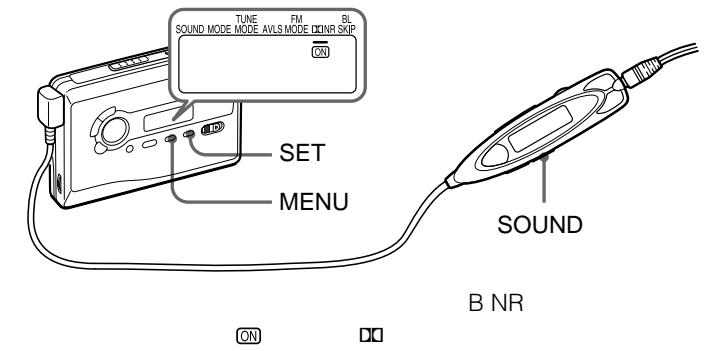
*
돌비
D
| ONR | |
| ON | BNR |
| BNR | |
| B NR | |
| SOUND | |
| MENU | |
| SET | ON |
1 밴드·라디오 켜짐
라디오 켜짐/
밴드·꺼짐 1
2 밴드·라디오 켜짐 FM
AM
라디오 켜짐/밴드-꺼짐
1
3 메뉴 튠 모드 4 설정 수동 5 튠/프리셋
- 튠/프리셋
튠/프리셋
AM FM 8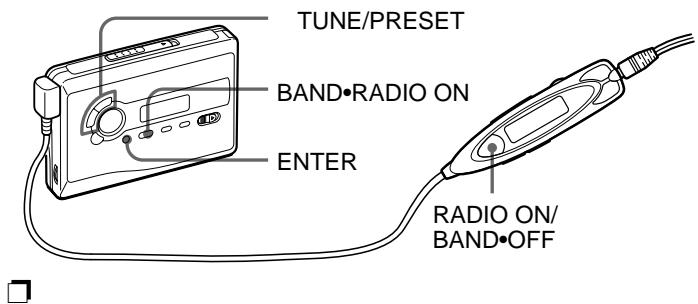
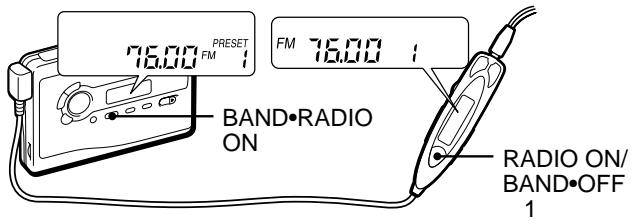
1 밴드·라디오 켜기
라디오 켜기/
밴드·끄기 1
2 밴드·라디오 켜기 FM
AM
라디오 켜기/밴드·끄기 1
3 A
입력
22
20

1 밴드·라디오 켜기
밴드·끄기 1
2 밴드·라디오 켜기 FM
라디오 켜기/
라디오 켜기/밴드·끄기 1
3 입력
4 튜닝/프리셋
입력
5 튜닝/프리셋
6 입력
*
3
22
1 21
1 3
2
TUNE/PRESENT
3 ENTER
4
TUNE/PRESET
5 ENTER
1 BAND·RADIO ON
RADIO ON/
BAND·OFF 1
2 BAND·RADIO ON FM
RADIO ON/BAND·OFF 1
3 MENU TUNE MODE 4 SET PRESET 5 TUNE/PRESET
- -
FM FM MODE SET LOCAL MONO AM
1 BAND·RADIO ON 2 ENTER 3 JPn USA Eur
BAND·RADIO ON
4 * BAND*RADIO ON
* 2
| JPn | FM: 76.0 - 90.0MHz AM: 531 - 1 710kHz |
| USA | FM: 87.5 - 108MHz AM: 530 - 1 710kHz |
| Eur | FM: 87.5 - 108MHz AM: 531 - 1 602kHz |
5 ENTER 6 19
20
SOUND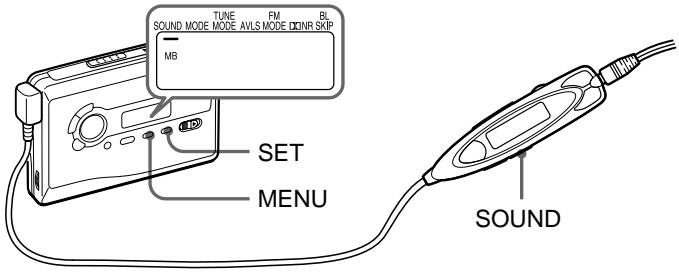
RV
MB
GRV
SOUND
MENU
SET
SOUND
GRV
AVLS—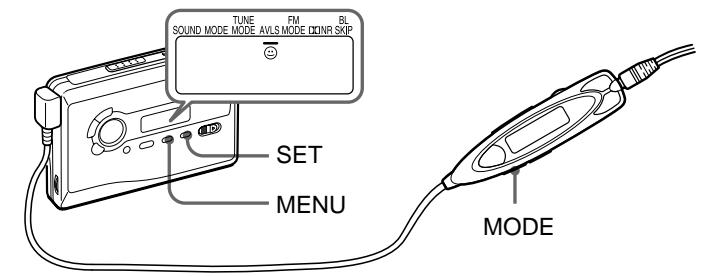
| AVLS | |
| AVLS | ◎ AVLS |
| AVLS | |
AVLS
MODE
AVLS
AVLS
MODE
MENU
SET
AVLS
AVLS
SET

AVLS
HOLD


100
| LR6 SG ** | 36 | 32 |
| 22 | 22 | |
| NH-14WM (A) 100% | ||
| 58 | 54 |
- JEITA HF
** LR6 SG
10
CHK-1W
C-1KW/
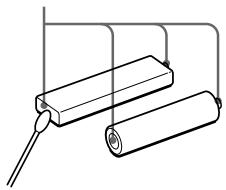
AC
300
Ni-MH
http://www.baj.or.jp/
AC
AC
JEITA
60
40
1
AMS 1
AMS
27
AC
AC
16
AVLS
AVLS
26
RV MB
GRV
25
15
CHARGE
- DOLBY NR OFF 40 15 000 Hz
- 1
- 8 300
- (DC) 4mW + 4mW / DC 1.5V NH-14WM (A) 1.2V 1350mAh
- (최소) Ni-MH 3 1
- 34 108.4 × 77.7 × 23.0 mm / / 108.4 × 77.7 × 23.4 mm / / 160g 187g JEITA* FM 76.0 ~ 90.0MHz AM 531 ~ 1,710kHz
NH-14WM C-1KW CHK-1W ** MDR-ED238SP GROOVE MDR-Q33SL MDR-E888SP MDR-848SP MDR-EX70SL
- JEITA
**
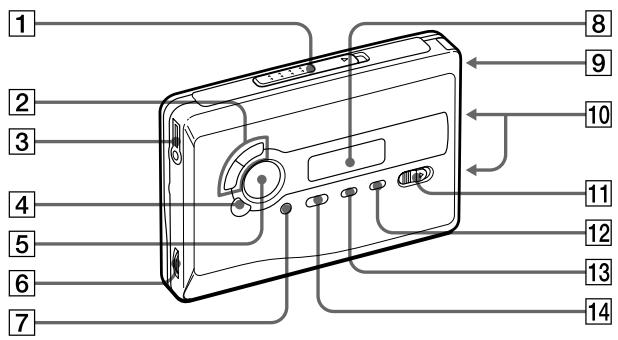
1 OPEN
8
2 :FF •AMS/REW •AMS
9
TUNE
10
PRESET
HOLD
3
12 SET
13 메뉴
14 밴드 AM FM 라디오 켜기
4 :■
: 라디오 끄기
5 반복 6 볼륨 7 확인
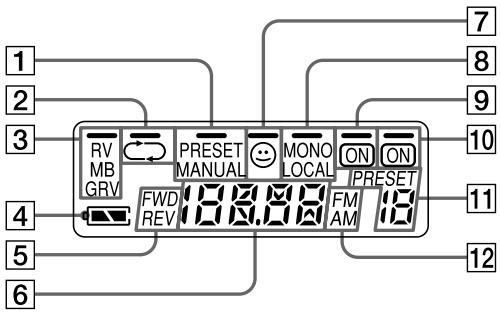
1 프리셋/수동 2 一 / 一 3 RV/MB/GRV 4 5 FWD/REV 6
7 AVLS 8 FM
모노/로컬
B NR 켜기 10 켜기 11 프리셋 FM/AM
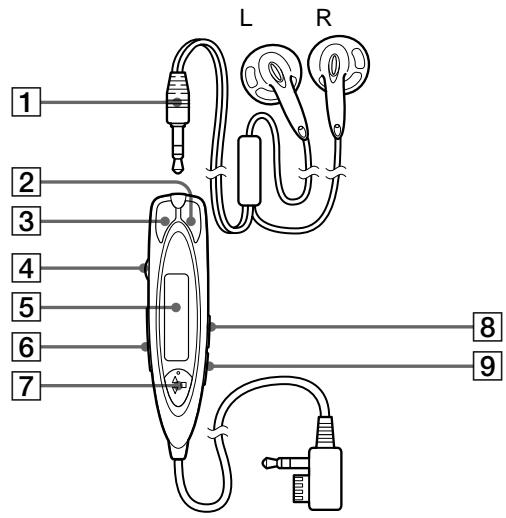
1 2 되감기 3 빨리 감기 4 볼륨 5 6 홀드 7
AMS
5

: 라디오 켜기/
밴드·끄기
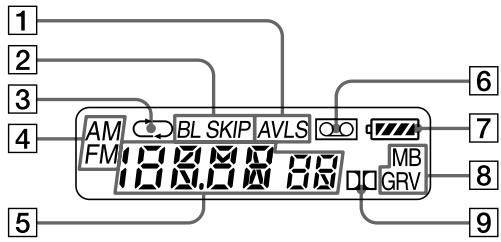
1 AVLS BL 스킵 3 一 / 一
준비
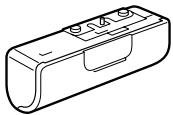
건전지(별매) 또는 충전지(부속)를 준비하십시오.
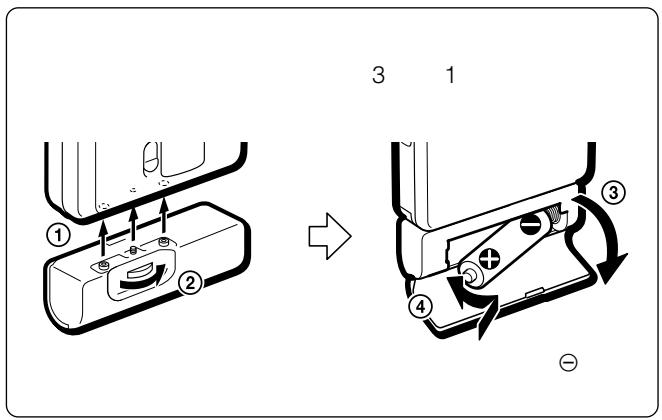
건전지
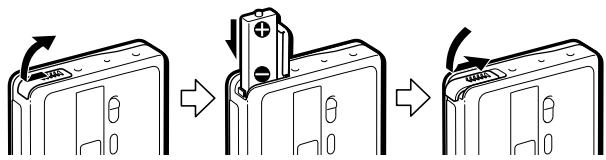
부속된 건전지 케이스를 부착한 다음, R6(AA 크기) 건전지 1개를 극성에 맞게 넣으십시오.
참고
- 최상의 성능을 위해 Sony 알카라인 건전지 사용을 권장합니다.
충전지
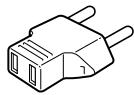
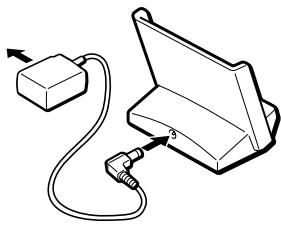
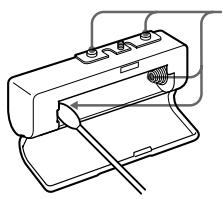
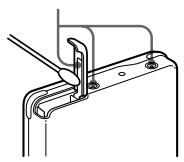
1 부속된 충전지(NH-14WM(A))를 극성에 맞게 충전지 수납부에 넣으십시오. 2 부속된 AC 어댑터를 충전 스탠드에 연결하고, AC 어댑터를 가정용 콘센트(주전원)에 꽂으십시오. 플러그가 콘센트에 맞지 않으면 부속된 AC 플러그 어댑터를 부착하십시오. 3 본체를 충전 스탠드에 올려놓으십시오. CHARGE 램프가 켜집니다.
완전 충전에는 약 6시간이 걸립니다.
충전이 완료되면 CHARGE 램프가 꺼집니다.
배터리는 약 300회 충전할 수 있습니다.
참고
- 충전 중에는 본체를 사용하지 마십시오. 사용할 때는 충전 스탠드에서 본체를 분리하십시오.
- 충전 중에 본체를 사용하면 배터리가 충전되지 않습니다.
- 충전 중에 본체를 사용하면 오작동을 일으킬 수 있습니다.
- 충전식 배터리 없이 충전 스탠드에 본체를 올려놓지 마십시오. 그렇지 않으면 오작동을 일으킬 수 있습니다.
- 일부 국가에서는 이 제품에 사용되는 배터리의 폐기에 관한 규정이 있을 수 있습니다. 해당 지역 당국에 문의하십시오.
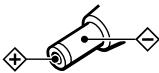
AC 전원 어댑터에 관한 주의
제공된 AC 전원 어댑터만 사용하십시오. 다른 AC 전원 어댑터는 사용하지 마십시오.
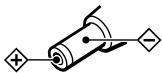
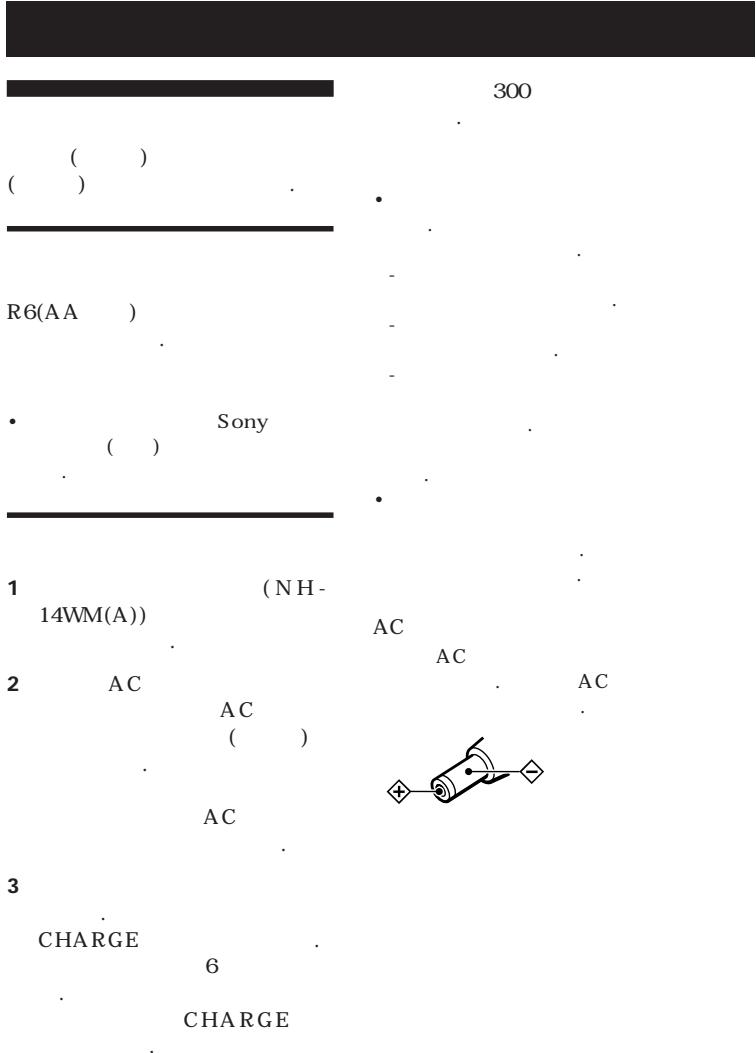
플러그의 극성
배터리 교체/충전 시기
디스플레이에 "□"가 깜박이면 배터리를 교체하거나 충전하십시오.
배터리 수명
| (Approx. hours) | (JEITA*) |
| Sony alkaline LR6 (SG)** | |
| Tape playback | 36 |
| Radio reception | 32 |
충전식 배터리 (NH-14WM (A))
| Tape playback | 22 |
| Radio reception | 22 |
소니 알카라인 LR6 (SG)** 및 충전식 NH-14WM (A)
| Tape playback | 58 |
| Radio reception | 54 |
- JEITA(일본 전자정보기술산업협회) 표준에 따른 측정값입니다. (소니 HF 시리즈 카세트 테이프 사용)
소니 LR6(SG) "STAMINA" 알카라인 건전지(일본산)를 사용하는 경우.
참고
- 사용 조건, 주변 온도 및 배터리 종류에 따라 배터리 수명이 짧아질 수 있습니다.
테이프 재생
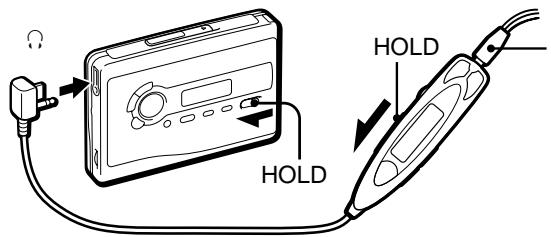
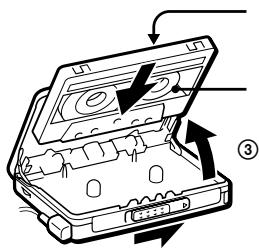
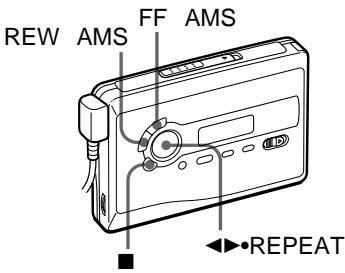
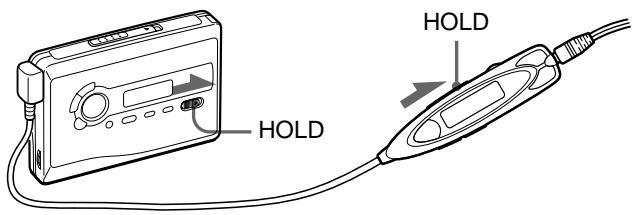
1 카세트를 삽입하고 HOLD 기능이 켜져 있으면 HOLD 스위치를 화살표 반대 방향으로 밀어 잠금을 해제합니다.
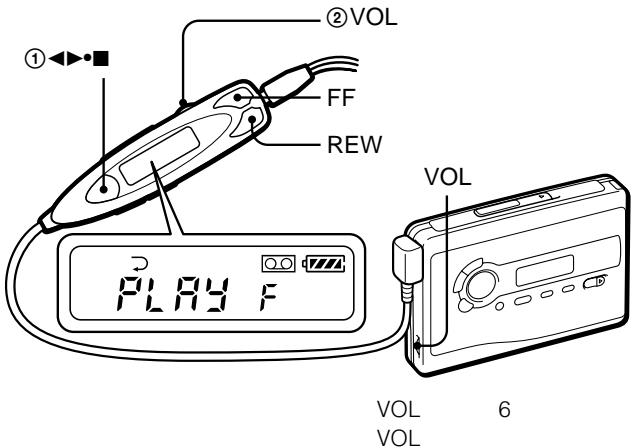
2 리모컨에서 (재생) (정지)를 누르고 VOL로 볼륨을 조절합니다. (본체에서는 REPEAT를 누릅니다.)
리모컨에서 볼륨을 조절할 때
본체의 VOL 컨트롤을 약 6으로 설정합니다.
본체에서 볼륨을 조절할 때
리모컨의 VOL 컨트롤을 최대로 설정합니다.
리모컨 조작
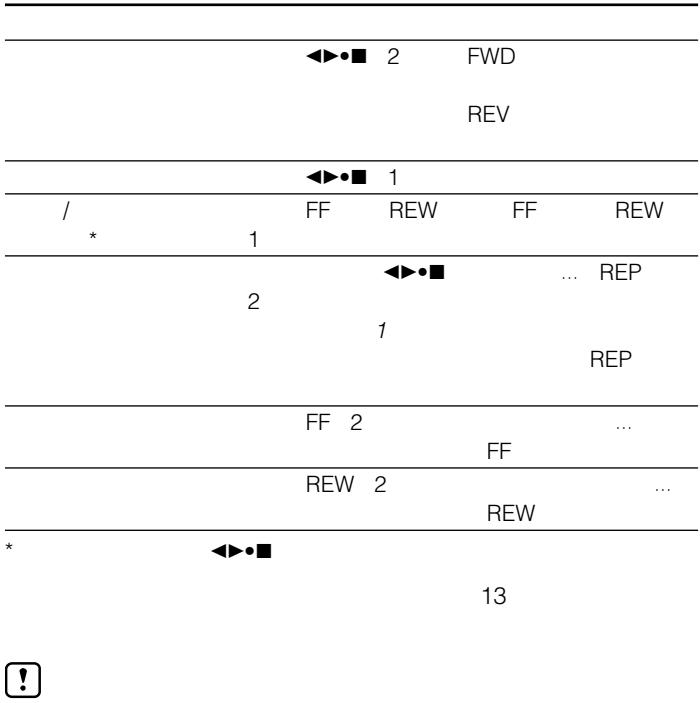
| To | Press |
| Switch playback to the other side | ▲▶●■ for 2 seconds or more during playback |
| Stop playback | ▲▶●■ once during playback |
| Repeat the current track (Repeat Single Track function) | ▲▶●■ twice during playback To stop a single repeat, press ▲▶●■ once. |
본체 조작
| To | Press |
| Switch playback to the other side | ↔●REPEAT during playback |
| Stop playback | ■ (stop) |
| Repeat the current track (Repeat Single Track function) | ↔●REPEAT for 2 seconds or more during playback To stop a single repeat, press it again. |
기타 테이프 조작
| To | Press |
| Fast forward* | FF |
| Rewind* | REW |
| Play the next track/succeeding 9 tracks from the beginning (AMS**) | FF once/repeatedly during playback |
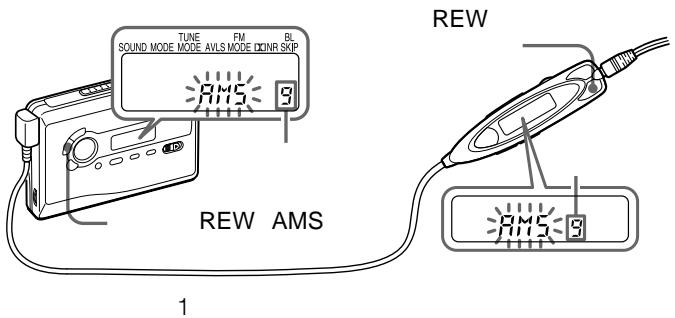
| Play the current track/previous 8 tracks from the beginning (AMS**) | REW once/repeatedly during playback |
| Play the other side from the beginning (Skip Reverse function) | FF for 2 seconds or more during stop |
| Play the same side from the beginning (Rewind Auto Play function) | REW for 2 seconds or more during stop |
| *If <>■ on the remote control is pressed during fast forward or rewind, the Walkman switches to playback.**Automatic Music Sensor | |
라디오 청취
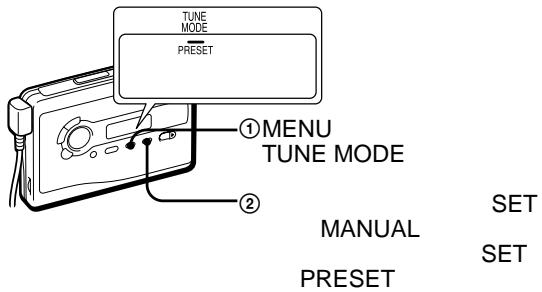
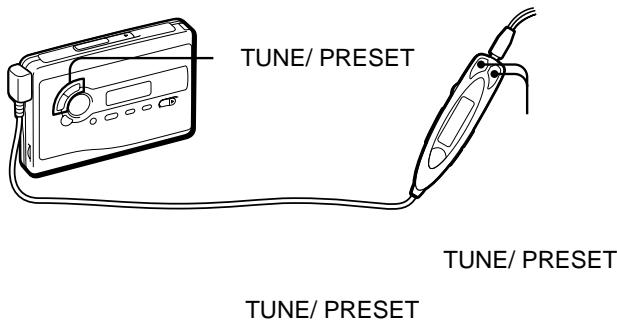
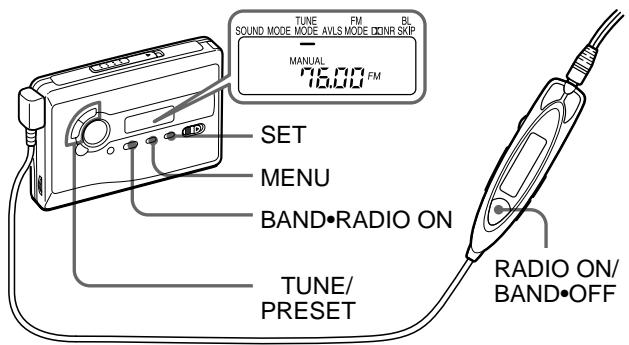
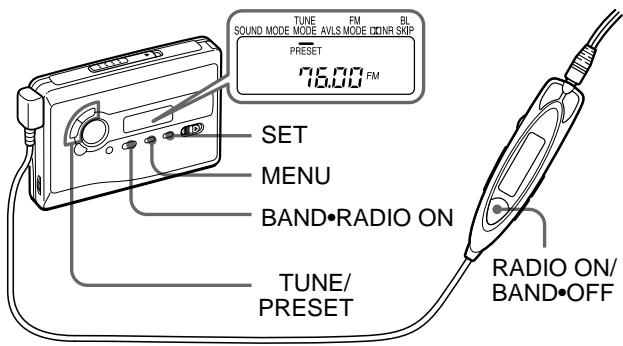
1 BAND·RADIO ON을 눌러 라디오를 켭니다. 2 BAND·RADIO ON을 반복적으로 눌러 AM, FM1 또는 FM2 대역을 선택합니다. 3 본체의 MENU를 반복적으로 눌러 본체 디스플레이의 " _ "(커서)를 TUNE MODE로 설정합니다.
수동 튜닝의 경우
① SET를 눌러 MANUAL을 선택합니다. ② TUNE/PRESET + 또는 -를 반복해서 눌러 원하는 방송국에 맞춥니다.
TUNE/PRESET + 또는 -를 몇 초 동안 길게 누르면 방송국을 자동으로 탐색합니다.
프리셋 튜닝의 경우
① SET를 눌러 PRESET을 선택합니다. ② TUNE/PRESET + 또는 -를 반복해서 눌러 원하는 프리셋 방송국을 불러옵니다.
프리셋 튜닝을 사용하려면 먼저 방송국을 프리셋으로 저장하십시오("라디오 방송국 프리셋" 참조).
라디오를 끄려면
RADIO OFF를 누릅니다.
방송 수신을 개선하려면
- AM의 경우: 워크맨에는 내장 안테나가 있습니다. 최상의 AM 수신을 위해 워크맨을 수평으로 돌리십시오.
- FM의 경우: 리모컨 코드(안테나)를 펼치십시오. 수신이 여전히 좋지 않으면 MENU를 반복해서 눌러 디스플레이의 커서를 FM MODE로 이동합니다. 그런 다음 SET를 눌러 "MONO"(모노), "LOCAL" 또는 없음(스테레오) 중에서 최상의 수신을 선택합니다.
리모컨에서 조작하려면
라디오를 켜려면 RADIO ON/BAND · OFF를 1초 이상 누릅니다(테이프가 정지 모드일 때만). 밴드를 선택하려면 라디오가 켜진 상태에서 RADIO ON/BAND · OFF를 1초 이상 누릅니다. 방송국을 맞추거나 프리셋 방송국을 불러오려면 + 또는 -를 누릅니다. 라디오를 끄려면 RADIO ON/BAND · OFF를 누릅니다.
라디오 방송국 프리셋
즐겨 찾는 방송국을 메모리에 저장하면 쉽게 재생할 수 있습니다. 최대 32개 방송국(AM 8개, FM1 및 FM2 각각 12개)을 프리셋할 수 있습니다.
라디오 방송국 자동 튜닝 및 저장(자동 메모리 스캔 기능)
1 BAND·RADIO ON을 눌러 라디오를 켭니다. 2 BAND·RADIO ON을 반복해서 눌러 AM, FM1 또는 FM2를 선택합니다.
3 디스플레이에 "A"가 나타날 때까지 ENTER를 누릅니다. 워크맨이 방송국을 검색하고 저장하기 시작합니다. 그런 다음 프리셋 번호가 나타납니다.
참고
- 모든 방송국이 저장될 때까지 전원을 제거하지 마십시오.
라디오 방송국 수동 저장(수동 메모리 기능)
방송국을 원하는 순서로 프리셋할 수 있습니다.
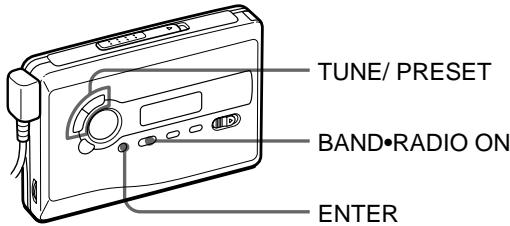
1 BAND·RADIO ON을 눌러 라디오를 켭니다. 2 BAND·RADIO ON을 반복해서 눌러 AM, FM1 또는 FM2를 선택합니다. 3 ENTER를 누릅니다. 디스플레이에서 주파수 숫자가 깜박입니다. 4 TUNE/PRESET + 또는 -를 반복해서 눌러 원하는 방송국에 맞추고 ENTER를 누릅니다. 프리셋 번호가 디스플레이에서 깜박입니다.
5 TUNE/PRESET + 또는 -를 반복해서 눌러 원하는 프리셋 번호를 선택하고 ENTER를 누릅니다. 방송국이 선택한 번호로 프리셋됩니다.
참고
- 표시가 깜박이는 동안 4단계 또는 5단계를 완료할 수 없으면 3단계부터 다시 반복하십시오.
- 같은 프리셋 번호에 새 방송국을 프리셋하면 이전에 저장된 방송국은 삭제됩니다.
저장된 방송국을 취소하려면
위의 절차를 따르고 4단계에서 방송국에 맞추는 대신 "---"가 표시될 때까지 TUNE/PRESET + 또는 -를 길게 누릅니다. "---"가 깜박이는 동안 ENTER를 누릅니다. 프리셋 번호가 디스플레이에서 깜박입니다. TUNE/PRESET + 또는 -를 반복해서 눌러 취소하려는 프리셋 번호를 선택하고 ENTER를 누릅니다.
외국에서 사용하기
1 밴드·라디오 ON을 눌러 라디오를 켭니다.
2 ENTER를 누릅니다. 디스플레이에서 주파수 숫자가 깜박입니다. 3 "JPn", "USA" 또는 "Eur"이 깜박일 때까지 BAND·RADIO ON을 길게 누릅니다. 4 "JPn", "USA" 또는 "Eur"을 선택하려면 BAND·RADIO ON을 반복해서 누르고 ENTER를 누릅니다. 5 "라디오 청취" 및 "라디오 방송국 사전 설정" 절차에 따라 방송국을 맞춥니다.
지역 표시 및 주파수 범위
| Area* | Frequency range | |
| FM (MHz) | AM (kHz) | |
| JPn | 76-90 | 531-1 710 |
| USA | 87.5-108 | 530-1 710 |
| Eur | 87.5-108 | 531-1 602 |
- JPn: 일본 USA: 미국, 캐나다, 중남미 Eur: 유럽 및 기타 국가
메뉴 사용
재생 모드 조정
재생 방향 모드 선택
MENU를 반복해서 눌러 디스플레이의 커서를 MODE로 설정합니다. 그런 다음 SET를 눌러 원하는 모드를 선택합니다.
| To play | Select |
| both sides repeatedly | ←→ |
| both sides once from the FWD side | → |
긴 공백 건너뛰기 - BL SKIP 모드
BL SKIP 모드가 켜져 있으면 12초 이상의 공백이 있을 때 테이프가 다음 트랙으로 빨리 감깁니다. 공백을 건너뛸 때 세 번의 짧은 경고음이 반복해서 들립니다.
본체에서:
1 MENU를 반복해서 눌러 디스플레이의 커서를 BL SKIP으로 설정합니다. 2 SET를 눌러 "ON"을 표시합니다.
리모컨에서:
1 MODE를 반복해서 눌러 "BL SKIP"을 표시합니다.
Dolby* B NR 시스템으로 녹음된 테이프 재생
MENU 버튼을 여러 번 눌러 디스플레이의 커서를 NR(돌비 노이즈 리덕션)로 설정합니다. 그런 다음 SET 버튼을 눌러 "ON"을 표시합니다.
- Dolby Laboratories의 라이선스 하에 제조되었습니다.
"Dolby" 및 이중 D 기호는 Dolby Laboratories의 상표입니다.
사운드 강조
본체에서:
1 MENU 버튼을 여러 번 눌러 디스플레이의 커서를 SOUND로 설정합니다. 2 SET 버튼을 여러 번 눌러 원하는 사운드 강조를 선택합니다.
리모컨에서:
1 SOUND 버튼을 여러 번 누릅니다. 누를 때마다 표시가 변경됩니다.
표시는 다음과 같이 변경됩니다:
RV: 사운드 리바이탈라이저. 고음을 강조합니다.
MB: 메가 베이스. 저음을 강조합니다(중간 효과). GRV: 그루브. 저음을 강조합니다(강한 효과). 메시지 없음: 일반(효과 없음).
참고
- "GRV" 모드에서 사운드가 왜곡되면 본체의 볼륨을 낮추거나 다른 모드를 선택하십시오.
청력 보호 — AVLS(자동 볼륨 제한 시스템)
본체에서: 재생, 정지 또는 라디오 모드에서 MENU 버튼을 여러 번 눌러 디스플레이의 커서를 AVLS로 설정합니다. 그런 다음 SET 버튼을 눌러 을 표시합니다.
리모컨에서 MODE를 "AVLS"가 표시될 때까지 길게 누릅니다.
AVLS 기능을 해제하려면
본체에서 SET를 눌러 "⑦"가 표시에서 사라지게 합니다. 리모컨에서는 MODE를 다시 "AVLS"가 사라질 때까지 길게 누릅니다.
참고
- 배터리를 교체하면 AVLS 설정이 해제됩니다.
컨트롤 잠금 — HOLD 기능
HOLD 스위치를 화살표 방향으로 밀어 워크맨 또는 리모컨의 컨트롤을 잠급니다.
“
(JEITA*)
| Sony | LR6(SG)** |
| 36 | |
| 32 |
| (NH-14WM(A)) |
| 22 |
| 22 |
| Sony | LR6(SG)** |
| NH-14WM(A) | |
| 58 | |
| 54 |
| * JEITA (Japan Electronics and Information Technology Industries Association: ) .(Sony HF) |
| **LR6(SG) Sony "STAMINA" ( ) |
1 HOLD HOLD
2 ( )·■ ( VOL.( REPEAT .)
VOL 6
VOL
| 2 |
| (1) 1 |
| (1) 2 |
| (1) 3 |
| * | FF | ||
| * | REW | ||
| / | FF | / | |
| 9 | . | ||
| (AMS**) | |||
| / | REW | ||
| 8 | / | ||
| (AMS**) | |||
| FF 2 | |||
| ( | . | ||
| ) | |||
| REW 2 | |||
| ( | . | ||
| ) | |||
| * | |||
| ←→■ | , | ||
| **Automatic Music Sensor( | |||
1 BAND·RADIO ON 2 BAND·RADIO ON
:AM FM1,FM2.
3 메뉴
튠 모드
4 라디오 끄기
① 수동 설정 ② 튠/프리셋 +
튠/프리셋 +
① 프리셋 설정 ② 튠/프리셋 +
1
라디오 끄기
AM 워크맨
AM
워크맨
FM
메뉴
FM
모드
SET "MONO"( ),
"LOCAL", ( )
RADIOON/BAND·OFF 1 (). RADIOON/BAND·OFF1 .,+ - RADI0ON/BAND·OFF
3 "A"
ENTER
Walkman
(
1 BAND·RADIO ON 2 BAND·RADIO ON AM FM1, FM2 3 ENTER 4 TUNE/PRESET + ENTER 5 TUNE/PRESET + ENTER
32 -AM 8, FM1, FM2 12
()
1 BAND·RADIO ON 2 BAND·RADIO ON AM FM1, FM2

4 5 3
1 BAND·RADIO ON
2 ENTER
4 TUNE/PRESET ^+ ."- - - - ENTER
TUNE/PRESET + ENTER
3 "JPn" "USA" "Eur" BAND·RADIO ON 4 BAND·RADIO ON "JPn" "USA" "Eur" ENTER 5 “ 1
| * | FM(MHz) | AM(kHz) |
| Jpn | 76 - 90 | 531 - 1 710 |
| USA | 87.5 - 108 | 530 - 1 710 |
| Eur | 87.5 - 108 | 531 - 1 602 |
*JPn: USA: , Eur:
| FWD | → |
| —BL SKIP | |
| BL SKIP | 12 |
| 3 | . |
| . | . |
| 1 | . |
| 1 | 1 |
| BL SKIP | . |
| 2 SET | . |
| . | . |
| RV:Sound Revitalizer( ). | |
| MB:Mega Bass.( ). | |
GRV:Groove.
AVLS
- "GRV"
—HOLD
HOLD
—AVLS(Automatic
Volume Limiter System:
)
:
MENU
AVLS SET
AVLS
MODE
AVLS
SET
"AVLS"
MODE
048-794-5194
9 6
http://www.sony.net/
ソニー株式会社 〒141-0001 東京都品川区北品川6-7-35
お問い合わせはお客様ご相談窓口へ
● 十比夕日儿
0570-00-3311
受付時間:
(全国どこからも市内通話料金でご利用いただけます)
● 携帯電話・PHSでのご利用は… 03-5448-3311
월~금
9:00~20:00
Fax 0466-31-2595
토·일·공휴일
9:00~17:00

VOC(


- 사용 설명서 (42페이지)
- AM
- FM
- 준비
- 건전지
- 참고
- 충전지
- AC 전원 어댑터에 관한 주의
- 배터리 교체/충전 시기
- 테이프 재생
- 리모컨에서 볼륨을 조절할 때
- 본체에서 볼륨을 조절할 때
- 리모컨 조작
- 본체 조작
- 기타 테이프 조작
- 라디오 청취
- 라디오를 끄려면
- 방송 수신을 개선하려면
- 리모컨에서 조작하려면
- 라디오 방송국 프리셋
- 라디오 방송국 자동 튜닝 및 저장(자동 메모리 스캔 기능)
- 라디오 방송국 수동 저장(수동 메모리 기능)
- 저장된 방송국을 취소하려면
- 외국에서 사용하기
- 메뉴 사용
- 재생 모드 조정
- 재생 방향 모드 선택
- 긴 공백 건너뛰기 - BL SKIP 모드
- 본체에서
- DOLBY* B NR 시스템으로 녹음된 테이프 재생
- 사운드 강조
- 리모컨에서
- 청력 보호 — AVLS(자동 볼륨 제한 시스템)
- AVLS 기능을 해제하려면
- 컨트롤 잠금 — HOLD 기능
- ソニー株式会社 〒141-0001 東京都品川区北品川
브랜드 : SONY
모델 : WM-FX888
카테고리 : 휴대용 카세트 플레이어