OMX-HDMI-1X2-4K2 - Prijemnik Ocean Matrix - Besplatni korisnički priručnik
Pronađite besplatno priručnik za uređaj OMX-HDMI-1X2-4K2 Ocean Matrix u PDF formatu.


Pitanja korisnika o OMX-HDMI-1X2-4K2 Ocean Matrix
0 pitanje o ovom uređaju. Odgovorite na one koje znate ili postavite svoje.
Postavi novo pitanje o ovom uređaju
Preuzmite upute za vaš Prijemnik u PDF formatu besplatno! Pronađite svoj priručnik OMX-HDMI-1X2-4K2 - Ocean Matrix i uzmite svoju elektroničku napravu natrag u ruke. Na ovoj stranici objavljeni su svi dokumenti potrebni za korištenje vaše naprave. OMX-HDMI-1X2-4K2 marke Ocean Matrix.
KORISNIČKI PRIRUČNIK OMX-HDMI-1X2-4K2 Ocean Matrix
OCEAN MATRIX®
INSTALLATION & SPECIFICATIONS
OMX-HDMI-1X2-4K2
Splitter-Distribution Amplifier Routes One HDMI Signal to Two HDMI Displays
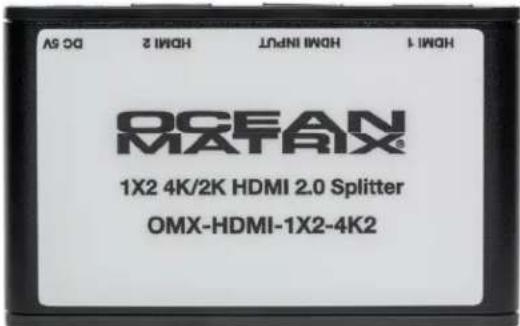
Installation Requirements
- Source: HDMI video source
- Display: Display with HDMI port
- Cable: HDMI cable able to support 4Kx2K
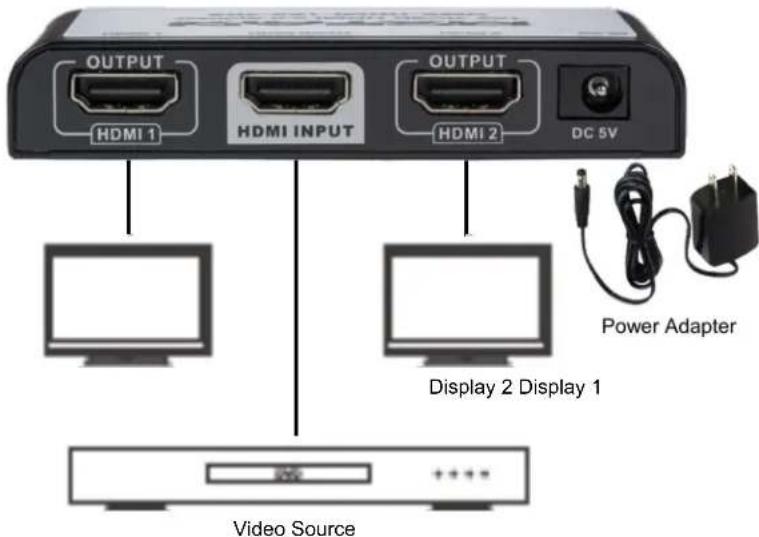
Installation
- Connect the HMDI video source output port to the splitter input port
- Connect the splitter output port to the HDMI display
- Set the display input to right HDMI channel
- Connect the power supply and turn the power on
| Specifications | |
| Input/Output | 1 HDMI Input, 2 HDMI Outputs |
| Compatibility | HDR, DVI1.0, HDMI1.4, HDMI2.0 HDCP1.4, HDCP2.2 |
| Frequency Range 25MHz-600MHz | |
| Video Form | 12 Bit Full HD3D Video4Kx2K@ 30/60HZ UHD |
| TMDS Signal 0.5~1 | 5Vp-p(TMDS) |
| DDC Signal 5Vp-p(TTL) | |
| Audio | StandardDSD (Direct Stream Digital)HD(HBR) |
| HDMI Resolution | 480i/480p/756i/756p/720p/1080i/1080p/4Kx2K@ 24/25/30/60Hz |
| Power Supply 5VDC/1A | |
| Power Consumption | 5W |
| Dimensions(LxWxH) | 3.8x2.3x0.66in |
| Weight 3.2oz | |
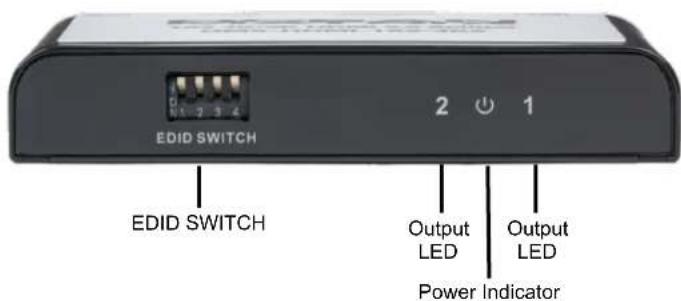
Features
- Distributes 1 HDMI source to 2 HDMI displays simultaneously
• Supports HDMI 3D and 4K x 2K@60Hz when both the input and output devices support 4K x 2K
• Supports 3D output when both HDMI source and HDMI displays support 3D - Supports HDR
• Support bandwidth up to 18Gbps
• HDMI2.0 and HDCP2.0 compliant - Audio - Supports Standard, Direct Stream Digital, and HD/high bit-rate audio
Includes—5VDC/1A Power Supply
OCEAN MATRIX®
EDID INFORMATION
The splitter reads the EDID information of the connected displays and sends that information to the HDMI source in order to determine the output mode.
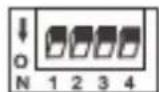
Switch is up for the 1 setting
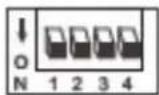
Switch is down for the 0 setting
| EDID Information Switch Settings | ||||
| SWITCH | 1 | 2 | 3 | 4 |
| 4k@60Hz 2CH | 0 | 0 | 0 | 0 |
| 4k@60Hz 7.1CH | 1 | 0 | 0 | 0 |
| 4k@30Hz 2CH | 0 | 1 | 0 | 0 |
| 4k@30Hz 7.1CH | 1 | 1 | 0 | 0 |
| 1080p@60Hz 2CH | 0 | 0 | 1 | 0 |
| 1080p@60Hz 7.1CH | 1 | 0 | 1 | 0 |
| 1080i@60Hz 2CH | 0 | 1 | 1 | 0 |
| 1080i@60Hz 7.1CH | 1 | 1 | 1 | 0 |
| 1080p@50Hz 2CH | 0 | 0 | 0 | 1 |
| 1080P@50Hz 7.1CH | 1 | 0 | 0 | 1 |
| 4K@30Hz HDR | 0 | 1 | 0 | 1 |
| 4K@60Hz HDR | 1 | 1 | 0 | 1 |
| Copy Once: Reads EDID of first connected output only | 0 | 0 | 1 | 1 |
| MIX1: Lowest audio format & lowest video format | 1 | 0 | 1 | 1 |
| MIX2: Highest audio format & video downscaling from HDMI 4K@60Hz (YCbCr4:4:4 or YCbCr4:2:0) to 1080P@60Hz | 0 1 | 1 1 | ||
| MIX3: Lowest audio format & video downscaling from HDMI 4K@60Hz (YCbCr4:4:4 or YCbCr4:2:0) to 1080P@60Hz | 1 1 | 1 1 | ||
OCEAN MATRIX®
Troubleshooting
No image output
- Ensure power supply is firmly connected. Only use the 5VDC power adapter included with the unit.
- Check that the HDMI cables are securely connected.
- Check that the display/TV has been set to the proper channel.
• For PC connections via HDMI, set output mode to mirror or extend.
Display is unstable
- Check all connections.
- Connect the HDMI source directly to the display device to ensure there is a signal output. Change the signal source if necessary.
• Use only high-quality HDMI 1.4 and HDMI 2.0 cable for transmitting 4K×2K UHD signal.

SAFETY PRECAUTIONS

-
To prevent fire or shock hazard, do not expose this equipment to high humidity and/or dust. Do not use in an unprotected outdoor installation nor any area classified as overly damp or wet.
-
The temperature for installation should be kept between 32^ F to 140^ F ( 0^ C to 60^ C). Avoid direct sunlight exposure or extreme changes of temperature over a short period of time.
-
Do not disassemble the unit or place it on an unstable base.
-
Do not drop the unit and avoid heavy impact.
-
This unit should not be permanently installed unless proper ventilation is provided. Any enclosure openings must not be blocked or covered as they protect the unit from overheating.
-
Before cleaning, turn off the power and unplug the unit from all connections. Use a damp cloth. Do not use liquid cleaners nor aerosol cleaners.
-
Do not overload outlets and extension cords as this may result in a risk of fire or electric shock.
-
Enclosure entry is dangerous. Never push objects of any kind, including liquids, into this unit through openings as they may touch dangerous voltage points or short-out parts that could result in a fire or electric shock.
-
Do not attempt to open or service this unit yourself as opening or removing covers may expose you to dangerous voltage and other hazards.
-
There are no user-serviceable parts inside the unit. If the unit requires service contact your authorized dealer, or an authorized repair service company.