PWR2128B - TV seinakinnitus Chief - Tasuta kasutusjuhend
Leidke seadme juhend tasuta PWR2128B Chief PDF-formaadis.


Kasutajate küsimused teemal PWR2128B Chief
0 küsimus selle seadme kohta. Vastake nendele, mida teate, või esitage oma.
Esita uus küsimus selle seadme kohta
Laadige alla juhend oma TV seinakinnitus PDF-formaadis tasuta! Leidke oma juhend PWR2128B - Chief ja võtke oma elektrooniline seade uuesti kätte. Sellel lehel on avaldatud kõik teie seadme kasutamiseks vajalikud dokumendid. PWR2128B kaubamärgi Chief.
KASUTUSJUHEND PWR2128B Chief
INSTALLATION INSTRUCTIONS
PSB-2128
DISPLAY MOUNTING BRACKET ^UL
Prior to assembly, unpack carton completely and verify contents.
If you are missing any of the following components, please contact Customer Service at 1-800/582-6480
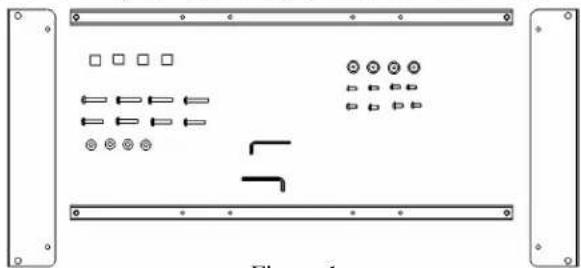
natural_image
Pure electrical circuit lines without any symbolsFigure 1
(2) Plasma Side Bracket (2) Plasma Top/Bottom Cross Bracket
(4) Mounting Button - Tapped (4) 10-24 x .500 Button Head Cap Screw
(4) M6 x 35mm Phillips Pan Head Machine Screw (4) M6 x 30mm Phillips Pan Head Machine Screw
(1) 5/32 Allen Key (4) ¼" Flat Washer
(4) ¼-20 x .500" Button Head Cap Screw (4) .680 x .390 x .625 Nylon Spacer
(1) 1/8 Allen Key
BEFORE PROCEEDING, READ INSTALLATION INSTRUCTIONS COMPLETELY
CAUTION!
DISPLAYS ARE EXTREMELY FRAGILE.
WARNING!
ALL COMPONENTS MUSTBE SECURELY FASTENED TO A STRUCTURAL MEMBER CAPABLE OF SUPPORTING 4 TIMES THE COMBINED WEIGHT OF ALL COMPONENTS PLUS THE EQUIPMENT BEING MOUNTED. IF IT CANNOT SUPPORT THIS WEIGHT, THE STRUCTURE MUST BE REINFORCED. THE MAXIMUM WEIGHT TO BE INSTALLED ON THE MOUNT IS 175 POUNDS (79.38 KG).
- Using a 10-24 button head cap screw inserted from back side of bracket, secure mounting button, with chamfered hole of mounting button (larger surface) facing bracket, to top and bottom brackets (four places) (see Figure 2 & Figure 3).
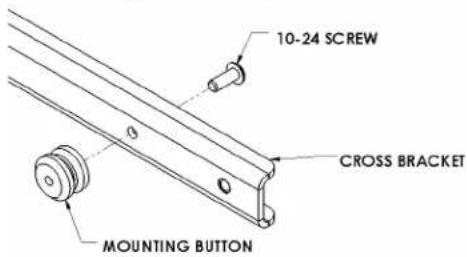
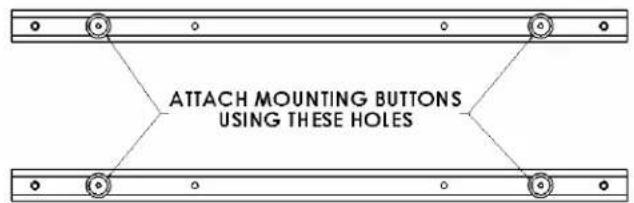
Figure 2 Figure 3
- Using four ¼-20 button head cap screws, attach top and bottom to side brackets. (see Figure 4 & Figure 5).
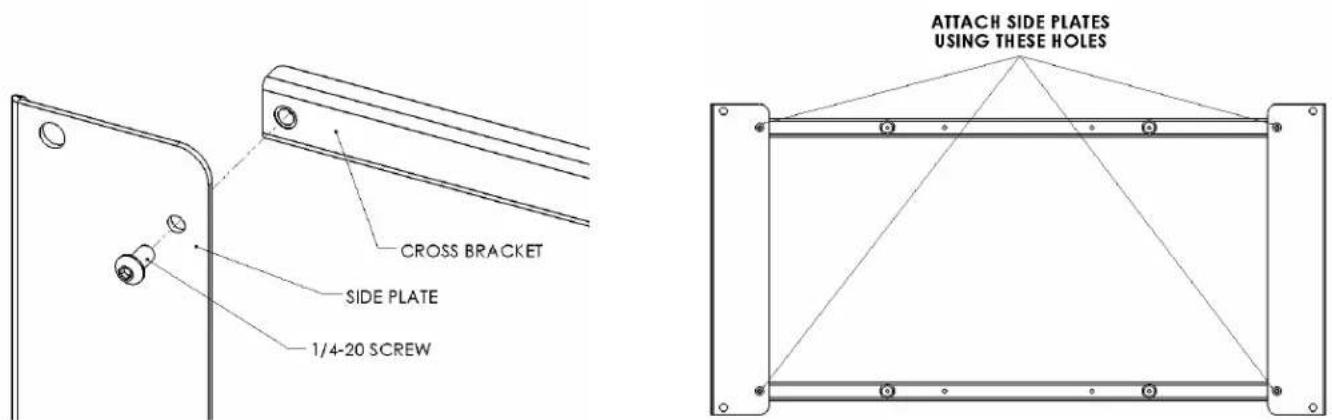
Figure 4 Figure 5
- Place Nylon spacers over mounting holes on back of screen. Attach mounting brackets to display using M6 screws (see Figures 6 & Figure 7).
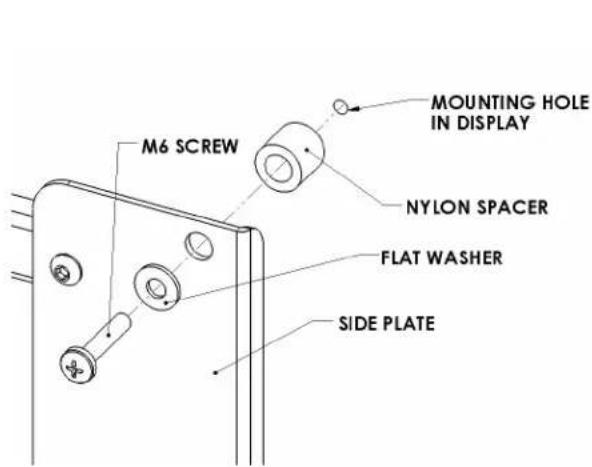
Figure 6
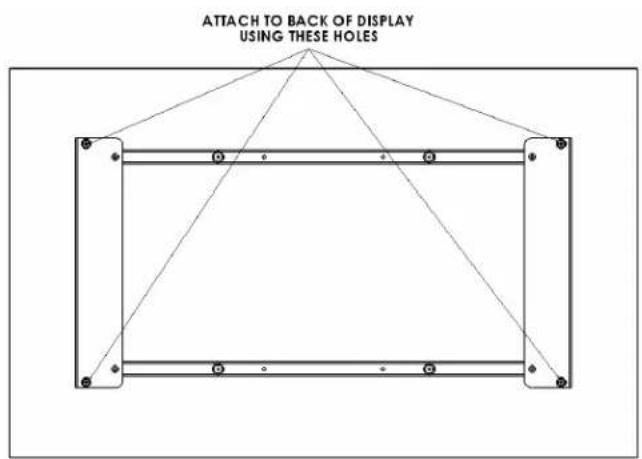
Figure 7
- With the aid of another person, lift your display up to the Chief Mount, aligning buttons of mounting brackets with slots in the Chief Mount.
- Lower safety latch on the Chief Mount to secure your display, making sure latch is completely engaged.